
Table of Contents
Some links on The Justifiable are affiliate links, meaning we may earn a small commission at no extra cost to you. Read full disclaimer.
GetResponse vs MailerLite for automation and pricing is one of those comparisons that looks simple at first, then gets a lot more interesting once you start comparing what you actually get at each plan level.
If you are choosing between them, you probably do not just want the cheapest monthly fee. You want to know which platform gives you useful automation, room to grow, and a pricing model that still makes sense six months from now.
That is exactly where this guide helps. I went through the latest official pricing and feature details to break down where each tool wins, where the trade-offs show up, and which one gives the better value for your specific stage.
The real difference between GetResponse and MailerLite
On the surface, both tools cover the same broad category: email marketing, automations, landing pages, signup forms, and audience segmentation. That is why so many buyers get stuck.
The real difference is not whether they both “do automation.” It is how much automation you get before you hit a pricing wall, and whether the extra features actually matter for your business model.
What each platform is trying to be
MailerLite is built around simplicity and affordability. Its free plan covers up to 500 subscribers and 12,000 emails every 30 days, and it includes automation, forms, websites, and landing pages.
Paid plans start at $10 per month for Growing Business and $20 per month for Advanced, with the higher plan adding features like enhanced automations, unlimited user seats, smart sending, and more advanced website options.
GetResponse is positioned a bit differently. It starts at $19 per month on Starter for monthly billing, or $15.58 per month billed annually, and includes unlimited email sends, landing pages, signup forms, welcome series, and one custom automation workflow.
But the more serious automation layer sits in the Marketer plan, which starts at $59 per month monthly or $48.38 per month annually.
That plan includes unlimited automation workflows, advanced segmentation, abandoned cart recovery, sales funnels, revenue reports, and web push notifications.
My take is simple: MailerLite is trying to win the value-for-money conversation early, while GetResponse is trying to win the “all-in-one growth engine” conversation once your marketing becomes more complex.
Why “automation and pricing” should be judged together
This is the mistake I see most often. People compare plan prices without comparing what those plans unlock.
That usually leads to frustration because a low monthly price looks great until you discover the automation builder is limited, the workflow depth is capped, or an ecommerce trigger lives behind a more expensive tier.
For example, GetResponse Starter includes only one custom automation workflow, and its help documentation says Starter users can create custom or template-based workflows with up to six elements using only basic elements. If your automation needs are simple, that may be enough.
But if you want branching logic, behavioral triggers, scoring, ecommerce conditions, or a true lifecycle funnel, you are really shopping the Marketer tier, not Starter.
MailerLite, on the other hand, includes automations on the free plan and lists up to 100 automation steps. That immediately changes the value equation for creators, bloggers, freelancers, and smaller brands that want workable automation without jumping to a premium tier.
How GetResponse automation compares to MailerLite automation

This is the section that matters most if your shortlist is based on automation. Both tools let you trigger emails and build visual workflows.
The difference is depth, complexity, and what level of logic is available before upgrading.
MailerLite is better for straightforward automation
MailerLite’s automation builder is one of the easiest to understand. You can build automations around actions like joining a group, clicking a link, or buying a product, and the platform says users can automate based on a range of customer actions including purchases, group joins, and link clicks.
It also includes automation templates and allows automations even on the free plan, with up to 100 automation steps.
For many users, that is honestly enough. Imagine you run a small digital product business. You might need:
- Welcome flow: Send a 3-email introduction series after signup.
- Lead magnet flow: Deliver the download, wait two days, then pitch a paid product.
- Re-engagement flow: Tag inactive readers and send a simple win-back email.
- Purchase follow-up: Send onboarding content after someone buys.
MailerLite handles that style of automation very well because it stays clear and lightweight. You are not buried under enterprise features you may never touch. I suggest MailerLite when the goal is getting automation live quickly with minimal setup friction.
GetResponse is better for deeper lifecycle automation
GetResponse becomes much more interesting once you move beyond linear email sequences. Its automation feature set includes behavior-based events, conditions, filters, scoring, tagging, visited URL tracking, purchases, abandoned cart triggers, and custom events.
The company describes marketing automation as a mix of conditions, filters, and actions that you combine into workflows reflecting the subscriber journey.
It also highlights engagement scores, customer profiles, behavioral targeting, abandoned cart emails, and website visitor tracking.
That means you can build automations that feel closer to a lightweight CRM journey than a basic autoresponder. For example:
- Behavior-driven segmentation: Tag readers who clicked product-category links and send category-specific offers.
- Scoring logic: Increase lead score when someone visits a pricing page or opens multiple campaign emails.
- Ecommerce recovery: Trigger abandoned cart reminders and revenue-based follow-up.
- Web activity targeting: React to page visits instead of relying only on email actions.
In my experience, this is where GetResponse starts pulling away. If your automation strategy involves multiple branches, sales intent signals, and ecommerce behavior, GetResponse gives you more room to design journeys that map to revenue.
The practical automation verdict
MailerLite wins on accessibility. GetResponse wins on sophistication.
That sounds obvious, but it matters because the better platform is not the one with the longest feature list. It is the one that matches your actual workflow complexity.
If your business needs just a few dependable sequences, MailerLite often gives the better value. If you need automation to act like the control center for audience behavior, segmentation, and sales recovery, GetResponse is the stronger choice.
Pricing breakdown: where the better value really shows up
A cheaper tool is not always a better-value tool. Value depends on how much capability you unlock for the price you pay and how soon you need to upgrade.
MailerLite is the better low-cost entry point
MailerLite’s free plan includes up to 500 subscribers, 12,000 monthly emails, one user seat, automation, one website, and 10 landing pages.
The Growing Business plan starts at $10 per month and includes unlimited monthly emails, 3 seats, unlimited websites, unlimited landing pages, templates, dynamic emails, auto-resend, multivariate testing, and more.
The Advanced plan starts at $20 per month and adds unlimited seats, smart sending, enhanced automations, AI writing assistant, and advanced website features.
That pricing is hard to ignore if you are bootstrapping. A lot of smaller businesses do not need a complex suite. They need email marketing, basic automation, clean forms, and a sane monthly bill.
MailerLite is strong here because the jump from free to paid still feels reasonable.
GetResponse gives more upside, but only after you pay for it
GetResponse also has a free entry option with space for up to 500 contacts, and its help pages note free-account limitations around messages, landing pages, marketing automation, and chats. On paid plans, the pricing staircase climbs faster.
Starter begins at $19 per month monthly or $15.58 per month annually. Marketer starts at $59 per month monthly or $48.38 per month annually. Creator starts at $69 per month monthly or $56.58 per month annually.
The reason some businesses still gladly pay that premium is because GetResponse bundles more growth tools into the platform: Unlimited automation on higher plans, abandoned cart recovery, sales funnels, revenue reports, web push notifications, webinars on Creator, and enterprise options like SMS, mobile push, transactional emails, and AI product recommendations.
So yes, GetResponse costs more. But it may replace extra tools if you would otherwise pay separately for funnel software, webinar software, or a more advanced automation platform.
The hidden cost is upgrading too early
Here is the real pricing insight I think most comparison posts miss: the expensive tool is not always the one with the higher sticker price. It is the one that forces you to upgrade before you are ready.
If you start on GetResponse Starter because it looks affordable, then realize you need more than one workflow or more than six automation elements, your real price is closer to Marketer.
If you start on MailerLite and your business stays within straightforward automation, you may avoid that kind of pricing shock for much longer.
That is why the better pricing value depends heavily on your next 12 months, not just today’s subscriber count.
Which platform is better for beginners, creators, and small businesses
The best platform changes depending on what you sell, how technical you are, and how much complexity you actually want.
MailerLite is easier for beginners and lean teams
MailerLite makes a strong first impression because it feels approachable. The platform centers around core functions without overwhelming you with layers of marketing terminology. For a solo creator or small team, that matters more than people admit.
A beginner usually wants three things: build a list, send campaigns, and automate the basics. MailerLite supports that flow without much friction.
The free plan already includes forms, automations, a website, and landing pages, which means you can build a working lead-generation system before spending anything.
I would point a beginner to MailerLite in scenarios like these:
- Newsletter creator: You want to launch a weekly email and a simple welcome sequence.
- Freelancer or consultant: You need lead capture pages and a nurture flow for inbound inquiries.
- Small ecommerce starter: You need purchase follow-up and basic product promotion, not full behavioral orchestration.
- Non-technical founder: You care more about simplicity than advanced branching logic.
The value here is not just lower cost. It is lower cognitive load.
GetResponse is better for marketers who already know what they want
GetResponse makes more sense when you have a clearer funnel strategy. If you already know you need segmentation, scoring, abandoned-cart workflows, funnel reporting, and revenue visibility, you are not really shopping for the easiest beginner tool. You are shopping for leverage.
This is why GetResponse can be a better fit for:
- Scaling ecommerce stores: Especially if abandoned cart recovery and purchase-triggered automation matter.
- Course creators or education brands: The Creator plan bundles courses, webinars, premium newsletters, and automation.
- Marketing-led businesses: Teams that use segmentation and behavior-driven lifecycle journeys.
- Businesses replacing multiple tools: When email, funnels, webinars, and automation need to live in one stack.
I believe this is the cleanest way to frame the choice: MailerLite is easier to grow into, while GetResponse is easier to grow with once your marketing machine gets more advanced.
Step-by-step: how to choose the right one for your business
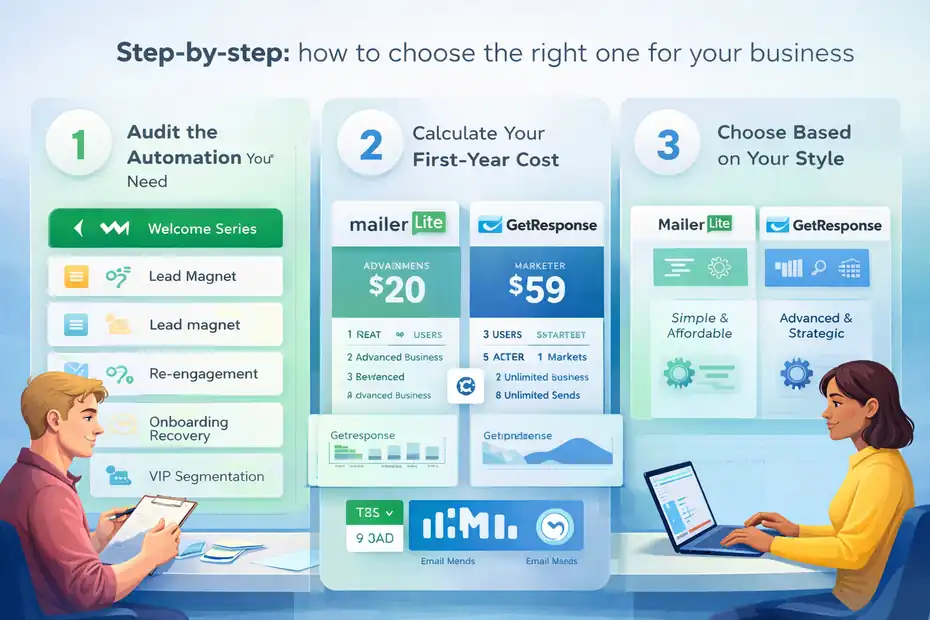
You do not need a giant scorecard to pick between them. You need a simple decision process that matches your business model.
Step 1: Audit the automation you actually need
Start by writing down the workflows you need in the next three months. Not the workflows you might build someday. The ones you genuinely plan to launch.
A useful list might include:
- Workflow 1: Welcome series for new subscribers.
- Workflow 2: Lead magnet delivery and upsell.
- Workflow 3: Re-engagement sequence for inactive readers.
- Workflow 4: Purchase onboarding or abandoned cart recovery.
- Workflow 5: VIP segmentation based on clicks or purchases.
If your list tops out at two or three simple automations, MailerLite probably gives you enough power without extra spend. If your list includes website visits, purchase behavior, lead scoring, and multiple branches, GetResponse will likely save you from outgrowing your setup too fast.
Step 2: Calculate your real first-year cost
Do not compare just the homepage starting price. Compare the plan you will probably need after implementation. This is where many buyers make a poor decision.
For example, GetResponse Starter may look like the lower-risk beginning, but if your strategy needs unlimited workflows and ecommerce automation, the realistic comparison is GetResponse Marketer versus MailerLite Advanced or Growing Business.
On the official pricing pages, that means comparing roughly $59 monthly or $48.38 annually for GetResponse Marketer against MailerLite’s $20 monthly Advanced or $10 monthly Growing Business entry points.
I recommend calculating:
- Plan price: Monthly and annual.
- Users needed: MailerLite includes 1 seat on Free, 3 on Growing Business, unlimited on Advanced; GetResponse includes 3 users on Starter and up to 5 on Marketer.
- Email volume: Unlimited monthly sends on GetResponse paid plans; MailerLite offers unlimited monthly emails on Growing Business and Advanced.
- Extra tools replaced: Webinar, funnel, or website tools you may no longer need.
That gives you a much more honest value comparison.
Step 3: Choose based on your operating style
This final step is more personal than technical. Ask yourself how you prefer to work.
Choose MailerLite if you want a lighter interface, lower ongoing cost, and enough automation to run a clean email program without overbuilding.
Choose GetResponse if you want automation to become a bigger strategic asset and you are comfortable paying more for breadth, segmentation depth, and revenue-focused features.
I usually phrase it this way: if your email setup supports your business, MailerLite is often enough. If your email setup drives your business, GetResponse becomes more compelling.
Common mistakes people make when comparing these platforms
A lot of bad software choices happen because the comparison logic is off from the start. The platform itself is not the problem. The buying framework is.
Mistake 1: Equating “has automation” with “fits my automation needs”
This is the biggest one. Both platforms have automation. That does not mean they give you the same practical flexibility.
MailerLite is strong for straightforward sequences and compact workflows.
GetResponse is stronger for layered journeys with deeper conditions, behavioral triggers, and ecommerce-focused actions like abandoned cart recovery and revenue-based targeting.
If you ignore that difference, you may choose based on marketing copy instead of implementation reality.
Mistake 2: Choosing the cheapest plan instead of the right plan
A low entry price feels safe, but the wrong low-tier plan usually becomes expensive later. The better question is not “Which tool starts cheaper?” It is “Which plan will still work once I finish setup?”
This matters especially with GetResponse because Starter includes one custom automation workflow and basic six-element workflow creation, while more complete automation lives in Marketer.
If your entire strategy depends on deeper lifecycle flows, you are not really a Starter customer.
Mistake 3: Paying for advanced features you will never use
This can happen on the other side too. Some users buy a more feature-heavy platform because it sounds more professional, then never touch half the stack.
If you do not need webinars, revenue reports, web push, or advanced behavioral targeting, MailerLite may deliver stronger ROI simply because you are using a bigger percentage of what you pay for. That is a quiet kind of value that matters a lot.
Advanced value analysis: when GetResponse is worth the premium
There are clear situations where the higher price is justified. This is where I think GetResponse earns its place.
When you need revenue-focused automation, not just email sequences
GetResponse’s Marketer plan includes abandoned cart recovery, advanced audience segmentation, sales funnels, promo codes, revenue reports, and unlimited web push notifications.
Those are not just “extra features.” They are tools designed to connect email automation more directly to sales outcomes.
For an ecommerce brand, that bundle can be meaningful. Imagine you have 20,000 monthly visitors and a cart abandonment problem.
A platform that lets you combine purchase triggers, page behavior, segmentation, and recovery campaigns may generate enough recovered revenue to offset the software premium quickly.
GetResponse even highlights examples of businesses using targeted marketing and advanced automations to increase turnover and generate sales from single campaigns.
Those are vendor case studies, so I would still treat them carefully, but they do reflect the platform’s positioning around revenue and growth, not just newsletter sending.
When consolidation saves more than the subscription costs
This is another overlooked point. GetResponse may be the better value if it lets you avoid paying for extra platforms. Its paid ecosystem includes automation, funnels, landing pages, websites, webinars on Creator, and enterprise add-ons like SMS and transactional email.
If you currently pay separately for:
- Email platform
- Landing page builder
- Basic funnel tool
- Webinar tool
- Push notification solution
then a more expensive all-in-one platform can still lower your total stack cost. In that case, the premium is not really a premium. It is consolidation.
Final verdict: which one gives the best automation and pricing value?
Both platforms are good. The better value depends on what kind of marketer you are becoming.
Choose MailerLite if value means affordability and simplicity
MailerLite is the better choice for most beginners, creators, and small businesses that want useful automation without a steep monthly bill.
Its free plan is generous enough to launch with, its Growing Business and Advanced tiers are still relatively affordable, and automation is available from the start.
If your workflows are mainly welcome emails, lead nurture, basic product follow-up, and list engagement, MailerLite gives you a lot for the money.
Choose GetResponse if value means depth and long-term marketing leverage
GetResponse is the better choice when your email platform needs to do more than send campaigns and basic automations.
If you need segmentation depth, behavioral logic, ecommerce triggers, web push, funnels, revenue reporting, or bundled growth tools, GetResponse makes a stronger long-term case.
The price is higher, but the ceiling is much higher too.
The simplest recommendation
If I had to make this easy:
- Best for budget-conscious users: MailerLite
- Best for advanced automation users: GetResponse
- Best for solo creators and small lists: MailerLite
- Best for ecommerce and lifecycle marketing: GetResponse
- Best overall pricing value for simple needs: MailerLite
- Best overall strategic value for complex growth: GetResponse
So if your question is strictly “GetResponse vs MailerLite: which has the best automation and pricing value?” my answer is this:
MailerLite gives the better value for most smaller businesses because it includes more usable automation at a lower starting cost.
GetResponse gives the better value for businesses that will actively use advanced automation, segmentation, and revenue-focused features enough to justify the jump in price. That is the real dividing line.
FAQ
Which is better for automation, GetResponse or MailerLite?
MailerLite is better for simple automation like welcome emails and basic sequences, while GetResponse offers more advanced automation with behavior tracking, segmentation, and ecommerce triggers. The better choice depends on whether you need straightforward workflows or deeper, revenue-focused automation systems.
Is MailerLite cheaper than GetResponse?
Yes, MailerLite is generally more affordable, especially for beginners and small businesses. It offers a free plan with automation included and lower-cost paid tiers. GetResponse starts at a higher price and requires upgrading to access full automation features.
Does GetResponse offer better value for ecommerce businesses?
GetResponse often provides better value for ecommerce because it includes features like abandoned cart recovery, sales funnels, and revenue tracking. These tools help businesses increase conversions, making the higher cost worthwhile for stores focused on growth and automation-driven sales.
Can beginners use GetResponse or is MailerLite easier?
MailerLite is easier for beginners because of its simple interface and lower learning curve. It allows users to quickly build campaigns and automations without technical complexity. GetResponse is more feature-rich but may feel overwhelming for users just starting out.
Which platform is best for long-term growth and scalability?
GetResponse is better for long-term scalability due to its advanced automation, segmentation, and all-in-one marketing tools. While MailerLite works well initially, businesses with complex funnels or growth-focused strategies may eventually benefit more from GetResponse’s expanded capabilities.

I’m Juxhin, the voice behind The Justifiable.
I’ve spent 6+ years building blogs, managing affiliate campaigns, and testing the messy world of online business. Here, I cut the fluff and share the strategies that actually move the needle — so you can build income that’s sustainable, not speculative.
Related posts:
 10 Powerful Brevo Alternatives to Boost Your ROI
 Top 10 Email Service Providers: Powerful Tools for Businesses
 Constant Contact Pricing: Which Plan Is Right for You?
 MailerLite Free: What You Actually Get Without Paying
 Aweber Affiliate Sign Up Tutorial for Beginners
 Try the Omnisend App—See the Difference Fast