Table of Contents
Some links on The Justifiable are affiliate links, meaning we may earn a small commission at no extra cost to you. Read full disclaimer.
Later review for creators usually starts with one simple question: will this platform actually help you grow, or will it just give you a prettier content calendar?
I’ve gone through Later from a creator-first angle, not a big-agency angle, and that distinction matters. If you’re managing content, trying to stay consistent, and looking for a better way to connect posting with traffic, partnerships, and results, Later can be useful.
But it is not magic, and it is not the right fit for every creator.
What Later Actually Is For Creators
Later sits in an interesting spot. It is no longer just an Instagram-first scheduling app. Its current plans support a “Social Set” that can include one profile each for Instagram, Facebook, Threads, Pinterest, TikTok, LinkedIn, YouTube, and Snapchat, which makes it more of a multi-platform content operations tool than a single-channel scheduler.
Later also positions itself around creator and influencer workflows, not only social posting.
What Problem It Solves
For most creators, the real problem is not publishing a post. The real problem is managing momentum. You have ideas in one place, drafts in another, captions in your notes app, links in a spreadsheet, and brand deadlines floating around in your head.
That is where Later can help. It centralizes scheduling, visual planning, analytics access, and link-in-bio functionality into one system. The value is less about “saving five minutes” and more about reducing friction across the whole week. If your content process currently feels messy, Later has a legitimate use case.
Who It Is Really Built For
I believe Later works best for three kinds of creators.
- Solo creators with repeatable content formats: Think creators posting Reels, carousels, TikToks, and promotional posts on a regular cadence.
- Creator-business hybrids: People selling digital products, courses, memberships, affiliate offers, or services.
- Small creator teams: A creator plus editor, VA, brand manager, or assistant.
If you post casually and only create content in the moment, Later may feel like extra structure you do not need. But if you are trying to turn consistency into revenue, structure becomes a competitive advantage.
What Makes It Different From “Just A Scheduler”
A lot of tools can schedule content. That alone is not enough anymore.
Later tries to stand out with three things: visual planning, creator-friendly link in bio, and scheduling guidance tied to performance data such as best times to post and trend-informed planning on higher plans. That does not automatically make it the best tool for every creator, but it does move it beyond bare-bones scheduling.
How Later Works In Real Creator Workflows
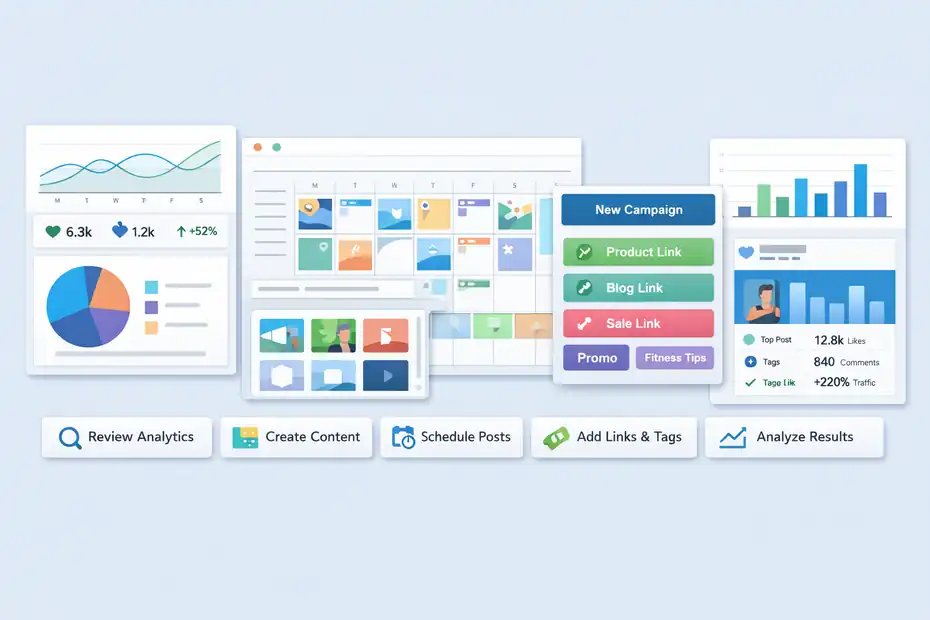
The best way to review Later is to stop thinking like a software buyer and think like a creator with deadlines, fatigue, and limited time.
Later works by giving you one place to organize profiles, build a posting calendar, prepare content in advance, publish automatically where supported, and monitor results afterward.
Its Social Set structure also matters because it forces organization around brand identity or channel groups rather than random account sprawl.
The Weekly Workflow Most Creators Will Use
Here is the practical flow many creators will end up following:
- Monday: Review analytics and identify what content style is working.
- Tuesday: Batch create captions, hooks, and visuals.
- Wednesday: Load assets into the calendar and schedule your next 7 to 14 days.
- Thursday: Attach links to promotional posts and update campaigns or tags.
- Friday: Review top-performing content and adjust next week’s mix.
This is why Later can feel helpful fast. It gives shape to your week. In my experience, creators do better when the tool supports rhythm, not just publishing.
Where It Fits In A Growth System
Later is strongest when it supports a system you already understand.
It will not fix weak content ideas, poor hooks, or unclear positioning. But it can improve execution. That matters because most creator growth is won through repeated high-quality attempts, not one viral post.
Imagine you are a fitness creator selling a strength guide. You post four short videos weekly, one educational carousel, and two Story-based promotional pushes. Later helps you pre-load the week, attach the right offer links, and track which pieces moved traffic.
That does not create demand by itself, but it does make your process more measurable.
Where It Does Not Help Enough
This is where I want to be honest. Later is not a content strategy brain.
It does not replace understanding your audience, testing hooks, building offers, or developing your point of view. Even “smart scheduling” features are still support features. They can improve timing, but timing is rarely the main reason content fails.
If you need deep competitive research, advanced cross-channel attribution, or full creator CRM-style brand management, Later may feel limited unless your use case is tightly centered on content operations rather than broader business systems.
Setting Up Later The Right Way
A lot of creators judge software too early because they set it up badly. Later is one of those tools that rewards a thoughtful setup.
The current plan structure includes Starter, Growth, and Scale, with paid tiers differing in users, Social Sets, analytics depth, and advanced features. Starter includes one Social Set and one user, while Growth and Scale expand profile capacity and collaboration.
Connect Profiles With A Clear Publishing Goal
The first mistake people make is connecting every social account they own before deciding what the system is for.
I suggest asking one question first: what result do you want Later to support? More consistency? Better analytics? Easier promo planning? Less team chaos?
Then connect only the profiles that fit that goal. Because a Social Set can include one profile per supported network, it is best to group accounts by brand identity. If you are one creator with one personal brand, that is easy. If you run separate niches, treat them as separate systems.
Build A Content Structure Before You Schedule Anything
Before loading posts, create a simple structure for your calendar.
Use 3 to 5 repeatable content buckets such as:
- Education
- Authority
- Personal connection
- Promotion
- Community engagement
This sounds basic, but it changes everything. Without content buckets, a scheduler becomes a storage box. With content buckets, it becomes a planning system.
A creator who teaches Notion templates, for example, could assign Mondays to tutorials, Wednesdays to workflow mistakes, Fridays to creator-business lessons, and weekends to soft promotion. Later becomes much more valuable when the calendar mirrors strategy.
Set Up Tracking Early
Later’s analytics depth varies by plan. Starter includes more limited analytics windows, while higher plans expand historical data and feature access. If you care about learning from performance over time, setup should include deciding what metrics matter before posting.
Track things like:
- Reach by content type
- Saves and shares on educational posts
- Click-throughs from link in bio
- Conversion spikes after promotional content
- Posting cadence versus engagement stability
I recommend doing this immediately, not after a month of “seeing how it goes.” Most creators wait too long to define success.
Content Planning And Scheduling: Where Later Helps Most
This is the section where Later earns its reputation. The scheduling experience is still one of its clearest strengths.
Later is designed around planning content visually and publishing across supported social platforms, with additional scheduling assistance such as Best Time to Post and, on qualifying plans, Future Trends within Smart Scheduling.
The Visual Calendar Is More Useful Than It Sounds
A visual calendar can sound like a cosmetic feature until you start using one seriously.
For creators, visual spacing matters. You do not want five sales-heavy posts in a row. You do not want your feed to drift away from your core message. You do not want to realize too late that all your scheduled content is top-of-funnel and none of it drives action.
The calendar helps you spot imbalance quickly. It is especially helpful for creators whose brand depends on a clean visual style, recurring series, or a healthy mix of educational and promotional content.
Scheduling Works Best For Repeatable Formats
Later shines when your content has patterns.
For example, let’s say you are a beauty creator. Every week you publish:
- Two short tutorials
- One product comparison
- One creator-life post
- One offer push for affiliate links or your own digital product
In that setup, Later is excellent. You can batch content, assign publication times, line up links, and keep your feed moving even during busy weeks.
Where it struggles more is highly reactive content. If your niche depends on daily commentary, breaking trends, or spontaneous posting, a scheduler helps less. You may still use it for evergreen posts, but not as the center of your workflow.
Publishing Support Has Limits You Should Know
No creator tool can fully override platform limitations, and Later is no exception.
For example, certain channels and formats come with publishing rules or feature gaps. Snapchat scheduling through Later, for instance, has format and platform-specific limitations, and Snapchat analytics are not currently available inside Later. That is normal in social software, but it matters if your business depends heavily on one specific channel.
This is why I would not buy Later just because it says “multi-platform.” I would buy it only if its strongest supported workflows match your actual publishing mix.
Analytics, Link In Bio, And Growth Tracking
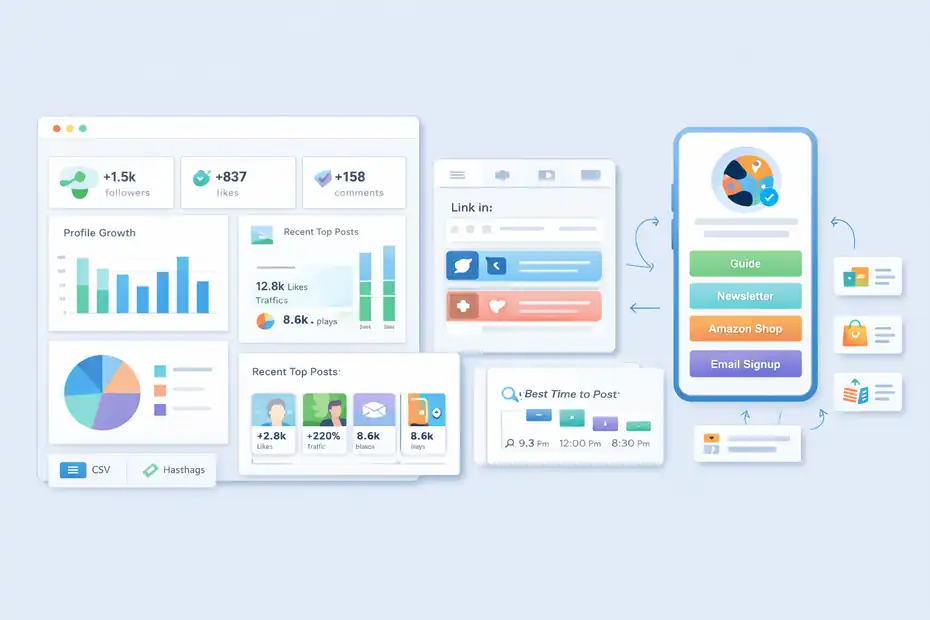
This is where the “grow faster” part of the review becomes more real.
Posting consistently is useful, but creators grow faster when they can connect content decisions to measurable outcomes.
Later leans into that with analytics and link-in-bio features rather than positioning itself as only a post scheduler.
Analytics: Good For Operational Decisions, Not Full Business Intelligence
Later’s analytics are practical. On Instagram, for example, it supports profile growth, audience insights, post and Reel performance, Story performance, hashtag analytics, and CSV export, with deeper history on higher plans.
That is enough for many creators to answer useful questions:
- Which format gets the most saves?
- Which post types earn profile visits?
- Which weeks perform best?
- Which campaigns actually create clicks?
What it is not, in my opinion, is a complete business intelligence layer. If you run a larger creator business with funnels, ad spend, CRM data, and multiple offer paths, you will eventually want more advanced attribution elsewhere.
But for creator-level content optimization, Later gives you enough signal to make smarter weekly decisions.
Link In Bio Is More Valuable Than Many Creators Realize
Later’s link-in-bio feature is one of its best creator-facing assets. It lets you build a customizable page tied to your social presence and connect posts to URLs, which is useful for products, affiliate links, articles, waitlists, or lead magnets. On some plans, Instagram posts can include multiple links.
That matters because creators rarely need “more links.” They need cleaner intent paths.
Imagine you are a book creator promoting Amazon affiliates, a newsletter, and a paid reading guide. A standard single-link bio quickly becomes a mess. A structured link-in-bio setup tied to actual posts gives followers a clearer path from interest to action.
This does not sound dramatic, but small friction reductions often create meaningful gains over time.
Best Time To Post Is Helpful, But Not A Superpower
Later’s Best Time to Post uses past post data, follower activity, and industry trends to recommend likely engagement windows. That is useful, especially for creators who normally post whenever they remember.
Still, I would keep expectations realistic.
Timing can improve reach around the margins. It can help a strong post perform slightly better. It rarely rescues weak content. If your hooks are boring or your topic is unclear, publishing at the “perfect” time will not save you.
I like this feature most as a consistency guide. It removes guesswork and makes your calendar easier to trust.
Pricing, Value, And Who Should Pay
Pricing is where many creator tools win or lose the conversation.
As of now, Later’s public pricing page lists Starter at $18.75 per month billed annually, Growth at $37.50 per month billed annually, and Scale at $82.50 per month billed annually, with plan differences tied to Social Sets, users, analytics access, AI credits, and advanced capabilities.
The help center also notes annual plans can include a discount period and add-ons for more Social Sets, users, or AI credits.
Quick Pricing Snapshot
| Plan | Best For | Notable Inclusions | Watchouts |
|---|---|---|---|
| Starter | Solo creators testing structure | 1 Social Set, 1 user, 30 posts per profile, link in bio, limited analytics | Can feel tight if you manage multiple brands or want deeper reporting |
| Growth | Serious creators or creator + assistant | 2 Social Sets, 2 users, smarter scheduling features, stronger collaboration | Higher cost only makes sense if you use the workflow regularly |
| Scale | Small teams or multi-brand operators | More users, more Social Sets, custom analytics, more advanced reporting | Overkill for most solo creators |
Pricing and feature availability are based on Later’s current public plan details and help documentation.
When Later Is Worth Paying For
I think Later is worth paying for when all three conditions are true:
- You publish at least several times per week
- Content directly supports revenue, leads, or partnerships
- You are actively trying to reduce chaos or improve decision-making
If that is your situation, even a modest lift in consistency or click-throughs can justify the subscription.
For example, if a creator earns from affiliate links and Later helps organize promotional timing and link paths more cleanly, one or two extra conversions per month may cover the software.
When It Is Not Worth It
Later is probably not worth it if you are still figuring out whether you even enjoy creating content.
It is also hard to justify if you publish randomly, have one channel, and do not review analytics at all. A tool cannot create discipline for you. It can support discipline you are already building.
That is the difference between software that feels expensive and software that feels profitable.
The Biggest Pros, Cons, And Common Mistakes
This is the part most reviews gloss over. A creator tool can be good and still be a bad fit for you.
Later has real strengths, but it also has blind spots, especially if you buy it for the wrong reason.
The Biggest Advantages
Here is where Later genuinely helps many creators:
- It creates operational clarity: Your content stops living in scattered apps.
- It supports multi-platform planning: One Social Set can cover a broad mix of channels.
- It adds creator-friendly traffic tools: Link in bio is practical, not just decorative.
- It improves planning discipline: A calendar makes weak content mix decisions visible faster.
- It offers usable performance feedback: Enough analytics to refine content without drowning in data.
For many of us, those advantages are more important than any flashy AI feature.
The Real Drawbacks
Now the downsides.
First, some creators will outgrow it. If you need a more complex campaign system, deeper reporting, or stronger workflow automation across your broader business, Later may start to feel like one layer of the stack rather than the core system.
Second, feature usefulness depends heavily on your content style. If you are highly spontaneous or trend-reactive, you may underuse the scheduling layer.
Third, platform limitations still exist. Some posting types, analytics gaps, or channel-specific restrictions are outside Later’s control, which means “all-in-one” never fully means everything in one place.
The Most Common Mistakes Creators Make With Later
I see the same errors over and over:
- Mistake 1: Buying the tool before building a content system. Later works best when your strategy already has recurring formats.
- Mistake 2: Measuring output instead of results. Scheduled posts are not the goal. Traffic, engagement quality, and conversions are.
- Mistake 3: Ignoring setup discipline. If your tags, content buckets, or link structure are messy, insights become weaker.
- Mistake 4: Expecting the tool to replace creative judgment. It will not tell you what your audience truly cares about.
That last point matters most. Later can improve execution, but it cannot manufacture resonance.
Final Verdict: Grow Faster Or Just Another Scheduling Tool?
Later for creators is not just another scheduling tool, but it also is not a shortcut to growth.
That is the honest answer.
If you are a creator with a real publishing cadence, recurring content themes, and something valuable to sell or promote, Later can absolutely help you grow faster by making your workflow cleaner, your promotion more intentional, and your analytics easier to act on.
Its strongest creator-facing value comes from combining scheduling, visual planning, link in bio, and practical performance tracking in one place.
If, however, you are hoping a tool will solve weak content strategy, inconsistent effort, or unclear positioning, Later will disappoint you. In that case, it will feel like a polished calendar with a monthly bill.
My take is simple: Later is best viewed as a growth support tool, not a growth engine.
Use it when you already know what you want to publish and why. Use it when consistency has business value. Use it when your content operation is becoming too big for notes apps and manual posting.
That is when Later stops being “just another scheduler” and starts becoming useful leverage.
Should You Try It?
I’d break it down like this:
- Choose Starter if you are a solo creator who wants a more organized content system without overcomplicating things.
- Choose Growth if you have a serious publishing cadence, want collaboration, and plan to use smarter scheduling and stronger analytics regularly.
- Skip it for now if you are still inconsistent, have no content workflow, or do not yet use analytics to make decisions.
That may sound less exciting than a hype-heavy review, but I think it is more useful.
A good creator tool should make your best habits easier to repeat. Later does that well. It just works best for creators who already treat content like a real system.
FAQ
What is Later and how does it help creators?
Later is a social media scheduling and planning tool designed to help creators organize, publish, and analyze content across multiple platforms. It improves consistency, simplifies content workflows, and provides insights that help creators make smarter posting decisions and grow their audience more effectively over time.
Is Later worth it for creators in 2026?
Later is worth it for creators who post consistently and want to streamline their workflow. It becomes valuable when content supports income, partnerships, or growth goals. However, it may not be necessary for beginners who post casually or do not yet use analytics to guide decisions.
Does Later actually help grow your social media?
Later can support growth by improving consistency, timing, and content organization. It helps creators identify what works through analytics and optimize posting schedules. However, growth still depends on content quality, audience understanding, and strategy, not just the tool itself.
What are the main features of Later for creators?
Later offers visual content planning, multi-platform scheduling, analytics tracking, and a customizable link in bio tool. These features help creators manage content calendars, track performance, and drive traffic from social platforms to external links like products, blogs, or affiliate offers.
What are the biggest drawbacks of using Later?
Later may feel limited for creators who need advanced analytics, deep automation, or complex campaign tracking. It also relies on platform restrictions, meaning some features vary by channel. For highly spontaneous creators, its structured workflow may feel unnecessary or restrictive.

I’m Juxhin, the voice behind The Justifiable.
I’ve spent 6+ years building blogs, managing affiliate campaigns, and testing the messy world of online business. Here, I cut the fluff and share the strategies that actually move the needle — so you can build income that’s sustainable, not speculative.