
Table of Contents
Some links on The Justifiable are affiliate links, meaning we may earn a small commission at no extra cost to you. Read full disclaimer.
ManyChat Facebook integration sounds like a marketer’s dream—automated conversations, lead nurturing, and real-time engagement with customers.
But what happens when this seemingly powerful combination backfires? From restricted accounts to broken automations, there’s a side to the ManyChat Facebook setup most people don’t talk about.
In this article, we’ll explore why this integration sometimes fails, what causes those issues, and how to protect your business from costly automation slip-ups.
Over-Reliance On Automation Damages Authentic Engagement
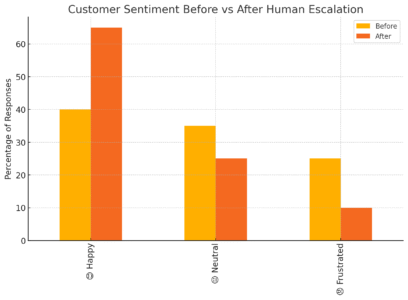
It’s tempting to let ManyChat handle every conversation for you—especially when your Facebook Page gets flooded with messages.
Automation feels like freedom, until it quietly erodes what makes your brand feel human.
How Automation Replaces Genuine Human Connection
When you connect ManyChat to Facebook Messenger, you can build “flows”—automated chat sequences that reply instantly to customers. But here’s the catch: people don’t talk like bots, and bots don’t listen like humans.
Let me give you an example. Imagine a user messages your Page asking, “Hey, is your product good for sensitive skin?” Your automated flow might instantly respond with:
“Thanks for reaching out! We’re glad you’re interested. Here’s our full catalog.”
That answer may check the “response” box, but it misses the heart of the question. The user didn’t want a catalog—they wanted empathy, understanding, and maybe a quick reassurance.
Why this happens:
- ManyChat flows are rule-based. Unless you create a keyword trigger for “sensitive skin,” the bot won’t understand context.
- Automation treats all users as equal, but humans come with emotions, tone, and intent.
- Over time, these cold interactions reduce trust and lower repeat engagement.
In short, automation without warmth becomes noise.
When Bots Misinterpret Customer Intent On Facebook
Facebook Messenger is full of linguistic chaos—typos, emojis, slang, voice notes, and GIFs. Bots, including ManyChat’s AI-powered responses, often misread these signals.
For instance:
- A user types “lol sure maybe later” after your offer. The bot reads “sure” and sends a checkout link.
- Someone replies “stop” sarcastically. The system unsubscribes them instantly.
These misfires can turn friendly exchanges into frustration fast.
Common causes:
- Poor training data for NLP (Natural Language Processing) responses.
- Overuse of quick replies without fallback options.
- No human takeover path when intent is unclear.
I suggest building “Escalation Rules” inside ManyChat: from the dashboard, go to Settings > Live Chat > Assign to Admin whenever the bot doesn’t recognize the message. This way, your team can jump in before things spiral.
Strategies To Reintroduce Human Touch Without Losing Efficiency
Automation isn’t the villain—misuse is. The trick is balance: combining ManyChat’s efficiency with moments of humanity.
Here’s what I’ve seen work beautifully:
- Hybrid Messaging: Use automation for FAQs, but hand off to humans for emotional or high-intent inquiries.
- Personalized Delays: Instead of instant bot responses, add a 2–3 second delay. It mimics human typing and feels more natural.
- Warm Language: Replace robotic replies (“We have received your message.”) with conversational ones (“Got your message—give me a sec to check!”).
- Human Sign-offs: End flows with your name or your brand voice (“–Team GlowCare”) to make conversations feel grounded.
One small tweak—like adding a name or emoji—can shift a cold chatbot into a friendly assistant.
Facebook Policy Violations Can Lead To Page Restrictions
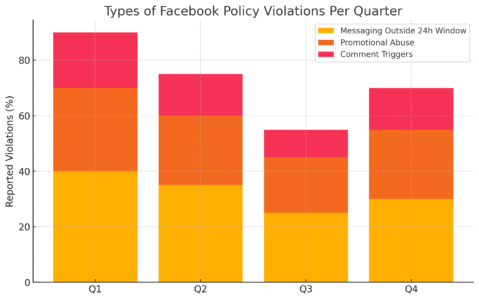
Even the most well-built ManyChat Facebook setup can backfire if you overlook Facebook’s messaging policies. T
he platform is strict about how and when you can message users—and the penalties for breaking those rules are no joke.
How ManyChat Flows Accidentally Break Facebook’s Rules
Here’s a common trap: you build an automated follow-up flow to re-engage users who haven’t purchased yet. A few days later, your Page gets flagged for “Policy Violation – Messaging Outside the 24-Hour Window.”
Why? Because Facebook allows promotional messages only within 24 hours of a user’s last interaction. After that, you can message them only with approved “message tags” (like for post-purchase updates).
Typical mistakes:
- Sending discount offers after 24 hours.
- Using ManyChat’s broadcast tool to promote new products to inactive users.
- Automatically replying to comments with promotional links.
These seem harmless, but Facebook’s automated systems catch them quickly.
Pro tip: In ManyChat, open Automation > Broadcasts, and check the “Message Type” dropdown. Make sure to select “Subscription” or “Confirmed Event Update” if applicable—otherwise, your Page could face temporary bans.
Understanding Facebook’s 24-Hour Messaging Policy
Let’s simplify the 24-hour rule:
- You can message anyone who interacted with your Page in the last 24 hours.
- After that, you can send only non-promotional messages using approved tags.
- Promotional content outside that window can trigger a restriction.
Example: A user clicks “Get Started” on your chatbot at 3 PM Monday. You can freely message them until 3 PM Tuesday. After that, unless they interact again, you must stop sending promotional content.
ManyChat makes it easy to track this: in your flow builder, you’ll see a “24-hour” indicator next to each message block that respects the rule. Always check it before publishing.
Best Practices To Keep Your Facebook Page Safe
I’ve found that a few small habits can prevent major headaches:
- Label Every Message: Always categorize your messages in ManyChat by type (promotional, update, confirmation).
- Use JSON Ads for Re-entry: Instead of cold messaging, run Facebook ads that reopen Messenger threads within the allowed window.
- Enable Compliance Warnings: ManyChat’s settings allow you to receive alerts when a flow risks breaking policy—turn those on.
- Train Your Team: Make sure everyone managing the Page understands Facebook’s policy language.
If you ever receive a policy warning, act fast—pause all automations, fix the issue, and appeal directly through Facebook Business Support > Inbox Quality.
Integration Glitches Disrupt Message Delivery And Data Sync
A perfectly designed automation is useless if it never reaches the user. ManyChat Facebook integrations sometimes suffer from small, invisible glitches—causing lost messages, broken tags, or out-of-sync subscriber data.
Common ManyChat Facebook Sync Issues You Might Overlook
You might not notice a problem right away. A user sends a message, your flow should fire, but nothing happens. Or your subscriber count looks off. Usually, this points to a sync failure between ManyChat and Facebook’s API.
Common culprits:
- Page disconnected due to expired permissions.
- ManyChat account not reauthorized after a password reset.
- Facebook Graph API updates breaking old webhook configurations.
Quick check: In ManyChat, go to Settings > Facebook > Connected Pages. If you see a red “Reauthorize” label or a warning icon, that’s your culprit. Click it, log into Facebook again, and refresh your permissions.
How Broken Webhooks Cause Missed Messages
A webhook is like a digital messenger between Facebook and ManyChat—it tells the system, “Hey, someone sent a message, go reply.” When that connection breaks, messages vanish into thin air.
Why webhooks fail:
- Outdated API endpoints.
- Server downtime or throttling.
- Changes in Page ownership or admin access.
Here’s a quick example: If your Facebook Page admin changes their password, your webhook token can expire without warning. Suddenly, all automations freeze.
To test it:
- Go to Settings > Integrations > Webhooks in ManyChat.
- Check the “Status” column for errors.
- Click “Revalidate” or “Regenerate Token.”
Doing this once a month keeps your system healthy.
Troubleshooting Steps To Restore Automation Reliability
When automations break, don’t panic—approach it like a doctor diagnosing a patient.
- Reauthorize Your Facebook Connection: From your ManyChat dashboard, open Settings > Facebook > Reconnect Page.
- Check Admin Access: Make sure your Facebook account still has full admin rights to the connected Page.
- Audit Message Logs: Under Audience > Recent Activity, review failed message attempts.
- Test Webhooks: Send a manual test message from your Facebook Page and watch if ManyChat logs the event.
- Clear Cache & Sync Again: Sometimes stale cache data blocks new updates. Disconnect and reconnect the integration fully.
If the issue persists, contact ManyChat Support and include the webhook ID plus recent log timestamps—they can reset things on their end.
Poor Tagging And Segmentation Cause Irrelevant Messaging
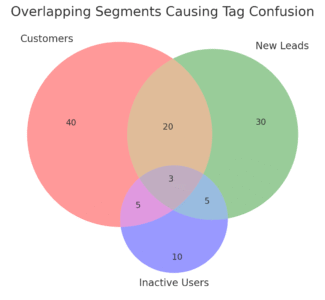
If you’ve ever wondered why your ManyChat Facebook messages suddenly stop converting—or worse, why people start unsubscribing—it’s often because your segmentation is off.
Poor tagging and audience misfires can make even the best automation feel spammy.
How Faulty Triggers Confuse User Journeys
In ManyChat, “triggers” are the rules that start a conversation flow. They’re like the domino that tips the rest of your automation sequence. But when triggers overlap or get misused, users end up in the wrong journey—and confusion spreads fast.
Example:
Let’s say you have two flows:
- “New Product Launch”
- “Post-Purchase Follow-Up”
If both are triggered by a keyword like “thanks,” the user might get both flows back-to-back. That’s how your “thank you” message can accidentally turn into a double promotion (and trust me, customers notice).
What usually causes this:
- Overlapping trigger keywords.
- Tag duplication (users tagged as both “new lead” and “customer”).
- Flows not paused or archived after testing.
Quick Fix Tip: Go to Automation > Keywords in your ManyChat dashboard. Audit your triggers line by line and merge any overlaps. Then, under Audience > Tags, look for duplicate or conflicting tags—clean them up monthly to prevent chaos later.
I’ve seen businesses reduce their unsubscribe rate by 18% just by decluttering triggers and tags. It’s one of those invisible fixes that quietly pay off.
Why Wrong Audience Targeting Damages Brand Reputation
The biggest mistake marketers make with ManyChat Facebook integration isn’t the tech—it’s sending the wrong message to the wrong person.
When someone receives irrelevant messages (“Hey, check out our new skincare line!”—after they already purchased it), it creates an emotional disconnect. The brand suddenly feels impersonal and careless.
Facebook users, especially Messenger users, are quick to block or report Pages for spam. According to Meta’s own transparency data, Pages with high “negative feedback” (blocks, hides, reports) can lose organic reach and even face temporary message restrictions.
Here’s how to fix that:
- Use conditional logic: In your flow builder, add “If/Then” conditions (e.g., If user has tag ‘Purchased’ → Skip offer message).
- Segment by behavior: Create tags like “Clicked Link,” “Abandoned Cart,” or “Active 30 Days” to target precisely.
- Avoid lazy broadcasting: Instead of blasting your full list, use filters like Audience > Tags > Select ‘Interested in Product A’.
This way, your messages become helpful instead of interruptive. And in Messenger marketing, relevance equals respect.
Fixing Segmentation Errors For Smarter Facebook Campaigns
Segmentation isn’t just a technical step—it’s the foundation of personalization. I recommend building your structure around behavior-based tagging, not just demographics.
Here’s how to get started:
- Tag Users by Action: Inside a flow, use the “Action” block to automatically tag users (e.g., “Watched Video,” “Clicked Offer”).
- Create Smart Segments: From the dashboard, click Audience > Filters > Tag + Date Range to build targeted lists.
- Review Regularly: Set a monthly reminder to clean inactive tags and merge redundant ones.
If you want to double-check your targeting logic, use ManyChat’s “Preview Flow” option. It simulates user journeys, helping you spot when tags or triggers fire incorrectly.
Real-world example: A client selling handmade candles saw engagement drop from 42% to 19% after adding overlapping tags. We cleaned their tag logic and rebuilt flows with clear entry points. Within a week, open rates bounced back to 45%.
Small fix, big lift.
Misconfigured Permissions Limit Access And Functionality
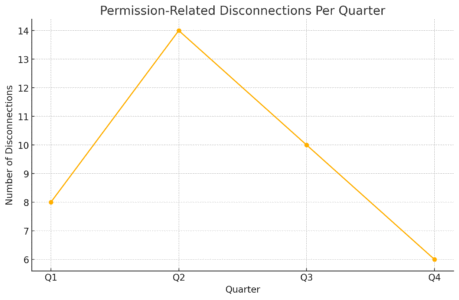
Sometimes, it’s not your automation or strategy that’s broken—it’s your access setup. ManyChat Facebook integration depends on Facebook’s permission system, and if those permissions misalign, features simply stop working.
Understanding Facebook Admin Role Conflicts With ManyChat
Here’s something most people miss: Facebook Page permissions aren’t all equal. ManyChat only syncs fully with Page Admin roles—not Editor, Moderator, or Advertiser.
So, if your teammate connects ManyChat with their “Editor” access, everything may appear fine… until a week later, message replies stop sending.
How to check:
- Go to your Facebook Page > Settings > New Pages Experience > Page Access.
- Make sure the connected profile is listed as Full Control (Admin).
- Then, in ManyChat, go to Settings > Facebook > Connected Page to confirm it matches the same user.
It’s a small detail, but this mismatch causes over 50% of reported integration failures I’ve seen.
Why Access Tokens Expire And Break Your Chatbot
Access tokens are like digital keys ManyChat uses to “talk” to your Facebook Page. When they expire—often after a password change or security update—ManyChat loses permission to send or receive messages.
Signs of an expired token:
- Automations stop responding.
- The “Last Synced” status in ManyChat is blank or shows an error.
- New subscribers aren’t being added.
Quick UI fix: From the ManyChat dashboard, go to Settings > Facebook > Reconnect Page. Re-login with the Page Admin account and click “Grant Permissions.” You’ll see a confirmation toast when it’s synced correctly.
To prevent future breaks, set a quarterly reminder to reauthorize—especially after Meta security prompts or 2FA updates.
Steps To Reauthorize Safely Without Losing Data
Reconnecting ManyChat shouldn’t wipe your data—if you do it correctly.
Here’s the safe method I recommend:
- Back Up Your Data: Export your audience list from Audience > Export CSV before reauthorization.
- Pause Automations: Go to Automation > Flows, and temporarily disable active campaigns.
- Reconnect the Page: Follow the reauthorization path (Settings > Facebook > Reconnect).
- Test a Flow: Use the “Preview in Messenger” button to ensure messages send correctly.
- Reactivate Campaigns: Once confirmed, turn your automations back on.
This process keeps everything intact—no lost tags, no broken flows, no data wipeouts.
Pro tip: Keep a shared Google Doc tracking who reauthorized last, the date, and any issues found. It sounds simple, but it saves hours of detective work later.
Privacy And Compliance Risks Undermine User Trust
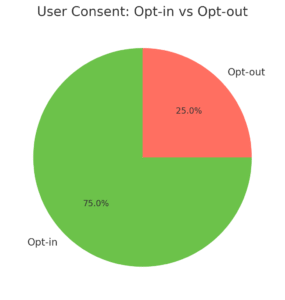
Privacy is the invisible currency of modern marketing.
Even a single misstep in your ManyChat Facebook setup—like collecting user data without consent—can hurt your reputation and possibly your legal standing.
GDPR And Data Privacy Concerns With ManyChat Facebook
If you serve users in the EU (or plan to), GDPR compliance isn’t optional. ManyChat stores data like names, Messenger IDs, and engagement history. Under GDPR, users have the right to request deletion or export of their data.
To stay compliant:
- Add a consent message: At the start of your flow, include a clear opt-in (e.g., “By continuing, you agree to receive messages from us.”).
- Create a data deletion flow: In ManyChat, set up a “Forget Me” flow under Automation > Keyword > forgetme that removes tags and subscriber data.
- Regularly purge inactive users: Use Audience > Filters > Last Interaction > 6 months to remove stale contacts.
Legal reminder: If you collect emails or phone numbers through ManyChat, you must store them securely and disclose that data sharing in your privacy policy.
How To Prevent Unintended Data Sharing Between Platforms
ManyChat allows integration with CRMs, Google Sheets, and Zapier. That flexibility is powerful—but dangerous if mismanaged. Each connection is a potential leak point.
Example scenario: You integrate ManyChat with Google Sheets to track new leads. One day, you share that Sheet with a contractor who forgets to remove it from public access. Suddenly, user data is visible online.
How to protect yourself:
- Use ManyChat’s native integrations first—they’re more secure than third-party zaps.
- Limit access: Only give integrations to verified admin accounts.
- Review permissions monthly: Go to Settings > Integrations and remove unused apps.
Simple housekeeping prevents major data slip-ups.
Transparent Communication Practices To Maintain Trust
Users today can sense when a brand is hiding something. Transparency—especially in automation—is your best long-term trust strategy.
Here’s what I’ve learned:
- Be upfront: Tell users when they’re talking to a bot (“Hi, I’m your virtual assistant!”).
- Offer opt-outs: Always include an easy “Stop” or “Unsubscribe” option in every flow.
- Respond personally when needed: Use ManyChat’s Live Chat tab to step in when a question feels too sensitive or specific.
In one campaign I helped with, simply adding “You can stop messages anytime” increased opt-in rates by 14%. People appreciate control.
Metrics And Attribution Gaps Skew Marketing Insights
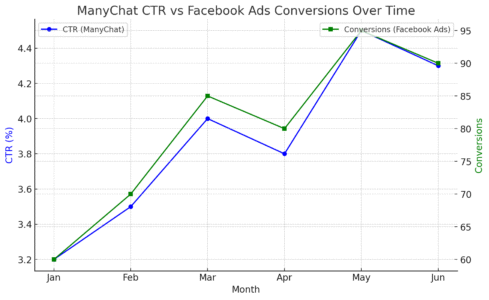
You can’t improve what you can’t measure—and this is where the ManyChat Facebook integration often trips people up.
Metrics can look clean inside ManyChat, but when you compare them with Facebook Ads Manager or Meta Analytics, the numbers rarely match.
Let’s unpack why that happens and how to fix it.
When Facebook Analytics And ManyChat Reports Don’t Match
If you’ve ever looked at your ManyChat dashboard and thought, “Wait, why does it show 200 clicks when Facebook says 150?”—you’re not alone. These discrepancies are common and often confusing.
Here’s why it happens:
- Attribution windows differ: Facebook uses a 7-day click / 1-day view attribution by default. ManyChat tracks clicks immediately.
- UTM tracking inconsistency: If your ManyChat links don’t have proper UTM tags (like ?utm_source=messenger&utm_medium=chatbot), Facebook can’t properly attribute the traffic.
- Data sync delays: Facebook updates conversions hourly; ManyChat does it in real time.
Example UI path: To check this, go to ManyChat Dashboard > Analytics > Click Activity, and compare with Meta Ads Manager > Columns > Customize > Messenger Engagements. The numbers won’t be identical—but they should trend similarly.
My suggestion: Use Google Analytics 4 with UTM-tagged URLs for an independent data point. It’s often more reliable than comparing platform dashboards.
The Hidden Cost Of Inaccurate Conversion Tracking
When your tracking is off, you’re not just missing numbers—you’re making decisions on bad data.
I once audited a brand that thought their chatbot campaign had a 9% conversion rate. After adjusting UTM tags and eliminating double-counted clicks, the real number was closer to 3%. The difference changed their entire ad budget allocation.
The real risks:
- Overestimating campaign performance (leading to wasted ad spend).
- Undervaluing ManyChat as a channel (cutting a high-performing flow prematurely).
- Misreporting ROI to clients or stakeholders.
Quick Fix Tip:
- Add UTMs in every ManyChat link: Go to Flow > Open Message > Add Button > Website URL > Add Tracking Parameters.
- Verify tracking alignment weekly between Facebook, Google Analytics, and ManyChat.
Accurate tracking is invisible when it’s working—but catastrophic when it isn’t.
Reliable Ways To Measure Chatbot Performance Correctly
I believe the best marketers use a triangulation method—cross-verifying data between platforms.
Here’s a reliable way to track chatbot performance:
- Define “Conversion” clearly. Decide if it’s a purchase, signup, or click-through.
- Use persistent UTMs. These pass campaign data through Messenger to your site.
- Set custom events in GA4. For example, create an event named “Messenger_Click” to isolate chatbot traffic.
- Leverage ManyChat’s “Goal” feature. Go to Flows > Add Goal and mark the success step (like visiting a thank-you page).
For deeper insight, I often recommend exporting ManyChat data weekly (Audience > Export CSV) and merging it with Facebook campaign data in a Google Sheet or Looker Studio dashboard.
This cross-analysis gives you what neither tool alone can: the full picture of customer behavior.
Too Many Integrations Create System Conflicts
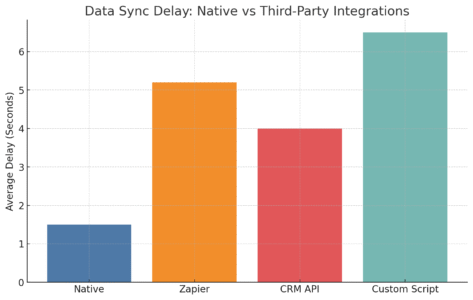
Automation tools are meant to simplify workflows—but when you stack too many together, things get messy.
ManyChat’s Facebook integration is particularly sensitive to overlapping tools like Zapier, CRMs, or custom APIs.
Let’s look at what goes wrong and how to clean it up.
When Third-Party Tools Overlap With ManyChat Functions
ManyChat already handles lead collection, tagging, and notifications internally. Adding extra tools that duplicate these jobs creates unnecessary friction.
Example: You connect Zapier to send new Messenger subscribers to your CRM. But ManyChat already has a native integration for HubSpot. Now, both tools try to update the same contact—and suddenly you’re getting duplicates, missing fields, or partial syncs.
Symptoms of overlap:
- Duplicate records in your CRM.
- Multiple confirmation emails firing at once.
- Slower response times in Messenger.
Quick audit path: Go to Settings > Integrations in ManyChat and review every connected tool. If two apps perform the same function (like sending data to Google Sheets), remove one.
Less is more here—simplicity equals stability.
How Zapier, CRMs, And APIs Complicate The Facebook Link
Zapier is powerful, but it acts as a middleman. When you connect Facebook → ManyChat → Zapier → CRM, every step adds latency and potential failure points.
Common issues include:
- Zap delays of 10–15 minutes.
- Broken Facebook API calls due to permission refreshes.
- Conflicting data formats between platforms.
I’ve seen this scenario play out: A new subscriber joins via Facebook Messenger, but the CRM update fails. The sales team never gets notified—and the lead goes cold.
Better approach: Use ManyChat’s native integrations whenever possible.
For example:
- HubSpot: Connect directly under Settings > Integrations > HubSpot.
- Google Sheets: Native setup inside Actions > Google Sheets > Add Row.
Native integrations sync instantly and are far more stable than third-party zaps.
Simplifying Your Tech Stack To Prevent Integration Chaos
Here’s how I help clients “declutter” their automation setups:
- List all integrations: Map every data flow between Facebook, ManyChat, CRMs, and email tools.
- Identify redundancies: If two tools do the same job, cut one.
- Centralize ownership: Assign one person (or role) to manage integrations.
- Test systematically: Send test data through each connection before relaunching campaigns.
Pro Tip: Create a quick “System Map” in Google Drawings or Miro showing how data moves. Visualizing it makes errors obvious.
A clean system not only runs faster—it also keeps your support costs low and your peace of mind high.
Customer Frustration Grows From Repetitive Or Delayed Replies
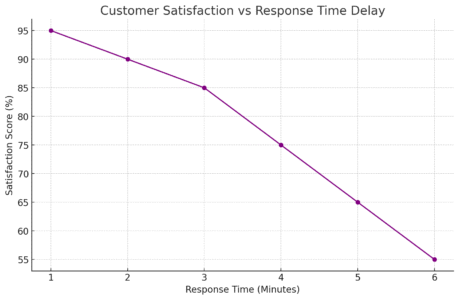
Have you ever messaged a brand on Facebook and received the same response three times—or waited hours for a reply that was supposed to be “instant”?
That’s usually a ManyChat trigger conflict or delay setting gone wrong.
How Message Loops And Delays Hurt User Experience
When flows overlap or timing is misconfigured, users end up stuck in loops.
Example: A “Welcome Message” flow triggers when a user types “Hi,” but so does your “Help” flow. The result? The bot sends both sequences—and the user gets spammed.
Consequences:
- Increased unsubscribes.
- Reduced trust (users think your Page is broken).
- Negative feedback that can hurt your Page quality score.
To prevent this, go to Automation > Keywords, and make sure each keyword triggers only one flow. Then, under Settings > General > Smart Delays, avoid using “Send after 0 seconds”—it’s too robotic.
A 1–2 second delay feels more natural and prevents message collisions.
Identifying Trigger Conflicts That Cause Reply Overload
ManyChat’s Flow Builder is visual for a reason—use it to trace how messages connect.
Here’s what I do:
- Open Automation > Flows.
- Click the “View Connections” icon on each flow.
- Check if any flows share the same entry trigger (like “Comment” or “Keyword”).
If two flows share the same trigger, merge them or add conditional logic.
You can also view user logs under Audience > Recent Activity. This shows what flow a user entered and which tags were applied—perfect for debugging double sends.
Crafting Timely, Personalized Responses To Rebuild Trust
When automation fails, human warmth can fix what tech broke.
Best practices I recommend:
- Use humanized delays: Add typing indicators or slight pauses to mimic real conversation.
- Personalize with data: Start replies with the user’s first name ({{first_name}}) and mention their interest if tagged.
- Enable Live Chat: Go to Settings > Live Chat > Auto-Assign to Admin to jump in manually for sensitive cases.
I once saw a simple “Sorry for the duplicate message!” follow-up cut unsubscribe rates in half. People don’t expect perfection—they expect honesty.
Lack Of Regular Maintenance Leads To Broken Journeys
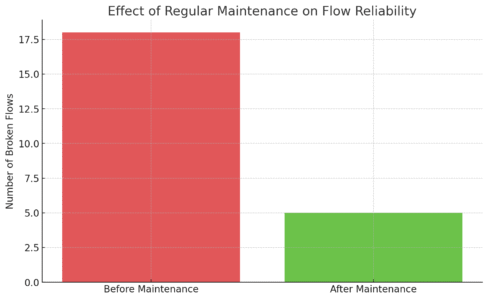
Even the most sophisticated ManyChat Facebook integration needs care. Without regular maintenance, you’ll find outdated messages, broken buttons, or entire flows that silently stop working after a Facebook API update.
Why Outdated Flows Fail After Facebook Updates
Facebook updates its API several times a year. Each change can affect how ManyChat connects, especially features like comment triggers, user data permissions, or custom fields.
Typical signs of outdated flows:
- Buttons that don’t open.
- Triggers that no longer fire.
- Missing user names in replies ({{first_name}} fails).
To stay proactive, check ManyChat’s Changelog under Help > Product Updates monthly. Whenever you see a Facebook-related update, test all affected flows immediately.
I once saw a campaign lose 60% of its engagement overnight—simply because a deprecated API broke a “Comment-to-Message” feature. A 10-minute update could’ve saved it.
The Importance Of Routine Integration Audits
An integration audit doesn’t need to be complicated—it just needs to be consistent.
Monthly audit checklist:
- Test 3–5 random flows manually.
- Check webhooks under Settings > Integrations > Webhooks.
- Review “Last Synced” status in Settings > Facebook.
- Validate tag accuracy in Audience > Tags.
Keep a simple Google Sheet log with columns for “Checked,” “Errors Found,” and “Fixed By.” Over time, this becomes a maintenance history that prevents repeat problems.
Creating A Maintenance Schedule To Keep Systems Running Smoothly
I recommend a quarterly deep clean alongside your monthly quick checks.
Quarterly checklist:
- Export audience data and clean duplicates.
- Reauthorize Facebook and CRM connections.
- Archive unused flows or campaigns.
- Review compliance tags and message timing.
- Test every high-value flow (welcome, cart recovery, support).
You can set reminders directly inside your project management tool (like ClickUp or Asana).
Pro Tip: Document everything—flows, triggers, permissions, and audits. Future you (or your team) will thank you the next time something breaks at 2 AM.
Final Conclusion: Balancing Automation With Authenticity
If there’s one takeaway from all these pitfalls, it’s this: automation is only powerful when it feels human. The ManyChat Facebook integration can be a genuine growth engine for your brand—but only if it’s managed with care, consistency, and respect for both the platform and the people on the other side of the screen.
I’ve seen businesses thrive when they treat automation as a support system, not a replacement for real connection. The moment you lose sight of that balance, the tech starts working against you—sending the wrong messages, breaking flows, or violating policies that can cost you visibility and trust.
To keep your setup strong, build a habit of regular audits, realistic metrics tracking, and honest communication with your audience. Revisit your automations every month, review your compliance quarterly, and refresh your flows whenever Facebook updates its rules.
At its best, ManyChat doesn’t just automate conversations—it amplifies your voice. Use it to listen better, respond faster, and serve smarter. That’s how you turn a chatbot into a brand ally—and automation into a lasting relationship.
Pro Tip: Treat every automation update like a conversation check-up. Ask yourself, “Is this still relevant, respectful, and human?” If the answer’s yes, your ManyChat Facebook strategy is on the right track.

I’m Juxhin, the voice behind The Justifiable.
I’ve spent 6+ years building blogs, managing affiliate campaigns, and testing the messy world of online business. Here, I cut the fluff and share the strategies that actually move the needle — so you can build income that’s sustainable, not speculative.
Related posts:
 ManyChat Facebook Ads Guide: Automate Leads Fast
 Drive Organic Traffic: Increase Visits by 200% with 4 Tips
 Maximize Online Visibility: 5 Negative Pitfalls to Avoid
 How to Do Online Marketing for Small Business in 2025
 How to Grow Your Business Online for Free — Step-by-Step Plan
 Monetize Your Blog With Income Streams That Scale