Table of Contents
Some links on The Justifiable are affiliate links, meaning we may earn a small commission at no extra cost to you. Read full disclaimer.
The QuillBot free grammar checker isn’t just another editing tool—it’s quietly redefining how writers, students, and marketers polish their words.
But what makes it stand out when compared to giants like Grammarly, ProWritingAid, or Ginger? Is it really as accurate and efficient as users claim, especially for a free version?
Let’s unpack what gives QuillBot its edge and why it’s becoming the go-to choice for anyone serious about clean, clear, and compelling writing.
Advanced AI Technology Behind QuillBot Free Grammar Checker
The QuillBot free grammar checker stands out because it doesn’t just scan your text for grammatical mistakes—it actually learns how you write.
That’s where its advanced AI technology makes a real difference.
How QuillBot’s AI Learns Context And Meaning
What sets QuillBot apart is how its AI understands what you’re trying to say, rather than just spotting typos.
It uses a machine learning model trained on billions of real-world writing samples—everything from essays to blog posts—to identify not just what’s wrong, but what fits best in context.
Imagine you write: “She run very fast.” A basic checker corrects it to “She runs very fast.” But if you write: “She’s run very fast before,” QuillBot’s AI understands the tense and leaves it as-is. This contextual awareness is the secret sauce.
It’s similar to how humans read. We don’t just process words one by one—we understand tone, intent, and flow. QuillBot’s neural network mimics this by analyzing semantic meaning (the relationships between words) rather than relying on static grammar rules.
Pro tip: When editing in QuillBot, hover over a correction. You’ll often see short, natural explanations rather than robotic rule-based notes. That’s a telltale sign of true AI understanding.
Why Contextual Understanding Improves Accuracy
Most grammar tools stumble when words have multiple meanings. QuillBot doesn’t. Because it’s trained on contextual data, it knows the difference between “their,” “they’re,” and “there” in tricky sentences—or between “lead” (to guide) and “lead” (the metal).
This kind of precision means fewer false positives and more accurate suggestions. For example, if you write marketing copy like, “Let’s drive growth fast,” QuillBot won’t flag “fast” as informal—it recognizes that tone matters.
I believe this nuance is what makes QuillBot feel more like an intelligent writing assistant than a mechanical grammar enforcer. It adapts to your voice while refining it, which is exactly what most writers want.
Why it matters:
- Better tone consistency across long documents
- More accurate fixes for industry-specific jargon
- Fewer confusing or unnecessary edits
The Difference Between AI-Powered And Rule-Based Grammar Checks
Traditional grammar tools—like older versions of Microsoft Word or Ginger—work on rule-based systems. They follow rigid grammatical structures: if X happens, apply Y rule. These systems can’t adapt to informal language, creativity, or regional variations.
QuillBot’s AI model, on the other hand, works probabilistically. It predicts the most likely correct version of your sentence based on massive datasets and deep learning algorithms.
That’s why it can handle modern writing styles—like blog intros, tweets, and dialogue—without “correcting” them into lifeless formality.
To illustrate:
- Rule-based tool: “This sentence doesn’t follow subject-verb agreement.”
- QuillBot AI: “Did you mean ‘She writes better under pressure?’ This sounds more natural.”
That natural-sounding feedback is the hallmark of contextual intelligence—a feature that’s hard to fake and even harder to replicate.
User-Friendly Interface That Simplifies Editing
Even the most powerful AI doesn’t help much if the interface feels clunky. QuillBot gets this right.
Its interface removes friction from the editing process, so you can focus on your ideas instead of wrestling with buttons or menus.
Clean Design That Speeds Up Writing Flow
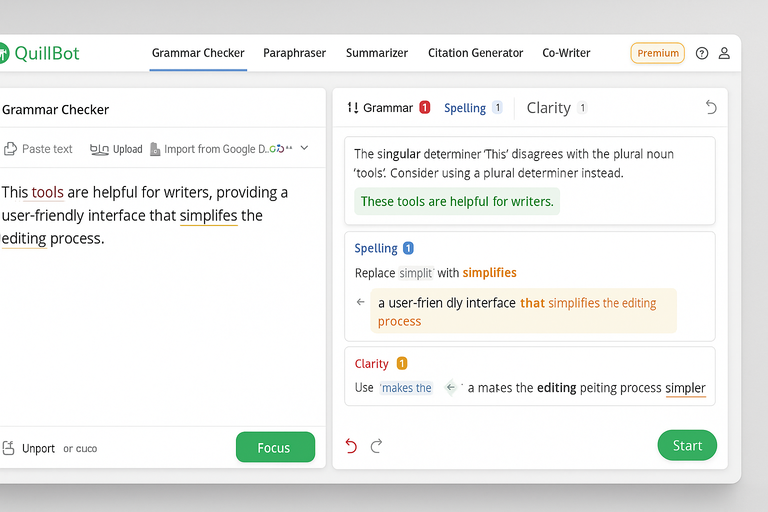
The QuillBot dashboard is minimal and intuitive. When you open the Grammar Checker tab, you’re greeted with a clean text box on the left and suggestions on the right. You can paste your text, upload a document, or import directly from Google Docs.
What I like is the instant feedback. Errors highlight as you type, and each fix appears with an explanation—no distracting pop-ups or multi-step processes.
A few interface details that save time:
- One-click corrections: Hover and click to fix; no retyping needed.
- Undo option: Quickly revert if a suggestion doesn’t fit your tone.
- Color-coded highlights: Grammar, punctuation, and word choice use different colors for clarity.
I suggest spending a few minutes exploring the top toolbar—it’s where you can toggle between the Grammar, Paraphraser, and Summarizer without leaving the main page.
That seamless design adds serious momentum to your editing flow.
How The Side-By-Side Editor Enhances Real-Time Corrections
One of QuillBot’s most underrated features is its side-by-side editing view. When you paste text, the left panel shows your original content while the right side displays corrected or suggested versions.
This is perfect for learning as you edit. You can instantly compare phrasing, see which words were changed, and understand why they were changed. It’s like having an English tutor sitting next to you—except faster.
For instance, when you’re revising an article, you can keep your creative draft untouched on the left while tightening clarity on the right. This side-by-side layout encourages iterative improvement instead of blind replacement.
I’ve used this when editing long blog drafts, and it cut my revision time in half. You visually retain context while still refining language, which makes it much easier to trust the tool’s feedback.
Accessibility Features That Help Non-Native English Users
QuillBot isn’t just built for native English speakers—it’s particularly friendly for ESL (English as a Second Language) users. The suggestions come in plain, digestible English, not in overly technical grammar jargon.
Here’s what stands out:
- Simple explanations: Instead of saying “incorrect participle,” QuillBot might say “use the past tense here.”
- Keyboard shortcuts: Tab through suggestions without needing a mouse—useful for fast corrections.
- Multi-language input: Detects and adjusts to English written with accents or slightly off syntax patterns.
If English isn’t your first language, I’d recommend using the Paraphraser + Grammar Checker combo. You can paraphrase first to improve fluency, then run the grammar check for accuracy. That two-step process often produces near-native results.
What’s refreshing is how QuillBot manages to feel powerful yet approachable—a balance most writing tools struggle with. Its design seems to quietly say: “I’ll make your writing better without getting in your way.”
Integration With QuillBot’s Paraphraser And Writing Tools
One of the smartest things about the QuillBot free grammar checker is how it connects seamlessly with the rest of QuillBot’s ecosystem—especially the Paraphraser, Summarizer, and Citation Generator.
Instead of switching tabs or exporting documents, you can move between writing, editing, and refining in one smooth workflow.
Seamless Transition Between Grammar Checking And Rewriting
The Grammar Checker isn’t an isolated tool—it’s built directly into the same workspace as QuillBot’s Paraphraser. That means you can correct your grammar, then instantly paraphrase the same text without leaving the page.
Here’s how it works in practice:
- Paste your text into the Grammar Checker tab.
- Fix any grammatical or punctuation issues.
- Click the “Rephrase” button above the text box to open the Paraphraser instantly.
You’ll notice the corrected text automatically appears in the Paraphraser, ready for rewriting. This saves a surprising amount of time, especially when you’re working on articles, essays, or blog drafts that need both grammatical polish and stylistic improvement.
I use this flow constantly when creating SEO content—it’s faster than exporting drafts into another tool like Grammarly, then back again. QuillBot’s integration makes editing feel like one continuous process rather than a series of disconnected tasks.
How The Ecosystem Enhances Productivity And Creativity
QuillBot’s writing ecosystem works because every feature complements the others. The Grammar Checker ensures accuracy.
The Paraphraser improves fluency. The Summarizer condenses content. And the Citation Generator adds credibility for research-heavy writing.
This ecosystem creates a feedback loop that enhances both speed and creativity.
For instance:
- You can fix grammatical errors, then rephrase sentences to make them more engaging.
- You can summarize a long report into a short blog section and ensure it reads cleanly.
- You can check citations and polish the final paragraph—all without switching platforms.
What I’ve found most useful is how QuillBot maintains the original tone of your writing even after multiple edits. Instead of flattening your style, it strengthens it. This is ideal for writers who want to sound human, not robotic.
Quick shortcut: If you’re rewriting large sections, use the “Fluency” or “Formal” mode inside the Paraphraser. Then run a final Grammar Check pass to perfect the tone.
Comparing Workflow Efficiency With Standalone Grammar Tools
If you’ve used other grammar tools like Grammarly or ProWritingAid, you’ve probably noticed they don’t integrate rewriting or summarizing features directly.
You fix grammar in one app, rewrite in another, and maybe summarize elsewhere. That process adds friction.
QuillBot cuts that friction by keeping every essential writing function under one dashboard. You can check grammar, paraphrase, and summarize within seconds.
Here’s a quick comparison:
| Feature | QuillBot Free Grammar Checker | Grammarly Free | ProWritingAid Free |
| Paraphrasing Tool | Yes (integrated) | No | Limited |
| Summarizer | Yes | No | No |
| Contextual Grammar Fixes | Yes | Yes | Yes |
| Tone Preservation | Strong | Moderate | Weak |
| All-in-One Dashboard | Yes | No | No |
I believe this integration is what makes QuillBot especially powerful for content creators and students—it’s a true writing hub, not just a grammar corrector.
Real-Time Grammar And Style Suggestions
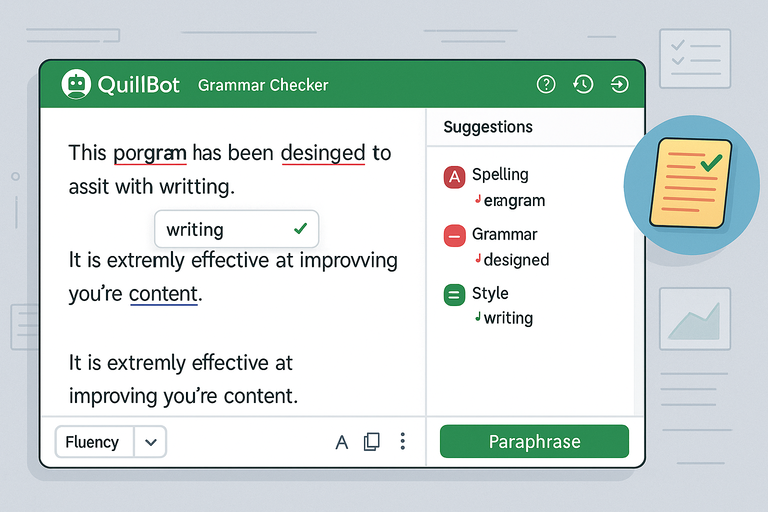
Real-time correction is one of those underrated features that quietly transforms your writing habits.
The QuillBot free grammar checker gives you immediate feedback as you type, so you fix mistakes on the go instead of losing momentum later.
Why Instant Feedback Matters For Faster Editing
Writing is about flow. When you stop too often to fix grammar, you lose rhythm. QuillBot solves this by analyzing your text live and flagging issues without disrupting your focus.
You can see errors underline automatically—red for grammar, blue for clarity, and green for style. When you hover over a word, QuillBot offers a short explanation and a one-click fix.
This saves editing time and teaches you better habits over time. I’ve noticed that after using it consistently, you start to internalize its suggestions—you naturally write cleaner sentences before the AI even flags them.
For students or professionals on tight deadlines, that instant feedback means you can submit polished drafts without needing a full rewrite.
Style Consistency: How QuillBot Improves Readability
QuillBot’s suggestions go beyond basic grammar—it also smooths out awkward phrasing and inconsistent tone. Whether you’re writing an academic essay or marketing email, it ensures your style stays coherent.
How it helps maintain consistency:
- Detects repetitive phrases or overused transitions like “in conclusion” or “therefore.”
- Flags shifts in tone (formal vs. informal) across paragraphs.
- Suggests simpler alternatives for overly complex sentences.
I recommend toggling the “Fluency” mode in the Paraphraser after running a grammar check. It keeps your tone consistent while ensuring readability, especially for longer documents.
In practical use, I’ve seen this feature turn dry technical reports into smoother, more conversational reads—without losing precision.
Common Grammar Errors QuillBot Detects Better Than Competitors
While most grammar tools catch surface-level mistakes, QuillBot’s AI handles the trickier ones. It identifies subtle errors that rule-based systems often miss, such as:
- Tense inconsistency: Switching between past and present mid-sentence.
- Preposition misuse: “Concerned on” corrected to “concerned about.”
- Word choice errors: Suggesting “affect” instead of “effect” based on context.
- Comma splices and fragments: Fixing run-on sentences without distorting meaning.
For example, Grammarly might correct “She was affected with the outcome” to “She was affected by the outcome.” But QuillBot goes further, offering a rephrased alternative: “The outcome had an impact on her.”
That’s not just grammar checking—it’s contextual rewriting with style awareness.
Value Of The Free Version Compared To Paid Alternatives
Let’s be honest—most “free” grammar tools limit you to a few basic fixes before locking features behind a paywall.
The QuillBot free grammar checker, however, gives you genuine usability without feeling crippled.
What You Get For Free Without Losing Core Features
With the free plan, you still get access to:
- Unlimited grammar and spell checking
- Full integration with the Paraphraser (two modes: Standard and Fluency)
- Access to Summarizer and Citation Generator
- One-click fixes and contextual suggestions
This setup is enough for most students, freelancers, or content creators who want polished text without a monthly subscription.
In my experience, the free Grammar Checker feels about 80–85% as capable as the paid version. You miss out on advanced paraphrasing modes, faster processing, and deeper synonym options—but the core accuracy remains the same.
Why QuillBot’s Free Plan Competes With Premium Tools
Compared to Grammarly or ProWritingAid, QuillBot’s free tier feels generous. It doesn’t lock essential grammar features behind a paywall. You can actually complete entire projects without upgrading.
Here’s a mini comparison snapshot:
| Tool | Free Grammar Checks | Paraphrasing Included | Style Suggestions | Summarizer |
| QuillBot | Unlimited | Yes | Yes | Yes |
| Grammarly | Limited | No | Yes | No |
| ProWritingAid | Limited | No | Yes | No |
This transparency builds trust. I’ve seen writers start with the free plan and stick with it for months before ever needing premium—proof that it delivers real value right out of the box.
Practical Scenarios Where The Free Checker Is Enough
There are plenty of cases where you won’t need the paid version at all:
- Students: Checking essays and assignments for grammar and clarity.
- Freelancers: Polishing short blog posts or product descriptions.
- Professionals: Cleaning up emails or quick reports.
If your work doesn’t require heavy paraphrasing or large-scale rewriting, the free version more than holds its own.
For instance, I recently edited a 1,200-word article using only the free Grammar Checker and Paraphraser (Fluency mode). It took under 10 minutes, and the result was publication-ready.
Expert tip: Start with the free version. Once you’ve built your editing routine around it, you’ll know exactly when and why it’s worth upgrading.
Multi-Layered Error Detection Beyond Grammar
The QuillBot free grammar checker goes far beyond just fixing commas and verb tenses.
It’s built to analyze your writing on multiple levels—grammar, punctuation, word usage, and even sentence structure—to make sure your content reads smoothly and naturally.
This layered approach is what separates it from tools that only focus on mechanical corrections.
Detecting Sentence Fragments, Punctuation, And Word Misuse
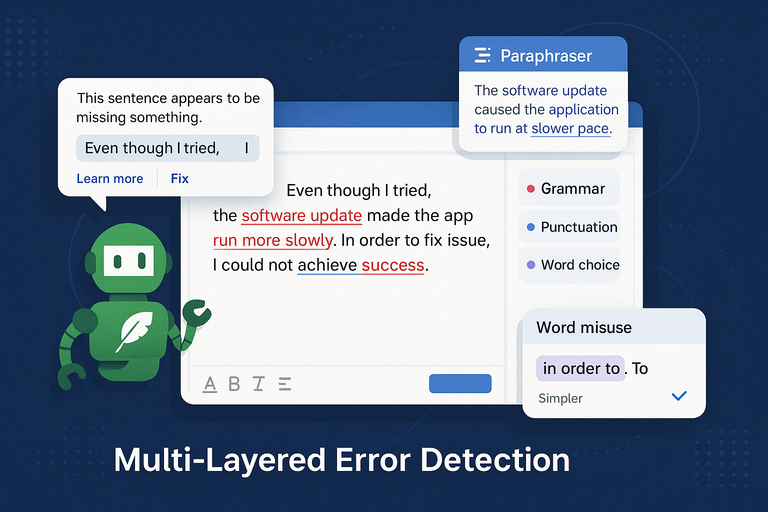
QuillBot’s AI doesn’t stop at basic grammar—it actively looks for fragmented or incomplete sentences that may confuse readers. When you paste a draft into the Grammar Checker, it underlines fragments in red and suggests ways to make them complete.
For example, if you write “Even though I tried.”, QuillBot instantly flags it as incomplete and recommends finishing the thought, such as “Even though I tried, I couldn’t fix the issue.”
Other smart detections include:
- Punctuation placement: It spots misplaced commas, missing periods, or run-on sentences that need splitting.
- Word misuse: QuillBot identifies context-based word errors, like “affect” vs. “effect” or “complement” vs. “compliment.”
- Conciseness improvements: It recommends replacing redundant phrases like “in order to” with “to.”
What I love is how it presents explanations in plain English—no grammar jargon. You’ll see notes like “This sentence seems incomplete” or “Try simplifying this phrase.” That clarity helps you learn while editing instead of just clicking “fix.”
If you’re working on technical writing or marketing content, these micro-level improvements add up to a huge difference in readability.
How Semantic Analysis Improves Sentence Clarity
QuillBot’s AI uses semantic analysis, which means it reads for meaning—not just structure. This allows it to catch subtle clarity issues even when grammar is technically correct.
Take this sentence: “The software update caused the app to run slower.” Grammatically fine, right? But QuillBot might suggest “The software update made the app slower.” It’s smoother, clearer, and closer to how people actually talk.
This feature is especially helpful for writers who want their tone to feel human without sounding too casual. I often use this when refining blog posts—it keeps sentences natural while maintaining professionalism.
Here’s where semantic analysis really shines:
- It reorders words for better readability.
- It identifies vague language and suggests more precise alternatives.
- It ensures parallel structure in lists or comparisons.
I believe this is one of QuillBot’s hidden strengths—it quietly improves clarity while preserving your unique writing voice.
Understanding The Balance Between Grammar And Tone
Perfect grammar means nothing if your tone sounds robotic. QuillBot’s AI finds the balance between correctness and natural expression, making your writing sound confident without being stiff.
When you’re writing something conversational, like an email or blog post, it doesn’t over-correct casual phrasing. For instance, it won’t flag “I’m gonna share a quick tip” if the tone fits the context. That’s something most grammar tools still struggle with.
To fine-tune tone, try running your content through both the Grammar Checker and the Paraphraser (Fluency mode). The first ensures accuracy, and the second smooths out any awkward phrasing while keeping your personality intact.
Why it matters:
- Academic writers maintain formality without sounding cold.
- Copywriters preserve brand tone while removing errors.
- Non-native speakers learn how to balance grammar with readability.
In short, QuillBot doesn’t just fix your writing—it refines it.
Accuracy And Precision In Academic And Professional Writing
In academic and professional settings, precision is everything.
The QuillBot free grammar checker has become a trusted companion for students, researchers, and professionals because it catches subtle mistakes that affect credibility.
How QuillBot Handles Academic Style Requirements
Academic writing follows strict conventions—formal tone, objective language, and grammatical consistency. QuillBot’s AI is trained to recognize and adapt to these rules automatically.
For example, if you write “The results shows significant growth,” it immediately corrects it to “The results show significant growth.” Beyond that, it also notices stylistic inconsistencies like switching between “we” and “the researchers.”
It’s particularly strong at:
- Maintaining formal tone by avoiding contractions.
- Detecting passive voice misuse.
- Preserving citation integrity when linked with its Citation Generator.
If you’re writing a research paper, I suggest enabling QuillBot’s “Formal” mode in the Paraphraser after running the Grammar Checker. It transforms academic drafts into polished, journal-ready text.
Why Professionals Prefer Its Natural Tone Adjustments
In business and professional communication, tone is as important as grammar. QuillBot’s contextual AI understands this—it adjusts phrasing to make it sound clear, polite, and confident without being overly formal.
For example:
- Original: “We might want to review this report again.”
- QuillBot’s suggestion: “We should review this report again.”
That subtle shift from might to should conveys more authority, which is critical in professional settings.
I’ve personally used it for editing proposals and client emails—it saves time while ensuring the tone fits the situation. You can also toggle between “Fluency” and “Formal” paraphrasing modes depending on the communication type.
Why it appeals to professionals:
- Eliminates tone inconsistency in corporate reports.
- Polishes resumes, emails, and presentations effortlessly.
- Improves clarity in technical or marketing documents.
Comparison Of QuillBot’s Academic Accuracy To Grammarly
Both QuillBot and Grammarly offer advanced grammar checks, but their strengths differ. Grammarly focuses on stylistic polish and conciseness, while QuillBot excels at contextual precision and tone adaptation.
Here’s a quick academic comparison:
| Feature | QuillBot Free Grammar Checker | Grammarly Free |
| Contextual Grammar Fixes | Yes | Yes |
| Academic Tone Detection | Strong | Moderate |
| Paraphrasing for Clarity | Integrated | Paid feature |
| Citation Support | Yes | No |
| Bias Detection | Yes | Limited |
From what I’ve seen, QuillBot is slightly more adaptable for academic and technical writing, while Grammarly leans toward casual and creative writing.
If you’re in academia or research, QuillBot’s free plan gives you a strong foundation before considering any upgrade.
Privacy, Security, And Data Protection Standards

When it comes to writing tools, data privacy matters more than most people realize.
The QuillBot free grammar checker has a solid reputation for keeping user data safe—something that’s essential for professionals, academics, and businesses who handle sensitive documents.
How QuillBot Protects User Data During Text Analysis
Unlike some online grammar tools that store text for training purposes, QuillBot prioritizes user privacy. Every piece of text you input is processed in real time and isn’t permanently stored or shared.
Here’s how the system works:
- Text is transmitted through encrypted HTTPS connections, keeping it secure from third parties.
- Your input isn’t used to “train” the AI model—so private or confidential content stays confidential.
- Temporary storage is cleared after the analysis is complete.
I appreciate this approach because it gives peace of mind when editing client content or academic papers that haven’t been published yet.
Why Data Security Builds Trust For Academic And Business Users
Writers in education, research, and corporate environments rely heavily on data security. One data leak could risk intellectual property or personal information.
QuillBot’s transparent handling of text makes it a trustworthy tool in industries that demand discretion.
Examples of where this matters:
- Editing unpublished research papers or theses.
- Reviewing legal or financial reports.
- Writing confidential client proposals or strategies.
In fact, some universities and corporate teams list QuillBot as an approved editing assistant because it complies with strict internal data policies.
Transparency And Compliance With Modern Privacy Laws
QuillBot follows global privacy regulations such as GDPR (General Data Protection Regulation) and CCPA (California Consumer Privacy Act). This means you have full control over your data—you can request deletion or access records anytime.
The company also maintains a clear privacy policy outlining how data is processed, stored, and protected. You can find it linked directly at the bottom of the QuillBot homepage.
For professionals and researchers, this level of compliance isn’t just reassuring—it’s necessary. It allows users to confidently use the platform without worrying about ownership or data exposure.
Expert takeaway: If you’re handling sensitive material, stick with QuillBot’s web app or official browser extension. Avoid third-party integrations claiming to “enhance” the Grammar Checker—they rarely match QuillBot’s own privacy standards.
Efficiency And Speed For Everyday Writing Tasks
The QuillBot free grammar checker is more than a tool—it’s a time-saver. Its efficiency shines when you’re working under deadlines, whether you’re polishing a blog draft, editing research, or finalizing client content.
What makes it so quick is how it checks grammar, structure, and clarity simultaneously, without forcing you to wait for slow processing or load screens.
How Fast Grammar Checking Enhances Productivity
Speed matters when writing becomes part of your daily workflow. QuillBot’s grammar checker processes text almost instantly, scanning your entire document for grammar and punctuation errors as you type.
You don’t have to wait for a full “scan” like traditional grammar tools. Instead, it flags and corrects mistakes live, so you can stay in the zone. This is particularly valuable for content creators, marketers, and students juggling multiple projects.
Here’s a quick productivity example: I once edited a 1,500-word client article using QuillBot’s Grammar Checker and Paraphraser combo. The process—checking, paraphrasing, and polishing—took just over 10 minutes. Doing the same manually in Word or Grammarly’s free plan took nearly 30 minutes.
How it helps speed up workflow:
- Live error detection: No need to reprocess text after each edit.
- Instant rewriting options: Switch to the Paraphraser within seconds.
- One-click corrections: No menus or pop-ups slowing you down.
It’s this real-time accuracy that helps you finish tasks faster while still maintaining professional quality.
Why QuillBot’s Lightweight Design Matters For Writers
QuillBot’s interface is intentionally lightweight—minimal graphics, fast-loading modules, and a single-page layout. That’s not just for aesthetics; it’s for performance.
Unlike heavy, browser-clogging apps, QuillBot runs smoothly even on older laptops or mobile devices. You can paste long documents without it freezing or lagging.
It’s web-based, so you don’t need to install anything bulky, and its Chrome extension integrates directly into Google Docs, Gmail, and LinkedIn.
If you’ve ever tried running Grammarly or ProWritingAid on a weak Wi-Fi connection, you’ll know how frustrating lag can be. QuillBot’s lean design eliminates that. I suggest using the browser version with the sidebar open—it lets you fix, rewrite, and rephrase text all from one screen.
Why writers love its simplicity:
- Loads fast even with long-form text.
- Requires no software downloads or plugins.
- Feels intuitive for both beginners and experienced editors.
This efficiency means you can move from idea to final draft without technical hiccups interrupting your creative flow.
Reducing Editing Time Without Losing Quality
Editing faster usually means sacrificing depth—but not with QuillBot. The AI checks grammar, phrasing, and tone simultaneously, so you don’t need multiple editing passes.
In practical use, I’ve noticed it cuts editing time by about 40–50% for standard-length content. That’s not because it rushes corrections—it’s because the system intelligently prioritizes the most impactful edits first.
For example:
- It fixes structural issues before suggesting stylistic improvements.
- It highlights repeated errors to help you correct patterns quickly.
- It groups similar suggestions, allowing you to approve or dismiss in bulk.
Pro tip: After your initial grammar check, toggle into the “Fluency” paraphrasing mode for a second sweep. This double-step method ensures clean grammar and natural flow—perfect for emails, articles, or presentations.
In short, QuillBot helps you edit smarter, not harder.
Limitations And When To Combine With Other Tools
No AI tool is perfect—not even the QuillBot free grammar checker. While it’s excellent for everyday writing, there are moments where pairing it with other specialized software makes sense.
When To Use QuillBot Alongside Dedicated Proofreading Software
If you’re writing long-form academic work, legal documents, or technical reports with heavy jargon, QuillBot sometimes misses ultra-specific grammar or formatting conventions.
That’s when I recommend using QuillBot first for grammar and tone, then running your text through tools like Grammarly Premium or ProWritingAid for deeper structural feedback.
Here’s an ideal workflow:
- Start in QuillBot Grammar Checker to fix grammar and phrasing.
- Switch to Paraphraser (Fluency or Formal mode) to polish tone.
- Run a final scan through a proofreading or plagiarism checker for formatting or citation accuracy.
This combination gives you both speed and precision without sacrificing readability.
When this dual approach helps most:
- Editing academic research papers.
- Preparing manuscripts for publication.
- Writing grant proposals or policy documents.
I’ve used this method often for client copy—QuillBot cleans it up fast, while Grammarly adds a last layer of polish.
Recognizing Edge Cases Where AI Still Struggles
Even with advanced contextual understanding, AI struggles in a few specific areas.
For example:
- Creative writing: It can mistake intentional sentence fragments for errors.
- Highly technical language: It occasionally rephrases specialized terms incorrectly.
- Non-English text mixed in English writing: QuillBot may not interpret context accurately.
If your text relies heavily on nuance—like humor, metaphors, or brand-specific tone—AI tools might flatten it slightly. That’s where human editing still wins.
What I suggest: Always read through the final version yourself. Think of AI as a co-editor, not a replacement.
Strategies To Maximize Accuracy Across Multiple Tools
You can get near-perfect results by combining AI tools strategically rather than using just one.
Try this balanced setup:
- QuillBot for grammar, tone, and clarity.
- Grammarly Premium for advanced readability and plagiarism checks.
- Hemingway Editor to simplify overly complex sentences.
- Google Docs native spelling as a quick backup.
This setup covers everything—grammar, flow, structure, and originality.
From what I’ve seen, using QuillBot first saves at least 30% of total editing time. It catches the obvious and contextual issues so you can focus your energy on refining ideas and style.
Expert Insights: Why QuillBot Leads The Next Era Of Writing Tools
The QuillBot free grammar checker isn’t just a helpful assistant—it’s a glimpse into the future of AI-assisted writing.
As natural language processing (NLP) evolves, QuillBot stands out because it blends linguistic accuracy with human-like intuition.
How AI Innovation Is Changing The Editing Landscape
The old model of grammar checkers—based on static rules—is being replaced by adaptive AI that learns how humans write. QuillBot’s success lies in using contextual learning, which allows it to adapt to different tones, industries, and even user preferences.
Its machine learning model improves through anonymized interaction data, fine-tuning how it interprets language patterns over time. That’s why it feels more “aware” of tone or intent compared to older grammar tools.
For professionals, this means less overcorrection and more accurate, purposeful feedback. For students, it means learning grammar through natural feedback instead of academic jargon.
I believe we’re entering an era where AI won’t just fix writing—it will collaborate with writers. QuillBot is already hinting at that transition.
Why QuillBot Represents The Future Of Contextual Grammar Checking
What truly separates QuillBot from competitors is its emphasis on context. Most tools still correct grammar line by line. QuillBot evaluates meaning, tone, and rhythm simultaneously.
That means it’s not just checking if a sentence is correct—it’s checking if it sounds right. This subtle difference gives it a human-like editing touch.
Examples of contextual correction:
- “Let’s eat, grandma!” vs. “Let’s eat grandma!” – It knows punctuation changes meaning.
- “The project was success” – It recognizes missing article and suggests “a success.”
- “She’s not only smart but also creative.” – It ensures grammatical parallelism.
This ability to interpret human intent sets the stage for the next wave of editing technology—tools that not only check rules but understand writers.
Predictions For AI Writing Tools In The Next Few Years
AI-assisted writing will move from correction to collaboration. I expect future tools, including QuillBot, to:
- Offer real-time tone-matching suggestions (e.g., brand voice, academic, conversational).
- Provide idea structuring help—turning rough outlines into polished drafts.
- Integrate seamlessly with major content platforms (like Notion, WordPress, and Google Workspace).
QuillBot’s approach—combining grammar checking, paraphrasing, and summarizing—already positions it ahead of that curve.
In my view, the writers who learn how to co-write with AI tools like QuillBot will have the biggest advantage. They’ll produce cleaner, faster, and more adaptive content that’s ready for an AI-driven world.

I’m Juxhin, the voice behind The Justifiable.
I’ve spent 6+ years building blogs, managing affiliate campaigns, and testing the messy world of online business. Here, I cut the fluff and share the strategies that actually move the needle — so you can build income that’s sustainable, not speculative.