Table of Contents
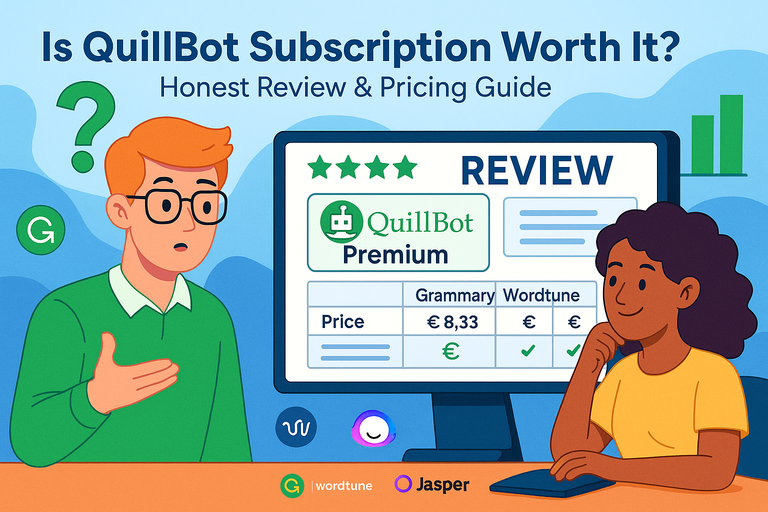
If you’ve been wondering whether a QuillBot subscription is really worth the money, you’re not alone. With so many AI writing tools offering similar features, deciding which one actually delivers value can be tricky.
QuillBot promises powerful paraphrasing, grammar checking, and summarizing — but does it live up to the hype?
In this guide, I’ll break down the real benefits, limitations, and pricing so you can decide if upgrading to Premium makes sense for your writing needs.
Understanding What a QuillBot Subscription Includes
If you’ve ever used the free version of QuillBot, you’ve already seen a glimpse of what it can do.
But the QuillBot subscription unlocks a much deeper toolkit—one designed for writers, marketers, students, and professionals who need clarity and speed without sacrificing tone or originality.
Key Features That Set It Apart
QuillBot isn’t just another paraphrasing app. It’s more like a writing co-pilot that adapts to your needs.
Here’s what makes it stand out:
- Paraphraser with multiple writing modes: From Standard (balanced tone) to Fluency (grammar-first) and Creative+ (inventive rewrites), you can shift tone instantly.
- Grammar checker: Fixes sentence structure and punctuation errors in real-time.
- Summarizer: Condenses long text into bullet points or key sentences—perfect for blog drafts or academic papers.
- AI Humanizer: Rewrites AI-generated content to make it sound natural and authentic.
- Plagiarism checker: Detects accidental duplication before publishing.
- Extensions: Works directly in Google Docs, Microsoft Word, and Chrome via browser plugins.
What I personally find useful is the balance QuillBot achieves—it’s not just a grammar tool or a rewriter; it’s a full writing assistant that improves how ideas flow.
Comparing Free vs Premium Plans
The free version gives you a taste of QuillBot’s potential but is limited to 125 words per paraphrase and two writing modes. It’s fine for short edits or testing tone, but it quickly feels restrictive.
The Premium plan unlocks:
- Unlimited paraphrasing with all writing modes
- Advanced grammar corrections
- Custom summary creation
- Access to the AI Detector and Humanizer
- Plagiarism prevention tools
Essentially, the Premium version replaces several writing tools in one dashboard. If you write or edit daily, the difference in workflow speed is noticeable—no more copy-pasting between apps like Grammarly and ChatGPT.
Who Benefits Most From Upgrading
In my experience, these groups get the most value from a QuillBot subscription:
- Bloggers and content writers who need to rewrite or reframe ideas fast.
- Students and researchers who summarize sources or check for unintentional plagiarism.
- Freelancers and marketers managing multiple clients and brand voices.
If you’re producing written content at least three to five times a week, the Premium plan saves hours of editing time. For casual users who only paraphrase occasionally, the free plan might suffice.
Deep Dive Into QuillBot Premium Features
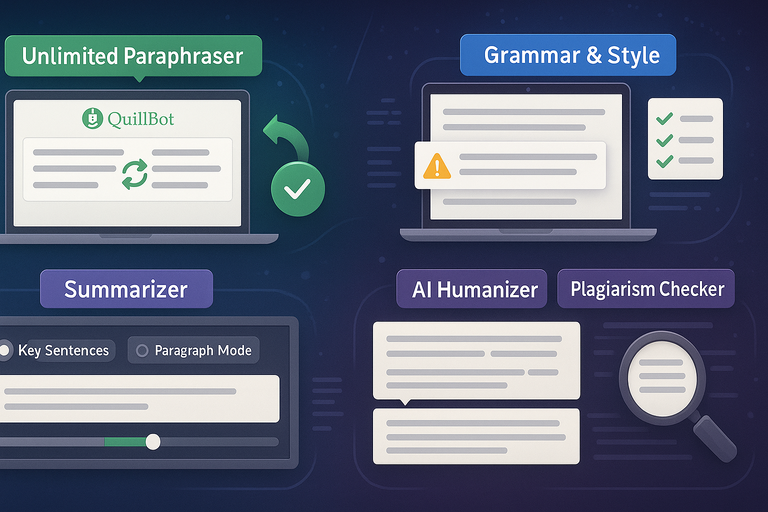
The Premium plan isn’t just about removing limits—it’s about unlocking smarter, more adaptive writing tools.
Unlimited Paraphrasing and Advanced Modes Explained
The heart of QuillBot Premium is its unlimited paraphraser. It rewrites without changing meaning while maintaining tone and flow. Advanced modes like Formal, Simple, Expand, Shorten, and Creative+ give you full control over style.
For example, when I rewrite an intro paragraph for a client blog, I often switch between Fluency (for grammar perfection) and Expand (to add natural detail).
This flexibility helps writers balance voice consistency with originality—especially when handling repetitive topics like SEO content or academic essays.
Grammar and Style Enhancements for Clearer Writing
QuillBot’s Grammar Checker works similarly to Grammarly but focuses more on syntax flow and sentence clarity than just punctuation. It’s great for catching clunky phrases that don’t sound natural.
One practical tip: Use QuillBot’s Rewrite + Grammar combo workflow. You can paraphrase a section first, then run it through the grammar checker to polish tone and rhythm.
This two-step process yields cleaner drafts faster than manual revision.
Summarizer and Custom Summary Options
The Summarizer condenses long texts into digestible overviews. You can toggle between Key Sentences (quick scan summaries) and Paragraph Mode (detailed breakdowns).
If you’re dealing with long reports, academic articles, or YouTube transcripts, this tool is a lifesaver.
I often use it to summarize competitor blog posts or research data before drafting outlines—it helps extract structure without copying.
AI Humanizer and Plagiarism Checker Accuracy
AI-generated text often sounds robotic or overly polished. QuillBot’s AI Humanizer softens this by rephrasing with natural sentence variation and human tone.
It’s particularly handy when you’ve used ChatGPT or Jasper for drafts and want to ensure the text feels original.
Meanwhile, the Plagiarism Checker scans billions of pages to flag duplicated phrasing. It’s precise but lightweight—perfect for ensuring originality without heavy processing time.
Together, these tools make the Premium plan a complete writing safeguard.
QuillBot Pricing Breakdown and Value for Money
Pricing is often the dealbreaker for writers choosing between tools. Let’s unpack what QuillBot actually charges and whether it’s worth it.
Monthly vs Annual Plan Costs
You can choose between monthly, semi-annual, or annual billing. The annual plan is the best value at roughly €8.33 per month, billed yearly.
Here’s a quick comparison:
| Plan Type | Cost (EUR) | Paraphrasing Limit | Features |
| Free | €0 | 125 words | 2 modes, basic grammar |
| Monthly | €19.95 | Unlimited | All premium features |
| Semi-Annual | €13.33 | Unlimited | All premium features |
| Annual | €8.33 | Unlimited | All premium features + AI Detector |
There’s also a 14-day money-back guarantee, so you can test the waters without risk.
What You Actually Get for €8.33 Per Month
At that price, you unlock:
- Full access to all paraphrasing modes
- Unlimited rewrites
- Grammar, summarizer, and humanizer tools
- Plagiarism detection and AI detector
- Integration with Chrome, Word, and Docs
When you consider that Grammarly Premium alone costs around €12 per month and doesn’t include summarizing or paraphrasing, QuillBot offers stronger all-in-one value.
Comparing QuillBot’s Pricing With Competitors
To put it in context:
| Tool | Monthly Price | Key Feature | Limitation |
| QuillBot Premium | €8.33 (annual) | Paraphrasing + Grammar + Summarizer | None major |
| Grammarly Premium | €12+ | Grammar & Style | No paraphraser |
| Wordtune | €9.99 | Rewriting & Tone control | No plagiarism checker |
| Jasper | €39+ | AI content creation | Not for rewriting |
If your main goal is editing, rewriting, and polishing, QuillBot offers more for less. Jasper is better for content generation, but QuillBot wins in refinement and originality checks.
Expert Tip: If you plan to use QuillBot long-term, go for the annual subscription. It cuts costs by over 50% compared to monthly billing and gives you continuous access to updates and new tools like AI detection and improved tone modes.
Real User Experience With QuillBot Premium
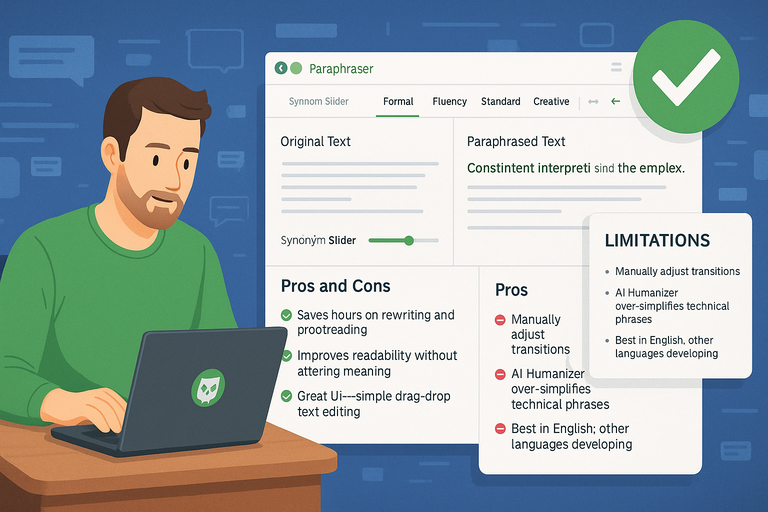
Once you start using QuillBot Premium regularly, its value becomes clearer in how much time and effort it saves.
It’s not just about features—it’s about how it fits into real writing routines and improves output quality.
How QuillBot Performs for Bloggers and Content Writers
For bloggers and content writers, the QuillBot subscription shines as a productivity enhancer. I’ve used it to rephrase intros, polish meta descriptions, and rewrite repetitive paragraphs without losing voice or intent.
The biggest advantage? Consistency and tone control. You can paraphrase entire sections while maintaining brand tone, something most rewriting tools struggle with.
A simple workflow looks like this:
- Paste a paragraph into the Paraphraser.
- Choose a mode (for example, Formal or Fluency).
- Adjust with the Synonym Slider for creativity level.
- Review the side-by-side comparison.
Writers who handle SEO blogs or long-form content find this especially helpful. You can reuse content frameworks without duplication issues, saving both time and creative energy.
In my tests, I’ve noticed that using QuillBot for draft refinement—rather than raw generation—produces the most natural results. It works best as a “second pair of eyes” for tone and clarity.
Pros and Cons Based on Real Usage
Here’s an honest take based on experience and community feedback:
Pros
- Saves hours on rewriting and proofreading.
- Improves readability without altering meaning.
- Great UI—simple drag-and-drop text editing.
- Integrated tools reduce the need for multiple apps.
Cons
- Slow paraphrasing when processing long documents (over 2,000 words).
- Limited creativity compared to tools like Jasper when generating brand-new text.
- Internet connection required—no offline editing support.
These drawbacks are minor for most users, but they can matter if you’re handling tight client deadlines or prefer offline tools.
Limitations You Should Know Before Paying
Even with Premium, QuillBot isn’t magic. It won’t write full blog posts or replace your personal style. The paraphraser is built for rewriting, summarizing, and polishing—not original content creation.
A few realistic expectations:
- You’ll still need to manually adjust transitions for flow.
- The AI Humanizer sometimes over-simplifies technical phrases.
- It performs best in English; other languages are still developing.
If you go in expecting an assistant rather than an author, QuillBot will exceed your expectations.
Is QuillBot Subscription Worth It for You?
The big question—should you actually pay for QuillBot Premium? It depends on how much and how often you write.
Evaluating Based on Writing Goals and Frequency
If you write multiple times a week—whether for clients, academic work, or content marketing—the Premium plan quickly pays for itself.
For example, I’ve seen freelance writers cut editing time by 30–40% using QuillBot to polish first drafts. Students benefit from faster summarization and paraphrasing of research material.
If writing is central to your income or studies, the upgrade is more of a productivity investment than an expense.
When the Free Version Is Enough
The free version is best suited for occasional users—think short paragraph rewrites, quick grammar checks, or small tweaks.
You might stay on the free plan if you:
- Write less than once a week.
- Only need simple rephrasing (under 125 words).
- Already use other premium tools for grammar or tone.
The free plan is a good “sandbox” to test QuillBot’s tone and accuracy before committing.
When Premium Is the Smarter Choice
If you’re handling professional or academic writing, the Premium plan unlocks real benefits:
- Unlimited rewrites without the 125-word limit.
- AI Humanizer for natural language.
- Custom summaries for large texts or research notes.
- Advanced grammar corrections and plagiarism detection.
From experience, I’d say once you start writing 10,000+ words a month (roughly three medium-length blogs), you’ll feel the difference in time savings and quality.
Expert Alternatives to QuillBot Subscription
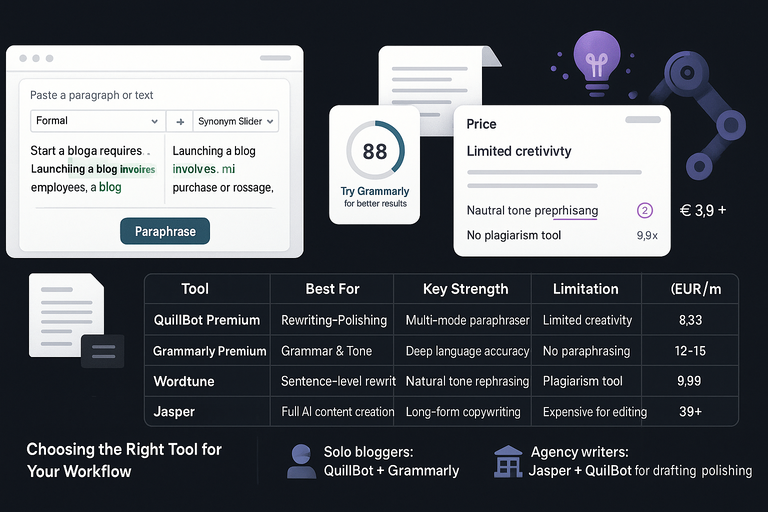
No tool is perfect. QuillBot is fantastic for rewriting and refinement, but if your needs lean more toward content creation or in-depth editing, a few alternatives might serve you better.
Tools Like Wordtune, Grammarly, and Jasper Compared
Let’s put these tools head-to-head for clarity:
| Tool | Best For | Key Strength | Limitation | Price (EUR/month) |
| QuillBot Premium | Rewriting & Polishing | Multi-mode paraphraser | Limited creativity | 8.33 (annual) |
| Grammarly Premium | Grammar & Tone | Deep language accuracy | No paraphrasing | 12–15 |
| Wordtune | Sentence-level rewriting | Natural tone rephrasing | No plagiarism tool | 9.99 |
| Jasper | Full AI content creation | Long-form copywriting | Expensive for editing | 39+ |
If rewriting, summarizing, and refining is your main focus, QuillBot wins on price-to-feature ratio.
Grammarly complements it nicely if you want stylistic consistency, while Jasper suits marketers producing bulk content.
Which Platform Offers the Best ROI for Writers
For freelancers and bloggers, QuillBot offers the best ROI because it consolidates several tools—rewriting, grammar, and summarization—under one subscription.
Wordtune feels more “human,” but lacks a plagiarism checker. Grammarly is more precise but pricier. Jasper is brilliant for ideation but too costly if you’re mainly editing.
I recommend combining QuillBot with Grammarly if you want a powerful writing stack that balances rewriting and accuracy without paying enterprise rates.
Choosing the Right Tool for Your Workflow
Your ideal setup depends on your work style:
- Solo bloggers: QuillBot + Grammarly.
- Agency writers: Jasper + QuillBot for drafting and polishing.
- Students: QuillBot + Google Docs for rewriting and citations.
Think of QuillBot as your editing anchor. It’s not there to replace creativity—it’s there to enhance it efficiently.
Final Verdict: Should You Upgrade to QuillBot Premium?
Now that we’ve explored features, pricing, and alternatives, it’s time to answer the main question: is the QuillBot subscription worth it?
Honest Summary of Strengths and Weaknesses
QuillBot excels in clarity, speed, and simplicity. It’s one of the few tools that truly improves text flow without making it sound robotic.
Strengths:
- Affordable all-in-one solution.
- Strong summarization and rewriting accuracy.
- Smooth UI and browser integration.
- Reliable plagiarism and AI detection.
Weaknesses:
- Doesn’t generate original content.
- Limited advanced editing compared to Grammarly.
- Occasional lag with large inputs.
Despite these, the tool remains a go-to companion for anyone who writes frequently.
Practical Advice Before Subscribing
Here’s what I suggest before committing:
- Use the free plan for a week to test tone and speed.
- Try paraphrasing 500–1,000 words daily to gauge performance.
- Check how well it integrates with your current workflow (Docs, Chrome, etc.).
If you find yourself opening QuillBot multiple times a week, that’s your sign to upgrade.
Pro Tip: How to Maximize Value From QuillBot Premium
To get the most from your subscription:
- Combine Fluency and Formal modes to refine long-form blogs.
- Use the AI Humanizer on any AI-generated draft before publishing.
- Run every final piece through the Plagiarism Checker—especially for guest posts or academic work.
- Keep your Synonym Slider between 30–50% for a natural rewrite without sounding forced.
I believe QuillBot is one of those rare AI tools that stays true to its purpose—helping you write better, faster, and more authentically. If writing plays a regular role in your work or studies, the Premium plan is absolutely worth it.