Table of Contents
Some links on The Justifiable are affiliate links, meaning we may earn a small commission at no extra cost to you. Read full disclaimer.
Finding semrush alternatives cheaper but still good is a lot easier in 2026 than it was a few years ago. You no longer need to pay premium all-in-one SEO software prices just to do solid keyword research, track rankings, audit a site, and spy on competitors.
I’ve seen a lot of smaller sites overspend on tools they barely use, while leaner setups quietly get better ROI.
In this guide, I’ll walk you through the affordable options that actually hold up, how they compare, who each one is best for, and how to choose without wasting your budget.
Why People Look For A Cheaper Semrush Alternative
Semrush is powerful, but for many users the issue is not quality. It is value.
The official Semrush pricing page shows the entry-level SEO Toolkit plan at $139.95 per month, or $117.33 per month when billed annually, which puts it well above the budget range for solo creators, small businesses, and many freelancers.
The Real Problem Is Paying For Features You Barely Use
- What happens in practice: A blogger may only need keyword research, rank tracking, and occasional site audits, but ends up paying for PPC research, social tools, and broader competitive modules they never touch.
- Why this matters: Software ROI drops fast when your monthly bill is higher than the value of the actions you can realistically take from the data.
- My take: I believe this is where most buyers get stuck. They shop by brand reputation, not by workflow.
A common example is a niche site owner publishing four to eight articles a month. That person usually does not need a heavyweight enterprise-style stack.
They need a reliable way to find low-competition topics, monitor a few priority pages, and catch technical issues before traffic slips. In that case, paying over $100 every month can feel less like an investment and more like tool tax.
“Cheaper But Still Good” Does Not Mean “Same As Semrush”
This is important. Most lower-cost tools are not trying to copy Semrush feature for feature. They usually win by being better at one or two jobs.
- Keyword-first tools: Great for content planning and finding long-tail opportunities.
- Rank-tracking-focused tools: Better when you care about movement, reporting, and daily positions.
- Lean all-in-one suites: Good when you want broad coverage without the premium price.
- Credit-based tools: Ideal when you research in bursts instead of every day.
In my experience, the best affordable choice is rarely the tool with the most features. It is the one that matches how you actually work. If you publish content weekly, a simpler and cheaper stack can outperform a premium subscription because you act faster and waste less time sorting through dashboards you do not need.
That tradeoff is the core idea behind choosing a Semrush alternative on a budget.
What “Good” Should Mean When Comparing Budget SEO Tools
A cheaper SEO platform only makes sense if it still helps you make better decisions. Price alone is not the win. Useful output is.
Look For Decision-Making Value, Not Just Data Volume
- Keyword usefulness: Can you find topics you can realistically rank for?
- SERP analysis: Does the tool help you judge search intent and competition quickly?
- Rank tracking: Can you monitor whether your updates are working?
- Site auditing: Will it catch meaningful technical issues without overwhelming you?
- Competitor research: Can you spot opportunities worth acting on?
I suggest judging every tool by one question: “Will this help me publish or optimize better this week?” That is a much smarter filter than comparing total feature counts.
For example, Ahrefs has a lower-cost Starter plan at $29 per month, but its more comparable Lite plan starts at $129 per month. That means it can be cheaper than Semrush at the entry point, but not always meaningfully cheaper if you need broader regular use.
Meanwhile, Mangools starts from $29 per month on annual billing and SE Ranking offers entry plans at a much lower price band than Semrush, making them easier to justify for day-to-day small-team SEO.
Accuracy, Limits, And Ease Of Use Matter More Than Most Reviews Admit
Budget tools often look similar on comparison pages, but three things separate the good ones from the frustrating ones.
- Limits: Credits, tracked keywords, reports, and projects can turn a cheap plan into an expensive workflow bottleneck.
- Interface speed: If you hesitate to use the tool because it feels clunky, you will not get value from it.
- Data presentation: You do not need perfect data. You need usable directional data you can trust enough to act on.
Imagine you run SEO for a local law firm and track 60 keywords across two cities. A cheap plan sounds great until you realize it only supports a small number of tracked terms or charges extra for local tracking.
In that scenario, a slightly higher monthly price can still be the cheaper choice in practice because it removes friction and avoids add-on costs. That is why “good” should include fit, not just affordability.
The Best Semrush Alternatives Cheaper But Still Good
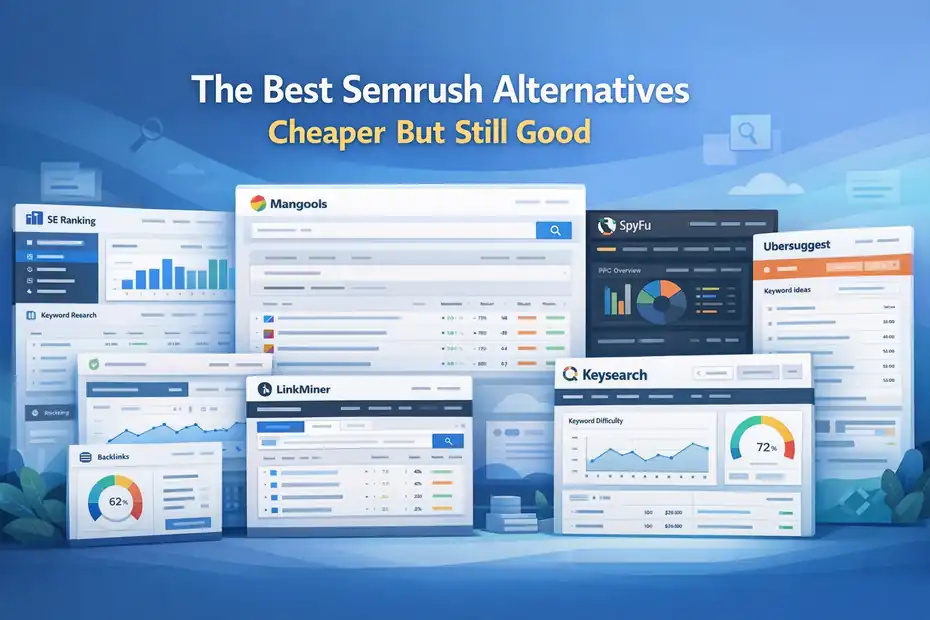
These are the tools I would actually put on a shortlist if the goal is strong SEO value without Semrush-level pricing.
SE Ranking Is The Closest Budget-Friendly All-In-One Option
SE Ranking is one of the strongest answers for people who want broad SEO coverage without jumping into premium pricing. Its subscription page highlights keyword research, competitor analysis, rank tracking, site audit, and backlinks in one platform, with annual discounts available.
- Best for: Freelancers, small agencies, service businesses, and growing content sites.
- Why it stands out: It covers the core Semrush-style workflow without feeling stripped down.
- What I like: It is easier to justify when you need one platform for several SEO tasks, not just keyword ideas.
If you are managing multiple client sites, this kind of tool structure matters. Instead of duct-taping separate apps together, you can research keywords, audit pages, check rankings, and build reports in one place. For many users, that convenience is what makes a tool feel “complete,” even if the database scale is smaller than Semrush.
I would not say it fully replaces Semrush for every advanced team. But for many small businesses, it gets close enough where the cost difference is hard to ignore. That is exactly the kind of cheaper-but-still-good tradeoff most people are searching for.
Mangools Is One Of The Easiest Affordable SEO Suites To Use
Mangools starts at $29 per month on annual plans and includes a bundle of tools such as KWFinder, SERPChecker, SERPWatcher, LinkMiner, and SiteProfiler. That bundle approach is a big part of its appeal.
- Best for: Bloggers, affiliate marketers, small niche sites, and SEO beginners.
- What it does well: Keyword discovery, SERP analysis, simple tracking, and lightweight backlink research.
- Where it wins: Ease of use. You can get useful answers fast without digging through a complex interface.
I recommend Mangools to people who feel overwhelmed by giant all-in-one platforms. It does not try to impress you with every possible metric. It tries to help you decide whether a keyword is worth targeting. That sounds small, but it is one of the most useful things an SEO tool can do.
A realistic scenario: You run a recipe site and need a dozen lower-competition article ideas this week. KWFinder plus SERPChecker can get you there quickly. You look at the results page, assess ranking difficulty, and move on. That kind of speed is why a simpler tool sometimes produces better publishing momentum than a more powerful but heavier platform.
SpyFu Is Excellent If Competitor Research Is Your Main Priority
SpyFu’s homepage and pricing pages make its positioning very clear. It focuses heavily on competitor keyword research, SEO intelligence, and PPC visibility, with plans below Semrush’s starting price. The pricing page lists Basic at $39 monthly or $29 billed annually.
- Best for: Agencies, consultants, and businesses that win by reverse-engineering competitors.
- Why it is different: It leans hard into competitor visibility and historical ad and keyword insights.
- When to choose it: When your SEO process starts with “Who already owns this SERP and how do I beat them?”
This matters more than many people realize. If you are entering a crowded niche, the fastest wins often come from finding terms competitors already rank for and then building a better page around search intent gaps. A tool that makes competitor analysis simple can save hours every week.
I would not buy SpyFu if your main goal is deep technical SEO auditing. But if competitive research is your actual pain point, it can feel more relevant than a broader suite. Cheaper tools become “good” when they overdeliver on the job you care about most. SpyFu does that for competitor-led strategy.
Ubersuggest Is Still A Strong Budget Pick For Simple Workflows
Ubersuggest positions itself as much cheaper than major competitors and offers both subscription and lifetime-style pricing options, along with free limited use and trial options. Its official pages emphasize affordability and low-friction entry.
- Best for: Beginners, side hustlers, solo founders, and marketers who want a simple dashboard.
- What it covers: Keyword research, site audits, traffic estimates, and content ideas.
- Why people keep choosing it: Low price, easy onboarding, and less intimidation.
I will be honest here. Ubersuggest is not the most advanced tool in the category. But not everyone needs advanced. Sometimes a cleaner tool that you actually use every week is better than a premium tool you keep postponing learning.
Think about a local med spa owner trying to grow appointment pages and blog traffic. They do not need endless filters and enterprise reporting. They need topic ideas, basic audit issues, and a quick way to track whether “botox in [city]” pages are improving.
Ubersuggest can do that job without the pricing jump of Semrush. That is why it remains relevant in budget conversations.
Keysearch Is A Quiet Favorite For Bloggers And Niche Publishers
Keysearch promotes simple, transparent pricing, with its Starter plan listed at $24 per month and annual billing savings available. It has built a loyal audience by staying focused on practical keyword research and content workflow support.
- Best for: Bloggers, affiliate marketers, and smaller content publishers.
- Why it works: It keeps the learning curve low while still offering ranking and competition insights.
- Where it shines: Topic validation for content-heavy websites.
I have noticed that many content creators do not need a giant SEO suite. They need confidence that a keyword is realistic and that the search results are not stacked with giant brands. Keysearch is very good at supporting that decision.
This is especially useful for newer sites. A new domain should not chase vanity keywords. It should build momentum with attainable long-tail topics and cluster content. A focused tool like Keysearch helps you stay disciplined.
That makes it a very good cheaper alternative, even if it is not trying to be a one-to-one Semrush clone.
Budget-Friendly Tools Worth Considering For Specific Jobs
Not every good alternative needs to replace Semrush entirely. Sometimes the smartest move is a smaller stack.
Ahrefs Starter Can Be Worth It, But Only For A Specific Type Of User
Ahrefs now offers a $29 per month Starter plan, while its Lite plan is $129 per month and Standard is $249 per month. That gives users a lower entry point, but you still need to pay attention to what level of usage and data access you actually need.
- Best for: Users who want the Ahrefs ecosystem but cannot justify a larger plan yet.
- Main caution: The cheapest Ahrefs tier is not automatically the best budget deal for regular heavy use.
- My opinion: It is a smart choice if you value the brand’s dataset and only need a narrower workflow.
If you are a consultant auditing a few sites each month and doing focused research, the Starter tier may be enough to get you in the door. But if you assume “Ahrefs is cheap now,” you may end up disappointed once your usage grows.
So yes, Ahrefs can be cheaper than Semrush at the low end. But the better framing is that it now has a budget entry option, not that it has become the default affordable all-in-one. That distinction saves people a lot of frustration.
Keywords Everywhere Is Great For Low-Cost Keyword Validation
Keywords Everywhere works differently from a full SEO suite. It is browser-based, and its subscriptions and credits are designed around lightweight data access rather than a giant dashboard.
Its pricing FAQ states it only offers annual plans, and its credits page explains how keyword data usage is consumed.
- Best for: Writers, content strategists, and SEOs who live in Google and YouTube search results.
- Why it helps: It gives quick data while you research, instead of forcing you into a separate workflow.
- Where it fits: Idea validation, SERP inspection, and efficient content planning.
This is one of those tools I like as a supplement. It is not a Semrush replacement, but it can cut research time dramatically. If your bottleneck is validating lots of topic ideas quickly, a small tool like this can give you outsized value for the cost.
For many users, the winning budget setup is not one cheaper all-in-one platform. It is one mid-range platform plus one tiny helper tool that makes everyday research faster.
LowFruits Makes Sense When Your Goal Is Finding Winnable Long-Tail Keywords
LowFruits is often recommended for publishers who care less about broad SEO dashboards and more about identifying weaker SERPs and low-competition opportunities.
Its documentation and blog content center heavily on keyword discovery and ranking opportunity analysis.
- Best for: Newer sites, niche sites, and content teams chasing topical gaps.
- Why people like it: It focuses on “Can I realistically rank here?” instead of overwhelming you with extra modules.
- What I like: It keeps you honest. That is useful when your site is not yet authoritative.
For a newer blog, this can be a better strategic fit than a flashier platform. You are not trying to dominate ultra-competitive head terms yet. You are trying to stack enough targeted wins to build topical authority and internal linking strength.
That is why I think long-tail-first tools deserve a place in this conversation. They are not always broad, but they can be extremely good at the one thing budget-conscious publishers need most: finding terms they can actually turn into traffic.
Side-By-Side Pricing Snapshot
This quick table is not meant to capture every limit or add-on. It is there to help you see how far below Semrush many solid options sit at entry level.
| Tool | Entry Pricing Seen On Official Source | Best Fit |
|---|---|---|
| Semrush | $139.95/mo, or $117.33/mo annually | Full premium all-in-one SEO suite |
| SE Ranking | Lower-cost entry tiers with annual discount | Best all-around budget suite |
| Mangools | From $29/mo on annual plans | Best for bloggers and simple workflows |
| SpyFu | $39/mo monthly or $29/mo annually for Basic | Best for competitor research |
| Ahrefs | Starter $29/mo; Lite $129/mo | Best if you want Ahrefs on a narrower budget |
| Keysearch | Starter $24/mo | Best for content-led small sites |
| Ubersuggest | Low-cost plans and lifetime offer messaging | Best for beginners and solo marketers |
How To Read This Table Without Fooling Yourself
- Do not compare price alone: Compare tracked keywords, projects, reports, and research depth.
- Check billing style: Some tools look cheaper annually than monthly.
- Watch for fit: A cheaper plan that blocks your workflow is not actually cheaper.
I recommend using this table as a filter, not a final answer. Narrow to two or three tools, then decide based on your actual tasks. That is the part most reviews skip, and it is where money gets wasted.
How To Choose The Right Alternative For Your Situation
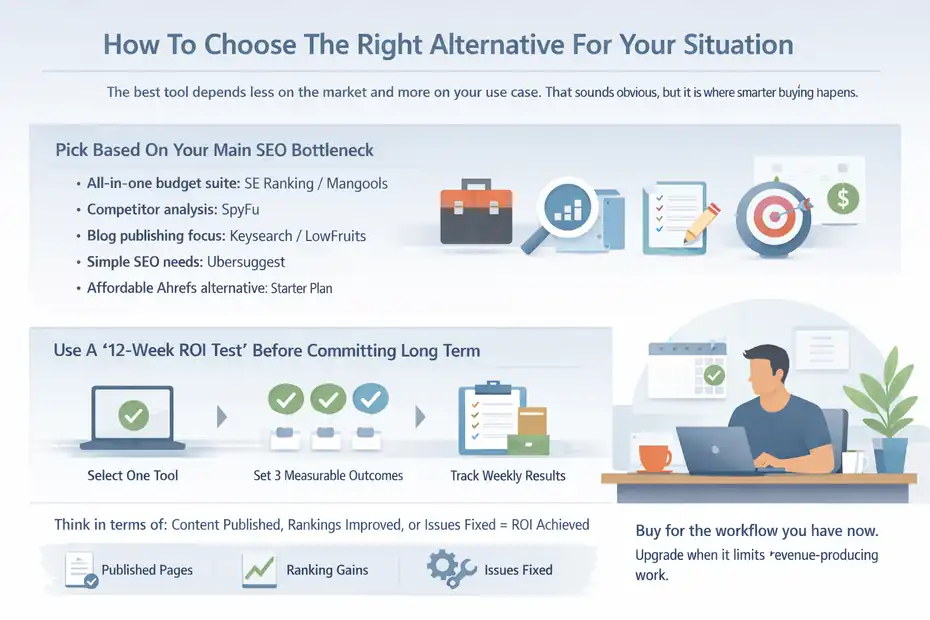
The best tool depends less on the market and more on your use case. That sounds obvious, but it is where smarter buying happens.
Pick Based On Your Main SEO Bottleneck
- You need an all-in-one budget suite: Start with SE Ranking or Mangools.
- You live in competitor analysis: Start with SpyFu.
- You mainly publish blog content: Start with Keysearch or LowFruits.
- You want simple SEO without complexity: Start with Ubersuggest.
- You want Ahrefs specifically but cheaper than Semrush: Test the Starter plan first.
Here is how I would simplify the decision. If your week mostly involves planning content, validating keywords, and refreshing pages, you probably do not need the heaviest all-in-one platform. If your week involves client reporting, multi-site tracking, and technical checks, broader suites make more sense.
A lot of people buy for the business they hope to become in 18 months. I suggest buying for the workflow you have right now. You can always upgrade once the tool starts limiting revenue-producing work.
Use A “12-Week ROI Test” Before Committing Long Term
This is the framework I recommend:
- Choose one tool based on your core workflow.
- Set three measurable outcomes: More qualified keyword ideas, better ranking visibility, or faster content planning.
- Use it weekly for 12 weeks.
- Track whether it creates output: Published pages, refreshed pages, client reports, or discovered issues fixed.
- Keep it only if it changes actions, not just knowledge.
For example, say you pay $29 per month for a tool and over 12 weeks it helps you publish eight articles built around better long-tail topics. If even one or two pages start generating leads or affiliate revenue, the subscription likely paid for itself.
That is how I think about software value. Not as “feature ownership,” but as “content and optimization leverage.”
A Smarter Setup: One Main Tool Plus Free Google Data
You do not need to make any paid tool do everything. In fact, forcing that can make your stack more expensive than it needs to be.
Pair Your Paid Tool With Google Search Console And Analytics
This is one of the easiest budget upgrades you can make.
- Paid SEO tool: Use it for research, competitor discovery, and rank tracking.
- Google Search Console: Use it for real query, click, impression, and page performance data.
- Analytics platform: Use it for engagement, conversions, and user behavior after the click.
This combination works because paid tools are often best for forecasting and research, while your first-party data is best for measuring what actually happened. When you combine the two, your decisions improve dramatically.
For example, your tool might suggest a keyword cluster is low competition. Search Console can later tell you which related queries are actually earning impressions. That is where optimization gets sharper. You stop guessing and start expanding based on real visibility patterns.
I honestly think many small sites would be better off with one affordable research tool and disciplined use of Search Console than with an expensive suite they only open twice a month.
Build A Lean Workflow Instead Of Chasing Tool Perfection
A simple weekly SEO process can look like this:
- Monday: Find 5 to 10 viable keywords.
- Tuesday: Review the current SERP and search intent.
- Wednesday: Publish or refresh one page.
- Thursday: Track ranking movement and internal links.
- Friday: Check Search Console for new impressions and CTR changes.
That workflow does not need a giant platform. It needs consistency and enough data to make good decisions. This is why cheaper-but-still-good tools work so well for disciplined users. They support action. And action is what grows traffic.
In my experience, the people who complain least about tool limitations are usually the people who have the clearest process. The ones who complain most often are still hoping the software will replace strategy. It will not.
Common Mistakes When Switching Away From Semrush
Moving to a cheaper tool can absolutely work, but only if you avoid a few predictable mistakes.
Mistake 1: Expecting Identical Metrics Across Platforms
- What goes wrong: Users compare one keyword difficulty number or traffic estimate and assume one platform is wrong.
- Reality: Tools use different data sources, update cycles, and modeling methods.
- Better approach: Compare trends and decision quality, not metric perfection.
If one platform says a keyword is easier than another, that does not automatically make it bad. The real question is whether the SERP analysis, intent match, and site strength suggest the term is worth pursuing. Metrics are guides, not laws.
I recommend manually checking the top 10 results whenever a keyword really matters. That habit protects you from blind trust in any score, no matter how expensive the software is.
Mistake 2: Replacing One Tool With Five Cheap Tools Too Fast
This happens all the time. Someone cancels Semrush to save money, then subscribes to several smaller tools at once and ends up with a mess.
- Problem: Overlap, context switching, and duplicated costs.
- Fix: Start with one main platform and add only one helper tool if a real workflow gap appears.
- Rule I use: One core paid tool, one optional specialty add-on, and first-party data.
A lean stack is easier to learn, easier to justify, and easier to use consistently. Consistency is usually what turns SEO tools into results.
Mistake 3: Buying For Features Instead Of Publishing Speed
A tool should help you move faster toward better output.
If your replacement platform gives you enough insight to publish stronger content more consistently, it is doing its job. If it gives you twenty extra dashboards but slows down decision-making, it is not helping, even if the feature list looks impressive.
That is why I keep coming back to the same idea: cheaper but still good means high utility per dollar, not maximum capability on paper.
Advanced Tips To Get More Value From A Budget SEO Tool
Once you choose a platform, the next step is squeezing more output from it than most users do.
Build Keyword Clusters, Not Isolated Articles
One of the easiest ways to make a budget tool perform like a bigger system is to think in clusters.
- Start with one core topic: For example, “email marketing for dentists.”
- Pull adjacent terms: Costs, software comparisons, templates, automation tips, local lead generation.
- Map intent: Informational, commercial, and service-page intent should not all live on one page.
- Publish in groups: This improves internal linking and topical relevance.
Most affordable tools can support this if you use them well. You do not need elite enterprise features to build strong topic clusters. You need good keyword judgment and a plan for covering related intent stages.
This matters even more in 2026 because broader topical coverage and entity relevance continue to shape visibility across search experiences. Tools that help you spot related subtopics can be enough to build serious momentum when used intentionally.
Use Competitor Pages As Decision Models, Not Copy Targets
I advise treating competitor data like a map, not a script.
- Check page type: Blog post, product page, category page, landing page, or tool page.
- Study SERP patterns: Are results list-based, how-to based, or comparison heavy?
- Look for omission gaps: Missing FAQs, weak examples, outdated screenshots, thin explanations.
- Win with clarity: Better structure and tighter intent matching often beat louder content.
This is where cheaper tools can still perform extremely well. You do not need every enterprise reporting feature to study what ranks, understand why it ranks, and produce something more helpful.
A lot of SEO growth comes from being more useful, not more complicated. I think budget-conscious marketers often forget that, and it is actually their advantage. They tend to focus harder on what will move the page.
Final Verdict: Which Semrush Alternative Should You Choose?
If you want the closest all-around budget-friendly substitute, I would start with SE Ranking. If you want the easiest and most approachable suite, Mangools is hard to beat. If your strategy revolves around competitor intelligence, SpyFu deserves serious attention.
If you want cheap, simple, and beginner-friendly, Ubersuggest still earns a place.
If you are a blogger or niche publisher, Keysearch and LowFruits are often better strategic fits than broader platforms.
And if you specifically want Ahrefs while spending less than Semrush, the Starter plan is now the entry point to test.
The truth is, the best semrush alternatives cheaper but still good are not the ones that look most similar in a feature table. They are the ones that help you research faster, publish smarter, and make better optimization decisions without bloating your monthly software costs. That is the standard I would use, and honestly, it is the standard that saves the most money.
FAQ
What are the best semrush alternatives cheaper but still good?
The best semrush alternatives cheaper but still good include SE Ranking, Mangools, SpyFu, Ubersuggest, and Keysearch. These tools offer strong keyword research, rank tracking, and competitor analysis features at a lower monthly cost, making them ideal for freelancers, bloggers, and small businesses.
Are cheaper SEO tools as accurate as Semrush?
Cheaper SEO tools can still provide reliable and actionable data, but they may use smaller datasets or different calculation methods. In most cases, accuracy is good enough for making decisions, especially when combined with manual SERP analysis and real data from Google Search Console.
Which semrush alternative is best for beginners?
Ubersuggest and Mangools are considered the best beginner-friendly semrush alternatives cheaper but still good. They offer simple dashboards, easy keyword research tools, and clear insights without overwhelming users, making them ideal for those new to SEO or running small websites.
Can I replace Semrush completely with a cheaper tool?
Yes, many users can replace Semrush completely with a cheaper tool if their needs are focused on keyword research, rank tracking, and basic audits. However, larger teams or advanced marketers may still require premium features that budget tools may not fully replicate.
How do I choose the right cheap SEO tool for my needs?
To choose the right semrush alternative cheaper but still good, focus on your main SEO tasks such as content creation, competitor research, or rank tracking. Select a tool that supports your daily workflow rather than one with the most features to maximize value and efficiency.

I’m Juxhin, the voice behind The Justifiable.
I’ve spent 6+ years building blogs, managing affiliate campaigns, and testing the messy world of online business. Here, I cut the fluff and share the strategies that actually move the needle — so you can build income that’s sustainable, not speculative.