
Table of Contents
Some links on The Justifiable are affiliate links, meaning we may earn a small commission at no extra cost to you. Read full disclaimer.
SurveyMonkey review for ecommerce customer feedback is a topic worth looking at carefully, because the right survey tool can help you fix checkout friction, improve repeat purchase rates, and understand why buyers leave without ever telling you.
If you run an online store, you do not need more data for the sake of data. You need feedback you can actually act on.
In this guide, I’ll walk you through where SurveyMonkey fits, where it falls short, and whether it is the right choice for your ecommerce setup in 2026.
What SurveyMonkey Is Really Good At for Ecommerce
If you are evaluating SurveyMonkey for an online store, the first thing to understand is this: it is not an ecommerce platform add-on first. It is a mature survey platform first. That distinction matters.
Customer Feedback Collection That Is Fast to Launch
SurveyMonkey is built to help teams create surveys quickly, with AI-assisted drafting, expert templates, real-time charts, and broad customization options.
The platform says it offers AI survey generation, 500+ templates, and real-time analysis features, which makes it appealing if you want to move fast without building every question from scratch.
For ecommerce brands, that speed is useful. You might need a post-purchase survey after a holiday sale, a packaging feedback survey after a product launch, or a quick NPS check after onboarding subscribers into a loyalty program.
In my experience, that is where SurveyMonkey feels strongest. You can create something polished without a long setup cycle.
What I like here is that it reduces the blank-page problem. A lot of store owners know they should ask customers for feedback, but they delay because writing good survey questions feels harder than it sounds.
SurveyMonkey lowers that barrier. That does not automatically make it the best ecommerce feedback tool, but it makes it one of the easiest to start using.
Strong Survey Methodology and Familiar Metrics
SurveyMonkey also does a solid job supporting common customer experience metrics like CSAT and NPS. Its help documentation and templates are built around established feedback formats, including Net Promoter Score surveys and customer satisfaction measurement.
That matters because ecommerce teams often need simple answers to practical questions such as:
- CSAT: Were buyers happy with the delivery, product quality, or support experience?
- NPS: Would they recommend your store or brand?
- Open Feedback: What specifically went wrong during checkout, shipping, or product use?
If you are a small or mid-sized store, having those survey frameworks ready to go saves time and helps you avoid sloppy survey design. I believe this is one of SurveyMonkey’s biggest advantages over cobbling together forms manually.
Flexible Enough for Multiple Feedback Moments
Ecommerce customer feedback is not one survey. It is a sequence of listening points across the buyer journey.
You may want feedback after checkout, after delivery, after a support interaction, or after a return. SurveyMonkey works well for these different use cases because it is flexible rather than tied to one narrow workflow.
Survey creation is broad enough to support transactional feedback, product research, support quality checks, and even pre-launch concept testing.
That flexibility is helpful when your business grows. A brand selling skincare, for example, might start with a simple “How was your order experience?” survey, then later add separate flows for product satisfaction, subscription churn reasons, and reorder intent.
SurveyMonkey can handle that evolution without forcing you into a single feedback template.
How SurveyMonkey Fits Into Ecommerce Customer Feedback Workflows
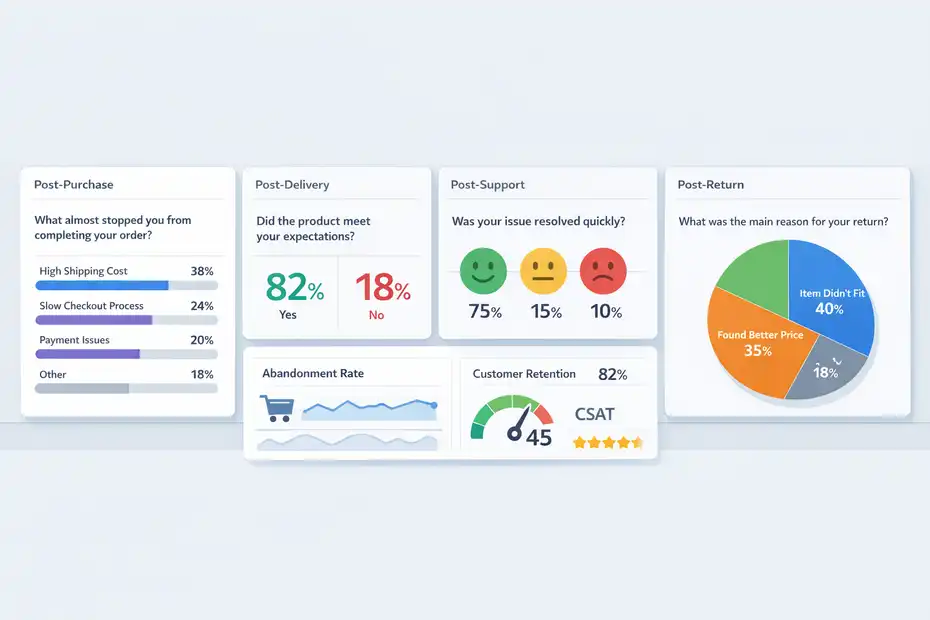
The question is not whether SurveyMonkey can collect feedback. It clearly can.
The better question is whether it fits how ecommerce feedback actually needs to work.
The Best Survey Points in the Customer Journey
In ecommerce, timing often matters more than survey length. If you ask for feedback at the wrong moment, response quality drops fast.
For most stores, the strongest moments to survey are right after purchase, after delivery, after a support conversation, and after a return or refund. These are high-memory moments where the customer can still recall what felt smooth and what felt frustrating.
SurveyMonkey’s templates and customer feedback guidance are broadly aligned with these touchpoints, especially for satisfaction and experience measurement.
Here is a practical workflow I would suggest:
- Post-Purchase: Ask what almost stopped the order.
- Post-Delivery: Ask whether the product matched expectations.
- Post-Support: Ask whether the issue was solved quickly.
- Post-Return: Ask what triggered disappointment or confusion.
This is where SurveyMonkey becomes useful as an insight engine. Instead of guessing why conversion or retention is weak, you start hearing direct reasons in customer language.
Why Feedback Matters So Much for Online Stores
Ecommerce margins are often tighter than they look from the outside. A brand can be spending heavily on ads while quietly leaking revenue through poor UX, confusing shipping policies, or weak product positioning.
That is why customer feedback is not optional anymore. Baymard’s latest compiled data places average online cart abandonment at roughly 70%, which tells you most shoppers still leave before completing checkout.
Customer feedback will not solve every abandonment issue, but it helps expose what analytics alone often cannot explain.
I think this is the real business case for SurveyMonkey in ecommerce. It helps connect behavioral metrics to actual customer reasoning.
Analytics might show a drop on the shipping page. Feedback tells you the shipping cost looked too high, delivery estimates felt vague, or trust signals were weak.
When you combine both, decisions get sharper.
Where SurveyMonkey Is Better Than Native Ecommerce Polling
Many ecommerce platforms let you add simple polls, app widgets, or one-question feedback popups. Those are fine for surface-level checks. They are less useful when you want structured, comparable, and reusable feedback data.
SurveyMonkey is better when you need:
- More control over question design
- Better logic and survey flow
- Consistent reporting over time
- Surveys that can be reused across campaigns or customer segments
- Cleaner tracking of NPS or CSAT programs
That said, it is not automatically better for every store. If your only goal is a tiny in-site poll asking “Why didn’t you buy today?” then a dedicated onsite feedback tool might feel lighter.
SurveyMonkey becomes more compelling when feedback is part of a repeatable process, not a one-off test.
Step-By-Step Setup for an Ecommerce Store
This is where a lot of reviews get vague, so let me make it practical.
If you want to use SurveyMonkey for ecommerce customer feedback, here is the setup path I would actually recommend.
Step 1: Start With One Feedback Goal, Not Five
The biggest mistake I see is trying to measure everything in one survey. That usually leads to low completion rates and messy data.
Start with one business question. For example:
- Checkout Friction: What almost stopped customers from ordering?
- Product Satisfaction: Did the item meet expectations after delivery?
- Support Quality: Was the issue resolved fast enough?
- Retention Risk: Why are repeat customers not coming back?
SurveyMonkey’s AI builder can help generate a draft survey from a prompt, which is useful if you already know your goal but need help structuring the questions.
Its AI survey generation and bias-checking tools are available as part of its creation workflow.
My advice is to choose the revenue-impacting problem first. If your conversion rate is weak, focus on pre-purchase or checkout feedback. If repeat purchase is the issue, focus on post-delivery or post-product-use feedback.
Step 2: Build Short Surveys Around One Moment
For ecommerce, short almost always wins.
A strong transactional survey is often just 3 to 5 questions. You do not need a 20-question questionnaire after a $32 order. In fact, I would avoid that unless you are doing deliberate research with an incentive attached.
A simple post-purchase survey could include:
- Q1: What almost stopped you from placing this order today?
- Q2: How easy was checkout?
- Q3: Was anything unclear about shipping, returns, or delivery?
- Q4: What could we improve before your next purchase?
SurveyMonkey supports multiple question types and logic, so you can keep this efficient. For example, if someone reports a poor experience, you can branch into a follow-up question asking what caused it.
That keeps the survey short for happy customers and more detailed for unhappy ones. Its product pages also highlight question-type guidance and automated survey structure support.
That branching is more important than many people realize. It increases relevance, and relevance usually improves completion.
Step 3: Connect Distribution to Real Customer Events
A survey is only as useful as its delivery timing. SurveyMonkey gives you multiple ways to send and distribute surveys, and it supports 200+ integrations plus APIs for custom workflows.
In an ecommerce context, that can look like this:
- Order Confirmation Email: Send a brief expectation-setting survey.
- Delivery Confirmation Email: Trigger product or shipping feedback.
- Support Resolution Email: Ask for service quality feedback.
- Segmented Campaigns: Survey VIP buyers, churn-risk customers, or recent returners.
Imagine you run a small apparel brand. Customers are buying, but repeat purchase is slipping. You set up a SurveyMonkey survey to send 10 days after delivery. One open-ended question asks what would make them order again.
After 150 responses, patterns appear: sizing confusion, fabric expectations, and delayed shipping updates. That gives you three concrete fixes instead of one fuzzy assumption.
That is the kind of outcome SurveyMonkey can produce when distribution is tied to actual customer lifecycle events.
Key Features That Matter Most in a Real Ecommerce Review
Not every SurveyMonkey feature matters for ecommerce. Some are nice to have.
Others actually shape whether the tool is worth paying for.
Templates, AI Drafting, and Ease of Use
SurveyMonkey’s biggest practical advantage is ease of use. The platform promotes 500+ templates, AI-assisted survey creation, and guided survey building based on best-practice methodology.
If you are not a research expert, this helps a lot. It means you can create a working customer feedback system without hiring a consultant or spending days studying survey design.
I would still edit heavily. AI-generated surveys are a starting point, not a finished strategy. For ecommerce, you want questions tied closely to customer actions, product categories, and pain points. A generic satisfaction survey is rarely enough on its own.
Still, I think SurveyMonkey deserves credit here. It makes “good enough to launch” easy, and that matters for busy teams.
Reporting, Charts, and Trend Tracking
SurveyMonkey includes real-time charts and response analysis, which is useful when you need quick feedback loops.
It also supports exports including CSV, XLS, PPT, PDF, and SPSS on its feature pages, which helps when you want to share findings with marketing, CX, or operations teams.
For ecommerce, this means you can move from raw comments to useful patterns faster. For example, you can tag themes like:
- Shipping cost complaints
- Product quality mismatch
- Slow support
- Confusing returns
- Discount expectation issues
This is not the same as having a deeply ecommerce-native voice-of-customer suite, but for many brands it is enough. Especially if your current setup is scattered across spreadsheets, inbox replies, and support tickets.
I suggest treating SurveyMonkey reporting as the middle layer. It is more structured than ad hoc feedback, but it may still need exports or integrations if you want advanced customer analytics across your stack.
Integrations and Workflow Potential
SurveyMonkey’s integrations are one of its strongest selling points for teams. Official materials highlight 200+ native integrations as well as API options for custom data movement and automation.
That matters if you want survey data to travel into your existing systems instead of living in a silo.
For example, you might:
- Send poor feedback scores into Slack for fast team review
- Push survey responses into your CRM
- Route detractor responses into customer support follow-up
- Export data into a BI dashboard for trend analysis
This is where SurveyMonkey starts feeling more enterprise-friendly. It is not just a form builder. It can participate in a bigger workflow.
The catch is that ease depends on your stack. Some teams will connect things quickly. Others will still need manual setup or middleware. So I would call integrations a real strength, but not a magic shortcut.
Pricing, Limits, and Whether the Cost Makes Sense
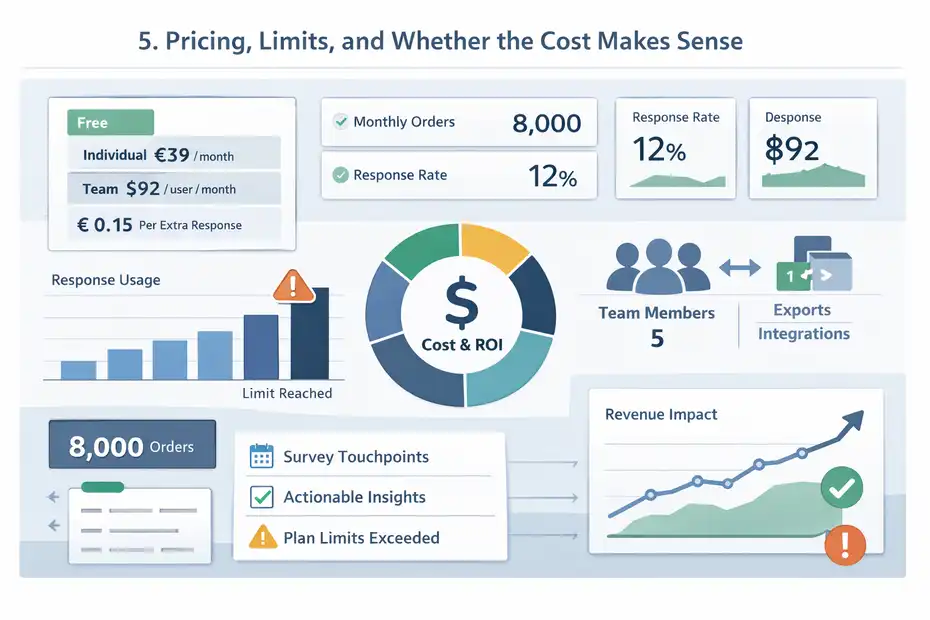
A review without pricing context is not very helpful, because software can look great until the limits show up.
What the Current Pricing Structure Suggests
SurveyMonkey’s current pricing pages show multiple tiers, including a free option, individual plans, and team plans.
Official pricing pages list a Standard Monthly option at €39 per month on the individual page, 1,000 responses per month on that tier, team plans such as Team Premier starting at $92 per user per month billed annually, and overage billing on some paid plans up to $0.15 per additional response.
Free users are limited in questions and visible responses per survey.
For ecommerce brands, the important issue is not just subscription cost. It is response volume.
If you send feedback surveys after every order, response counts can add up quickly. A store processing 8,000 monthly orders with even a modest response rate might hit plan limits faster than expected. So before committing, estimate:
- Monthly orders
- Expected response rate
- Number of survey touchpoints
- Team members who need access
- Whether exports and integrations are essential
I would not evaluate SurveyMonkey as a cheap tool. I would evaluate it as a workflow tool that can be cost-effective if the feedback leads to measurable improvements.
When the Cost Is Justified
SurveyMonkey is easier to justify when one useful insight can pay for the software.
Let’s say a brand uncovers, through survey feedback, that delivery estimates are unclear on mobile. They fix the checkout messaging and improve conversion by even a small margin.
For a store doing meaningful order volume, that can offset software cost quickly.
The same logic applies to repeat purchase. If feedback reveals that buyers want a reorder reminder, better fit guidance, or clearer return expectations, those changes can improve retention or reduce support load.
This is why I do not think the question should be, “Is SurveyMonkey expensive?” The better question is, “Can your team turn feedback into operational improvements fast enough to justify the spend?”
If the answer is yes, the pricing makes more sense.
When It May Feel Overpriced
SurveyMonkey can feel overpriced in three situations:
- You only need one tiny survey a month
- You do not have a process to review and act on feedback
- You mainly need ecommerce-native triggers and dashboards rather than a general survey platform
That last point is important. Some ecommerce tools are built specifically for purchase events, review requests, onsite prompts, or retention automation. SurveyMonkey is broader. That is a strength and a weakness.
I would not recommend paying for flexibility you will never use. If your use case is narrow, a more specialized tool may feel simpler and more cost-effective.
Common Mistakes Ecommerce Brands Make With SurveyMonkey
SurveyMonkey can work well, but it is still easy to misuse. Most disappointing results come from setup problems, not from the platform itself.
Asking Too Many Questions Too Early
The fastest way to hurt response rates is to ask for too much.
A customer who just placed an order does not want to complete a long research study. They want to move on with their day. This is why I strongly recommend short transactional surveys first, then deeper surveys only for selected segments or research campaigns.
A better approach is layered listening:
- First Survey: 1 to 4 quick questions
- Second Survey: Follow up later with a more detailed survey for selected respondents
- Third Step: Use interviews or support outreach for deeper qualitative insight
SurveyMonkey gives you the flexibility to build both short and long forms. The problem usually happens when brands assume flexibility means they should ask everything at once.
Collecting Feedback Without a Clear Owner
This one sounds boring, but it is huge.
If nobody owns the feedback loop, customer feedback turns into digital clutter. SurveyMonkey can collect responses beautifully, but it cannot force your team to do something useful with them.
I recommend assigning ownership clearly:
- Marketing: Messaging, landing pages, offer clarity
- CX or Support: Service issues, return friction, resolution quality
- Operations: Shipping, packaging, fulfillment
- Product Team: Product quality, fit, usage confusion
Without that ownership, survey responses become “interesting” instead of actionable. And interesting does not improve revenue.
Ignoring Open-Ended Responses
A lot of teams obsess over scores and ignore comments. I think that is a mistake, especially in ecommerce.
Scores help you benchmark sentiment. Comments tell you what to fix.
SurveyMonkey supports open feedback alongside structured question types, which is critical for ecommerce use cases where customers often describe friction in plain language.
If five customers say checkout was “fine,” that is mildly useful. If twenty customers say, “I was not sure how long shipping would take,” that is a fixable insight with real commercial value.
In my experience, the comments are often where the money is.
Optimization Strategies That Make SurveyMonkey More Valuable
Using SurveyMonkey is one thing. Getting strong business value from it is another. Here is how I would make it work harder.
Segment Surveys by Customer Type
Do not ask first-time buyers the exact same questions you ask loyal repeat customers. Their experiences and expectations are different.
A useful ecommerce breakdown could be:
- First-Time Buyers: Why did you trust us enough to order?
- Repeat Buyers: What keeps bringing you back?
- High-Value Customers: What would improve your premium experience?
- Return Customers: What disappointed you?
This kind of segmentation increases relevance and often improves response quality. It also gives you more useful insight than averaging everyone into one dashboard.
Microsoft’s customer service research has shown that consumer expectations continue to rise, with 55% reporting higher expectations in one widely cited global report. That is not ecommerce-specific, but it does reinforce why audience-specific feedback matters more now.
The more customer expectations rise, the more generic surveys underperform.
Pair Survey Data With Store Metrics
Survey feedback is much stronger when paired with actual store performance data.
I suggest mapping survey responses against:
- Conversion rate by device
- Return rate by product category
- Repeat purchase rate by cohort
- Support ticket type
- Delivery time by region
- Cart abandonment trends
For example, imagine your NPS is stable, but repeat purchase is falling in one product line. Open-text responses might reveal buyers like the product but hate the refill process or shipping interval. That gives you a far clearer optimization path than staring at retention charts alone.
SurveyMonkey can help collect the voice layer. Your analytics stack helps validate scale and urgency.
That combination is where strong ecommerce decisions come from.
Use Closed-Loop Follow-Up for Negative Feedback
This is one of the highest-value plays.
When a customer leaves poor feedback, do not just count it. Follow up. SurveyMonkey’s integrations and workflow options make it possible to route responses into operational processes, which is especially useful for detractor recovery or service follow-up.
A simple recovery workflow might look like this:
- Low Score Trigger: Mark the response for follow-up
- Ownership: Assign to support or CX
- Action: Reply within 24 hours
- Outcome Tracking: Note whether the issue was resolved
For ecommerce brands, this can reduce churn and sometimes even save a future repeat customer. Not every unhappy buyer will respond, but enough will that the process is worth building.
Final Verdict: Is SurveyMonkey Worth Using for Ecommerce Customer Feedback?
This is the part most readers care about, so here is my honest take.
Who Should Use SurveyMonkey
I think SurveyMonkey is a good fit for ecommerce teams that want a reliable, flexible feedback platform without overcomplicating the first step.
It is especially useful if you need:
- Structured post-purchase or post-support surveys
- Reusable NPS or CSAT programs
- Easy survey creation with templates and AI help
- Integrations that move feedback into your workflow
- A platform your team can learn quickly
Its official product materials point to AI-assisted creation, large template coverage, real-time reporting, and 200+ integrations, which together make it a practical and scalable survey platform.
If your store is growing and you are still making customer experience decisions mostly from guesswork, SurveyMonkey can absolutely help.
Who Might Want Something Else
I would look elsewhere if your main need is deeply ecommerce-native feedback tooling built around order events, product reviews, website behavior, or retention automation from day one.
SurveyMonkey is flexible, but it is still general-purpose. That means some brands may prefer tools designed specifically for ecommerce ecosystems, especially if they want tighter platform-native workflows and less customization work.
I would also hesitate if your team is unlikely to review feedback consistently. Survey software is only valuable when someone acts on what comes in.
So no, SurveyMonkey is not automatically worth using for every online store.
My Bottom-Line Recommendation
My overall verdict on this SurveyMonkey review for ecommerce customer feedback is simple: yes, it is worth using for many ecommerce businesses, but mostly when you treat it as a decision-making tool rather than a box-ticking survey app.
If you want fast setup, credible survey structure, useful customer satisfaction frameworks, and flexible workflows, SurveyMonkey is a strong option. If you want a tool that magically fixes customer experience on its own, it will disappoint you.
I believe the smartest way to approach it is this:
- Start with one high-impact feedback moment
- Keep surveys short
- Route insights to the right team
- Use comments, not just scores
- Tie feedback to actual store metrics
Do that well, and SurveyMonkey can become genuinely valuable.
Use it poorly, and it becomes another dashboard nobody opens.
That is really the difference.
FAQ
What is SurveyMonkey used for in ecommerce customer feedback?
SurveyMonkey is used to collect structured feedback from ecommerce customers through surveys at key moments like post-purchase or after delivery. It helps store owners understand customer satisfaction, identify friction points, and gather actionable insights that improve conversion rates, retention, and overall shopping experience.
Is SurveyMonkey good for ecommerce businesses?
SurveyMonkey can be a good choice for ecommerce businesses that need flexible and easy-to-create surveys. It works well for collecting customer insights, but it is not ecommerce-specific, so it may require integrations or manual setup to fully align with order-based workflows and customer journeys.
How does SurveyMonkey improve customer experience in ecommerce?
SurveyMonkey improves customer experience by capturing direct feedback from buyers about checkout, delivery, product quality, and support. This feedback helps businesses identify issues quickly, make data-driven improvements, and better align their store experience with customer expectations and behavior.
What are the limitations of SurveyMonkey for ecommerce?
SurveyMonkey’s main limitation is that it is not built specifically for ecommerce workflows. It may lack native integrations for order-based triggers and real-time customer journey tracking, which means businesses often need additional tools or setup to fully automate feedback collection.
Is SurveyMonkey worth the cost for ecommerce feedback?
SurveyMonkey is worth the cost if your business actively uses customer feedback to improve performance. If insights from surveys lead to better conversions or retention, the tool can pay for itself. However, it may feel expensive for stores with low survey usage or minimal feedback processes.

I’m Juxhin, the voice behind The Justifiable.
I’ve spent 6+ years building blogs, managing affiliate campaigns, and testing the messy world of online business. Here, I cut the fluff and share the strategies that actually move the needle — so you can build income that’s sustainable, not speculative.
Related posts:
 Best Sales Funnels Builder for Explosive Growth
 Why Businesses Love Freshworks Freshdesk for Service
 Ecommerce Marketing Solutions That Multiply Your Sales
 SurveyMonkey Review For Small Business Surveys: Worth It Or Waste?
 SurveyMonkey Pros And Cons For Freelancers: Smart Tool Or Overpriced?
 SurveyMonkey Review For Affiliate Marketers: Can It Boost Conversions?