
Table of Contents
Some links on The Justifiable are affiliate links, meaning we may earn a small commission at no extra cost to you. Read full disclaimer.
Doba for beginners is something I get asked about a lot, especially by people who are curious about dropshipping but don’t want to jump in blind.
This guide is for first-time dropshippers, side hustlers, and online sellers who want to know exactly what Doba is, how it works, and what to realistically expect before signing up.
I’ll answer the core question most beginners have: is Doba worth starting with, and what should you know before creating an account?
How Doba Works For Beginners Before You Create Account
If you’re brand new, this is the part where most confusion happens.
I’ve seen beginners assume Doba works like a marketplace, but it’s closer to a managed dropshipping hub that sits between you and verified suppliers.
What Doba Is and How Its Dropshipping Model Functions
At its core, Doba is a dropshipping platform that connects online sellers to pre-approved suppliers, without you holding inventory.
You create a store, list products from Doba, and when a customer places an order, the supplier ships it directly to them.
Here’s the beginner-friendly flow, broken down simply:
- You choose products inside Doba’s catalog
- You import those products into your store (Shopify, WooCommerce, etc.)
- A customer buys from your store
- You pay the wholesale cost + Doba fees
- The supplier fulfills the order
What I like about this model for beginners is predictability. Unlike open marketplaces, suppliers are already inside the system, so you’re not negotiating terms one-by-one or guessing who’s legit.
From what I’ve seen, beginners who struggle here usually expect instant automation without setup. Doba still requires product selection, pricing decisions, and customer service on your end.
How Doba Connects Suppliers, Products, and Retailers
Doba acts as the middle layer. You don’t contact suppliers directly for every order. Instead, Doba aggregates suppliers into one dashboard and standardizes the process.
Think of it like this:
- Suppliers upload products and inventory to Doba
- Doba organizes, categorizes, and syncs availability
- You browse, filter, and import those products
- Orders route automatically to the correct supplier
This structure matters because it reduces beginner mistakes like selling out-of-stock items. Inventory syncing isn’t perfect, but it’s far more controlled than sourcing manually.
In my experience, this centralized setup is why beginners feel less overwhelmed during their first few weeks. You’re learning dropshipping, not supplier negotiation.
What Makes Doba Different From Marketplaces Like AliExpress
This is where expectations need to be realistic. Doba is not AliExpress, and that’s both good and limiting.
Key differences beginners notice quickly:
- Suppliers are mostly US-based, not overseas factories
- Pricing is higher, but shipping times are faster
- You pay a subscription, not per-product access
- Less product variety, but more consistency
AliExpress gives you millions of products but zero guardrails. Doba gives you fewer options but tighter control. If you’re someone who values reliability over endless browsing, Doba feels calmer.
I personally suggest Doba for beginners who want fewer surprises, even if margins are tighter early on.
Key Terminology Beginners Need to Understand on Doba
Doba uses a few terms that confuse beginners at first, so let me simplify the important ones.
Common Doba terms explained plainly:
- Supplier: The company shipping products to your customer
- Retailer: You, the store owner selling the product
- Landed cost: Product cost + shipping + handling
- Automated fulfillment: Orders sent to suppliers without manual steps
Understanding landed cost early is critical. Many beginners price products based on wholesale cost only, then realize later that shipping eats their margin.
My advice is to calculate profit before importing anything. It saves frustration later.
Doba Pricing Plans And Costs Beginners Must Budget For
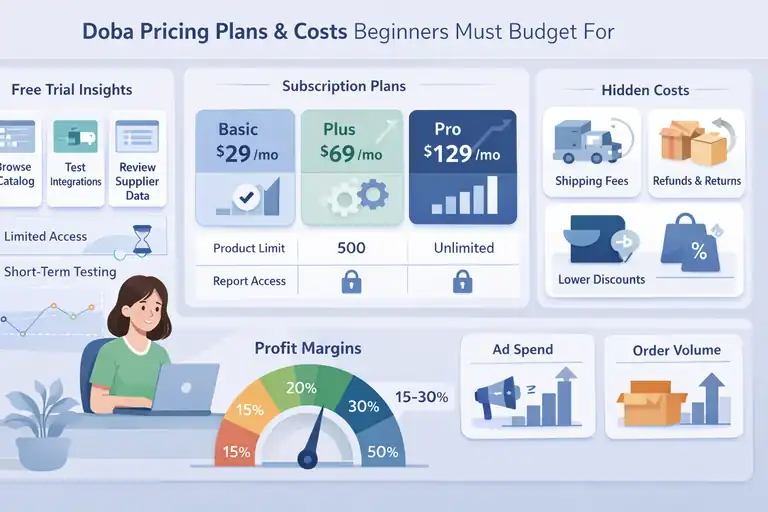
This is where many beginners hesitate, and honestly, they should. Doba is not free long-term, so budgeting upfront matters.
Free Trial Limits and What You Can Actually Test
Doba does offer a free trial, but it’s limited in ways beginners don’t always expect.
During the trial, you can:
- Browse the product catalog
- Test integrations
- Review supplier data
What you can’t fully test is long-term order performance. You won’t see patterns like supplier responsiveness or repeat fulfillment speed in a short window.
I suggest using the trial to evaluate usability, not profitability. If the dashboard feels confusing now, it won’t magically improve later.
Monthly Subscription Tiers Explained for New Users
Doba’s plans are subscription-based, usually starting around $29 per month and scaling up based on features and volume.
Beginner-focused plan differences often include:
- Number of products you can list
- Automation depth
- Reporting access
Higher plans don’t guarantee higher profits. They simply remove limits. If you’re just starting, paying for unused capacity doesn’t help.
From what I’ve seen, most beginners over-upgrade too early.
Hidden Costs Beginners Often Overlook With Doba
This is the part I wish more people talked about. The subscription is only one piece of the cost puzzle.
Other costs include:
- Shipping fees baked into landed cost
- Lower wholesale discounts compared to direct sourcing
- Refunds or reshipments if issues arise
These aren’t scams or tricks. They’re just part of a managed ecosystem. But if you expect razor-thin pricing, Doba can feel expensive fast.
How Doba Pricing Compares to Beginner Profit Margins
Let’s talk numbers briefly. Many beginners aim for 30–50% margins. With Doba, early margins often land closer to 15–30%, depending on category.
This means:
- You need higher order volume to scale
- Paid ads require careful testing
- Organic traffic becomes more valuable
I believe Doba works best as a learning platform first, profit engine second. If you treat it that way, expectations stay realistic.
Product Selection Experience Beginners Can Expect Inside Doba
Product selection is where beginners either gain confidence or lose momentum. Doba simplifies access, but strategy still matters.
Product Quality Control and Supplier Vetting Standards
Doba doesn’t allow just anyone to sell. Suppliers are vetted before joining, which reduces extreme quality issues.
That said, vetting doesn’t mean perfection. Products still vary. I always recommend:
- Reading supplier ratings carefully
- Checking return policies
- Avoiding overly generic listings
This step alone filters out many beginner headaches.
How Easy It Is to Find Winning Products as a Beginner
Doba won’t hand you “winning products” on a silver platter. What it does give you is structured data.
Helpful filters include:
- Category performance
- Shipping origin
- Price range
Beginners who succeed here usually look for practical products, not trends. Think home essentials, office tools, or replacement items.
Trendy items spike fast and die faster, especially with subscription costs involved.
Shipping Times and Fulfillment Expectations for New Sellers
Shipping is one of Doba’s stronger points compared to overseas sourcing.
Typical expectations:
- US-based shipping in 3–7 business days
- Tracking numbers provided
- Fewer customs delays
This improves customer satisfaction and reduces refund requests. Faster delivery builds trust, especially for new stores without brand recognition.
Common Product Category Pitfalls Beginners Should Avoid
Some categories look appealing but cause problems later.
Categories beginners often regret:
- Electronics with compatibility issues
- Apparel with sizing variations
- Fragile items with high return rates
I usually suggest starting boring. Boring products are predictable, and predictability is your friend when learning.
Expert tip: Treat Doba for beginners as a controlled training ground. Focus on learning pricing, fulfillment, and customer expectations before chasing scale. That mindset turns early limitations into long-term advantages.
Store Integrations Beginners Use Most With Doba Platform
Once you understand how Doba works, integrations become the make-or-break point.
This is where beginners either feel empowered or quietly overwhelmed, depending on expectations and setup patience.
Shopify Integration Setup Experience for First-Time Users
For most beginners, Shopify is the smoothest way to start with Doba. The integration is native, meaning you don’t need custom code or third-party connectors.
Here’s how it typically feels in real life:
- You connect Shopify to Doba using API credentials
- Products import with titles, images, and pricing fields
- Orders sync automatically once a sale happens
What I like here is that beginners don’t have to understand technical jargon like APIs deeply. Doba handles the handshake behind the scenes.
That said, product listings are not “ready to sell” out of the box. You still need to rewrite descriptions, adjust pricing, and clean up images. Beginners who skip this step often wonder why conversions are low.
From my experience, Shopify + Doba works best when you treat Doba as a product source, not a store builder.
WooCommerce Integration Challenges Beginners Should Expect
WooCommerce works with Doba, but it’s less forgiving for beginners.
Common friction points include:
- Plugin compatibility issues
- Manual configuration steps
- Slower sync compared to Shopify
WooCommerce assumes you’re comfortable managing hosting, updates, and plugins. If you’re brand new to ecommerce, this can feel like too many moving parts.
I’ve seen beginners succeed here, but only when they already understand WordPress basics. If that’s not you, frustration can pile up quickly.
Order Automation Features That Actually Save Time
Automation is one of Doba’s strongest selling points, especially for beginners juggling limited time.
Key automation features that matter early on:
- Automatic order forwarding to suppliers
- Order status updates pushed back to your store
- Tracking numbers sent to customers
This means fewer manual steps and fewer mistakes. Instead of copying addresses or SKUs, you’re focusing on marketing and support.
In my opinion, this is where Doba earns its subscription cost for beginners with day jobs or families.
Inventory Sync Issues Beginners Should Watch Closely
Inventory syncing is helpful, but not flawless.
What beginners should actively monitor:
- Sudden stock changes on popular items
- Price adjustments by suppliers
- Delays in sync during high-demand periods
I suggest checking top-selling products daily at first. One out-of-stock order can create a customer service headache that feels way bigger than it should.
Realistic Pros And Cons Of Doba For Beginners Starting Out
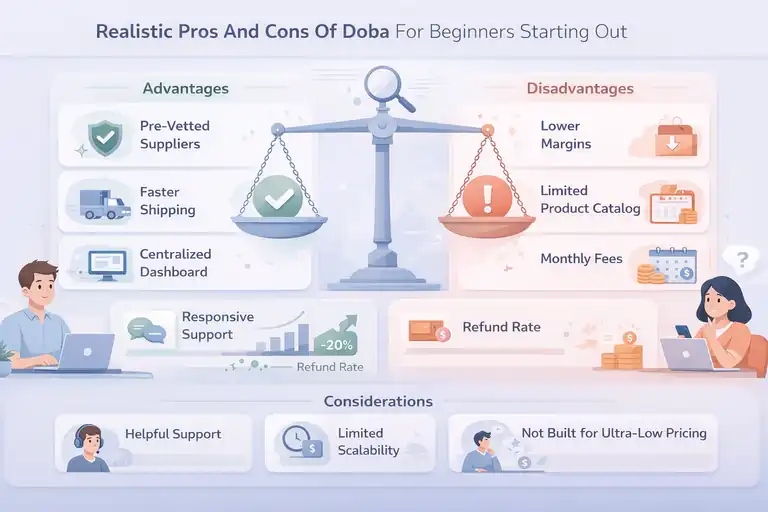
Doba isn’t magic, and it isn’t terrible either. The truth sits in the middle, and beginners benefit most from seeing both sides clearly.
Advantages That Help Beginners Move Faster Early On
Doba removes many early barriers that stop beginners from launching.
The biggest advantages I see:
- Pre-vetted suppliers reduce risk
- Faster shipping compared to overseas sourcing
- Centralized dashboard simplifies learning
According to industry data, faster shipping can reduce refund requests by over 20 percent for new stores. That alone can protect beginner confidence.
If your goal is to learn dropshipping without drowning in complexity, these advantages matter.
Limitations That Can Slow Growth for New Dropshippers
The same structure that helps beginners can limit scaling later.
Common limitations include:
- Lower margins compared to direct supplier deals
- Smaller product catalog than open marketplaces
- Monthly fees regardless of sales volume
This doesn’t mean Doba is bad. It just means it’s not built for hyper-aggressive scaling right away.
I believe many beginners quit not because Doba fails, but because expectations were unrealistic.
Customer Support Experience From a Beginner Perspective
Support quality matters more when you’re new and unsure.
From what I’ve seen:
- Support is responsive but not instant
- Answers are clear, not overly technical
- Complex issues may take follow-ups
Beginners who ask specific questions get better answers. Vague messages usually lead to generic replies.
Treat support like a tool, not a safety net.
Situations Where Doba Is Not the Right Fit for Beginners
Doba isn’t for everyone, and that’s okay.
It may not be right if:
- You want ultra-low pricing above all else
- You enjoy negotiating directly with factories
- You’re focused on viral product trends
If speed, structure, and learning matter more than raw margin, Doba makes sense.
Beginner Readiness Checklist Before Signing Up For Doba
Before paying for anything, I always suggest a quick self-check. This saves money and emotional energy later.
Skills and Tools You Should Have Before Using Doba
You don’t need to be an expert, but a few basics help a lot.
Helpful skills and tools include:
- Basic ecommerce navigation
- Willingness to edit product pages
- A store platform like Shopify or WooCommerce
If you can upload images and adjust pricing, you’re already ahead.
Budget and Time Commitments Beginners Must Be Honest About
Doba requires both time and money, even at a beginner level.
Be realistic about:
- Monthly subscription costs
- Testing products without immediate profit
- Spending a few hours weekly managing orders
Dropshipping isn’t passive at the start. Anyone who says otherwise is selling something.
Questions Beginners Should Answer Before Paying for a Plan
Ask yourself these questions honestly:
- Do I want structure or freedom right now?
- Can I afford learning costs without pressure?
- Am I okay with slower margins early on?
Clear answers here prevent regret later.
Signs You’re Ready to Start With Doba Confidently
You’re likely ready if:
- You value simplicity over endless options
- You want faster shipping for customer trust
- You’re focused on learning, not shortcuts
When those boxes are checked, Doba for beginners becomes less intimidating and far more useful.
Best practice: Start with one store, one category, and five carefully chosen products. Master the process before expanding. That approach builds skill faster than chasing scale too early.
FAQ
Is Doba good for beginners with no dropshipping experience?
Yes. Doba for beginners works well if you want a structured platform with vetted suppliers, faster shipping, and built-in order automation. It’s especially helpful if you prefer learning in a controlled environment rather than managing suppliers manually.
How much does Doba cost for beginners starting out?
Doba uses a monthly subscription model, typically starting around $29 per month, plus product and shipping costs. Beginners should budget for lower profit margins early while they learn pricing, product selection, and fulfillment workflows.
What should beginners know before signing up for Doba?
Before signing up, beginners should understand that Doba is a paid platform, not a marketplace. You’ll still need to edit product listings, manage customer service, and test margins carefully to avoid overpricing or underpricing products.

I’m Juxhin, the voice behind The Justifiable.
I’ve spent 6+ years building blogs, managing affiliate campaigns, and testing the messy world of online business. Here, I cut the fluff and share the strategies that actually move the needle — so you can build income that’s sustainable, not speculative.
Related posts:
 AppScenic Pros And Cons For Dropshipping
 Salehoo Directory Free: What You Can Access Without Paying
 How to Dropship With SaleHoo: What Makes It Easier
 How Much Does Doba Cost and Is It Justified?
 Doba Dropshipping Review: Honest Pros, Cons, and Verdict
 Spocket Review Honest Pros And Cons: Worth It Or Not?