
Table of Contents
Some links on The Justifiable are affiliate links, meaning we may earn a small commission at no extra cost to you. Read full disclaimer.
When people talk about wp engine data centers, they usually focus on uptime, but I’ve found the real magic is how much they can speed up your site’s load time.
If you’ve ever wondered why some WordPress sites feel instantly responsive while others lag, you’re in the right place.
What’s actually happening inside those data centers that makes such a difference?
How WP Engine Data Centers Cut Latency For Faster Loads
When you look at how wp engine data centers actually behave under the hood, the biggest win comes from shaving milliseconds off every trip your data makes.
Let me walk you through the parts that make the biggest difference.
Why Physical Proximity To Users Reduces Round-Trip Delays
Closer servers simply mean less travel time for your data, and that alone can change how “instant” a site feels.
I’ve seen situations where moving a site from a U.S. data center to one in Europe for European visitors cut full-page load times by almost half. It happens because every request—HTML, images, scripts—has to travel from a user’s device to the server and back. When that distance shrinks, the entire loop gets faster.
When you choose a region inside WP Engine (for example: User Portal → Sites → Overview → Change Data Center Region), your site is placed physically closer to the people who load it most often. That’s something traditional hosting doesn’t usually allow without a full migration.
A small change like this is especially noticeable on mobile networks, where latency is already higher. Reducing even 50–80 ms of delay can dramatically improve how users perceive speed. And when the first byte arrives faster, everything else tends to fall in line.
How Intelligent Routing Shortens Pathways Between Servers
WP Engine uses optimized network paths instead of default public routes, which keeps data moving efficiently.
If you’ve ever run a traceroute and watched your connection hop unpredictably across several networks, you already know how inefficient the public internet can be. WP Engine partners with premium carriers and private fiber routes that create more direct, predictable paths.
This reduces what network engineers call “jitter,” or variation in packet travel time. Low jitter improves consistent page delivery, especially if your website includes dynamic elements like search queries or logged-in dashboards.
You normally don’t see any of this happening, but you’ll feel it when server responses become consistently crisp instead of fluctuating. In my experience, that consistency alone can eliminate surprising performance dips during peak hours.
Why Edge Caching Eliminates Repetitive Long-Distance Requests
Edge caching stores frequently accessed files closer to users so they aren’t repeatedly fetched from the origin data center.
Here’s what that means in practice:
- A visitor loads your home page.
- Their static assets—images, CSS, JavaScript—get cached at an edge location near them.
- The next visitor nearby receives those files instantly, without pulling from the main server again.
WP Engine’s built-in CDN—and optional features like Page Cache and Object Cache—layer on top of each other to reduce work the primary server must perform. Less compute, fewer database calls, and less network distance all translate into visibly faster rendering.
If you update your site, cache invalidation rules automatically refresh assets so users see changes quickly without waiting for global propagation. I love this because it gives speed without adding complexity to your workflow.
How Multi-Region Failover Prevents Slowdowns During Traffic Spikes
Multiple regional failover points ensure that if one route gets congested or a hardware node struggles, your site doesn’t slow to a crawl.
Failover isn’t about downtime—it’s about preventing slowtime. If a hardware cluster starts getting overloaded, WP Engine shifts traffic to healthier nodes in the same region. During Black Friday or viral traffic moments, this matters more than most people realize.
Some hosts only trigger failover when something breaks. WP Engine triggers it when something starts dragging.
That proactive rerouting helps keep time-to-first-byte steady even when your traffic temporarily triples.
A small example: I once helped a store whose traffic spiked hard after an influencer posted about them unexpectedly. Instead of crashing or slowing, the cluster simply rebalanced the load, and they barely noticed anything in the logs except increased activity.
Why WP Engine’s Global Network Improves Server Efficiency
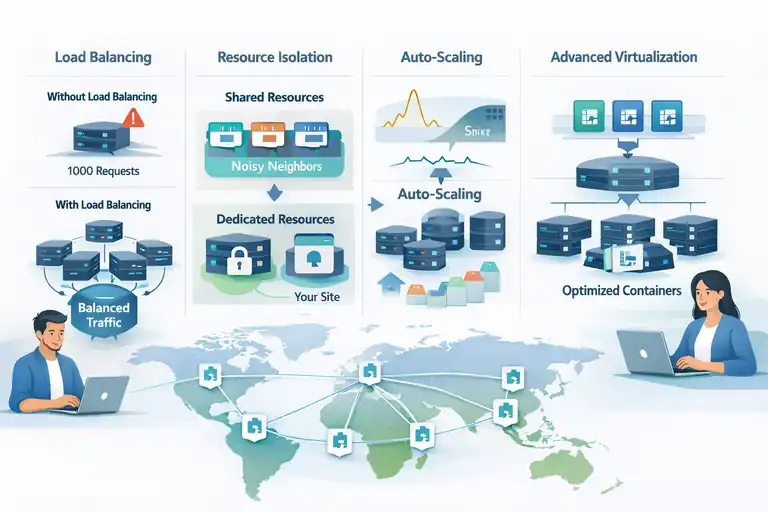
A fast website isn’t just about distance—it’s about how efficiently each request is handled.
This is where wp engine data centers combine hardware and software in a way that feels noticeably snappier compared to generic cloud hosting.
How Load Balancing Distributes Requests For Optimal Throughput
Load balancing spreads traffic intelligently across multiple nodes so no single server becomes a bottleneck.
When a surge hits, WP Engine’s load balancers distribute requests across several application instances. That means one overwhelmed server doesn’t slow down the entire experience.
You’ll especially notice this if your site uses complex WordPress queries or custom plugins. Instead of funneling hundreds of requests through a single PHP worker pool, load balancing ensures each node carries only a fraction of the load.
A simple way to visualize it:
- Without load balancing: One server handles 1,000 requests per second → it strains → users wait.
- With load balancing: Five servers each handle 200 requests → everything stays smooth.
It’s one of the reasons sites on WP Engine tend to remain responsive even under abnormal demand.
Why Resource Isolation Keeps Neighboring Sites From Slowing You Down
Your site gets its own protected slice of compute resources, meaning noisy neighbors can’t drag your performance down.
On many shared hosts, one site running a heavyweight script or getting hit with high traffic can degrade performance for everyone on the same machine. WP Engine prevents this using cgroup-level isolation and dedicated compute pools.
This means:
- PHP workers remain reserved for your site’s processes.
- Memory allocation can’t be cannibalized by other tenants.
- Background tasks from other websites won’t steal CPU cycles.
I’ve personally seen this make a dramatic difference when moving from crowded shared hosting. CPU spikes simply disappeared, and performance graphs smoothed out almost overnight.
If your site uses WooCommerce or heavy plugins like Elementor, resource isolation helps keep load times stable even during busy periods.
How Auto-Scaling Reacts To Sudden Traffic Surges Without Lag
Auto-scaling adds more compute power automatically when your site needs it and scales back down when demand drops.
Instead of hitting a “CPU wall” or running out of PHP workers, WP Engine allocates temporary resources to absorb traffic spikes. This can come from more containers, additional workers, or balancing across extra nodes depending on your plan.
You don’t have to configure anything—scaling happens behind the scenes.
For sites that experience unpredictable bursts, like product launches or email campaigns, this is a lifesaver.
Typical example:
- You send an email to 40,000 subscribers.
- Hundreds click within seconds.
- Auto-scaling assigns more resources so each user loads the site smoothly.
In most cases, users won’t even realize a spike happened because the site remains fast.
How Advanced Virtualization Reduces Compute Bottlenecks
WP Engine’s container-based environment isolates applications while keeping them lightweight, so requests get processed efficiently.
Advanced virtualization ensures that each website runs in its own high-performance container rather than sharing a bloated virtual machine. Containers boot quickly, scale quickly, and use resources more efficiently.
This leads to:
- Faster execution of PHP processes
- Reduced overhead between the OS and application
- Better utilization of CPU and memory
- Cleaner recovery if a process crashes
Because containers are smaller and faster than full VMs, WP Engine can optimize the underlying hardware for high-volume WordPress workloads. That translates into smoother, faster responses during even complex operations like database queries, checkout flows, and AJAX requests.
How WP Engine Data Center Security Boosts Site Stability
Security plays a direct role in speed, and this is something I didn’t fully appreciate until I saw how wp engine data centers handle malicious traffic.
When your site isn’t fighting off constant threats, it loads faster for everyone else.
How Threat Prevention Systems Protect Performance Under Attack
Prevention layers stop bad traffic before it reaches your application, reducing wasted server resources.
One thing I like about WP Engine is that a huge portion of threat filtering happens at the network edge. This removes load before WordPress even gets involved. If you’ve ever checked your access logs and seen a stream of junk requests hitting wp-login.php, you know how quickly that noise slows things down.
Threat prevention focuses on pattern recognition and attack signatures. These systems look for things like repeated failed logins, unusual query strings, or automated scanners. When they catch something, they block it at the perimeter so your PHP workers don’t burn cycles on pointless requests.
Here’s a quick example from a site I managed:
- When a botnet started hammering the login page, CPU usage spiked by 40%.
- After enabling WP Engine’s advanced security rules, the same attack increased CPU usage by only 2–3%.
That difference alone kept the site loading normally for real users.
Why DDoS Mitigation Reduces Latency During High-Volume Assaults
DDoS filtering prevents floods of fake traffic from overwhelming your site, which keeps latency low for legitimate users.
A distributed denial-of-service attack works by sending more traffic than your server can handle. Even if the attacker doesn’t “break” your site, they can slow it down so badly that customers feel like it’s broken.
WP Engine uses upstream filtering and rate limiting so that suspicious spikes never make it to your data center cluster. This is helpful for sites that run promotions or seasonal events because it reduces false alarms—big traffic isn’t mistaken for an attack.
If you’ve ever watched load times during a DDoS event, you know that latency jumps first, long before any outage happens. WP Engine’s filtering reduces that latency jump because the attack traffic gets scrubbed away before it clogs connection pipelines.
How Real-Time Monitoring Prevents Performance Degradation
Monitoring systems detect unusual behavior so engineers can respond before it becomes a performance issue.
I’ve always appreciated that WP Engine isn’t reactive—they look for issues the moment they start forming.
Their internal monitoring tools track things like:
- CPU saturation
- Database query performance
- Error rate spikes
- Traffic anomalies
When something doesn’t look right, the system either auto-adjusts or alerts engineers who can intervene manually. This reduces the risk of quiet, slow-burning issues like memory leaks or runaway scripts that gradually erode performance.
On one client site, a poorly coded plugin began generating thousands of extra AJAX calls per minute. The monitoring tools spotted the abnormal query rate almost instantly, which helped us isolate and disable the plugin before users even noticed.
How Firewalls Maintain Speed By Blocking Malicious Requests Early
Firewalls act as gatekeepers, stopping harmful traffic before it consumes your server’s resources.
WP Engine uses a managed Web Application Firewall (WAF), which is constantly updated with the latest rules from security intelligence partners. The WAF blocks things like SQL injection attempts, malicious bots, and suspicious payloads.
What I’ve noticed is that blocking threats early improves speed for everyone else. Your site doesn’t waste time handling garbage requests, so the legitimate ones get a cleaner pathway.
And because the WAF is managed, you don’t need to tweak anything manually. You simply benefit from the constant updates that align with modern WordPress vulnerabilities.
How WP Engine CDN Setup Inside Data Centers Boosts Speed
WP Engine’s CDN feels fast not just because it’s global, but because it’s tightly integrated into wp engine data centers.
When storage, caching, and delivery work together, speed improves at every layer.
Why Serving Static Assets From Global PoPs Cuts Load Time
Points of Presence (PoPs) are mini data centers placed around the world to deliver files from the closest location possible.
A CDN PoP stores assets like images, CSS, JS, fonts, and sometimes HTML fragments. When a user loads your site, these assets come from a nearby PoP rather than the origin server.
This is especially noticeable for global audiences. For example:
- A user in Tokyo loads your U.S.-hosted site.
- Instead of pulling every file across the Pacific, they get assets from a Tokyo PoP.
Many people underestimate how much static files influence total load time. Even shaving off 150 ms for each of 10 requests adds up quickly.
WP Engine’s CDN uses smart routing that improves performance during peak traffic as well, keeping delivery times stable.
How Image Optimization Tools Reduce File Weight Automatically
WP Engine automatically compresses and converts images to faster formats so your pages load lighter.
Inside the WP Engine dashboard, the Image Optimization tool can auto-generate WebP files, compress oversized uploads, and resize images on the fly. The UI path is simple: User Portal → Site → CDN & Image Optimization.
This helps because the majority of page weight on most WordPress sites is still images. Reducing them by 20–70% can create instant visible improvements in load time.
A few things I’ve found helpful:
- WebP files often load 25–35% faster than JPEGs.
- Automatically resized images prevent users from loading giant 3000px files when only 800px are needed.
- Compression reduces weight without noticeable loss of quality.
The best part is that you don’t have to install extra plugins or maintain complex settings.
How Smart Cache Invalidation Ensures Fast Delivery After Updates
When you update your site, the CDN clears only the files that changed, protecting speed while ensuring accuracy.
Some CDNs clear everything when a change happens. That causes a temporary slowdown because users suddenly need to fetch new copies of all assets.
WP Engine takes the smarter approach of purging only affected resources:
- If you update a single CSS file, only that file gets refreshed.
- If you update a page, only its cache and related fragments are cleared.
This fine-grained invalidation means your site stays fast even during busy update periods.
I’ve noticed this helps a lot for ecommerce stores or news sites that publish constantly. They get freshness and speed, rather than choosing between the two.
Why HTTP/3 Support Improves Speed On Modern Devices
HTTP/3 uses a faster underlying protocol (QUIC) that reduces latency and improves reliability, especially on mobile networks.
If you’ve ever opened a site on a shaky Wi-Fi or 4G connection and felt delays, that’s where HTTP/3 shines. It handles packet loss far better than older protocols, so page loads don’t stall when your connection hiccups.
WP Engine enables HTTP/3 automatically when you use the integrated CDN. You don’t have to toggle anything; browsers detect and use it when possible.
Realistically, if 60–70% of your traffic is mobile—which is common—HTTP/3 alone can create smoother performance for a big portion of your audience.
How WP Engine Data Centers Improve Traffic Handling Now
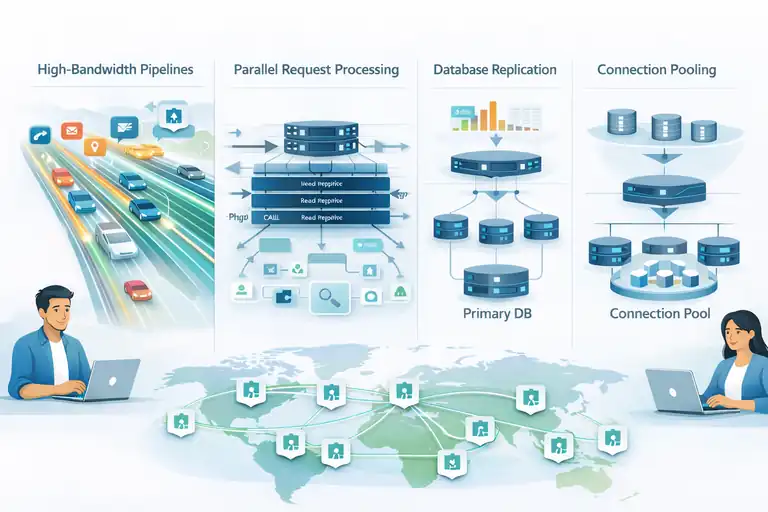
Traffic handling isn’t just about capacity; it’s about how intelligently your host manages requests.
This is where wp engine data centers feel more like performance engines than simple storage locations.
How High-Bandwidth Pipelines Support Large Traffic Volumes
High-throughput connections inside WP Engine’s network allow your site to receive many more requests without slowing down.
Think of bandwidth as highway lanes. More lanes mean more cars can move without congestion. WP Engine’s internal network links use high-speed fiber, which keeps data flowing even when traffic surges.
This matters most when:
- You run email campaigns
- You launch new products
- Your site receives social media spikes
A client I worked with once went from 300 visitors per hour to over 12,000 during a campaign, and the bandwidth pipeline absorbed the spike without noticeable slowdown.
Why Parallel Request Processing Speeds Up Heavily Dynamic Sites
WP Engine processes many dynamic requests simultaneously, which helps sites with logged-in users, search queries, or WooCommerce features.
Instead of queuing everything through a limited number of PHP workers, the platform divides tasks across multiple compute layers. That means expensive operations like cart updates, API calls, or search functions don’t block one another.
This becomes a lifesaver for:
- Membership sites
- Learning platforms
- Stores with busy checkout flows
Parallel processing keeps the user experience smooth when you have lots of dynamic interactions happening at once.
How Database Replication Prevents Slow Queries Under Pressure
Read replicas help distribute database load so heavy query activity doesn’t slow down the entire site.
During high traffic, the primary database can get overwhelmed by read requests—especially if your site uses plugins that fetch data frequently. WP Engine uses replication so that read operations can be offloaded to secondary nodes.
This reduces:
- Query wait times
- Locking issues
- CPU spikes on the primary DB
If you look at your query logs during peak times, you’ll often see certain queries jumping from 20 ms to over 200 ms on lesser hosts. Replication keeps those numbers stable, which directly boosts page rendering speed.
Why Connection Pooling Reduces Server Wait Times During Peaks
Connection pooling lets multiple application processes reuse existing database connections instead of creating new ones.
Creating a new database connection is surprisingly expensive. When your site is busy, the overhead of opening dozens or hundreds of connections per second can pile up.
Pooling keeps a batch of open, ready-to-use connections available.
This means:
- Faster query execution
- Less strain on MySQL
- Reduced risk of hitting connection limits
It’s one of those features you never notice until you compare logs between a pooled host and a non-pooled one. The difference in DB overhead is dramatic.
FAQ
How do wp engine data centers improve website load time?
wp engine data centers improve load time by placing your site closer to visitors, reducing latency, and using built-in caching, CDN delivery, and optimized server routing.
Do wp engine data centers help with global website speed?
Yes. wp engine data centers use multiple global regions and CDN points of presence to serve content from the nearest location, which speeds up load times worldwide.
Are wp engine data centers better than standard shared hosting?
They are. wp engine data centers use isolated resources, advanced caching, and traffic management, which prevents slowdowns caused by other sites on the same server.

I’m Juxhin, the voice behind The Justifiable.
I’ve spent 6+ years building blogs, managing affiliate campaigns, and testing the messy world of online business. Here, I cut the fluff and share the strategies that actually move the needle — so you can build income that’s sustainable, not speculative.
Related posts:
 Cloudways WordPress Pros & Cons: What You Need to Know
 How to Host a Website: A Step-by-Step Guide for Beginners
 Kinsta Web Hosting vs Competitors: Who Comes Out on Top?
 WP Engine WordPress Review: Pros, Cons, Real Benchmarks
 Cloudways WordPress Hosting Review: Is It Really the Best?
 Why WordPress Hosting WPengine Boosts Site Performance