
Table of Contents
Some links on The Justifiable are affiliate links, meaning we may earn a small commission at no extra cost to you. Read full disclaimer.
Looking for a way to claim a Hostinger free domain without pulling out your wallet? You’re not alone. Many people ask: How do I get a domain name on Hostinger for free? What’s included with it, and are there any hidden catches?
In this guide, I’ll walk you through everything you need to know about getting a free domain through Hostinger, step by step.
How Hostinger Free Domain Registration Works
Getting a Hostinger free domain is simpler than most guides make it sound, but there are some fine print details you need to understand before you jump in.
Let’s break it down so you know exactly what you’re getting.
Understanding Hostinger’s Free Domain Offer
Hostinger includes a free domain with certain hosting plans, but it’s not a stand-alone perk. The deal is pretty straightforward: you choose a plan (like Premium or Business web hosting), and you get one free domain name bundled in.
I believe this is smart because most people need hosting and a domain together anyway — trying to buy them separately often ends up costing more. Hostinger’s main hook here is the first-year savings. You’re basically skipping the $10–$15 you’d normally spend on a .com or .net domain.
The catch? That “free” label only applies to the first year. When renewal time comes, you’ll pay the standard yearly fee, just like with any registrar. That’s where planning ahead really matters.
Which Domain Extensions Are Available for Free
Not every extension (the “.com” part of a web address) is part of the free deal. The most popular ones are included, such as:
- .com
- .net
- .org
- .info
- .online
But if you’re eyeing something quirky like .io, .tech, or country codes like .co.uk, you’ll usually have to pay separately. I suggest checking Hostinger’s search tool before getting your hopes up, since availability varies.
A quick pro tip: if your exact .com is taken, .online and .net are strong fallbacks that Hostinger often includes free. They’re widely recognized and don’t look “cheap” the way some ultra-niche extensions might.
Who Qualifies for the Free Domain Perks
This is where a lot of people get tripped up. Not every Hostinger plan comes with a free domain. You’ll qualify if you pick one of these:
- Premium Web Hosting
- Business Web Hosting
- Cloud Hosting plans
If you go with the Single Web Hosting plan (the cheapest option), you won’t get the domain perk — it’s hosting only. From what I’ve seen, this catches many people off guard, so read the plan features carefully before checking out.
Also, the free domain applies only to new customers. If you already have a Hostinger account and renew or upgrade later, you usually don’t get another freebie.
My suggestion: if you’re serious about building a website, start with at least the Premium plan from day one so you unlock the offer.
Step-By-Step Process to Register a Hostinger Free Domain
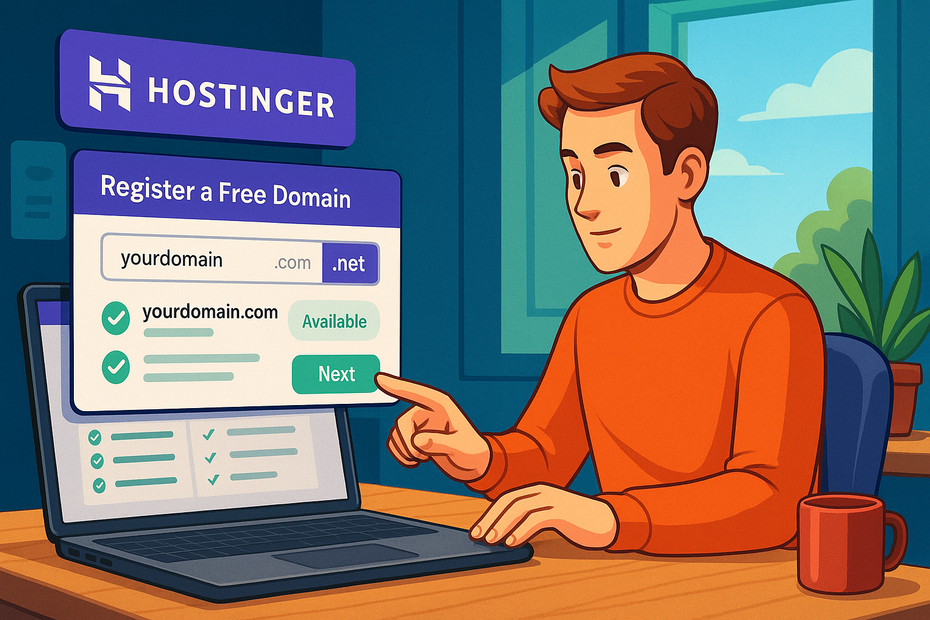
Now that you know the rules of the game, let’s walk through exactly how to claim your Hostinger free domain without paying a cent extra.
Creating a Hostinger Account to Unlock Free Domains
Step one is as basic as it sounds: you’ll need to create a Hostinger account. Head over to their homepage and click “Start Now.” You’ll be prompted to sign up with your email, Google, or Facebook.
I recommend sticking with email — it gives you more control, especially if you need to recover access later. Once you’re inside the dashboard (Hostinger calls it hPanel), that’s where all the free domain magic happens.
Choosing a Hosting Plan That Includes a Free Domain
Here’s where you need to be careful. On the pricing page, you’ll see options like “Single,” “Premium,” and “Business.”
- Single Web Hosting: No free domain.
- Premium Web Hosting: Includes free domain.
- Business Web Hosting: Includes free domain + extra features.
If you’re on a budget, Premium is usually the sweet spot. I’d only go with Business if you expect heavy traffic or want extra speed tools right away.
Once you’ve selected your plan, you’ll be asked to pick a billing cycle. The free domain offer is usually tied to annual plans (12 months or longer). Month-to-month billing won’t unlock the perk.
Searching for and Selecting Your Free Domain Name
This is the fun part — picking your actual domain. After selecting your hosting plan, Hostinger’s system automatically prompts you to search for a domain.
Type in your desired name and hit search. You’ll see availability results, along with which extensions are free.
For example, searching “mybrand” might show:
- mybrand.com – free
- mybrand.net – free
- mybrand.io – $39.99/year
If your perfect .com is taken, try slight tweaks (like adding a dash or a short word) or consider .net or .online. I usually suggest keeping it short, simple, and easy to spell. Avoid numbers or hyphens unless absolutely necessary.
Completing the Setup Without Paying Extra Fees
Once you’ve chosen your domain, just proceed with checkout. If you’ve selected a qualifying hosting plan, the domain fee will automatically be zeroed out in your cart. You’ll see “Free” next to the domain name.
A couple of things to double-check before you hit pay:
- Make sure WHOIS privacy protection is included (sometimes it’s added free, sometimes optional). This hides your personal info from public records.
- Confirm the domain is listed as free for the first year only, so you know what to expect later.
After checkout, you’ll find your domain listed in the hPanel under “Domains.” From there, you can manage DNS, set up email accounts, or point it to your website builder.
What’s Included With a Hostinger Free Domain
A Hostinger free domain isn’t just the name itself — it comes with a handful of extras that make managing your site easier.
Think of it like buying a new phone and realizing it comes with a charger and case already in the box.
Domain Privacy and WHOIS Protection Explained
Whenever you register a domain, your personal details — like your name, phone number, and email — are added to a public database called WHOIS. Anyone can look that up. That’s where privacy protection steps in.
Hostinger often bundles WHOIS privacy with your free domain. If it’s included, you’ll see a toggle for it inside your hPanel dashboard under Domains > Manage > Privacy Settings.
I strongly suggest keeping this switched on. Without it, you’re opening the door to spam emails, cold calls, and even phishing attempts.
I’ve tested setups with and without privacy, and the difference is night and day. Within a week of registering a domain without WHOIS protection, my inbox filled with SEO “gurus” promising to rank me #1 on Google. Trust me, check the box for privacy if it isn’t already ticked.
DNS Management Tools You Get With Hostinger
Once your domain is active, you’ll get full DNS (Domain Name System) controls. This might sound technical, but it’s basically how you point your domain to different services.
From hPanel > Domains > DNS Zone Editor, you can:
- Add A records to point your domain to a specific IP address.
- Set up CNAME records for subdomains like blog.mysite.com.
- Configure MX records to link your domain to an email provider.
If you’re planning to use third-party tools (say, linking your domain to a newsletter platform like Mailerlite), DNS control is essential. Hostinger’s interface keeps it simple — you don’t need to be a networking engineer to update a record.
Email Accounts and Extra Perks That Come Free
Another underrated perk of Hostinger free domains is email. With most plans that include a free domain, you also get at least one custom email account, like you@yourdomain.com.
This may not sound like a big deal, but having a branded email address instantly adds professionalism. Imagine reaching out to a client from a Gmail address vs. one with your domain — one looks personal, the other looks like a real business.
Setup is quick:
- Go to hPanel > Emails > Email Accounts.
- Click “Create Account.”
- Enter the username you want and a secure password.
Hostinger also offers webmail access, or you can connect your email to Outlook or Gmail. That’s the kind of detail that saves you from juggling separate inboxes.
Limitations of the Hostinger Free Domain Offer
Even though Hostinger’s free domain deal is a good starting point, it’s not without strings attached. Let me lay out the main limits so you’re not caught off guard down the road.
Extensions That Are Not Covered by the Free Plan
Not every domain extension is free. While .com, .net, and .org are usually included, premium or country-specific extensions often aren’t.
For example:
- .io, .ai, and .tech = Paid extras
- .co.uk, .ca, or .in = Usually not covered
- Trendy TLDs like .shop or .blog = Paid
If you had your heart set on a newer extension like .ai, be prepared to pay full price. I usually recommend sticking with a .com if it’s available, since it’s included in the offer and still the most trusted extension worldwide.
Renewal Costs After the First Year of Registration
This is where reality sets in. The “free” part only applies to your first year. After that, you’ll need to pay the standard annual renewal fee.
For most .com domains, renewal is about $9–12 per year. Some extensions like .online or .store might cost more — closer to $20 or even $40.
Here’s a quick way I plan for this: when budgeting for a new website, I don’t just look at the hosting cost. I add in around $10–15 per year as a “domain maintenance” line item. That way, the renewal doesn’t sneak up on me as a surprise expense.
Restrictions on Transfers and Ownership Rights
Another small but important detail is domain transfers. When you register your free domain with Hostinger, the domain is technically under their registrar account. You still own it, but you can’t transfer it immediately.
ICANN rules (the global domain authority) require a 60-day lock after registration. After that, you can transfer it to another registrar if you want.
One thing I’ve noticed: if you cancel your hosting plan early, the free domain doesn’t always come with you. In most cases, you’ll either need to pay the registration fee to keep it active or wait out the plan. I always suggest reading the terms in your checkout screen closely so you’re not surprised.
Tips to Make the Most of Your Free Domain

A Hostinger free domain is only as valuable as how you use it. With a little strategy, you can stretch that first-year freebie into a powerful long-term asset.
Picking the Best Extension for Your Website Goals
Choosing the right extension (the part after the dot) is more than a style choice — it can influence credibility and SEO.
- .com: Best for businesses, blogs, or anything with global reach. It’s what people instinctively type.
- .net: Great backup if your .com is gone. Often used by tech or digital brands.
- .org: Works well for nonprofits, communities, or educational groups.
- .online or .info: Good if you want something modern and still widely recognized.
If you’re building a personal portfolio, I’d lean on .com if available, but .online has grown in popularity. For instance, one of my side projects used a .online extension, and I never had trouble with trust signals in Google search results.
The bottom line? Stick to extensions people recognize. That way, when someone hears your name, they won’t second-guess typing it into the browser.
Using Domain Forwarding to Connect Other Services
Domain forwarding is like setting up a shortcut. Let’s say you grabbed a Hostinger free domain but still prefer running your site on a tool like Notion or Carrd.
Instead of sharing a clunky URL (like notion.site/username123), you can forward your free domain to it.
Here’s how to do it in Hostinger:
- Log in to hPanel > Domains > Manage > DNS Zone Editor.
- Set up a redirect or forward your A record to the IP of the service you’re connecting.
- Save changes and allow time for DNS to propagate (usually under 24 hours).
I did this once for a quick product launch. Instead of asking people to visit a long Gumroad link, I used my free domain to forward straight to the sales page. It made the site look polished, even though the backend was super simple.
Setting Up SSL Certificates for Security and Trust
An SSL certificate encrypts traffic between your site and visitors. Without it, your site will show up as “Not Secure” in Chrome — a huge turn-off for anyone clicking your link.
The good news is Hostinger gives you a free SSL certificate with hosting. To activate it:
- Go to hPanel > SSL.
- Choose your domain from the dropdown.
- Click “Install SSL.”
Within minutes, your site should display the little padlock in the browser. That padlock isn’t just visual candy; Google ranks HTTPS sites higher, and people trust them more.
I believe skipping SSL is one of the easiest mistakes beginners make. It takes 2 minutes to set up and instantly boosts credibility.
Alternatives if You Don’t Qualify for Hostinger Free Domain
Not everyone can unlock the Hostinger free domain — maybe you picked the wrong plan, or maybe you’re already a customer. Here are other ways to keep costs low.
Exploring Free Subdomains From Other Platforms
If you’re just testing an idea, you don’t always need a full domain right away. Platforms like WordPress.com, Wix, and Blogger offer free subdomains (like yourname.wordpress.com).
These aren’t perfect for professional branding, but they’re a solid sandbox for learning and experimenting. I once built a demo site for a client entirely on a free subdomain just to show off a layout before moving to a paid domain.
Using Budget-Friendly Domain Registrars Instead
If you miss the Hostinger free domain, you can still find cheap alternatives. Registrars like Namecheap often run deals where a .com is under $10 for the first year.
I suggest comparing renewal costs too — a cheap first year can turn into a $30 yearly bill if you’re not careful. I keep a spreadsheet of renewal fees for each domain I own so I’m never blindsided.
Leveraging Limited-Time Hostinger Promotions
Hostinger runs seasonal promos where the free domain perk extends to more plans or comes bundled with extra tools. If you don’t qualify right now, it might be worth waiting for a Black Friday or New Year deal.
For example, I’ve seen Hostinger throw in both a free domain and a free email service upgrade during holiday sales. If you’re on the fence, keep an eye out — timing can literally save you $20–30 per year.
Common Questions About Hostinger Free Domains
Let’s clear up some of the questions I hear most often about the Hostinger free domain offer.
Can I Register More Than One Free Domain on Hostinger?
No. The free domain perk applies to one domain per hosting account. If you want multiple domains, you’ll need to purchase the extras.
However, you can still add unlimited parked domains and subdomains on most plans. For instance, you could buy another domain later and point it to the same website.
What Happens if I Cancel My Hosting Plan?
If you cancel your hosting within the first 30 days (the money-back guarantee window), the domain fee may be deducted from your refund. That’s because domains are a separate cost Hostinger pays to registrars.
If you cancel after that, you’ll usually keep the domain but may need to pay for renewal when it comes due. I always tell people: don’t register a free domain just to test hosting unless you’re ready to stick with it.
Is the Free Domain Truly Free Forever?
No — it’s only free for the first year. After that, you’ll pay the standard renewal price (usually $10–15 for .com, more for specialty extensions).
Think of the free year as a head start. It gives you time to test your idea, build your site, and decide whether it’s worth the long-term investment.
Expert Tips Before Registering Your Domain
Here’s where I want to share some personal advice that can save you money and headaches in the long run.
Planning Ahead for Renewal Costs and Future Growth
Your Hostinger free domain is only free once. Budget around $12 per year for renewals, and if you plan to grow into multiple sites, factor in more.
I usually register domains for at least 3 years upfront if I’m serious about a project — it signals stability to Google and saves me from annual billing reminders.
Avoiding Common Mistakes When Choosing a Domain Name
I’ve seen people make the same mistakes over and over:
- Picking a name too long (hard to type).
- Using numbers or hyphens (confusing when spoken).
- Chasing trends (a “.fidgetspinner” domain won’t age well).
Keep it short, memorable, and relevant. I always test a name by saying it out loud to a friend. If I have to spell it out more than once, it’s not a good fit.
Aligning Your Domain Choice With SEO and Branding
Your domain doesn’t have to include keywords, but it should align with your brand. If you’re running a bakery, “sweetcorner.com” works better than “bestcakes123.com.”
Google pays more attention to quality content than domain keywords these days, but branding sticks with your audience. I suggest thinking 3–5 years ahead — will this name still make sense if you expand your business or niche?
Quick Comparison: Perks vs. Limitations of Hostinger Free Domain
| Feature | What You Get Free | What You Pay Later |
| Domain Registration (Year 1) | $0 | Renewal $10–$15+ |
| WHOIS Privacy Protection | Often included | Sometimes extra |
| DNS Management | Free | Always free |
| Custom Email (you@domain.com) | Free with plan | Renewal tied to plan |
| SSL Certificate | Free | Renewal tied to plan |
| Transfer Flexibility | Locked for 60 days | Transferable after |

I’m Juxhin, the voice behind The Justifiable.
I’ve spent 6+ years building blogs, managing affiliate campaigns, and testing the messy world of online business. Here, I cut the fluff and share the strategies that actually move the needle — so you can build income that’s sustainable, not speculative.
Related posts:
 HostGator Domain vs Competitors: Smart Saving Strategies
![An informative illustration about Bluehost Blog Setup for Beginners [Complete Walkthrough]](https://thejustifiable.com/wp-content/uploads/2025/11/Bluehost-Blog-Setup-for-Beginners-Complete-Walkthrough.png "Bluehost Blog Setup for Beginners [Complete Walkthrough]") Bluehost Blog Setup for Beginners [Complete Walkthrough]
Bluehost Blog Setup for Beginners [Complete Walkthrough]
 Expert Review: Are Namecheap Hosting Plans Worth It?
 Webhostingpad: Everything You Need to Know
 The Ultimate Guide to UltraWebHosting: Features, Benefits, and Pricing
 How to Host a Website: A Step-by-Step Guide for Beginners