
Table of Contents
Some links on The Justifiable are affiliate links, meaning we may earn a small commission at no extra cost to you. Read full disclaimer.
If you’ve been searching for an affordable, easy-to-use HR software for small to mid-sized businesses, Freshteam by Freshworks probably caught your eye. It promises to simplify hiring, onboarding, and employee management all in one place.
But is it really the best HR tool for SMBs—or just another name in the crowded HR tech market?
In this review, we’ll break down exactly what Freshteam offers, where it shines, and where it might fall short, so you can decide if it’s the right fit for your growing business.
What Is Freshteam By Freshworks?
Freshteam by Freshworks is an all-in-one HR software designed specifically for small and mid-sized businesses (SMBs). It helps teams manage hiring, onboarding, employee data, and time-off tracking—all from a single, clean dashboard.
Think of it as your digital HR assistant that handles the repetitive work while you focus on building a great team.
Understanding Freshteam’s Core Purpose
At its heart, Freshteam is built to simplify people management. Rather than juggling spreadsheets, emails, and paper forms, everything—from job postings to offer letters—lives in one centralized system.
Example: If you’re hiring for a marketing role, you can post jobs directly to LinkedIn or Indeed from Freshteam, track applicants through the recruitment stages, and automatically move candidates into onboarding once they’re hired—all without switching tabs.
The goal is simple: to help growing businesses run HR operations efficiently, without needing a full-time HR department. I believe that’s where Freshteam really shines—it makes professional HR accessible to teams that don’t yet have massive HR budgets or headcounts.
Key Features That Define Freshteam’s Value
Freshteam’s true value lies in its integration of hiring, onboarding, and employee management under one roof.
Some standout features include:
- Applicant Tracking System (ATS): Lets you create custom hiring pipelines, manage resumes, and communicate with candidates seamlessly.
- Onboarding Automation: Sends welcome emails, assigns tasks to departments, and ensures new hires are ready on day one.
- Employee Database (HRIS): Acts as a digital filing cabinet for employee profiles, job details, and documents.
- Time-Off Management: Handles leave requests and approvals through a self-service model.
- Mobile App: Lets managers approve requests and check employee data on the go.
In my experience, SMBs find this combination particularly useful because it cuts down administrative overhead while improving communication across departments.
How Freshteam Fits Into the Freshworks Ecosystem
Freshteam isn’t a standalone island—it’s part of the larger Freshworks suite, which includes customer and IT solutions like Freshdesk, Freshsales, and Freshservice.
That means if you’re already using Freshsales for CRM or Freshdesk for customer support, you can connect them easily.
For example:
- Sync candidate details from Freshteam to Freshsales when onboarding sales reps.
- Use Freshservice integration to automatically create employee IT requests during onboarding.
This ecosystem approach gives SMBs the power of enterprise-grade tools with the simplicity of plug-and-play integration—something few HR tools in its price range can offer.
Core Features That Simplify HR Management
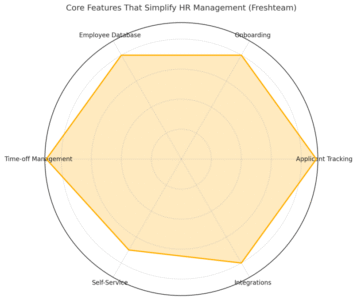
Freshteam bundles multiple HR functions into one interface, removing the chaos of fragmented tools. Here’s how its core features make daily HR work smoother.
Streamlined Applicant Tracking System (ATS)
Freshteam’s ATS helps you post jobs, track applicants, and collaborate with hiring teams in real-time.
Example workflow:
- Create a job posting directly from the dashboard.
- Share it to multiple platforms like LinkedIn and Glassdoor with one click.
- Use customizable hiring stages—like Screening → Interview → Offer—to track candidate progress.
What I like about it is the built-in collaboration: hiring managers can leave comments or ratings on each candidate, keeping everyone aligned without endless email threads.
Smart Onboarding Workflows for New Hires
Once you’ve made a hire, Freshteam automatically transitions them to onboarding. This means:
- Predefined onboarding task lists for IT, HR, and management.
- Automated email invitations with access to the employee portal.
- Document upload and e-signature capability.
This is especially powerful for remote or hybrid teams where onboarding can easily get disjointed. The automation ensures no step—like provisioning email accounts or setting up payroll—is missed.
Employee Database and Document Management
Freshteam includes a centralized HR Information System (HRIS). Every employee profile includes details like department, job title, date of joining, emergency contact, and uploaded documents.
Why it matters: Instead of storing contracts and performance reviews across shared drives, Freshteam’s HRIS becomes a secure, searchable hub. You can even define access permissions so managers only see what’s relevant to them.
Time Off Management and Attendance Tracking
Managing leaves and holidays is often a headache, but Freshteam’s leave management feature simplifies it. Employees can apply for time off via desktop or the mobile app, and managers get instant notifications for approval.
You can set up:
- Custom leave types (sick leave, vacation, etc.)
- Approval workflows
- Automatic holiday calendars
It’s one of those quiet but vital tools that keeps small teams running smoothly, especially when balancing workloads across projects.
Employee Self-Service Portal
Freshteam empowers employees to manage their own HR data—updating personal information, applying for leaves, or checking policy documents—all through a simple dashboard.
From what I’ve seen, this self-service model saves HR teams hours every week and encourages transparency. It also builds trust, since employees feel more in control of their own data.
How Freshteam Automates HR Tasks Efficiently
Automation is where Freshteam really starts to feel like an HR assistant rather than just another management tool. It takes repetitive processes and turns them into set-it-and-forget-it workflows.
Using Automation to Reduce Manual Work
Freshteam’s automation engine allows you to trigger actions based on defined events.
For instance:
- When a candidate reaches the “Interview” stage, an email is sent to schedule a call.
- When an employee joins, onboarding tasks are automatically assigned.
- When leave is approved, it syncs with the calendar instantly.
These automations eliminate follow-ups and reduce human error, ensuring HR processes run consistently every time.
Integrations with Other Freshworks Tools and Apps
Freshteam integrates with tools like Slack, Microsoft Teams, Google Calendar, and Freshservice.
This means:
- You can receive leave notifications in Slack.
- Interview reminders show up directly in Google Calendar.
- IT tasks for new employees are created in Freshservice automatically.
I recommend enabling these integrations early—they’re easy to set up (usually under Settings → Integrations) and can save hours of manual coordination.
Leveraging AI and Custom Workflows for HR Efficiency
Freshteam doesn’t have the deep AI capabilities of some enterprise HR tools yet, but it leverages automation smartly. You can build custom workflows—for instance, triggering emails, status changes, or reminders based on conditions like “new hire added” or “leave balance low.”
For SMBs, this level of automation hits the sweet spot: powerful enough to reduce workload, but simple enough to manage without IT support.
Pricing Breakdown: Is Freshteam Affordable for SMBs?
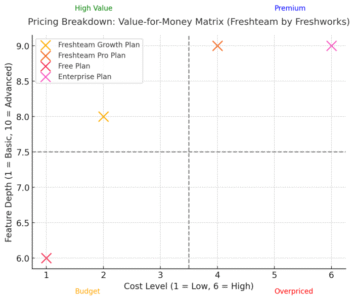
Freshteam by Freshworks was designed with small to mid-sized businesses in mind, so affordability plays a big role in its appeal.
What I appreciate is that Freshworks doesn’t hide its pricing behind endless demos or quote forms—it’s clear, upfront, and flexible enough to fit growing teams.
Overview of Freshteam Pricing Plans
Freshteam offers four main plans: Free, Growth, Pro, and Enterprise. Each plan scales based on the number of users and the level of features your team needs.
Here’s a quick breakdown:
| Plan | Price (billed annually) | Best for | Key Highlights |
| Free | $0/month (up to 50 employees) | Startups or very small teams | Basic applicant tracking, employee directory, and time-off management |
| Growth | $1.20/user/month | SMBs building structured HR processes | Job postings, onboarding workflows, and automation options |
| Pro | $2.40/user/month | Growing businesses | Advanced recruitment analytics, custom workflows, and integrations |
| Enterprise | Custom pricing | Large or scaling organizations | Advanced permissions, reporting, and dedicated support |
Pricing may vary slightly depending on billing cycle and region.
What’s great is you can start with the free plan—no credit card required—and upgrade once you outgrow it. This lets small businesses test the system without pressure.
Comparing Free vs. Paid Plans
The Free plan is surprisingly functional for startups. You get applicant tracking, a basic employee directory, and simple time-off tracking. But once you start hiring actively, you’ll hit its limits quickly—especially since it caps the number of employees and lacks automation.
The Growth plan is where most SMBs start to feel the power of Freshteam. It unlocks automated workflows, onboarding checklists, and more integrations. For under the price of a cup of coffee per user, it’s hard to argue with the value it delivers.
The Pro and Enterprise plans bring scalability, including advanced analytics, reporting, and role-based permissions. These plans are built for organizations managing multiple locations or departments.
If you want a quick recommendation, I’d say start with the Growth plan—it balances features and cost perfectly for small to medium teams.
Which Plan Offers the Best Value for Small Businesses?
In my experience, the Growth plan offers the best overall value. It covers all essential HR needs—hiring, onboarding, time-off, and team collaboration—without overloading you with enterprise-level complexity.
Here’s why it stands out:
- Affordable entry cost with premium-level automation tools.
- Custom workflows that replace hours of manual admin work.
- Access to integrations like Slack, Gmail, and Microsoft Teams.
For most SMBs, this plan delivers everything needed to run HR operations efficiently and scale up when growth demands more advanced capabilities.
Cost Transparency and Scalability Considerations
One thing I’ve always liked about Freshworks is their transparent pricing. There are no sneaky “contact us for a quote” barriers. You see what you pay, and you can upgrade or downgrade directly from your admin dashboard.
Freshteam also scales seamlessly. As your team grows from 10 to 200 employees, you can simply adjust your plan and keep all your data intact.
To put it simply: Freshteam grows with you, not against you. For SMBs mindful of both budget and expansion, that’s a big win.
Freshteam User Experience and Interface Review
User experience can make or break HR software adoption. Freshteam stands out for its clean, intuitive design that feels approachable even for non-technical users.
Dashboard Design and Ease of Use
The first thing you’ll notice after logging in is the Freshteam dashboard—a clean, organized space that displays your most important HR insights at a glance.
- The left-hand menu gives quick access to key areas like Recruitment, Onboarding, Employees, and Time-Off.
- The kanban-style hiring view makes it easy to drag candidates between stages.
- The search bar works well even for partial names or keywords, which saves time when juggling multiple applicants.
I’ve used many HR systems that felt overwhelming or buried key actions behind five clicks. Freshteam feels refreshingly simple—you can post a job, view candidates, or approve time-off requests within seconds.
Accessibility and Mobile App Functionality
Freshteam’s mobile app is a quiet powerhouse. Available for both iOS and Android, it lets managers approve leave, check attendance, or view candidate updates without needing a laptop.
Some small but practical features:
- Push notifications for new applications or leave requests.
- Employee directory with quick contact access.
- Offline support for basic actions like checking records.
This kind of flexibility makes Freshteam a great fit for remote or field-based teams who rely on mobile-first tools.
Role-Based Access and Data Security Features
Security is non-negotiable in HR software, and Freshteam handles it well. You can set role-based access controls, meaning employees only see what’s relevant to them.
For example:
- Recruiters can access candidate profiles but not payroll information.
- Managers can approve leave requests only within their teams.
- Admins have visibility across departments.
All data is stored securely in the cloud with enterprise-grade encryption. For SMBs that don’t have in-house IT support, this level of built-in security offers serious peace of mind.
Strengths That Make Freshteam Ideal for SMBs
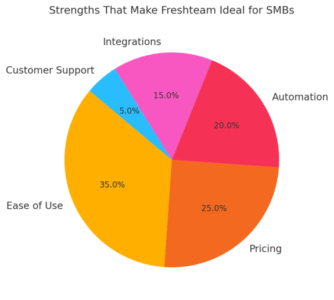
Freshteam’s biggest strength is how it brings enterprise-level HR tools into an SMB-friendly package. It’s accessible, scalable, and designed to simplify—not complicate—your daily operations.
Quick Setup and Minimal Learning Curve
Freshteam can be fully configured in under an hour. The onboarding wizard walks you through setting up employee profiles, job openings, and time-off policies step by step.
If you’ve ever felt intimidated by HR software, this one’s a relief. The UI feels familiar, like using a mix of Google Workspace and Trello. Plus, Freshworks’ support documentation and tutorials are genuinely helpful, not just filler content.
Affordable Pricing for Growing Teams
For the price, Freshteam packs serious value. I often recommend it to early-stage startups or SMBs with limited HR resources.
Here’s what you get without breaking the bank:
- End-to-end recruitment management.
- Automated onboarding and offboarding.
- Leave tracking and employee self-service portal.
- Integrations with popular collaboration tools.
It’s rare to see this level of functionality at such a modest cost per user.
Seamless Collaboration and Workflow Management
Freshteam isn’t just about HR administration—it’s about teamwork. Multiple stakeholders can collaborate during the hiring process, leave comments on candidates, and track onboarding tasks.
When paired with integrations like Slack, the collaboration becomes effortless. You can even approve requests or view candidate updates directly from your chat channels.
Integration with Email, Slack, and Other Platforms
Freshteam’s integrations make it the hub of your HR operations. You can connect with:
- Slack for instant notifications and approvals.
- Google Workspace for syncing calendar events and email invites.
- Microsoft Teams for collaboration and communication.
- Freshservice to handle IT-related onboarding tasks automatically.
I suggest setting up these integrations early—they drastically reduce manual effort and make your workflows more seamless.
Limitations and Potential Drawbacks of Freshteam
While Freshteam by Freshworks is an excellent HR platform for small and mid-sized businesses, it’s not perfect. Every HR tool has trade-offs, and knowing them helps you plan smarter before committing long-term.
Reporting and Customization Constraints
Freshteam’s reporting tools cover basic needs—like tracking hires, time-off balances, and onboarding status—but they fall short if you’re craving deep analytics or custom dashboards.
For example, while you can generate reports on open positions or new hires per recruiter, you can’t always slice data across multiple dimensions (like department performance vs. time-to-hire) without exporting it first.
If you need more flexible insights, you’ll find yourself exporting to Excel or Google Sheets. It’s manageable but not ideal when you want quick, visual analytics inside the app.
I recommend using Freshteam’s Custom Report Builder (found under the Reports tab) to stretch its capabilities—it lets you combine data from different modules, but you’ll still hit limits compared to advanced tools like BambooHR’s analytics engine.
Limited Advanced HR Analytics
Another area where Freshteam could improve is advanced HR analytics. While it tracks essential metrics, such as employee turnover and recruitment funnel data, it doesn’t offer predictive analytics or detailed engagement trends.
In practical terms, that means you can see what happened but not necessarily why it happened. For example, Freshteam can show that your marketing department has higher attrition, but it won’t correlate that to manager feedback scores or training frequency.
If you’re an SMB, this might not be a deal-breaker. But once you start scaling and want to use HR data strategically, the lack of deeper analytics becomes noticeable.
Challenges in Scaling for Larger Enterprises
Freshteam was purpose-built for SMBs. As you grow into hundreds of employees or multiple business units, you may find it lacks the enterprise depth for complex needs—like advanced role hierarchies, global compliance management, or multi-country payroll integrations.
To give an example, if your company expands across regions and you want localized leave policies or custom tax fields, setup can become cumbersome. Freshteam supports basic customization, but not the depth you’d get from full-fledged enterprise HR suites.
I believe this isn’t a flaw—it’s a design choice. Freshteam focuses on ease of use for smaller teams, not massive enterprises with HRIS systems like Workday or SAP SuccessFactors.
Freshteam vs. Competitors: How It Stacks Up
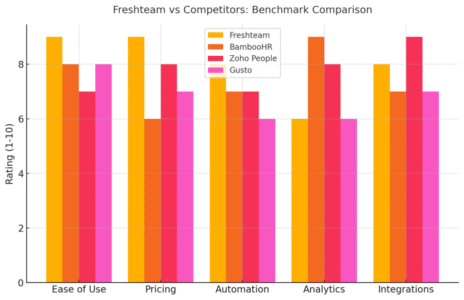
Freshteam stands confidently among other SMB-friendly HR tools, but each competitor brings its own edge. Let’s break down how it compares against the top players.
Freshteam vs. BambooHR
BambooHR is often considered the gold standard for small business HR. It offers strong performance management, in-depth analytics, and better reporting than Freshteam.
However, BambooHR’s pricing can be a barrier for smaller teams—it’s usually 3–5 times more expensive than Freshteam. Freshteam, in contrast, gives you robust recruitment and onboarding tools at a much lower cost.
If you need advanced analytics and employee engagement tools, BambooHR wins. But for lean teams that prioritize usability and automation over complex analytics, Freshteam offers more bang for your buck.
Freshteam vs. Zoho People
Zoho People is Freshteam’s closest competitor in terms of pricing and target audience. It offers deeper customization and integrates tightly with Zoho’s other business apps (like Zoho Payroll or Zoho CRM).
However, Freshteam’s user interface is far more intuitive. I’ve found that HR teams with limited technical experience often prefer Freshteam’s cleaner layout.
Zoho People feels more powerful but can be intimidating to set up. Freshteam’s plug-and-play simplicity means you can be operational in hours rather than days.
Freshteam vs. Gusto
Gusto is primarily a payroll and benefits management tool with some lightweight HR features. It’s perfect if your priority is running payroll efficiently.
Freshteam, however, focuses on recruitment and onboarding, not payroll. So if you’re hiring frequently or want a structured applicant tracking system, Freshteam wins easily.
In a perfect world, pairing both tools works beautifully—Freshteam for hiring and onboarding, and Gusto for payroll. Integration options between them make this combination seamless.
When Freshteam Wins and When It Doesn’t
Freshteam shines when:
- You want affordable HR automation for under 100 employees.
- You prioritize recruitment and onboarding over analytics.
- You value ease of setup and use.
Freshteam struggles when:
- You need deep analytics or performance management.
- You operate in multiple regions with different compliance needs.
- You rely heavily on payroll or benefits management within one tool.
I’d summarize it this way: Freshteam is ideal for SMBs that want a simple, affordable HR foundation—not an over-engineered corporate HR suite.
Who Should Use Freshteam By Freshworks?
Freshteam by Freshworks fits a specific kind of business profile. If you’re in that sweet spot, it can genuinely transform how you handle HR.
Ideal Business Sizes and Use Cases
Freshteam is best suited for small to mid-sized businesses (10–500 employees) that want to streamline HR without needing a full HR department.
It works perfectly for:
- Startups building their first structured hiring process.
- SMBs automating manual HR tasks like leave management.
- Companies hiring remotely and needing digital onboarding.
If you’re growing fast and want an affordable way to bring structure to your HR, Freshteam is a smart starting point.
Industries That Benefit Most from Freshteam
While Freshteam is flexible, it tends to shine in:
- Tech startups: Quick hiring cycles and remote onboarding.
- Creative agencies: Managing freelancers and short-term hires.
- Service-based SMBs: Centralized tracking of multiple roles or departments.
I’ve seen marketing agencies use Freshteam to manage both full-time staff and contractors efficiently, simply by creating separate hiring pipelines for each.
Signs You’ve Outgrown Freshteam’s Capabilities
Eventually, your business might outgrow Freshteam. Here’s when you’ll know:
- You need detailed analytics across departments or regions.
- You require deep integration with enterprise payroll systems.
- You’re managing 1,000+ employees or multi-country HR policies.
At that stage, moving to a tool like BambooHR or Rippling makes sense. Until then, Freshteam gives you all the structure and automation you need—without the enterprise bloat.
Expert Verdict: Is Freshteam the Best HR Tool for SMBs?
Freshteam by Freshworks delivers exactly what most SMBs need: simplicity, affordability, and functionality.
It won’t overwhelm you with features you’ll never use, yet it automates enough to save countless hours each month.
Balancing Cost, Functionality, and Scalability
Freshteam hits a rare balance between cost-effectiveness and capability. Its pricing is transparent, setup is fast, and it integrates smoothly with tools you already use—like Slack, Google Workspace, and Freshsales.
For an SMB running on tight budgets, that’s gold. You get automation, collaboration, and structure without having to hire a full-time HR specialist.
Real-World Scenarios Where Freshteam Excels
Here’s what I’ve observed from real users:
- A 50-person SaaS startup used Freshteam to cut onboarding time by 40%.
- A digital agency automated its recruitment pipeline and filled roles 2x faster.
- A retail brand used the time-off tracker to manage 150 part-time staff with minimal admin work.
These aren’t miracles—they’re examples of how Freshteam’s automation and simplicity translate directly into saved hours and smoother operations.
Final Recommendation for SMB Decision-Makers
If you’re a growing SMB, Freshteam by Freshworks is one of the smartest HR investments you can make. It’s user-friendly, transparent in pricing, and built to scale up until you truly need enterprise complexity.
I’d suggest starting with the Growth plan—it’s affordable and includes most of the features that make a difference for small teams.
In short, Freshteam isn’t just a budget-friendly HR tool—it’s a practical, intuitive system that helps your business grow without growing your workload.

I’m Juxhin, the voice behind The Justifiable.
I’ve spent 6+ years building blogs, managing affiliate campaigns, and testing the messy world of online business. Here, I cut the fluff and share the strategies that actually move the needle — so you can build income that’s sustainable, not speculative.
Related posts:
 Social Media Marketing for Small Business – Best Tips
 How to Increase Social Media Followers
 Online Business Courses: Start Your Entrepreneurial Journey Today
 Top Marketing for Business Tactics Every Entrepreneur Must Know
 Freshworks Sign Up Guide: Start in Minutes
 How to Grow Your Business Online for Free — Step-by-Step Plan