
Table of Contents
Some links on The Justifiable are affiliate links, meaning we may earn a small commission at no extra cost to you. Read full disclaimer.
Freshworks CRM is an AI-powered customer relationship management platform designed to streamline sales, marketing, and customer engagement for modern businesses.
If you’ve ever wondered how to simplify your sales process, nurture leads efficiently, and close deals faster without juggling multiple tools, this guide will walk you through exactly how Freshworks CRM makes that possible.
How does it combine automation, AI insights, and omnichannel communication into one seamless workflow?
Let’s explore how it all comes together to transform sales management into a smarter, simpler system.
Understanding What Freshworks CRM Really Is
Freshworks CRM is more than a digital address book—it’s a complete sales intelligence and automation system designed to help businesses grow faster with less manual effort.
I’d describe it as the tool that connects your leads, deals, and communication in one clean dashboard while using AI to nudge your team at just the right time.
What Makes Freshworks CRM Different From Traditional CRMs
Traditional CRMs often act as static databases—they store customer information but don’t actively guide your team.
Freshworks CRM breaks that mold by using Freddy AI, its built-in artificial intelligence engine, to learn from every sales interaction.
Here’s how it stands apart:
- Smart Automation: It doesn’t just record activity; it acts on it—sending follow-up reminders or assigning tasks automatically.
- Unified View: Unlike old systems that separate sales and marketing, Freshworks combines them into one platform, letting you see exactly where each lead stands.
- User-Friendly Design: Instead of endless tabs, you get a Kanban-style pipeline that feels intuitive. I’ve seen teams with zero tech experience become power users in days.
In short, Freshworks CRM transforms customer data into daily action plans that make sales predictable, not chaotic.
How AI Enhances Every Stage of the Sales Pipeline
Freddy AI is the silent assistant working behind the scenes. It doesn’t just crunch data—it interprets it. Here’s what that means in practice:
- Predictive Lead Scoring: It identifies leads most likely to convert, saving time and effort.
- Email Optimization: Freddy suggests the best times to send messages for higher open rates.
- Deal Insights: It flags deals that are at risk of stagnating so you can intervene early.
I believe the biggest benefit is how AI removes guesswork. Instead of relying on instinct alone, teams get data-backed recommendations that actually guide strategy.
Key Features That Define Freshworks CRM’s Core Capabilities
Freshworks CRM focuses on simplicity backed by intelligence.
Some standout features include:
- Kanban Pipeline View: Visualize your deals in drag-and-drop style.
- Built-in Communication Tools: Chat, email, and phone integrated directly into contact records.
- Automation Workflows: Create rules like “If a lead opens an email, schedule a follow-up call.”
- Custom Reports: Build dashboards that highlight what truly matters—conversion rates, team activity, or revenue growth.
If you’re used to juggling multiple tools, this single system feels like a relief. Everything connects seamlessly.
Why Freshworks CRM Appeals to Both Startups and Enterprises
Startups love it for affordability and ease of use; enterprises love it for scalability and AI-driven insights.
I often recommend it to small teams because it starts simple (with affordable Growth plans) and expands as you grow—no painful migrations later.
For larger companies, enterprise-level controls like field-level permissions, custom modules, and forecasting insights make it powerful enough to handle complex workflows.
Essentially, Freshworks CRM grows with you—it’s as light or as powerful as you need it to be.
Streamlining Lead Management With Smart Automation
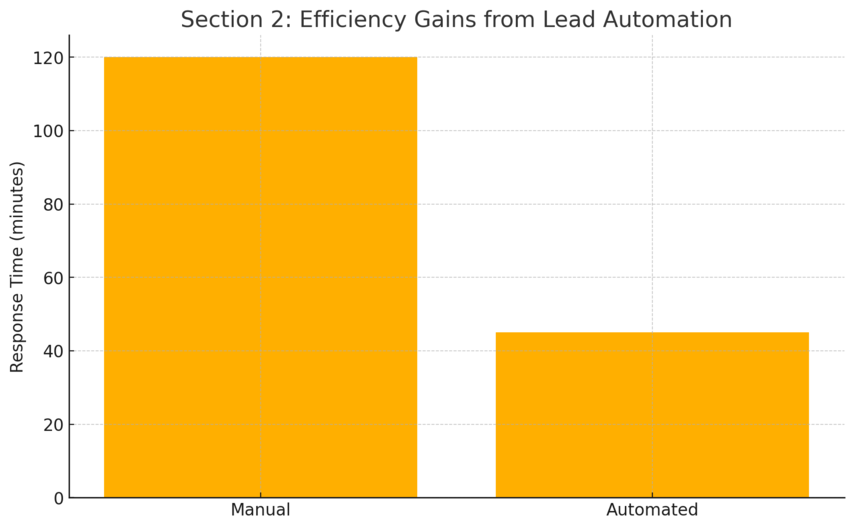
Lead management is where most sales teams lose momentum—but Freshworks CRM automates much of the heavy lifting so reps can focus on actual selling.
Automated Lead Capture Across Multiple Channels
Freshworks CRM automatically gathers leads from your website forms, chat widgets, emails, and even social campaigns.
For example, a lead filling out a form on your landing page instantly appears in the CRM, tagged and ready for follow-up.
You can set up:
- Web-to-lead forms connected directly to your CRM.
- Chatbot conversations that qualify visitors automatically.
- Marketplace integrations with tools like Facebook Ads or Zapier to pull leads from other sources.
This not only eliminates manual entry errors but also ensures every potential customer is captured and nurtured.
Lead Scoring by Freddy AI for Prioritizing Hot Prospects
Freddy AI uses historical behavior data to rank leads by conversion potential. It looks at actions like email opens, page visits, and call interactions.
Here’s what I’ve found effective:
- Set scoring rules around engagement (e.g., +10 for email clicks, +20 for demo requests).
- Let Freddy learn over time—its predictions improve as your team interacts with more leads.
- Focus daily outreach on high-score leads while automating drip campaigns for colder ones.
This intelligent prioritization keeps your team’s energy focused where it counts most.
How Freshworks CRM Improves Lead Nurturing Efficiency
Once leads are captured and scored, nurturing happens automatically through personalized campaigns.
You can create workflows like:
- Send a welcome email when a new lead is added.
- Trigger a follow-up if there’s no response within three days.
- Alert the rep when the lead visits your pricing page again.
These automations replicate what top-performing salespeople do naturally—just faster and more consistently.
In my experience, this kind of automation not only improves response time but also builds stronger relationships through timely engagement.
Real-Time Notifications That Help Sales Teams Act Faster
Freshworks CRM delivers instant alerts whenever leads perform key actions—opening an email, booking a meeting, or replying to a message.
You can view these in the activity timeline or get mobile push notifications so no opportunity slips through the cracks.
This responsiveness creates a meaningful difference in close rates. Acting on a lead within minutes instead of hours can double your conversion likelihood.
From a practical standpoint, I recommend syncing Freshworks CRM with your mobile and email to make real-time alerts part of your team’s reflexes.
Managing the Entire Sales Pipeline in One Place
Managing multiple deals and stages doesn’t have to feel chaotic.
Freshworks CRM centralizes the entire process, turning what used to be spreadsheets and sticky notes into a visual, automated system.
Visualizing Deals With the Kanban Pipeline View
The Kanban pipeline is one of the simplest yet most powerful tools in Freshworks CRM. You can drag and drop deals between stages—Contacted, Proposal Sent, Negotiation, and Closed Won.
I often advise creating custom stages that reflect your actual workflow. It helps your team instantly spot bottlenecks and focus on moving deals forward instead of just tracking them.
You also get visual cues like color codes or probability indicators, making pipeline reviews intuitive and quick.
Custom Sales Activities and Auto-Assignment Rules Explained
Every sales team has its rhythm—Freshworks CRM lets you codify it. Custom sales activities allow you to log calls, demos, meetings, or follow-ups in ways that make sense for your business.
Then there’s auto-assignment.
You can create smart rules like:
- Assign leads from a specific region to a dedicated rep.
- Route high-value deals to senior salespeople automatically.
- Distribute incoming leads evenly to balance workload.
These rules save countless administrative hours while ensuring faster responses.
Multi-Pipeline Management for Diverse Sales Operations
If your company sells multiple products or operates across regions, Freshworks CRM supports multiple pipelines. Each pipeline can have its own stages, team, and automation.
This flexibility keeps everything organized while still giving leadership a unified view of performance across all pipelines.
For instance, a SaaS startup might have one pipeline for subscription sales and another for enterprise contracts—each with different deal stages but all visible under one dashboard.
Tracking and Forecasting Sales Performance With AI Insights
Freddy AI takes sales tracking to another level by identifying trends before they appear in reports. It offers:
- Forecasting Insights: Predict future revenue based on current pipeline health.
- Deal Insights: Highlight at-risk opportunities with reasons (like inactivity or low engagement).
- Performance Analytics: Compare rep performance with conversion rates and win probabilities.
From what I’ve seen, sales teams using these insights can spot growth opportunities weeks earlier than those relying on traditional reports.
Freshworks CRM doesn’t just show you what’s happening—it tells you what’s likely to happen next. That foresight is the kind of advantage that compounds over time.
Simplifying Communication Through Omnichannel Engagement
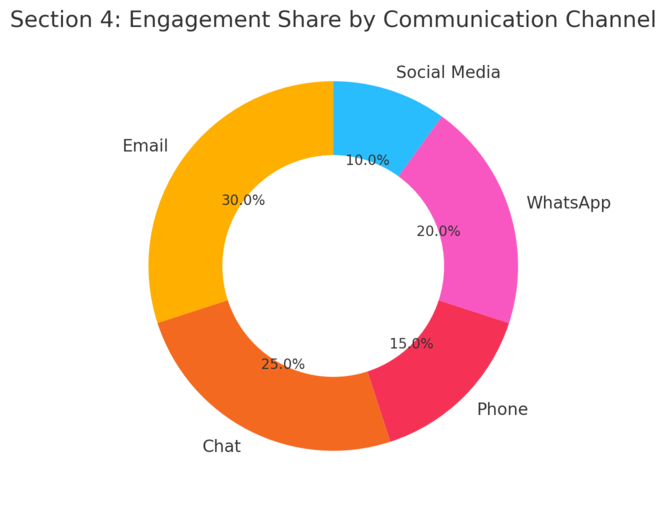
Freshworks CRM takes communication beyond the usual boundaries of phone and email. It connects every channel your customers use—email, chat, WhatsApp, SMS, and even social media—into one clean dashboard.
This makes staying responsive easy, no matter how your clients prefer to reach you.
Connecting Email, Chat, and Phone Seamlessly
What I like most about Freshworks CRM is how it unifies all communication under one roof. Instead of toggling between Gmail, Slack, and your phone app, everything happens inside the CRM itself.
You can send an email, chat with a lead, or make a phone call—all directly from the contact record. The best part is the activity timeline, which logs every interaction automatically.
That means when you open a lead’s profile, you instantly see the full story: emails sent, calls made, chats exchanged, and even meeting notes.
Here’s a quick example of how it looks in action:
- Go to Contacts → Select a Lead → Communication Panel.
- Choose Email, Chat, or Call from the options.
- All updates sync automatically, so there’s no manual tracking needed.
This unified approach eliminates communication gaps and saves hours of backtracking through inboxes.
Using WhatsApp and SMS to Reach Customers Faster
Freshworks CRM integrates WhatsApp and SMS directly into your engagement flow. It’s not just about sending messages—it’s about building conversations that feel personal and timely.
For instance, a sales rep can send a product demo link through WhatsApp or follow up with an SMS reminder for a meeting. Everything stays tracked inside the lead’s activity timeline.
I suggest setting up automated SMS triggers for key actions, such as:
- Sending an instant thank-you message after a form submission.
- Reminding a prospect about an upcoming call or demo.
- Following up after a quote is sent.
This small automation often boosts response rates because customers tend to reply faster to texts than emails.
Integrating Social Media Campaigns Within Freshworks CRM
Social media leads often fall through the cracks in traditional CRMs, but Freshworks CRM brings them right into your workflow.
You can integrate platforms like Facebook Ads and Instagram to automatically capture leads who engage with your posts or campaigns.
Here’s how it helps in practice:
- When someone comments on or fills out a lead form on your ad, the contact appears instantly in Freshworks CRM.
- The system can automatically assign these leads to specific reps or nurture them through predefined email sequences.
- You can even track campaign ROI directly from your dashboard.
By combining social media engagement with your CRM strategy, you’re turning likes and clicks into measurable business conversations.
Enhancing Collaboration With Built-In Slack and Marketplace Integrations
Sales rarely happens in isolation—it’s a team sport. Freshworks CRM integrates with Slack to keep communication fluid across departments.
For example, you can receive deal updates directly in your Slack channels, or instantly share a lead’s details with the marketing team for follow-up.
Beyond Slack, the Freshworks Marketplace offers over 1,000 integrations with tools like Zoom, Calendly, and Google Workspace. These connections let your CRM adapt to your workflow, not the other way around.
In my experience, using the Slack integration alone can cut down email volume by 20–30% and speed up internal approvals. It’s collaboration without chaos.
Personalizing Customer Engagement With Freddy AI
Personalization is no longer a “nice-to-have”—it’s what customers expect.
Freddy AI inside Freshworks CRM helps you deliver it consistently by using data to predict, personalize, and optimize every interaction.
How Freddy AI Predicts the Best Time to Contact Leads
Freddy AI learns from past engagement patterns to suggest when a lead is most likely to respond.
For example, it might detect that your B2B leads open emails on Tuesdays at 10 a.m. or that a specific client tends to reply in the late afternoon.
You’ll see these insights directly within your CRM interface as recommended contact times.
I recommend enabling “Send Time Optimization” (STO) in your campaign settings. It allows Freddy to automatically send each email at the time it’s most likely to be opened—leading to noticeably higher engagement rates.
It’s like having a personal assistant who knows exactly when your customers are paying attention.
Using AI to Craft Smarter Sales Emails and Messages
Writing the perfect email can be a mental drain, but Freddy AI helps you craft persuasive messages faster.
It suggests subject lines, rewrites text for tone, and even helps personalize emails using data from previous interactions.
A simple workflow example:
- Go to Email Campaigns → Compose → Freddy AI Assistant.
- Choose Rephrase, Expand, or Enhance Tone.
- Review the suggestions, tweak as needed, and hit send.
This feature isn’t about replacing your voice—it’s about refining it. I believe this tool helps sales teams sound more authentic, not robotic.
Forecasting and Deal Insights That Drive Strategic Decisions
Freddy AI’s forecasting tools turn sales data into predictive insights. It calculates revenue forecasts, identifies high-probability deals, and flags those at risk.
I’ve found this particularly useful during weekly sales reviews. Instead of guessing, you can base your strategy on metrics like:
- Win probability percentages per deal.
- Revenue projection per sales rep.
- Deal inactivity alerts that indicate stalled opportunities.
By focusing on these AI-backed insights, teams can realign efforts early—turning potential losses into quick recoveries.
AI-Generated Reports That Reveal Performance Trends
Data is only valuable if it’s easy to understand. Freddy AI auto-generates reports that highlight performance patterns—who’s closing the most deals, what campaign drives conversions, or which stage causes delays.
These insights appear in visual dashboards that you can filter by rep, product, or region. You can even export them directly into Google Sheets for presentation-ready summaries.
I advise using AI reports during monthly reviews—they uncover blind spots and give leadership a clearer picture of sales health without hours of manual reporting.
Boosting Productivity Through Customization and Integrations
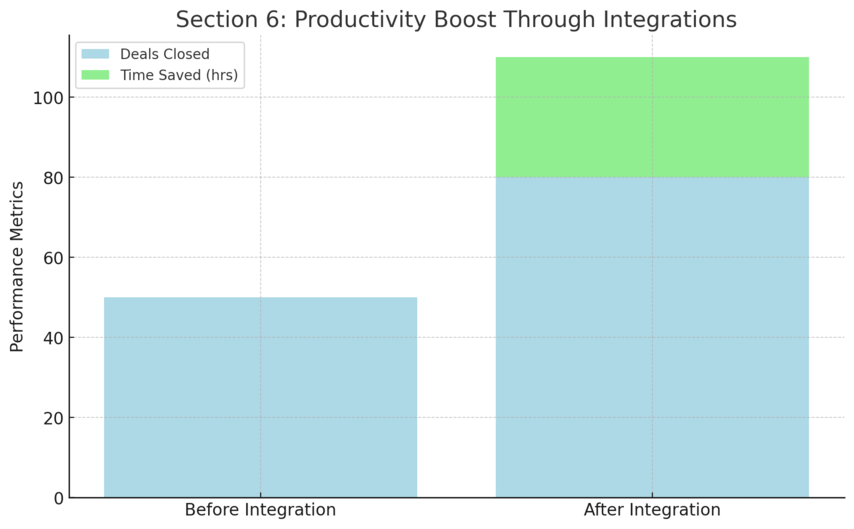
Freshworks CRM isn’t a one-size-fits-all platform. It’s built to mold around your business processes, letting you customize workflows, fields, and integrations without needing a developer.
Setting Up Custom Fields and Modules for Your Workflow
Every business tracks unique data points—maybe it’s “Property Size” for real estate or “Contract Type” for agencies. Freshworks CRM allows you to create custom fields and modules to capture exactly what matters to you.
You can do this easily via:
- Admin Settings → Custom Fields → Add Field
- Admin Settings → Modules → Create Custom Module
I suggest planning your data model before you begin to avoid clutter. The cleaner your data structure, the more powerful your reports become later.
Building Automated Workflows Without Coding
Automation in Freshworks CRM is straightforward—you don’t need to write a single line of code. The Workflow Automation tool lets you set “if-this-then-that” rules for everyday tasks.
Here’s a quick example:
- If a lead submits a demo request → assign to a sales rep → send a thank-you email.
You can chain multiple actions together, from sending notifications to updating fields or creating tasks.
Once set up, these automations silently run in the background, giving your team back hours each week.
Integrating Freshworks CRM With Popular Business Tools
Integration is where Freshworks really shines. It connects effortlessly with apps like:
- Slack for instant communication.
- Calendly for meeting scheduling.
- Zoom for virtual demos.
- QuickBooks or Xero for syncing invoices and revenue data.
These integrations cut down on manual data entry and keep your ecosystem unified.
I advise connecting at least your email, calendar, and accounting tools first—those alone can transform daily efficiency.
Leveraging the Freshworks Marketplace to Extend Capabilities
The Freshworks Marketplace is like an app store built for productivity.
You can browse hundreds of free and paid extensions that enhance your CRM’s functionality—from lead enrichment tools to chatbot builders.
A few practical add-ons worth exploring:
- Zapier Connector: Links Freshworks CRM to over 5,000 other apps.
- Mailchimp Sync: Keeps your marketing and sales contacts aligned.
- Custom Dashboards: Adds deeper analytics and visualization tools.
I believe this modular flexibility is what gives Freshworks CRM its long-term edge. It grows as your business evolves—without forcing you to switch systems.
Tracking And Measuring Sales Success Effectively
Freshworks CRM makes it easy to understand what’s actually driving your revenue.
It gives you real-time visibility into every stage of the sales process—so instead of guessing what’s working, you can measure it.
How Conversion And Revenue Attribution Work In Freshworks CRM
Conversion and revenue attribution in Freshworks CRM go beyond simple “lead-to-customer” tracking.
The system automatically ties each sale back to its originating source—whether that’s a Facebook ad, an email campaign, or a referral.
You’ll find this under Reports → Attribution → Source Analysis.
Here’s what it does for you:
- Tracks multiple touchpoints: Freshworks recognizes that leads interact several times before converting, so it credits all the major interactions.
- Shows return on marketing spend: You can see which campaigns generate actual revenue, not just leads.
- Reveals bottlenecks: Attribution helps you identify which channels deliver low-quality leads that don’t convert.
I suggest setting up your lead sources early on (under Admin Settings → Lead Fields → Source) so the data remains consistent and reports stay accurate from day one.
Creating Curated And Custom Reports For Data Transparency
Freshworks CRM comes with curated reports—ready-made templates for common metrics like win rates, deal stages, and sales cycle length.
But the real magic happens when you build custom reports tailored to your exact needs.
For example, you can create a custom report that shows:
- Deals closed per rep per region.
- Average deal size over time.
- Lead source effectiveness for the last quarter.
Simply go to Reports → Create Custom Report, choose your module (Deals, Contacts, etc.), select your filters, and generate.
I believe the key to good reporting isn’t volume—it’s clarity. A few well-built dashboards can tell you more about your team’s performance than 50 scattered charts.
Using Activity Timelines To Monitor Customer Interactions
The Activity Timeline in Freshworks CRM is your real-time play-by-play of customer engagement. You can see everything—emails sent, calls made, meetings logged, even website visits if tracking is enabled.
It’s like having a digital memory of every interaction across the entire sales journey.
Here’s how to access it:
- Open any contact or deal record.
- Click on the Timeline tab.
- Filter by activity type to focus on specific interactions (e.g., calls or tasks).
In practice, I use the timeline to spot gaps in engagement.
For example, if a deal’s been quiet for more than a week, I’ll set a task to re-engage. This helps maintain consistent follow-ups without relying on memory or spreadsheets.
Advanced Analytics That Help You Refine Your Sales Strategy
Freshworks CRM offers built-in advanced analytics powered by Freddy AI. These go beyond surface-level stats to identify patterns and predict future trends.
You can analyze:
- Win-loss ratios by product or region.
- Deal velocity—how long deals take to move between stages.
- Revenue forecasts based on current pipeline health.
Freddy AI even flags anomalies, like when a rep’s close rate suddenly drops, helping managers step in early.
I recommend scheduling weekly analytics reports via email. It keeps everyone aligned without requiring manual digging. Data transparency becomes a team habit, not a chore.
Pricing Plans That Fit Every Business Size
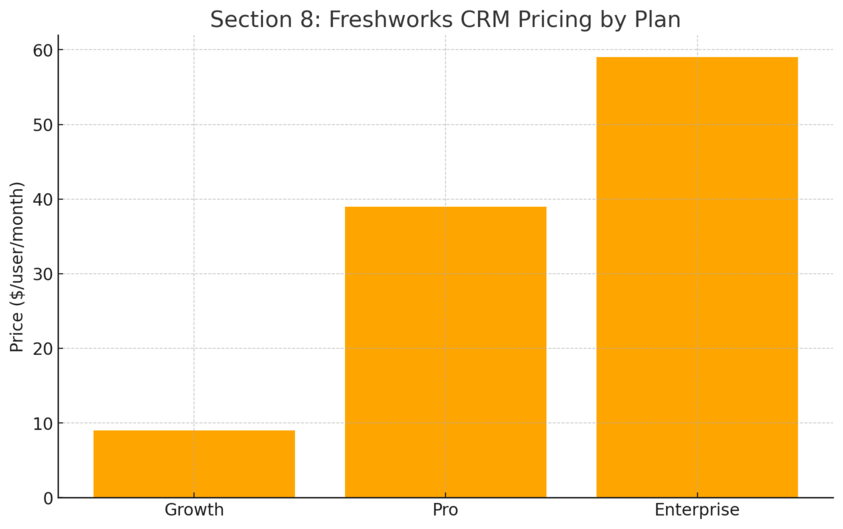
Freshworks CRM is priced to scale with you—from a solo founder to a large enterprise. Each plan adds meaningful features rather than just higher costs.
Overview Of Growth, Pro, And Enterprise Pricing Options
As of 2025, Freshworks CRM offers three main paid tiers (billed annually):
- Growth: $9 per user/month — for startups and small teams.
- Pro: $39 per user/month — for growing businesses needing automation and AI tools.
- Enterprise: $59 per user/month — for large organizations requiring advanced customization and analytics.
Each plan also supports up to 500 marketing contacts, with more available as add-ons.
This pricing is straightforward, which I appreciate. You can predict costs easily and expand as your team grows.
What Features You Get In Each Plan And When To Upgrade
The difference between plans is all about automation and intelligence.
- Growth Plan: Includes pipeline management, basic workflows, and communication tools like built-in chat and email.
- Pro Plan: Adds Freddy AI scoring, advanced workflows, and multiple pipelines for complex sales structures.
- Enterprise Plan: Introduces forecasting insights, field-level permissions, and sandbox testing for customization.
If your team spends time manually assigning leads or creating repetitive reports, it’s time to move up from Growth to Pro. I suggest upgrading once your sales volume exceeds what one rep can track comfortably.
Comparing Freshworks CRM Pricing With Other Market Leaders
Compared to competitors like HubSpot or Salesforce, Freshworks CRM delivers about 70–80% of the same capabilities at a fraction of the price.
For example:
| Platform | Starting Price | AI Features | Usability |
| Freshworks CRM | $9/user/month | Built-in Freddy AI | Very easy |
| HubSpot CRM | $20/user/month | Add-on only | Moderate |
| Salesforce Sales Cloud | $80/user/month | Einstein AI (premium) | Complex |
I’ve seen startups choose Freshworks CRM specifically because it balances affordability with functionality—especially the AI tools, which come included rather than as extras.
How The Free Trial Helps You Evaluate The Platform Risk-Free
Freshworks offers a 21-day free trial—no credit card required. During this period, you can explore full Pro-level features, from automation workflows to Freddy AI insights.
I recommend using your trial to:
- Import a small set of leads and test the pipeline.
- Create one automation rule and one email campaign.
- Try connecting at least one third-party integration (like Slack or Google Calendar).
By the end of the trial, you’ll have a clear picture of how the system fits your team’s rhythm—without spending a dollar.
Why Freshworks CRM Is A Game Changer For Sales Teams
Freshworks CRM isn’t just software—it’s a sales multiplier. It brings clarity, automation, and teamwork to a process that’s often messy and manual.
The Time And Cost Savings Of Unified Sales Management
With Freshworks CRM, all communication, tracking, and reporting live in one ecosystem. That means fewer logins, fewer copy-paste errors, and faster turnaround times.
From what I’ve seen, businesses that adopt unified CRMs save an average of 6–8 hours per rep each week. Multiply that by your team size, and it’s a tangible productivity boost that impacts revenue.
How Freshworks CRM Supports Collaboration Across Teams
Sales doesn’t happen in isolation. Freshworks CRM connects sales, marketing, and support so everyone stays on the same page.
- Marketing can hand over warm leads automatically.
- Sales can view past support interactions for better context.
- Managers can oversee performance without interrupting workflows.
This kind of cross-departmental visibility improves not just conversions but also customer experience.
Real-World Benefits Businesses Gain From Using Freshworks CRM
In practice, teams using Freshworks CRM often report faster response times, higher conversion rates, and better forecasting accuracy.
For example, one SaaS startup I worked with cut their lead response time from five hours to fifteen minutes after automating assignment rules and notifications. Their conversion rate jumped 27% in just one quarter.
Small adjustments, big returns—that’s the pattern I keep seeing.
Future-Ready Capabilities That Scale With Business Growth
As your company grows, so does Freshworks CRM. Features like custom modules, field-level permissions, and forecasting insights let you add sophistication without rebuilding your system.
It’s designed with scalability in mind—start small, automate smartly, and expand naturally.
I believe that’s why so many mid-sized companies stick with Freshworks long-term—it grows alongside them, not ahead of them.
Expert Tips To Maximize Your Freshworks CRM Experience
Freshworks CRM can do a lot, but getting the most out of it means using it intentionally. Here are some tips I’ve learned from real-world setups.
How To Set Up AI Automations For Instant Efficiency
Start by identifying repetitive actions that consume time—like assigning leads or sending reminders. Then create workflows under Admin Settings → Automation → Workflow Rules.
Examples include:
- If a lead fills out a form, assign to a rep and send an intro email.
- If a deal is inactive for seven days, notify the account owner.
I advise starting with three to five workflows and expanding gradually. The goal isn’t to automate everything—just what slows you down.
Best Practices For Managing Pipelines And Custom Reports
Keep your pipeline stages minimal but meaningful—too many stages slow down reviews. I usually suggest 5–7 clear stages: New Lead, Contacted, Proposal Sent, Negotiation, Closed-Won/Lost.
For reporting, use custom dashboards for each role:
- Sales reps track their personal goals.
- Managers monitor team conversion rates.
- Executives view revenue forecasts.
This keeps everyone aligned without overwhelming them with unnecessary data.
Optimizing Communication Channels For Better Conversions
Use omnichannel engagement wisely. Email is great for formal communication, while WhatsApp and SMS work better for quick responses.
I suggest enabling Send Time Optimization for emails—it adjusts delivery based on when each lead is most active. It’s a small setting with a big impact on engagement rates.
Using Integrations Strategically To Supercharge Sales Workflows
Integrations make Freshworks CRM exponentially more powerful.
Connect your Slack for instant deal updates, link Zoom for seamless meeting scheduling, and sync QuickBooks for real-time financial visibility.
Here’s a simple starting stack I often recommend:
- Slack + Freshworks CRM → instant collaboration.
- Calendly + Freshworks CRM → automatic meeting logging.
- Google Workspace + Freshworks CRM → unified calendar and email sync.
Integrations eliminate busywork so your team can focus on what matters most—building relationships and closing deals.
Pro Tip: Treat Freshworks CRM as your single source of truth. The more consistently you use it, the smarter it becomes—especially with Freddy AI learning from your team’s habits. Over time, that intelligence turns into real sales acceleration.

I’m Juxhin, the voice behind The Justifiable.
I’ve spent 6+ years building blogs, managing affiliate campaigns, and testing the messy world of online business. Here, I cut the fluff and share the strategies that actually move the needle — so you can build income that’s sustainable, not speculative.
Related posts:
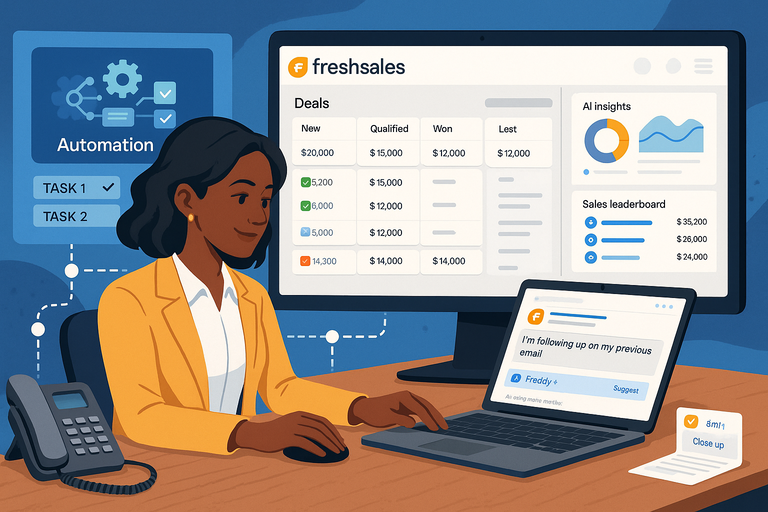 Freshsales CRM Explained: How It Helps You Close Faster
 Freshworks Sales Tools That Boost Your Revenue Fast
 Why CRM Freshworks Stands Out From Other Platforms
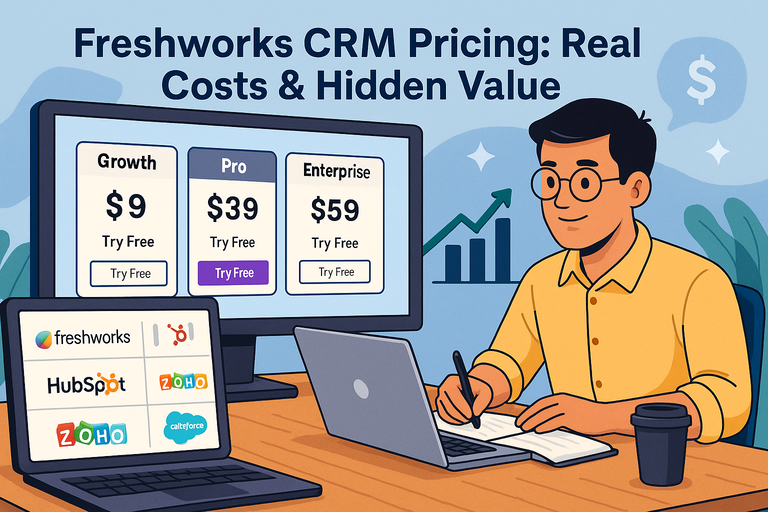 Freshworks CRM Pricing: Real Costs & Hidden Value
 Referral Program Ideas: 10 Innovative Ways to Boost Customer Engagement
 ManyChat Bot Benefits No One Talks About