
Table of Contents
Some links on The Justifiable are affiliate links, meaning we may earn a small commission at no extra cost to you. Read full disclaimer.
Breaking into UI UX freelance work without a polished portfolio can feel like trying to sell a dream without proof it’s real.
But here’s the truth: Clients don’t just hire portfolios—they hire problem solvers who can communicate, collaborate, and deliver results.
So how do you stand out when your design portfolio isn’t stacked with case studies or big-name clients yet?
This guide walks you through exactly how to land UI/UX freelance jobs without relying on a massive portfolio, using practical, tested strategies that actually work.
Understand What Clients Really Care About
Before you pitch your next UI UX freelance project, it helps to understand that clients rarely obsess over design aesthetics the way designers do.
What they truly care about is whether your design decisions solve their business problems, improve conversions, and make users happier.
Focus On Solving Business Problems, Not Just Design Aesthetics
When a client hires a UI/UX freelancer, they’re thinking in terms of results. A beautiful interface means little if it doesn’t reduce bounce rates or boost sign-ups.
I suggest reframing your work in business terms. Instead of saying, “I redesigned your app’s layout,” say, “I restructured the onboarding process, cutting drop-offs by 40%.”
Here’s how you can show this thinking in your proposals or portfolio pieces:
- Map design outcomes to business goals: Connect every design decision to a measurable result, like improved user retention or reduced task time.
- Talk metrics, not colors: Use data to back up your value — even small analytics insights can build trust.
- Prioritize usability over beauty: Clients care about efficiency, not artistic flair.
A real example: I once saw a freelancer redesign a startup’s dashboard and triple their sign-up completion rate — not because the interface looked cooler, but because they simplified the user flow.
That’s the kind of story that gets you hired.
Learn How To Communicate Value Clearly During Discovery Calls
Most clients decide whether to work with you within the first few minutes of a discovery call. They’re listening for confidence, clarity, and empathy.
Instead of overexplaining your design process, focus on what you can achieve for them.
Try this flow:
- Start with curiosity: Ask, “What’s been your biggest challenge with the current design?”
- Show understanding: Rephrase their problem in your own words to confirm alignment.
- Offer strategic insight: Give one actionable idea they can implement immediately — even if they don’t hire you.
Using this structure instantly positions you as a partner, not just a designer-for-hire. I believe that clients pay for clarity, not complexity. The simpler and more relevant your communication, the more valuable you appear.
Use Client Language Instead Of Design Jargon To Build Trust
Clients don’t want to hear about “heuristic evaluations” or “atomic design systems.” They want to hear how you’ll help users get through checkout faster or increase form completions.
Translate your design process into the client’s world:
- Instead of saying “user personas,” say “we’ll define who your key customers are.”
- Replace “usability testing” with “we’ll see where users get stuck and fix it fast.”
- Use examples of impact: “When we improved navigation clarity, users found what they needed 2x faster.”
In short, the less you sound like a textbook, the more you sound like a solution.
Build Credibility With Real-World Experience (Without Clients)
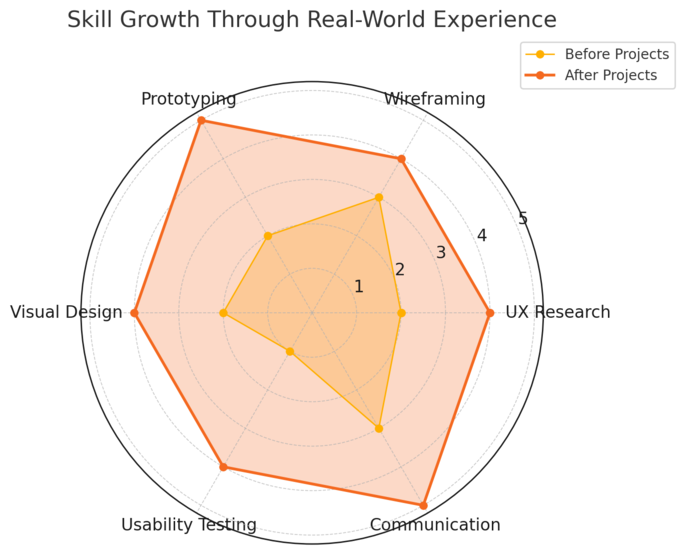
No clients yet? No problem. You can absolutely prove your skills with personal projects that demonstrate your ability to think and solve like a designer.
Create Self-Initiated Projects That Solve Real User Problems
Start small but real. Choose a problem you’ve experienced yourself — maybe a confusing booking app or a clunky government form — and redesign it.
The key is to treat it like a real client project: do user research, test your assumptions, and explain your reasoning.
Here’s a framework I often recommend:
- Identify a real user frustration (e.g., food delivery tracking confusion).
- Research similar apps to see what’s working.
- Redesign with clarity and user flow in mind.
- Present the before-and-after screens and summarize your insights.
Tools like Figma make this simple. You can even share interactive prototypes using a public link. This approach shows initiative, curiosity, and the ability to deliver outcomes.
Redesign Existing Apps Or Websites To Demonstrate UX Thinking
You can’t use client logos yet, but you can use well-known platforms as case studies. Redesign a familiar product to show how you’d improve it.
Example: A freelancer redesigned Airbnb’s search filter experience, focusing on accessibility. They shared the rationale, sketches, and prototype online — it went viral and brought paying clients.
Keep these principles in mind:
- Respect copyright: Don’t claim to work for the brand.
- Show process, not just final screens: Explain why your version works better.
- Quantify the improvement: Estimate how your design could impact engagement or conversions.
Participate In Design Challenges On Platforms Like Dribbble Or Behance
Platforms like Dribbble, Behance, and Daily UI are great for practice and exposure. Participating in challenges keeps your skills sharp and your profile visible.
Try this method:
- Use Daily UI prompts to build a consistent posting habit.
- On Behance, post full project breakdowns — research, sketches, wireframes, and mockups.
- Engage with other designers through feedback exchanges; clients often find freelancers through community activity.
When clients see you actively creating and refining designs, they perceive you as engaged, consistent, and serious about your craft — even without client names.
Leverage UX Case Studies Instead Of Traditional Portfolios
When you don’t have dozens of client projects, detailed case studies can become your strongest proof of ability.
Document Your Process From Research To Prototype
Most freelancers show final designs — but clients want to see how you think. Document your process like a story: what was the problem, what did you learn, and how did you solve it?
You can structure it like this:
- Problem statement: Define what you set out to fix.
- Research insights: Summarize what users said or did.
- Design decisions: Explain your reasoning, not just your visuals.
- Results: Even small wins (like simplified flow) matter.
I advise using screenshots, flowcharts, and bullet insights for clarity. Think of your case study as proof of strategic design thinking, not just pixel work.
Use Free Tools Like Notion Or Webflow To Present Case Studies Professionally
You don’t need an expensive portfolio site. Notion and Webflow let you build clean, responsive project pages quickly.
- Notion: Perfect for minimal storytelling and quick editing. Include visuals inline with your process text.
- Webflow: Great for interactive, visually rich portfolios that reflect real UI skills.
Pro tip: Add a short video walkthrough using Loom — clients love hearing your voice and seeing your confidence.
Highlight The “Why” Behind Each Design Decision
Clients hire you for your judgment, not just your execution. Always clarify why you made certain design choices.
For example:
- “I chose this layout to reduce decision fatigue for first-time users.”
- “I simplified navigation because usability testing showed 60% of users missed key links.”
When you articulate reasoning this way, you sound less like a freelancer showing work and more like a consultant providing insight — and that’s what earns premium projects.
Pro Tip: You don’t need a big portfolio to land UI UX freelance work. What you need is visible, well-documented thinking. Every redesign, self-initiated project, or UX breakdown is another signal of your capability. The more you demonstrate how you think, the faster you’ll attract clients who value it.
Use Networking To Open Freelance Opportunities
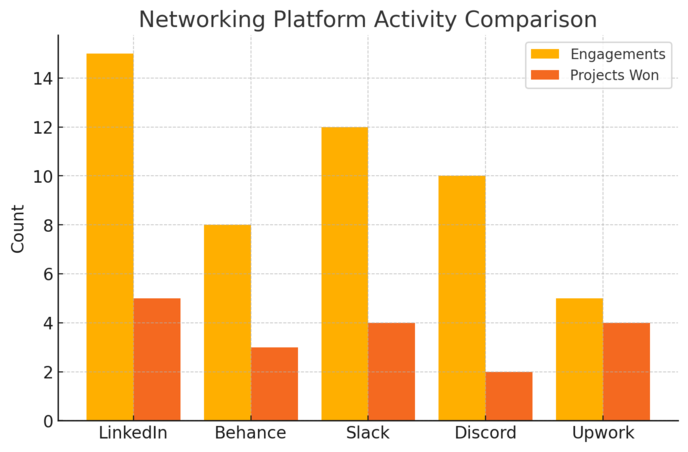
Networking isn’t about collecting contacts — it’s about building relationships that naturally lead to opportunities.
Most UI UX freelance work comes from trust, and trust grows when you show up, share insights, and contribute meaningfully to communities.
Join UI/UX Communities On Discord, Slack, And LinkedIn
You don’t need to attend conferences or meetups to network effectively. Online spaces can open just as many doors — if you engage the right way. Communities like Designer Hangout, ADPList Slack, UX Mastery, or Figma’s Discord server are full of hiring managers, product designers, and startup founders looking for collaborators.
To make these spaces work for you:
- Be visible for the right reasons: Ask smart questions, share resources, and give feedback on others’ work.
- Add value first: Instead of asking for job leads, offer insights. For example, comment on a UX question with a helpful Figma prototype example.
- Keep your profile optimized: Most Slack and Discord servers let you add short bios. Include your niche (e.g., “UI/UX designer focused on SaaS dashboards”).
I’ve seen designers land recurring freelance gigs just by consistently helping others troubleshoot in design channels. Helping becomes your portfolio in real time.
Engage In Conversations And Offer Value Before Pitching Services
It’s easy to spot someone networking only to sell — and it’s a turnoff. Clients remember people who made them think, not people who immediately pitched them.
I suggest following this rhythm:
- Comment on posts with genuine insights. If a founder shares an app update, offer constructive UX suggestions — not a sales pitch.
- Connect with intent. Send a personalized note like, “I enjoyed your post about simplifying onboarding — I’ve worked on similar flows.”
- Nurture relationships. Check in occasionally, share useful content, or introduce them to someone valuable.
Once a connection trusts your expertise, they’ll think of you when they need design help. Freelance success often comes from these “quiet relationships” built months before an opportunity arises.
Collaborate With Developers Or Marketers On Micro Projects
Micro projects — small collaborations where you contribute design expertise — are excellent networking seeds. Partner with developers building side projects, or marketers launching landing pages, and co-create quick wins.
Example scenario: You team up with a front-end developer to redesign a local café’s ordering app. You handle UX flow and UI visuals; they handle code. You both showcase the result in your portfolios and tag each other on LinkedIn.
Benefits of this approach:
- You get real-world results to show, not just mockups.
- You meet professionals in complementary fields who can refer clients.
- You learn how different disciplines collaborate — a skill clients value highly.
I recommend treating every collaboration as a case study in communication and teamwork. These small partnerships often snowball into steady freelance referrals.
Optimize Your Online Presence For UI UX Freelance Work
Your online presence is your 24/7 portfolio.
A strong digital footprint tells clients who you are, what you do, and why they can trust you — before they ever speak to you.
Craft A Compelling LinkedIn Profile That Speaks To Problem-Solving
LinkedIn isn’t just a résumé platform; it’s a discovery engine. Recruiters and founders often search for UI UX freelance talent by specific skills or outcomes. I suggest optimizing your profile with clarity and credibility.
Key areas to refine:
- Headline: Instead of “UI/UX Designer,” try “UI/UX Freelancer Helping SaaS Teams Simplify User Journeys.”
- About section: Write conversationally about your design philosophy. Mention how you solve user pain points, not just your toolset.
- Featured section: Add links to your case studies, Notion portfolio, or Dribbble profile.
Also, post mini breakdowns of your projects — even 100–200 word insights with visuals. Those posts often outperform traditional portfolios because they show thinking in action.
Share Design Insights And Project Breakdowns Consistently
Consistency builds authority. When you share your process regularly, people start to associate you with expertise in your niche.
Try posting about:
- Design decisions you’ve made and why you made them.
- Lessons learned from a UX challenge or user test.
- Tools or workflows that improved your efficiency (e.g., “How I used Figma Auto Layout to speed up prototyping”).
I recommend aiming for one meaningful post a week. Don’t focus on likes — focus on visibility and credibility. Even if only ten people see your content, one of them could be your next client.
Use Platforms Like Behance And Dribbble To Build Social Proof
These platforms are still powerful when used strategically. Behance helps you present full case studies; Dribbble showcases snapshots and style.
For Behance:
- Create in-depth project stories — from problem statement to solution.
- Use real user context, not just pretty mockups.
- Tag your niche (e.g., fintech, healthcare UX) for search visibility.
For Dribbble:
- Post polished screens with short, clear captions.
- Engage with comments — community activity boosts discoverability.
- Link back to your full projects elsewhere.
Social proof grows when you’re active. A single Dribbble shot or Behance project can lead to collaborations if you’re consistent.
Master Client Outreach Without Sounding Desperate
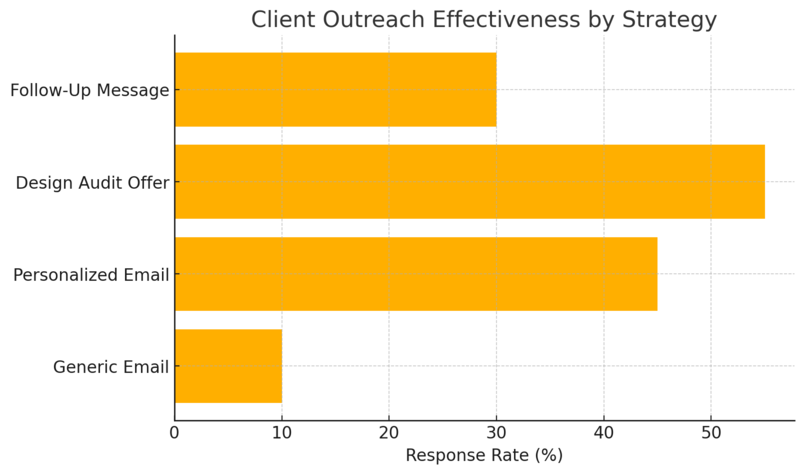
Client outreach doesn’t need to feel awkward or pushy. When done right, it’s simply a structured conversation where you connect your skills to someone’s current pain point.
Personalize Cold Emails With Research And Empathy
Generic cold emails get ignored. Personalized ones start conversations. I suggest focusing less on you and more on the client’s goals.
Here’s a simple framework:
- Research first: Look at their website or product and note one UX issue or improvement opportunity.
- Write with empathy: Open with genuine appreciation, not flattery. Example: “I love how your homepage focuses on clarity — I noticed a few areas that might reduce friction even more.”
- Offer a quick win: Suggest a small, actionable improvement.
- End with low pressure: “Would you be open to a quick 10-minute chat about it?”
Keep it short — under 120 words. Clients appreciate brevity and relevance.
Offer Small Audits Or Design Reviews As Entry Points
Sometimes clients hesitate to hire freelancers without prior collaboration. Offering a small paid (or even free) design audit helps break that barrier.
You can structure a mini-audit like this:
- Analyze their user flow and identify 2–3 usability issues.
- Suggest actionable fixes using visuals or a quick Figma walkthrough.
- Deliver it as a one-page PDF or a 5-minute Loom video.
Once they see the value, they’ll often ask for a full redesign or ongoing work. I’ve personally used this method to turn small audits into multi-month contracts.
Use Past Feedback Or Testimonials To Establish Credibility
Even if you don’t have many clients yet, gather testimonials from collaborators, classmates, or mentors. A simple quote about your communication, creativity, or reliability helps build trust.
You can include testimonials on your LinkedIn, portfolio, or even email signature. Example:
“Working with [Your Name] was refreshing — clear communication and thoughtful UX insights made a real difference.”
Also, reuse feedback snippets in proposals. When a potential client sees others vouching for your professionalism, their hesitation drops.
Pro Tip: Networking, presence, and outreach are three sides of the same coin. The more you show up where your ideal clients already spend time — and communicate your value in human, helpful ways — the more your UI UX freelance opportunities will grow naturally. Consistency builds trust, and trust converts into long-term projects.
Use Freelance Marketplaces Strategically
Freelance platforms can be a goldmine for UI UX freelance designers if you know how to navigate them strategically.
The secret isn’t to compete with everyone — it’s to position yourself where your skills and niche stand out.
Start With Niches On Platforms Like Upwork Or Toptal
If you’re new, avoid broad categories like “UI/UX Design.” Instead, target specific niches that align with your strengths — for example, “SaaS dashboard design,” “mobile onboarding UX,” or “ecommerce app redesign.”
These micro-niches attract clients who value expertise over volume.
Here’s how to make the most of each platform:
- Upwork: Build a specialized profile with a single, outcome-driven title (e.g., “I design conversion-optimized SaaS dashboards in Figma”). Use your description to tell a story — how your designs solve business problems, not just look good.
- Toptal: This platform is highly curated, so focus on depth. Share complete case studies showing research, prototyping, and user testing. Mention metrics or measurable outcomes where possible.
A practical example: a designer who focused solely on UX audits for Shopify stores made over $10k in 3 months because her positioning was specific, not generic. That’s the power of niching.
Focus On Detailed Project Descriptions Over Portfolio Quantity
Clients on freelance sites often skim, so clarity wins. A single well-written project description often does more than ten half-baked ones.
When writing your profile or proposal, use this framework:
- Describe the challenge: “The client’s users struggled to complete onboarding.”
- Explain your process: “I mapped the user journey and simplified the flow using Figma prototypes.”
- Highlight the outcome: “Completion rates improved by 35% post-redesign.”
Also, use visuals wisely. Even two polished case images (problem/solution) make your listing look professional. I recommend prioritizing quality, not volume — clients care more about your approach than your archives.
Learn To Identify Serious Clients Versus Low-Budget Listings
Not every job post deserves your attention. I’ve learned that spotting red flags early saves hours.
Serious clients typically:
- Use clear, goal-oriented language (“We need to improve retention by optimizing our dashboard flow”).
- Offer realistic budgets or hourly rates.
- Mention collaboration tools like Figma or Slack, showing they understand design workflows.
Avoid listings that are vague (“Need quick UI help, low budget”) or require “unlimited revisions.” Those usually drain your energy.
A smart trick: Send one thoughtful question with your proposal (“How are you currently collecting user feedback on your product?”). Serious clients appreciate curiosity; budget hunters don’t reply.
Build Trust Through Transparent Process And Communication
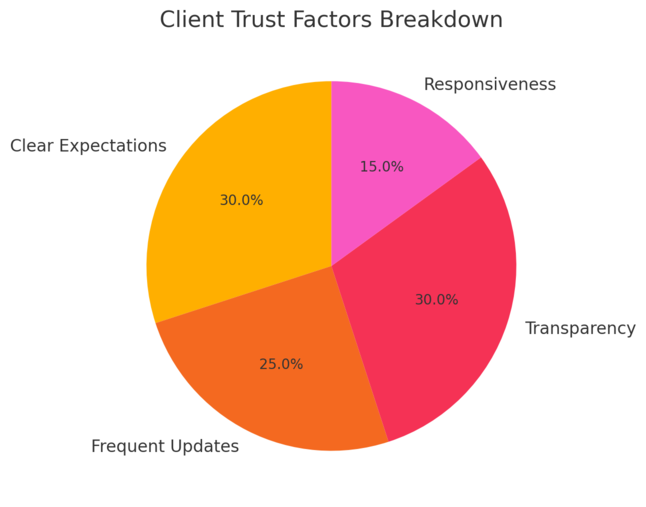
Trust turns one-off gigs into long-term freelance relationships. The best way to build it is through transparency — showing your process, progress, and professionalism at every stage.
Walk Clients Through Your Workflow From Brief To Delivery
When you explain your workflow clearly, clients feel secure — they see structure instead of guesswork.
I like to share a simple visual roadmap during kickoff:
- Discovery: Define goals, audience, and key metrics.
- Wireframes: Outline structure and flow.
- Design: Develop UI in Figma with regular check-ins.
- Handoff: Deliver assets or prototypes with annotations.
Walk them through this using a quick Figma board or Notion doc. It not only looks professional but also prevents miscommunication later. Clients who understand your process tend to respect your timelines more.
Use Tools Like Figma And Loom To Show Progress Clearly
Transparency thrives on visibility. Figma allows real-time collaboration — invite your client as a viewer so they can observe updates without interrupting your flow.
Combine this with Loom, a video tool for quick walkthroughs. Instead of sending a long message, record a 3-minute video explaining your latest design choices. It humanizes your communication and builds rapport.
I’ve found that Loom updates often eliminate 70% of unnecessary client revisions — because clients feel involved and informed.
Set Expectations Early To Reduce Revision Cycles
Revisions usually happen when expectations aren’t aligned early on.
During onboarding, discuss:
- Number of revisions: Set clear limits (e.g., two rounds).
- Feedback process: Use tools like Figma comments or Notion notes to centralize feedback.
- Deadlines and deliverables: Confirm timelines in writing.
I always suggest restating everything in a summary message after the call. It avoids confusion later and shows professionalism.
Clients value structure more than flexibility — especially in UI UX freelance work where timing matters.
Create Partnerships That Lead To Recurring Work
Long-term partnerships bring stability to your freelance income. Instead of chasing one-off gigs, think about how you can collaborate consistently with agencies, startups, or teams.
Collaborate With Agencies That Need Extra Design Support
Agencies often have more work than their in-house team can handle. They’re always looking for reliable freelancers who can jump in quickly.
To find these opportunities:
- Search for small digital agencies on LinkedIn and reach out with examples of your niche work.
- Offer to help with overflow projects or redesign sprints.
- Emphasize reliability — agencies prioritize speed and communication.
Example: a freelance designer I know worked with a digital marketing agency as their on-demand UX partner. That single relationship turned into consistent monthly work for over a year.
Offer Retainer-Based UX Consulting For Ongoing Projects
Once you’ve built trust with a client, offer a retainer — a fixed monthly payment for continued design support. Retainers give you predictable income and give clients peace of mind that you’re available when needed.
Here’s a sample setup:
- 5–10 hours per week for UX audits, small UI updates, or testing insights.
- Monthly reporting on what’s been improved or optimized.
- Flexible scope: The client can use hours where needed.
I recommend positioning it as design continuity — keeping their product evolving instead of doing one big overhaul every year.
Build Long-Term Relationships Through Reliability And Follow-Up
Clients remember the designers who make their lives easier. After project delivery, always follow up.
Send a short check-in message a month later: “Hey, just wanted to see how users are responding to the new layout.”
You can also:
- Offer post-launch support for testing or analytics review.
- Share UX improvement suggestions proactively.
- Stay connected via LinkedIn by engaging with their updates.
It’s a small effort that keeps you top of mind — and often leads to referrals or repeat projects.
Keep Evolving Your Skills And Design Thinking
The UI/UX field changes fast. Staying curious and adaptive isn’t optional; it’s your long-term advantage as a freelancer.
Stay Updated With UI/UX Trends Through Courses And Communities
Regularly sharpening your skills keeps you relevant. Platforms like Interaction Design Foundation, DesignLab, or Figma Community are excellent for continuous learning.
I suggest dedicating 1–2 hours weekly to exploring:
- Emerging UX trends like AI-assisted interfaces or accessibility-first design.
- New tools (e.g., Framer for interactive prototypes or Maze for user testing).
- Thought leadership content — podcasts, newsletters, and YouTube breakdowns.
Staying plugged in helps you speak confidently with clients about future-facing design strategies.
Learn Basic Front-End Concepts To Improve Collaboration
Even if you’re not a developer, understanding basic front-end principles (HTML, CSS, responsive grids) can dramatically improve communication with dev teams.
For instance, if you know how a CSS grid works, you’ll design layouts that developers can implement faster — saving time for everyone. Tools like CodePen or Frontend Mentor make this learning hands-on and practical.
Clients appreciate designers who understand how their designs come to life. It builds respect and smoother handoffs.
Reflect On Each Project To Sharpen Your Design Process
After each project, take 15 minutes to reflect:
- What worked well?
- Where did miscommunication happen?
- How could I improve my design logic next time?
I like to document insights in Notion under a “Design Lessons” database. Over time, you’ll see patterns — maybe you need to simplify briefs or clarify deliverables earlier. This reflection habit compounds your expertise.
Pro Tip: In UI UX freelance work, consistency outshines perfection. The designers who build trust, communicate clearly, and keep evolving their craft become irreplaceable. Your growth and professionalism speak louder than a flashy portfolio ever will.

I’m Juxhin, the voice behind The Justifiable.
I’ve spent 6+ years building blogs, managing affiliate campaigns, and testing the messy world of online business. Here, I cut the fluff and share the strategies that actually move the needle — so you can build income that’s sustainable, not speculative.
Related posts:
 Is Freelancer Worth It: Make Good Money
 Legitimate Transcription Work From Home
 How Fiverr Affiliate Program Will Make You Tons Of Cash
 How Does Udemy Work? Your Ultimate Guide to the Online Learning Platform
 Side Job Ideas: 10+ Easy and Profitable Ways to Earn Extra Income
 Free Invoice Software: Top 10 Solutions for Small Businesses and Freelancers
The self-initiated project approach is a good starting point, but I’d add that you need to be ruthless about scoping. Pick one specific UX problem, something like cutting checkout friction, and redesign just that flow end-to-end. That focus lets you show measurable outcomes (e.g., fewer steps to purchase) which matters more to clients than a full app mockup. We use a similar scoping process for our own case studies at the start.
Thanks, Dirk — really good insight here. I agree that tight scoping makes UX case studies much stronger, especially when you can show measurable improvements instead of just polished screens. Focusing on one user flow feels far more realistic and client-oriented than redesigning an entire app concept. Appreciate you sharing this.