
Table of Contents
Some links on The Justifiable are affiliate links, meaning we may earn a small commission at no extra cost to you. Read full disclaimer.
Freelance gigs have opened the door for anyone with a laptop to earn real income from home, and I’ve seen how life-changing that shift can be.
If you’ve been wondering which opportunities are actually accessible for beginners, or what makes these gigs profitable long term, you’ll find clear answers here.
1. High-Demand Freelance Gigs You Can Start With Zero Experience
Stepping into freelance work without experience is more doable than most people think.
The real trick is understanding which tasks businesses already outsource and learning just enough to deliver them well.
Learning Basic Skills Quickly Through Free Online Resources
You don’t need a formal background to become useful to clients. What you need is focused learning. I’ve watched beginners turn simple curiosity into paid work just by committing a few hours a week to structured practice.
You can pick up practical skills through platforms like YouTube, Coursera, and HubSpot Academy. These resources break down basics in areas like writing, admin work, and social media. You only need one or two skills to start offering freelance gigs.
A smart way to move quickly is following a simple loop: learn a small skill, practice it once or twice, then turn it into a paid offer.
For example, learning how to use Google Docs formatting tools—headers, spacing, comments—sets you up to help clients with document cleanup or basic editing.
A beginner doesn’t need mastery; they need competence. Once you can reliably perform a task without rewatching tutorials, you’re ready to sell it.
The confidence to begin grows every time you complete a real project, even if it’s for yourself.
Identifying Simple Services Businesses Already Pay For
I like looking at marketplaces such as Fiverr or Upwork to see what clients repeatedly request. Tasks like formatting resumes, building spreadsheets, scheduling posts, or updating contact lists appear constantly. These are all beginner-level freelance gigs.
Businesses outsource tasks that drain their time. Think of tedious administrative work, repetitive digital tasks, or anything that requires organization. When you position yourself as someone who “handles the small stuff,” you instantly become valuable.
You can also observe entrepreneurs on social media. When someone says they’re overwhelmed with DMs, emails, or posting consistently, that’s a need you can fill. These are real signals of demand.
Packaging Beginner-Friendly Tasks Into Sellable Offers
Once you understand what businesses pay for, package your skills into clear, bite-sized services. Instead of saying “I can do admin work,” be specific:
- Inbox cleanup: Sort emails into folders, flag priorities, remove clutter.
- Document formatting: Prepare PDFs, create templates, organize files.
- Social post scheduling: Upload posts using a tool like Buffer with a simple weekly calendar.
Specific offers make clients feel safe choosing you because they know exactly what they’re buying.
I suggest creating three levels of service: a starter option, a standard option, and a slightly higher-priced option for clients who need ongoing support.
This structure helps beginners earn more without needing advanced skills.
2. Entry-Level Writing Gigs That Pay Well From Home
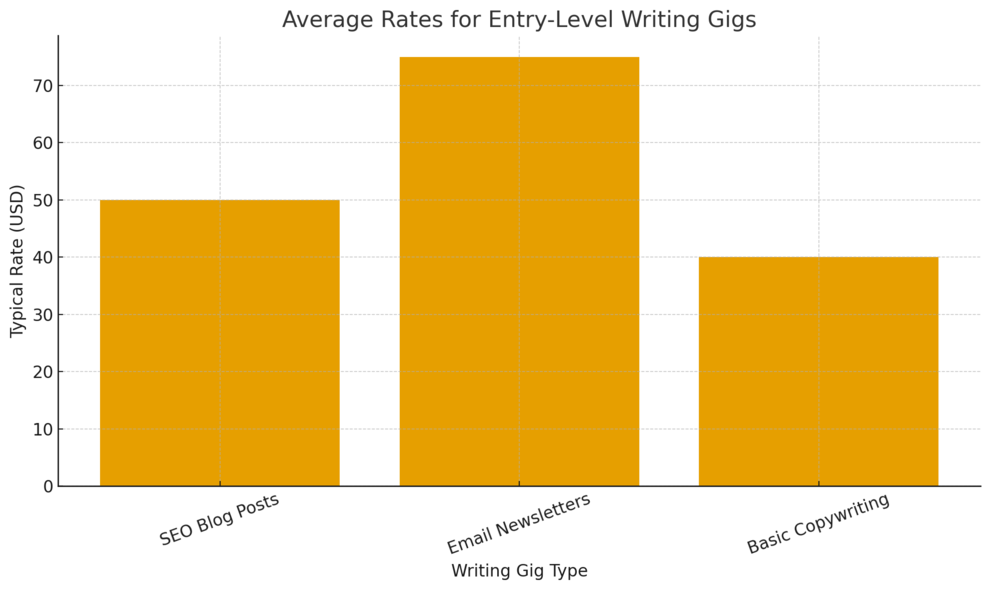
Writing is one of the most accessible freelance gigs because businesses need content every day. You don’t need fancy grammar mastery; you need clarity, structure, and a willingness to research.
Creating SEO Blog Posts Using Simple Research Techniques
SEO writing might sound intimidating, but the basics are straightforward once you understand how search works. You’re essentially answering questions people type into Google.
A simple workflow I like uses only two free tools: Google and AnswerThePublic. Search a phrase like “how to clean white shoes,” then look at the top articles. The headings show what readers expect. AnswerThePublic reveals related questions that people also ask.
Create a short outline using those questions. Then write in a natural, conversational style. A good blog post doesn’t chase keywords; it solves the reader’s problem clearly. That’s what clients want.
Inside your workflow, keep a structure:
- Intro: Connect with the reader’s problem.
- Body: Teach step-by-step solutions.
- Conclusion: Offer a final takeaway or next step.
Even beginners can earn $25–$75 per article once they deliver consistent quality.
Offering Email Newsletter Drafting for Small Brands
Newsletters are a goldmine for freelancers because small businesses rely on them but rarely have time to write. You only need to understand how to tell a short story or share a helpful tip in a friendly tone.
You can start simple:
- Write weekly shop updates.
- Summarize blog content into email form.
- Create short promotional messages with a clear call-to-action.
A typical client workflow might look like: Client shares bullet points → you shape them into a readable 150–300 word email → you format it inside Aweber or Mailerlite. Both platforms use drag-and-drop editors, so no technical background is required.
I’ve seen beginners land recurring $150–$300 monthly retainers from two or three newsletter clients because consistency matters more than complexity.
Using AI Tools Responsibly To Speed Up Writing Workflows
AI can help beginners build confidence without becoming dependent. I suggest using AI for brainstorming ideas, generating outlines, or rewriting complex sentences into clearer language.
The danger is letting AI write entire articles. That usually leads to generic content clients can spot immediately.
Instead, let AI support you:
- Use it to create variation in headlines.
- Ask it to simplify complicated explanations.
- Let it summarize research so you can rewrite it in your own words.
Think of AI like a writing assistant, not a replacement. You maintain creativity; AI handles the heavy lifting. This approach makes you faster and improves quality while keeping your voice intact.
3. Virtual Assistant Roles With Flexible Workloads
Virtual assistants (VAs) support entrepreneurs with daily tasks that require organization and consistency.
If you’re detail-oriented and like helping people, VA work is one of the most reliable freelance gigs from home.
Managing Inbox and Calendar Tasks for Busy Entrepreneurs
Many entrepreneurs drown in emails and scheduling. If you can organize communication, you become a lifesaver for them.
Inbox management involves things like:
- Sorting emails into labeled folders.
- Creating rules that auto-filter messages.
- Drafting replies based on client-provided templates.
You can also manage calendars through Google Calendar → Settings → Add Shared Calendar. This lets you schedule meetings, set reminders, and avoid double-booking.
Some VAs take it further by confirming appointments, sending reminders, or syncing Zoom links with events. These are simple actions but huge time savers for clients.
Offering Data Entry or Document Formatting Services
Data entry is one of the simplest freelance gigs to start with. Tasks include transferring information from PDFs to spreadsheets or cleaning up messy datasets so they’re easier to use.
Google Sheets is usually enough for this work.
Most clients only need:
- Organized columns.
- Drop-down menus for categories.
- Simple formulas like =SUM() or =AVERAGE().
Document formatting is another overlooked skill. If you learn how to use styles in Google Docs—Format → Paragraph Styles → Update Heading—you can clean up resumes, reports, or ebooks quickly.
These services pay because they’re tedious, not because they’re difficult.
Supporting Social Media Scheduling With Tools Like Buffer
Buffer is a tool that allows you to schedule posts across several platforms at once.
The UI path is simple: Buffer dashboard → Create Post → Select Platforms → Schedule. This lets you upload content for clients and organize a full week of posts in minutes.
Even beginners can manage:
- Uploading images or videos.
- Copying captions into Buffer.
- Setting posting times based on analytics the client provides.
Many entrepreneurs want to stay active online but hate the scheduling process. If you can step in and handle the routine posting, you become extremely valuable.
Some VAs even offer simple engagement help, like responding to comments or liking follower posts. These small touches help clients grow without being glued to their screens.
4. Social Media Management Freelance Gigs For Beginners
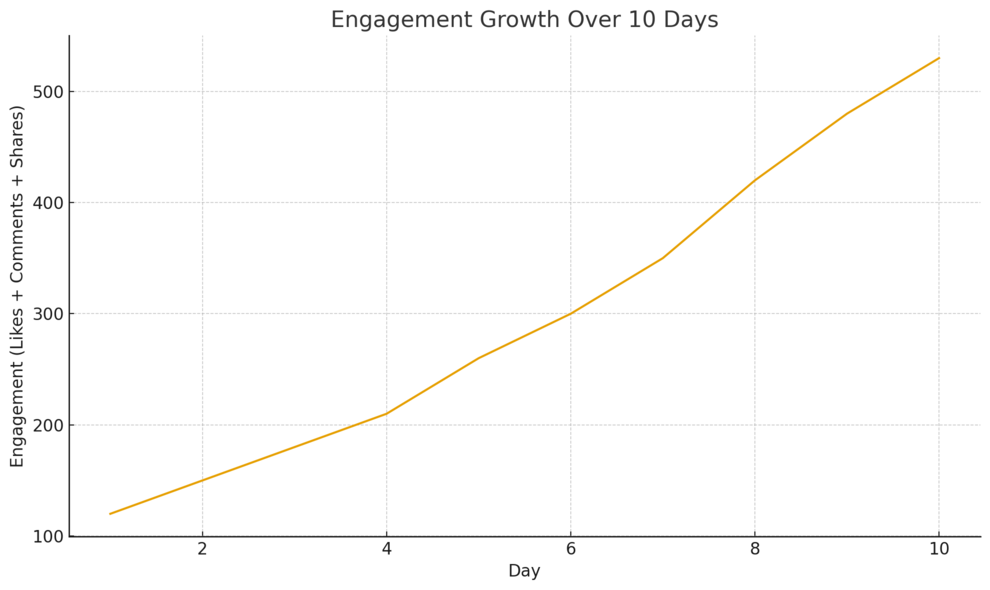
Social media management is one of the easiest freelance gigs to step into because brands always need consistent posting, basic engagement, and simple content.
You don’t need deep marketing expertise to start, just a good eye and a reliable workflow.
Designing Simple Content Using Canva Templates
Canva makes content creation accessible even if you’ve never touched design tools before. I like recommending Canva because its drag-and-drop interface speeds up everything, and templates remove the guesswork.
Template selection: Inside Canva, the UI path is: Home → Social Media → Instagram Post (or TikTok Video). From here you can choose prebuilt layouts that match the brand’s tone.
Brand consistency: Once a client shares their colors and fonts, you can save them inside Canva Brand Kit. This keeps every post aligned visually. It’s a small step that makes you look professional from day one.
Batching workflow: I suggest creating a week’s worth of content in one sitting. Choose 5–7 templates and customize them with the client’s text or images. Beginners often overthink “design,” but with templates you’re mostly editing, not creating.
A practical example: A café might need daily specials posted with warm colors and simple typography. You can build a reusable template with one photo placeholder and one text block, then update it daily. It takes minutes.
Tracking Audience Activity With Native Platform Insights
You don’t need fancy software to understand what’s performing well. Instagram, Facebook, TikTok, and LinkedIn all include built-in analytics dashboards.
Inside Instagram, for example, the path is: Profile → Professional Dashboard → Insights. These numbers help you see which posts get the most reach or engagement.
I rely on three simple metrics for beginners:
- Reach: How many people saw the content.
- Engagement: Likes, comments, shares, and saves.
- Retention: How long people watch videos or reels.
A beginner can use these numbers to guide content ideas. If carousels perform better than single-image posts, you simply make more carousels. This is how you create value without needing advanced strategy skills.
If you manage multiple clients, tracking these insights weekly in a Google Sheet helps you show progress and justify your rates. Most clients love seeing even tiny improvements.
Handling Comment Moderation To Boost Engagement
Engagement is the lifeblood of social media, but many business owners avoid responding because it’s time-consuming. That’s where you come in.
Comment moderation includes:
- Replying to questions.
- Removing spam.
- Thanking followers.
- Directing people to the right product or page.
You can handle this from any device. I advise creating a simple reply library with prewritten responses clients approve. This makes you faster and ensures your tone matches theirs.
A quick scenario: A boutique posts a reel. Dozens of people comment “Where can I buy this?” You jump in with a friendly answer and a link. These micro-engagements stack up and signal the algorithm that the page is active, helping posts reach more people.
5. Remote Customer Support Roles You Can Do Online
Customer support is another beginner-friendly role because all you need is a calm tone, clarity, and a system for solving common issues. Most businesses prefer chat or email support, which is simpler than phone support.
Providing Chat-Based Assistance For Ecommerce Stores
Many ecommerce stores use tools like Shopify Inbox or Gorgias for live chat. The workflow is usually simple: Customers submit questions about shipping, returns, or products, and you respond using clear, pre-approved messaging.
A common UI path inside Shopify Inbox is: Shopify Admin → Inbox → Conversations. From there, you see each chat and respond directly.
As a beginner, you can handle:
- Shipping status questions.
- Return/Exchange instructions.
- Basic product recommendations.
- Redirecting complex issues to the owner.
Most chat tools include saved replies, which means you can answer frequently asked questions instantly. I believe this is one of the easiest freelance gigs because your value is in speed, clarity, and tone—not specialized knowledge.
Handling Ticket Management Through Tools Like Zendesk
Zendesk is a popular customer support platform many small businesses rely on. While it can look technical, it becomes straightforward once you understand the basics.
Tickets are simply messages from customers that need responses. Your job is to read the issue, categorize it, respond, or escalate it.
A basic UI path inside Zendesk is: Views → Open Tickets → Select Ticket → Add Reply. Once you reply, you choose a status like Open, On-hold, or Solved.
If you ever feel overwhelmed, Zendesk includes macros—prewritten responses you can insert with one click. This speeds up your workflow so you can handle multiple requests without burnout.
A practical scenario: A customer reports a missing package. You check the tracking number, confirm it’s delayed, send them a friendly update, and log the issue for follow-up. The key is staying patient, organized, and clear.
Setting Up Clear Response Scripts To Make Replies Faster
If you want clients to love working with you, build them simple response scripts. Scripts ensure consistent answers across platforms and make you efficient.
Scripts typically include:
- Greeting lines.
- Answers for the top 10 common questions.
- Escalation messages when something needs the owner’s attention.
- Closing lines that match the brand voice.
You can store scripts in Google Docs or inside the platform’s macros. I advise keeping the tone friendly and short. For instance: “Happy to help with that! Here’s how you can track your order…” This keeps communication warm and human.
Once scripts are in place, you reduce your workload dramatically, and clients appreciate the professionalism and structure you bring.
6. Freelance Graphic Design Gigs Using Beginner Tools
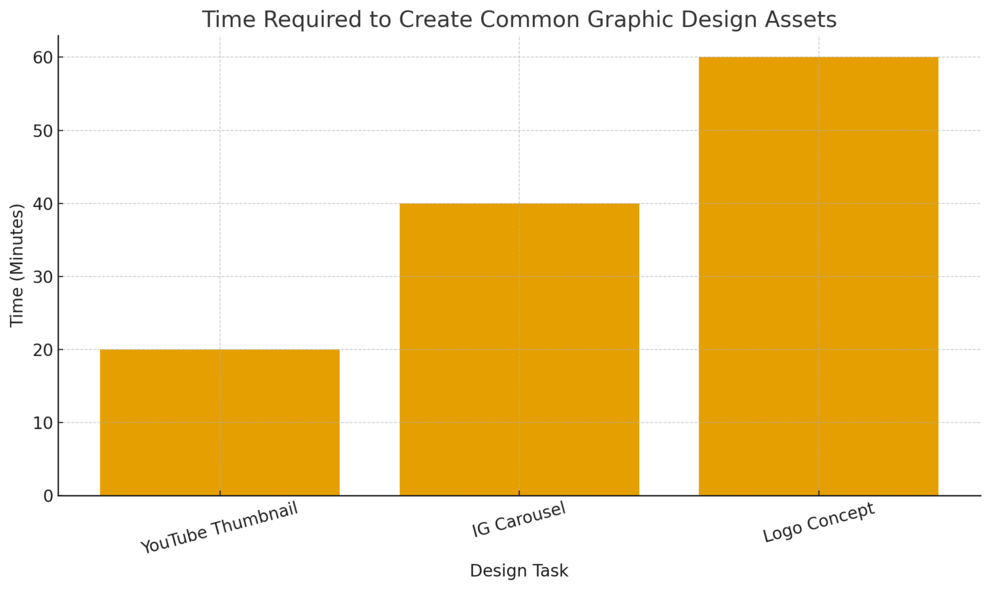
Graphic design today doesn’t require advanced software. With tools like Canva and Figma templates, beginners can create professional-quality visuals quickly.
These gigs work well because brands constantly need new designs.
Creating Social Banners And Thumbnails For Creators
YouTube thumbnails and social banners are in high demand. Every creator wants visuals that stand out, and templates make this work accessible.
Inside Canva, you can search “YouTube Thumbnail” or “Facebook Cover” and find thousands of predesigned layouts. Your job is mainly adjusting colors, images, and text.
Two things matter most:
- Contrast: Use lighter text on dark backgrounds or vice versa so thumbnails pop.
- Faces: Photos with expressions and close-ups usually perform better in YouTube thumbnails.
For example, a fitness coach might want a thumbnail for a workout video. You use a photo of them, add bold text like 10-Minute Core Routine, and adjust the colors to match their brand. This takes under 15 minutes once you get the hang of it.
Using Templates To Build Brand Kits For Small Businesses
Brand kits sound complicated, but beginners can build starter versions using templates.
A brand kit usually includes:
- A color palette.
- Font pairings.
- Logo variations.
- Simple social media templates.
Canva’s Brand Hub lets you save these elements so clients stay consistent across every design. The path is: Canva Home → Brand → Brand Kits → Create New.
I suggest starting with small businesses, especially local ones that rarely have a defined brand identity. You can create a clean, cohesive look they can use everywhere—website, Instagram, flyers, etc.—without needing advanced design theory.
This service often pays better than one-off designs because businesses value consistency over time.
Delivering Simple Logo Concepts Using Online Editors
Logo creation is a profitable beginner-friendly gig when you stick to simple concepts. You don’t need Illustrator-level skills to make clean, modern logos.
Canva and Looka offer easy ways to prototype logo ideas. Inside Canva, the path is: Home → Logo. You can choose a minimal template and customize it with text, icons, and color.
When you present logos, offer:
- One primary version.
- A simplified icon-only version.
- A black-and-white version.
These variations look professional and give clients flexibility for different platforms. In practice, a handmade business might want a logo for packaging and social media. You create one clean badge-style design, a round icon version, and a watermark. These small touches elevate your service.
Logos are simple but high-value. Many beginners secure repeat work once clients trust their visual style.
7. Transcription And Captioning Gigs With No Experience Needed
Transcription and captioning are great starter freelance gigs because you only need a laptop, headphones, and a bit of patience.
These tasks help businesses turn audio or video into written text, and the demand has grown as more brands publish video content.
Using Automated Tools To Reduce Manual Typing Time
Automated transcription tools can cut your workload in half, which is why I suggest using them as your foundation. You still need to edit their output, but it saves you from typing everything from scratch.
Using Otter.ai: Upload the audio through Home → Import → Select File. The tool generates a transcript in minutes. You then clean errors and format sections.
Using Google Docs Voice Typing: This works well for clear audio. Inside Docs, go to: Tools → Voice Typing. Press the microphone icon and let the audio play while Google types.
I’ve seen beginners complete 60-minute transcripts in under two hours using these tools. Without automation, it could take four or more. The key is choosing clean recordings; poor-quality audio demands more edits and slows your workflow.
A practical scenario: A YouTuber wants their video transcribed for a blog. You run it through Otter.ai, fix errors, insert timestamps if requested, and deliver a polished text file. It’s simple, repeatable work with steady demand.
Formatting Captions To Meet Platform Requirements
Captioning isn’t just typing words. Each platform has specific formatting rules, especially if you’re exporting SRT files (subtitle files).
YouTube’s requirements include short lines, clear punctuation, and proper timestamps. Inside YouTube Studio, the path is: Content → Select Video → Subtitles → Add. You can upload an SRT file or type captions manually.
TikTok and Instagram Reels use auto-captions, but creators still hire freelancers to fix inaccuracies and adjust styling. Tools like Veed make this easier. Inside Veed, use: Upload Video → Subtitles → Auto Subtitle → Edit. You can adjust text placement, duration, and accuracy.
I recommend keeping each caption line under 32 characters for readability. This ensures viewers can follow along without distraction, especially on mobile.
Improving Accuracy With Clear Audio And Style Guides
Accuracy is what sets good captioning freelancers apart. Clients appreciate attention to detail, especially when videos involve fast speakers or technical terminology.
Accuracy improves when you:
- Choose audio sources with minimal background noise.
- Use headphones instead of laptop speakers.
- Follow a style guide such as the BBC or Rev guidelines.
Style guides explain decisions like whether to include filler words, how to handle overlapping speech, and how to format timestamps. They make your work look clean and professional.
If you’re working with unclear audio, slowing playback to 0.75x can help you capture difficult sections. I’ve done this many times, and it significantly reduces errors.
8. Simple Web Design Services Using Drag-And-Drop Builders
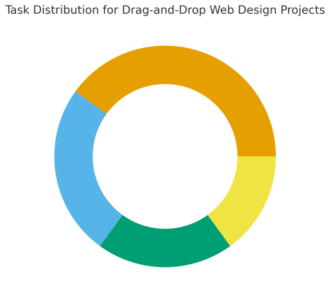
Web design might sound complex, but drag-and-drop builders make it accessible for anyone willing to learn layouts and simple design. These tools handle the code for you.
Building Starter Websites With Platforms Like Wix
Wix is one of the easiest website builders for beginners because of its intuitive editor. You can create pages visually without touching code.
Inside Wix, start with: Create New Site → Business or Portfolio → Choose Template. Each template includes prebuilt sections such as hero banners, about sections, and contact forms.
Clients often need:
- A clean homepage.
- An about page.
- A simple services or products page.
- A contact form synced to their email.
A starter website for a yoga teacher, for example, might include class schedules, booking buttons, and testimonials. You drag elements, change colors and text, and publish when everything looks right.
This work pays well because even simple websites look impressive to clients.
Creating Landing Pages For Freelancers And Coaches
Landing pages are single-purpose pages built to convert visitors. Coaches and freelancers often need them for consultations, free downloads, or upcoming events.
Tools like Carrd make this easy. Inside Carrd, the path is: Choose Template → Edit Text → Add Sections → Publish. You can embed forms from WPforms or Omnisend, which takes a few clicks.
I recommend focusing on clarity:
- A strong headline.
- One benefit-focused paragraph.
- A clear call-to-action button.
A coach selling a 30-minute consultation might want a short bio, client results, and a single booking button. You can deliver this in a few hours once you’ve practiced with templates.
Offering Website Updates And Maintenance As Add-Ons
Maintenance work is where you earn recurring income. Most small business owners don’t want to update plugins, change photos, or adjust text themselves.
Maintenance tasks include:
- Updating prices or service descriptions.
- Swapping outdated images.
- Refreshing blog posts.
- Fixing broken links.
- Checking mobile responsiveness.
Even platforms like Wix and Squarespace need periodic refreshes. You can offer monthly plans where you handle small requests for a flat fee. This turns a one-time website project into long-term revenue.
A simple scenario: A realtor you built a site for wants new property photos added weekly. That’s easy income for you and valuable support for them.
9. Online Tutoring Or Coaching In Everyday Skills
Tutoring and coaching are flexible freelance gigs that don’t require formal teaching backgrounds.
If you’re good at explaining things—or you know a skill others want—you can teach it online.
Teaching Languages Or School Subjects Through Video Calls
Platforms like Preply and Cambly make it easy to teach languages even if you’re not a certified instructor. Students often want conversational practice rather than formal lessons.
Inside Preply, the path is: Become a Tutor → Create Profile → Set Hourly Rate → Add Availability. Students choose you based on your intro video and teaching style.
For academic subjects, you can tutor math, writing, or science through Zoom or Google Meet. Students appreciate clear explanations and patience more than credentials.
I’ve met tutors who started with one student and slowly built recurring schedules. All you need is consistency and a friendly teaching style.
Creating Lesson Plans That Keep Students Engaged
Lesson plans don’t have to be complicated. I believe simple, predictable structure works best.
A typical language session might look like:
- Warm-up conversation.
- Vocabulary practice tied to a real scenario.
- Short reading or audio clip.
- Feedback or correction.
For academic subjects, you can create Google Docs with exercises, examples, and short drills. Students appreciate visual aids and step-by-step solutions.
Adding small engagement tools like quizzes in Google Forms can also make lessons more enjoyable.
Using Platforms Like Preply To Find New Clients
Preply is one of the easiest places to start because the platform brings clients to you. Your profile acts like a mini sales page.
A strong profile includes:
- A friendly intro video.
- Clear subjects or skills you teach.
- A defined hourly rate.
- A short description of your teaching approach.
Once you get a few positive reviews, Preply begins recommending your profile to more students. This creates predictable bookings without needing marketing skills.
10. Selling Digital Products As Scalable Freelance Gigs
Digital products allow you to earn passively because you create a resource once and sell it repeatedly. This is one of the most scalable freelance gigs when you find the right niche.
Creating Downloadable Templates For Busy Professionals
Templates are easy to create using Canva, Google Docs, or Notion. Busy professionals buy templates because they want shortcuts—things like resumes, social media calendars, planners, or invoices.
Inside Canva, you can design templates using: Home → Create Design → Choose Document Type. Once finished, export as a PDF or editable template link.
A productivity coach, for example, might need a weekly planner or habit tracker template. You create a clean layout, save it, and upload it to a marketplace.
This kind of product solves real problems and doesn’t require advanced design skills.
Publishing Simple Guides Or Workbooks Using Canva
Workbooks are popular with creators, coaches, and freelancers because they help teach concepts. You can make them with Canva by combining text sections, worksheets, and prompts.
A simple UI path is: Home → Ebook Template → Customize. Add your chapters, example pages, and fill-in-the-blank exercises.
You might create:
- A beginner budgeting workbook.
- A meal planning guide.
- A productivity workbook for entrepreneurs.
These products often sell well because they’re practical and easy to follow. I suggest starting with a 10–20 page workbook to keep the process manageable.
Using Marketplaces Like Etsy To Validate Demand
Etsy is one of the best platforms for selling digital products because buyers already search for templates and planners.
The workflow is simple:
- Create your digital file.
- Upload it to Etsy.
- Write a clear title and description.
- Set an affordable price.
If a product gets traction, you can create similar variations or bundles. Etsy also provides analytics so you can see which pages attract visitors and what keywords lead to sales.
This is how many beginners validate their digital product niche: They post 5–10 products and see what sells. It’s low risk and fast to test.

I’m Juxhin, the voice behind The Justifiable.
I’ve spent 6+ years building blogs, managing affiliate campaigns, and testing the messy world of online business. Here, I cut the fluff and share the strategies that actually move the needle — so you can build income that’s sustainable, not speculative.
Related posts:
 How to Make Money Working from Home Without Experience
 How to Earn Money Freelancing (Free Beginner’s Guide)
 Making Money Through Freelance Article Writing
 Freelancer Website: How to Stay Competitive in the Gig Economy
 Freelancing Websites: Top 10 Platforms to Kickstart Your Career
 How To Find The Perfect Freelance Services For Your Business