
Table of Contents
Some links on The Justifiable are affiliate links, meaning we may earn a small commission at no extra cost to you. Read full disclaimer.
If you’ve ever searched for an AI writing tool to polish your content, chances are you’ve come across Free QuillBot. But can this tool really improve your writing, or does it just sound good on paper?
Let’s dig in to see whether QuillBot’s free version lives up to the hype—and whether it’s worth your time as a writer, blogger, or student.
What Is Free QuillBot and How Does It Work?
If you’ve ever felt stuck rephrasing a sentence or cleaning up awkward wording, Free QuillBot might feel like a lifeline.
It’s an AI-powered writing tool designed to help you rewrite, summarize, and refine your content using natural language processing (NLP).
In simpler terms, it studies your text and suggests alternative ways to express the same idea—often faster and cleaner than doing it yourself.
How QuillBot Uses AI To Rewrite and Improve Text
QuillBot’s AI engine relies on machine learning models trained on billions of sentences.
When you paste text into the Paraphraser, the tool analyzes meaning, structure, and tone before rewriting it while keeping the original intent intact.
Here’s how it works in practice:
- You paste a sentence like “Writing content takes too long.”
- QuillBot’s AI instantly suggests “Creating content can be time-consuming.”
- The meaning stays the same, but the phrasing feels more natural.
What I like is that QuillBot doesn’t just swap words with synonyms—it restructures sentences to improve rhythm and flow.
I suggest experimenting with its modes like Standard (for safe rewrites) and Fluency (for smoother readability). You’ll see how each changes tone subtly without breaking meaning.
The Core Features Included in the Free Version
The free version gives access to QuillBot’s most essential tools, but with certain restrictions.
You get:
- Paraphraser tool with two writing modes: Standard and Fluency.
- Word Flipper slider to control how aggressive the rewrites are.
- Grammar checker to fix punctuation and sentence structure errors.
- Summarizer that condenses long paragraphs into key points.
While the free version limits the number of characters you can paraphrase at once (usually 125 words), it’s more than enough for quick edits or short content sections.
I often use it to fine-tune blog introductions or reword product descriptions—it saves time without making the text sound robotic.
What Makes QuillBot Different From Other Writing Tools
Unlike tools that simply fix grammar, QuillBot acts as an AI rewriter. It doesn’t just tell you what’s wrong—it gives you improved phrasing options in real time.
That’s a big deal if you’re writing frequently and want variety in tone or structure.
Here’s what sets it apart:
- Contextual Rewriting: It understands sentence intent, not just word meaning.
- Integration Options: It works directly inside Google Docs, Chrome, and Microsoft Word.
- Dual-Purpose Design: You can use it for both creative rewriting and academic summarizing.
In my experience, QuillBot feels less “robotic” than many alternatives because it focuses on preserving your original style.
It’s like having an editor who politely suggests better ways to say what you already mean.
Key Features You Get With Free QuillBot
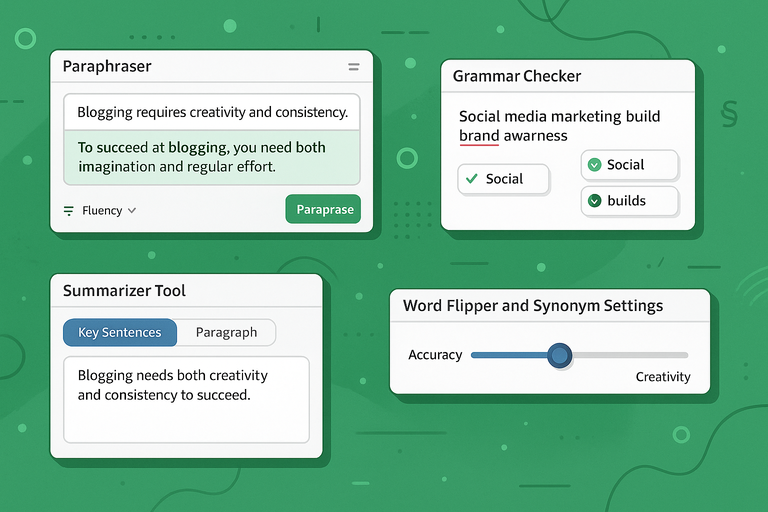
Even with its limitations, Free QuillBot packs surprising value. Each feature contributes to a smoother, more efficient writing workflow without the pressure to upgrade immediately.
Paraphraser: How Accurate and Useful It Really Is
The Paraphraser is QuillBot’s signature feature, and for most users, it’s the main reason to try it. It helps you rewrite text for clarity, tone, or originality—perfect if you’re refreshing old content or avoiding repetitive phrasing.
Here’s a quick example:
- Original: “Blogging requires creativity and consistency.”
- Paraphrased: “To succeed at blogging, you need both imagination and regular effort.”
It nails the meaning but introduces new word structures. The tool’s Fluency mode is particularly useful for non-native English writers, as it smooths awkward phrasing while keeping sentences human-like.
However, accuracy depends on your input quality. I advise proofreading every output—QuillBot occasionally over-simplifies complex sentences or changes nuance.
Grammar Checker: Can It Compete With Grammarly?
QuillBot’s grammar checker is surprisingly capable. It identifies standard grammar issues, such as:
- Misplaced commas and punctuation
- Subject-verb disagreement
- Sentence fragments and wordy phrases
It’s more intuitive than basic built-in checkers like Google Docs, but not as advanced as Grammarly in tone or context detection.
For example, Grammarly might flag subtle tone mismatches (“You sound too formal”), while QuillBot focuses on readability and sentence accuracy.
Still, it’s a great free option. I recommend using QuillBot for rewriting, then running Grammarly afterward for stylistic polish. The combo works beautifully for bloggers and freelance writers.
Summarizer Tool: A Shortcut or a Risk for Clarity?
The Summarizer tool condenses long content into concise summaries or bullet lists using AI analysis.
You can choose between Key Sentences (pulls the most important lines) or Paragraph Mode (rewrites in summary form).
For example, pasting a 600-word article gives you a neat 80-word version that captures the main points.
It’s ideal for:
- Summarizing research articles
- Creating short takeaways for blog intros
- Extracting highlights for social posts
Still, I suggest caution—AI summarizers can oversimplify technical text. Always read the output before publishing, especially if your writing relies on nuance or factual detail.
Word Flipper and Synonym Settings: Are They Helpful or Gimmicky?
The Word Flipper is a slider that adjusts how aggressively QuillBot replaces words. Move it right for more creativity, left for accuracy.
For example, flipping too high might turn: “Social media marketing builds brand awareness” into “Digital networking enhances company visibility.”
While it sounds fresh, meaning can drift. I believe moderate settings (around 30–40%) work best for everyday rewriting—you’ll get originality without distortion.
This feature shines when you’re trying to diversify content, like rewriting product descriptions or reusing social media captions. Used wisely, it’s an excellent creativity booster. Used carelessly, it can make your writing sound alien.
Expert Tip: Pair the free version of QuillBot with Grammarly or Hemingway Editor for best results. QuillBot refines structure and flow, while the other tools handle style and tone. That mix keeps your writing sharp without spending a dime.
Free QuillBot vs Paid Version: What’s the Real Difference?
When comparing Free QuillBot to its premium version, the differences go beyond simple word count limits.
The free plan gives you a solid taste of what the tool can do, but the premium version opens up its full power—ideal if you’re a frequent writer or editor who depends on polished text.
Word Limits and Mode Restrictions in the Free Plan
The biggest limitation in the free version is the 125-word paraphrasing cap. You can only rewrite up to that amount at a time, which makes it great for short-form edits (like meta descriptions or email snippets), but a hassle for longer content.
In contrast, the premium plan raises the limit to 10,000 characters per use, letting you paraphrase full articles or reports in one go. It also unlocks additional writing modes, which are disabled in the free version.
To put it simply:
- Free users get 2 modes: Standard and Fluency
- Premium users get 7 total modes: Creative, Expand, Shorten, Formal, Simple, Standard, and Fluency
I’d say the free plan works well for occasional edits or testing tone, but if you’re producing content daily, the switching and pasting can slow you down.
Premium Modes Like “Fluency” and “Creative”: Are They Worth Paying For?
Yes—and no. It depends on how you write and what kind of content you produce.
The “Fluency” mode, available even in the free version, focuses on fixing grammatical errors and awkward phrasing. I find it especially handy for non-native English speakers—it smooths out writing while keeping your voice intact.
But premium modes like “Creative” and “Expand” take it up a notch.
- Creative mode rewrites text more boldly, changing structure and tone for originality. Great for bloggers or marketers who want variety.
- Expand mode adds depth to ideas, often turning a short phrase into a full sentence.
- Shorten mode trims wordy sentences without losing meaning—useful for tightening web copy.
I believe the real value of these premium modes is control. They let you decide whether you want safety, creativity, or brevity—all with one click.
Performance Speed and Accuracy Compared Between Free and Paid Versions
Speed and accuracy are where you truly notice the premium difference. Free QuillBot can lag slightly when processing longer text, while premium users enjoy faster AI response times and smoother transitions between modes.
Accuracy-wise, premium outputs feel more “human.” For example, when testing both versions with a paragraph about SEO, the free tool gave me repetitive synonyms, while the premium version restructured sentences to read naturally—like something I’d actually publish.
Here’s a quick side-by-side comparison:
| Feature | Free Version | Premium Version |
| Paraphrasing Limit | 125 words | 10,000 characters |
| Available Modes | 2 | 7 |
| Speed | Moderate | Fast |
| Grammar + Fluency | Basic | Advanced |
| Plagiarism Checker | Not included | Included |
| Summarizer Limit | 2,500 words | 6,000 words |
If you’re writing daily blog posts or long articles, the premium version feels worth it purely for time saved.
But if you only need occasional help cleaning up writing, the free version does just fine.
How Reliable Is QuillBot for Bloggers and Writers?
For everyday content creation, QuillBot is reliable, though not flawless.
It helps refine drafts, simplify complex sentences, and maintain flow—but it still requires a human touch to ensure meaning and tone stay consistent.
Does QuillBot Maintain Original Meaning After Rewrites?
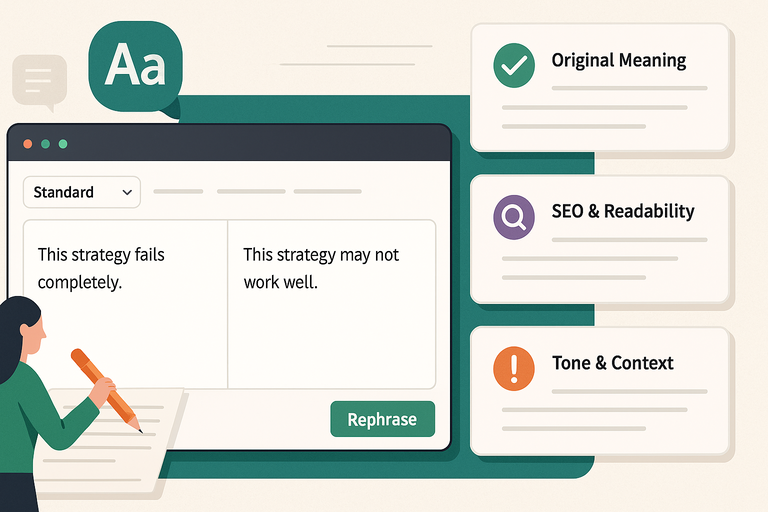
Mostly, yes. QuillBot is impressively accurate at preserving meaning during rewrites. It uses AI-driven semantic understanding—basically, it reads context before changing anything.
However, it sometimes softens strong opinions or rewrites too conservatively. For instance, “This strategy fails completely” might become “This strategy may not work well,” which sounds milder.
I recommend checking each rewrite for tone drift, especially in persuasive or emotional writing.
My workflow: I paraphrase in Standard mode, then review sentence-by-sentence. If something feels “off,” I use Fluency or Creative mode to rebalance tone. It’s a quick fix.
How It Handles SEO and Readability in Content Creation
For SEO-focused writers, QuillBot can be a double-edged sword. It improves readability—breaking down long sentences, adding clarity, and making text easier for users (and Google) to digest.
But it doesn’t understand keyword intent or semantic optimization like dedicated SEO tools.
Here’s how I make it work:
- I draft normally with keywords in mind.
- Then, I run sections through QuillBot to improve flow without touching keywords.
- Finally, I double-check keyword placement with tools like SurferSEO or Frase.
Used this way, QuillBot helps you boost on-page readability without hurting SEO relevance.
Where QuillBot Struggles: Tone, Flow, and Context Issues
No AI is perfect, and QuillBot sometimes struggles with subtle writing tasks.
- Tone drift: It can unintentionally make confident sentences sound uncertain.
- Context misunderstanding: Longer paragraphs with layered ideas might lose nuance.
- Over-simplification: The AI tends to simplify complex or academic phrasing too aggressively.
For example, when rewriting a marketing paragraph, it once changed “value proposition” to “offer,” which slightly altered meaning. I suggest always scanning the final text before publishing, especially if precision matters.
That said, for quick rewrites, blog drafts, or brainstorming phrasing options, it’s one of the most consistent AI tools I’ve used.
Pros and Cons of Using Free QuillBot
Like any AI writing tool, Free QuillBot shines in some areas and struggles in others.
Here’s an honest breakdown to help you decide if it fits your writing workflow.
The Advantages That Make It Worth Trying
- Free and user-friendly: You can start immediately without logging in.
- Effective paraphrasing: The Standard and Fluency modes produce clean, readable text.
- Grammar correction built-in: It’s handy for spotting basic grammatical mistakes.
- Integration-ready: Works smoothly with Google Docs and Chrome extensions.
- Great learning aid: You can study how it rewrites to naturally improve your phrasing over time.
I’d recommend it especially for students, bloggers, and freelancers who want quick help polishing copy or overcoming writer’s block.
Common Limitations and Frustrations Users Face
While it’s powerful, the free version has some notable pain points:
- The 125-word limit can slow you down for long-form writing.
- Limited modes restrict flexibility.
- Occasional word meaning errors—especially with technical or niche topics.
- Context loss when paraphrasing multi-sentence ideas.
- No plagiarism checker, which means you’ll need a separate tool like Copyscape.
I’ve found these manageable with a simple workaround: break longer sections into smaller chunks and run them separately through the paraphraser. It takes a few extra minutes but keeps accuracy high.
Who Should Use Free QuillBot (and Who Shouldn’t)
Free QuillBot is ideal for:
- Bloggers refining short posts or headlines.
- Students rewriting essays or simplifying academic text.
- Non-native English writers improving fluency.
It’s less suited for:
- Professional copywriters who need stylistic consistency.
- SEO specialists managing keyword density.
- Agencies producing high-volume, client-ready content.
If you fall into the latter groups, I suggest upgrading or pairing QuillBot with more advanced tools like Grammarly Premium or Jasper AI for context-rich content.
Expert Tip: Use QuillBot’s free version to handle the editing stage of your workflow rather than the writing stage. Draft freely, then paste sections in to refine structure, tone, and clarity. This keeps your voice intact while letting AI handle the mechanical work.
Best Use Cases for Free QuillBot
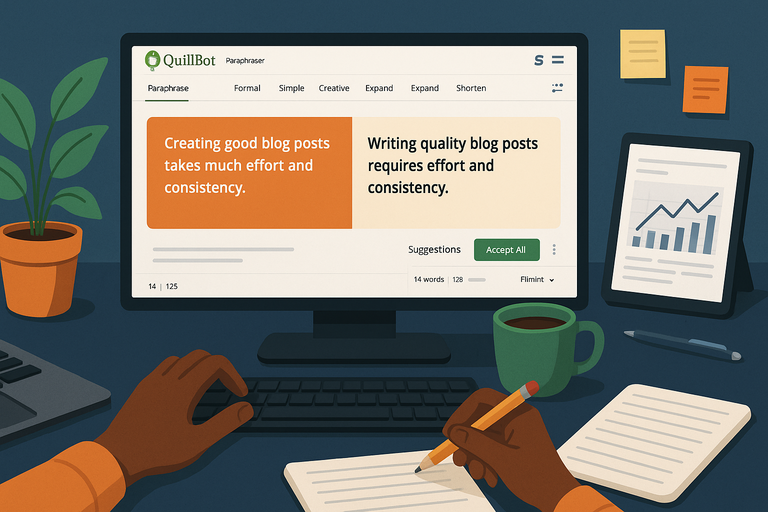
Free QuillBot is most useful when you need quick, light-touch editing that improves clarity, flow, or tone.
I’ve found it works best as a supportive writing assistant—not a full content creator. Think of it as your editor-on-demand for small but meaningful improvements.
Editing and Polishing Drafts for Clarity
One of the strongest use cases for Free QuillBot is refining drafts that feel a bit rough. The Paraphraser and Fluency modes make your text cleaner, easier to read, and more natural-sounding without removing your personality.
Here’s how I usually do it:
- Paste your paragraph into QuillBot.
- Switch to Fluency mode.
- Review its suggestions line by line, keeping what works and editing what doesn’t.
For instance, if you write:
“Creating good blog posts takes much effort and consistency,”
QuillBot might suggest:
“Writing quality blog posts requires effort and consistency.”
Small, but impactful. The flow improves instantly. I recommend using it for polishing blog intros, meta descriptions, and short copy—areas where readability matters most.
Rewriting Sentences for Simplicity or Variety
If you often repeat phrases or struggle to simplify complex ideas, Free QuillBot can save you time. The Word Flipper slider helps adjust how much QuillBot changes your text.
I usually keep it around 30–40% to strike a balance between creativity and accuracy. For example:
- Original: “Effective SEO demands consistent optimization across all content.”
- Rewritten: “Strong SEO requires ongoing improvement in every piece of content.”
It’s clear, natural, and avoids sounding robotic. If you’re writing for a broad audience, these subtle rewrites help ensure everyone understands your message.
Pro tip: Don’t let QuillBot rewrite full sections of your work without review. Use it sentence by sentence for maximum control and natural tone.
Using It as a Learning Tool to Improve Writing Style
I often tell new writers to treat Free QuillBot like a writing tutor. It helps you see better ways to phrase ideas, which gradually improves your own writing.
Try this exercise:
- Write a short paragraph in your usual style.
- Run it through QuillBot’s Standard mode.
- Compare its suggestions to your original.
You’ll notice how it simplifies awkward wording, tightens flow, and uses more precise vocabulary. Over time, you’ll naturally start writing more like the improved versions.
I believe this makes QuillBot one of the best free writing tools for anyone looking to grow their editing instincts without spending a dime.
Real Alternatives to QuillBot You Should Consider
While Free QuillBot offers excellent value, no single AI writing tool fits every need.
Depending on your goals—grammar, tone, or deep analysis—you might prefer one of its competitors.
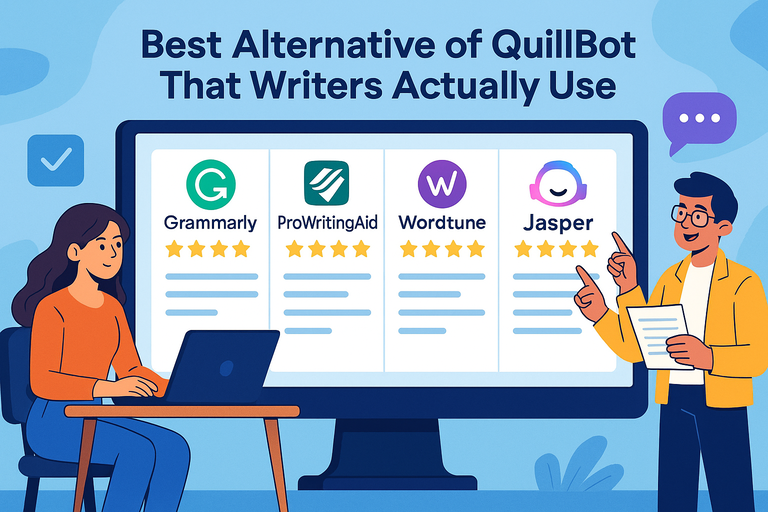
Grammarly: A Stronger Grammar and Tone Checker
Grammarly is the most direct competitor to QuillBot, but it focuses more on correction than rewriting. It checks grammar, punctuation, tone, and readability in real time.
Where it wins:
- Tone detection: Tells you if your writing sounds formal, confident, or too casual.
- Advanced grammar suggestions: Identifies subtle errors that QuillBot sometimes misses.
- Browser integration: Works seamlessly in Gmail, Google Docs, and LinkedIn.
If you’re mainly after accuracy and tone balance, Grammarly outperforms QuillBot. But for creative rephrasing or paraphrasing, QuillBot remains the better choice.
I often use both: QuillBot for rewriting, Grammarly for final polish.
ProWritingAid: Better for Deep Style Analysis
ProWritingAid feels like Grammarly’s analytical cousin. Instead of just correcting, it explains why something sounds awkward or unclear.
You get detailed reports on:
- Sentence variety and length
- Sticky sentences (those that slow down readers)
- Overused words and repetitive phrasing
It’s perfect for long-form writers who want to understand their writing habits. If you’re producing ebooks, whitepapers, or lengthy blog posts, I recommend testing ProWritingAid’s reports. It gives insights that can genuinely make you a better writer over time.
QuillBot improves flow; ProWritingAid improves structure. They actually complement each other beautifully.
Wordtune: A More Natural Rewriter for Everyday Use
Wordtune focuses entirely on making sentences sound more conversational. When you highlight a sentence, it instantly offers multiple rewritten versions—each with a slightly different tone or rhythm.
For example, if you highlight “I’m happy to collaborate on this project,” it might suggest:
- “Excited to team up on this project.”
- “Looking forward to working together on this.”
It’s faster and more fluid than QuillBot for short-form writing like social media posts or emails. But for long paragraphs or essays, QuillBot handles structure better.
If your priority is sounding natural and human, Wordtune is worth trying alongside Free QuillBot.
Final Verdict: Is Free QuillBot Worth It for Writing Help?
At this point, it’s clear that Free QuillBot is one of the most practical AI tools for writers who want to refine their work without paying a subscription.
It’s fast, intuitive, and genuinely improves sentence flow and clarity. Still, whether it’s “worth it” depends on your writing habits.
When the Free Version Is Enough for Everyday Writing
If you’re an occasional writer, student, or blogger producing short-form content, the free version offers everything you need. The 125-word limit may sound restrictive, but it’s manageable if you edit in chunks.
I find the free plan perfect for:
- Rewriting short paragraphs, intros, or product descriptions
- Cleaning up awkward sentences
- Improving fluency in non-native English writing
It’s like having an extra pair of eyes for structure and readability—without extra cost.
When Upgrading to Premium Makes Sense
You should consider upgrading if you:
- Write full-length articles or essays daily
- Need access to creative or formal writing modes
- Want faster performance and unlimited word limits
- Prefer built-in plagiarism checking
For professionals or content creators managing volume, these upgrades save real time. From what I’ve seen, most heavy users outgrow the free plan within a few weeks once they see its value.
Expert Tip: How To Combine QuillBot With Other Tools for Best Results
The smartest approach isn’t choosing between tools—it’s combining them. Here’s my personal workflow that consistently delivers clean, optimized writing:
- Draft: Write freely without worrying about grammar or phrasing.
- Rewrite: Run your text through Free QuillBot in Fluency or Standard mode.
- Polish: Use Grammarly or Hemingway Editor to check tone and readability.
- Optimize: Run the final text through an SEO tool like SurferSEO or Frase to fine-tune keywords.
This layered method keeps your content human, readable, and search-friendly—without sounding like an AI wrote it.

I’m Juxhin, the voice behind The Justifiable.
I’ve spent 6+ years building blogs, managing affiliate campaigns, and testing the messy world of online business. Here, I cut the fluff and share the strategies that actually move the needle — so you can build income that’s sustainable, not speculative.
Related posts:
 Top Tools QuillBot Similar For Rewriting And Grammar Fixing
 Free QuillBot Alternative: Top AI Tools For Writers
 Quillbot Alternative Review: Top 5 Choices
 Best Alternative Of QuillBot That Writers Actually Use
 The QuillBot Review: Is This AI Writing Tool Worth It?
 How To Use QuillBot Tool To Rewrite Like A Pro