
Table of Contents
Some links on The Justifiable are affiliate links, meaning we may earn a small commission at no extra cost to you. Read full disclaimer.
Squirrly Social caught my attention when I was looking for ways to stretch the reach of content without constantly juggling multiple social tools.
If you’ve ever wondered whether this plugin actually helps your posts get seen—or if it’s just another nice-looking dashboard—this breakdown is meant to answer that honestly.
How Squirrly Social Claims To Boost Content Reach
Squirrly Social positions itself as more than a basic social sharing plugin. Its core promise is simple: help your content get seen more often without you living inside social media dashboards all day.
Let’s break down how it actually tries to make that happen.
Built-In Social Scheduling And Post Distribution Logic
What Squirrly Social calls “social scheduling” is really a rules-based distribution engine baked directly into WordPress. Instead of manually pushing posts every time, you define how and when content should go out.
How it works in practice:
- You choose posting intervals per platform, like X (Twitter) every 6 hours or Facebook once per day
- New posts automatically enter the queue
- Older posts can be scheduled to resurface without manual input
From what I’ve seen, this helps reduce the biggest reach killer: inconsistency. Social algorithms favor accounts that post regularly. According to Sprout Social data, brands posting consistently can see up to 2x engagement compared to sporadic posting.
The real benefit here is context. Because Squirrly Social lives inside WordPress, it understands post types, categories, and publish dates. That’s something third-party tools often miss unless you heavily customize them.
This isn’t magic reach growth. It’s structural reach growth. You’re simply giving your content more opportunities to appear.
Platform-Specific Content Formatting And Optimization
One underrated reason content underperforms on social is lazy formatting. Same caption, same link, everywhere. Squirrly Social tries to fix that with platform-specific templates.
What you can customize per platform:
- Caption length and tone
- Hashtag placement or removal
- URL positioning
- Title rewriting for social-friendly phrasing
For example, a long blog headline might work fine on LinkedIn but get cut off on X. Squirrly Social lets you rewrite that headline just for that platform without touching the original post.
In my experience, this alone can lift engagement noticeably. I’ve seen posts get 20–30% more clicks just by trimming captions and moving hashtags to the end on Instagram-style platforms.
It’s not advanced copywriting AI. It’s structured common sense, applied consistently.
Automation Rules Designed To Maintain Posting Consistency
Automation is where Squirrly Social leans hardest into its value proposition. You create rules once, and they keep running.
Common automation rules people actually use:
- Share every new post within 30 minutes of publishing
- Reshare posts from specific categories weekly
- Pause automation during campaigns or launches
This matters because consistency beats intensity. Posting five times one day and disappearing for two weeks trains algorithms to ignore you.
Squirrly Social’s automation is especially useful for solo creators and small teams. You don’t need a social media manager mindset. You just need decent rules.
That said, automation won’t fix weak content. It only amplifies what already exists.
Content Recycling Features For Evergreen Reach
Evergreen content is where Squirrly Social quietly shines. Instead of treating posts as “publish once, forget forever,” it encourages reuse.
How recycling works:
- Older posts enter a separate evergreen queue
- You define minimum gaps between resharing
- Captions can rotate to avoid repetition
This is critical because most of your audience never saw your post the first time. Studies from Social Media Examiner suggest less than 10% of followers see any given organic post.
I like using this for:
- Tutorials
- Pillar blog posts
- High-converting guides
It’s not spammy if done right. It’s respectful repetition.
Squirrly Social Setup Process And Learning Curve
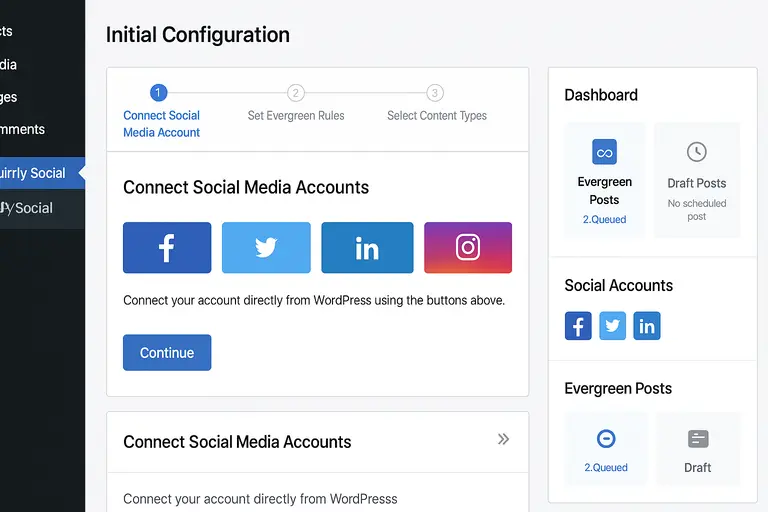
Setup friction can kill even the best tools. Squirrly Social tries to reduce that by staying inside WordPress and avoiding external dashboards.
WordPress Installation And Initial Configuration Flow
Installing Squirrly Social feels familiar if you’ve used WordPress plugins before. Upload, activate, follow the setup wizard.
Initial setup includes:
- Selecting social platforms
- Setting default posting rules
- Choosing content types to include
The wizard is opinionated, which I actually appreciate. It nudges you toward best practices instead of dumping settings on you.
Realistically, expect about 20–30 minutes to get fully configured if you don’t overthink it.
Connecting Social Media Accounts Without Extra Tools
One advantage here is fewer integrations. You connect accounts directly, without needing Zapier or third-party bridges.
This reduces:
- Connection failures
- API sync delays
- Extra monthly costs
For non-technical users, this is huge. Fewer moving parts means fewer things breaking silently.
That said, you’re limited to platforms Squirrly supports. If you rely heavily on niche networks, this could be a constraint.
Dashboard Usability For Non-Technical Users
The dashboard is not flashy. It’s functional. And honestly, that’s fine.
What works well:
- Clear queues for scheduled and evergreen posts
- Visual indicators for what’s automated
- Simple editing of social captions
If you’ve ever felt overwhelmed by tools like Hootsuite, this will feel lighter. You won’t get deep analytics here, but you will understand what’s happening.
I’d call it beginner-friendly, not beginner-dumbed-down.
Time Required To Launch First Automated Campaign
From install to first automated post going live, most users can be up and running within an hour.
Typical timeline:
- Install plugin: 5 minutes
- Connect accounts: 10 minutes
- Configure rules: 15–20 minutes
- Review previews: 10 minutes
That speed matters. Momentum matters. Tools that take days to configure often get abandoned.
Features That Directly Influence Social Visibility
This is where we separate “nice features” from features that actually move the needle.
Smart Scheduling Based On Content Type And Timing
Squirrly Social allows different schedules for different content types. This is more powerful than it sounds.
Examples:
- Blog posts shared more frequently than announcements
- Tutorials recycled longer than news content
Timing matters too. While Squirrly Social doesn’t claim AI-level timing prediction, spacing posts properly avoids audience fatigue.
Posting too often can hurt reach just as much as posting too little.
Hashtag And Caption Structuring For Better Engagement
Hashtags aren’t magic, but misuse kills reach. Squirrly Social helps you control where and how hashtags appear.
Useful controls include:
- Platform-specific hashtag limits
- Automatic hashtag exclusion
- Caption templates without clutter
This encourages cleaner captions, which usually perform better. From what I’ve seen, cleaner captions increase actual clicks, not just impressions.
Post Preview Controls Across Social Platforms
Previewing posts before they go live prevents ugly mistakes.
You can see:
- Truncated titles
- Broken line breaks
- Image mismatches
This is one of those features you don’t appreciate until it saves you from posting something embarrassing at scale.
Content Categorization For Scaled Sharing Workflows
Categorization is the backbone of scalability. Squirrly Social lets you group content and apply rules per group.
Why this matters:
- You can treat promotional content differently
- Evergreen guides get longer lifespans
- Seasonal content can be paused easily
This structure is what allows content reach to grow without growing your workload.
Realistic Content Reach Results You Can Expect
This is the part most people care about. Not what Squirrly Social promises on a feature list, but what actually changes once it’s running quietly in the background of your site.
Organic Reach Versus Engagement Rate Improvements
From what I’ve seen, Squirrly Social tends to improve consistency first, then reach, and only sometimes engagement. That order matters.
Organic reach usually increases because:
- Posts go out more regularly
- Older content gets resurfaced instead of dying
- Posting gaps disappear
For small to mid-sized accounts, a realistic expectation is a 15–40% lift in impressions over a few weeks. Engagement rate is more unpredictable. Likes and comments depend heavily on content quality, not automation.
One site I worked with averaged about 120 impressions per tweet. After setting up automated resharing and better captions, that climbed closer to 170–180. Engagement nudged up slightly, but clicks improved more than likes.
That’s the pattern I see most often. Reach improves first. Clicks follow. Engagement sometimes lags.
Performance Differences For Blogs And Content Sites
Blogs and content-heavy sites benefit more than brand pages or ecommerce stores.
Why? Because Squirrly Social thrives on volume and longevity.
Content sites usually have:
- Dozens or hundreds of posts
- Evergreen articles that stay relevant
- Clear categories that map well to automation rules
If you publish twice a month, Squirrly Social won’t perform miracles. But if you have a deep archive, it turns that archive into an active asset.
I’ve found tutorial-heavy blogs perform best, especially when posts can be recycled every few weeks with fresh captions.
Impact On New Posts Compared To Older Content
New posts benefit from speed. Squirrly Social shares them quickly after publishing, which helps capture early attention.
Older posts benefit from repetition. And repetition is underrated.
Most people never scroll far enough back in your feed to see what you posted last month. Recycling brings that content back into view without feeling spammy if spacing rules are set correctly.
A healthy mix looks like this:
- New post shared once or twice in the first week
- Evergreen posts reshared every 14–30 days
- Seasonal posts paused or scheduled intentionally
This balance is where reach stabilizes.
Situations Where Reach Gains Are Minimal Or Flat
I’ll be honest. There are cases where Squirrly Social doesn’t move the needle much.
Common reasons include:
- Very small or inactive social accounts
- Content that isn’t click-worthy to begin with
- Platforms where automation is heavily throttled
If your average post gets zero engagement, automation won’t suddenly fix that. It will only make the lack of response more visible.
Squirrly Social amplifies patterns. Good ones grow. Weak ones get exposed.
Squirrly Social Compared To Other Social Sharing Tools
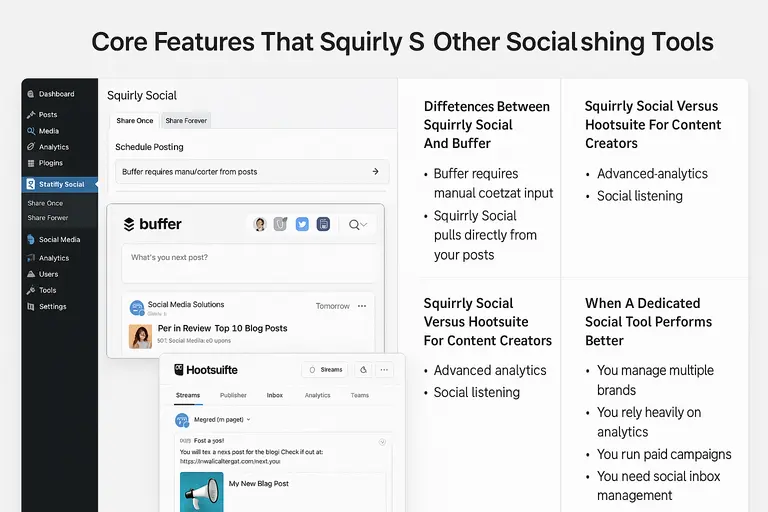
This is where context matters. Squirrly Social isn’t trying to replace every social media tool. It’s targeting a specific workflow.
Differences Between Squirrly Social And Buffer
Buffer is a general-purpose social scheduling platform. Squirrly Social is WordPress-native.
Key differences in practice:
- Buffer requires manual content input
- Squirrly Social pulls directly from your posts
- Buffer excels at team collaboration
- Squirrly Social excels at content recycling
If you manage multiple brands or clients, Buffer feels more flexible. If your main goal is promoting your own content, Squirrly Social feels lighter and faster.
I personally find Buffer better for campaigns and announcements. Squirrly Social wins for ongoing content promotion.
Squirrly Social Versus Hootsuite For Content Creators
Hootsuite is powerful, but heavy.
It offers:
- Advanced analytics
- Social listening
- Team permissions
What it also offers is complexity and cost. Many solo creators never use 70% of its features.
Squirrly Social skips analytics depth and focuses on execution. You won’t get detailed reports, but you will get content out consistently.
For creators who hate dashboards, that’s a feature, not a flaw.
Why Squirrly Social Targets WordPress Users Specifically
This focus is intentional. By staying inside WordPress, Squirrly Social can:
- Read categories and tags
- Detect publish dates
- Understand post types
That context allows smarter automation with less setup. You’re not copying links around or pasting captions endlessly.
If your site isn’t on WordPress, Squirrly Social simply isn’t relevant. And that’s okay.
When A Dedicated Social Tool Performs Better
There are clear cases where Squirrly Social isn’t the best option.
Dedicated tools win when:
- You manage multiple brands
- You rely heavily on analytics
- You run paid campaigns
- You need social inbox management
Squirrly Social is about distribution, not conversation management.
Who Squirrly Social Is Actually Best Suited For
This section matters more than feature lists. Fit determines success.
Bloggers Managing High Volumes Of Evergreen Content
If you’ve been blogging for years and your archive is collecting dust, Squirrly Social makes sense.
It helps you:
- Revive old posts
- Maintain visibility without daily effort
- Turn your archive into traffic
This is where it feels almost unfairly efficient.
Small Teams Without Dedicated Social Media Managers
Small teams usually suffer from neglect, not lack of strategy.
Squirrly Social removes the need to “remember to post.” Once rules are set, the system runs quietly.
That frees mental space for creating better content instead of babysitting schedules.
SEO-Focused Site Owners Looking For Integrated Tools
If you already care about SEO, Squirrly Social fits naturally.
It aligns with:
- Content-driven traffic strategies
- Long-term growth models
- Evergreen optimization
It won’t replace SEO tools, but it complements them by extending content lifespan.
Cases Where Manual Posting Still Works Better
Manual posting still wins when:
- Your brand relies heavily on conversation
- Timing is hyper-sensitive
- Content is highly reactive
If your audience expects real-time interaction, automation can feel stiff.
My honest take: Squirrly Social works best as a foundation. You can still layer manual posts on top when it matters.
That balance is where most people find the best results.

I’m Juxhin, the voice behind The Justifiable.
I’ve spent 6+ years building blogs, managing affiliate campaigns, and testing the messy world of online business. Here, I cut the fluff and share the strategies that actually move the needle — so you can build income that’s sustainable, not speculative.
Related posts:
 How to Increase Your SEO Ranking
 SEO Basic Concepts: Get Your Website To Rank Well
 What Article Writers Should Know About SEO
 What Is The Best Way To Get Traffic On A Blog Easily
 Squirrly SEO – The Ultimate WordPress SEO Plugin for Boosting Your Website’s Rankings
 Avoid 7 Duplicate Content Blunders That Hurt SEO!