
Table of Contents
Some links on The Justifiable are affiliate links, meaning we may earn a small commission at no extra cost to you. Read full disclaimer.
I’ve seen many site owners hesitate before installing an SEO plugin, and squirrly wordpress often comes up in those conversations.
If you don’t code, don’t touch server settings, and just want clear guidance without breaking your site, this question matters more than most people admit.
How Easy Is Squirrly WordPress for Non-Technical Users
If you’re not technical, ease of use isn’t a “nice to have” — it’s the whole deal. What makes squirrly wordpress stand out is that it doesn’t assume you already understand SEO, WordPress internals, or Google’s rules.
It’s clearly built for people who want guidance, not control panels filled with toggles they’re afraid to touch.
Guided Onboarding Without Technical SEO Knowledge
The first time you activate Squirrly, you’re taken through a guided onboarding flow that feels more like a checklist than a configuration maze. You’re asked simple questions about your site goals, business type, and experience level.
What I appreciate here is that:
- You’re not forced to configure advanced SEO settings
- Each step explains why it matters in plain terms
- You can skip steps without breaking anything
For example, when Squirrly asks about your focus audience, it explains how Google uses relevance signals instead of assuming you know about search intent or semantic indexing. That framing alone reduces anxiety for beginners.
In my experience, this onboarding takes about 10–15 minutes. Compare that to plugins where you’re expected to understand indexation, schema, and XML settings on day one, and the difference is night and day.
Preconfigured SEO Settings That Reduce Setup Errors
One of the biggest risks for non-technical site owners is misconfiguration. I’ve seen people accidentally noindex their entire site or break titles just by clicking the wrong toggle.
Squirrly wordpress avoids this by shipping with:
- Safe, preconfigured defaults
- Locked settings for high-risk SEO options
- Contextual warnings before changes take effect
You don’t see raw technical fields unless you explicitly go looking for them. Canonicals, indexing rules, and metadata behavior are handled automatically based on best practices.
This matters because according to Ahrefs data, a significant percentage of small sites suffer from basic technical SEO mistakes that prevent ranking at all. Removing those risks upfront is a real advantage if you’re managing your own site.
Plain-Language Explanations Instead Of SEO Jargon
SEO tools love jargon. Squirrly mostly doesn’t.
Instead of terms like “TF-IDF” or “latent semantic indexing,” you’ll see explanations like:
- Why a keyword fits your topic
- How readable your content is for humans
- Whether your page answers searcher questions
When technical concepts do appear, they’re immediately explained. For example, when Squirrly references “ranking signals,” it follows up with a short explanation about what Google looks for on pages like yours.
I genuinely believe this is why many non-technical users stick with Squirrly longer. You’re learning passively, without feeling like you’re studying for an exam.
Visual Indicators That Replace Manual SEO Checks
This is one of my favorite parts.
Instead of asking you to manually audit your page, Squirrly uses visual indicators:
- Green, orange, and red markers for optimization status
- Progress bars for content completeness
- Simple “done / not done” task markers
You don’t need to interpret data. You just act on it.
For example, while editing a post, you’ll see whether:
- Your title matches search intent
- Your content depth is competitive
- Your keyword usage feels natural
No spreadsheets. No external tools. No guesswork.
Safe Defaults That Prevent Common Beginner Mistakes
Non-technical users don’t need more options — they need fewer ways to mess things up.
Squirrly wordpress protects you by:
- Preventing over-optimization
- Limiting keyword stuffing
- Avoiding duplicate metadata automatically
This is especially helpful for bloggers and small business owners who publish frequently. You’re less likely to accidentally hurt your site while trying to “do SEO right.”
I often say this: A tool that stops you from making bad decisions is more valuable than one that gives you unlimited control you don’t understand.
What Daily SEO Tasks Look Like Inside Squirrly WordPress
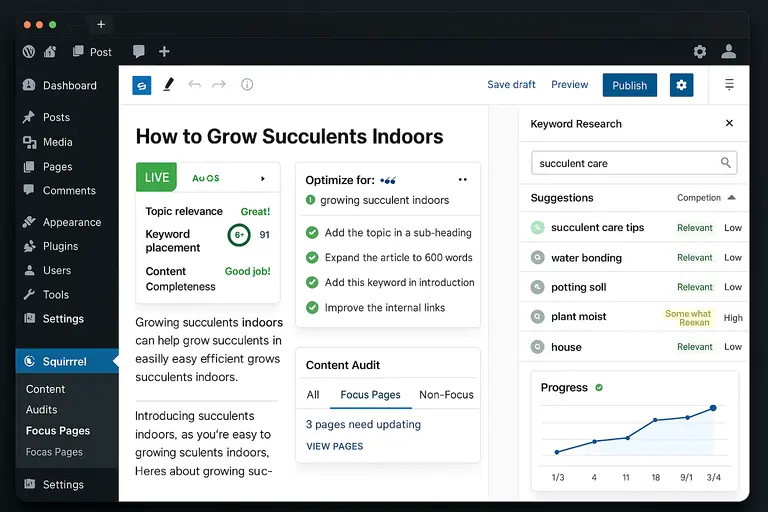
SEO isn’t something you “set and forget,” especially if you’re publishing content regularly. The real test is whether daily SEO tasks feel manageable or exhausting.
For non-technical users, Squirrly turns those tasks into guided actions instead of abstract work.
Real-Time Page Optimization While You Write Content
This is where Squirrly feels very different from traditional SEO plugins.
As you write, it analyzes your content in real time and gives live feedback on:
- Topic relevance
- Keyword placement
- Content completeness
You don’t need to publish, wait, re-edit, and repeat. Everything happens while you type.
In practice, this means:
- Fewer revisions
- Faster publishing
- Less second-guessing
From what I’ve seen, this alone can cut content optimization time by 30–40% for solo site owners.
Step-By-Step SEO To-Do Lists For Each Page
Instead of vague advice, Squirrly generates page-specific SEO to-do lists.
Each task is actionable and clear, such as:
- Add a supporting keyword in a subheading
- Expand a specific section for clarity
- Improve internal linking
You’re not told to “optimize content.” You’re told how.
I like that you can complete tasks in any order and see visible progress. That sense of momentum matters when SEO already feels overwhelming.
Keyword Research Without External SEO Tools
Most keyword tools assume you know how to evaluate search volume, difficulty, and intent. Squirrly simplifies this by handling the analysis behind the scenes.
You get:
- Keyword suggestions tied to your topic
- Clear labels for relevance and competition
- Guidance on which terms fit your page naturally
You’re not bouncing between tools or exporting CSVs. Everything stays inside WordPress.
For non-technical users, that integration reduces friction — and friction is usually why SEO efforts die off.
Content Audits That Don’t Require Manual Analysis
Auditing old content is where many site owners give up. It’s tedious and technical.
Squirrly automates this by scanning existing pages and flagging:
- Pages that need updates
- Content that no longer matches search intent
- Opportunities for improvement
You don’t get a wall of metrics. You get prioritized actions.
For example, instead of “traffic declined,” you’ll see guidance like improving depth or aligning the content better with current queries.
That’s a huge difference if analytics intimidate you.
Progress Tracking Without Reading Complex Reports
Finally, tracking progress doesn’t feel like reading a financial statement.
Squirrly uses:
- Visual growth indicators
- Simple performance summaries
- Goal-based tracking instead of raw data
You can tell if things are moving in the right direction without understanding Google Search Console charts or ranking graphs.
I believe this is why non-technical users actually stick with Squirrly. Progress feels visible, even when results take time.
How Squirrly WordPress Compares To Beginner SEO Plugins
Choosing an SEO plugin isn’t about which one has more features. For non-technical site owners, it’s about which tool helps you make the fewest mistakes while still moving forward.
This is where squirrly wordpress feels fundamentally different from most beginner SEO plugins.
Squirrly WordPress Vs Yoast SEO For Non-Technical Owners
Yoast SEO is often the first plugin people install, mostly because it’s well-known. But popularity doesn’t always translate to clarity.
Here’s the real-world difference I’ve seen:
- Yoast focuses on indicators and rules, assuming you already understand SEO basics
- Squirrly focuses on guidance and execution, assuming you don’t
Yoast’s traffic light system tells you something is wrong but rarely explains how to fix it beyond surface-level suggestions. Squirrly, on the other hand, breaks down each improvement into clear actions you can complete immediately.
For example, instead of saying your content is “not optimized,” Squirrly tells you exactly which section to expand and why it matters for rankings. For non-technical owners, that difference reduces frustration and speeds up publishing.
Squirrly WordPress Vs Rank Math For Ease Of Use
Rank Math is powerful, but it’s power-first, not beginner-first.
During setup, Rank Math asks questions about schema, indexing, and advanced SEO features. If you don’t know what those mean, you’re either guessing or skipping steps.
Squirrly wordpress avoids this by:
- Hiding advanced features until you’re ready
- Explaining concepts in plain language
- Prioritizing content optimization over configuration
In my experience, Rank Math works well for users who already understand SEO. Squirrly works better for users who want SEO to work without learning it upfront.
Differences In Automation, Guidance, And Learning Curve
This is where Squirrly separates itself most clearly.
Most beginner SEO plugins rely on automation alone. They set things up and leave you to figure out content quality on your own.
Squirrly combines:
- Automation for technical SEO
- Guidance for content decisions
- Gradual learning without pressure
You’re not just automating SEO. You’re being coached through it.
From what I’ve seen, users who stick with Squirrly long-term tend to understand SEO better over time, without intentionally trying to learn it.
Control Vs Simplicity Trade-Offs For Small Websites
Every SEO plugin forces a trade-off.
More control usually means more complexity. More simplicity usually means fewer options.
Squirrly wordpress leans toward simplicity by default, which is ideal for:
- Bloggers
- Solopreneurs
- Small business sites
If you want to micromanage every SEO setting, Squirrly may feel restrictive. But if your goal is publishing consistently without breaking your site, that restraint is a feature, not a limitation.
Which Plugin Requires Less SEO Knowledge Over Time
This is the question most people forget to ask.
In my opinion, Squirrly requires the least SEO knowledge over time because:
- It adapts recommendations as your site grows
- It prevents over-optimization automatically
- It replaces analysis with action
You’re not memorizing rules. You’re following guidance.
For non-technical users, that’s often the difference between “I tried SEO once” and “SEO is just part of how I publish now.”
Limitations Non-Technical Users Should Know In Advance
No tool is perfect, and it’s important to be honest about where squirrly wordpress may feel less friendly. Knowing these limitations upfront helps avoid disappointment later.
Interface Complexity As Features Scale Up
Squirrly starts simple, but it doesn’t stay minimal forever.
As you unlock more features, the interface can feel busy. There are dashboards, panels, and progress indicators that may feel like “a lot” if you only want basic SEO help.
This doesn’t mean it’s poorly designed, but it does mean:
- You’ll want to ignore features you don’t need
- You may need time to adjust as your site grows
For some users, more guidance eventually feels like noise.
Learning Curve Beyond The Initial Setup Wizard
The onboarding is beginner-friendly. What comes after requires more patience.
Once you move past the basics, Squirrly introduces concepts like content strategy and long-term optimization. These are explained well, but they still require attention.
If you’re expecting SEO to be entirely hands-off forever, this may feel heavier than expected.
When Recommendations May Feel Overwhelming
Squirrly is proactive. Sometimes, very proactive.
You may see:
- Multiple recommendations per page
- Suggestions across old and new content
- Ongoing improvement prompts
For motivated users, this is gold. For overwhelmed users, it can feel like too much.
My advice is simple: you don’t need to do everything. Pick one task, complete it, and move on.
Scenarios Where Advanced SEO Still Needs Expertise
Squirrly handles content SEO extremely well. But there are cases where no plugin replaces expertise.
Examples include:
- Large ecommerce sites
- International SEO setups
- Complex technical migrations
In these scenarios, Squirrly can support the process, but it shouldn’t be your only strategy.
Situations Where Simpler Plugins Might Feel Easier
If your site has:
- Fewer than 10 pages
- No active content strategy
- No growth goals
Then a simpler plugin might feel lighter.
Squirrly shines when you’re publishing consistently. If you’re not, its guidance may feel unnecessary.
Who Should And Should Not Use Squirrly WordPress

This is the section I wish more reviews included. Squirrly isn’t for everyone, and that’s okay.
Bloggers Managing Content Without SEO Background
If you’re a blogger who writes regularly but doesn’t understand SEO, Squirrly is a strong fit.
It helps you:
- Optimize while writing
- Avoid keyword stuffing
- Improve content depth naturally
I’ve seen bloggers increase organic traffic simply by following Squirrly’s content guidance consistently.
Small Business Owners Handling Their Own Websites
For business owners who don’t want to hire SEO help yet, squirrly wordpress acts like a safety net.
You get:
- Direction without dependency
- Protection against common mistakes
- A clear sense of progress
This is especially valuable if your site is a lead generator rather than a content empire.
Site Owners Focused On Guidance Over Manual Control
If you prefer being told what to do instead of deciding what to tweak, Squirrly fits that mindset.
It’s less about configuration and more about execution.
In my experience, people who enjoy checklists and clear steps thrive with this plugin.
Users Who May Prefer Hands-Off Or Fully Automated SEO
If you want to install a plugin and never think about SEO again, Squirrly might feel demanding.
It expects participation.
In that case, a lighter, automation-first plugin may feel more comfortable, even if results grow slower.
When Hiring SEO Help Makes More Sense Than Any Plugin
There’s a point where plugins stop being enough.
If your site:
- Generates significant revenue
- Competes in aggressive niches
- Requires technical customization
Then hiring an SEO professional may deliver better ROI than any plugin.
Squirrly wordpress works best as a guide, not a replacement for expertise at scale.

I’m Juxhin, the voice behind The Justifiable.
I’ve spent 6+ years building blogs, managing affiliate campaigns, and testing the messy world of online business. Here, I cut the fluff and share the strategies that actually move the needle — so you can build income that’s sustainable, not speculative.
Related posts:
 Schema Pro Review: The Ultimate SEO Optimization Plugin
 Is the Squirrly SEO WordPress Plugin Enough to Rank?
 Does the Squirrly SEO Plugin Improve Rankings?
 Squirrly SEO: Does It Actually Help You Rank Faster?
 Squirrly Review: Honest Pros, Cons, and Use Cases
 Squirrly SEO Pro Nulled: Why It’s a Risky Shortcut