Table of Contents
Some links on The Justifiable are affiliate links, meaning we may earn a small commission at no extra cost to you. Read full disclaimer.
Here’s my honest take on this squirrly review, based on how the tool actually feels to use rather than marketing hype.
I remember first testing Squirrly when I wanted clearer SEO guidance without drowning in technical jargon, and that experience shaped how I look at its strengths, limits, and real-world fit today.
What Squirrly Is And How It Works For SEO Users
Squirrly is an SEO plugin built specifically for WordPress users who want clear direction instead of vague SEO scores.
In this part of the squirrly review, I’ll focus on how it actually works day to day and what makes its approach different from traditional SEO plugins.
AI-Powered SEO Assistant Inside WordPress
Squirrly works directly inside the WordPress editor, so you don’t need to jump between tools or dashboards. Everything happens where you already write and manage content, which lowers friction a lot.
What makes it feel different is the AI assistant. Instead of just telling you something is “good” or “bad,” it gives task-based guidance. Think of it more like a checklist-driven coach than a scoring system.
Here’s how it plays out in practice:
- You start writing a post or page
- Squirrly analyzes content structure, keyword usage, and intent
- You get specific actions like improving paragraph length, adjusting headings, or clarifying topic focus
In my experience, this is helpful when you’re juggling content and SEO alone. According to Squirrly’s own data, users who follow the Live Assistant tasks tend to improve content optimization consistency, which matters more than chasing perfect scores.
It’s not magic SEO. But it’s practical, especially if you want guidance without hiring an expert.
Real-Time Optimization While You Write Content
One of Squirrly’s strongest features is real-time feedback. As you type, the plugin updates suggestions instantly, which keeps you in flow instead of fixing SEO later.
This is useful because SEO mistakes often happen mid-writing, not after publishing.
Squirrly flags issues like:
- Keyword placement problems
- Missing semantic terms
- Overly long or unclear sections
Instead of overwhelming you with data, it prioritizes tasks. You see what to fix first and what can wait. I like this because it mirrors how real editors work.
A small but important detail is that changes update live. You don’t need to rescan or reload. For writers producing content weekly or daily, that saves real time and reduces mental load.
Keyword Research And Focus Pages Explained
Squirrly handles keyword research differently from traditional tools. Rather than dumping hundreds of keywords, it focuses on intent-driven suggestions.
The Focus Pages feature is central here. A focus page is a page you actively want to rank, and Squirrly tracks it closely over time. This includes ranking position, optimization level, and content relevance.
What stood out to me is how this discourages random publishing. Instead of writing dozens of unfocused posts, you’re nudged to improve specific pages strategically.
This approach works well for:
- Service pages
- Pillar blog posts
- Evergreen guides
If you’ve ever felt busy but not strategic with SEO, this structure helps bring clarity.
Non-Technical SEO Guidance For Beginners
Squirrly shines when it comes to explaining SEO in plain language. Terms like NLP, ranking signals, or search intent are simplified into actions you can take immediately.
For example, instead of saying “optimize semantic relevance,” it might suggest adding related phrases or answering a missing question. That translation layer matters a lot for beginners.
I’ve seen new users gain confidence faster because they’re not guessing what Google wants. They’re following steps that make sense.
This doesn’t replace technical SEO audits, but for content-first users, it removes fear and confusion. That alone can lead to more consistent publishing, which is half the SEO battle.
Core Features That Define The Squirrly SEO Platform
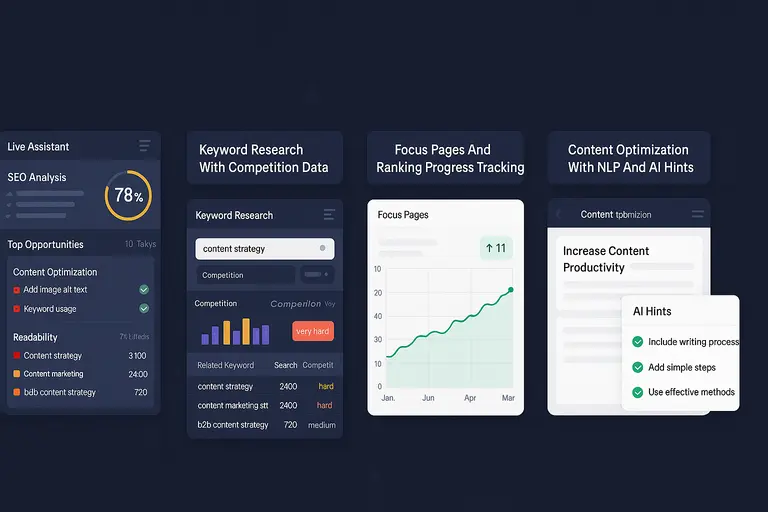
This section of the squirrly review breaks down the core tools that shape the platform. These features are where Squirrly either clicks with your workflow or doesn’t.
Live Assistant And SEO Auditing Capabilities
The Live Assistant is the heart of Squirrly. It combines on-page SEO checks with task-based auditing.
Instead of a static audit report, you get ongoing guidance tied to each page. That means SEO becomes iterative, not a one-time fix.
Key things it audits include:
- Content clarity and length
- Keyword usage balance
- Readability and structure
What I appreciate is that it doesn’t expect perfection. Tasks are marked as done when they’re “good enough,” which mirrors real-world SEO better than rigid scoring.
This is especially useful for content teams or solo site owners who want progress, not paralysis.
Keyword Research With Competition Data
Squirrly’s keyword research includes competition analysis, but it’s framed for decision-making rather than raw data exploration.
You see whether a keyword is realistic based on your site’s current strength. That helps avoid targeting impossible terms early on.
Instead of overwhelming charts, you get guidance like whether to pursue, postpone, or avoid a keyword. For newer sites, that honesty is refreshing.
While it’s not as deep as enterprise SEO tools, it’s sufficient for most content strategies focused on organic growth.
Focus Pages And Ranking Progress Tracking
Focus Pages act as long-term SEO projects inside Squirrly. Once you assign one, the plugin tracks improvements and ranking changes over time.
This changes how you think about SEO. Instead of publishing and forgetting, you revisit and refine.
You can see:
- Optimization improvements
- Ranking movement trends
- Tasks still holding pages back
I’ve found this especially useful for cornerstone content. It encourages updating instead of constantly creating new posts, which aligns with how Google rewards quality.
Content Optimization With NLP And AI Hints
Squirrly uses NLP, which simply means it looks at how humans and search engines understand language context, not just keywords.
The AI hints suggest related topics, missing angles, or clarity improvements. It’s subtle, but it pushes content toward completeness.
What I like is that it doesn’t force exact phrasing. You’re guided, not constrained. That keeps content natural and readable.
From what I’ve seen, this helps posts cover topics more thoroughly, which aligns with modern search algorithms focused on intent and depth.
Pros Of Squirrly Based On Real-World Usage
This part of the squirrly review is where things get practical.
These are the advantages I’ve consistently noticed while actually using Squirrly on live WordPress sites, not just reading feature lists.
Beginner-Friendly SEO Guidance Without Overwhelm
Squirrly is unusually gentle for beginners. Instead of throwing technical SEO language at you, it breaks tasks down into things you can act on immediately.
When Squirrly says something like “optimize for intent,” it doesn’t leave you guessing. It follows up with guidance such as expanding explanations, answering common questions, or clarifying topic relevance.
What helps most is the pacing. You’re not expected to fix everything at once. Tasks are prioritized so you can focus on progress instead of perfection.
From what I’ve seen, this reduces the classic beginner mistake of abandoning SEO tools because they feel intimidating. Confidence builds quickly, and that alone can improve consistency.
Clear Action Steps Instead Of Generic SEO Scores
Many SEO plugins rely heavily on abstract scores. Squirrly takes a different route by focusing on actions rather than numbers.
Instead of a vague “SEO score: 78,” you’ll see tasks like:
- Improve paragraph clarity
- Add related terms naturally
- Strengthen topic focus
This matters because scores don’t teach. Actions do.
I’ve personally found this approach more motivating. Checking off tasks feels like real progress, especially when you’re managing content alongside other responsibilities.
It’s not that scores are useless. It’s just that they don’t help you understand what to do next. Squirrly fills that gap well.
Useful For Content-Driven And Blog-Heavy Sites
If your site grows through content, Squirrly fits naturally into that workflow. Bloggers, niche site owners, and content marketers benefit the most.
The Live Assistant encourages better structure, deeper coverage, and clearer intent. Over time, this leads to stronger evergreen content rather than shallow posts.
For example, I’ve seen blog posts improve rankings simply by revisiting them through Focus Pages and completing overlooked tasks. No backlinks. No redesign. Just better content alignment.
This aligns with broader SEO trends. Multiple studies show that content depth and intent matching are now stronger ranking factors than raw keyword density.
Helpful Learning Curve For Non-SEOs
One underrated benefit is how much you learn by using Squirrly. It quietly teaches SEO concepts through repetition and context.
After a while, you start anticipating suggestions before they appear. That’s a sign the tool is doing more than optimizing pages. It’s building understanding.
For freelancers or business owners who don’t plan to become SEO experts, this passive learning is valuable. You improve without formal training.
I believe this is one of Squirrly’s strongest long-term advantages.
Cons And Limitations You Should Know Before Using
No honest squirrly review is complete without the drawbacks. These are not deal-breakers for everyone, but they matter depending on your experience level and goals.
Interface Can Feel Busy For Advanced Users
Squirrly shows a lot of information at once. For beginners, that’s helpful. For advanced users, it can feel cluttered.
If you already know what you’re doing, you may find yourself ignoring many suggestions. That can create friction rather than flow.
The interface isn’t confusing, but it is dense. Advanced SEOs often prefer cleaner dashboards with fewer prompts.
This doesn’t mean Squirrly is badly designed. It’s just optimized for guidance, not minimalism.
Limited Technical SEO Depth Compared To Competitors
Squirrly focuses heavily on content SEO. That’s great, but it means technical SEO features are lighter.
You won’t find deep controls for:
- Schema customization
- Crawl budget management
- Advanced indexing controls
If your site relies heavily on technical optimization, you’ll likely need an additional tool or plugin.
In my experience, Squirrly works best when paired with a more technical-focused SEO solution if needed.
Learning Curve For Interpreting AI Suggestions
While Squirrly explains concepts well, its AI suggestions still require judgment. Not every task needs to be followed blindly.
New users sometimes try to complete every task exactly as written, which can lead to over-optimization.
The key is understanding that tasks are guidance, not rules. Once you grasp that, the tool becomes much more flexible.
This learning curve is manageable, but it’s worth mentioning.
Pricing Feels High For Small Or Static Sites
For very small sites or static business pages, Squirrly’s pricing may feel disproportionate to the value.
If you publish rarely or don’t plan to grow content, many features will go unused.
In those cases, simpler or cheaper tools might make more sense. Squirrly shines when it’s actively used.
Squirrly Pricing Plans And Value For Different Users
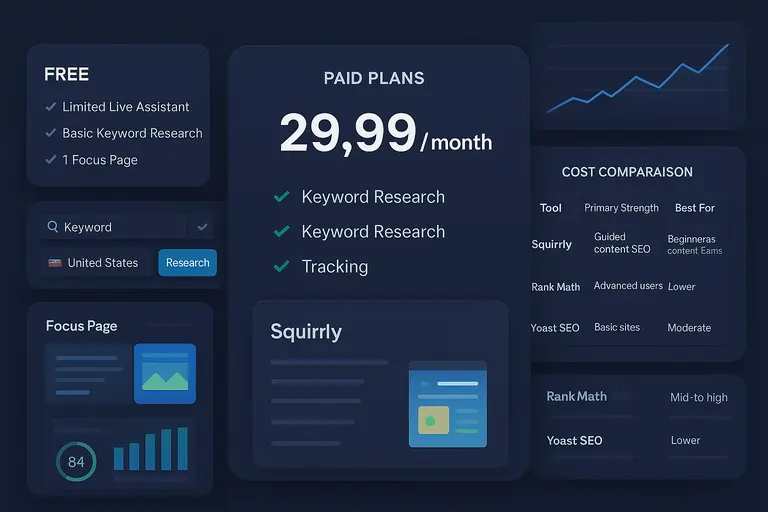
Pricing is often where people hesitate, so let’s talk honestly about what you get and who it’s really for.
Free Version Capabilities And Key Restrictions
Squirrly offers a free version that’s useful for testing the interface and basic guidance.
You can access:
- Limited Live Assistant features
- Basic keyword research
- One focus page
The limitation is scale. You’ll quickly hit ceilings if you publish regularly.
I see the free version as a trial, not a long-term solution.
Paid Plans And Feature Differences Explained
Paid plans unlock more focus pages, deeper keyword research, and full tracking.
Higher tiers are designed for:
- Consistent bloggers
- Growing businesses
- Agencies managing multiple sites
The biggest value jump comes from expanded Focus Pages and ranking tracking. That’s where strategy starts to form.
Cost Comparison Versus Other SEO Tools
| Tool | Primary Strength | Best For | Pricing Feel |
| Squirrly | Guided content SEO | Beginners, content teams | Mid to high |
| Rank Math | Technical + content SEO | Advanced users | Lower |
| Yoast SEO | Simplicity | Basic sites | Moderate |
Squirrly isn’t the cheapest, but it’s also not trying to be. You’re paying for guidance and structure, not just features.
Who Gets The Most Value From Each Plan
From what I’ve seen, Squirrly delivers the most value to:
- Bloggers publishing weekly or more
- Small teams without dedicated SEO staff
- Site owners who want direction, not dashboards
If that sounds like you, the pricing makes sense. If not, it may feel like overkill.
Best Use Cases Where Squirrly Actually Makes Sense
This section of the squirrly review is about fit. Squirrly isn’t for everyone, but when it matches the situation, it can feel like having an SEO coach sitting next to you.
Bloggers Focused On Content And Organic Growth
If you publish content regularly, Squirrly fits naturally into your routine. Bloggers benefit most from its real-time guidance and Focus Pages system.
Here’s a realistic scenario. You publish one to two posts a week and want them to rank over time, not just exist.
Squirrly helps by:
- Nudging you to cover topics more completely
- Highlighting weak sections before you hit publish
- Encouraging updates to older posts through Focus Pages
From what I’ve seen, bloggers who revisit and improve content tend to see better long-term results. Multiple SEO studies show that updated content often outperforms brand-new posts after a few months.
If blogging is your growth engine, Squirrly supports that mindset well.
Small Business Owners Managing SEO Alone
Many small business owners don’t have time to “learn SEO” properly. They just want their site to perform better.
Squirrly works well here because it removes guesswork. Instead of asking, “What should I do?”, you’re told what to do next.
For example, a local service business owner might use Squirrly to:
- Optimize service pages for clearer intent
- Improve blog content supporting those services
- Track a handful of priority pages
You don’t need to understand algorithms. You just follow guidance. That’s a big win when time is limited.
WordPress Users Wanting Guided SEO Tasks
Squirrly is built specifically for WordPress, and that shows. Everything lives inside the editor, which reduces tool fatigue.
If you already feel overwhelmed by plugins, Squirrly can actually simplify things by replacing multiple SEO-related decisions with one guided system.
I’ve noticed this works best for users who like structure. If you enjoy checking off tasks and seeing progress, Squirrly scratches that itch.
Agencies Educating Clients On SEO Basics
Agencies often struggle to explain SEO to clients. Squirrly helps bridge that gap.
Clients can see tasks, progress, and focus pages without needing deep technical explanations. This transparency builds trust.
While agencies may still use other tools behind the scenes, Squirrly works well as a client-facing educational layer.
Squirrly Vs Rank Math Vs Yoast SEO Comparison
This comparison comes up a lot, so let’s break it down honestly. Each tool serves a different type of user and workflow.
Content Optimization Approach And Guidance Style
Squirrly is guidance-first. It tells you what to do and why, step by step.
Rank Math is feature-rich and flexible. It gives you options, but expects you to know what to choose.
Yoast focuses on simplicity. It offers basic checks and readability feedback with minimal depth.
If you want instruction, Squirrly wins. If you want control, Rank Math shines. If you want minimal effort, Yoast fits.
Keyword Research And Tracking Differences
Squirrly includes built-in keyword research with competition context and Focus Page tracking.
Rank Math relies more on integrations and external tools for deep keyword work.
Yoast offers very limited keyword insights unless paired with paid add-ons.
Here’s a quick comparison:
| Tool | Keyword Research | Ranking Tracking | Focus Pages |
| Squirrly | Built-in, guided | Yes | Yes |
| Rank Math | Limited native | Partial | No |
| Yoast | Minimal | No | No |
Squirrly clearly prioritizes ongoing keyword strategy, not just on-page checks.
Ease Of Use For Beginners Versus Advanced SEOs
Beginners usually feel more comfortable with Squirrly. It explains concepts and reduces decision fatigue.
Advanced SEOs often prefer Rank Math because it stays out of the way and allows deep customization.
Yoast sits in the middle but leans basic. It’s easy, but limited once you outgrow it.
This isn’t about better or worse. It’s about expectations.
Which Tool Fits Different SEO Goals Best
If your goal is learning and steady growth, Squirrly makes sense.
If your goal is fine-tuned technical SEO, Rank Math is stronger.
If your goal is basic hygiene without thinking too much, Yoast works.
Matching the tool to the goal matters more than feature count.
Who Should Use Squirrly And Who Should Avoid It
Let’s wrap this up clearly. This part of the squirrly review is about making a confident decision.
Ideal Users Who Benefit From AI-Led SEO Help
Squirrly works best for people who want direction, not just data.
You’ll likely benefit if you:
- Create content consistently
- Don’t have a dedicated SEO specialist
- Prefer guided tasks over dashboards
If that sounds like you, Squirrly can reduce stress and improve results over time.
Scenarios Where Squirrly May Feel Limiting
Squirrly may feel restrictive if you already know exactly what you’re doing.
Advanced users sometimes feel slowed down by suggestions they don’t need. In those cases, the guidance becomes noise.
It’s also less ideal for sites with very little content or no growth plans.
When Advanced SEO Tools Are A Better Fit
If you manage large sites, complex structures, or heavy technical SEO needs, you’ll likely want tools that offer deeper control.
Squirrly isn’t designed to replace enterprise-level SEO platforms. It’s designed to guide.
Knowing that difference avoids disappointment.
How To Decide If Squirrly Matches Your Workflow
Here’s a simple way to decide. Ask yourself:
- Do I want to be told what to do next?
- Do I value learning while doing?
- Do I focus more on content than code?
If you answer yes to most of those, Squirrly probably fits.
My honest take is this. Squirrly isn’t flashy, and it’s not perfect. But for the right person, it’s quietly effective. That’s often the best kind of tool.

I’m Juxhin, the voice behind The Justifiable.
I’ve spent 6+ years building blogs, managing affiliate campaigns, and testing the messy world of online business. Here, I cut the fluff and share the strategies that actually move the needle — so you can build income that’s sustainable, not speculative.