
Table of Contents
Some links on The Justifiable are affiliate links, meaning we may earn a small commission at no extra cost to you. Read full disclaimer.
If you’ve ever dreamed of turning your passion into profit, you’ve probably thought about setting up your own store online. The good news is that today’s online store platforms make it easier than ever to start, scale, and earn steady income streams—even if you’re not tech-savvy.
I’ve seen countless creators, entrepreneurs, and side hustlers build real businesses using these tools. The trick is knowing which platform fits your goals—because not all of them are created equal.
Let’s dive into the best ones that can help you build long-term income with confidence.
Shopify: The All-In-One Online Store Platform
Shopify is one of the most trusted online store platforms because it removes nearly every technical hurdle for first-time sellers.
It gives you all the essentials—hosting, payments, inventory tracking, and marketing—without needing any coding knowledge.
Why Shopify Dominates E-Commerce For Beginners
If you’re just starting your online business, Shopify makes the process incredibly easy. The platform handles everything—from store setup to checkout security.
Why it’s beginner-friendly:
- No coding needed: You can drag, drop, and launch within hours.
- Built-in hosting: No need to manage servers or install plugins.
- Professional templates: Over 100 designs, so you can focus on products, not pixels.
In my experience, Shopify’s simplicity is what converts hesitant beginners into confident sellers. It’s like renting a fully furnished store instead of building one from scratch—you just move in and start selling.
Key Features That Streamline Store Management
Shopify’s dashboard is built for efficiency. You can track sales, fulfill orders, and adjust inventory in one place.
Key tools worth noting:
- Shopify POS: Syncs online and offline sales automatically.
- Inventory alerts: Get notified before you run out of stock.
- Shipping integrations: Print labels and calculate rates instantly.
What I like most is that Shopify doesn’t just simplify management—it anticipates what you’ll need next. For example, once you start getting more orders, it automatically suggests upgrades to improve processing and delivery.
Pricing Plans And Hidden Costs Explained
Shopify’s pricing starts at around $39/month, which is fair considering hosting, security, and support are all included. But there are some costs many beginners overlook.
Here’s a quick breakdown:
- Basic Plan ($39): Great for new stores but has limited reports.
- Shopify Plan ($105): Adds advanced reports and better shipping discounts.
- Advanced Plan ($399): Ideal for scaling—comes with custom reporting and automation.
Hidden costs to watch:
- Transaction fees (unless using Shopify Payments).
- Paid app subscriptions that enhance functionality.
A smart way to manage expenses is to start small, test revenue streams, and only upgrade once you consistently hit sales targets.
How To Scale Your Business Using Shopify Apps
Shopify’s App Store is where small stores turn into automated income engines. There are over 8,000 apps that can handle marketing, fulfillment, reviews, and more.
Apps that boost sales fast:
- Klaviyo: Automates email marketing and cart recovery.
- Loox: Adds photo reviews that build trust.
- ReConvert: Optimizes thank-you pages for upsells.
Once you’ve built a steady sales rhythm, start automating repetitive tasks. It’s the smartest way to grow without burning out—and that’s where Shopify really shines.
WooCommerce: The Flexible WordPress Plugin For Sellers
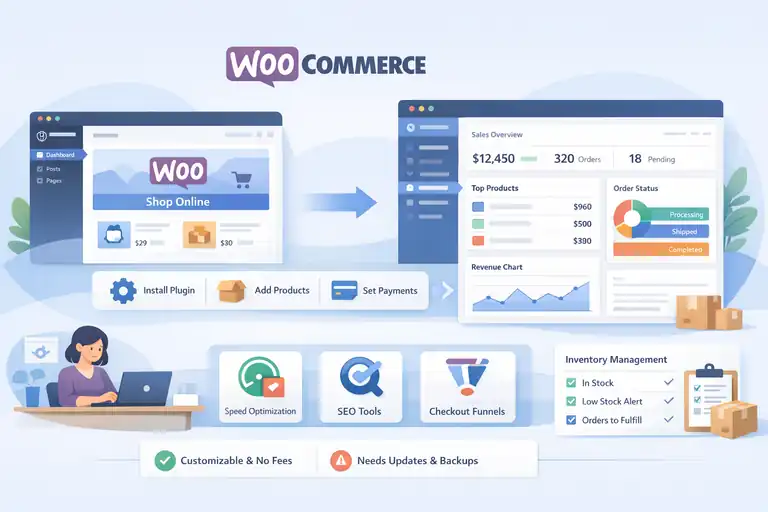
WooCommerce turns any WordPress site into a full-fledged online store. It’s perfect for those who love flexibility, control, and open-source customization.
How WooCommerce Transforms A WordPress Site Into A Store
WooCommerce integrates directly with WordPress, so you can use your existing website and simply “bolt on” e-commerce functionality.
Here’s how it works:
- Install the WooCommerce plugin.
- Add products, prices, and payment options.
- Publish your store instantly.
It’s like adding a checkout counter to a blog—you don’t need to rebuild the whole thing.
Essential Plugins To Maximize WooCommerce Performance
Because WooCommerce is open-source, plugins are your secret weapon for performance.
Top WooCommerce add-ons I recommend:
- WP Rocket: Speeds up load times.
- Rank Math SEO: Improves store visibility on Google.
- CartFlows: Simplifies checkout and increases conversions.
These tools help your store load faster, rank higher, and convert better. If you’re running multiple plugins, just keep them updated—outdated ones can slow down performance.
Pros And Cons Of Using WooCommerce For Long-Term Growth
WooCommerce gives you total control, but it also demands maintenance.
Pros:
- 100% customizable (design, code, layout).
- No monthly fees beyond hosting.
- Vast community support and extensions.
Cons:
- Requires regular updates and backups.
- Hosting costs can rise as traffic grows.
- Security depends on your setup.
In short, WooCommerce is like owning your own building—you control everything, but you’re also responsible for maintenance.
Tips For Managing Inventory And Orders Efficiently
Managing stock manually can be overwhelming, especially if your product line grows fast.
Quick strategies to stay organized:
- Use WooCommerce Stock Manager to track products in bulk.
- Set low-stock alerts for popular items.
- Sync with Google Sheets for visual tracking.
I also suggest connecting WooCommerce with tools like ShipStation for smoother order fulfillment—it can cut shipping time by half.
BigCommerce: The Scalable Solution For Growing Brands
BigCommerce is designed for brands ready to scale without hitting software limits. It’s one of the most powerful online store platforms for larger product catalogs or high-volume sales.
What Makes BigCommerce Ideal For Expanding Businesses
BigCommerce shines when your business starts to outgrow basic solutions. It’s a robust system built for managing thousands of SKUs and processing large orders with ease.
Why it’s built for scale:
- Handles complex catalogs and bulk uploads.
- Supports multiple storefronts from one dashboard.
- No extra fees for high transaction volumes.
If Shopify is your entry-level car, BigCommerce is more like a sturdy SUV—it’s built to carry weight while staying stable.
Built-In Tools That Simplify SEO And Marketing
BigCommerce takes SEO seriously, offering advanced features right out of the box.
SEO-friendly advantages:
- Automatic URL optimization.
- Built-in structured data for rich snippets.
- Fast site performance for better rankings.
For marketing, tools like Mailchimp integration and Abandoned Cart Saver help you recover lost sales automatically. You can also create product-level discounts and customer groups to personalize pricing—something Shopify usually requires an app for.
Integrations That Power Multi-Channel Selling
If your goal is to sell everywhere, BigCommerce is made for that.
Supported channels include:
- Amazon and eBay marketplaces.
- Facebook, Instagram, and TikTok Shops.
- Google Shopping and point-of-sale systems.
With these integrations, you manage all your orders and inventory from one dashboard—no jumping between platforms. It’s ideal for businesses juggling multiple audiences.
Comparing BigCommerce Pricing To Competitors
BigCommerce pricing starts around $39/month—similar to Shopify—but includes more built-in tools.
Plan overview:
- Standard Plan ($39): Great for small stores.
- Plus Plan ($105): Adds customer segmentation and abandoned cart recovery.
- Pro Plan ($399): Designed for high-volume stores.
One key advantage? BigCommerce doesn’t charge transaction fees. Over time, this can save hundreds for stores with consistent sales.
If you’re planning to scale aggressively, the value you get from BigCommerce’s built-in features can outweigh the simplicity of Shopify or WooCommerce.
Wix eCommerce: The Creative Platform For Visual Brands
Wix eCommerce stands out among online store platforms because it’s incredibly visual and easy to use. It’s ideal for creators, photographers, or boutique sellers who care as much about design as functionality.
You don’t need to be a designer to make it look professional—it’s practically built for creative people who want to sell beautifully.
How Wix Combines Design Flexibility With Store Features
Wix combines drag-and-drop freedom with surprisingly powerful eCommerce tools. You can customize every pixel of your storefront without touching a line of code, which makes it perfect if you’re the type who likes to “see” your brand come alive as you build.
Here’s where Wix shines:
- Over 500 customizable templates designed for different store types.
- Drag-and-drop editing for total visual control.
- Built-in product galleries that make your items stand out.
I personally find Wix helpful for small boutique brands because it feels more like designing an art portfolio than setting up a technical store. You can even adjust your layout for mobile directly inside the editor—a feature some platforms still struggle with.
Customizing Templates For High-Converting Product Pages
If you want your store to sell, not just look pretty, customization is key. Wix makes it easy to tweak templates to guide your visitors toward checkout.
Quick tips for high-converting pages:
- Use large product images with clear backgrounds.
- Add scarcity prompts (like “Only 3 left!”) using dynamic text tools.
- Highlight benefits, not features, in your product descriptions.
You can even use Wix’s built-in Heatmap Analytics to see which parts of your page attract the most attention.
I once helped a small candle shop redesign their product layout using this feature—they saw a 22% boost in conversions within a month.
Managing Payments, Shipping, And Customer Data On Wix
Wix takes care of the back-end stuff so you don’t have to juggle multiple systems.
Key management tools:
- Wix Payments: Accept cards, PayPal, and Apple Pay instantly.
- Shipping rules: Set regional rates and automated carrier calculations.
- Customer CRM: Stores every buyer’s history, making re-marketing easier.
I really like that Wix keeps customer data centralized—it saves hours of admin work. You can even segment buyers into categories (like “frequent shoppers”) and create custom email campaigns right inside the dashboard.
When To Upgrade To Wix’s Advanced Business Plans
Wix’s Business Basic plan works well for testing the waters, but serious sellers should consider upgrading once traffic picks up.
When it’s time to upgrade:
- You’re processing over 100 orders a month.
- You need automated tax calculations or multiple currencies.
- You want advanced analytics to track revenue per product.
The jump to Business Unlimited (around $32/month) unlocks automation tools and ad vouchers that can quickly pay for themselves if you’re running campaigns.
Think of it as moving from a studio workspace to a fully equipped shop—you get more tools to create faster.
Squarespace: The Stylish Choice For Creators And Professionals

Squarespace is one of the sleekest online store platforms around, known for its beautiful templates and creative focus.
It’s ideal for freelancers, artists, and service-based sellers who want their site to feel like a brand, not just a store.
Why Squarespace Appeals To Artists, Designers, And Coaches
Squarespace has always catered to creative minds. The platform’s aesthetic-first approach makes it perfect for visual portfolios, digital products, and coaching services.
What creatives love about Squarespace:
- Designer-quality templates built by professionals.
- Seamless integration between content, store, and blog.
- Simple scheduling and booking tools for service-based businesses.
I’ve noticed many designers use Squarespace because it eliminates tech overwhelm. It lets you focus on storytelling—your art, your brand voice—without worrying about plugins or code.
Building Brand Identity With Built-In Design Tools
Squarespace includes brand-building tools that go beyond color palettes and fonts. It helps you maintain consistency, which is key to earning customer trust.
Branding features worth using:
- Logo Maker: Quickly design or tweak your logo.
- Style Editor: Control colors, spacing, and typography globally.
- Video backgrounds: Add motion and emotion to homepages.
For a handcrafted jewelry brand I once worked with, switching to Squarespace’s Fluid Engine editor helped create a more immersive homepage—visitors stayed 40% longer, and sales followed.
Limitations To Consider Before Launching A Full Store
Squarespace is elegant but not without limits. It’s not the best choice for large stores with hundreds of SKUs or complex logistics.
Things to keep in mind:
- Limited app marketplace compared to Shopify or BigCommerce.
- No native multi-currency checkout (yet).
- Limited backend automation for large inventory management.
That said, for digital creators or boutique sellers, these limitations don’t matter much. It’s like choosing a high-end gallery instead of a warehouse—it’s about presentation, not mass scale.
SEO And Marketing Capabilities Of Squarespace Stores
Squarespace has solid SEO features built in, though it doesn’t go as deep as WordPress or Shopify.
What you get out of the box:
- Editable meta titles, descriptions, and image alt text.
- Clean, responsive design (which Google loves).
- Built-in email marketing and social media integration.
One thing I recommend is connecting Squarespace with Google Search Console. It helps you track keyword performance and fix crawling errors easily. Combined with Squarespace’s analytics, you’ll have a clear view of how your store performs over time.
Shift4Shop (Formerly 3dcart): The Underrated Powerhouse
Shift4Shop is often overlooked, but it’s one of the most feature-rich online store platforms available—especially for advanced users who want control without the high price tag.
What Sets Shift4Shop Apart From Mainstream Platforms
Shift4Shop packs enterprise-level features into every plan, even the free one. It’s perfect for entrepreneurs who want serious tools without monthly fees.
Key advantages:
- 100% free plan if you use Shift4 Payments.
- Unlimited product listings and bandwidth.
- Built-in CRM and email marketing tools.
Unlike Shopify or BigCommerce, many of these features aren’t behind a paywall. I’d say it’s like getting a luxury car with premium upgrades included—if you know how to handle it.
Advanced Features For Tech-Savvy Entrepreneurs
Shift4Shop is ideal for those who like customization and control. You can dig into the code, tweak HTML, and optimize performance without needing extra plugins.
Advanced capabilities include:
- REST API access for custom integrations.
- Advanced product filtering and smart categories.
- Built-in blogging and digital product delivery.
If you’re comfortable managing tech, Shift4Shop gives you a lot of leverage.
I’ve seen a small electronics store use its automation rules to send dynamic upsells based on purchase behavior—something that usually requires third-party apps elsewhere.
How Free Enterprise-Level Tools Boost Profit Margins
The biggest reason I recommend Shift4Shop to experienced sellers is its value. The free plan includes enterprise-level tools like abandoned cart recovery, advanced reports, and custom invoices.
Why this matters:
- You keep more profit by skipping app fees.
- You can run multiple stores under one system.
- Built-in automation reduces manual work.
It’s a budget-saver for established sellers who want enterprise flexibility without recurring costs. In other words, you get premium performance for the price of zero—if you’re willing to learn its layout.
Ideal Use Cases For Shift4Shop’s Business Model
Shift4Shop fits best for businesses that already have traffic or some technical knowledge.
Best suited for:
- Mid-size retailers selling 50+ products.
- Entrepreneurs who want advanced reporting.
- Businesses focused on automation and bulk management.
However, it’s not ideal for absolute beginners. The learning curve can feel steep at first, but once you get the hang of it, it becomes an incredibly powerful platform that can grow with you—without draining your wallet.
Ecwid: The Quick Add-On Store For Existing Websites
Ecwid is one of those online store platforms that feels like magic when you first try it. Instead of forcing you to rebuild your entire site, it simply adds eCommerce functionality to what you already have.
Whether you’re running a WordPress blog, a portfolio site, or even a social media page, Ecwid can transform it into a full-fledged store almost instantly.
How Ecwid Instantly Turns Any Site Into A Store
What makes Ecwid stand out is its “plug-and-sell” approach. You don’t start from scratch—you simply add a store to your existing site using a short piece of embed code.
How it works:
- Create your Ecwid account and upload products.
- Copy a small store widget code.
- Paste it anywhere on your site—homepage, sidebar, or blog post.
And just like that, your visitors can browse, add to cart, and check out—all within your website’s design.
I’ve used it to help a local photography studio sell gift cards directly from their portfolio page. It took less than 30 minutes.
Integration Options For WordPress, Wix, And Social Media
Ecwid isn’t picky—it works with almost any platform you can think of.
Popular integrations include:
- WordPress: Through a free plugin that syncs your catalog instantly.
- Wix: Seamlessly embeds through drag-and-drop widgets.
- Facebook and Instagram: Lets you tag products in posts and sell directly through your profiles.
What I appreciate most is that Ecwid automatically keeps everything in sync. If you update your inventory or prices, changes reflect across every channel without extra steps. That’s a lifesaver when you’re managing multiple storefronts.
Cost Comparison Between Ecwid And Other Platforms
Ecwid’s pricing is one of the biggest reasons it’s so popular. There’s even a free plan, which is great for testing ideas.
Quick pricing breakdown:
- Free plan: For up to 5 products.
- Venture plan ($19/month): Unlocks SEO tools and mobile checkout.
- Business plan ($39/month): Adds advanced features like product variations and social selling.
- Unlimited plan ($99/month): Ideal for scaling and managing multiple stores.
Compared to Shopify or BigCommerce, Ecwid is more affordable—especially if you already have hosting or a site in place. You’re essentially saving the cost of a full rebuild.
Best Practices For Selling On Multiple Channels With Ecwid
If your goal is to sell everywhere your audience hangs out, Ecwid makes it easy. But success depends on setup and consistency.
Best practices I recommend:
- Centralize inventory: Let Ecwid manage all product data so every channel stays accurate.
- Use channel-specific pricing: Offer exclusive discounts for social media shoppers.
- Automate product updates: Connect with Ecwid’s mobile app to update stock in real-time.
One of my clients used Ecwid to sell the same handmade crafts through a WordPress site, Etsy, and Instagram—all managed from one dashboard. It simplified everything and boosted sales by nearly 30% in three months.
Zyro (Now Hostinger Website Builder): The Budget-Friendly Starter
Hostinger’s Website Builder is designed for beginners who want to start earning online without big upfront costs.
It’s not just affordable—it’s incredibly simple, making it one of the best online store platforms for first-time entrepreneurs.
Why Hostinger’s Builder Is Perfect For New Entrepreneurs
Hostinger’s Website Builder focuses on speed and simplicity. You don’t need technical knowledge or a big budget to get started.
Why beginners love it:
- Affordable all-in-one pricing that includes hosting.
- Prebuilt eCommerce layouts tailored to your niche.
- Guided setup that walks you through every step.
I’ve found it especially useful for freelancers who want to add a quick store to their portfolio site or sell digital downloads without fussing with plugins.
Easy Setup Process For First-Time Store Owners
Getting started with Hostinger’s builder is refreshingly straightforward.
Setup steps:
- Choose a store template and customize with drag-and-drop editing.
- Add your products, descriptions, and prices.
- Connect your domain and publish.
It’s that easy. Most users can go from sign-up to launch in under an hour. When I tested it for a sample handmade goods shop, I had products uploaded and live before I finished my coffee.
Built-In Marketing And AI Tools For Product Success
Hostinger’s builder goes beyond the basics with built-in marketing and AI-powered tools that save time and help you sell smarter.
Features worth using:
- AI Writer: Generates product descriptions or SEO-friendly copy automatically.
- Hebatmap Tool: Shows where visitors click the most so you can optimize layouts.
- Integrated SEO tools: Automatically optimize meta titles and images.
These features make a noticeable difference for small shops without marketing teams. One store owner I know used the AI Writer to revamp her product pages—it improved engagement and organic traffic in just weeks.
When To Transition From Starter To Pro Plans
Hostinger’s basic eCommerce plan works beautifully for small stores, but you’ll know it’s time to upgrade when you hit consistent monthly sales or need more control.
Upgrade when:
- You need advanced analytics or multi-currency support.
- Your traffic grows beyond 10,000 monthly visitors.
- You plan to integrate email marketing or advanced SEO tools.
The Pro plan is still very affordable and unlocks scaling features like priority support and faster load times. It’s a natural next step once you’ve validated your product idea.
Squarespace vs. Shopify vs. BigCommerce: Direct Comparison
When choosing between online store platforms, the big question often comes down to three: Squarespace, Shopify, or BigCommerce. Each has strengths depending on your goals, technical comfort, and growth plans.
Let’s break them down side by side so you can decide what fits your business best.
Which Platform Offers The Best Value For Your Budget
If budget is your top concern, each platform gives you value in a different way.
At a glance:
- Squarespace: Great all-around value for small creative stores.
- Shopify: Worth the cost if you plan to grow and automate.
- BigCommerce: Best for large catalogs and enterprise-level scaling.
From my experience, Squarespace is ideal if you prioritize aesthetics and simplicity, while Shopify offers the strongest ecosystem for scaling. BigCommerce, on the other hand, gives you the most built-in tools for your money—especially if you want to avoid app costs.
Comparing Design Flexibility And Customization Options
Each of these three platforms handles design differently.
Design flexibility overview:
- Squarespace: Offers stunning templates with drag-and-drop simplicity. Perfect for visual brands.
- Shopify: Provides functional themes, though deep customization often requires paid apps or custom coding.
- BigCommerce: Offers flexible templates but leans more toward structure than creativity.
If you care deeply about how your brand looks, Squarespace wins. For pure eCommerce control, Shopify gives you more room to expand. BigCommerce sits in the middle—practical and performance-driven.
Ease Of Use For Beginners And Growing Businesses
Ease of use often determines how quickly you can launch and grow.
In my experience:
- Squarespace: Has the gentlest learning curve.
- Shopify: Slightly steeper at first, but scales beautifully.
- BigCommerce: Most complex but extremely powerful for experienced sellers.
If you’re starting solo, Squarespace helps you get up and running fast. But if your goal is to build an automated business, Shopify’s ecosystem will reward you in the long run.
Which Platform Supports Long-Term Passive Income Goals
For long-term income streams, automation and scalability matter most.
Here’s how they compare:
- Shopify: Best overall for automation through apps, dropshipping, and integrations.
- BigCommerce: Ideal for high-volume businesses with detailed control needs.
- Squarespace: Great for digital products and creative service income.
If I had to choose one for passive income potential, Shopify takes the crown. Its integrations with print-on-demand, email marketing, and inventory automation make it easier to earn even when you’re not actively managing your store.
Expert Tips For Choosing The Right Online Store Platform
Choosing the right online store platform can make or break your eCommerce success. With so many options available, it’s easy to get caught up in features instead of focusing on what actually fits your business goals.
Let’s walk through a few expert-backed steps that will help you make a confident, future-ready decision.
Identify Your Business Goals Before Picking A Platform
Before diving into comparisons, get clear on what you want your store to achieve.
Here’s how to think about it:
- If you’re testing an idea: Choose a low-cost, easy-to-launch platform like Wix or Hostinger’s Website Builder.
- If you’re building a long-term brand: Shopify or BigCommerce offer stronger scalability and automation.
- If your focus is creative presentation: Squarespace might be your best match.
Your platform should grow with your business, not against it. I’ve seen people spend months building on the wrong system—only to migrate later when traffic picks up. A little clarity upfront can save you weeks of rebuilding down the line.
Factor In Future Growth And Integration Needs
One of the most overlooked steps is thinking beyond today’s setup. Your store might start small, but if things go well, you’ll eventually want to automate fulfillment, add new channels, or run email campaigns.
Ask yourself:
- Will this platform integrate easily with tools like Mailchimp or Klaviyo?
- Can I expand to marketplaces like Amazon or eBay later?
- Does it allow API access or third-party apps for future automation?
For example, Shopify and BigCommerce excel in long-term integration flexibility, while Ecwid makes multichannel expansion easy if you already have an existing website.
Even if you’re not using these features yet, having the option matters more than you might think.
Test Free Trials To Compare User Experience
Every platform looks good in screenshots—but hands-on experience is where you’ll truly see the difference.
My personal approach:
- Create a free trial on your top two or three platforms.
- Upload one or two real products.
- Test checkout speed, page editing, and mobile responsiveness.
Pay attention to how intuitive the dashboard feels. Some platforms, like Squarespace, offer smooth visual editing, while others, like BigCommerce, focus more on backend control. The one that feels natural to use will likely help you stay consistent and avoid burnout.
I’ve guided several new store owners through this process, and nearly all of them ended up choosing differently than they expected—simply because they tested the experience firsthand.
How To Avoid Common Mistakes When Starting Out
Most new sellers stumble because they rush setup or overcomplicate things too early. I’ve made that mistake myself in my first store, and it cost me time and motivation.
Avoid these common pitfalls:
- Skipping a clear niche: Pick one target audience and start small.
- Over-customizing too soon: Focus on product quality before perfecting design.
- Ignoring mobile optimization: Over 70% of eCommerce traffic comes from mobile users.
- Not setting up analytics early: You can’t improve what you don’t measure.
Take your time to build the foundation right. Remember, simplicity scales better than perfection at the start.
Pro Tip: Start Small, Then Automate For Income Growth
If you want your store to generate steady income, the key isn’t doing more—it’s doing the right things automatically.
Start small, build proof of concept, and then gradually automate operations so you can grow without being glued to your laptop.
Automating Orders, Marketing, And Customer Support
Automation is where real passive income starts to take shape. You don’t need to be a tech expert to set it up either—most online store platforms already include built-in automation tools.
Here’s what to automate first:
- Order confirmations: Send instant branded emails post-purchase.
- Abandoned cart recovery: Automatically remind customers to complete checkout.
- Customer support: Use chatbots or FAQs for common questions.
Shopify apps like Klaviyo and BigCommerce’s native email triggers are excellent for this. A small candle store I advised implemented automated follow-ups and saw repeat purchase rates jump by 25% in two months—without increasing workload.
Using Analytics To Track Profitable Products
Analytics are your compass for growth. Once you have some sales data, it’s time to double down on what works and cut what doesn’t.
Metrics worth tracking:
- Conversion rate by product.
- Cart abandonment rate.
- Repeat purchase rate.
Most platforms (like Shopify, Squarespace, and BigCommerce) include built-in analytics dashboards. But I suggest connecting Google Analytics 4 for deeper insights—it helps you spot top-performing pages and traffic sources.
For example, one of my clients realized 60% of her revenue came from a single product bundle she almost discontinued. Data saved her business.
Reinvesting Earnings Into Ads And Product Expansion
Once your store starts making money, resist the urge to pocket it all right away. The smartest sellers reinvest their early profits.
Here’s how to reinvest wisely:
- Put 20–30% back into targeted ads on Facebook, Instagram, or TikTok.
- Expand product lines based on customer feedback or bestsellers.
- Upgrade to paid tools that save time or improve conversions.
Even a modest $100 ad spend can bring in new data and leads that multiply over time. The goal isn’t to grow fast—it’s to grow sustainably.
How Consistency Turns Small Sales Into Sustainable Income
Building income online isn’t a single breakthrough moment—it’s the result of consistent, strategic effort.
You’ll probably start with a few small sales. That’s normal. The turning point comes when you refine your process, trust your platform, and start automating repetitive work.
I like to think of it like gardening: you plant a few seeds (your first products), water them regularly (marketing and optimization), and with time, they grow into something that sustains itself.
Pro tip: Set aside one hour each week to review analytics, check automations, and tweak small details. That steady rhythm can turn an early side hustle into a dependable source of income over the long run.
FAQ
What are the best online store platforms for beginners?
Shopify, Wix, and Squarespace are among the best online store platforms for beginners because they offer easy setup, built-in templates, and no coding requirements.
Which online store platform is most profitable for small businesses?
Shopify tends to be the most profitable for small businesses due to its scalable tools, automation features, and large app ecosystem that helps increase sales efficiently.
How do I choose the right online store platform for my business?
Choose an online store platform based on your goals, budget, and technical comfort level. For creative brands, Squarespace works well; for scalability, Shopify or BigCommerce are better choices.

I’m Juxhin, the voice behind The Justifiable.
I’ve spent 6+ years building blogs, managing affiliate campaigns, and testing the messy world of online business. Here, I cut the fluff and share the strategies that actually move the needle — so you can build income that’s sustainable, not speculative.
Related posts:
 How to Launch a Dropshipping Startup From Scratch
 Dropshipping How to Start: Your Complete Beginner’s Guide
 Best Platform to Sell Online for Fast Growth and Low Fees
 Online Store Website Builder That Helps You Sell Fast
 Salehoo and Shopify: How to Connect Them for Profit Fast
 Creating a Website to Sell Products That Converts Fast