
Table of Contents
Some links on The Justifiable are affiliate links, meaning we may earn a small commission at no extra cost to you. Read full disclaimer.
If you’ve ever spent hours scrolling through supplier lists or second-guessing product profitability, the Salehoo app might just become your new favorite tool.
I remember the first time I used it—it felt like having a virtual sourcing assistant that knew exactly where to look and what to recommend.
The beauty of Salehoo lies in how it simplifies and accelerates product research, especially for dropshippers and eCommerce sellers who want to cut through the noise and find winning products fast.
Let’s break down exactly how the Salehoo app works—and why it can dramatically speed up your product research process.
Understanding How The Salehoo App Works
Before diving into the specifics, it’s important to know that the Salehoo app was designed to make eCommerce product sourcing easier, faster, and more reliable.
Everything it does—from supplier connection to pricing validation—is built to save you time and minimize risk.
How Salehoo Connects You With Verified Suppliers
What sets Salehoo apart from typical supplier directories is its commitment to verification. Each supplier in the database goes through a detailed vetting process before being approved.
Here’s what happens behind the scenes:
- Salehoo’s team manually checks supplier credentials, such as business licenses, contact information, and fulfillment capabilities.
- Only suppliers with proven track records of consistent delivery, genuine product quality, and responsive communication make it onto the platform.
- This means you’re never guessing whether a supplier is legitimate—you’re dealing with verified, trustworthy sources.
In my experience, this verification alone can save days of cross-checking or chasing unreliable vendors, especially when you’re scaling fast.
The Role of Product Filters and Search Intelligence
The Salehoo app includes smart filtering tools that simplify product discovery. Instead of endlessly scrolling, you can filter by price, niche, profit margin, location, or even shipping speed.
The search intelligence built into the platform does more than basic keyword matching—it analyzes what’s trending across marketplaces like Amazon, eBay, and Shopify. This gives you a snapshot of what’s actually selling in real-time, not just what looks good on paper.
If you’re new to product sourcing, these filters act like a GPS—they guide you toward viable product opportunities and away from oversaturated or low-profit markets.
How Salehoo Validates Supplier Reliability And Pricing
One of the biggest frustrations in eCommerce is finding suppliers who actually deliver what they promise. Salehoo’s reliability checks go beyond verification; they analyze performance metrics.
You can view details like:
- Average shipping times
- Minimum order quantities (MOQs)
- Supplier response rate and communication quality
- Bulk discount availability
This allows you to compare not just who to buy from, but who performs best in your specific category.
The pricing insights also show suggested retail margins, so you instantly know whether a product is profitable before you invest a single dollar.
How The App Integrates With Popular eCommerce Platforms
Salehoo doesn’t just help you find suppliers—it helps you connect them directly with your online store. The app integrates seamlessly with platforms like Shopify, WooCommerce, and eBay.
This means you can:
- Import products directly into your store with one click.
- Keep inventory levels synced automatically.
- Update pricing and product details in real-time.
For me, this integration removes one of the biggest bottlenecks—manual data entry. Instead of juggling spreadsheets or CSV uploads, you can focus on what actually matters: testing, marketing, and scaling your product lines.
Exploring The Key Features That Simplify Product Research
The Salehoo app isn’t just a directory—it’s a research and decision-making toolkit.
Its features are designed to give you a competitive edge in identifying profitable opportunities faster.
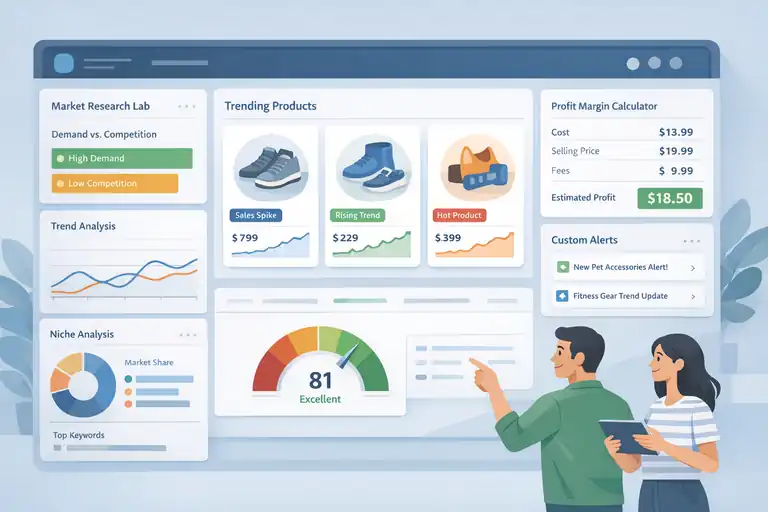
Using Salehoo’s Market Research Lab For Data-Driven Insights
The Market Research Lab is like your personal product analyst. It gathers data from thousands of online stores and marketplaces, showing you what’s in demand, what’s trending down, and where gaps exist.
What I find most valuable is that it provides market demand vs. competition ratio. This helps you spot opportunities where consumer demand is high, but competition is still manageable—exactly where new sellers can thrive.
It’s the difference between guessing and strategically choosing your next winning product.
How The Trending Product Feature Spots High-Demand Items
The Trending Product feature constantly monitors eCommerce marketplaces for surges in buyer activity. It doesn’t just rely on search volume—it tracks sales velocity and growth consistency.
For example: If a certain kitchen gadget starts spiking in Amazon sales but still has low competition on Shopify, the app flags it early. You get a chance to jump on trends before they explode, giving you a valuable first-mover advantage.
It’s like having an insider tip on what’s about to go viral.
Understanding Profit Margin Calculations Within The App
One of Salehoo’s underrated features is its built-in profit margin calculator. It automatically factors in product cost, average retail price, and potential shipping or transaction fees.
Instead of doing manual math or using third-party spreadsheets, you can instantly see:
- The expected gross profit per item.
- Recommended retail pricing range.
- Whether the product fits your target margin goals.
This small feature can save hours of manual calculations and prevent costly pricing errors.
Custom Alerts: How To Track Niche-Specific Product Trends
If you specialize in a specific niche—say pet accessories or fitness gear—the custom alerts feature is a game-changer. You can set alerts for particular keywords, price thresholds, or supplier updates.
Whenever a new trend or opportunity emerges, Salehoo notifies you. No more checking daily or fearing you missed a market shift.
This keeps your sourcing process proactive instead of reactive—perfect for sellers who want to stay ahead of the curve.
Why The Salehoo App Speeds Up Product Research
Time is everything in eCommerce. The faster you can validate an idea, the sooner you can list, test, and sell it. Salehoo’s strength lies in condensing what used to take days into minutes.
Centralized Access To Trusted Global Suppliers
Instead of bouncing between multiple websites, Salehoo centralizes access to thousands of pre-vetted suppliers. You can source from countries like the U.S., U.K., China, and Australia—all within one dashboard.
The benefit here is clear: fewer tabs, fewer headaches. You instantly know who ships where, what the lead times are, and what MOQ applies. It’s efficient, transparent, and ideal for scaling globally.
Real-Time Data That Replaces Manual Market Guesswork
Market data changes fast. What’s trending this week may be irrelevant next month. Salehoo’s real-time analytics pull data from live marketplaces so your decisions are based on current conditions, not outdated reports.
This helps eliminate the typical “guesswork loop” where sellers rely on gut instinct or incomplete information. It’s like trading blindfolded versus trading with a live market dashboard.
Automation Tools That Eliminate Time-Consuming Tasks
Automation is one of the Salehoo app’s biggest time-savers. From bulk importing products to automatic inventory updates, it minimizes manual repetition.
Some key automations include:
- Auto-syncing supplier data (so product availability is always accurate).
- Updating pricing when suppliers adjust costs.
- Managing supplier communications directly from the app.
These small efficiencies add up quickly, freeing up your time for strategy, marketing, or scaling.
Instant Comparison Of Price, Shipping, And Supplier Ratings
One of my favorite features is Salehoo’s comparison dashboard. You can compare suppliers side-by-side by product cost, shipping speed, and ratings—instantly.
This removes hours of spreadsheet work and lets you make smarter, faster sourcing decisions. For instance, you can quickly see that one supplier offers a $2 lower price but a slower shipping time—allowing you to choose based on your priorities, not guesswork.
Pro Tip: Combine Salehoo’s filters with trending product data to find high-margin, low-competition products faster than your competitors. It’s one of the most practical ways to build a data-driven sourcing strategy without getting overwhelmed.
How Salehoo Minimizes Research Errors And Risk
Every eCommerce seller knows that one wrong product choice—or one unreliable supplier—can lead to wasted time and lost money. The Salehoo app was built to help you avoid those costly mistakes before they happen.
Its built-in protection systems, data tools, and performance tracking all work together to make sure your decisions are backed by facts, not guesses.
Built-In Fraud Protection And Supplier Verification
One of the most stressful parts of product sourcing is the fear of getting scammed. Salehoo addresses that directly by offering fraud protection and verified suppliers in every category.
Here’s how Salehoo keeps your business safe:
- Every supplier in the app is manually verified for authenticity, licensing, and trading history.
- Fraudulent or inactive suppliers are removed automatically after periodic checks.
- Salehoo provides supplier ratings based on communication quality, delivery speed, and product consistency.
I’ve personally found this especially useful when testing new niches. Instead of gambling on a random contact from Alibaba or social media, you’re working with suppliers that have already been screened for legitimacy.
It removes that uneasy feeling of “Is this vendor real?” and replaces it with confidence.
Data-Backed Product Validation To Avoid Bad Investments
This is where Salehoo’s research intelligence shines. Instead of relying on intuition or trends you’ve seen online, Salehoo uses data validation to tell you whether a product is truly worth your time.
It analyzes:
- Sales velocity (how fast products are selling)
- Competition levels in your niche
- Historical performance over time
- Profit margins and supplier consistency
This kind of insight prevents you from falling into the trap of “shiny object syndrome”—chasing every product that looks exciting on TikTok or Instagram.
I like to think of it as a pre-launch filter: if the data doesn’t support the idea, I skip it.
It’s a smart way to keep your store lean, efficient, and profitable.
Performance Metrics That Help Predict Product Success
Salehoo doesn’t just stop at supplier vetting—it gives you performance data that helps predict how successful a product might be.
The performance metrics include:
- Sell-through rate: The percentage of products that actually sell after being listed.
- Market saturation score: Indicates how competitive a category is.
- Trend growth curve: Visualizes whether demand is rising or falling.
Let me give you a quick example. I once found a fitness resistance band that seemed perfect—great price, verified supplier, and healthy profit margin.
But Salehoo’s data showed that demand was actually declining month-over-month. That insight alone saved me from investing in a dead product.
In short, these metrics act like your personal market forecast—they don’t just tell you what’s hot now, but where the momentum is heading.
Using Salehoo Insights To Refine Your Product Strategy
Once you’ve learned how to identify safe, reliable suppliers, the next step is to refine your product strategy.
This is where Salehoo’s insights turn research into real business growth.
Identifying Market Gaps With Data Visualization Tools
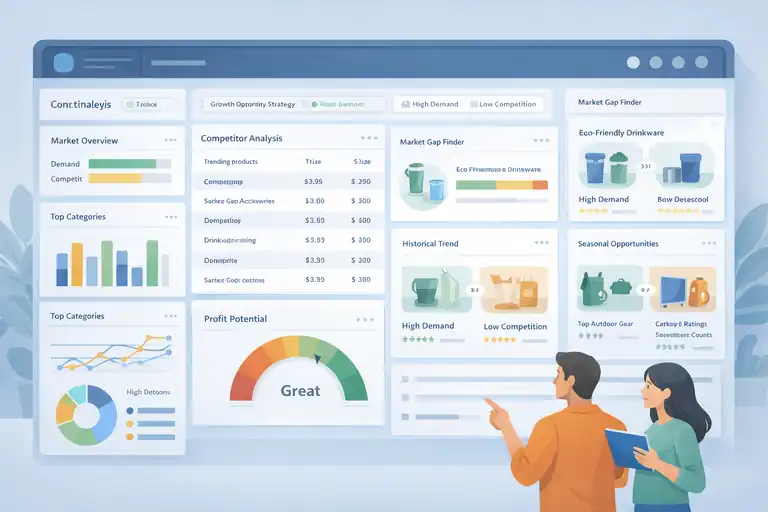
Salehoo offers a simple yet powerful visual interface that helps you spot market gaps—areas where demand exists but competition is still low.
For example: You might notice that while “eco-friendly drinkware” has strong overall sales, the subcategory “biodegradable tumblers” shows low seller activity. That’s a perfect market gap.
How to use this feature effectively:
- Use filters to sort by “low competition + high demand.”
- Review the historical demand chart to confirm stability.
- Save and track your findings in Salehoo’s dashboard for future analysis.
This approach turns vague niche ideas into actionable opportunities, grounded in data instead of guesswork.
How To Use Competitor Analysis For Smarter Product Selection
Salehoo’s competitor analysis tools give you a peek into what other sellers are doing—without needing to manually search marketplaces for hours.
It shows you:
- Top-selling products in your chosen category.
- Competitor pricing trends.
- Supplier overlap (who’s using the same source).
One of the strategies I like using here is the “differentiation test.” If you find that multiple sellers are offering the same item, check whether you can source a version with a slightly better feature, bundle, or branding. Salehoo’s product database helps you find those alternative suppliers fast.
This isn’t about copying your competitors—it’s about learning from them and positioning yourself more strategically.
Leveraging Historical Trends To Predict Seasonal Opportunities
Predicting demand spikes is one of the most underrated uses of Salehoo’s data. The historical trend charts show you how certain products perform during different times of the year.
Here’s what that means in practice:
- If you sell outdoor gear, you can identify when camping accessories peak in interest (usually pre-summer).
- For gift-related products, you can time your inventory build-up around key holidays.
- You can even discover off-season opportunities where competition temporarily dips.
I once used this feature to prepare for a “back-to-school” wave by sourcing study accessories two months earlier than usual. The result? I had stock ready when others were still scrambling to order.
It’s all about timing—and Salehoo gives you the visibility to plan ahead.
Integrating Salehoo With Your eCommerce Workflow
Integration is where everything clicks. The Salehoo app isn’t just a sourcing tool—it’s a workflow enhancer that keeps your operations smooth, synced, and scalable.
How Salehoo Works With Shopify And WooCommerce
Salehoo connects directly to Shopify and WooCommerce, two of the most popular eCommerce platforms. This means you can import, list, and manage products without constantly switching tabs or exporting files.
Here’s what integration allows you to do:
- One-click import of product listings from Salehoo to your store.
- Automatic updates when supplier prices or stock levels change.
- Instant synchronization between your store inventory and supplier data.
If you’ve ever dealt with overselling or manual stock mismatches, you know how much of a headache that can be. This feature basically automates one of the most error-prone parts of eCommerce.
Streamlining Product Import And Inventory Updates
What I appreciate most about Salehoo is how it handles bulk imports. You can bring dozens of products into your store at once, complete with descriptions, pricing, and images.
Then, once products are live, Salehoo’s system continuously checks for supplier updates—like stock shortages or price adjustments—and syncs them to your store automatically.
It’s the kind of automation that keeps your shop accurate and professional, without spending hours maintaining it manually.
Pro tip: Always double-check imported product descriptions before publishing them. Even though Salehoo imports clean data, customizing your descriptions improves SEO and brand voice.
Managing Supplier Communication Directly From The Dashboard
Salehoo makes supplier communication surprisingly easy. Instead of juggling separate email threads or waiting days for responses, you can message suppliers directly within the dashboard.
This saves time, keeps your correspondence organized, and allows you to manage multiple supplier relationships in one place.
I’ve found this especially helpful during busy sales seasons when I need quick order confirmations or price quotes. Having a central place to manage those conversations keeps things running smoothly—and prevents any “lost in inbox” chaos.
Expert Tip: To get the most from the Salehoo app, combine its supplier integrations with automation tools inside Shopify or WooCommerce. When both systems work together, you can test products faster, scale smarter, and stay responsive to demand without being buried in admin work.
Expert Tips To Maximize Results With The Salehoo App
The Salehoo app works best when you treat it as more than just a supplier database—it’s a full research assistant that helps you build a data-driven eCommerce business.
With a few smart habits, you can turn it into a growth engine instead of just a sourcing tool.
Start With A Focused Niche Before Expanding Product Lines
When you’re new to Salehoo, it’s tempting to explore dozens of product ideas. But from experience, I’ve found that focusing on one profitable niche first leads to faster results.
Start small with one product category—like eco-friendly kitchenware or pet accessories—and use Salehoo’s filters to narrow down suppliers and demand data for that niche. Once you’ve validated your first few winning products, then expand gradually.
Why this works:
- It helps you understand your target market deeply.
- You can optimize ads, SEO, and pricing more effectively.
- You build supplier relationships faster within a focused category.
Think of it like learning to master one instrument before starting a band—it’s easier to fine-tune your skills and scale with confidence.
Use Salehoo’s Data To Validate Ideas Before Investing
One of the most powerful (and underrated) things you can do is validate every product idea before spending money on stock. Salehoo makes this super straightforward.
Inside the app, check the product’s:
- Competition level (how many other sellers are listing it)
- Demand score (how often it’s selling across marketplaces)
- Supplier performance (ratings, fulfillment speed, and communication)
For example, when I considered adding wireless chargers to my store, Salehoo’s data showed that while demand was high, the market was saturated. That single insight pushed me to pivot toward “multi-device” chargers—a smaller niche but with higher margins.
Always let the data lead the way, not your gut.
Combine Salehoo Insights With SEO Tools For Better Product Visibility
Even the best product won’t sell if no one can find it. This is where blending Salehoo insights with SEO tools like Google Trends or Ahrefs really helps.
Here’s a simple workflow I use:
- Find trending products in Salehoo’s research lab.
- Cross-check keyword popularity and search intent using Google Trends.
- Optimize your product listings using those keywords for SEO.
This ensures your listings align with what customers are actually searching for. A quick example: Salehoo showed me that “reusable silicone food bags” were trending, but Google data revealed that “eco sandwich bags” had higher search volume.
Using both insights, I optimized my titles—and my product started ranking much faster.
Continuously Track And Optimize Based On App Performance Metrics
Salehoo’s performance metrics aren’t just for research—they’re ongoing tools for optimization.
Keep an eye on:
- Demand fluctuations: If a product starts trending downward, consider reducing ad spend or testing a new variation.
- Supplier reliability: Track communication speed and fulfillment rates regularly.
- Profit margins: Adjust prices when supplier costs change to maintain profitability.
I like to do a quick “Salehoo check-up” every two weeks—it’s a simple way to catch issues early and keep your catalog lean and profitable.
Comparing Salehoo With Other Product Research Tools
There are plenty of product research platforms out there, but few combine supplier verification, data insights, and usability like the Salehoo app.
Here’s how it stacks up against some common alternatives.
Key Differences Between Salehoo And AliExpress Dropshipping Tools
AliExpress is a familiar starting point for many dropshippers, but it’s not built with long-term reliability in mind. Salehoo, on the other hand, focuses on supplier trust and verified data.
Here’s the breakdown:
- Supplier quality: AliExpress suppliers are often unverified, while Salehoo’s are hand-checked.
- Shipping times: Salehoo lists suppliers with faster fulfillment, especially for local markets.
- Data insight: AliExpress gives you access to products, but no market intelligence. Salehoo includes trend data, competition analysis, and profit estimates.
If you’re serious about building a brand instead of a short-term store, Salehoo is the smarter foundation.
How Salehoo Outperforms Free Product Research Platforms
Free product research tools can be helpful for basic ideas, but they often rely on limited or outdated data. Salehoo stands out because it updates its marketplace insights in real-time.
Advantages of using Salehoo instead:
- Fresh, reliable sales data from multiple sources.
- Built-in supplier validation to prevent scams.
- Access to a global supplier base (not just one region).
I’ve tried free tools that gave me great “trend ideas,” but when I cross-checked them in Salehoo, I found half of those products were already declining. That’s the difference between assumptions and actual market intelligence.
The Unique Advantage Of Salehoo’s Verified Supplier Network
This is where Salehoo truly shines—its verified supplier network. Every supplier in Salehoo’s ecosystem passes a multi-step verification process before being approved.
This means:
- No fake companies or middlemen.
- Consistent product quality and delivery times.
- Long-term relationships that grow with your business.
What’s powerful is that you can message suppliers directly, compare offers, and even negotiate prices confidently. It’s like having a personal sourcing assistant that filters out the noise and leaves only trustworthy options.
Common Mistakes To Avoid When Using The Salehoo App
Even the best tools can be misused if you’re not careful. Over time, I’ve noticed a few common mistakes sellers make when using the Salehoo app—and how easy they are to avoid.
Ignoring Market Data Before Choosing Products
It’s tempting to go with your instincts, but skipping data analysis is one of the biggest mistakes. Salehoo’s data is there for a reason—use it.
Always check:
- Competition levels.
- Seasonal demand trends.
- Supplier fulfillment speed.
Without this step, you risk investing in low-margin or declining products. Think of Salehoo as your “reality check” before you buy or list anything new.
Overlooking Supplier Reviews And Communication Quality
A supplier might look perfect on paper, but poor communication can ruin your business relationships fast.
Before committing, message the supplier through Salehoo and test their response time and clarity. Ask direct questions about shipping times, product quality control, and restock schedules.
I once worked with a supplier who had great reviews but slow responses. It taught me that reliability isn’t just about ratings—it’s about communication consistency.
Failing To Update Product Lists Based On Demand Shifts
eCommerce moves quickly, and what’s trending now might fade in a few months. Salehoo’s real-time demand data helps you keep up—but only if you check it regularly.
I recommend setting a reminder to review your top products every two weeks. If you notice a decline in trend growth or search volume, either pivot to a variation or replace the product entirely.
This kind of agility keeps your store fresh, relevant, and profitable long-term.
Final Thoughts: Why Salehoo Is Worth Using For Product Research
At the end of the day, the Salehoo app isn’t just a research tool—it’s a business advantage. It takes the guesswork out of product selection and helps you scale with confidence.
The Long-Term Value Of Consistent Data-Driven Decisions
When you make decisions based on Salehoo’s data instead of emotions, you build a foundation for stability. Data-driven sourcing means fewer failed products, fewer wasted ad dollars, and more predictable profits.
It’s not about finding one viral product—it’s about building a process that works every time.
How Salehoo Saves Time While Increasing Profit Potential
Time is your most valuable asset in eCommerce. Salehoo cuts research time dramatically by giving you pre-vetted suppliers, built-in analytics, and one-click integrations.
That saved time can be re-invested in marketing, customer service, or building your next product line. The compound effect of those saved hours often leads to significantly higher profit potential.
Why Many eCommerce Sellers Rely On It For Sustainable Growth
From beginners testing their first product idea to seasoned sellers managing hundreds of SKUs, Salehoo fits into nearly every stage of business.
It’s reliable, transparent, and built around data and trust—two things that define long-term success in eCommerce.
If you’re serious about building a business that lasts, not just a quick trend store, Salehoo gives you the clarity and confidence to make smarter, faster, and safer decisions every single time.
Pro Tip: Use Salehoo’s data weekly, even if you’re not sourcing new products. It helps you stay ahead of market shifts and gives your store that professional, always-updated edge that customers can feel.
Frequently Asked Questions
What is the Salehoo app used for?
The Salehoo app is used to find verified suppliers and research profitable products using real-time market data, trends, and competition insights.
How does the Salehoo app speed up product research?
The Salehoo app speeds up product research by combining supplier verification, demand data, and profit metrics in one dashboard, eliminating manual checks.
Is the Salehoo app good for beginners and experienced sellers?
Yes. The Salehoo app works well for beginners validating first products and for experienced sellers scaling with faster, data-driven sourcing decisions.

I’m Juxhin, the voice behind The Justifiable.
I’ve spent 6+ years building blogs, managing affiliate campaigns, and testing the messy world of online business. Here, I cut the fluff and share the strategies that actually move the needle — so you can build income that’s sustainable, not speculative.
Related posts:
 Is SaleHoo Legit? What Real Sellers Actually Discover
 Viral Launch Chrome Extension: The Ultimate Tool for Sellers
 How the Salehoo Catalog Helps You Spot Winning Items Quickly
 Salehoo Pricing Explained: What You Actually Get for Your Money
 What Is SaleHoo All About? A Clear Guide for Beginners
 Top Ecommerce Platforms That Make Selling Simple