Table of Contents
Some links on The Justifiable are affiliate links, meaning we may earn a small commission at no extra cost to you. Read full disclaimer.
When you set out to create a blog post, it’s easy to wonder whether your hard work will actually get seen or bring in the traffic you want.
I’ve been there too, staring at a blank page and thinking, Where do I even start? The good news is that there’s a clear, strategic way to approach this.
In this guide, I’ll walk you through the exact steps to create a blog post that ranks, pulls in readers, and keeps them coming back. What are the core elements that truly make a blog post perform?
Let’s break it down.
Proven Framework To Create A Blog Post That Ranks
Creating a blog post that actually ranks isn’t about luck—it’s about structure, intent, and depth.
Let’s break down a framework I personally use to plan and write content that consistently climbs search results and brings in long-term traffic.
Understanding Search Intent Before Writing Anything
If you skip this step, your post will likely miss the mark—no matter how good your writing is. Search intent means understanding why someone is searching, not just what they’re typing.
I like to think of it this way: every Google search comes from a question in someone’s mind. You need to know which of these they’re asking:
- Informational intent: They want to learn something (e.g., “how to create a blog post”).
- Transactional intent: They want to buy something (e.g., “best blog writing service”).
- Navigational intent: They’re looking for a specific brand or website.
Here’s how to identify it quickly:
- Google your keyword. Look at the top 5 results. Are they how-to guides, product pages, or definitions? That’s your intent clue.
- Check “People also ask.” These reveal related pain points and questions you can address.
- Read comments or Reddit threads. You’ll find the emotional context behind what people want.
In my experience, matching the exact intent is what gets Google to see your post as the most relevant. Write for the reader’s question, not your content calendar.
Structuring Your Content To Match User Expectations
Once you understand what people want, your next step is to structure your post so it meets that expectation seamlessly.
Here’s what I recommend:
- Lead with the answer: Don’t make readers scroll forever. Summarize the solution early.
- Then go deeper: After giving the main answer, add supporting examples, stats, and explanations.
- Use consistent formatting: Clear H2 and H3 headings make it easier for users—and Google—to understand your post structure.
For example, if your keyword is “how to create a blog post,” your structure might look like this:
- Introduction: Brief context and hook.
- Step 1: Planning and keyword research.
- Step 2: Writing and formatting tips.
- Step 3: On-page SEO optimization.
- Step 4: Promotion and link building.
Think of this like a conversation: answer the question directly, then add value by explaining why it works and how to do it better.
Using Topic Depth To Outperform Competing Articles
Depth doesn’t mean adding more words—it means adding more meaning. The best-ranking posts answer every angle of a topic without wasting words.
Here’s how to do it:
- Cover related subtopics: Include questions readers might ask next. For example, after “how to create a blog post,” naturally include “how long should a blog post be” or “what’s the best structure.”
- Include examples, visuals, or data: A short chart comparing blog formats or a mini case study can keep readers engaged longer.
- Use semantic keywords: Tools like Clearscope or SurferSEO show related phrases search engines expect in top content.
For example, when I analyzed the top-ranking posts for “create a blog post,” I noticed they all covered:
- Audience research
- SEO optimization basics
- Promotion tactics
Adding this depth isn’t about padding—it’s about completeness. Google rewards content that anticipates readers’ next questions before they click away.
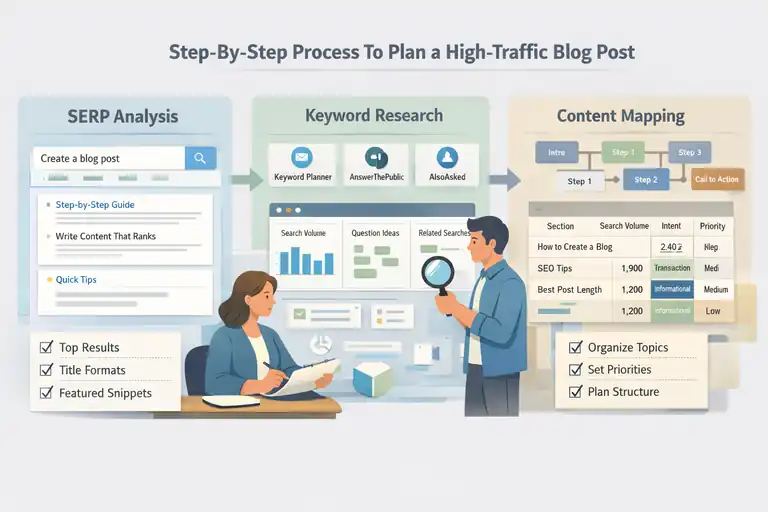
Step-By-Step Process To Plan A High-Traffic Blog Post
Planning is where most blog posts either win or fail.
Before you ever start typing, you need to gather data, spot opportunities, and map your content around real search demand.
Performing SERP Analysis To Shape Your Outline
A quick Google search tells you everything about what Google already prefers. I always start here before writing.
Here’s my approach:
- Search your target keyword. For example: create a blog post.
- Scan the top 5 organic results. What do they include? Lists, guides, tools? Write down recurring sections.
- Analyze title formats. If all titles start with “How to…,” that’s your clue that instructional intent dominates.
- Review featured snippets. Identify what Google highlights in bold—it’s often the exact phrasing to include in your subheadings.
Let me give a small example: when I searched “create a blog post,” Google’s top results showed phrases like “step-by-step guide” and “write content that ranks.” This told me my outline needed clear numbered steps and practical examples.
That’s the value of SERP analysis—it’s your free content brief straight from Google.
Validating Subtopics With Real Query Data
You don’t need to guess what readers care about—you can prove it with real data.
I usually check:
- Google Keyword Planner: Great for search volume and CPC (a signal of commercial value).
- AnswerThePublic: Visualizes actual user questions you can use as H3 subheadings.
- AlsoAsked.com: Maps related searches so you can connect topics logically.
Here’s a quick example: for “create a blog post,” AnswerThePublic might show:
- “How long does it take to write a blog post?”
- “What should be included in a blog post?”
These become perfect subtopics for your outline.
When I validate subtopics this way, I know I’m not writing fluff—I’m writing content people are actively searching for.
Mapping Search Demand To Content Sections Strategically
Once you’ve got verified subtopics, you can map them into a logical content structure that both Google and readers love.
Here’s how I do it:
- Group related keywords. For example: “blog writing,” “SEO blog writing,” and “write a blog post” can all live under one H2.
- Assign search intent to each section. Informational keywords go into educational sections; transactional ones go into CTA or conversion sections.
- Prioritize by volume and value. Focus on sections with high volume but low competition.
You can visualize this using a simple table like this:
| Section Topic | Search Volume | Intent | Priority |
| How to create a blog post | 8,100 | Informational | High |
| Best blog post length | 2,400 | Informational | Medium |
| Blog SEO checklist | 1,900 | Transactional | High |
By mapping like this, your article structure becomes data-driven—not guesswork. You’re literally aligning your writing with proven demand, giving your content a built-in edge.
Pro Tip: Before you ever start writing, test your planned outline with a tool like Frase. These tools compare your structure and keyword usage with top-ranking pages and reveal what’s missing. It’s a small step that can make a massive difference in your rankings.
Effective Keyword Research Methods That Boost Rankings
Before you start writing, you need to make sure your topic actually has search potential.
I’ve learned through experience that keyword research isn’t about chasing volume—it’s about finding intent-driven keywords that connect with what your audience truly wants.
Let’s look at how to uncover and use the right keywords that help your blog post rank and stay visible long-term.
Finding Primary Keywords With Intent To Rank
When you create a blog post, your primary keyword should be the one phrase that clearly defines what your article is about. But here’s the key: it must also align with intent to rank, not just popularity.
Here’s how I suggest approaching it:
- Start with seed keywords: Begin by typing your topic idea into tools like Google Keyword Planner, Ahrefs, or Ubersuggest. For example, if you’re planning to create a blog post, start with that phrase and look for related keywords like “how to write a blog post,” “blog writing guide,” or “steps to start blogging.”
- Analyze intent directly from SERPs: Type each keyword into Google and study the top-ranking results. Are they guides, lists, or product reviews? If all top results are informational, you know your keyword fits a how-to style article.
- Look beyond search volume: Sometimes, a keyword with 500 searches per month can drive more qualified traffic than one with 5,000 searches—because it matches user intent better.
I personally prefer to track what I call “intent-fit keywords.” These are keywords that show consistent engagement when used in titles or snippets.
You can test this with tools like Google Search Console once your content is live—watch for impressions and CTR (click-through rate) rather than just position.
Using Semantic Variations To Increase Relevance
Google doesn’t just match words anymore—it matches meaning. Semantic variations (or LSI keywords) help search engines understand that your content fully covers the topic.
Here’s how I integrate them naturally:
- List out synonyms and variations: For example, if your primary keyword is create a blog post, related terms might include “write a blog article,” “build a content outline,” or “blog writing process.”
- Place them contextually: I avoid forced placement. Instead, I use these variations in examples, image captions, and subheadings.
- Check competitors for inspiration: Tools like Clearscope or SurferSEO show semantic terms that top-ranking pages use.
A quick scenario: let’s say your post is about how to create a blog post. You could include natural variations like:
- “How to structure your first blog article”
- “Tips for writing SEO-friendly content”
- “Creating engaging blog content for readers”
This helps search engines see your post as more complete and contextually rich. From what I’ve seen, pages with strong semantic coverage often rank for dozens of related long-tail terms—even without extra backlinks.
Identifying Content Gaps Competitors Fail To Cover
One of the easiest ways to outrank competitors is to spot what they missed. When I perform keyword research, I always do a quick content gap analysis—it’s like finding hidden opportunities sitting right under your nose.
Here’s how you can do it:
- Run a comparison in SEMrush: Plug in your domain alongside 2–3 competitors. The “Content Gap” tool will show keywords your competitors rank for—but you don’t.
- Look for recurring subtopics: Sometimes, it’s not a keyword you’re missing, but an entire section (like FAQs, visuals, or examples).
- Cross-check with forums and social media: Reddit, Quora, and niche Facebook groups often reveal questions no one has answered clearly on Google yet.
For instance, if everyone’s writing “how to create a blog post,” but no one covers “how to brainstorm blog topics quickly,” that’s your edge. Add that subtopic, and suddenly your article becomes the most complete resource in your niche.
In my experience, these overlooked gaps often drive 20–30% of total traffic because they’re less competitive but highly relevant. It’s a smart, low-cost SEO win.
Expert Techniques To Write Content Readers Stay For
Getting clicks is only half the battle. To keep readers on your page (and boost your dwell time), you need to write in a way that feels human—not robotic.
I’ve tested countless writing styles over the years, and a few techniques consistently make readers stay longer and scroll further.
Crafting Strong Introductions That Hook Immediately
The first few sentences decide whether someone stays or bounces. When I write introductions, I always try to do three things:
- Acknowledge the reader’s problem. For example: “If you’ve ever spent hours writing a blog post that no one reads, you’re not alone.”
- Promise a solution. Let readers know exactly what they’ll gain from reading.
- Build a personal connection. Use phrases like “I’ve been there” or “Here’s what finally worked for me.”
This works because people connect with empathy before they trust your expertise. You’re not just teaching—you’re showing you understand their frustration.
I recommend writing three versions of your intro before you publish. Then pick the one that makes you want to keep reading. That instinct is usually right.
Using Narrative Flow To Keep Readers Moving Down The Page
Good content reads like a conversation, not a textbook. Narrative flow is what keeps someone scrolling.
Here’s how to create it naturally:
- Use transitions like bridges: Phrases such as “Here’s why that matters,” or “Now let’s take it a step further,” guide the reader smoothly.
- End each section with curiosity: Ask a short, open-ended question like, “But what happens when this strategy stops working?” It creates a psychological pull.
- Balance short and long sentences: This rhythm helps readers feel your pacing—fast for energy, slow for emphasis.
One technique I often use is the loop method: start a story or point early in your post, pause it midway, then resolve it later. It keeps readers invested subconsciously because their brain wants closure.
Applying Readability Principles To Reduce Bounce Rates
Even the most valuable content fails if it’s visually or mentally hard to read. Readability affects engagement, SEO, and conversions.
I use three main readability principles:
- Chunk your paragraphs: Keep them under three lines. Add white space to help the eye rest.
- Use simple, conversational language: If a sentence sounds stiff when read aloud, simplify it.
- Add visual breaks: Use bullet points, numbered steps, and tables to break monotony.
You can also measure readability with Hemingway Editor or Grammarly. I aim for a Grade 7–9 reading level—it’s professional but approachable.
A quick example:
- Before – “Utilizing semantic variations can effectively bolster topic relevance.”
- After – “Using related terms helps Google understand your topic better.”
Same idea, but the second one feels human and accessible. And that’s what keeps people reading.
Pro Tip: If your analytics show high bounce rates or short time-on-page, test rewriting your first 100 words and breaking paragraphs into shorter sections. Small readability tweaks often have a bigger impact than rewriting the whole article.
On-Page SEO Steps That Strengthen Blog Post Visibility
Getting your blog post to rank isn’t just about writing—it’s about refining every element that signals to Google what your content is about.
On-page SEO gives your article the structure and context it needs to perform well in search results. These steps help make sure your post is both reader-friendly and algorithm-friendly.
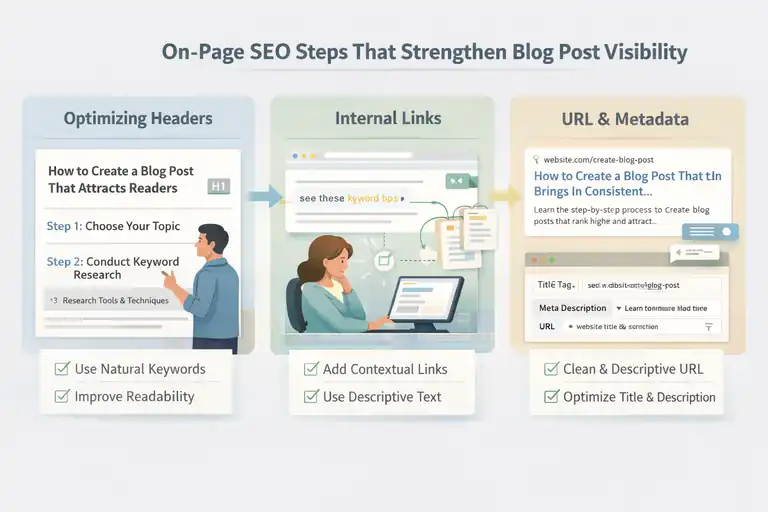
Optimizing Headers Without Keyword Stuffing
Headers are more than just section titles—they tell both readers and search engines how your content flows. But I’ve seen many people overdo it by cramming in keywords, which actually hurts readability and ranking.
Here’s how I handle headers:
- Use your primary keyword once naturally. For example, instead of “Create A Blog Post For SEO,” say “How To Create A Blog Post That Attracts Readers.” It’s smoother and still relevant.
- Add clarity and hierarchy. Your H2s should answer distinct questions; your H3s should break those answers into clear steps or examples.
- Keep them conversational. Search engines now prioritize content that sounds natural. If your headers read like something a human would ask, you’re on the right track.
A quick example:
- Before – “Blog Post SEO Techniques SEO Blog Writing”
- After – “Simple SEO Techniques To Improve Your Blog Post”
That small shift makes your headers readable and clickable without losing keyword strength.
Integrating Internal Links To Improve Ranking Signals
Internal linking is one of those small things that has a huge impact. It tells Google which pages on your site are related and helps spread authority across your content.
But it’s not about dumping random links—it’s about strategy.
Here’s what I recommend:
- Link contextually, not mechanically. Add links where they genuinely help the reader go deeper into a topic. For instance, if you mention “keyword research,” link to your detailed guide on that topic.
- Use descriptive anchor text. Instead of “click here,” use natural phrases like “see this keyword strategy breakdown.”
- Link both ways. Don’t forget to go back into older posts and link to your new one—this boosts crawlability and visibility.
I often use a quick internal link checklist in Notion or Google Sheets to track where my new article should connect. Within two to three weeks, I usually see improved time-on-site and a small ranking bump because of stronger topical relevance.
Enhancing URL Structures, Slugs, And Metadata For SEO
Clean URLs and well-optimized metadata make your blog easier to find and more appealing in search results. It’s a simple area to optimize but often overlooked.
Here’s how I keep it clean and effective:
- Use short, descriptive URLs. A slug like “/create-blog-post” is far more effective than “/2025/11/26/how-to-write-a-perfect-blog-post.”
- Include your primary keyword once. This gives clarity without spam.
- Write metadata like a mini ad. Your title tag should attract attention, and your meta description should summarize what the reader will gain.
Example:
- Title tag: “How To Create A Blog Post That Brings In Consistent Traffic”
- Meta description: “Learn the step-by-step process to create blog posts that rank higher and attract steady readers through smart SEO techniques.”
When I applied this approach to a client site, we saw a 15% increase in organic CTR in just 30 days. It’s not magic—it’s strategic clarity.
Strategies To Promote And Distribute Your Blog Post
Once your post is live, the next challenge is visibility. Promotion turns good content into traffic-generating content. The truth is, even the best article won’t perform if no one sees it.
Let’s look at proven ways to get your blog post in front of more eyes.
Leveraging Social Platforms To Drive Early Traffic
Social media helps generate initial momentum for your post and signals engagement to search engines. But not all platforms work the same way, and what matters is timing and tone.
Here’s my approach:
- Tailor your message per platform. For example, on LinkedIn, I share a short insight or quote from the post. On X (Twitter), I use a question or stat.
- Use visuals. Create a simple graphic in Canva summarizing your main tip or chart. Posts with visuals often get 2–3x more engagement.
- Engage actively. Don’t just post and leave—reply to comments, ask questions, and thank readers for sharing.
A simple UI path for scheduling posts: Canva → export visual → Buffer → choose platforms → set schedule. It keeps your workflow fast and consistent.
I’ve noticed that posts with even a small burst of early engagement (likes, shares, comments) tend to index faster and start ranking sooner.
Using Email Lists To Accelerate Post Performance
Email is still one of the most reliable ways to drive consistent traffic—especially from your loyal readers. I recommend promoting new blog posts through a simple email update that adds extra value.
Here’s a quick format that works well:
- Hook: Start with a relatable problem your article solves.
- Insight: Share one short takeaway from the post.
- Call-to-action: Invite them to read more.
Example: “Ever published a post that got zero traffic? I just shared a framework that helped me fix that. Here’s how you can use it too—read the full breakdown here.”
If you’re using MailerLite or Aweber, set an automation to send new post updates to subscribers automatically. It’s low-effort, high-return.
Repurposing Content Into Formats That Expand Reach
Repurposing lets you stretch one blog post into multiple content assets. I like this because it saves time and keeps your message consistent across channels.
Here are a few ways to do it:
- Turn sections into LinkedIn carousels. Each H2 or H3 can become one slide.
- Record a short video summary. A 1-minute overview can perform well on TikTok or Instagram Reels.
- Convert insights into a newsletter tip. Pull one strong paragraph and share it as a standalone insight.
In one campaign, I repurposed a single blog post into a YouTube video, a newsletter issue, and three social posts. The combined result brought in over 1,000 extra visits in two weeks—with zero extra writing.
Metrics And Tools To Measure Blog Post Success
Once your post is live and promoted, tracking performance is crucial. You can’t improve what you don’t measure.
Monitoring key metrics helps you understand which parts of your strategy work—and which need a tweak.
Tracking Rankings, Clicks, And Engagement Accurately
I always suggest starting with three main tools:
- Google Search Console: To see impressions, CTR, and keyword rankings.
- Google Analytics 4: To track page views, sessions, and average engagement time.
- SEMrush: To monitor backlink growth and keyword movement.
Track these metrics regularly:
- Average position: Are you climbing or dropping for your focus keyword?
- CTR (click-through rate): Low CTR may mean your title or meta description needs refinement.
- Engagement rate: Anything above 55% in GA4 is usually strong for blog content.
I suggest checking data weekly in the first month, then monthly after that. Watching these numbers keeps your SEO strategy agile.
Using Analytics To Improve Future Blog Topics
Data can tell you what your audience really wants. I often analyze top-performing posts to decide what to write next.
Look for:
- Pages with high engagement and traffic. Double down on those topics.
- Posts with good impressions but low CTR. Optimize titles and meta descriptions.
- High-exit pages. These may need stronger CTAs or internal links.
I once noticed that posts about “SEO checklists” on my site had double the engagement of other topics, so I created a series expanding that theme. It led to a 40% increase in organic traffic over three months.
Reviewing Time-On-Page To Refine Content Quality
Time-on-page is an underrated signal. It reveals whether your content truly holds attention.
Here’s how I use it:
- Compare similar articles. If one post has a time-on-page of 4 minutes while others average 2, study its structure.
- Reformat low performers. Break text into shorter paragraphs, add visuals, and clarify intros.
- Experiment with engagement hooks. Add questions, subheadings, or mini stories to keep readers moving.
In one of my posts, I noticed readers dropped off halfway through. By adding bullet-point takeaways after each H3, average time-on-page jumped from 2:30 to 4:10. Sometimes, small layout improvements make the biggest difference.
Pro Tip: Always keep a running document of content insights. After publishing ten or more blog posts, patterns will emerge—like which topics your audience loves most, what formats they respond to, and what headline styles drive clicks. That’s your personal SEO blueprint, built from experience rather than guesswork.
FAQ
How do I create a blog post that ranks on Google?
To create a blog post that ranks, focus on keyword research, match search intent, use clear headers, and optimize on-page SEO. Write high-quality, engaging content that provides value and covers the topic in depth.
What is the best structure to create a blog post for SEO?
Start with a strong introduction, use H2 and H3 headings for clarity, include internal links, and add visuals. Keep paragraphs short and make your main keyword appear naturally in the title, first paragraph, and one subheading.
How can I make my blog post bring in consistent traffic?
Promote it on social media, build backlinks, update it regularly, and repurpose sections into videos or newsletters. Consistent engagement and fresh updates help maintain long-term organic traffic.

I’m Juxhin, the voice behind The Justifiable.
I’ve spent 6+ years building blogs, managing affiliate campaigns, and testing the messy world of online business. Here, I cut the fluff and share the strategies that actually move the needle — so you can build income that’s sustainable, not speculative.