
Table of Contents
Some links on The Justifiable are affiliate links, meaning we may earn a small commission at no extra cost to you. Read full disclaimer.
Should you use HubSpot for your business? In most cases, the honest answer is: it depends less on company size and more on how simple or messy your revenue process already is.
If you need one place for leads, sales follow-up, marketing, support, and reporting, HubSpot can be a very strong fit. If you mainly want a cheap contact database and nothing more, it can feel like overkill.
I’ll walk you through where HubSpot shines, where it gets expensive, and how to decide without getting trapped by hype or fear.
What HubSpot actually is and who it helps most
HubSpot is no longer just a marketing tool. It has grown into a broader customer platform that combines CRM, marketing, sales, service, content, data, and AI features in one system.
HubSpot says its Smart CRM connects with its marketing, sales, and service tools by default, and the company reported serving more than 288,000 customers globally as of February 2026.
HubSpot is best understood as an “all-in-one growth system”
A lot of business owners ask the wrong first question. They ask, “Is HubSpot a good CRM?” I think the better question is, “Do I want one connected system for attracting leads, converting them, serving them, and measuring the whole journey?”
That difference matters. A traditional CRM mostly stores contacts, deals, and notes. HubSpot goes wider. It includes lead capture, email marketing, meeting booking, pipeline management, customer support tools, reporting, content tools, and AI assistance across the platform.
Its free CRM includes contact, deal, and task management, email tracking, templates, meeting scheduling, live chat, and sales quotes.
That makes HubSpot especially useful for businesses with these patterns:
- You have multiple tools that do not talk to each other: Your leads live in forms, inboxes, spreadsheets, and someone’s brain.
- You are losing follow-up consistency: Good leads go cold because nobody owns the next step.
- You want cleaner reporting: You need to know which channel, campaign, or rep actually drives revenue.
- You are scaling across teams: Sales, marketing, and customer success all need the same customer history.
In my experience, HubSpot tends to feel strongest for B2B services, agencies, SaaS companies, consultants, education businesses, and growing e-commerce brands with longer customer journeys. It is less magical when your business is extremely simple and stays simple.
The real value is operational clarity, not just software features
This is the part many reviews miss. Most businesses do not buy HubSpot because they desperately need one more dashboard. They buy it because they are tired of chaos.
Imagine you run a 12-person agency. Leads come in through your website, LinkedIn, referrals, and webinars. One salesperson uses Gmail labels. Another uses a spreadsheet. Client onboarding starts in a project tool, while renewals are tracked nowhere.
In that setup, HubSpot can create a shared operating system for the entire customer lifecycle.
The hidden payoff is not just productivity. It is decision quality. When your data is centralized, you can answer questions like:
- Which lead sources actually close?
- How long does it take to move from inquiry to sale?
- Which services have the highest retention?
- Where do prospects stall in the pipeline?
Salesforce’s State of CRM research highlights why this matters: CRM is increasingly used as a growth and productivity layer, not just a record-keeping tool, and the report notes that 57% of companies struggled to maintain good customer experience remotely because their CRM was not accessible enough.
So yes, HubSpot can help your business. But only if you want better process discipline, not just prettier software.
How HubSpot works in practice

Before you decide whether to buy it, you need to picture daily use.
HubSpot works best when it becomes the place where your customer data, team actions, and reporting all meet.
The platform connects customer data, team actions, and automation
At a practical level, HubSpot centers everything around the contact record. That record can include email activity, deal stage, tasks, support history, website interactions, meeting history, and more. When the system is set up well, your team does not have to hunt for context.
HubSpot’s current positioning is built around a connected “customer platform,” and its AI layer, Breeze, uses CRM context to help with things like meeting prep, strategic analysis, summaries, and content creation.
HubSpot says Breeze Assistant works with your CRM data and business context rather than acting like a generic chatbot.
That matters because context is where many businesses lose time. A salesperson should not have to ask, “Has marketing already nurtured this lead?” A support rep should not have to ask, “Who sold this account and what was promised?” A founder should not need three tools open just to understand one customer.
Here is a simple flow:
- Lead enters: Form fill, chat, ad response, import, or manual entry.
- Record updates: Contact and company details are stored in the CRM.
- Team acts: Sales tasks, emails, notes, meetings, and deal stages are logged.
- Automation runs: Follow-ups, assignments, notifications, and internal workflows trigger.
- Reporting reveals patterns: You can track conversion, velocity, source quality, and service performance.
If that sounds appealing, HubSpot is probably worth serious consideration. If that sounds like more structure than you want, that is useful too.
HubSpot gets stronger as your process complexity increases
Here is my blunt opinion: HubSpot often feels “too much” right before a business actually needs it.
Many small businesses wait until the mess becomes painful. At first, a spreadsheet works. Then you add forms, landing pages, email nurture, sales handoff, onboarding, renewals, and support tickets.
Suddenly the spreadsheet is not cheap anymore. It is expensive in missed follow-ups, inconsistent customer experience, and invisible revenue leaks.
HubSpot is designed to reduce that operational drag. Its investor materials in early 2026 emphasized growth in multi-hub adoption, with 62% of new Pro+ customers landing with multiple hubs in 2025 and 40% of the Pro+ install base by ARR owning four or more hubs.
That does not prove HubSpot is right for you, but it does signal where the platform is strongest: businesses that want one shared system rather than a pile of point solutions.
From what I’ve seen, complexity shows up in five common ways:
- More than one person touches a lead
- Sales cycles last longer than a few days
- Marketing needs attribution
- Support and renewals affect revenue
- Leadership wants forecasting and reporting
If your business has three or more of those conditions, HubSpot becomes easier to justify. If not, simpler tools may do the job just fine.
When HubSpot is a smart choice for your business
This is where we move from theory to decision-making. HubSpot is usually a smart buy when your growth bottleneck is coordination, visibility, or follow-up.
Use HubSpot if your team needs one source of truth
The strongest argument for HubSpot is not “it has lots of features.” Plenty of tools have features. The strongest argument is that it can become one source of truth across marketing, sales, and service.
That means one customer timeline, one reporting layer, one automation engine, and fewer awkward handoffs. HubSpot’s free CRM also lets businesses start without a paid commitment, and the company states that the free CRM includes up to two users, 1,000 contacts, and no expiration date for the free CRM functionality.
A good fit usually looks like this:
- You are past founder-only selling: More people need visibility into deals and follow-up.
- You want repeatable lead handling: Not “whoever remembers to reply first.”
- You care about revenue attribution: You need to connect campaigns to pipeline, not just clicks.
- You want smoother customer experience: Support, onboarding, and sales should not live in silos.
Example: Imagine a small law firm or consulting company with inbound leads from SEO, referral partners, and webinars. Without one system, consultations get booked, notes get lost, and follow-up quality depends on who is available.
In HubSpot, you can capture the lead, assign ownership, schedule reminders, track the deal, and build reporting around source-to-client conversion.
That is the practical reason many businesses love it. It reduces friction where revenue is usually lost: between steps.
HubSpot is especially useful when you want to grow without rebuilding your stack every year
I believe this is one of HubSpot’s real advantages. A lot of businesses buy cheap tools early, then pay for that decision later in migration pain.
HubSpot’s appeal is that you can start with free or starter tools and add more functionality without rebuilding everything from scratch. HubSpot explicitly positions its free CRM as a foundation you can expand on later, with “no starting over” and no migration headache when upgrading.
That does not mean it is the cheapest path. It means it can be the smoother path.
This is especially helpful if you expect to add:
- More sales reps
- More lead sources
- More automation
- Better reporting
- Service or customer success workflows
- AI-assisted work inside the CRM
HubSpot’s Breeze layer is also becoming more central. The company says Breeze Assistant uses company context, while Breeze agents support marketing, sales, and service workflows.
HubSpot’s 2026 investor materials also highlighted adoption numbers such as more than 8,000 customers activating Customer Agent and over 10,000 activating Prospecting Agent in 2025.
So if you want a platform that can start fairly light and grow into a more sophisticated operating system, HubSpot makes sense.
When you should avoid HubSpot
HubSpot is not a universal yes. In some businesses, it is genuinely the wrong fit. Avoiding it can save you money, complexity, and frustration.
Avoid HubSpot if your business needs are simple and likely to stay simple
If you are a solo operator with a short sales cycle, low lead volume, and no real need for automation or cross-team reporting, HubSpot may be more platform than you need.
This is especially true if your workflow is basically:
- Get inquiry
- Reply manually
- Send quote
- Close deal
- Deliver work
In that case, a simpler CRM or even a lightweight pipeline tool may be enough. HubSpot’s structure can feel heavy if you never use the extra depth. Some businesses end up paying for “potential” they never turn into process.
I would be cautious if you fall into one of these groups:
- Very low lead volume: You can personally track every opportunity without friction.
- Mostly repeat or referral business: You do not need complex attribution or nurture.
- Tiny team with no specialization: Sales, marketing, and service are basically the same person.
- No appetite for setup: Nobody wants to define lifecycle stages, pipelines, properties, or workflows.
The software is not the issue there. The mismatch is. Buying a broad platform will not fix a business that does not need systemization yet.
Avoid HubSpot if you want enterprise power at starter-level pricing
This is probably the biggest trap. HubSpot can start affordably, but costs rise as you add advanced hubs, seats, automation, and higher-tier functionality.
As of the current HubSpot catalog, Smart CRM Starter starts at $20 per seat per month, Professional at $50 per seat per month, and Enterprise at $75 per seat per month.
But some advanced hubs jump much faster: Marketing Hub Professional starts at $890 per month, Sales Hub Professional at $100 per seat per month, Service Hub Professional at $100 per seat per month, and Content Hub Professional at $500 per month. Some enterprise tiers also require onboarding fees.
That means HubSpot is often affordable at the beginning and expensive once you want deeper functionality.
I suggest asking yourself one uncomfortable question: “Will we really use advanced automation, reporting, content, or service features enough to justify the upgrade?”
If the answer is no, do not buy based on future fantasies. Buy based on current process needs and near-term usage.
How to decide if HubSpot is worth the cost
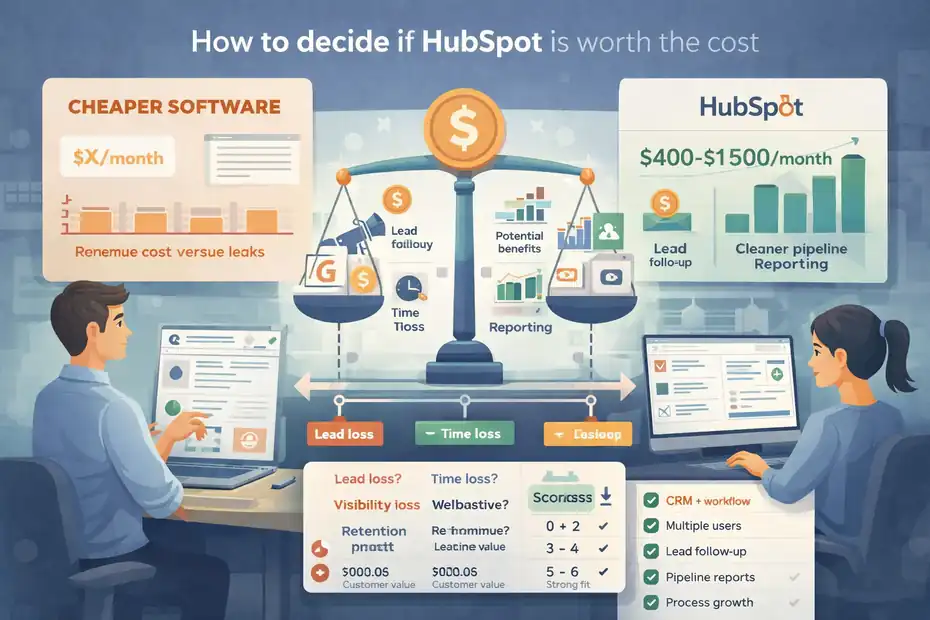
This is the section most readers actually need. Not “is HubSpot good?” but “is HubSpot worth paying for in my situation?”
Measure HubSpot against revenue leaks, not subscription price alone
I see many owners compare HubSpot to cheaper software and stop there. That is understandable, but incomplete.
The right comparison is not just monthly software cost. It is software cost versus revenue leakage and team inefficiency.
For example, let’s say HubSpot costs your business $400 to $1,500 a month depending on seats and hubs. That sounds significant. But if better follow-up, cleaner pipeline management, and improved reporting help you close one extra client per month worth $2,000 to $10,000, the economics change fast.
Run this basic test:
- Lead loss: How many leads go cold without follow-up?
- Time loss: How many hours does your team waste updating multiple systems?
- Visibility loss: How often do you make decisions without reliable attribution or pipeline data?
- Retention loss: How often do customers feel the handoff friction between teams?
I believe HubSpot pays off fastest when your average customer value is healthy and your sales process involves multiple touches. It pays off much slower in low-ticket, low-complexity businesses.
HubSpot’s own positioning leans heavily on unifying customer data and reducing tool fragmentation, and that is where the ROI case usually becomes real.
A simple decision framework you can use today
Here is a practical scoring model. Give yourself one point for each “yes.”
- Yes: I need a CRM plus marketing, sales, or service workflows in one place.
- Yes: More than one person needs customer visibility.
- Yes: We lose leads or delay follow-up today.
- Yes: We need better reporting on pipeline or source quality.
- Yes: We expect to grow team size or process complexity within 12 months.
- Yes: Our average customer value is high enough to support software investment.
Interpretation:
- 0–2 yes answers: HubSpot may be unnecessary right now.
- 3–4 yes answers: HubSpot is worth serious consideration.
- 5–6 yes answers: HubSpot is probably a strong fit, assuming implementation is realistic.
I like this framework because it cuts through feature envy. You do not need every HubSpot feature. You need enough process complexity and enough upside to justify a connected system.
The biggest mistakes businesses make with HubSpot
A bad HubSpot experience is usually not caused by the platform alone. It is caused by poor expectations, weak setup, or overbuying.
Mistake 1: Buying the platform before defining the process
This is the classic one. A company buys HubSpot hoping the software will create the process for them. It will not.
If you do not know your pipeline stages, lead handoff rules, lifecycle definitions, follow-up timing, or reporting goals, HubSpot will simply mirror your confusion at scale.
Before implementation, you should define:
- Lead stages: What counts as new, qualified, sales-ready, customer, and inactive?
- Pipeline stages: What exact steps does a deal move through?
- Ownership rules: Who handles what, and when?
- Required data: What fields are actually necessary?
- Success metrics: What will leadership review weekly or monthly?
I have seen teams blame HubSpot for being messy when the truth was simpler: their business process was already messy.
HubSpot becomes powerful when it reflects a clean operating model. Without that, it becomes an expensive filing cabinet.
Mistake 2: Upgrading too fast or using too little of what you buy
The second common mistake is jumping to Professional or Enterprise tiers before proving usage. This often happens because people buy for ambition instead of workflow.
HubSpot’s higher tiers can be excellent, but only when there is a real need for deeper automation, reporting, content operations, or service management. If those use cases are vague, the platform starts to feel overpriced very quickly.
The current catalog shows how sharply pricing can increase between starter and professional tiers in products like Marketing Hub, Sales Hub, Service Hub, and Content Hub.
A better approach is staged adoption:
- Start with the exact workflows you need now.
- Train the team on consistent usage.
- Review where manual work still hurts.
- Upgrade only when higher-tier features solve a visible bottleneck.
That approach is less exciting than buying the “full growth stack” on day one, but it is usually smarter.
A realistic setup path for small and mid-sized businesses
You do not need a six-month implementation project to get value. Most businesses need a sensible first phase.
Start with the core journey: lead capture, pipeline, follow-up, and reporting
If I were setting up HubSpot for a typical service business, I would not start with everything. I would start with the customer journey that directly affects revenue.
Phase one usually includes:
- Contact and company structure: Clean fields, tags, and ownership.
- Lead capture: Forms, imports, chat, or manual entry routed to the right place.
- Deal pipeline: Clear stages with exit criteria.
- Tasks and reminders: Nobody should “just remember” to follow up.
- Basic reporting: Source, conversion, deal velocity, and close rate.
That alone can create a big jump in consistency.
Example: A home services company might track incoming leads by service type, source, and urgency. Pipeline stages could include new lead, contacted, quote sent, booked, completed, and repeat opportunity. Simple, but powerful. Once that is running, you can add automation.
HubSpot’s free CRM and starter options make this staged setup realistic for many smaller teams, especially because the free CRM already includes common features like contact management, scheduling, live chat, and email tracking.
Add advanced features only after the team uses the basics consistently
Here is my rule: do not automate a process your team cannot perform consistently by hand.
Once the basics are working, then consider adding:
- Lifecycle automation
- Lead routing
- Nurture sequences
- Ticketing
- Knowledge base
- Advanced dashboards
- AI-assisted workflows
HubSpot’s AI direction is becoming more meaningful here. Breeze Assistant is positioned to help with CRM-aware tasks like meeting prep and summarization, while agents extend into support, prospecting, and data enrichment.
HubSpot reported that 50% of Core Seat users had tried and were using Breeze Assistant by early 2026, according to its Q4 2025 earnings call transcript.
Still, I would treat AI as an enhancer, not a foundation. Clean data and clear process come first. Otherwise AI just helps you scale bad inputs faster.
Advanced optimization: how to get real ROI from HubSpot
Once the platform is live, the difference between “we have HubSpot” and “HubSpot drives growth” comes down to usage quality.
Focus on adoption, data quality, and decision-making cadence
The best HubSpot account in your industry is probably not the one with the most workflows. It is the one with the best data discipline and the most useful review rhythm.
I suggest focusing on three operating habits:
- Adoption: Reps log activity, update stages, and use tasks consistently.
- Data quality: Required fields are kept clean and duplicate chaos is controlled.
- Cadence: Leadership reviews the same few numbers every week.
Useful weekly metrics usually include:
- New leads by source
- Contact-to-opportunity conversion
- Opportunity-to-close conversion
- Average days in stage
- No-contact or stalled deals
- Ticket volume and resolution trends, if service matters
This is where HubSpot becomes valuable beyond software. It becomes a management system.
HubSpot has also leaned further into unified data and AI-supported action, including Data Hub and Breeze-related capabilities. Its 2026 materials emphasize that connected customer context is the foundation for personalization, workflows, and agents.
If you treat HubSpot like a database, you will get database-level value. If you treat it like an operating system for revenue, you can get much more.
The honest final answer: use HubSpot if your business is growing into complexity
So, should you use HubSpot for your business or avoid it?
Use HubSpot if your business needs one place to manage customer relationships, lead flow, sales activity, service interactions, and reporting—and if that structure can help you recover lost revenue or improve team efficiency.
Avoid HubSpot if your process is still very simple, your budget is tight, your team will not maintain the system, or you are expecting premium functionality without premium pricing.
My personal view is this: HubSpot is rarely the wrong tool for a business with real cross-functional growth needs. But it is often the wrong timing for businesses that are still too simple or too undisciplined to use it properly.
The best decision is not “HubSpot yes” or “HubSpot no.” It is “HubSpot now, later, or never.”
And that answer gets much easier once you judge the platform against your real workflow, your real team habits, and your real revenue leaks—not the sales page.
FAQ
Should I use HubSpot for my business?
You should use HubSpot if your business needs a centralized system for managing leads, sales, marketing, and customer relationships. It works best when multiple people handle customers or when follow-up, tracking, and reporting are becoming difficult to manage manually.
Is HubSpot worth the cost for small businesses?
HubSpot can be worth it for small businesses if your revenue depends on consistent lead management and follow-up. While the free tools are useful, paid plans become valuable when automation, reporting, and scaling your sales process directly impact your income.
When should you avoid using HubSpot?
You should avoid HubSpot if your business is very simple, has low lead volume, or doesn’t require structured sales processes. If you’re managing everything alone and don’t need automation or reporting, a lighter and cheaper solution may be more practical.
What type of businesses benefit most from HubSpot?
Businesses with longer sales cycles, multiple team members, and a need for marketing, sales, and customer service alignment benefit the most from HubSpot. This includes agencies, SaaS companies, consultants, and service-based businesses that rely on consistent lead nurturing and tracking.
Can HubSpot help increase sales and conversions?
Yes, HubSpot can help increase sales by improving lead tracking, follow-up consistency, and pipeline visibility. When used correctly, it reduces missed opportunities and helps teams close deals faster by organizing customer data and automating repetitive tasks.

I’m Juxhin, the voice behind The Justifiable.
I’ve spent 6+ years building blogs, managing affiliate campaigns, and testing the messy world of online business. Here, I cut the fluff and share the strategies that actually move the needle — so you can build income that’s sustainable, not speculative.
Related posts:
 Apollo IO Pricing Explained: Plans, Costs & Real Value
 How To Use Apollo Lead Generation To 5x Your Sales
 What Is Freshworks CRM and How Does It Simplify Sales?
 Freshsales Pricing Breakdown: Which Plan Is Best for You?
 Freshworks CRM Pricing: Real Costs & Hidden Value
 Ecommerce Marketing Solutions That Multiply Your Sales