
Table of Contents
Some links on The Justifiable are affiliate links, meaning we may earn a small commission at no extra cost to you. Read full disclaimer.
A callrail review for marketers usually starts with one core question: can this platform actually fix attribution gaps between calls, ads, and real revenue? If you run paid ads, local SEO campaigns, or lead-generation funnels, you already know how frustrating it is when phone calls—often the highest-intent leads—show up in your CRM with no clear source.
That’s where tools like CallRail promise to close the gap between marketing activity and offline conversions.
But attribution tools often sound better in theory than in practice. Marketers worry about tracking accuracy, setup complexity, integration limits, and reporting clarity—especially when real budgets are on the line.
In this CallRail review for marketers, we’ll break down exactly how the platform performs in real marketing workflows: from call tracking and keyword attribution to integrations with tools like Google Analytics, HubSpot, and Google Ads.
What CallRail Does And Why Marketers Use It
If you’ve ever run campaigns where customers prefer calling instead of filling out forms, you already know the frustration: those leads show up, but you have no idea which marketing channel actually generated them. That’s the core problem CallRail is designed to solve.
In simple terms, it connects phone calls to your marketing activity so you can see which ads, keywords, landing pages, or campaigns actually drive phone leads. For marketers managing SEO, paid ads, or local lead generation, this type of attribution can completely change how budgets are allocated.
How Call Tracking Connects Calls To Marketing Sources
Call tracking works by assigning unique phone numbers to different traffic sources.
When someone calls one of those numbers, the system logs key details such as:
- Where the visitor came from
- Which page they landed on
- What keyword triggered the visit
- Which campaign generated the call
For example, imagine you’re running three campaigns:
| Campaign | Phone Number Displayed | What You Learn |
| Google Ads campaign | Unique tracking number | Which ad generated the call |
| SEO landing page | Another number | Which blog or landing page converts |
| Facebook ad | Separate number | Whether social traffic calls |
Without call tracking, all calls look identical.
With CallRail, each call is automatically connected to the exact marketing source that generated it. This allows marketers to answer questions like:
- Which keyword produces the most phone leads?
- Which landing page drives qualified calls?
- Which campaign wastes budget?
From what I’ve seen working with local lead-gen campaigns, phone calls are often the highest converting leads, especially for service businesses. But if you can’t attribute them, you’re basically optimizing marketing with incomplete data.
Call tracking fills that gap.
Dynamic Number Insertion For Keyword-Level Attribution
Dynamic Number Insertion (often shortened to DNI) is where call tracking becomes really powerful.
Instead of assigning one number per campaign, DNI dynamically changes the phone number shown on a website based on each visitor’s traffic source.
Here’s what happens behind the scenes:
- A visitor clicks a Google ad.
- They land on your website.
- The phone number on the page automatically swaps to a unique tracking number.
- If they call, the system logs the exact source and keyword.
This allows attribution down to the keyword level.
Example scenario:
A personal injury lawyer runs ads for these keywords:
- car accident lawyer
- truck accident attorney
- motorcycle accident lawyer
Without DNI, all calls blend together.
With DNI, you might discover something surprising:
| Keyword | Calls | Average Case Value |
| Car accident lawyer | 40 calls | $8,000 |
| Truck accident attorney | 10 calls | $25,000 |
| Motorcycle accident lawyer | 30 calls | $3,500 |
Suddenly, your ad strategy changes.
Instead of optimizing purely for call volume, you start optimizing for call value.
This is where attribution tools become revenue optimization tools, not just analytics dashboards.
Tracking Calls From SEO, PPC, And Offline Campaigns
Another thing marketers often underestimate is how many calls come from non-paid sources.
A typical lead-generation business might see calls from:
- SEO traffic
- PPC ads
- Google Business Profile
- social media
- email campaigns
- offline marketing
The challenge is that most analytics platforms struggle to attribute offline conversions like phone calls.
With CallRail, marketers can assign unique numbers to each marketing channel.
Example setup:
| Channel | Tracking Setup |
| SEO traffic | Dynamic number insertion |
| Google Ads | Keyword-level tracking |
| Facebook ads | Dedicated campaign number |
| Billboard or radio | Static tracking number |
Let’s say someone sees a billboard and calls the number listed.
That call is logged as offline attribution, meaning you can finally measure whether traditional marketing is worth the cost.
For many service businesses, this reveals surprising insights.
I’ve seen cases where Google Ads generated fewer calls than SEO but higher-quality leads, while radio ads produced a lot of calls but very low conversions.
Without tracking, that kind of insight simply isn’t possible.
Multi-Channel Attribution For Marketing Campaigns
Modern marketing rarely happens in a single step.
A typical customer journey might look like this:
- Someone searches Google and reads your blog post.
- A few days later they click a retargeting ad.
- They return directly and call the phone number.
Without proper attribution, that call gets labeled as direct traffic.
Which hides the real marketing impact.
Multi-channel attribution helps reconstruct that path.
Instead of only tracking the last interaction, systems track the entire journey.
A simplified example might look like this:
| Step | Channel |
| First touch | SEO blog article |
| Second touch | Facebook retargeting ad |
| Final conversion | Phone call |
This helps marketers understand:
- Which channels introduce new prospects
- Which channels close leads
- Which campaigns assist conversions
That’s a much more realistic picture of how marketing actually works.
When Marketers Typically Need Call Tracking Software
Not every business needs call tracking immediately.
But certain marketing models almost require it.
Here are the situations where call tracking becomes extremely valuable:
1. Service Businesses With High Phone Volume
Industries like:
- Legal services
- HVAC
- Plumbing
- Home remodeling
- medical clinics
Often see 60–80% of leads coming from phone calls.
Without call attribution, marketing optimization becomes guesswork.
2. Agencies Managing Paid Ads For Clients
Agencies need to prove ROI.
Clients don’t just care about:
- impressions
- clicks
- traffic
They care about real leads and phone calls.
Call tracking helps agencies show exactly which campaigns generate revenue.
3. Businesses Running Local SEO
Local search is heavily phone-driven.
Think about searches like:
- “dentist near me”
- “emergency plumber”
- “roof repair near me”
These users often call directly instead of filling out forms.
Tracking those calls helps marketers see which pages or keywords actually drive local conversions.
4. High-Ticket Lead Generation Funnels
In industries where one lead can be worth thousands of dollars, attribution becomes critical.
Examples include:
- legal leads
- real estate investors
- financial services
- B2B consulting
If one phone call is worth $5,000+, missing attribution data becomes very expensive.
How CallRail Attribution Works Behind The Scenes
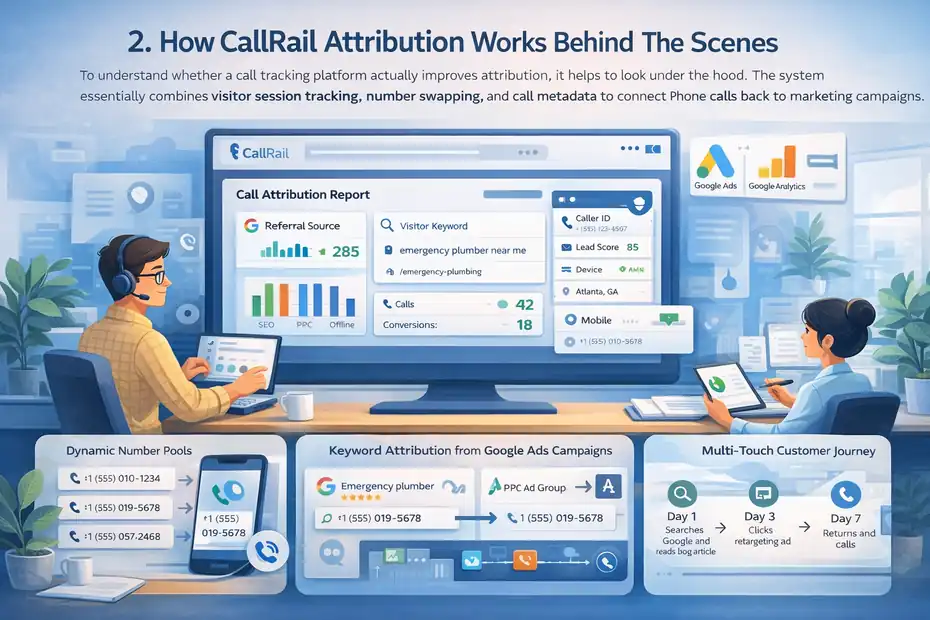
To understand whether a call tracking platform actually improves attribution, it helps to look under the hood. The system essentially combines visitor session tracking, number swapping, and call metadata to connect phone calls back to marketing campaigns.
Once you understand how the attribution engine works, the reporting dashboards start to make a lot more sense.
Dynamic Number Pools And Visitor Session Tracking
Dynamic number pools are the backbone of accurate call attribution.
Instead of assigning one phone number per campaign, the platform creates a pool of tracking numbers that rotate among website visitors.
Here’s the simplified process:
- A visitor arrives on your website.
- The system assigns them a unique number from the pool.
- That number is displayed on the page.
- If the visitor calls it, the system connects the call to that specific visitor session.
Each session stores valuable attribution data, including:
- referral source
- landing page
- device type
- marketing campaign
- keyword data
This solves one of the biggest attribution problems: multiple users visiting the site at the same time.
Without a number pool, two visitors could see the same number and attribution would break.
With dynamic pools, each visitor essentially receives their own temporary tracking number.
The result is much more accurate call attribution across traffic sources.
Keyword Attribution From Google Ads Campaigns
For PPC marketers, keyword attribution is one of the most valuable insights.
Paid search often generates phone leads from high-intent queries, but traditional analytics tools struggle to connect those calls back to individual keywords.
With call tracking connected to Google Ads, the system can capture:
- the keyword that triggered the ad
- the ad group
- the campaign name
- the click ID
When a visitor calls, that data gets attached to the call record.
Example PPC call report:
| Keyword | Calls | Avg Call Duration |
| emergency plumber near me | 35 | 4 min |
| water heater repair | 18 | 3 min |
| plumbing services | 9 | 1 min |
Notice something interesting.
- The broad keyword generated traffic, but shorter calls.
- The emergency keyword generated longer calls, which often means higher intent leads.
That’s the type of insight PPC managers use to:
- increase bids on profitable keywords
- pause low-quality search terms
- adjust landing pages for better conversions
In my experience, keyword-level call attribution is often the moment marketers realize their campaign data was incomplete.
Landing Page And Source Attribution Mapping
Attribution isn’t just about keywords.
Landing pages play a huge role in call generation.
Each visitor session stores the page where the visitor first arrived. When a call occurs, the system connects the phone call to that landing page.
Example landing page report:
| Landing Page | Calls | Conversion Rate |
| /roof-repair | 52 | 9% |
| /emergency-roof-repair | 41 | 16% |
| /roof-inspection | 11 | 4% |
This type of data helps marketers quickly identify which pages drive calls and which pages leak leads.
Sometimes the insights are counterintuitive.
A page with less traffic might generate twice as many phone calls because it matches stronger buyer intent.
That’s the kind of signal marketers look for when deciding:
- which pages deserve more traffic
- which pages need conversion optimization
- which offers resonate with customers
Multi-Touch Attribution For Phone Conversions
Many phone calls don’t happen during the first visit.
Someone might:
- Discover your website through SEO
- Leave and research competitors
- Click a retargeting ad later
- Return and call
Without multi-touch attribution, that final call often gets labeled direct traffic, which hides the influence of earlier channels.
Multi-touch tracking records multiple interactions across sessions.
A typical report might show something like:
| Touchpoint | Channel |
| First visit | Organic search |
| Second visit | Display retargeting |
| Third visit | Direct visit |
| Conversion | Phone call |
This helps marketers answer deeper questions:
- Which channels generate awareness
- Which channels nurture leads
- Which channels close conversions
That insight helps allocate marketing budgets more intelligently.
How CallRail Connects Calls To Customer Journeys
The real power of call attribution isn’t just counting calls.
It’s understanding the story behind each lead.
When someone calls, the platform records several layers of data tied to the visitor journey:
- traffic source
- keyword
- campaign
- landing page
- device
- geographic location
- call recording
- call duration
This allows marketers to analyze calls not just as events, but as complete marketing outcomes.
Example customer journey:
| Step | Interaction |
| Day 1 | Searches Google and reads blog article |
| Day 3 | Clicks retargeting ad |
| Day 7 | Returns directly and calls |
In reporting, that call becomes connected to the earlier marketing interactions.
This type of attribution clarity helps answer questions like:
- Which content generates qualified leads?
- Which ads push prospects to call?
- Which campaigns influence buying decisions?
For marketers focused on lead generation, these insights often become the foundation for smarter campaign optimization and higher ROI.
Core Features That Make CallRail Useful For Marketers
When people read a callrail review for marketers, they’re usually trying to answer one thing: Does this tool actually help me make better marketing decisions?
The short answer is yes—but not because it simply tracks calls. The real value comes from how it turns phone conversations into marketing data you can act on.
Below are the core features that tend to matter most for marketers running paid ads, SEO campaigns, and lead-generation funnels.
Dynamic Call Tracking For Paid And Organic Traffic
Dynamic call tracking is the feature most marketers start with.
Instead of showing one static phone number on your website, the system dynamically swaps numbers depending on where the visitor came from. This allows you to attribute phone calls to specific marketing channels.
In practice, it works like this:
| Visitor Source | Phone Number Displayed | What Gets Tracked |
| Google Ads | Tracking Number A | Campaign + keyword |
| Organic SEO | Tracking Number B | Landing page |
| Facebook ad | Tracking Number C | Ad source |
| Direct traffic | Tracking Number D | Returning visitors |
This dynamic number swapping allows marketers to see exactly which traffic source generated the phone call.
For example:
A roofing company running paid ads might see this call data after one month:
| Channel | Calls | Booked Jobs |
| Google Ads | 73 | 21 |
| Organic SEO | 41 | 19 |
| Facebook Ads | 12 | 3 |
At first glance, Google Ads looks like the winner.
But if you calculate job conversion rate:
- Google Ads: 28%
- SEO: 46%
Now the insight changes completely. SEO traffic generates fewer calls but much higher-quality leads.
Without call tracking, that kind of optimization opportunity would be invisible.
AI Conversation Intelligence And Call Transcriptions
One of the more interesting features inside CallRail is conversation intelligence.
Instead of manually listening to every call recording, the system uses AI to automatically analyze phone conversations.
Here’s what it can extract:
- Call transcripts
- Important keywords spoken during calls
- Sentiment analysis (positive vs negative tone)
- Frequently asked questions from prospects
- Lead qualification signals
For marketers, this becomes extremely valuable because call recordings contain insights most analytics tools miss.
Example insight from conversation analysis:
A home services business discovers that many callers ask about financing options.
The marketing team then:
- Adds financing messaging to landing pages
- Updates ad copy
- Creates a financing FAQ page
Within two months, call-to-booking conversion increases.
Why?
Because marketing started reflecting real customer questions, not just assumptions.
Another benefit: sales coaching.
Managers can quickly identify calls where:
- Leads were mishandled
- Pricing objections occurred
- competitors were mentioned
Instead of guessing why leads don’t convert, you get actual conversational evidence.
Lead Scoring And Call Qualification Insights
Not every phone call is a good lead.
Some calls are:
- wrong numbers
- existing customers
- job seekers
- spam calls
This is where lead scoring becomes useful.
Call scoring helps categorize phone calls based on quality signals such as:
| Signal | What It Suggests |
| Call duration over 90 seconds | Likely qualified lead |
| Repeated business inquiries | High buyer intent |
| Short calls under 20 seconds | Often misdial or spam |
Marketers can use these signals to filter reports.
Instead of counting all calls, you can track qualified leads only.
For example:
| Campaign | Total Calls | Qualified Leads |
| Emergency plumber ads | 63 | 39 |
| General plumbing ads | 58 | 21 |
Even though the second campaign generated almost the same number of calls, it produced far fewer qualified leads.
This helps marketers allocate budgets toward campaigns that generate real customers, not just phone activity.
Form Tracking For Non-Phone Lead Attribution
Phone calls aren’t the only conversions marketers care about.
Many websites generate leads through forms like:
- quote requests
- consultation bookings
- contact forms
- demo requests
Form tracking captures these submissions and connects them to the same attribution data used for calls.
This means a marketer can see both call leads and form leads inside one reporting system.
Example lead breakdown:
| Source | Calls | Form Leads |
| Google Ads | 46 | 31 |
| SEO | 28 | 52 |
| Facebook Ads | 11 | 17 |
This type of combined view helps answer a critical question:
Which channels drive phone-first customers versus form-first customers?
For example:
- Emergency services often drive calls
- informational searches often generate form leads
Understanding this difference helps marketers tailor landing pages to the visitor’s preferred action.
Custom Reporting Dashboards For Marketing Data
Marketing attribution data can quickly become overwhelming.
That’s why customizable dashboards are important.
Instead of digging through multiple reports, marketers can build dashboards showing only the metrics they care about.
Typical dashboard metrics include:
- total calls
- qualified calls
- calls by marketing channel
- call duration
- calls by keyword
- conversion rate by landing page
Example dashboard snapshot:
| Metric | Monthly Value |
| Total Calls | 287 |
| Qualified Calls | 168 |
| Avg Call Duration | 3m 12s |
| Top Channel | Google Ads |
| Best Landing Page | /emergency-repair |
These dashboards make reporting much easier for agencies and marketing teams.
Instead of sending complicated spreadsheets to clients or stakeholders, you can quickly show which campaigns generate real leads.
CallRail Integrations That Strengthen Attribution
A call tracking platform becomes far more powerful when it connects with the rest of your marketing stack.
Integrations allow call data to flow into advertising platforms, analytics dashboards, and CRM systems so that phone leads become part of your complete marketing attribution picture.
Let’s look at the integrations that matter most for marketers.
Google Analytics Integration For Call Conversion Data
One of the most useful integrations is with Google Analytics.
When connected, phone calls can appear as conversion events inside your analytics reports.
That means marketers can see:
- which landing pages generate phone calls
- which traffic sources drive phone conversions
- how calls impact conversion rate metrics
Example analytics report:
| Channel | Sessions | Phone Calls |
| Organic Search | 3,200 | 72 |
| Paid Search | 1,500 | 96 |
| Direct Traffic | 800 | 24 |
Without call tracking, these calls would remain invisible inside web analytics.
This integration turns phone leads into measurable conversion events, allowing marketers to evaluate traffic quality instead of just traffic volume.
Google Ads Conversion Tracking For Phone Leads
For PPC marketers, connecting call tracking with Google Ads can significantly improve campaign optimization.
When a tracked phone call occurs, the system sends conversion data back to the ad platform.
This enables:
- conversion tracking at the keyword level
- automated bidding based on phone leads
- smarter campaign optimization
Example PPC data after integration:
| Keyword | Clicks | Phone Leads |
| emergency plumber | 410 | 52 |
| plumbing repair | 360 | 19 |
| water heater repair | 210 | 33 |
Now the PPC manager can:
- increase bids on high-converting keywords
- pause keywords generating low-quality leads
- optimize campaigns based on actual revenue-driving calls
This is one of the biggest reasons agencies use call tracking tools.
Without phone conversion tracking, PPC campaigns often optimize around clicks instead of customers.
HubSpot CRM Integration For Lead Source Tracking
Marketing teams that rely on CRM systems often struggle with one major issue: phone leads appear without clear marketing attribution.
Integration with HubSpot solves that problem.
When someone calls, the system can automatically create or update a contact record in the CRM.
This record can include:
- original traffic source
- campaign name
- keyword data
- call recording
- call outcome
Example CRM entry:
| Field | Data |
| Lead Source | Google Ads |
| Campaign | HVAC Emergency Repair |
| Keyword | emergency AC repair |
| Call Duration | 5 minutes |
This level of detail helps sales teams understand how the lead found the business.
It also helps marketing teams evaluate which campaigns produce leads that actually close.
Facebook Ads Integration For Call Attribution
Social advertising often drives phone calls, but those conversions can be difficult to track.
Integration with Facebook Ads helps attribute calls back to specific ad campaigns.
When someone clicks a Facebook ad, visits your website, and then calls, the system records that interaction.
This allows marketers to see:
- which Facebook campaigns generate calls
- which ad creatives drive phone inquiries
- how social traffic compares with search traffic
Example campaign report:
| Campaign | Clicks | Calls |
| Emergency Plumbing Ads | 1,240 | 32 |
| Seasonal Maintenance Ads | 860 | 18 |
This helps marketers evaluate whether social media is producing actual lead activity, not just engagement.
Zapier Automation For Custom Marketing Workflows
Automation can make call tracking data far more useful across different tools.
Integration through Zapier allows call events to trigger automated workflows across hundreds of marketing and productivity platforms.
Example automations marketers often create:
- Send Slack alert when a high-value call occurs
- Add new callers to email follow-up sequences
- Log call summaries inside project management tools
- Notify sales teams about missed calls
Example workflow:
| Trigger | Action |
| Qualified call detected | Send notification to sales team |
| Missed call | Create follow-up task |
| Call longer than 5 minutes | Tag as high-value lead |
This type of automation ensures important leads don’t slip through the cracks.
For busy marketing teams or agencies, these small automations can significantly improve lead response speed and sales coordination.
CallRail Pricing And Cost Value For Marketing Teams
If you’re reading a callrail review for marketers, pricing is probably one of the biggest decision factors. Attribution tools can sound powerful, but the real question is: Does the cost actually make sense for your marketing budget?
The truth is, pricing depends heavily on how many calls you track, how many tracking numbers you use, and which features you enable. Let’s break down what marketing teams actually pay and when the investment makes sense.
CallRail Pricing Tiers And Feature Differences
CallRail offers several pricing tiers designed for different types of marketing teams, from small businesses to agencies managing multiple clients.
Here’s a simplified breakdown of typical pricing structures marketers encounter:
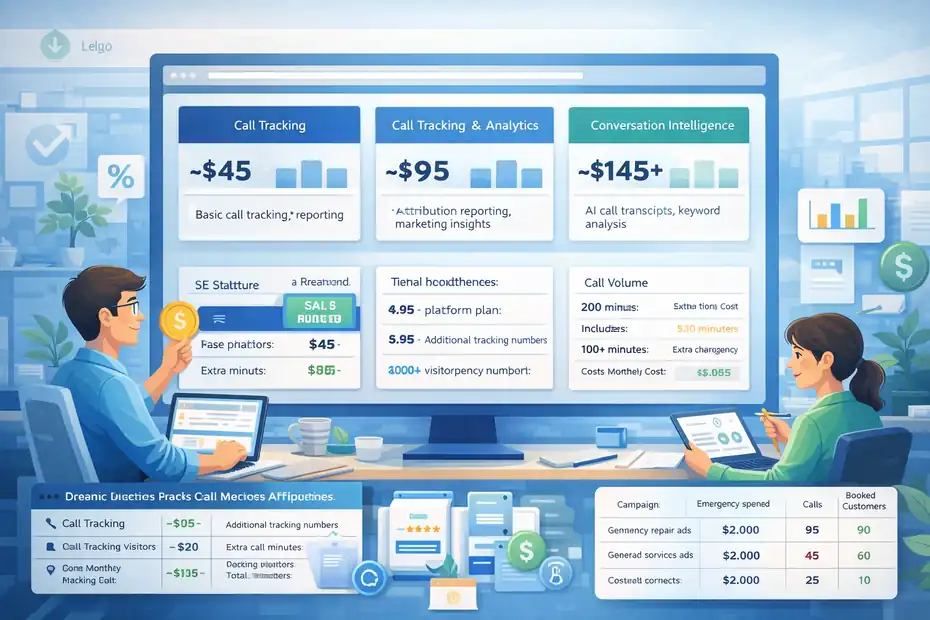
| Plan | Starting Monthly Price | Key Features |
| Call Tracking | ~$45 | Basic call tracking, reporting |
| Call Tracking + Analytics | ~$95 | Attribution reporting, marketing insights |
| Conversation Intelligence | ~$145+ | AI call transcripts, keyword analysis |
These plans typically include:
- A base number of local tracking numbers
- A pool of included call minutes
- Access to reporting dashboards
- basic integrations
Higher tiers unlock additional features like:
- call transcription
- conversation intelligence
- automated lead insights
- deeper reporting tools
For most marketers running paid ads or SEO campaigns, the mid-tier plan tends to be the sweet spot because it includes the attribution data needed to evaluate campaigns properly.
What Small Marketing Teams Actually Pay Monthly
The base pricing rarely reflects the real monthly cost. Most marketing teams end up paying more depending on call volume and tracking needs.
Let’s look at a realistic example for a small lead-generation campaign.
| Cost Component | Typical Monthly Cost |
| Base platform plan | $95 |
| Additional tracking numbers | $20 |
| Extra call minutes | $30 |
| Total Monthly Cost | ~$145 |
Now compare that cost with potential lead value.
Imagine a local HVAC company where:
- Average job value = $600
- Close rate from phone calls = 30%
If the platform helps generate just one additional booked job per month, the cost is already covered.
This is why attribution tools tend to make more sense for industries where one lead is worth hundreds or thousands of dollars.
Hidden Costs Like Call Minutes And Number Pools
One thing marketers often overlook when evaluating call tracking platforms is usage-based pricing.
The main variable costs usually include:
- Call Minutes
Calls are typically billed per minute after the included monthly allowance.
Example:
| Call Volume | Estimated Monthly Cost |
| 200 minutes | Included |
| 500 minutes | Extra charges apply |
| 1,000+ minutes | Costs increase quickly |
Businesses with high call volume—like medical clinics or service providers—may see costs rise if they exceed included limits.
- Tracking Numbers
Dynamic number insertion requires a pool of tracking numbers to properly attribute visitor sessions.
The larger your website traffic, the larger your number pool must be.
Example number pool sizing:
| Monthly Website Visitors | Recommended Number Pool |
| 1,000 visitors | 4–5 numbers |
| 5,000 visitors | 8–10 numbers |
| 10,000+ visitors | 12–20 numbers |
More numbers mean more accurate tracking, but also slightly higher monthly costs.
The key is finding a balance between tracking accuracy and cost efficiency.
ROI Potential For PPC And Lead Generation Campaigns
From a marketing perspective, the real value of call tracking isn’t just data—it’s optimization opportunities.
When marketers can see exactly which campaigns generate phone leads, they can make smarter budget decisions.
Let’s look at a simplified PPC example.
| Campaign | Monthly Spend | Calls | Booked Customers |
|—|—|—|
| Emergency repair ads | $2,000 | 90 | 25 |
| General service ads | $2,000 | 60 | 10 |
Without call attribution, both campaigns might appear equally successful.
But when call tracking reveals booking data, marketers quickly realize:
- Campaign A generates 2.5x more customers
- Budget should shift toward that campaign
Even a small optimization like that can increase campaign ROI significantly.
From what I’ve seen in lead generation marketing, the first major optimization usually pays for the tool several times over.
When CallRail Becomes Worth The Investment
Call tracking tools aren’t necessary for every business.
But they become extremely valuable in certain scenarios.
Call tracking tends to make financial sense when:
- Your average lead value is $300 or more
- A large percentage of leads come through phone calls
- You run paid advertising campaigns
- You manage marketing for multiple clients
- Attribution gaps are causing uncertainty in campaign performance
Industries where the investment often pays off quickly include:
- legal services
- home services
- medical practices
- real estate
- insurance
- high-ticket consulting
In these industries, one additional booked job or client can easily cover months of software costs.
CallRail Reporting Tools Marketers Actually Use
Tracking calls is useful, but the real value comes from what marketers can learn from the data.
Reporting tools transform raw call logs into insights that help marketers optimize campaigns, identify high-quality leads, and improve ROI.
Let’s walk through the reports that marketing teams actually rely on.
Source Tracking Reports For Campaign Performance
Source reports show exactly where phone calls originate from.
Instead of guessing which channels drive leads, marketers can view calls broken down by traffic source.
Typical report structure:
| Traffic Source | Calls | Avg Call Duration |
| Google Ads | 84 | 3m 20s |
| Organic Search | 47 | 4m 05s |
| Facebook Ads | 19 | 2m 15s |
| Direct Traffic | 22 | 1m 40s |
Call duration often becomes an important quality indicator.
Longer calls usually suggest:
- stronger buyer intent
- more detailed conversations
- higher likelihood of conversion
Short calls often represent:
- wrong numbers
- quick inquiries
- unqualified leads
This simple report can immediately reveal which marketing channels produce the most meaningful customer interactions.
Keyword Attribution Reports For PPC Optimization
Keyword attribution reports are especially valuable for PPC marketers.
Instead of optimizing campaigns based only on clicks or form conversions, marketers can see which keywords generate actual phone leads.
Example keyword report:
| Keyword | Calls | Avg Duration |
| emergency plumber near me | 42 | 4m 12s |
| plumbing services | 15 | 1m 50s |
| water heater repair | 26 | 3m 30s |
In this example, the first keyword clearly drives the most valuable leads.
With this insight, marketers can:
- increase bids on profitable keywords
- remove low-performing search terms
- create landing pages tailored to high-converting searches
For many PPC managers, this is where call tracking delivers its biggest strategic advantage.
Call Activity Reports For Lead Quality Analysis
Call activity reports focus on patterns in call behavior.
These reports typically track metrics like:
- call volume by time of day
- average call duration
- missed calls
- first-time callers vs repeat callers
Example activity snapshot:
| Time Period | Calls |
| Morning (8–11am) | 38 |
| Midday (11–2pm) | 56 |
| Afternoon (2–5pm) | 34 |
| Evening | 12 |
Insights from this report might reveal:
- peak call times
- staffing gaps
- opportunities for automated call routing
For instance, if most calls occur during lunch hours but staff availability is low, businesses may be losing valuable leads simply due to missed calls.
Conversion Reports For Marketing ROI Measurement
Conversion reports help marketers connect phone calls to actual revenue outcomes.
Instead of measuring success based on call volume alone, marketers can track:
- qualified leads
- booked appointments
- closed customers
Example campaign ROI report:
| Campaign | Calls | Qualified Leads | Closed Deals |
| Google Ads Emergency | 91 | 63 | 18 |
| SEO Local Pages | 48 | 34 | 15 |
| Facebook Ads | 22 | 11 | 4 |
This type of reporting helps marketing teams focus on the metric that actually matters: revenue generated from leads.
Conversation Intelligence Insights For Sales Teams
Conversation insights bridge the gap between marketing and sales.
Instead of just tracking that a call occurred, conversation analysis can reveal what actually happened during the call.
Common insights extracted from calls include:
- frequently mentioned questions
- objections about pricing
- competitor comparisons
- service requests
Example insight from call transcripts:
Many callers repeatedly ask:
“Do you offer same-day service?”
Marketing teams can use that information to update:
- landing pages
- ad copy
- FAQs
- call scripts
This feedback loop between marketing and real customer conversations can significantly improve conversion rates across campaigns.
Pros And Cons Marketers Should Know Before Using
No marketing platform is perfect. Every tool has strengths and limitations, and understanding both sides helps marketers decide whether the platform fits their workflow.
Here’s a balanced look at what marketers tend to appreciate—and where challenges sometimes appear.
Major Advantages For Agencies And Lead Gen Marketers
For agencies and lead generation specialists, call tracking solves one of the most frustrating problems in marketing: proving ROI.
Some of the biggest advantages include:
- clear attribution between campaigns and phone leads
- deeper insight into customer conversations
- improved PPC optimization using call data
- easier client reporting for agencies
For example, an agency managing PPC campaigns for a plumbing company might previously report:
- impressions
- clicks
- traffic
With call tracking, they can report:
- actual phone leads generated
- which keywords produced those calls
- which campaigns generated booked jobs
This level of transparency helps agencies demonstrate real marketing impact, not just traffic metrics.
Attribution Accuracy Compared To Basic Call Tracking
Basic call tracking tools often rely on static tracking numbers, which assign one number per campaign.
While this works at a high level, it lacks detailed attribution.
Dynamic tracking provides a much clearer picture because it connects phone calls to:
- individual website sessions
- keywords
- landing pages
- traffic sources
That level of data helps marketers understand not just where calls came from, but also why they occurred.
For example:
A blog article about emergency roof repair may drive fewer visits than a general service page, but significantly more phone calls.
That insight might lead marketers to:
- promote that page more heavily
- create similar content
- build ads around that topic
Limitations In Advanced Multi-Touch Attribution
While call tracking significantly improves attribution visibility, it’s not a perfect representation of every marketing touchpoint.
Complex customer journeys often involve multiple interactions across devices and platforms.
Examples include:
- discovering a brand through social media
- researching through search engines
- calling days later after a recommendation
Capturing every influence in these journeys can still be challenging.
Multi-touch attribution models continue to evolve, but marketers should remember that no attribution system perfectly captures every marketing interaction.
Instead, the goal is to improve visibility enough to make better decisions.
Learning Curve For First-Time Call Tracking Users
Marketers who have never used call tracking software sometimes experience a short learning curve.
The main concepts that require understanding include:
- dynamic number insertion
- number pool sizing
- call attribution reports
- keyword tracking setup
Fortunately, once these concepts are understood, the platform becomes much easier to use.
In many cases, the biggest challenge isn’t the technology itself—it’s learning how to interpret the data and apply it to marketing strategy.
When CallRail Might Not Fit Your Marketing Stack
Despite its strengths, call tracking tools don’t make sense for every marketing setup.
Businesses that rely primarily on:
- ecommerce checkouts
- online purchases
- automated funnels
- form-based conversions
May not benefit as much from phone call attribution.
Similarly, businesses with very low call volume may find that the data collected is too limited to drive meaningful insights.
In those situations, traditional analytics platforms might already provide enough conversion visibility.
However, for businesses where phone calls represent a significant portion of leads, call tracking often becomes an essential part of marketing attribution.
Who Gets The Most Value From CallRail Marketing Data
Not every business needs call tracking. But in certain industries, phone calls are the primary conversion event, which makes attribution tools extremely valuable.
If you’re evaluating a platform while reading a callrail review for marketers, the most important question is this: Does your marketing generate phone-driven leads?
If the answer is yes, the insights from call tracking can dramatically improve how you optimize campaigns.
Local Service Businesses Running PPC Campaigns
Local service industries benefit the most from call tracking.
Think about searches like:
- emergency plumber near me
- roof repair near me
- HVAC repair today
- personal injury lawyer
These searches usually lead to immediate phone calls, not form submissions.
In fact, according to Google research, about 60–70% of mobile searchers contact businesses directly from search results when they have urgent needs.
This creates a common problem:
Paid ads generate calls, but marketers can’t see which keywords actually drive those leads.
With CallRail, local businesses can connect phone calls directly to campaigns and keywords.
Example campaign insight:
| Keyword | Calls | Booked Jobs |
| emergency AC repair | 42 | 18 |
| HVAC maintenance | 31 | 9 |
| air conditioner repair | 27 | 14 |
Now the marketing team can clearly see which keywords produce real revenue opportunities, not just traffic.
For service industries where one job might be worth $500–$5,000, this level of attribution is incredibly valuable.
Agencies Managing Lead Generation Clients
Agencies often rely on reporting to justify marketing budgets.
The problem is that many traditional reports focus on metrics like:
- impressions
- clicks
- website visits
Clients, however, care about actual leads and booked customers.
This is where call tracking becomes a powerful reporting tool.
For example, an agency running campaigns for a dental clinic might generate this report:
| Marketing Channel | Calls | Booked Appointments |
| Google Ads | 61 | 22 |
| SEO | 44 | 18 |
| Facebook Ads | 13 | 5 |
Suddenly the conversation with the client shifts from:
“We increased traffic this month.”
To:
“We generated 45 booked appointments.”
That type of reporting builds trust and long-term client retention, which is why many agencies consider call tracking essential.
Multi-Location Businesses Tracking Phone Leads
Businesses with multiple locations face a unique attribution challenge.
If you operate several offices or service areas, it becomes difficult to track which location generates which leads.
Call tracking helps by assigning unique numbers per location or campaign.
Example multi-location report:
| Location | Calls | Avg Call Duration |
| Downtown Office | 112 | 3m 45s |
| Northside Office | 76 | 3m 10s |
| Westside Office | 59 | 2m 50s |
This data helps marketing teams answer important questions:
- Which locations receive the most inbound leads
- Which areas respond best to advertising
- Where marketing budgets should increase
For franchise brands, healthcare networks, and regional service providers, this level of visibility can significantly improve marketing efficiency
SaaS Companies With Sales Call Pipelines
Many SaaS companies focus heavily on product demos and sales calls.
In these cases, phone calls or scheduled meetings become a key step in the sales pipeline.
Marketing teams often struggle to connect marketing campaigns to those calls.
For example, a B2B SaaS company might run campaigns across:
- SEO content
- LinkedIn ads
- Google search ads
- webinars
But without call attribution, demo requests and sales conversations often appear as generic CRM entries.
Call tracking can connect those calls back to:
- original marketing source
- campaign
- landing page
- keyword
This allows SaaS marketing teams to understand which acquisition channels generate high-value sales conversations.
That insight can dramatically improve customer acquisition strategy.
Ecommerce Brands Supporting Phone Conversions
Ecommerce businesses usually focus on online purchases, but phone calls still play an important role for certain industries.
Examples include:
- luxury products
- high-ticket items
- custom products
- B2B ecommerce
In these scenarios, customers often call before completing a purchase.
Example ecommerce call report:
| Campaign | Calls | Assisted Sales |
| Google Shopping | 38 | 12 |
| SEO Product Pages | 24 | 9 |
| Facebook Ads | 17 | 6 |
These calls often represent high-intent buyers who need reassurance before purchasing.
Tracking them helps ecommerce teams understand how phone support contributes to revenue.
CallRail Alternatives Marketers Compare Before Buying
Even though CallRail is one of the most well-known call tracking platforms, it’s not the only option marketers consider.
Different tools specialize in different types of marketing workflows.
Some focus on enterprise attribution, while others prioritize automation or affiliate tracking.
Below are several alternatives marketers commonly evaluate.
What Makes Invoca Different For Enterprise Attribution
Invoca is often positioned as an enterprise-level call tracking and conversation intelligence platform.
Compared to many other tools, it focuses heavily on large-scale marketing teams and enterprise brands.
Key strengths include:
- advanced AI conversation analysis
- large-scale call data processing
- integrations with enterprise marketing platforms
- advanced customer journey tracking
Typical users include:
- large retail brands
- insurance companies
- national service providers
However, enterprise-level capabilities usually come with significantly higher pricing, which can make the platform less practical for smaller marketing teams.
What CallTrackingMetrics Offers For Marketing Automation
CallTrackingMetrics is often compared directly with CallRail because the feature sets overlap heavily.
Where it stands out is automation flexibility.
The platform includes features such as:
- automated call routing
- advanced call flows
- marketing automation triggers
- customizable tracking logic
Example comparison snapshot:
| Feature | CallRail | CallTrackingMetrics |
| Call tracking | Yes | Yes |
| Conversation intelligence | Yes | Yes |
| Advanced call routing | Limited | Strong |
| Marketing automation | Moderate | Strong |
For agencies managing complex call workflows, this platform can offer more automation control.
Why Ringba Is Popular In Performance Marketing
Ringba focuses heavily on performance marketers and affiliate traffic.
It’s widely used in industries where calls are generated through:
- affiliate networks
- performance advertising
- lead marketplaces
The platform emphasizes:
- real-time call routing
- advanced call analytics
- traffic source tracking
- affiliate payout management
Example use case:
A lead generation company running affiliate traffic campaigns can track:
- which affiliate generated the call
- call duration
- conversion outcome
This makes the platform particularly popular in pay-per-call marketing models.
When WhatConverts Works For Simple Lead Attribution
WhatConverts focuses on simplicity.
Instead of offering extensive automation or enterprise features, the platform concentrates on basic lead tracking across calls, forms, and chats.
Typical features include:
- call tracking
- form tracking
- simple reporting dashboards
- lead capture
Comparison snapshot:
| Feature | CallRail | WhatConverts |
| Call tracking | Yes | Yes |
| Conversation intelligence | Yes | No |
| Marketing attribution | Strong | Basic |
| Ease of use | Moderate | Very easy |
This type of platform often works well for small businesses that want basic lead visibility without complex reporting tools.
Choosing Between CallRail And Competitor Platforms
Choosing the right call tracking platform often depends on your marketing model.
Here’s a simplified comparison to help illustrate typical use cases.
| Platform | Best For |
| CallRail | Agencies, local lead generation |
| Invoca | Enterprise marketing teams |
| CallTrackingMetrics | Advanced call automation |
| Ringba | Affiliate and performance marketing |
| WhatConverts | Simple lead tracking |
In many cases, marketers start with one platform and switch later as their needs evolve.
The key is choosing a solution that aligns with:
- campaign complexity
- lead volume
- reporting needs
- marketing team size
Final Verdict: Is CallRail Worth It For Marketers
After reviewing features, pricing, reporting capabilities, and alternatives, the final question becomes simple:
Does call tracking actually improve marketing performance?
For many marketers, the answer is yes—especially when phone calls play a major role in lead generation.
When CallRail Improves Marketing Attribution Accuracy
Marketing attribution becomes much clearer when phone calls are included in conversion data.
Without call tracking, marketers often optimize campaigns based on incomplete signals such as:
- clicks
- page views
- form submissions
But phone calls frequently represent high-intent leads, particularly in service industries.
By connecting calls to marketing campaigns, marketers gain visibility into:
- which keywords generate calls
- which landing pages drive inquiries
- which campaigns produce qualified leads
That level of insight allows teams to make smarter decisions about where to invest marketing budgets.
Scenarios Where CallRail Quickly Pays For Itself
The return on investment becomes clear in industries where one lead has high value.
Example scenario:
| Metric | Example Value |
| Average customer value | $1,200 |
| Conversion rate from calls | 25% |
| Calls needed for one customer | 4 |
If call tracking helps identify campaigns that generate just one additional customer per month, the software often pays for itself many times over.
This is why industries such as:
- legal services
- home services
- healthcare
- real estate
- financial services
often see immediate value from call attribution tools.
Situations Where Simpler Tracking Tools May Work
Not every business needs advanced call tracking.
Companies that rely mainly on:
- ecommerce checkout conversions
- online subscriptions
- automated funnels
may not generate enough phone leads to justify the cost.
In those cases, traditional analytics platforms might already provide enough visibility into marketing performance.
Call tracking is most valuable when phone conversations are a primary conversion step.
Key Takeaways For Marketers Considering CallRail
If you’re evaluating call tracking while reading this callrail review for marketers, here are the main takeaways.
Call tracking is most valuable when:
- phone calls generate a large portion of leads
- marketing campaigns rely on PPC or local search
- attribution gaps make optimization difficult
- agencies need stronger reporting for clients
The biggest advantage is simple: clarity.
Instead of guessing which marketing efforts produce real customers, marketers gain direct visibility into the campaigns, keywords, and pages that generate phone conversations.
And when marketing decisions are based on real lead data rather than assumptions, optimization becomes much easier—and often far more profitable.

I’m Juxhin, the voice behind The Justifiable.
I’ve spent 6+ years building blogs, managing affiliate campaigns, and testing the messy world of online business. Here, I cut the fluff and share the strategies that actually move the needle — so you can build income that’s sustainable, not speculative.
Related posts:
 Top 7 Skills Every Marketing Manager Needs
 3 Sales Funnel Flaws Killing Your Business & How to Fix Them
 Lead Generation Magic: 6 Steps to Double Your Sales
 Top Brand24 Competitors Offering Excellent Value
 CallRail Reviews: What Real Users Are Saying
 CallRail Customer Service: Helpful or Frustrating?