
Table of Contents
Some links on The Justifiable are affiliate links, meaning we may earn a small commission at no extra cost to you. Read full disclaimer.
Aweber vs MailerLite comparison gets a lot more interesting once you look past the homepage pricing and into the real costs of running email marketing week after week.
On paper, both tools look affordable for beginners. In practice, the cheaper platform depends on how you send, how fast your list grows, how many users you need, and which features you cannot live without.
I’ve seen plenty of people choose based on the entry price alone, then get surprised by send limits, branding rules, support restrictions, or upgrade friction. This guide breaks down the hidden costs so you can choose with your eyes open.
What “Hidden Costs” Really Mean In This Comparison
When most people search for an aweber vs mailerlite comparison, they expect a pricing face-off. That matters, but it is only part of the story.
The real hidden costs usually show up after you start using the platform. They come from limits, tradeoffs, and operational friction.
One tool might look cheaper at checkout, but cost you more in time, support headaches, or feature upgrades once your email program becomes even slightly more serious.
Pricing Is Only The First Layer
I suggest thinking about cost in four layers: subscription price, feature access, growth penalties, and switching pain.
At the subscription level, AWeber’s paid plans start at $15 per month for Lite and $30 per month for Plus on monthly billing, while MailerLite’s paid plans start at $10 per month for Growing Business and $20 per month for Advanced.
On annual billing, AWeber lists Lite from $12.50 per month and Plus from $20 per month, while MailerLite still positions Growing Business from $10 and Advanced from $20, with taxes potentially added depending on billing location.
That makes MailerLite look like the obvious budget winner. For many small creators, it is. But the next layer matters more: what you actually get before needing to upgrade.
AWeber Lite includes one email list, three landing pages, three automations, three users, and one custom segment, while AWeber Plus unlocks unlimited landing pages, automations, segments, and users plus branding removal.
MailerLite’s Free plan includes one user, one website, up to 10 landing pages, and 12,000 monthly emails for up to 500 subscribers; Growing Business adds unlimited monthly emails, three users, branding removal, and unlimited websites and landing pages; Advanced adds unlimited users and enhanced automations.
So yes, entry price matters. But the more useful question is this: how much do you have to pay before the platform works the way you actually need it to?
The Most Common Hidden Costs People Miss
In my experience, most buyers miss the same handful of traps.
Step 1: Watch send caps, not just subscriber caps. AWeber Lite sends 10 times your subscriber count per month, and AWeber Plus sends 12 times your subscriber count. That means your list size and your sending frequency are tightly connected. MailerLite’s paid plans emphasize unlimited monthly emails, which changes the math for content-heavy newsletters or ecommerce campaigns.
Step 2: Check user-seat limits early. MailerLite Free allows one seat, Growing Business allows three, and Advanced unlocks unlimited users. AWeber Lite allows three users, while AWeber Plus includes unlimited users. That matters more than many solo founders expect, especially once a freelancer, VA, designer, or client joins the workflow.
Step 3: Look at downgrade behavior. AWeber states that deleting subscribers does not automatically lower your bill and requires a manual downgrade request. MailerLite says downgrades take effect at the next billing cycle, and downgrading to Free can automatically remove extra users.
That is why “hidden costs” are not always sneaky fees. Often, they are little operational rules that quietly shape your monthly bill.
Current Pricing Side By Side
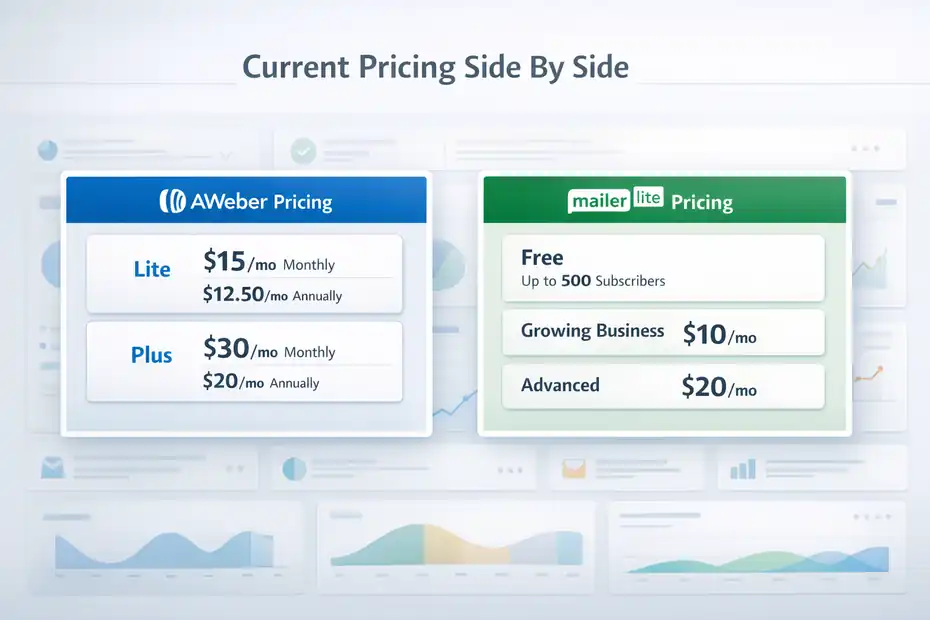
Before we get into feature tradeoffs, let’s anchor the comparison in the current official pricing structure.
The goal here is not to obsess over every tier. It is to understand how each tool charges as your needs expand.
AWeber Pricing: Where The Real Cost Starts
AWeber currently separates its paid product into Lite, Plus, and Unlimited-style higher support options, with Lite and Plus being the most relevant for most small businesses. Official pricing shows Lite starting at $15 monthly or $12.50 monthly when billed annually. Plus starts at $30 monthly or $20 monthly when billed annually.
For 500 subscribers, AWeber Lite includes 5,000 sends per month; for 1,000 subscribers, 10,000 sends. AWeber Plus includes 6,000 sends at 500 subscribers and 12,000 sends at 1,000 subscribers.
This pricing structure creates a hidden pressure point: frequency. Imagine you run a weekly newsletter, two promo campaigns, and a short welcome sequence. That can work fine on low send limits. But if you send more often, or your automation volume grows, the send cap matters quickly.
AWeber’s stronger value shows up when you care about support and want a more human-guided experience. The company advertises 24/7 support, including chat and email, with phone support available on weekdays, and it also promotes free account migration assistance.
That is not free in a business sense, because you are paying for it through the platform price, but it can save real onboarding time.
I believe this is the core AWeber tradeoff: you often pay more for support access, migration help, and a more service-oriented setup, even when the pure feature list is not the cheapest.
MailerLite Pricing: Cheaper Entry, But With Plan Boundaries
MailerLite’s structure is easier to read for most buyers. The Free plan supports up to 500 subscribers and 12,000 monthly emails. Growing Business starts at $10 per month and adds unlimited monthly emails, three user seats, branding removal, unlimited websites and landing pages, RSS campaigns, auto-resend, and more.
Advanced starts at $20 per month and adds unlimited users, enhanced automations, promotion pop-ups, custom HTML editing, and other advanced features. Enterprise is custom and aimed at lists above 100,000 subscribers.
The hidden cost here is less about raw price and more about feature gating. MailerLite does a great job of looking affordable because it is affordable at entry level. But some capabilities people assume are “basic enough” only arrive on higher plans, especially if you need more users, more advanced automation logic, or more design control.
There is also tax treatment to consider. MailerLite explicitly notes that taxes may apply on paid plans, and its help documentation explains that applicable VAT or US sales tax can be added on top of the listed price depending on billing details.
So if you are comparing “$10 vs $15,” be careful. In some cases, the checkout reality can be “$10 plus tax vs $15 with a different set of caps and support expectations.”
Free Plan And Trial Traps To Watch
Free plans are where many email platform decisions begin, and also where many bad decisions begin.
A free plan is useful only if it lets you test the parts that matter to your workflow.
AWeber’s Trial And Free-Level Limitations
AWeber’s public pricing page currently emphasizes a free start with a 14-day trial, and its pricing documentation shows four subscription plans including a Free tier, Lite, Plus, and higher-end options. But the important part is what happens when you are not paying for the richer plans.
AWeber documentation states that downgrading to the Free plan removes access to features such as saved custom segments, advanced reporting, split testing, behavioral automation for broadcasts, and more than one campaign or landing page. AWeber also notes that some confirmation and opt-in controls require paid plans.
This is the kind of hidden cost that does not show up on a top-line pricing chart. You may think you are “just trying it,” but if your real use case depends on segmentation, automation logic, or better reporting, your learning experience on a limited plan might not reflect the actual product you would later pay for.
I would be especially careful here if you are testing with a client account or planning a migration. A trial can tell you whether the editor feels comfortable, but it may not fully expose the long-term feature mix you need for a serious newsletter or ecommerce workflow.
MailerLite’s Free Plan Looks Generous Until You Hit A Wall
MailerLite’s Free plan is strong on paper. You get up to 500 subscribers, 12,000 emails every 30 days, one user seat, one website, up to 10 landing pages, automations, forms, and a 14-day premium trial at the beginning. That is honestly one of the reasons MailerLite wins so many beginner comparisons.
But there are two hidden catches.
First, support on Free is limited. MailerLite’s pricing page states 24/7 email and chat support for up to 14 days on the Free plan, then paid plans become the path to consistent ongoing support.
Second, exceeding the 500 active subscriber limit on Free can lock sending. MailerLite states that if a free account goes above the limit, campaigns, automations, and manual subscriber additions can stop until you upgrade or reduce your active count.
The company also reduced the Free plan subscriber cap from 1,000 to 500 starting September 23, 2025, which is a reminder that free-plan economics can change.
That does not make MailerLite bad. It just means the free plan is best seen as a starter runway, not a permanent operating system.
Feature Gating That Changes The Real Value
This is where the aweber vs mailerlite comparison usually gets real. Two platforms can both “do email marketing,” but the practical difference is which features unlock at which price.
Automation, Segmentation, And Landing Pages
AWeber Lite includes only three email automations, three landing pages, and one custom segment. AWeber Plus removes those caps and adds advanced landing page features.
MailerLite Free already includes automations and up to 10 landing pages, while Growing Business moves to unlimited landing pages and Advanced adds enhanced automations and multiple advanced capabilities.
That difference matters because automation is not a luxury anymore. Even a simple creator business often needs a welcome sequence, lead magnet delivery, onboarding series, abandoned interest follow-up, and a re-engagement flow. Three automations sounds workable until you sketch your actual funnel.
Here is a realistic example. Imagine you sell a small course and also run a weekly newsletter. You likely want: one welcome automation, one lead magnet automation, one sales sequence, one onboarding sequence, and one re-engagement cleanup workflow. On AWeber Lite, you would hit the limit fast.
On MailerLite Free or Growing Business, the structural limitation is less about the number of assets and more about whether the automation sophistication fits your logic.
So if your business model depends on multiple journeys, MailerLite often feels cheaper because it gives you more functional room before you need to jump plans.
Branding Removal, Reporting, And Team Access
Branding is a small thing until it is not. AWeber Lite does not remove AWeber branding; Plus does. MailerLite’s pricing language says branding removal comes in Growing Business. That means MailerLite removes one common upgrade trigger earlier in the pricing ladder.
Reporting is another subtle value driver. AWeber Plus includes advanced reporting and analytics, while Lite is more constrained. MailerLite includes comparative reporting even on Free and adds more reporting depth on paid plans.
Then there is team access. AWeber Lite includes three users, which is actually decent for a small team. MailerLite Free includes only one user, Growing Business includes three, and Advanced includes unlimited users.
So the cheaper platform depends on your team shape. A solo founder will usually find MailerLite lower-cost. A small team that needs several seats but not advanced automation might find the math less one-sided.
This is why I never recommend choosing by homepage price alone. You need to map plan gates to your workflow, not to your wishful budget.
Operational Costs Beyond The Monthly Bill
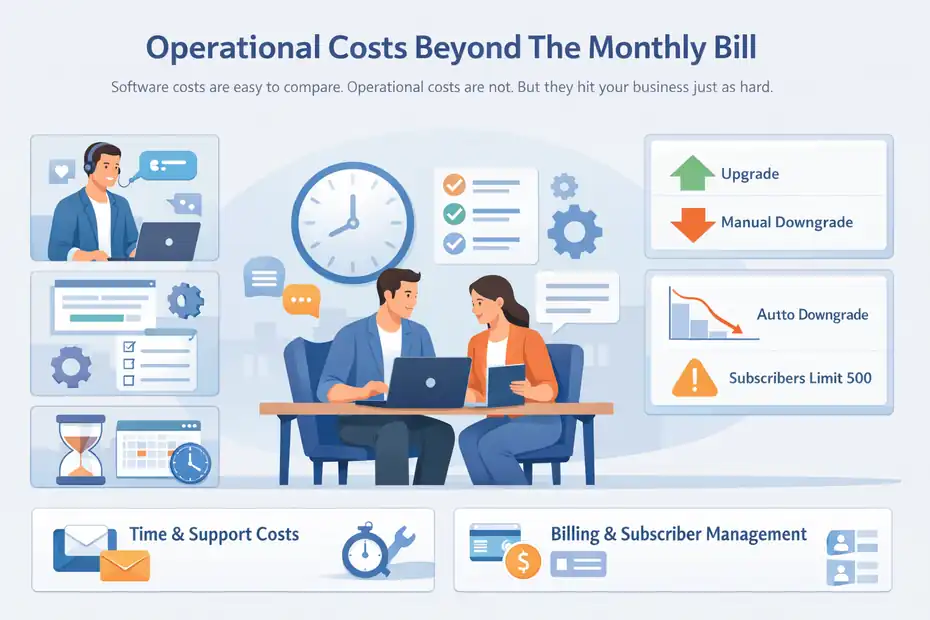
Software costs are easy to compare. Operational costs are not. But they hit your business just as hard.
Support, Migration, And Setup Time
AWeber leans heavily into support. Its site and support pages advertise 24/7 contact options, with live chat and email available around the clock and phone support during weekday business hours. It also promotes free migration help.
MailerLite offers 24/7 live chat and email support on paid tiers, but its Free plan support is only available for up to 14 days after sign-up. Enterprise adds a dedicated success manager and deliverability consultation.
That means one hidden cost question becomes: how expensive is your own time? If you are comfortable figuring out forms, domains, automations, and template setup on your own, MailerLite’s lower price can be a real savings. If you hate setup friction or you are migrating a list under deadline pressure, AWeber’s support-heavy positioning may justify the higher bill.
I’ve seen this play out a lot with consultants and nontechnical small business owners. They do not necessarily need more features. They need fewer stalls. In those cases, paying extra for better hand-holding can actually be the cheaper business decision.
Downgrades, Billing Friction, And Subscriber Cleanup
This is one of the biggest hidden-cost sections in the whole comparison.
AWeber explicitly states that deleting subscribers does not automatically adjust your bill. To match billing to a lower subscriber level, you need to request a manual downgrade. That means list cleanup alone does not guarantee a lower invoice next cycle.
MailerLite handles this differently. Its billing help docs say downgrades take effect when the current billing cycle ends, and if you downgrade to Free, you must stay under 500 active subscribers. It also warns that extra users are automatically removed on a Free downgrade.
Neither approach is “wrong,” but they create different kinds of friction.
With AWeber, the hidden cost is manual effort and the possibility of paying for a higher tier longer than expected unless you actively request the change. With MailerLite, the hidden cost is planning: your downgrade does not instantly fix spend, and operational access can change if you lose seats or exceed free limits.
Which Platform Is Actually Cheaper For Different Types Of Users
Now let’s turn the comparison into something practical. The answer changes depending on who you are and how you send.
Best For Beginners, Creators, And Small Newsletters
For beginners, MailerLite is usually the cheaper and more flexible starting point. The Free plan gives up to 500 subscribers, 12,000 monthly emails, automations, forms, one website, and up to 10 landing pages. The Growing Business plan starts lower than AWeber Lite and removes branding while unlocking unlimited emails and more creation flexibility.
If you are a solo creator sending one weekly newsletter and running a lead magnet funnel, MailerLite’s economics are hard to beat. You get enough room to grow without bumping into list, page, and automation caps too quickly.
AWeber can still make sense for beginners who value support more than platform range. Its 24/7 support and migration assistance are meaningful benefits, and three user seats on Lite can be useful for a small operation. But on pure cost-efficiency for a solo newsletter, I would lean MailerLite.
Best For Small Teams, Client Work, And Support-Heavy Businesses
For small teams, the answer gets more nuanced.
AWeber Lite includes three users right away, and AWeber Plus includes unlimited users along with unlimited automations and landing pages. MailerLite Growing Business also includes three users, but unlimited users move to Advanced.
If your team needs several seats plus strong ongoing support, AWeber starts to look more defensible. This is especially true if you run client campaigns, need phone access, or want migration help included in the service relationship.
If your team is more self-sufficient and focused on content production, landing pages, or creator-style funnels, MailerLite still tends to deliver better value per dollar. The platform gives you more creative surface area earlier, and its paid entry price remains lower.
So the real split is not “AWeber is expensive, MailerLite is cheap.” It is more like this: AWeber prices in support and service; MailerLite prices in product-led efficiency.
Common Mistakes That Make Either Tool More Expensive
A lot of hidden costs are self-inflicted. The platform matters, but setup discipline matters too.
Choosing Based On Entry Price Instead Of Sending Behavior
This is probably the biggest mistake I see.
People compare $10, $15, or $20 plans and assume the cheapest plan wins. But if you send frequent campaigns or run multiple automations, send allowances and feature limits matter more than entry cost. AWeber’s send structure is tied to subscriber count on Lite and Plus, while MailerLite’s paid plans emphasize unlimited monthly emails.
Imagine two businesses with 1,000 subscribers. Business A sends one newsletter per week. Business B sends three newsletters per week, plus abandoned browse emails, welcome emails, and promo pushes. Even if both have the same list size, their cheapest workable platform can be completely different.
My advice is simple: estimate your monthly sends before you choose. Not your current sends. Your realistic next-six-month sends.
Ignoring Seat Limits And Downgrade Rules
The next common mistake is forgetting that software is used by people, not just subscribers.
MailerLite Free only supports one user, and downgrading from paid to Free can automatically remove extra users. AWeber Lite offers three users, and AWeber does not automatically lower your bill when you delete subscribers unless you request a downgrade.
These are not dramatic problems, but they can create messy handoffs. A VA loses access. A client cannot log in. A founder cleans the list and still gets charged at the old level. None of this is exciting, but all of it is expensive in time.
I recommend building a simple pre-purchase checklist: user count, number of automations needed, landing pages needed, branding requirement, support expectation, and downgrade process. That single exercise will save you from most hidden-cost surprises.
Final Verdict: AWeber Vs MailerLite Comparison For Hidden Costs
If your main goal is minimizing software spend while still getting a modern email marketing stack, MailerLite usually wins. Its Free plan is generous for beginners, its Growing Business plan starts lower than AWeber Lite, and it unlocks unlimited emails, branding removal, and unlimited landing pages at a friendlier price point. For solo creators, bloggers, and lean ecommerce brands, that is a strong advantage.
If your main goal is support, migration help, and a more service-backed experience, AWeber makes a stronger case. It offers 24/7 support, phone availability on weekdays, free migration assistance, and plan structures that may feel safer for people who value direct help. The tradeoff is that you often pay more, and lower-tier limits on lists, automations, landing pages, and branding can push upgrades sooner.
My honest take is this: MailerLite is usually the better value, while AWeber is usually the better comfort purchase.
That sounds simple, but it is the cleanest summary I can give you. If you are confident, self-serve, and price-sensitive, MailerLite is hard to beat. If you want more human support and are willing to pay for it, AWeber may still be worth the premium.
And that is really the heart of this aweber vs mailerlite comparison: the hidden costs are not hidden once you know where to look. They live in send limits, upgrade triggers, user seats, support access, and billing mechanics. Choose based on those, and you are far more likely to end up with the right platform the first time.
FAQ
What is the main difference in pricing between AWeber and MailerLite?
The main difference in pricing comes down to structure and limits. MailerLite offers a lower starting price with more features included early, while AWeber charges more but includes stronger support. MailerLite also offers unlimited emails on paid plans, while AWeber limits sends based on subscriber count.
Which platform has more hidden costs, AWeber or MailerLite?
Both platforms have hidden costs, but they appear in different ways. AWeber’s hidden costs often come from send limits and manual downgrade processes, while MailerLite’s come from feature gating, user limits, and support restrictions on lower plans. The cheaper option depends on your usage style.
Is MailerLite really cheaper than AWeber in the long run?
MailerLite is generally cheaper for beginners and small creators because of its lower entry pricing and generous free plan. However, as your needs grow, advanced features and additional users may require upgrades, which can narrow the pricing gap depending on your setup.
Does AWeber offer better support than MailerLite?
AWeber typically offers more accessible support, including 24/7 chat and email plus weekday phone support. MailerLite provides strong support on paid plans but limits access on the free plan after the initial period, which can impact users who need ongoing assistance.
Which is better for beginners in email marketing?
MailerLite is usually better for beginners due to its simple interface, lower cost, and flexible free plan. It allows users to build landing pages and automations without upgrading quickly, while AWeber may require earlier upgrades to unlock similar functionality.

I’m Juxhin, the voice behind The Justifiable.
I’ve spent 6+ years building blogs, managing affiliate campaigns, and testing the messy world of online business. Here, I cut the fluff and share the strategies that actually move the needle — so you can build income that’s sustainable, not speculative.
Related posts:
 GetResponse Vs MailerLite: Best Automation And Pricing Value
 Top 10 Email Service Providers: Powerful Tools for Businesses
 Best Email Marketing Software for Boosting Customer Retention
 How to Master AWeber Email Marketing in Just a Few Steps
 Constant Contact Pricing: Which Plan Is Right for You?
 How Enterprise Email Marketing Drives Higher ROI