
Table of Contents
Some links on The Justifiable are affiliate links, meaning we may earn a small commission at no extra cost to you. Read full disclaimer.
Monday alternatives for small teams on a budget are easier to find than most comparison posts make it seem. If you’re running a lean team, you usually do not need a giant work operating system with enterprise-style complexity and pricing.
You need something your team will actually open every day, understand quickly, and afford without turning every new seat into a budgeting discussion.
That is why I’d compare tools based on real small-team friction: seat minimums, upgrade pressure, automation limits, and how fast a five-person team can get value without hiring an ops person.
Why Small Teams Start Looking For A Monday Alternative
Before you switch, it helps to be clear about what is pushing you away from monday.com in the first place.
The Real Budget Problem Is Usually Not Just The Sticker Price
For many small teams, the issue is not that monday.com is a bad platform. It is that the pricing structure and feature ladder can become awkward when you have a very small team and a very specific workflow.
Monday.com’s free plan is limited to up to 2 seats, while paid plans for work management start at $9 per seat per month billed annually for Basic and $12 per seat per month billed annually for Standard, and paid plans start from 3 users. That means a small team can hit paid territory earlier than expected.
Here is where I think the frustration becomes real. A lot of small teams do not just want “task management.” They want one or two advanced features that make a tool feel complete, like timeline view, guest access, automations, or better dashboards.
On monday.com, some of those are not in Basic, so the practical starting point often feels closer to Standard than the entry plan.
That does not mean monday.com is overpriced for everyone. It means it can feel expensive for a team of 3 to 10 people that only needs clean planning, simple automations, and decent reporting. In my experience, that is exactly where cheaper alternatives start to look smarter.
What Small Teams Usually Need Instead
Most budget-conscious teams are trying to solve a simpler problem than enterprise buyers. They want to assign tasks, track deadlines, organize projects, reduce Slack chaos, and maybe automate a few repetitive steps.
A good low-cost alternative usually wins when it does these things well:
- Fast onboarding: New teammates understand the tool in one sitting.
- Low seat friction: You do not pay a painful premium every time you add one person.
- Useful free or entry plans: The tool is still functional before you upgrade.
- Light automation: Enough to save time without forcing a bigger plan.
- Simple visibility: Boards, lists, calendars, and timelines that make work obvious.
That is why I would not choose a monday replacement by feature count alone. I would choose it by how much management overhead it removes for your specific team.
1. Trello Is The Best Low-Cost Monday Alternative For Simple Visual Workflows
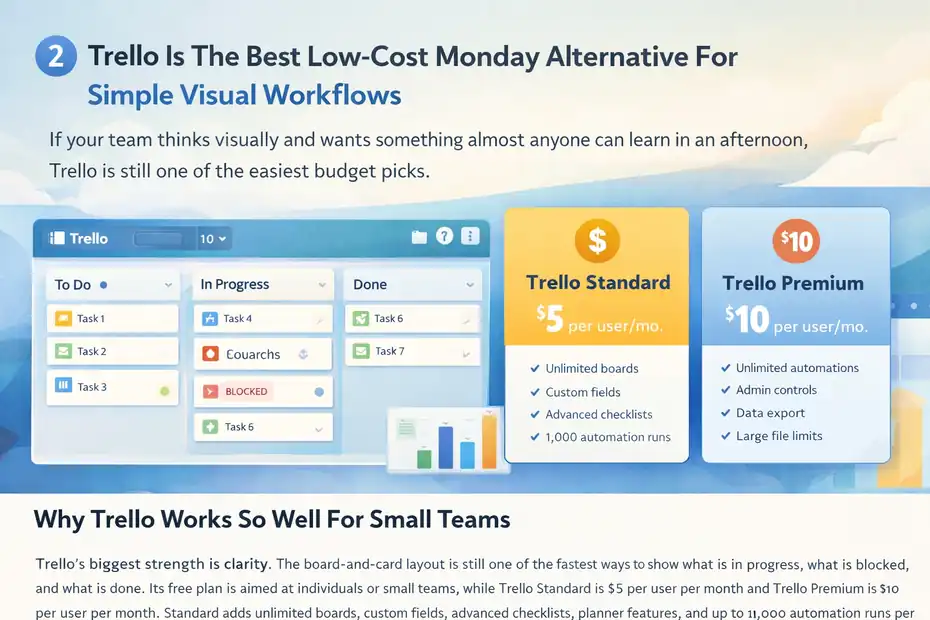
If your team thinks visually and wants something almost anyone can learn in an afternoon, Trello is still one of the easiest budget picks.
Why Trello Works So Well For Small Teams
Trello’s biggest strength is clarity. The board-and-card layout is still one of the fastest ways to show what is in progress, what is blocked, and what is done. Its free plan is aimed at individuals or small teams, while Trello Standard is $5 per user per month and Trello Premium is $10 per user per month.
Standard adds unlimited boards, custom fields, advanced checklists, planner features, and up to 1,000 automation runs per month; Premium adds unlimited automations, admin controls, data export, and larger file limits.
That pricing matters. If you compare Trello Standard at $5 with monday Basic at $9 and monday Standard at $12, Trello can come in noticeably cheaper for a small team that mostly needs Kanban-style project tracking.
I recommend Trello most when your team says things like, “We just want one board per project,” or, “We need less software, not more software.”
Where Trello Beats Monday And Where It Does Not
Trello beats monday.com on ease of use, lower entry cost, and quicker adoption for straightforward task tracking. If you run a content team, design team, small agency, or startup ops team with repeatable workflows, Trello can feel refreshingly light.
A team managing blog production, for example, can use columns like Backlog, Briefing, Drafting, Review, Scheduled, and Published without needing a more complex database-style setup.
But Trello is not the better choice if you need richer reporting, portfolio views, complex dashboards, or a highly customizable data structure. It is simpler by design. That is both its charm and its limit.
My honest take is this: if monday feels like too much tool for your current process, Trello is often the cleanest downgrade without becoming a weak one.
2. ClickUp Is The Best Value Pick If You Want More Features For Less Money
ClickUp is the tool I would look at first if your team wants strong functionality without paying monday-level prices.
Why ClickUp Offers The Strongest Budget-To-Feature Ratio
ClickUp’s Free Forever plan already includes unlimited tasks, unlimited free plan members, docs, Kanban boards, calendar view, sprint management, and basic custom fields.
Its Unlimited plan is $7 per user per month billed yearly, and Business is $12 per user per month billed yearly. The Unlimited plan adds unlimited storage, integrations, Gantt charts, forms, time tracking, goals, portfolio management, and guests with permissions.
That is why ClickUp gets so much attention from small businesses. On paper, its $7 plan gives budget buyers a lot of what they were probably hoping to get from a more expensive work management platform.
Compared with monday Basic at $9 and monday Standard at $12, ClickUp often looks stronger for teams that want “more than boards” without stepping up too fast in price.
For a five-person team, the difference adds up quickly over a year, especially if you need time tracking and Gantt-style planning.
When ClickUp Is A Better Choice Than Monday
ClickUp is a better fit when your team wants one central workspace for projects, docs, internal notes, lightweight SOPs, time tracking, and dashboards. It can replace more tools at once, which matters if your actual goal is not just cutting project management software spend, but reducing total software sprawl.
Imagine a small marketing agency with five people. In monday.com, they may still rely on another docs tool and another time-tracking system. In ClickUp, they can often consolidate that into one environment. That can save money beyond the subscription line item.
The tradeoff is that ClickUp can feel denser. I would not call it difficult, but it does have more setup decisions. If your team hates configuration, Trello may still be easier. If your team likes control and wants room to grow, ClickUp usually gives you more runway for the money.
3. Notion Is The Best Pick If Your Team Lives In Docs, Wikis, And Lightweight Project Tracking
Notion is not a direct clone of monday.com, and that is exactly why some small teams love it.
Why Notion Feels Cheaper And More Flexible For Knowledge-Heavy Teams
Notion’s Free plan is usable for small teams, and Notion Plus is $10 per member per month, while Business is $20 per member per month. The Plus plan is positioned for small teams and professionals, and includes unlimited pages and blocks, custom forms, basic SEO controls for published pages, and broader collaboration features than the limited multi-member Free setup.
If your team’s work is heavily tied to briefs, notes, SOPs, meeting docs, content calendars, and internal documentation, Notion can be a smarter budget buy than monday.com because it combines project coordination with documentation in one place.
I have seen this work especially well for content teams, product startups, and small remote teams that care as much about shared context as task tracking.
Where Notion Fits Best In Real Life
Notion is great when your workflow starts with information, not just tasks. A small SEO team, for example, can keep keyword research, outlines, briefs, publication checklists, content status, and internal guidelines in the same workspace. That is something monday can do too, but Notion often feels more natural for writing-first teams.
The downside is that Notion is not the strongest option for heavier project management. It can handle statuses, owners, calendars, and board views well enough, but it is not the first tool I would choose for teams that need structured workload planning, advanced resource management, or dense reporting.
So here is my simple rule: choose Notion when your team says, “We need a brain with tasks,” not, “We need an operations control center.”
4. Zoho Projects Is The Best Cheap Monday Alternative For Small Teams That Need More Traditional Project Management
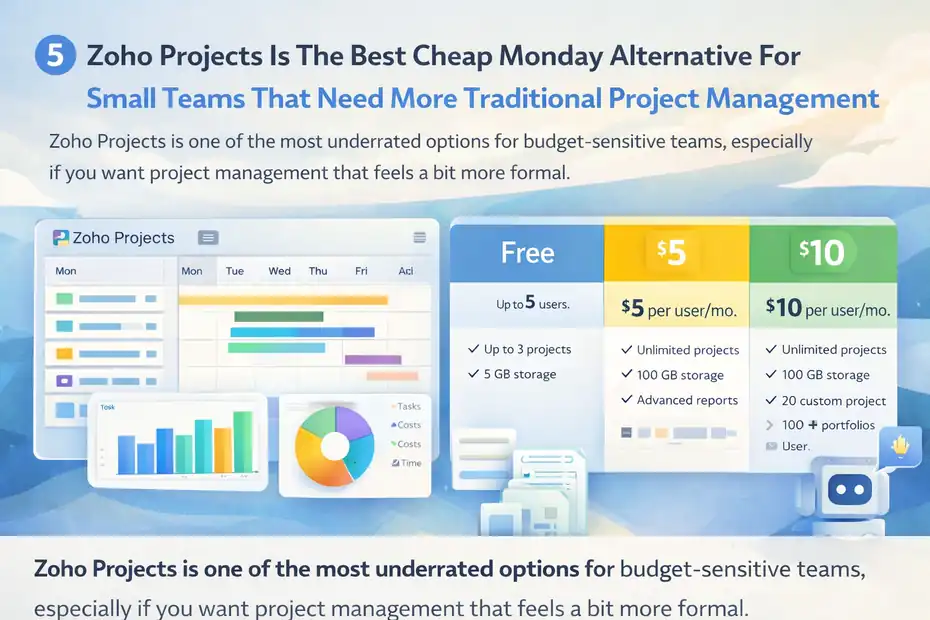
Zoho Projects is one of the most underrated options for budget-sensitive teams, especially if you want project management that feels a bit more formal.
Why Zoho Projects Makes Sense On A Tight Budget
Zoho Projects offers a free plan for up to 5 users, and its plan comparison highlights essentials like Gantt charts, project templates, storage allowances, reports, and AI-related features across paid tiers.
The free plan includes up to 3 projects and 5GB storage, while paid tiers expand to unlimited projects and deeper reporting.
That free-for-five angle is a big deal. A tiny team can actually start using the platform without immediately paying, which is very different from monday.com’s 2-seat free cap.
This alone makes Zoho Projects one of the most practical monday alternatives for small teams on a budget, especially when you are still validating your process and do not want to lock into a pricier stack too early.
Who Should Choose Zoho Projects
Zoho Projects makes the most sense for teams that want a more classic project management structure with milestones, dependencies, Gantt views, reports, and project-centric organization. If your team works in client delivery, web development, implementation, or operations, that can be a better fit than a lighter Kanban-first system.
A realistic scenario: a small web agency handling four active client builds can use one project per client, map milestones, track tasks by phase, and keep a clearer delivery structure than they might in a very loose board-based tool.
The main caution is usability. Zoho tools often give you plenty of value, but the experience can feel less polished than Trello or Notion. I still think it is worth a serious look when price sensitivity is high and your team cares more about capability than aesthetics.
5. Teamwork Is The Best Budget Option For Client Service Teams That Need Time Tracking
If your small team bills clients, manages retainers, or needs to connect work to budget reality, Teamwork deserves more attention.
Why Teamwork Can Save Money Indirectly, Not Just On Subscription Cost
Teamwork’s pricing page positions its Basics plan for small teams at $9.99 per user per month billed yearly, with features such as project health, time and status reporting, AI comment summaries, client collaboration, intake capture, and 5,000 automations.
The next tier, Accelerate, is $24.99 per user per month billed yearly and adds capacity planning, time budgets, retainers, and more advanced workflow logic.
At first glance, Teamwork Basics is close to monday Basic on price. But this is where feature alignment matters more than the headline number. If your team earns revenue by project, having time tracking and client-oriented workflow built into the way you manage work can reduce missed billing, under-scoped work, and hidden over-servicing.
In other words, Teamwork can be “budget-friendly” because it protects margin, not just because the monthly fee is low.
When Teamwork Is Better Than Monday
Teamwork is the better option for agencies, consultants, creative studios, and service businesses that need project management tied to time, utilization, or client communication.
Imagine a three-person design studio. In monday.com, they may manage tasks well enough, but still need extra tooling or manual processes to understand whether a project is profitable. Teamwork is more opinionated around that services workflow.
I would not choose Teamwork for a simple internal team just trying to organize to-dos. It is best when client work is the business model. If that sounds like you, Teamwork can be one of the most cost-effective alternatives because it helps prevent the classic small-agency problem of being “busy but not profitable.”
6. Asana Is The Best Option If Your Team Wants Clean Structure And Easy Cross-Functional Planning
Asana is not the cheapest entry on this list, but it can still be a smart budget move for the right kind of team.
Why Asana Still Belongs In A Budget Comparison
Asana’s free Personal plan includes up to 10 seats, and the plan details highlight unlimited projects and tasks, list, board, and calendar views, integrations, and apps.
Asana’s paid Starter tier is commonly listed at $10.99 per user per month, with Advanced at $24.99 per user per month on the pricing references surfaced through Asana’s own pricing ecosystem and community references to the official pricing page.
So yes, Asana can cost more than ClickUp or Trello at the paid level. But the free tier is solid for a team under 10, and Asana’s interface is one of the cleanest for cross-functional coordination. That can matter more than saving a few dollars per seat if your team loses time every week to unclear ownership and status confusion.
I usually recommend Asana for teams that want structure without feeling like they are operating a database.
Where Asana Wins And Where It Does Not
Asana is especially good for marketing, operations, and internal business teams managing recurring work across departments. Its task relationships, timeline-style planning, forms, templates, and workflow logic tend to feel polished and accessible.
A simple example: A seven-person marketing team can run campaign planning, content production, launch checklists, approvals, and stakeholder intake in a way that feels more orderly than Trello, but less overwhelming than a heavier system.
The reason I would not rank Asana first for ultra-budget buyers is simple: once you need paid features, cheaper tools often win on pure cost. But if your team values ease, consistency, and fewer setup headaches, Asana can still be a very reasonable long-term choice.
7. Todoist Business Is The Best Ultra-Light Option For Tiny Teams That Mainly Need Shared Task Management
Sometimes the smartest monday alternative is not another full project platform. Sometimes it is a simpler task system your team will actually maintain.
Why Todoist Can Be The Cheapest “Good Enough” Choice
Todoist’s pricing and help documentation show a free Beginner plan, while its 2025 pricing update set Todoist Business at $8 per user per month billed yearly, or $10 per user per month billed monthly.
The platform focuses on task management, board and list layouts, filters, reminders, and collaboration rather than heavyweight project operations.
For a small team that mostly needs shared to-dos, recurring task management, lightweight delegation, and clean personal productivity, Todoist can save both money and mental overhead. That matters more than people admit. A tool that is 20% less powerful but 80% more likely to be used consistently often wins in real life.
I like Todoist for founder-led teams, admin teams, and very small service businesses where most work is operational rather than deeply project-based.
The Right And Wrong Way To Use Todoist As A Monday Alternative
Todoist works best when your team’s coordination is task-centric, not portfolio-centric. If your team mainly needs recurring checklists, weekly planning, basic ownership, and a shared work queue, it can be excellent.
A realistic use case would be a small virtual assistant team managing inbox checks, content uploads, invoice follow-ups, client requests, and recurring maintenance tasks. In that setup, Todoist feels fast, simple, and affordable.
The wrong use case is a team that needs advanced automations, client-facing project workspaces, detailed reporting, resource planning, or a lot of custom workflow logic. That is not Todoist’s lane. But for the right tiny team, it can be the cheapest tool here that still feels professional.
Quick Comparison Table
| Tool | Best For | Entry Price Worth Watching | Why It Saves Money |
|---|---|---|---|
| Trello | Visual task boards | Standard: $5/user/month | Cheap, fast, low training overhead |
| ClickUp | Feature-rich value | Unlimited: $7/user/month billed yearly | More functionality at lower cost |
| Notion | Docs + lightweight PM | Plus: $10/member/month | Combines wiki, docs, and projects |
| Zoho Projects | Traditional PM on a budget | Free for up to 5 users | Lets tiny teams start free |
| Teamwork | Client service teams | Basics: $9.99/user/month billed yearly | Better for billable work and time tracking |
| Asana | Clean team coordination | Personal free up to 10 seats | Strong free plan and polished workflows |
| Todoist Business | Tiny teams with simple task workflows | $8/user/month billed yearly | Minimal cost and minimal complexity |
The pricing and feature positioning above come from current vendor pages and help documentation. monday.com’s work management pricing is listed from $9 per seat for Basic and $12 for Standard billed annually, with a free plan limited to 2 seats and paid plans starting from 3 users, which is why these alternatives can feel more budget-friendly for smaller teams.
How To Choose The Right Monday Alternative Without Regretting It Later
This is where most buyers go wrong. They compare logos and plan prices, then ignore workflow fit.
Use This Simple Decision Filter
I suggest choosing based on the way your team naturally works:
- Choose Trello: If your team loves visual boards and wants the lowest-friction upgrade path.
- Choose ClickUp: If you want the most features per dollar and room to scale.
- Choose Notion: If docs, SOPs, and shared knowledge matter as much as tasks.
- Choose Zoho Projects: If you need classic project management structure on a tighter budget.
- Choose Teamwork: If time, billing, retainers, or client delivery are central.
- Choose Asana: If you want polished, structured coordination across functions.
- Choose Todoist: If your team mostly needs shared task management, not full PM.
The best tool is not the one with the longest feature checklist. It is the one your team still uses six months later.
A Practical Way To Test Before You Commit
Here is the test I recommend. Build one real workflow in your top two choices:
- Create one live project your team is already managing.
- Add real owners, due dates, and statuses.
- Invite two or three teammates.
- Run one weekly review inside the tool.
- Check whether people updated it without being chased.
That last part matters most. A cheaper tool is not cheaper if nobody adopts it and your team falls back to Slack threads and spreadsheet guessing.
Common Mistakes Small Teams Make When Switching Away From Monday
A cheaper tool only helps if your process gets simpler, not messier.
Mistake 1: Buying For Future Complexity Instead Of Current Reality
Small teams often buy the tool they think they will need when they are three times bigger. I understand the logic, but it usually backfires. You end up paying for complexity before you have the workflow maturity to use it.
In my experience, a team of five should optimize for speed, clarity, and adoption first. Scalability matters, but not at the cost of daily usability.
Mistake 2: Rebuilding Every Workflow On Day One
You do not need to migrate everything immediately. Start with one project type, one repeatable process, and one reporting habit. Get that stable first.
The fastest way to sabotage a migration is to recreate every field, automation, dashboard, and view from the old system before your team even understands the new one.
Mistake 3: Ignoring Hidden Costs
Subscription price is only one cost. The bigger hidden costs are:
- Training time
- Admin overhead
- Broken adoption
- Duplicate tools
- Manual reporting work
That is why ClickUp may be cheaper than monday on paper, but Trello could still be the better value for a less technical team. The “best deal” depends on how much operational drag the platform removes.
Final Verdict
If I had to narrow this down for most readers searching for monday alternatives for small teams on a budget, I would start here:
- Best overall value: ClickUp
- Best for simplicity: Trello
- Best for docs + workflows: Notion
- Best free option for very small teams: Zoho Projects
- Best for client work: Teamwork
- Best polished team coordination: Asana
- Best ultra-light choice: Todoist Business
My honest opinion is that most small teams do not need to replace monday.com with something equally broad. They need something narrower, cheaper, and easier to maintain. Once you accept that, the right choice usually becomes much clearer.
FAQ
What are the best monday alternatives for small teams on a budget?
The best monday alternatives for small teams on a budget include tools like ClickUp, Trello, Notion, Zoho Projects, and Todoist. These platforms offer lower pricing, flexible plans, and essential project management features without forcing small teams into expensive upgrades or complex setups.
Why should small teams look for alternatives to monday.com?
Small teams often look for alternatives to monday.com because of pricing limitations, seat minimums, and feature restrictions on lower-tier plans. Many alternatives provide similar functionality with better free plans or lower entry costs, making them more suitable for teams with tight budgets.
Which monday alternative has the best free plan?
ClickUp and Zoho Projects offer some of the best free plans for small teams. ClickUp provides unlimited tasks and users, while Zoho Projects allows up to five users with essential features, making both strong options for teams that want to avoid early subscription costs.
Is there a cheaper tool than monday.com with similar features?
Yes, several tools like ClickUp and Trello offer similar features at a lower cost than monday.com. ClickUp includes advanced features like time tracking and dashboards at a lower price, while Trello provides simple and effective task management for a fraction of the cost.
How do I choose the right monday alternative for my team?
To choose the right alternative, focus on your team’s workflow, size, and complexity. If you need simplicity, go with Trello. For advanced features, choose ClickUp. If documentation is important, Notion works well. Always test the tool with a real project before committing.

I’m Juxhin, the voice behind The Justifiable.
I’ve spent 6+ years building blogs, managing affiliate campaigns, and testing the messy world of online business. Here, I cut the fluff and share the strategies that actually move the needle — so you can build income that’s sustainable, not speculative.
Related posts:
 Project Management Tools Monday: Complete Beginner’s Guide
 Is Monday Project Management Software Worth It?
 Monday App Download: Quick Setup Guide for New Users
 Why Teams Prefer Monday PM Software Over Traditional Tools
 Start Your Own Online Business Without Experience – It’s Easy!
 How to Quickly Grow Online Business Without Stress