Table of Contents
Some links on The Justifiable are affiliate links, meaning we may earn a small commission at no extra cost to you. Read full disclaimer.
WP Rocket review for bloggers making money online usually comes down to one uncomfortable question: does paying for speed actually make you more money, or are you just buying another WordPress plugin you will barely use? I think that is the right question to ask.
For bloggers earning through ads, affiliate links, digital products, or client leads, site speed is not a vanity metric. It affects rankings, user experience, pageviews, and how many people stick around long enough to click, buy, or subscribe.
Google still recommends strong Core Web Vitals, and WP Rocket is positioning itself as an all-in-one performance plugin with pricing starting at $59 per year.
What WP Rocket Actually Is And Why Bloggers Care
If you are reading a WP Rocket review for bloggers making money online, you probably do not need another generic explanation of “site speed matters.”
You need to know whether this plugin solves a real business problem.
What WP Rocket Does In Plain English
- Caching: WP Rocket creates static versions of your pages so visitors do not have to wait for WordPress to rebuild everything from scratch each time.
- File optimization: It can minify CSS and JavaScript, defer code, and improve how assets load.
- Media improvements: It includes lazy loading and other features that reduce how much has to load immediately.
- Cache preloading: It warms up pages so your first visitor does not get the slow version.
- Compatibility focus: It is built to work with many common WordPress themes, plugins, and hosting environments.
That sounds technical, but the money angle is simple. A faster blog can mean more pages per session, fewer frustrated exits, and better odds that your ad impressions, affiliate clicks, and email signups actually happen.
If you publish SEO content and depend on organic traffic, performance is not a side issue. It is part of how your content gets consumed.
Why Bloggers Who Monetize Feel Speed Problems Faster
A hobby blog can get away with being messy for longer. A monetized blog usually cannot.
Here is the pattern I see all the time. You start with a clean site. Then you add an ad network script, analytics, a page builder, image-heavy tutorials, email popups, affiliate comparison tables, social share buttons, and maybe WooCommerce or a course plugin.
Suddenly your site is “successful,” but also heavy. Your traffic grows, yet your pages feel slower.
That is where WP Rocket becomes attractive. It is not trying to replace your content strategy. It is trying to stop your monetization stack from sabotaging your user experience.
My Honest Take On Who This Plugin Is Really For
I would not frame WP Rocket as a magic button for every blogger. I would frame it as a paid convenience and performance tool for site owners who value speed but do not want to spend days learning a maze of server-level tweaks and free plugin settings.
In my experience, that audience includes:
- Bloggers earning with display ads
- Affiliate bloggers publishing long review content
- Niche site owners scaling organic traffic
- Course creators or creators selling digital products
- Lead-gen bloggers who rely on forms and landing pages
If you are already making money, even modestly, paying for a plugin that removes friction can be rational. The real question is whether WP Rocket gives enough upside compared to free options. That is where the rest of this review matters.
How WP Rocket Works Behind The Scenes Without Feeling Overwhelming
Most speed plugins lose normal users because they explain everything like an engineer talking to another engineer.
WP Rocket has always leaned toward usability first, which is a big reason it became popular.
The “80% Out Of The Box” Argument
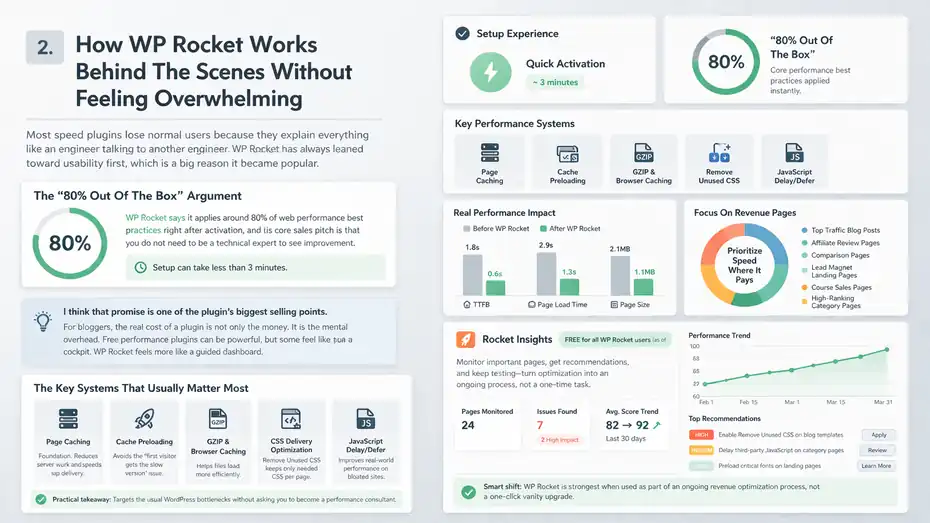
WP Rocket says it applies around 80% of web performance best practices right after activation, and its core sales pitch is that you do not need to be a technical expert to see improvement. The company also says setup can take less than 3 minutes.
I think that promise is one of the plugin’s biggest selling points. For bloggers, the real cost of a plugin is not only the money. It is the mental overhead. Free performance plugins can be powerful, but some feel like a cockpit. WP Rocket feels more like a guided dashboard.
The Key Systems That Usually Matter Most
- Page caching: This is the foundation. It reduces server work and speeds up delivery.
- Cache preloading: This helps avoid the “first visitor gets the slow version” issue.
- GZIP and browser caching support: These help files load more efficiently.
- CSS delivery optimization: WP Rocket includes a Remove Unused CSS feature that keeps only the CSS needed per page.
- JavaScript delay/defer options: These can improve real-world performance, especially on bloated sites.
For a blogger, the practical takeaway is that the plugin targets the usual WordPress bottlenecks without asking you to become a performance consultant.
Why This Matters For Revenue, Not Just Scores
A lot of site owners get trapped chasing PageSpeed scores because the score is visible and emotionally satisfying. I get it. But revenue bloggers should care more about speed in the pages that actually earn money:
- Top traffic blog posts
- Affiliate review pages
- Comparison pages
- Lead magnet landing pages
- Course sales pages
- Category pages that rank well
WP Rocket now includes Rocket Insights, and as of March 2026 that feature became free for all WP Rocket users. The idea is useful: monitor important pages, get recommendations, and keep testing instead of treating optimization like a one-time chore.
That is a smart shift. I believe the plugin is strongest when you use it as part of an ongoing revenue optimization process, not a one-click vanity upgrade.
WP Rocket Features That Matter Most For Bloggers Making Money Online
Not every feature is equally valuable. Some sound flashy but barely change outcomes for typical blog businesses. Others quietly protect rankings, user experience, and ad revenue.
Caching, Preloading, And Why They Usually Deliver The Fastest Wins
Caching is not exciting, but it is usually the first thing that moves the needle. WP Rocket automatically caches pages and clears cache when content changes, which keeps the live version fresh while still serving visitors a faster copy.
For bloggers, this matters because content sites often get spikes from Google, Pinterest, newsletters, or viral mentions. If every visitor has to wait on repeated dynamic database work, your server feels the pain and so do your readers.
Imagine you run a niche affiliate blog and one buying guide jumps from 100 visits a day to 3,000 after a rankings boost. Caching will not fix weak hosting, but it can stop traffic growth from turning into a slow-motion crash.
Remove Unused CSS Is More Useful Than It Sounds
This feature deserves more attention because heavy themes and builders often dump huge stylesheets on every page. WP Rocket’s Remove Unused CSS feature keeps only the CSS needed for each page, which can improve rendering performance when it works well.
WP Rocket’s docs updated this feature in February 2026 and also maintain troubleshooting guidance because it can sometimes cause display issues on more complex sites.
That last part matters. This is a real review, so here is the balanced version:
- It can be a strong win on bloated sites
- It is not always plug-and-play on custom setups
- You should test layouts carefully after enabling it
I recommend treating this feature like a controlled experiment, not a blind checkbox.
Delay JavaScript Can Help, But It Is Not A Miracle Cure
JavaScript is often where monetized blogs get messy. Ads, popups, analytics, cookie banners, and widgets all pile up. WP Rocket cannot fully remove unused JavaScript by itself, but it can delay execution of scripts, which often improves how quickly the page becomes usable.
WP Rocket’s own docs are pretty clear about that limitation.
I appreciate the honesty there. Some tools overpromise. WP Rocket is better viewed as a strong performance layer, not a total replacement for cleaning up third-party script bloat.
Built-In Performance Monitoring Is More Valuable Than It Looks
Rocket Insights becoming free in WP Rocket 3.21 is not just a nice extra. It pushes users to monitor important pages over time instead of optimizing once and forgetting the site exists.
For bloggers who earn online, that matters because speed problems often creep in slowly:
- New ad code gets added
- A plugin update changes behavior
- A theme adds new scripts
- An affiliate table plugin becomes heavier
- A landing page builder starts loading more assets
Monitoring helps you catch revenue leaks before they become ranking drops or bounce-rate problems.
WP Rocket Pricing, Value, And Whether It Pays For Itself
This is where a lot of reviews get weirdly vague. Let’s not do that.
Current Pricing And What You Get
As of March 2026, WP Rocket’s official pricing page shows:
- Single: $59 per year for 1 website
- Plus: $119 per year for 3 websites
- Multi: $299 per year for 50 websites, with options to scale higher
- Rocket Insights: Included free with WP Rocket plans
That makes WP Rocket a premium plugin from day one. There is no forever-free version.
Is $59 A Year Expensive For A Blogger?
That depends on what kind of blogger you are.
If your site makes $0 and you are still validating the niche, I would be cautious with every recurring cost. There are free caching plugins that may be “good enough” while you are learning.
If your site makes even a little money, I think the math changes fast. Let’s use a realistic example.
Imagine your blog earns:
- $150 per month from display ads
- $200 per month from affiliate commissions
- $50 per month from email-driven sales
That is $400 monthly. If faster pages help you keep more readers engaged, recover even a tiny percentage of lost traffic value, or raise conversion efficiency slightly, the yearly cost can pay for itself very quickly.
I would not promise exact ROI, because every site behaves differently. But for revenue sites, $59 is usually not the scary part. Wasted traffic is.
Where The Value Really Comes From
I do not think bloggers pay for WP Rocket because no free plugin exists. They pay because:
- Setup is easier
- Default optimization is stronger than many free tools
- Support is included with an active license
- Compatibility work saves time
- It can replace multiple smaller plugins
- It reduces the chance you leave speed problems half-fixed
That last point is underrated. A free plugin with 16 settings pages is “cheaper” only if you actually configure it well. WP Rocket’s value is largely time saved and mistakes avoided.
When It Probably Does Not Make Sense
I would skip WP Rocket, or at least delay it, if:
- Your site is brand new and unmonetized
- You are on poor hosting that is the real bottleneck
- You already have a well-optimized performance stack you understand deeply
- Your site is so lightweight that gains would be marginal
A speed plugin cannot rescue a bad foundation. If your host is weak, your theme is bloated, and your page is overloaded with ad tech, WP Rocket can help, but it cannot perform magic.
Setup: How Bloggers Should Configure WP Rocket Without Breaking Their Site
This is the section most buyers need. Not theory. Not marketing. The “what should I turn on first” part.
Start With The Low-Risk Wins
I suggest a simple order:
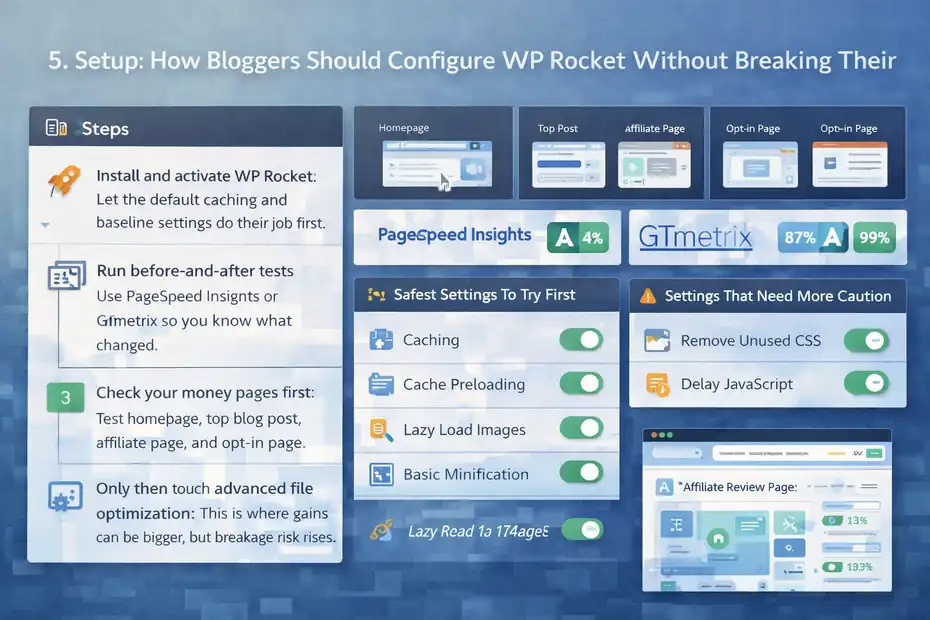
- Step 1: Install and activate WP Rocket. Let the default caching and baseline settings do their job first.
- Step 2: Run before-and-after tests. Use PageSpeed Insights or GTmetrix so you know what changed.
- Step 3: Check your money pages first. Test homepage, top blog post, affiliate page, and opt-in page.
- Step 4: Only then touch advanced file optimization. This is where gains can be bigger, but breakage risk rises.
That order matters because too many bloggers activate every option at once, break layouts, then blame the plugin.
The Safest Settings To Try First
For most blogs, the following are reasonable early moves:
- Caching and cache preloading: Usually foundational and helpful.
- Lazy loading for images: Helpful on content-heavy posts.
- Basic file minification: Often safe, but still test.
- Browser cache support and compression-related optimizations: Usually part of the easy wins.
These settings often deliver noticeable improvements with relatively low drama.
The Settings That Need More Caution
- Remove Unused CSS: Useful, but test pages carefully.
- Delay JavaScript execution: Often beneficial, but can interfere with popups, sliders, consent tools, or custom scripts.
- Combination settings: These can be more fragile on certain themes or plugin stacks.
My advice is boring, but it works: change one thing, test, clear caches, test again, then move on.
A Simple Testing Workflow That Saves Headaches
Here is the workflow I recommend for bloggers:
- Example: Turn on one feature.
- Visit your homepage logged out.
- Open one long-form post with lots of images.
- Test one affiliate review page.
- Test one landing page or email opt-in page.
- Click menus, accordions, forms, comparison tables, and mobile navigation.
If something breaks, you will know which toggle caused it. That makes troubleshooting ten times easier.
Real-World Pros And Cons For Bloggers, Affiliates, And Ad Revenue Sites
A good WP Rocket review for bloggers making money online needs a business-owner lens, not just a developer lens.
The Biggest Pros In My View
- It is genuinely beginner-friendlier than many alternatives.
- It often delivers visible speed gains quickly.
- It can replace multiple smaller optimization plugins.
- It keeps improving, with regular updates through March 2026.
- It now includes Rocket Insights at no extra cost.
For bloggers, ease matters because performance work is rarely your main job. Your real job is publishing, promoting, and monetizing content.
The Biggest Downsides
- No free version: You must pay to use it.
- Some advanced features still need testing: Especially CSS and JS options.
- It cannot solve every script problem: Third-party ad and tracking code can still drag your site down.
- Hosting still matters a lot: A plugin cannot fully compensate for a weak server.
- Some gains depend on your site’s starting point: A well-built site may see smaller jumps.
Those are not dealbreakers, but they matter. If a review hides the tradeoffs, it is not useful.
Where WP Rocket Feels Strongest
In my opinion, WP Rocket shines most on sites that are:
- Not developer-maintained every week
- Already earning enough that speed matters financially
- Running common WordPress stacks
- Slightly bloated, but not disastrously broken
- Owned by creators who want strong defaults
That is a huge chunk of the blogging world.
Where It Feels Less Essential
If you are highly technical and enjoy building a performance stack with free tools, server caching, CDN rules, and selective script management, you might not need WP Rocket.
The plugin is not trying to win a “most hardcore tinkering options” contest. It is trying to help you get strong results quickly.
SEO, Core Web Vitals, And Conversion Impact: Does WP Rocket Help Enough?
This is the part revenue bloggers care about most, even if they pretend they only want “better speed.”
Speed Still Matters For Search And User Experience
Google continues to recommend good Core Web Vitals and connects them to real-world page experience. Core Web Vitals focus on loading performance, interactivity, and visual stability.
That does not mean speed alone will rank thin content. It will not. But when content quality is similar, performance can absolutely affect competitiveness, especially in crowded search results.
Speed And Revenue Usually Move Together
WP Rocket itself cites that 57% of consumers will abandon a site loading in more than 3 seconds. On the broader conversion side, one commonly cited benchmark is that a 0.1-second speed improvement can lift conversion rates by around 8% in some contexts.
Those figures should be treated as directional, not universal guarantees, but they reflect a real trend: slower sites leak money.
For bloggers, conversion may mean different things:
- Clicking an affiliate link
- Loading another page with more ads
- Joining an email list
- Buying a template, course, or ebook
- Submitting a contact form
When pages feel faster, those actions become easier to complete.
What WP Rocket Can Realistically Improve
From what I have seen, WP Rocket can most realistically help with:
- Faster initial rendering on WordPress sites
- Better cache behavior
- Improved Core Web Vitals on bloated installs
- More stable page delivery during traffic spikes
- Better technical conditions for SEO and UX
WP Rocket’s own case-study-style content shows examples like LCP dropping from 3.3 seconds to 1.2 seconds and PageSpeed scores improving from 82 to 98 after optimization. Those are company-published examples, so I would treat them as illustrative rather than guaranteed outcomes. Still, they show the sort of improvements the plugin is targeting.
My Bottom-Line SEO View
I do not think buying WP Rocket automatically improves rankings. I do think it can improve the technical environment that helps strong content perform better. That distinction matters.
For bloggers making money online, the value is not “WP Rocket equals rankings.” The value is closer to this: good content plus better speed plus a smoother user experience gives your monetization system fewer ways to fail.
Common Mistakes Bloggers Make With WP Rocket
This is where money gets lost. Not because WP Rocket is bad, but because people use it badly.
Turning On Everything At Once
This is the classic mistake. You buy the plugin, activate every optimization, see a prettier score, and then realize your mobile menu, affiliate tables, or opt-in popup stopped working.
I recommend restraint. Speed optimization is still optimization. That means controlled changes, not chaos.
Blaming WP Rocket For Problems Caused Elsewhere
A lot of “WP Rocket broke my site” stories are really “my site was already fragile.” Heavy page builders, poorly coded plugins, aggressive ad tech, and overloaded themes create unstable environments. WP Rocket can expose those weaknesses because performance optimization changes how assets load.
That does not mean the plugin is blameless. It means your stack matters.
Ignoring Script Bloat From Monetization Tools
If you run:
- Multiple ad network scripts
- Heatmaps
- Session recording
- Popups
- Quiz tools
- Social widgets
- A/B testing tools
- Live chat
then your speed problems may not be primarily about caching. WP Rocket can help around the edges and sometimes quite a bit, but it cannot turn a script-heavy page into a featherweight page by itself.
Testing Logged In Instead Of Logged Out
Bloggers often test their site while logged into WordPress, which can produce misleading impressions. Always test as a normal visitor too. Better yet, use private browsing and external tools.
Treating Speed As A One-Time Task
Performance drifts over time. New plugins get added. Tracking scripts change. Pages get longer.
That is why Rocket Insights becoming free is actually useful. It encourages repeat measurement instead of one-and-done optimization.
Advanced Tips To Get More Value From WP Rocket As Your Blog Grows
Once your blog starts earning real money, the goal changes. You are no longer just “making the site faster.” You are protecting a business asset.
Focus On Your Highest-Value Pages First
Do not obsess equally over every URL. Prioritize:
- Top organic landing pages
- Highest EPC affiliate pages
- Best RPM ad pages
- Best-converting opt-in pages
- Product and sales pages
A page getting 20 visits a month is not where your optimization hours should go. A page generating 30% of your affiliate income is.
Pair WP Rocket With Better Hosting Before Adding More Plugins
I believe this is one of the best growth-stage decisions you can make. If your blog is growing, upgrading hosting often creates bigger gains than stacking more optimization tools. WP Rocket works best when the underlying infrastructure is not struggling.
Think of it this way. WP Rocket is a performance multiplier, not a substitute for decent hosting.
Use Cloudflare Carefully, Not Blindly
WP Rocket documents compatibility with Cloudflare and Cloudflare APO, and it also provides recommended settings guidance. That is helpful if you are building a stronger speed stack.
But I would be careful here. Layering caching systems can be powerful, yet it can also create confusion when you are trying to purge the right cache or debug stale content. Keep your stack understandable.
Create A Simple Monthly Performance Habit
- Step 1: Re-test your top 5 money pages.
- Step 2: Check what new plugins or scripts were added.
- Step 3: Review layout or script issues after major updates.
- Step 4: Compare changes in rankings, RPM, or conversion metrics.
- Step 5: Fix the biggest bottleneck, not ten tiny ones.
That habit is worth more than chasing random speed tips from social media.
Final Verdict: Is WP Rocket Worth It Or Just Hype?
Here is my honest conclusion.
Who Should Buy WP Rocket
I think WP Rocket is worth it for bloggers making money online when:
- Your site already earns enough that user experience affects revenue
- You want strong speed improvements without deep technical setup
- You run a typical WordPress content business with ads, affiliate links, or products
- You value support, compatibility, and ease of use
- You would rather spend time publishing and monetizing than learning advanced caching systems
For that person, WP Rocket is not hype. It is a practical business tool.
Who Should Probably Wait
You may want to hold off if:
- Your blog is brand new and not monetized
- Your hosting is the obvious bottleneck
- You enjoy building your own performance stack with free tools
- Your site is already very lean and fast
In those cases, WP Rocket may still be good, but not urgent.
My Final Opinion
If you asked me whether WP Rocket is the cheapest way to speed up a blog, I would say no.
If you asked me whether WP Rocket is one of the easiest and most reliable premium ways to improve performance on a WordPress blog that earns money, I would say yes.
That is the distinction that matters.
A monetized blog does not need every shiny plugin. It does need to protect traffic, reduce friction, and give visitors a fast path to the actions that create revenue. WP Rocket fits that job well. It is not magic. It will not fix weak content or broken monetization. But for the right blogger, it can absolutely be worth the yearly fee.
So, is this WP Rocket review for bloggers making money online a thumbs-up or a pass?
My answer is: Thumbs-up for revenue-focused bloggers who want a faster site without turning speed optimization into a second full-time job.
FAQ
Is WP Rocket worth it for bloggers making money online?
WP Rocket is worth it for bloggers making money online if site speed affects your traffic, rankings, or conversions. Faster loading pages can improve user experience, reduce bounce rates, and increase revenue from ads, affiliates, and digital products, making the yearly cost easier to justify.
Does WP Rocket improve SEO rankings for blogs?
WP Rocket does not directly increase rankings, but it improves site speed and Core Web Vitals, which support better SEO performance. When combined with strong content, faster load times can help improve user engagement and give your blog a competitive advantage in search results.
Can WP Rocket increase blog earnings?
WP Rocket can indirectly increase blog earnings by improving page speed, which often leads to better user experience and higher engagement. Faster pages can result in more ad impressions, higher affiliate clicks, and improved conversion rates across monetized blog content.
Is WP Rocket better than free caching plugins?
WP Rocket is often easier to use and provides more reliable performance improvements compared to many free caching plugins. While free options can work, WP Rocket simplifies setup and combines multiple optimization features into one tool, saving time and reducing configuration errors.
How easy is it to set up WP Rocket for beginners?
WP Rocket is beginner-friendly and works effectively right after activation with minimal setup. Most bloggers can see performance improvements without advanced knowledge, and additional settings can be tested gradually to avoid breaking layouts or affecting site functionality.

I’m Juxhin, the voice behind The Justifiable.
I’ve spent 6+ years building blogs, managing affiliate campaigns, and testing the messy world of online business. Here, I cut the fluff and share the strategies that actually move the needle — so you can build income that’s sustainable, not speculative.