
Table of Contents
Some links on The Justifiable are affiliate links, meaning we may earn a small commission at no extra cost to you. Read full disclaimer.
An envato elements content creation strategy works best when you treat Envato as a production system, not just a download library.
That shift matters because Envato Elements now combines a very large creative asset library with AI tools, unlimited stock downloads, and commercial licensing options that can remove a lot of friction for solo creators and lean marketing teams.
If you have ever felt slow, inconsistent, or visually scattered across platforms, this is where a smart strategy can genuinely help.
I’ll walk you through how to plan it, build it, and keep it useful without turning your content into template soup.
Understand What An Envato Elements Content Creation Strategy Really Is
A lot of people think this is just about finding templates faster. It is bigger than that.
A real strategy connects your goals, content formats, asset choices, workflow, and publishing rhythm so Envato Elements helps you create better content with less waste.
Define The Strategy Beyond “Downloading Nice Assets”
An envato elements content creation strategy is a repeatable system for turning one subscription into a steady output of usable content. In simple terms, you are deciding what you want to publish, what kinds of assets support that content, and how those assets move through your workflow from idea to final post.
I think this is the first mistake most people make: they browse first and think later. That usually leads to over-downloading, mismatched visuals, and a brand presence that feels random. A strategy flips that order. You begin with audience needs, then choose the right asset categories to support those needs.
Here is the practical way to think about it:
- Goal: What outcome does the content need to drive?
- Format: Blog graphic, Reel, lead magnet, YouTube intro, ad creative, or presentation?
- Asset Type: Photo, video, music, font, template, graphic, or AI-generated asset?
- Workflow: Who edits it, approves it, repurposes it, and publishes it?
- Measurement: What metric tells you the content actually worked?
That matters more now because creator and brand investment in creator marketing keeps growing, which means visual quality and consistency have become competitive advantages, not optional polish.
Goldman Sachs estimated the creator economy could reach $480 billion by 2027, and more recent creator-marketing reporting has shown brands increasing spend sharply as ROI measurement improves.
Know What Envato Elements Actually Gives You
Before you build the workflow, you need to understand the toolbox. Envato Elements offers unlimited downloads of millions of creative assets, including stock video, photos, templates, music, graphics, fonts, and more.
It also now includes AI tools such as video, image, audio, voice, and graphics generation or editing in current plan structures.
That changes how you should plan content. Instead of buying one asset at a time, you can build content systems around reusable categories:
- Short-form video: Video templates, music, motion graphics, stock footage.
- Long-form blog content: Featured images, diagrams, icons, mockups, downloadable PDF templates.
- Lead generation assets: Presentation templates, eBooks, worksheets, checklists, landing-page visuals.
- Brand consistency: Fonts, logo mockups, style assets, lower-thirds, and design templates.
- Fast ideation: AI tools for first-draft visuals or variation testing.
In my experience, the smartest use of Envato is not making every piece from scratch. It is reducing the “blank canvas tax.” You still need taste and strategy, but the production load gets lighter.
Match The Platform To The Search Intent
Not all content needs Envato in the same way. If your goal is education, you might need presentation templates, blog visuals, and downloadable resources. If your goal is social reach, motion templates and stock footage may matter more.
If your goal is conversion, landing page graphics, case study layouts, and polished testimonials often deserve more attention.
Imagine you run a small ecommerce skincare brand. Your weekly content mix might look like this:
- Awareness: Reels using stock video, text animation templates, and trending-style edits.
- Consideration: Carousel graphics explaining ingredients with icons and clean typography.
- Conversion: Product comparison PDFs, email headers, ad creatives, and landing section visuals.
- Retention: UGC-style recap edits, loyalty campaign graphics, and seasonal banners.
Same subscription, different content intent. That is why a serious envato elements content creation strategy always starts with purpose before aesthetics.
Set Clear Content Goals Before You Touch The Library
Once you understand the platform, the next step is deciding what success looks like.
This is where strategy starts saving time, because your goals tell you which assets are worth using and which ones are just creative distractions.
Choose One Primary Business Outcome
Your content cannot do everything equally well. Most of us get better results when each content pillar supports one main objective. That could be traffic, leads, product sales, email signups, demo bookings, audience growth, or client inquiries.
I suggest choosing one primary outcome and one secondary outcome for the next 90 days. That forces sharper decisions.
A simple framework looks like this:
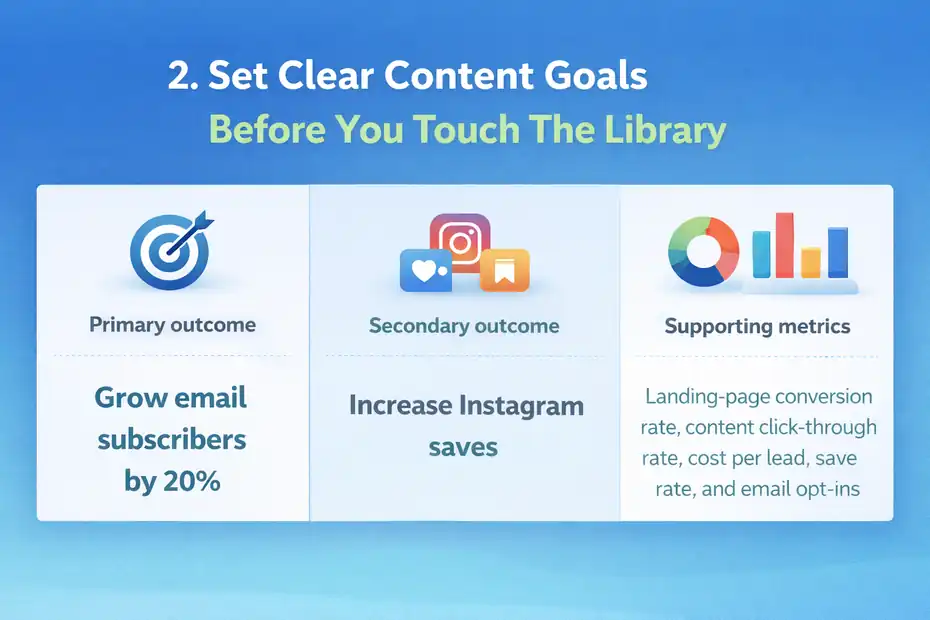
- Primary outcome: What you care about most.
- Secondary outcome: What you still want, but not at the expense of the primary goal.
- Supporting metrics: The numbers that tell you if the content is moving in the right direction.
Example:
- Primary outcome: Grow email subscribers by 20%.
- Secondary outcome: Increase Instagram saves.
- Supporting metrics: Landing-page conversion rate, content click-through rate, cost per lead, save rate, and email opt-ins.
This matters because different Envato assets help different goals. A slick intro animation might boost perceived quality, but a clear downloadable checklist design may drive more actual signups. A beautiful stock photo can support a blog post, but a better comparison chart may create more conversions.
The point is not to create prettier content. It is to create useful content that moves a reader or viewer closer to action.
Build Audience-Centered Content Pillars
Once your goal is clear, create three to five content pillars. These are your recurring themes. They keep you focused and help you search Envato with intent instead of endless curiosity.
For most brands or creators, strong content pillars usually fit into these buckets:
- Education: How-tos, explainers, myths, beginner guidance.
- Trust: Testimonials, case studies, behind-the-scenes, process content.
- Decision support: Comparisons, FAQs, objections, buyer guides.
- Engagement: Trends, opinion posts, community questions, relatable pain points.
- Conversion: Offers, lead magnets, product demos, launch assets.
Let’s say you are a freelance video editor selling services to coaches. Your pillars might be editing tips, client transformation stories, video strategy, and offer education.
Inside Envato, that would steer you toward motion templates, thumbnail graphics, pitch deck layouts, lower-thirds, audio, and B-roll rather than wandering into unrelated website themes or print kits.
I believe this is where topical authority also gets stronger for SEO. When your articles, videos, and downloads all reinforce a few core themes, search engines and readers both understand what you are about.
Pick Metrics That Reflect Real Performance
Vanity metrics can make a bad strategy look healthy. I would rather see a post with 900 views and 40 signups than a post with 20,000 views and zero action. So before you build anything, define the metrics that matter for your format.
A practical metric map could be:
- Blog content: Organic clicks, average position, dwell time, assisted conversions.
- Short-form video: Retention, shares, profile visits, link clicks.
- Lead magnets: Landing-page conversion rate, opt-in rate, cost per lead.
- Email creative: Click rate, reply rate, unsubscribe rate.
- Sales content: Demo bookings, add-to-cart rate, revenue per visitor.
This is also where your asset choices get smarter. If retention is weak, your video hook design may need help. If conversions are low, your CTA graphic or lead magnet layout may be the actual bottleneck. Your envato elements content creation strategy should help you diagnose those weak points, not just decorate them.
Audit Your Current Content And Asset Workflow
Before building a new system, take a hard look at what you already have. This step feels boring, but it is usually where the biggest gains hide.
Most content teams do not need more ideas first. They need less chaos.
Find What Is Already Working
Start by reviewing your last 20 to 50 content pieces across your main channels. Look for patterns in performance, not isolated wins. Ask simple questions:
- Which formats get the best engagement or conversions?
- Which topics consistently attract the right audience?
- Which visuals seem to increase watch time, saves, or click-throughs?
- Which assets are slowing production down?
You do not need enterprise analytics to do this. A spreadsheet works. Tag each piece by topic, format, audience stage, asset type, and result. After that, the patterns usually become obvious.
For example, you may notice your how-to carousels perform better than motivational posts. Or your tutorial videos with text overlays retain viewers better than talking-head clips alone. Or your downloadable templates bring in more leads than your blog sidebar offers.
Once you see that, you can use Envato more deliberately. Instead of asking, “What can I make?” you ask, “What assets improve the content types that already perform?”
Identify Content Bottlenecks
In most workflows, the real problem is not creativity. It is friction. Someone cannot find the right visual. Thumbnails take too long. Brand fonts are inconsistent. The editing queue gets stuck waiting for graphics. Licensing questions slow down approvals.
Envato can help with speed, but only if you identify the friction first.
Common bottlenecks include:
- Search overload: Too many asset choices and no naming system.
- Design inconsistency: Different fonts, colors, or visual styles across channels.
- Editing delay: Templates are not pre-selected for recurring content.
- Approval issues: Team members do not know which assets are safe to use.
- Repurposing waste: One video gets published once instead of turned into clips, carousels, email visuals, and blog graphics.
This part matters because Envato’s current setup includes broad commercial licensing for stock assets and simplified licensing guidance, including automatic commercial licensing changes that reduce friction compared with older project-registration workflows.
The exact terms still matter, especially for repeated or separate uses, but the system is clearly designed to streamline everyday content operations.
Clean Up Your Existing Asset Library
This is my favorite ugly-but-important recommendation: build a tidy internal asset bank before you produce more content. Even the best subscription becomes messy if your local folders are a landfill.
Set up a simple structure like this:
- Brand
- Campaigns
- Social Templates
- Blog Graphics
- Lead Magnets
- Audio
- B-Roll
- Fonts
- Approved Asset Packs
- Retired Assets
Then create a naming rule. Something like: platform-topic-format-version-date
Example: youtube-email-funnel-lowerthird-v2-mar2026
That sounds small, but it is the difference between “Where is that file?” and “Open the folder and publish.”
Build A Content System Around Envato Asset Categories
Now you are ready to turn the subscription into an actual operating system.
This is where your envato elements content creation strategy becomes practical and repeatable.
Map Each Content Type To Specific Asset Categories
One of the easiest wins is building a category map. This tells you which Envato asset groups support each content format you publish. It reduces browsing time and keeps your creative choices aligned with your goals.
Here is a simple mapping model:
| Content Type | Best-Fit Asset Categories | Main Use |
|---|---|---|
| Blog posts | Photos, icons, infographics, mockups, fonts | Improve readability and shareability |
| Reels/Shorts | Video templates, stock footage, music, sound effects, motion graphics | Increase retention and production speed |
| YouTube videos | Intro templates, lower-thirds, B-roll, music, thumbnail graphics | Raise perceived quality |
| Lead magnets | Presentation templates, document layouts, icons, charts | Improve opt-in conversion |
| Ads | Video templates, product mockups, music, stock visuals | Fast creative testing |
| Emails | Header graphics, illustrations, banners | Better visual hierarchy |
Envato’s broad category coverage is exactly why this approach works. It lets one subscription support multiple channels instead of forcing you to patch together assets from separate vendors.
The trick is to pre-decide the category match. That way, a blog workflow does not accidentally turn into an hour of browsing stock footage you never needed.
Create Reusable Asset Packs For Recurring Content
If you publish weekly, monthly, or campaign-based content, create pre-approved asset packs. These are small groups of visuals, fonts, tracks, templates, and graphic elements you reuse across a content series.
For example, a “Weekly Tutorial Pack” might include:
- One intro animation template
- Two lower-third styles
- Three background music tracks
- Five B-roll folders
- One thumbnail layout
- One caption style
- A color and font reference sheet
A “Lead Magnet Pack” might include a worksheet template, icon set, cover layout, chart style, and PDF export checklist.
This matters because your audience usually responds better to consistent structure than endless novelty. Familiarity creates brand memory. And on your side, production gets faster because you are no longer starting from zero.
I recommend limiting each recurring content series to one primary pack and one backup pack. That keeps your visuals stable without feeling stale.
Use Templates As Starting Points, Not Finished Content
This is where many people get lazy, and it shows. A template should speed up thinking, not replace it. If you use Envato templates exactly as they come, your content can feel generic fast.
Here is the better approach:
- Keep the structure: Layout, timing, visual hierarchy, transitions.
- Change the identity: Fonts, colors, copy, pacing, imagery, and CTA.
- Adapt for the platform: Vertical for Reels, tighter cuts for ads, longer pacing for tutorials.
- Localize the message: Use your product, your audience pain points, your actual offer.
Imagine you are creating a lead magnet for a B2B consultant. A generic presentation template becomes more effective when you rewrite headings around real objections, swap stock charts for meaningful data, simplify slide density, and align visuals with the consultant’s actual offer.
In my experience, the best-performing template-based content still feels like it came from a real person with a point of view.
Create A Step-By-Step Production Workflow
A strategy only matters if it can be repeated under deadline pressure. This section is where you turn ideas and assets into a production line that still feels creative.
Build A Five-Stage Workflow
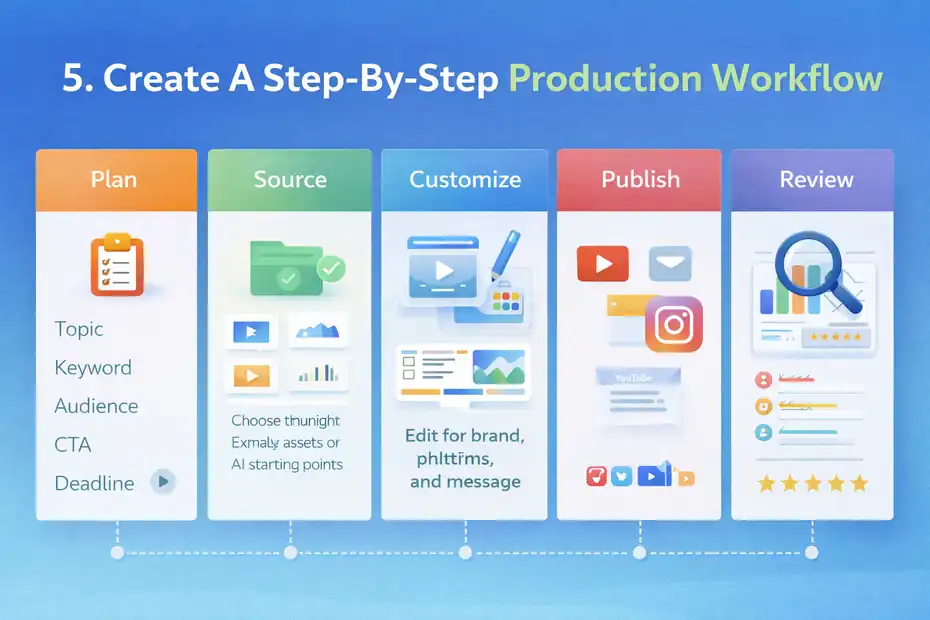
You do not need a complicated project-management philosophy here. Most teams do well with five clear stages:
- Plan: Topic, keyword, audience, CTA, format, deadline.
- Source: Choose the right Envato assets or AI starting points.
- Customize: Edit for brand, platform, and message.
- Publish: Export, schedule, and distribute.
- Review: Measure performance and document learnings.
That is simple on purpose. Complexity usually kills consistency.
At the sourcing stage, create clear criteria before you search:
- Does this asset support the content goal?
- Does it match the brand look?
- Is it flexible across channels?
- Can it be edited quickly?
- Will it still feel relevant in 60 to 90 days?
That last question is underrated. A trend-heavy template may be exciting today and embarrassing next quarter. I usually lean toward adaptable assets with clean foundations.
Assign Roles Even If You Work Alone
This sounds strange for solo creators, but it helps. Split your work into functional roles, even if you are doing all of them yourself.
Example roles:
- Strategist: Chooses the topic and CTA.
- Producer: Pulls assets and drafts the first version.
- Editor: Tightens pacing, copy, visuals, and hierarchy.
- Publisher: Formats for each platform and posts it.
- Analyst: Reviews the results and updates the system.
When one person does all of that without switching hats intentionally, quality drops. You make rushed creative decisions because no part of the process has a clear job.
For teams, this model also reduces confusion. The designer knows which assets are approved. The editor knows what needs customization. The marketer knows what metric the piece is chasing.
Add Approval Rules And Brand Guardrails
The fastest way to scale content is to reduce avoidable debate. Create a one-page guide with these rules:
- Approved fonts
- Core brand colors
- Thumbnail rules
- CTA styles
- Image treatment rules
- Music mood guidelines
- Intro and outro standards
- Asset naming rules
- Export specs by platform
This is especially important if you use templates, stock media, or AI-generated content. Without guardrails, the library becomes a source of inconsistency.
Envato’s team and licensing resources also matter here if multiple people are accessing and using assets across client or company work. Teams can nominate a licensee, and official terms still make clear that separate uses or projects may require separate licensing treatment depending on how an item is used.
Use Envato Elements For Multi-Format Repurposing
This is where the economics of your strategy improve. One strong content idea should turn into several outputs.
Envato is especially useful here because it supports visual adaptation across formats.
Turn One Core Asset Into Multiple Deliverables
Let’s say you produce one educational YouTube video. With the right asset system, that single piece can become:
- A blog post with screenshots, icons, and featured images
- Three Shorts or Reels using edited clips, captions, and motion templates
- An email newsletter with a matching header graphic
- A PDF checklist using a document or presentation template
- A LinkedIn carousel using clean slide layouts
- A thumbnail test set using alternative mockups or design assets
This is what I mean by a real envato elements content creation strategy. You are not using the library for isolated outputs. You are using it to multiply each piece of strategic thinking.
The leverage gets stronger when your content calendar is built around “pillar assets.” One hero video, one lead magnet, one webinar, or one flagship article can feed a week or month of supporting content.
Design For Adaptation From The Start
Repurposing gets easier when the original content is built for reuse. That means planning visual blocks that can be extracted later.
For example:
- Use headline overlays that can become carousel slides.
- Use clean diagrams that can be exported as blog graphics.
- Use section-based scripts that create natural short-form clips.
- Use visual hooks that can double as ad openers.
- Use modular templates where colors, text, and layouts swap quickly.
A lot of repurposing fails because the original piece is too messy. Overcrowded slides, weak structure, and inconsistent visuals are hard to turn into anything else. I recommend designing your core content with modular sections from the very beginning.
Build A Repurposing Checklist
A checklist keeps the workflow honest. Here is a simple one:
- Long-form asset created
- Three short clips identified
- Blog visuals exported
- Email banner version made
- Lead magnet tie-in included
- Thumbnail variants created
- Performance tracking links added
This may sound basic, but systems beat intentions. A checklist is often what turns “we should repurpose this” into “we actually published six assets from one idea.”
Handle Licensing, Compliance, And Brand Risk Correctly
This section is not the most exciting, but it is one you should not skip. A strategy that creates legal confusion or client risk is not a good strategy.
Understand The Commercial Usage Basics
Envato’s official support materials describe broad commercial rights for stock items under a simple license model, and recent updates note that downloads are automatically licensed for commercial use, reducing friction compared with older registration processes.
That said, the user terms and FAQ still make clear that licensing relates to a specific project or end product, and multiple uses can require new licenses for the same item.
The safe takeaway is this: do not assume “unlimited downloads” means “use one download however you want forever in every context.” It means access is broad and efficient, but usage still follows license rules.
For practical workflow purposes:
- Keep download records.
- Document which assets were used in which projects.
- Create fresh license records where needed.
- Review special-use questions before client delivery or paid campaigns.
I am not giving legal advice here, but I strongly suggest making licensing part of your production checklist instead of an afterthought.
Protect Your Brand From Generic-Looking Content
There is also a reputational risk that gets ignored: overused assets. If your content looks identical to ten other brands using the same template pack, your differentiation disappears.
A few easy ways to reduce that risk:
- Rewrite all copy from scratch.
- Replace default stock images when possible.
- Change pacing and timing in motion templates.
- Build your own color and typography system.
- Add custom screenshots, quotes, data, and examples.
- Pair stock visuals with original insight.
This is one reason I think the best Envato users are not “template users.” They are creative directors of their own content system. The asset is the base layer, not the finished identity.
Create A Lightweight Compliance Routine
You do not need a legal department to stay organized. A simple routine works:
- Before sourcing: Confirm the intended use.
- During production: Save asset links or IDs with the project file.
- Before publishing: Verify client or campaign alignment.
- After publishing: Archive final usage notes in one folder.
For agencies, this is even more important because one asset may move across multiple client contexts. Envato’s own support explains that separate client uses can require separate licensing treatment. The smoother your internal records are, the less likely you are to hit avoidable compliance problems later.
Optimize The Strategy With Testing, Analytics, And Advanced Scaling
Once the system is running, your job shifts from building content to improving the output. This is where many good strategies become great.
Test Creative Variables, Not Just Topics
A lot of teams only test topics. That is useful, but it is incomplete. With Envato-supported production, you can also test creative variables faster:
- Thumbnail style
- Hook animation
- Background music mood
- Text overlay density
- CTA slide design
- Lead magnet cover layout
- Short-form pacing
- Carousel visual hierarchy
This is where current plan structures with AI generations can help as a fast ideation layer, especially for variant creation and early creative exploration. Plan allowances differ by tier, but AI tools are clearly part of the current product direction.
A simple example: if one lead magnet landing page converts at 22% and another at 31%, the difference may not be the topic at all. It may be the preview mockup, the visual clarity, or the promise in the cover design.
Create A Content Scorecard
I recommend building a monthly scorecard with three categories:
- Efficiency: Time to produce, number of assets reused, cost per asset-driven campaign.
- Performance: Click-through rate, retention, conversions, saves, assisted revenue.
- Consistency: On-brand execution, asset quality, workflow compliance, publishing cadence.
Then score your recurring content formats. You may find that one format is beautiful but inefficient, while another is less glamorous but delivers leads every month. That kind of clarity helps you decide where Envato should play a bigger or smaller role.
Scale With Systems, Not More Downloads
The advanced version of an envato elements content creation strategy is not “download more things.” It is “build more reliable systems.”
That usually means:
- Turning winning assets into reusable packs
- Creating platform-specific presets
- Standardizing naming and approvals
- Training team members on a shared workflow
- Building a swipe file of high-performing structures
- Updating asset packs quarterly instead of randomly
From what I have seen, the biggest jump in content quality often comes after simplification. Fewer recurring templates. Better brand standards. Clearer content pillars. More deliberate testing. Less browsing.
That is also where teams stop feeling overwhelmed by “content creation” and start feeling in control of a content engine.
Common Mistakes That Quietly Ruin Results
Most weak strategies do not fail loudly. They just become inconsistent, slow, and forgettable. Here are the mistakes I see most often.
Mistake 1: Treating Envato As Inspiration Instead Of Infrastructure
Browsing is fun. Strategy is useful. If your workflow begins with “Let’s see what looks cool,” you will probably waste time and dilute your message.
The fix is simple: define the goal, topic, format, and CTA first. Search second.
Mistake 2: Using Too Many Styles At Once
A huge library can tempt you into visual drift. One week your brand feels cinematic. The next week it looks minimal. Then playful. Then corporate. That confuses the audience.
Choose a limited visual system and stick to it for at least one quarter before making major changes.
Mistake 3: Repurposing Poor Source Content
No asset library can rescue weak structure. If the original video rambles, the blog has no clear angle, or the lead magnet solves nothing specific, repurposing just multiplies mediocrity.
Make the core content better first. Then scale it.
Mistake 4: Ignoring Workflow Friction
If your team cannot find files, confirm licensing, or edit templates quickly, you do not have a content strategy. You have a subscription and a headache.
Fix file structure, approval rules, and asset packs before you worry about doing more.
Mistake 5: Confusing Polish With Performance
Better-looking content can help, but only when the message is strong. I have seen plain content outperform beautifully designed content because the offer, hook, or idea was clearer.
Use Envato to enhance communication, not cover up a weak strategy.
A Simple 30-Day Plan To Build Your Strategy
If you want to put all of this into action without overcomplicating it, here is a clean 30-day rollout.
Week 1: Strategy And Audit
Focus on the fundamentals:
- Pick one primary goal and one secondary goal
- Define three to five content pillars
- Audit your last 20 to 50 pieces of content
- Identify your best-performing formats
- Spot production bottlenecks
By the end of week one, you should know what content deserves more support and where your workflow is breaking down.
Week 2: Asset Mapping And Brand Rules
Now build the foundation:
- Map content types to asset categories
- Create two or three recurring asset packs
- Set naming conventions
- Document brand rules
- Create folders for approved assets
This is where the strategy starts feeling real. You are no longer relying on memory or random downloads.
Week 3: Production And Repurposing
Create one pillar asset and multiply it:
- Produce one flagship article, video, or lead magnet
- Build supporting visuals from Envato assets
- Repurpose it into at least three secondary formats
- Track time spent and friction points
- Document what should become a repeatable template
Keep it practical. One well-built mini-system beats ten unfinished ideas.
Week 4: Measure And Refine
Use the last week to improve:
- Review performance metrics
- Compare versions or creative variations
- Retire weak assets
- Save winning templates
- Update your scorecard
- Plan next month based on evidence
That last part matters most. A real envato elements content creation strategy gets better through feedback, not guessing.
Final Thoughts
If I had to sum this up simply, I would say this: the best envato elements content creation strategy is not about downloading more creative assets. It is about creating less friction between your idea and the finished content your audience actually needs.
Envato Elements is strongest when you use it as a structured content system. The platform’s current mix of large asset coverage, unlimited creative stock downloads, AI tooling, and streamlined commercial licensing gives creators and teams a lot of operational leverage.
But leverage only turns into results when your goals are clear, your workflow is organized, and your brand choices stay intentional.
That is the difference between “using Envato” and building a strategy around it. One gives you more files. The other gives you a repeatable content engine.
FAQ
What is an envato elements content creation strategy?
An envato elements content creation strategy is a structured system for using Envato assets to plan, create, and scale content efficiently. It connects your goals, content formats, asset choices, and workflow so you can produce consistent, high-quality content without starting from scratch every time.
How do I start using Envato Elements for content creation?
Start by defining your content goals and identifying the formats you publish most often. Then map those formats to Envato asset categories like templates, videos, and graphics. Create reusable asset packs and build a simple workflow so you can consistently produce content without wasting time searching.
Is Envato Elements good for scaling content production?
Yes, Envato Elements is ideal for scaling content production because it offers unlimited downloads and reusable templates. When combined with a clear workflow and repurposing strategy, it allows you to turn one content idea into multiple formats quickly while maintaining consistent quality across platforms.
Can I use Envato Elements assets for commercial content?
Envato Elements allows commercial use of its assets under a simple licensing model. However, each project or end product may require its own license usage. It’s important to track where assets are used and review licensing terms to ensure compliance for client work or monetized content.
What are the biggest mistakes in an Envato content strategy?
The most common mistakes include relying too heavily on templates without customization, lacking clear content goals, inconsistent branding, and poor workflow organization. These issues lead to generic content and slow production. A structured strategy helps maintain quality, efficiency, and brand identity.

I’m Juxhin, the voice behind The Justifiable.
I’ve spent 6+ years building blogs, managing affiliate campaigns, and testing the messy world of online business. Here, I cut the fluff and share the strategies that actually move the needle — so you can build income that’s sustainable, not speculative.
Related posts:
 10 Similar Sites To Apollo IO Every Marketer Should Try
 LearnWorlds Shopify Setup: What Works, What Fails
 Why CallRail Cost Might Be Worth the Investment
 Inside Freshworks Inc: Products, Vision, and Growth Story
 Omnisend for WooCommerce: Boost Store Sales Instantly
 Why Businesses Love Freshworks Freshdesk for Service