
Table of Contents
Some links on The Justifiable are affiliate links, meaning we may earn a small commission at no extra cost to you. Read full disclaimer.
Elementor review for bloggers trying to monetize is a fair question, because a page builder can either help you turn traffic into revenue faster or quietly add cost, clutter, and friction to your site.
I’ve seen both outcomes.If your blog already runs on WordPress, Elementor is appealing because it gives you drag-and-drop control over landing pages, opt-in forms, sales pages, and key monetization elements without touching much code. But that does not automatically make it the right buy.
In this guide, I’ll break down where Elementor genuinely helps bloggers earn more, where it falls short, and whether the upgrade is worth it for your stage.
Elementor runs inside the larger WordPress ecosystem, which powers 42.5% of all websites, and Elementor itself is used on 13.2% of all websites as of March 31, 2026.
What Elementor Really Is For Bloggers Trying To Monetize
Elementor looks like a design tool on the surface, but for bloggers, it is really a conversion tool.
The real question is not “Can it make pages look better?” It is “Can it help you make more money from the traffic you already have?”
What Elementor Does In Plain English
If you are new to page builders, let me simplify it. Elementor is a visual builder for WordPress. Instead of relying only on your theme’s default layout or the normal WordPress editor, you can drag sections, images, buttons, forms, pricing blocks, testimonial boxes, and product areas into place visually.
Elementor’s official plans also separate features quite clearly: the more advanced plans include Theme Builder, Dynamic Content, Form Builder, Popup Builder, custom code and CSS, and eCommerce features, while lower tiers limit or remove some of those tools.
For a blogger, that matters because monetization usually depends on pages that do a specific job well. A normal blog post informs. A monetized blog often also needs pages that convert. Think about these examples:
- Affiliate Landing Page: A comparison page built to guide a reader toward one offer.
- Lead Magnet Page: A clean email signup page offering a checklist, template, or mini-course.
- Sales Page: A long-form page selling your own digital product.
- Resource Hub: A curated page listing tools, sponsors, and affiliate links in one place.
You can build all of these inside WordPress without Elementor. The difference is speed and control.
In my experience, Elementor becomes valuable when you are tired of saying, “I wish I could move this section, remove that sidebar, add an opt-in here, and make this page feel intentional.”
Why Bloggers Consider It In The First Place
Most bloggers do not buy Elementor because they love design. They buy it because monetization exposes the limits of a basic theme. You start noticing that your homepage does not guide readers anywhere. Your category pages feel dead.
Your opt-in boxes look generic. Your affiliate content works, but not as well as it could if the layout supported the pitch.
Elementor is attractive because it sits between two extremes. It is easier than custom coding, but far more flexible than leaving everything to your theme. That middle ground is the real product.
I also think this is why Elementor has stayed relevant. It is not just a “make it pretty” tool. It is a “build the exact revenue page you need this week” tool.
For bloggers who monetize through affiliate offers, digital products, coaching, membership content, or email funnels, that flexibility can pay for itself quickly when used well. Its continued reach is not small either:
Elementor is used on 18.5% of websites where the CMS is known, and 13.2% of all websites overall.
Who Elementor Is Best For And Who Should Skip It

Before getting excited about templates and widgets, it helps to know whether Elementor matches your business model. This is where most bad purchases happen.
Bloggers Who Usually Benefit The Most
Elementor tends to make the most sense for bloggers who already know how they plan to monetize. If you are building around display ads alone, the benefit is smaller.
But if your income depends on moving readers into offers, email sequences, or product pages, Elementor becomes more useful.
I’d put the best-fit bloggers into a few buckets:
- Affiliate Bloggers: You need custom comparison pages, product roundups, and clean call-to-action sections.
- Digital Product Creators: You want course pages, checkout support pages, webinar pages, and launch pages.
- Service-Based Bloggers: You need consultation pages, portfolio-style sections, and lead forms that feel polished.
- Email-First Bloggers: You care deeply about landing pages, segmentation, popups, and lead capture flows.
The reason these groups win with Elementor is simple. Their revenue depends on page design doing real work. A blogger selling a $49 ebook, a $299 course, or a recurring affiliate offer can often recover the annual cost from one decent conversion lift.
Elementor’s official entry pricing starts from $49 per year, though feature access changes significantly by tier.
Bloggers Who May Not Need It Yet
I do not think every blogger should rush to install Elementor Pro. If your blog is brand new, you have 12 posts, no email strategy, and no monetization path beyond “maybe ads later,” Elementor can become a distraction.
Here is the honest version. A page builder cannot fix weak positioning, low-quality content, or nonexistent traffic. If you have not yet validated your niche, published enough useful content, or clarified your offer, design freedom may actually slow you down.
You may not need Elementor yet if:
- You Monetize Mostly With Ads: Your money comes from pageviews, so content output and site speed may matter more.
- You Use A Strong Block Theme Already: Modern WordPress themes and the block editor can cover a lot.
- You Hate Ongoing Site Tweaking: Elementor gives control, and control tempts you to keep redesigning.
- You Want The Simplest Stack Possible: Fewer plugins often means fewer moving parts.
That does not mean Elementor is bad. It just means monetization maturity matters. I usually suggest bloggers earn or validate at least some early revenue path first, then decide whether Elementor helps them scale it.
The Monetization Features That Actually Matter
This is the part that separates hype from practical value. Not every Elementor feature matters to bloggers. Some are nice. A few are directly tied to revenue.
Landing Pages, Sales Pages, And Offer Pages
For most bloggers, the biggest revenue win is layout control. A monetized page needs to remove distractions and guide attention.
With Elementor, you can build pages without the default blog sidebar, adjust spacing around buttons, add sections for testimonials, FAQs, guarantee boxes, feature grids, and comparison blocks, and structure a page for one action instead of six.
That sounds small until you compare outcomes. Imagine you run a blog that gets 10,000 visits a month to a high-intent tutorial. You link from that post to a dedicated affiliate tools page. If the default page looks cluttered, people bounce.
If the page is structured with a clear headline, short trust-building sections, comparison cards, and better calls to action, even a modest lift in clicks can matter.
A move from 2% to 3% click-through on 10,000 visitors means 100 additional clicks. If your affiliate EPC is strong, that can turn into meaningful monthly revenue.
I would not claim Elementor magically causes that lift. Your copy and offer still matter more. But better control over layout makes testing good monetization design much easier.
Forms And Email Capture
Email is where Elementor becomes more than a design toy. On Elementor’s higher Pro tiers, Form Builder is included, and the more advanced plan versions also allow you to manage and analyze submissions centrally.
Lower tiers are more limited, and the Essential tier notably includes Form Builder but does not include form submissions management in the same way.
For bloggers, that matters because email often monetizes better than raw pageviews. A reader who does not buy today may buy from your newsletter next week. Elementor helps you create:
- Lead Magnet Forms: Embedded inside blog posts or dedicated landing pages.
- Two-Step Opt-Ins: Click a button, then show the signup form.
- Segmented Signup Pages: Different forms for different reader interests.
- Content Upgrade Blocks: Inline opt-ins tailored to the topic of a post.
I like this because it lets you align design with intent. A generic footer form rarely performs like a targeted content upgrade halfway through a relevant post.
Popups And Exit Intent
I know popups annoy some people. Used badly, they are awful. Used carefully, they can recover abandoning traffic.
Elementor’s Popup Builder is included on more advanced Pro plans, not on the Essential plan, and Elementor’s own help documentation shows options such as exit intent, page-view rules, session rules, frequency limits, and source-based display conditions.
That means a blogger can do more than blast the same popup sitewide. You can show:
- Exit-Intent Lead Magnet Offers: Triggered when a reader looks ready to leave.
- Referral-Specific Offers: A popup shown only to users coming from search or a specific link source.
- Page-Depth Prompts: Displayed after a reader visits multiple pages.
- Frequency-Limited Campaigns: So the same user is not hammered repeatedly.
In my opinion, this is one of Elementor Pro’s strongest monetization angles. Not because popups are magical, but because audience targeting plus decent design can rescue readers who would otherwise disappear.
Free Vs Pro: Is The Upgrade Actually Worth Paying For?
This is where the buying decision gets real. A lot of bloggers can use the free version for quite a while.
Others will outgrow it almost immediately.
What You Can Realistically Do With The Free Version
The free version is enough for experimenting with page layout and building simple pages visually.
If your current site feels rigid, Elementor Free can improve page presentation fast. That alone can be useful when you are creating a homepage, about page, simple lead page, or cleaner blog content sections.
But the free version is not where serious monetization flexibility lives. The upgrade matters when your income strategy needs specialized pieces. Think popups, dynamic content, stronger form workflows, theme-level customization, and eCommerce-focused layouts.
If you are still early, here is the test I recommend: Use the free version to build one page you actually need. Not a fake demo page. Build a real lead magnet page, resource page, or affiliate tools page. If the free version solves 80% of your frustration, you may not need Pro yet.
What Pro Unlocks For Monetization
The jump to Pro is less about “more design” and more about “more business functionality.”
According to Elementor’s official plan breakdown, the higher-feature plans include 85 Pro widgets, Theme Builder, Dynamic Content with custom fields and post types, Form Builder with submission management, Popup Builder, custom code and CSS, and eCommerce features.
Lower Essential access is more restricted, with 57 widgets and no Popup Builder, no custom code/CSS, and no eCommerce features.
For bloggers trying to monetize, the practical Pro wins are usually these:
- Theme Builder: Customize key templates such as headers, footers, post layouts, and archive designs.
- Popup Builder: Run list-growth and retention campaigns without another popup plugin.
- Dynamic Content: Pull structured content into reusable layouts, useful for reviews, directories, and content templates.
- eCommerce Features: Helpful if your blog sells products through WooCommerce.
- Custom Code And CSS: Gives more control if you want fine-tuning later.
I’d frame the purchase like this: if Pro helps you build one better opt-in funnel, one stronger affiliate comparison page, or one more persuasive product page, the cost can be justified. If you mainly want prettier pages, the value is softer.
How Elementor Performs In Real Blogger Monetization Scenarios
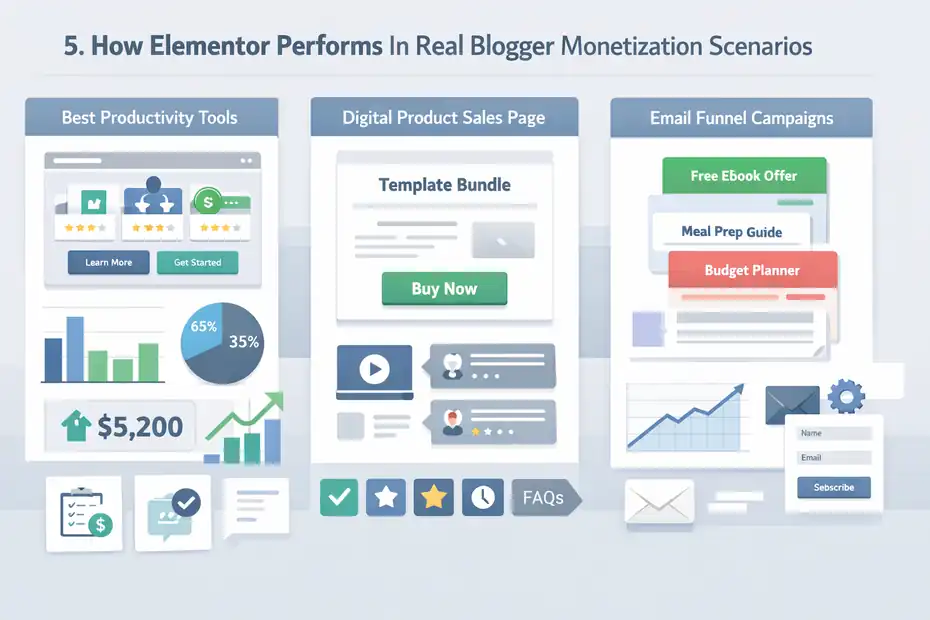
The easiest way to judge Elementor is not by the feature list. It is by asking, “What happens when a blogger tries to use it for an actual revenue goal?”
Scenario 1: Affiliate Content That Needs Better Conversion Paths
Imagine you run a blog about productivity tools. Your review posts rank, and people click your affiliate links, but the pages feel messy. You have text links everywhere, inconsistent call-to-action boxes, and no dedicated comparison pages.
Elementor can help you build:
- A Dedicated Best Tools Page: Organized with sections, anchor links, comparison cards, and stronger calls to action.
- Custom Review Templates: More consistent layouts for pros, cons, pricing notes, and recommendation blocks.
- Topic-Specific Resource Hubs: One clean page for “my favorite blogging tools,” “best email tools,” or “best note-taking apps.”
This is where Elementor shines. It lets you package commercial-intent content more deliberately. I have found that many bloggers do not need more traffic first. They need a better bridge between existing traffic and the right offer.
That said, there is a danger. If you go overboard with flashy sections, animations, and cluttered layouts, your page can feel salesy and slow. Elementor gives power, but it does not supply judgment. That part is still on you.
Scenario 2: Selling A Digital Product
Now imagine you sell a blogging template bundle or mini-course. Your sales page is currently just a blog post with a buy button near the bottom. It technically works. It just does not persuade well.
This is where Elementor can have a very direct revenue effect. You can structure the page around a classic conversion flow: problem, promise, proof, product details, FAQs, objections, and CTA. That makes your offer easier to understand and easier to buy.
You can also pair it with opt-in pages for free lead magnets and nurture readers before the pitch. If you are using WordPress as a content engine and want the front-end experience to feel more intentional, Elementor closes that gap nicely.
Scenario 3: Building An Email Funnel
Many bloggers underestimate how valuable custom landing pages are for list growth. An inline form inside a post is fine. A focused landing page often converts better because it removes distractions and matches a specific promise.
Elementor’s form and popup capabilities on eligible Pro plans make it more practical to create funnel entry points. For example, a food blogger could build separate landing pages for “30 quick weeknight dinners,” “meal prep checklist,” and “grocery budget guide,” each tied to a different segment.
A finance blogger could do the same for budgeting, side hustles, and debt payoff. That kind of segmentation can improve the relevance of later affiliate or product pitches.
The Biggest Downsides Bloggers Should Know Before Buying
I like Elementor in the right context, but I would not call it a no-brainer. There are trade-offs, and some of them matter a lot.
It Can Hurt Performance If You Use It Carelessly
This is probably the most common complaint, and it is not imaginary. Any builder that adds layers of design controls can produce heavier pages if you pile on widgets, animations, oversized images, or bloated templates. Elementor itself now includes image optimization and performance-related tools on some plans, but those extras are not universal across all tiers.
What matters more than the brand is how you build. I have seen simple Elementor pages load fine, and I have seen overdesigned pages become sluggish. If your monetization model depends on SEO and ad revenue, poor performance can quietly offset some conversion gains.
Here is my view: Elementor is not automatically slow. But it absolutely makes it easier for an undisciplined site owner to create slow pages.
It Can Encourage Design Procrastination
This one is less technical but just as real. Elementor makes redesigning fun. That is both a feature and a trap.
A blogger who should be writing the next revenue-generating article can spend three hours adjusting spacing, button shadows, and section padding. Ask me how I know.
If you are the type who already overthinks branding, Elementor can become an expensive way to avoid publishing. In that case, the problem is not the plugin. It is the temptation.
The Best Features Are Not On The Cheapest Tier
This matters for honest budgeting. Elementor’s official pricing starts at $49 per year, but the Essential plan does not include Popup Builder, custom code and CSS, or eCommerce features, and it limits some form-related functionality compared with the more advanced tiers. Advanced Solo and above are where the stronger monetization toolkit appears.
So if you are reading sales pages or blog posts that talk about all the cool Elementor monetization features, make sure those features are actually in the tier you plan to buy. This is a small detail that causes a lot of frustration.
How To Decide If Elementor Will Pay For Itself
This is the section I wish more reviews included. You do not need a philosophical answer. You need a math answer.
Run A Simple ROI Check
Let’s say the plan you need costs around the entry-level annual range or more, depending on tier. Instead of asking, “Is Elementor expensive?” ask, “What would it need to improve for this to break even?”
Here is a basic framework:
- Affiliate Blogger: How many extra affiliate commissions would a better comparison page need to generate?
- Product Seller: How many additional product sales would one stronger sales page need to produce?
- Email-Focused Blogger: How many extra subscribers would a better landing page need to capture, and what is each subscriber worth over time?
- Service Blogger: How many additional consult calls or inquiries would justify the cost?
Example: If your average affiliate commission is $25, two extra conversions a year can cover a $49 entry-level cost. Even if you need a higher plan, the threshold may still be surprisingly low if your monetization engine is working.
That is why I rarely evaluate Elementor as a “design expense.” I evaluate it as a revenue infrastructure expense.
Ask Whether Your Bottleneck Is Design Or Traffic
This is the second filter. Elementor helps more when design and funnel structure are the bottleneck. It helps less when your real issue is that almost nobody visits your site.
A quick self-check:
- If readers click but do not convert, Elementor may help.
- If your offer exists but the page feels weak, Elementor may help.
- If you have traffic but weak email signup rates, Elementor may help.
- If you have 50 monthly visitors and no monetization model, Elementor is probably not your first priority.
In my experience, Elementor pays off best for bloggers who already have some traction and know where revenue leakage is happening.
Best Practices If You Use Elementor For Monetization
If you buy Elementor, use it like a business tool, not a decorating hobby. That mindset changes everything.
Build Revenue Pages First, Not Cosmetic Pages
Do not start with your footer redesign. Start with the pages closest to money.
I suggest this order:
- Lead Magnet Landing Page: Capture email subscribers.
- Primary Affiliate Tools Page: Present your most profitable recommendations.
- Sales Page: If you sell a digital product or service.
- Homepage Or Start Here Page: Guide readers to the right monetization paths.
- Key Post Templates: Improve call-to-action placement inside content.
This order matters because it creates a faster feedback loop. You want Elementor judged by measurable results, not by whether your site feels prettier.
Keep Templates Tight And Reusable
Elementor becomes more powerful when you stop designing every page from scratch. Build reusable sections and page structures. Use consistent CTA blocks, testimonial areas, guarantee boxes, and FAQ layouts.
That is where Dynamic Content and theme-level control can become especially helpful on the more advanced plans. Instead of rebuilding repeated structures manually, you can create repeatable systems that save time and support consistency.
For bloggers producing lots of review-style content, consistency is not just a branding issue. It reduces friction and makes monetization clearer to the reader.
Design For Clarity, Not Impressiveness
This is my strongest opinion in the whole article. The biggest Elementor mistake bloggers make is trying to make pages look impressive instead of making them easy to act on.
A monetized page should usually do these things well:
- Communicate The Offer Fast
- Make The Next Step Obvious
- Reduce Distractions
- Support Trust With Proof
- Work Cleanly On Mobile
That is it. Fancy motion effects do not usually increase trust. Clear structure does.
Elementor Vs Sticking With Native WordPress Blocks
This comparison matters because WordPress has improved a lot.
Elementor is no longer competing against a weak editor from years ago. It is competing against a much more capable block-based environment.
Where Native Blocks May Be Enough
For many bloggers, the native WordPress editor plus a solid theme can cover a surprising amount. If your site mainly publishes content, embeds opt-ins through another tool, and does not rely on custom sales or landing pages, native blocks may be enough.
That route can also be cleaner. Fewer moving parts, fewer plugin dependencies, and often less temptation to overdesign. Since WordPress remains the dominant CMS on the web, many theme and block ecosystems keep improving around that core experience.
I would stay with blocks if your monetization is simple, your site already feels cohesive, and you do not need advanced popups, template control, or page-specific funnels.
Where Elementor Still Wins
Elementor still wins on speed of visual control, specialized marketing page creation, and convenience when you want one interface for building pages, forms, and popups. For bloggers who are already treating the site like a business, that convenience matters.
I also think Elementor is easier for non-technical users who want fast visual results. Native blocks are improving, but they can still feel more fragmented depending on your theme and plugin stack.
So this comparison is not about which one is “better.” It is about whether your blog has reached the point where conversion infrastructure matters more than stack minimalism.
Final Verdict: Worth It Or Hype?
Elementor is not hype, but it is also not a magic revenue switch.
For bloggers trying to monetize, I believe Elementor is worth it when you already have a real monetization path and need better pages to support it. It is especially useful for affiliate bloggers, digital product creators, service-based bloggers, and anyone serious about email growth.
The combination of landing page control, advanced forms, popup targeting, dynamic layouts, and theme customization can make your site feel much more intentional, and in many cases that translates into better monetization opportunities.
Elementor’s feature set varies a lot by plan, though, so the entry-level price is not the whole story. Officially, pricing starts from $49 per year, while more advanced monetization features sit in higher tiers.
I would skip the hypey framing and put it this way:
- If you need prettier pages, Elementor is optional.
- If you need better monetization pages, Elementor can be very useful.
- If you have no traffic and no offer, Elementor is probably premature.
- If you already know where conversions are leaking, Elementor can be a smart investment.
My honest conclusion is this: Elementor is worth it for bloggers trying to monetize when they use it to build revenue assets, not just redesign blog pages. Use it to create lead pages, sales pages, affiliate hubs, popups, and cleaner funnels. Ignore the urge to treat it like a toy. Do that, and it can absolutely earn its keep.
FAQ
Is Elementor good for bloggers trying to monetize?
Elementor can be a strong tool for bloggers trying to monetize because it allows you to create high-converting landing pages, sales pages, and opt-in forms. When used strategically, it helps improve user experience and guide readers toward affiliate links, email signups, or product purchases more effectively.
Do you need Elementor Pro to make money from a blog?
You do not necessarily need Elementor Pro to start monetizing, but it becomes valuable as your strategy grows. Features like popups, advanced forms, and theme customization help create better funnels, which can increase conversions and make your monetization efforts more efficient.
Does Elementor slow down a blog?
Elementor can slow down a blog if used poorly with too many widgets, animations, or heavy layouts. However, with clean design practices and optimized images, many bloggers maintain good performance while still benefiting from its flexibility and conversion-focused features.
Is Elementor worth the cost for affiliate bloggers?
Elementor is often worth the cost for affiliate bloggers if it helps improve conversion rates. Even small increases in clicks or sales from better-designed pages can cover the yearly cost, making it a practical investment for bloggers with consistent traffic.
What is the biggest advantage of Elementor for monetization?
The biggest advantage is control over page design and user flow. Elementor allows bloggers to build focused pages that remove distractions and highlight offers clearly, which can significantly improve how readers interact with monetization elements like links, forms, and sales content.

I’m Juxhin, the voice behind The Justifiable.
I’ve spent 6+ years building blogs, managing affiliate campaigns, and testing the messy world of online business. Here, I cut the fluff and share the strategies that actually move the needle — so you can build income that’s sustainable, not speculative.
Related posts:
 How to Make a Blog for Money in 7 Simple Steps
 How Many Views for a Blog to Make Money? Find Out Now!
 How Long for a Blog to Make Money? The Realistic Timeline
 Make a Blog for Money: Start Earning in 30 Days or Less
 How to Start a Personal Blog That Stands Out Today!
 Starting a Blog for Money With Quick Results