
Table of Contents
Some links on The Justifiable are affiliate links, meaning we may earn a small commission at no extra cost to you. Read full disclaimer.
Elementor review for freelancers building client sites usually comes down to one practical question: does it help you deliver faster without creating a maintenance mess later? I think that is the right way to judge it.
For freelancers, a builder is not just a design tool. It affects scoping, revisions, client handoff, speed, margins, and support requests months after launch.
In this review, I’ll break Elementor down from that angle, not from the usual “look at the widgets” perspective, so you can decide whether it actually fits a client-site workflow in 2026.
What Elementor Is Really Offering Freelancers
If you build client sites on WordPress, Elementor is not just selling a drag-and-drop editor.
It is selling production speed, reusable systems, and a simpler handoff process for non-technical clients.
What Elementor Actually Is In A Freelance Workflow
Elementor is a WordPress website builder plugin with a visual editor, Theme Builder capabilities, dynamic content support on higher plans, forms, popups, WooCommerce features, and workflow tools such as site settings, cloud templates, notes, and import/export kits depending on the plan.
Elementor says its platform powers over 21 million sites, while WordPress itself continues to dominate the CMS market, which matters because freelancers usually want a builder that sits inside a large, well-supported ecosystem rather than a niche setup.
In plain English, Elementor gives you a visual layer on top of WordPress so you can build pages, headers, footers, templates, archives, and in many cases entire client sites without writing much code.
That is the core appeal. You can move faster on brochure sites, local business sites, landing pages, lead-gen sites, and even some WooCommerce projects. In my experience, that speed is what usually makes freelancers interested in Elementor in the first place.
Where freelancers should pay attention is the difference between “can build visually” and “can build profitably at scale.” Those are not the same thing. A tool becomes worth it only when it reduces revision time, keeps your design system organized, and lets clients update content without breaking layouts.
Elementor has features aimed directly at those needs, especially Site Settings, Role Manager, template import/export, and Notes.
Why Freelancers Keep Considering Elementor
There is a reason Elementor keeps showing up in client-site conversations. WordPress remains the biggest CMS ecosystem on the web, and Elementor has become one of the most widely used builder layers inside that ecosystem.
That gives you a broad pool of tutorials, contractors, plugins, and client familiarity. For a freelancer, that lowers operational risk. You are less likely to get stuck on an island with a tool nobody around you understands.
It also fits how many freelance projects are sold. Clients usually do not ask for “a clean templating architecture.” They ask for a site they can edit, pages that look polished, forms that work, blog layouts that are easy to update, and a process that does not drag on for six weeks.
Elementor speaks directly to that reality because it can cover layout, theme parts, basic forms, dynamic templates, and handoff controls inside one environment on qualifying plans.
I believe this is Elementor’s real edge for freelancers: it is easier to package. You can sell a faster turnaround, offer editable sections, create reusable kits, and keep your delivery process more standardized. That does not automatically make it the best choice for every project, but it explains why it is still so relevant for client work.
Where Elementor Fits Best For Client Sites

Not every client project benefits equally from Elementor.
The smartest way to use it is selectively, based on site type, revision volume, and who will manage content after launch.
Best Use Cases For Elementor
Elementor is strongest on client sites where layout flexibility and non-technical editing matter more than ultra-custom engineering. Think local service businesses, agencies, consultants, personal brands, startups validating offers, course creators, nonprofits, SaaS marketing sites, and lead-generation landing page stacks.
These projects often need speed, clean visuals, forms, promotional popups, blog templates, and easy content edits more than they need a deeply custom front-end architecture.
It is also a solid fit when you want to templatize delivery. For example, imagine you build five sites a month for niche service businesses. If you reuse a style system, a few section patterns, testimonial blocks, FAQ layouts, and a blog template, Elementor’s cloud templates and import/export workflow can cut hours from every new build.
That is the kind of shortcut freelancers actually feel in their margins.
Another good fit is phased projects. Maybe the client starts with a five-page brochure site, then later adds lead magnets, popups, landing pages, resource archives, or simple store pages.
Elementor’s higher-tier features make that kind of expansion easier without forcing a rebuild. From what I’ve seen, that flexibility helps freelancers upsell retainers and phase-two work more naturally.
When Elementor Is Probably The Wrong Choice
Elementor is less ideal when the project demands highly custom application behavior, unusually strict performance budgets, or a bespoke front-end that will be maintained by a development-heavy team.
In those cases, a custom theme or a block-based setup may be a cleaner long-term foundation. The issue is not that Elementor cannot ship a polished site. It can. The issue is whether a visual builder is the right abstraction layer for the complexity involved.
I would also be careful on projects where the client is likely to install random plugins, edit global styles casually, or let multiple staff members touch design layouts without governance.
Elementor gives you controls, but if the site’s internal process is chaotic, the builder can become the place where that chaos shows up. This is where Role Manager and content-only editing permissions matter, but they are not magic. They just reduce the damage.
A simple rule I use is this: If the client needs structured marketing pages and manageable editing, Elementor is often a strong candidate. If the client needs a custom product, a complex app-like experience, or an ultra-opinionated performance stack, I would look elsewhere first.
The Features That Matter Most For Freelancers
This is where an Elementor review for freelancers building client sites gets more interesting.
The features that matter are not always the flashy ones. They are the ones that save time after the contract is signed.
Site Settings And Design System Control
Site Settings is one of the most freelancer-friendly parts of Elementor. It centralizes global fonts, colors, site identity, layout controls, and theme styles in one place. That means you can build a repeatable design system instead of styling every page like a one-off art project.
That matters because revision requests are rarely isolated. A client asks to “make the blue a bit darker” or “tighten heading spacing across the site,” and suddenly you are touching 25 pages.
With a proper global setup, that turns into a controlled change instead of a scavenger hunt. In my opinion, this is one of the strongest arguments for Elementor on client work. It protects your time and keeps the build more consistent.
If you want a practical shortcut, build every client project with a simple design system from day one: two heading styles, one body size system, one button system, one spacing rhythm, and a limited color palette. Elementor makes that approach easier to enforce than an ad hoc page-by-page workflow.
Theme Builder, Dynamic Content, And Templates
On higher plans, Elementor includes Theme Builder and dynamic content support that can display custom fields and post types. That is a big deal for freelancers because it moves you from designing pages to building systems.
Instead of laying out every team member page or service page manually, you can create a template once and let content populate automatically.
This changes project economics. Imagine a client wants 40 location pages, 25 case studies, or a property directory. Without templating, that can become miserable. With a dynamic template setup, you spend more time designing the system up front and far less time duplicating pages.
That is usually better for both margin and quality.
Elementor’s Loop Grid also supports customized listing layouts, which helps when you need blog archives, news listings, resources, or product-style content displays that feel more tailored than a standard archive page.
For freelancers selling higher-value WordPress builds, this is where Elementor starts feeling less like a page builder and more like a visual site-building framework.
Collaboration, Handoff, And Permission Control
Freelancers usually lose profit during feedback cycles and after-launch support, not during the first homepage draft. Elementor’s collaboration features are relevant because they target exactly that stage.
Notes lets logged-in users leave comments, tag teammates or clients with @mentions, and trigger email notifications on assignments or replies.
That may sound minor, but it solves a real workflow problem. Instead of scattered email threads like “on the second section of the About page, can we replace this image,” feedback can live closer to the actual build context.
That reduces confusion and back-and-forth. I would not buy Elementor just for Notes, but for active client revision cycles, it is genuinely useful.
Role Manager is even more important for handoff. Elementor allows you to block some users from opening the editor entirely or limit them to editing content only, without adding new elements.
That is one of the most practical client-protection features in the stack. It gives you a middle ground between “client can edit everything” and “client can edit nothing.”
Step-By-Step: How I’d Use Elementor On A Typical Client Project
The best way to judge whether Elementor is worth it is to look at how it fits a real freelance delivery process from kickoff to handoff.
Step 1: Build The System Before Building Pages
I suggest starting with strategy, sitemap, and content structure before touching design. This is not unique to Elementor, but Elementor rewards that discipline because its templates and global controls work better when your structure is clear.
Define the content types, required templates, conversion points, and repeatable sections first. Then configure Site Settings for fonts, colors, buttons, images, and form styles.
This step is where many freelancers waste time. They jump into page design too early, build a beautiful homepage, and then realize the service pages, case studies, and archives all need a system they did not plan.
Elementor can help you move fast, but it will not save you from bad process. In fact, a builder can make messy process faster in the worst possible way.
A better workflow is simple: Content model first, template map second, global settings third, then actual page production. That turns Elementor into a multiplier instead of a distraction.
Step 2: Create Reusable Blocks And Templates Early
Once your structure is set, build reusable pieces immediately. Headers, footers, CTA sections, testimonial layouts, FAQs, lead forms, team cards, and hero patterns should be designed once and reused across the site.
Elementor’s template and cloud-template approach is valuable here because it reduces repeated work and keeps your designs visually consistent across multiple builds.
If you serve a niche, this gets even more powerful. A freelancer working with dentists, law firms, coaches, or home service businesses can create a private internal “starter system” made of proven sections and kit components.
That lets you spend more of your billable time on messaging and conversion thinking instead of rebuilding the same trust-section layout every week.
This is one of the biggest reasons I think Elementor can be worth it for freelancers. It supports productized service delivery better than many people realize.
Step 3: Protect The Site Before Handoff
Before you hand anything over, tighten permissions. Decide which users should have no editor access, which should have content-only access, and which, if any, should have full control.
Elementor’s Role Manager supports these options, including content-only editing where users can change existing content but not add new elements.
I strongly recommend using that content-only middle layer for most clients. It gives them enough autonomy to update text, swap images, and manage routine content without opening the door to layout drift.
This lowers emergency support requests and makes you look more professional because the handoff feels intentional, not risky.
Then export a kit or template package for internal backup or future reuse. Elementor’s import/export tools are designed for backup, hosting transfers, and using a completed site as a template for a new one.
That is useful both operationally and commercially if you plan to templatize parts of your service.
Pricing, Plans, And What Freelancers Actually Need
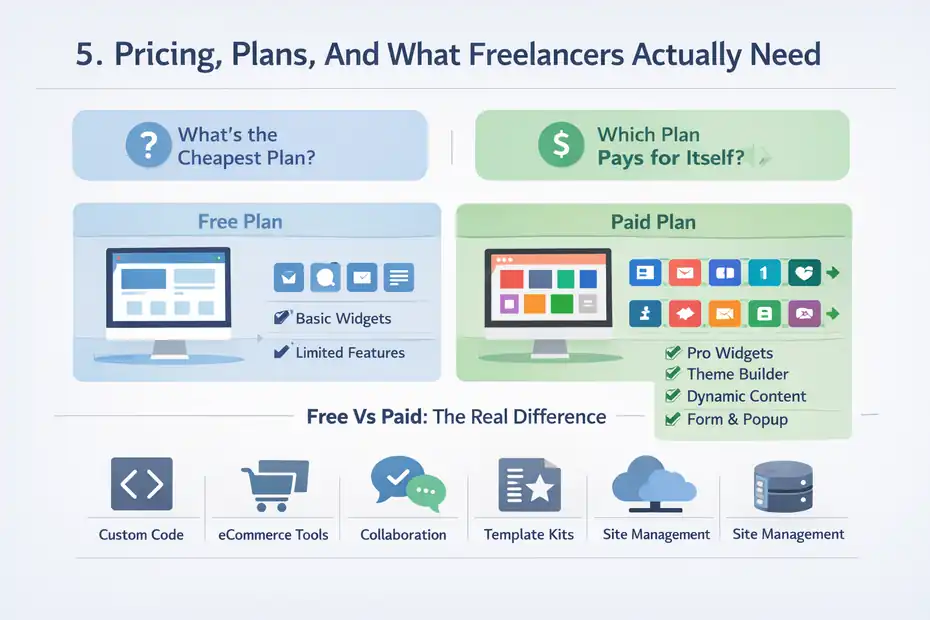
For most freelancers, the important question is not “what is the cheapest plan?” It is “which plan removes enough friction to pay for itself?”
Free Vs Paid: The Real Difference
Elementor’s free/core offering gives access to the editor and a starter feature set, but the paid tiers unlock the features freelancers usually care about for client work.
On Elementor’s official plan pages, higher-value capabilities for client projects include the fuller widget library, dynamic content support, Theme Builder, Form Builder, Popup Builder, custom code and CSS, eCommerce features, collaborative notes, and varying levels of cloud templates and site-management tools depending on plan.
That split is important. You can absolutely use Elementor free for simple page design, but once you are building client sites professionally, the limitations show up fast.
For example, if you need popups, advanced dynamic content, broader widget access, more robust forms, or stronger collaboration and handoff support, you are already in paid territory.
From what I’ve seen, the free version is more of a test drive for freelancers than a long-term business setup. It is fine for evaluating the editor, but not enough to judge Elementor’s full value for client delivery.
Which Paid Tier Makes Sense For Freelancers
Elementor’s official pages show multiple paths, including single-site and multi-site plans, plus broader “One” packages that bundle additional services and credits. The exact prices on the page can change, but the structure matters more than the headline number.
Essential-level access is for a very basic single-site build, while higher plans add more advanced features, more sites, and extras such as collaboration and expanded management. Elementor’s pricing page also advertises plans starting from $49 per year.
For most freelancers building client sites, I would not base the decision on the cheapest tier alone. I would match the plan to your delivery model. If you build one simple brochure site occasionally, a lower plan may be enough.
If you manage several active client sites, need Notes, dynamic data, templates, and tighter workflows, you will usually get more value from a higher tier because the labor savings matter more than the subscription delta.
A simple mental model helps: One hour saved on revisions or template reuse can often pay for the software. That is why freelancers should evaluate Elementor as an operations expense, not just a plugin purchase. The right question is whether it improves gross margin per project.
The Real Pros And Cons After You’ve Used It On Client Work
Every builder looks good in demos. The real test is what happens during revisions, handoff, maintenance, and scope creep.
What Elementor Does Very Well
The biggest advantage is delivery speed combined with visual control. You can build polished marketing pages quickly, establish a global design system, create reusable templates, and hand clients a site they can usually understand faster than a custom-coded setup.
Theme Builder, Site Settings, import/export tools, and Role Manager all contribute to that.
Another strength is packaging. Elementor helps freelancers turn a messy custom service into a more standardized process. That can improve quoting, production timelines, and client expectations. In my opinion, that business benefit is more valuable than any individual widget.
It also offers a broad enough feature set on higher tiers that many common client needs can stay in one environment: templates, forms, popups, WooCommerce page design, dynamic content, collaboration, and some management extras.
Keeping more of the workflow under one roof can simplify maintenance.
Where Elementor Can Frustrate Freelancers
The downside is that flexibility can tempt you into overbuilding. Because it is easy to keep tweaking layouts visually, projects can drift into endless refinement. This is not entirely Elementor’s fault, but the builder experience can encourage it if your scope is weak.
There is also a judgment call around complexity. The more custom and application-like the site becomes, the more carefully you need to assess whether a visual builder is still helping.
Elementor is excellent for many content-driven and marketing-oriented projects, but that does not mean it is the best abstraction for every advanced implementation.
Finally, clients can still break things if you hand off full control carelessly. Elementor gives you governance tools, but you have to use them. I have seen freelancers blame the builder when the real issue was poor permission setup and no training.
Common Mistakes Freelancers Make With Elementor
A builder only works well when the workflow around it is disciplined.
Most bad Elementor experiences are really process problems wearing a plugin costume.
Mistake 1: Designing Pages Instead Of Systems
The first common mistake is building every page manually instead of using templates, global styles, and repeatable blocks. This feels productive at the beginning because you see immediate visual progress.
But once revisions start, the inefficiency becomes obvious. Elementor’s own tooling around Site Settings, templates, and import/export is designed to avoid that kind of page-by-page chaos.
A better approach is to define your repeatable components before you get emotionally attached to any one page design. That creates consistency and makes client edits safer.
Mistake 2: Giving Clients Too Much Access
Another major mistake is giving the client full editor freedom on day one. That often leads to broken spacing, duplicate sections, inconsistent typography, and support emails that should never have existed.
Elementor’s Role Manager gives you a much better option with no-access and content-only editing controls.
I recommend defaulting to content-only access unless the client has a genuine reason and the training to manage layouts responsibly. That one decision can save a surprising amount of unpaid support time.
Mistake 3: Ignoring Reuse Across Projects
Freelancers often underuse the business side of Elementor. Import/export kits are not just technical utilities. They are part of building a more scalable service model.
If you repeatedly serve similar industries, you should be saving proven structures and design systems for future projects. Elementor explicitly supports using exports as templates for new sites.
This is where margin grows. Not by charging less, but by reducing invisible build time while keeping quality high.
So, Is Elementor Worth It For Freelancers Building Client Sites?
This is the part that matters. My answer is yes, for many freelancers, but not blindly.
My Verdict
If your business focuses on WordPress brochure sites, local business sites, content-driven marketing sites, lead-gen builds, and templated client delivery, Elementor is often worth it.
Its combination of visual editing, Theme Builder, global Site Settings, reusable templates, permission controls, and collaboration features lines up well with the actual pain points of freelance client work.
I would especially recommend it if you want to standardize your process, shorten delivery cycles, and improve handoff without forcing clients into a fully custom-coded environment they cannot comfortably manage. That is where Elementor has real business value, not just design convenience.
Where I would hesitate is on highly custom builds, development-heavy products, or projects where long-term architecture matters more than editing convenience. In those cases, Elementor might still work, but it should not be your default answer just because it is familiar.
The Practical Bottom Line
Here is the most honest conclusion I can give you: Elementor is worth it when you use it like a freelance production system, not like a canvas for endless page tinkering. If you lean into global styles, templates, dynamic content where needed, structured handoff, and permission control, it can absolutely improve delivery speed and protect margins. If you use it casually without process, it can become messy fast.
So if you are evaluating this through the lens of “elementor review for freelancers building client sites,” I would frame the answer like this: it is not the perfect builder for every project, but for the right kind of WordPress freelance business, it is still one of the most practical and commercially useful tools available in 2026.
FAQ
Is Elementor good for freelancers building client sites?
Elementor is a strong choice for freelancers because it speeds up site creation, allows reusable templates, and simplifies client edits. It works especially well for marketing websites and small business projects where design flexibility and fast delivery matter more than complex custom development.
Do freelancers need Elementor Pro for client work?
In most cases, yes. Elementor Pro unlocks essential features like Theme Builder, forms, dynamic content, and templates that are critical for building complete client websites efficiently. The free version is useful for testing but limited for professional freelance workflows.
Can clients easily edit websites built with Elementor?
Yes, Elementor allows clients to edit content visually without coding. Freelancers can also restrict access using role settings, so clients can update text and images without breaking layouts. This makes it easier to hand off projects with fewer support issues.
Is Elementor worth the cost for freelancers?
Elementor is worth the cost if it saves time and reduces revisions. Many freelancers recover the subscription cost by delivering projects faster and reusing templates. It becomes more valuable when used across multiple client sites rather than for a single project.
What are the downsides of using Elementor for client sites?
Elementor can become inefficient if freelancers build pages without structure or overuse design elements. It may also not suit highly complex or custom-coded projects. Without proper setup and permissions, clients might accidentally disrupt layouts after handoff.

I’m Juxhin, the voice behind The Justifiable.
I’ve spent 6+ years building blogs, managing affiliate campaigns, and testing the messy world of online business. Here, I cut the fluff and share the strategies that actually move the needle — so you can build income that’s sustainable, not speculative.
Related posts:
 How to Freelance Graphic Design
 How Does Udemy Work? Your Ultimate Guide to the Online Learning Platform
 Free Invoice Software: Top 10 Solutions for Small Businesses and Freelancers
 How to Use QuillBot Paraphrasing Tool Effectively
 Where to Find a Safe Quillbot Download—No Viruses, No Spam
 Does Quillbot Rewrite Better Than Ai Humanizer Tools Comparison