
Table of Contents
Some links on The Justifiable are affiliate links, meaning we may earn a small commission at no extra cost to you. Read full disclaimer.
The doba platform walkthrough guide you actually need is not just a tour of buttons and menus.
It is a practical path from opening your account to getting a product live without making the beginner mistakes that quietly kill margins, slow fulfillment, or create messy listings.
If you want to use Doba to find products, connect a store, sync inventory, and publish items faster, this guide will walk you through the full setup in a logical order.
I’ll keep it simple, honest, and focused on what matters when you are trying to launch, not just browse.
Understand What Doba Actually Does
Before you click through the dashboard, it helps to understand what Doba is built for and where it fits in your workflow.
Most people move faster once they stop treating it like “just a product catalog” and start using it like an operations layer.
What Doba Is And How The Platform Fits Into Dropshipping
Doba is a dropshipping platform that helps retailers find products, connect suppliers, and sync product and order data with ecommerce sales channels.
On its official site, Doba highlights real-time inventory and pricing sync, product curation powered by long-term market data, and integrations with major marketplaces and store platforms.
It also states that it supports multiple channels such as Shopify, Amazon, eBay, Wix, WooCommerce, Walmart, BigCommerce, TikTok Shop, and more.
That matters because the platform is not just helping you “pick something to sell.” It is helping you reduce manual work in four areas:
- Product Discovery: You browse products, niches, and curated collections instead of contacting suppliers one by one.
- Listing Management: You can push products to connected stores instead of recreating listings manually.
- Inventory Sync: Doba says it monitors inventory and pricing continuously, which helps reduce overselling risk.
- Order Flow: Once your store is connected, the platform can support a more automated fulfillment workflow depending on your setup and plan.
In my experience, that last point is where beginners usually misunderstand the platform. Doba is most useful when you already know you want repeatable store operations, not just random product inspiration.
Who This Guide Is Best For And What “Product Live” Really Means
This doba platform walkthrough guide is best for three kinds of users.
- Beginner Store Owners: You want a structured way to move from account creation to your first published product.
- Marketplace Sellers: You want to sync products across channels without building every listing from scratch.
- Operators Scaling Past Manual Work: You want product import, inventory updates, and order handling in one place.
When I say “product live,” I do not mean “imported into your dashboard.” I mean the product is fully ready for sale with a cleaned-up title, useful description, images checked, pricing logic set, shipping expectations reviewed, and the item published to the right store or marketplace.
That distinction matters. A product can be technically imported in a few clicks, but still be a weak listing that never converts. Doba’s own Shopify import guide notes that sellers should review details like names, descriptions, variants, and images before publishing because auto-filled data still needs checking.
So the real goal is not speed alone. It is controlled speed. You want the first live product to be publishable, profitable, and operationally manageable.
Create Your Account And Choose The Right Plan
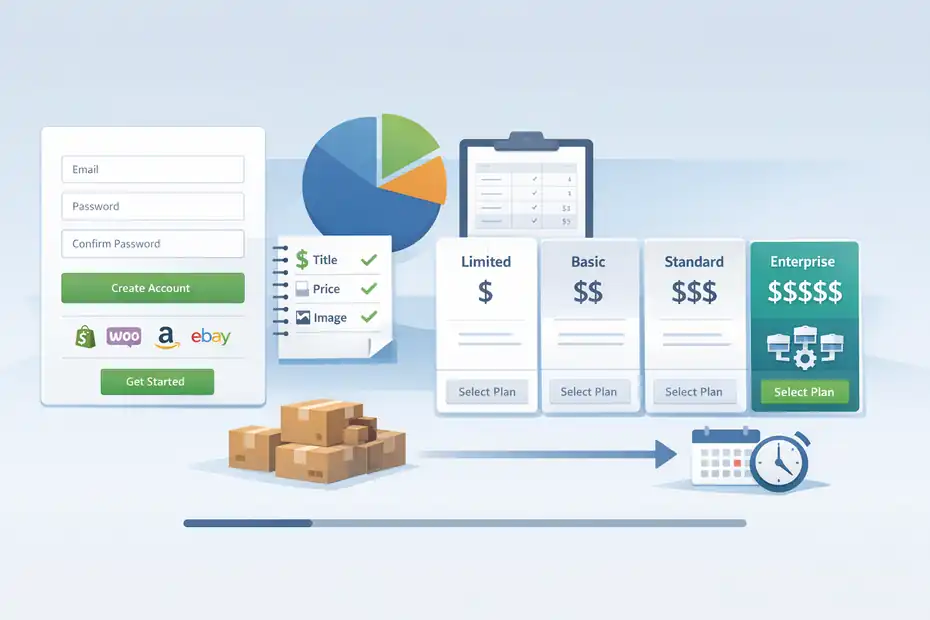
This stage is where you set the foundation. If you rush plan selection or skip store planning, you can end up rebuilding your setup later.
Sign Up, Confirm Your Account, And Set Your Working Environment
The starting point is straightforward: Create your Doba account, sign in, and get familiar with the layout before connecting anything.
Doba’s public pages consistently point users to account registration and emphasize a guided “get started” flow, which is useful if this is your first time working with a sourcing platform.
Here is how I suggest approaching the first login:
- Step 1: Start With One Sales Channel In Mind. Decide whether your first live product is going to Shopify, WooCommerce, Amazon, eBay, or another supported channel before doing anything else. Doba supports many channels, but clarity saves you time.
- Step 2: Create A Simple Product Standard. Write down your rules for titles, descriptions, pricing floor, and image count. This helps later when you begin importing.
- Step 3: Keep A Margin Sheet Nearby. Even a basic spreadsheet with cost, shipping, target sell price, and desired gross margin helps you make better decisions fast.
- Step 4: Avoid Connecting Multiple Stores On Day One. That sounds efficient, but it usually creates confusion. Start with one store, one niche, and one publish-ready workflow.
I recommend spending 20 to 30 minutes learning the interface before importing anything. That tiny pause saves hours of cleanup.
Choose A Plan Based On Store Count, Automation Needs, And Growth Stage
Doba’s pricing-plan comparison page describes four tiers: Limited, Basic, Standard, and Enterprise. It frames them around increasing store integrations, higher capacity, more automation, and stronger support as your business grows.
The published breakdown says Limited includes 1 store integration, Basic includes 2, Standard includes 5 plus API access and a dedicated account manager, and Enterprise includes 15 with the highest capacity.
Here is the practical way to think about it:
- Limited: Best when you are testing one store and learning the system.
- Basic: Better when you already validated a niche and need more room.
- Standard: Usually the operational sweet spot once you are managing multiple products or channels.
- Enterprise: Meant for larger teams, heavier automation, or high-volume catalog operations.
I believe most beginners overpay for complexity they do not use. If you only plan to push a handful of products to one store, start lean. The real upgrade trigger is not “I want more features.” It is “My current workflow is slowing me down or limiting store connections.”
A simple rule helps: If your bottleneck is publishing speed, catalog size, or store count, look at upgrading. If your bottleneck is product selection or offer quality, stay focused there first.
Learn The Dashboard Before You Import Anything
A few minutes here prevents rookie mistakes. The dashboard is easier to use when you know what each area is supposed to help you decide.
Navigate The Core Areas You Will Use Most Often
Doba positions itself around product discovery, integration, sync, and support. Across its site and help ecosystem, the repeated themes are curated products, store connections, cross-platform syncing, and guided onboarding resources.
In practical terms, your early workflow usually revolves around these zones:
- Product Discovery Area: This is where you browse categories, curated selections, trending-style groupings, and niche ideas.
- Inventory Or Import Area: This is where shortlisted products move closer to publication.
- Store Integration Area: This connects your ecommerce platform or marketplace.
- Order And Sync Area: This is where automation becomes valuable later as volume grows.
- Learning Or Support Area: Doba promotes help resources, support, and training options because beginners often need setup guidance.
What I suggest is simple: do one dry run without publishing. Browse a product, inspect variants, imagine your markup, and click through the import flow without completing it. That teaches you more than reading ten platform comparisons.
It also helps you spot where your questions really are. Usually they fall into one of three buckets: margin, fulfillment time, or listing quality.
Set Up Your Personal “Go Live” Checklist Inside The Platform
The smartest shortcut is not a hidden Doba feature. It is building your own repeatable checklist.
Before any product goes live, I recommend checking these items every single time:
- Listing Quality: Is the title clear, readable, and not stuffed with supplier wording?
- Images: Are the photos usable, clean, and consistent with your store style?
- Variants: Did the right sizes, colors, or bundle options come through correctly?
- Pricing Logic: Does the sell price leave enough margin after fees, shipping, returns, and promo discounts?
- Shipping Expectation: Is the expected delivery window realistic for your customer?
- Store Fit: Does this product match your niche or does it look random?
This is where beginners often get hurt. They assume synced data equals ready-to-sell data. It does not. Doba’s own Shopify import guidance specifically warns users to review product name, description, variants, and images during import.
Imagine you are selling home organization products. A storage bin with a clunky supplier title, five messy variant names, and vague dimensions might technically import fine. But a customer browsing your store will hesitate. A five-minute cleanup can raise trust more than another hour of product hunting.
Connect Your Store Or Marketplace The Right Way
This is the bridge between browsing and selling. The quality of your integration setup affects almost everything that comes after.
Connect One Sales Channel First And Confirm The Sync Basics
Doba says it integrates with major platforms and marketplaces, and its help pages list channels including Shopify, Wix, TikTok Shop, Temu, Walmart, WooCommerce, Square, Amazon, Newegg, BigCommerce, eBay, and API-based options.
That flexibility is useful, but I strongly recommend starting with one primary destination. Here is the clean approach:
- Step 1: Pick Your Main Channel. Use the platform where you already understand fees, customer expectations, and listing rules.
- Step 2: Complete Authentication Carefully. Marketplace and store authorizations often fail because of account-permission issues, not Doba itself.
- Step 3: Test With A Low-Risk Product. Do not make your first sync attempt with a high-variant item.
- Step 4: Confirm Data Mapping. Check titles, descriptions, images, and variants after the connection is live.
Doba’s integration messaging focuses heavily on cross-platform compatibility and synchronized inventory and order handling, which tells you the platform is designed for operational efficiency once the connection is stable.
From what I’ve seen, most setup friction comes from trying to connect too many channels too early. One clean connection beats four half-working ones.
Common Integration Problems That Slow Down New Sellers
Even when the connection technically works, the first product sync can still go wrong.
The most common issues usually look like this:
- Variant Confusion: Wrong option names, duplicate combinations, or messy formatting.
- Description Mismatch: Supplier descriptions import, but they do not match your brand voice.
- Image Order Problems: The least useful image becomes the hero image.
- Store Permission Errors: Your connected channel does not have the right authorization scope.
- Category Misalignment: The product ends up under the wrong collection or marketplace category.
Doba’s Shopify tutorial points out that even though product details are often auto-filled, sellers still need to review and manually correct missing or weak details before finalizing the listing.
Here is a realistic example. Say you import a fitness resistance band set. The supplier may name the variants by internal code, not shopper-friendly labels. The description may emphasize packaging specs instead of buyer benefits.
The images may lead with a plain product shot instead of a lifestyle use case. None of these are “fatal,” but together they can slash conversion rate.
That is why I advise treating your first synced listing like a QA test, not a launch milestone.
Find Products Worth Listing, Not Just Products That Exist
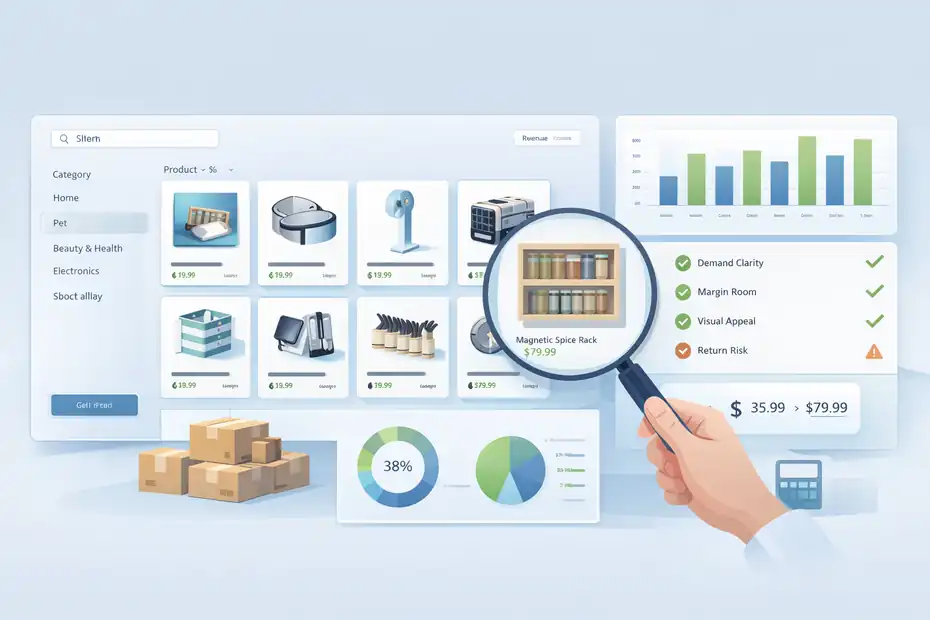
This is where the real business begins. A huge catalog is not the same thing as good product selection.
Use Doba’s Product Discovery Features With A Margin-First Mindset
Doba highlights expert product selection, curated categories, and AI-assisted product analytics as part of its value proposition. It also surfaces grouped selections and niche categories to make browsing easier for retailers.
That sounds great, but here is the honest truth: curated does not automatically mean profitable for your store.
When evaluating a product, I suggest using this filter:
- Demand Clarity: Can you explain in one sentence why someone would buy it now?
- Margin Room: Is there enough spread between landed cost and sell price?
- Visual Appeal: Can the product earn a click in a feed or collection page?
- Low Confusion Risk: Is it easy to understand without lots of buyer education?
- Reasonable Return Risk: Fragile, sizing-heavy, or expectation-sensitive products can be harder early on.
A practical benchmark many sellers use is to avoid products that leave almost no room after shipping, transaction fees, and discounting. A product with a headline margin might look fine until one refund wipes out profit from three orders.
I believe beginners should favor simple, demonstrable products over clever ones. Home, organization, pet, beauty accessories, and impulse-friendly lifestyle items often make better first tests than complicated electronics or high-return apparel.
Validate A Product Before Importing It To Your Store
Before you import, pause and ask whether the product deserves shelf space.
Here is a lightweight validation process that works well:
- Check Offer Clarity: Can the product title be rewritten into something a real shopper would immediately understand?
- Check Competitive Positioning: Is the product common enough to prove demand, but not so generic that your listing disappears?
- Check Content Potential: Can you imagine the product working in short-form video, UGC-style images, or bundles?
- Check Store Fit: Does it strengthen your niche identity?
Imagine you run a minimalist kitchen store. A magnetic spice rack might be a strong fit because it is visual, useful, and easy to explain. A random car gadget might still have demand, but it weakens your store’s coherence.
Doba’s marketplace-like breadth can tempt you to chase “whatever looks interesting.” I would resist that. The better move is to use the platform’s discovery tools to deepen your niche, not dilute it.
Its category segmentation and curated product groupings help that process, but the final judgment still needs to come from your brand and margin logic.
One product that clearly fits your audience is usually worth more than ten imported products that do not belong together.
Import The Product And Clean Up The Listing Before It Goes Live
This is the stage most beginners underestimate. Importing is technical. Publishing is editorial.
Follow The Product Import Flow Without Publishing Too Fast
Doba’s Shopify import guide lays out a simple workflow: log into both accounts, find products, add them to your inventory list, choose “list to store,” select the store, and then review details like title, description, variants, and images before publishing.
It also notes that products can be imported individually or in bulk.
That tells us the core publishing sequence is basically:
- Step 1: Shortlist The Product. Add it to your working list instead of publishing instantly.
- Step 2: Choose Destination Store. Make sure the correct channel is selected.
- Step 3: Review Auto-Populated Data. Never assume imported copy is customer-ready.
- Step 4: Confirm Variant Logic. Check sizes, colors, pack counts, and option naming.
- Step 5: Publish Only After Edits. Going live should be the last click, not the first.
In my experience, one-by-one publishing is better for your first few listings even if bulk import is available. Bulk tools are powerful once your standards are locked in, but dangerous when you are still learning how Doba data maps into your storefront.
Speed matters, yes. But early accuracy matters more. A messy listing can waste ad spend, weaken trust, and create support headaches immediately.
Rewrite Titles, Descriptions, And Pricing So The Product Can Convert
This is where you turn supplier data into a storefront asset.
The import may give you a usable starting point, but you still need to adapt the listing for shoppers:
- Title Fix: Remove filler words, codes, and awkward phrasing. Make the benefit obvious.
- Description Fix: Lead with the problem solved, then explain features in plain language.
- Variant Fix: Rename options so customers do not need to “decode” them.
- Image Fix: Put the clearest benefit-driven image first.
- Pricing Fix: Set a price that protects margin while fitting your positioning.
Here is a simple transformation example.
Supplier-style title: “Portable Multifunctional Foldable Storage Rack Household Organizer New Arrival”
Store-ready title: “Foldable Countertop Storage Rack For Small Kitchens”
The second one is cleaner, more specific, and easier to trust.
I suggest writing descriptions in this order: what it helps with, who it is for, key feature highlights, size or material notes, and shipping expectations. That structure converts better than dumping technical details up front.
Remember, Doba gives you the pipeline, but your offer quality still comes from positioning. Its import flow is useful, yet even Doba’s own tutorial emphasizes reviewing imported details instead of relying entirely on automation.
Set Up Pricing, Inventory Logic, And Fulfillment Expectations
This is the operations layer. If product selection gets you excited, this stage keeps you in business.
Build A Pricing Model That Protects Margin From Day One
Doba promotes real-time sync for inventory and pricing, which is helpful because supplier-side changes can quietly destroy margins if you are not watching them.
That is why your pricing model needs a buffer.
A simple pricing framework includes:
- Product Cost: What the item costs from the supplier.
- Shipping Cost: Direct or hidden delivery cost.
- Channel Fees: Payment processor, marketplace, or platform fees.
- Promo Cushion: Space for discounts, bundles, or coupon codes.
- Return Risk Buffer: Small allowance for issues, replacements, or refunds.
For many stores, the dangerous mistake is pricing based only on product cost. If a product costs $12 and you sell it for $21, that may look workable until shipping, processing fees, and a 10 percent discount knock your real margin down to almost nothing.
I recommend setting a minimum acceptable gross margin before you publish any product. Not every product needs luxury margins, but every product does need survival room.
This might work differently for you depending on channel and traffic source. Paid ads, for example, demand much more cushion than organic traffic or email-driven sales.
Use Sync Features To Reduce Stockouts, Overselling, And Support Issues
Doba repeatedly emphasizes 24/7 inventory and pricing synchronization and cross-platform inventory management. That is one of its strongest operational selling points because stock mismatches are one of the fastest ways to frustrate customers and lose platform trust.
Here is how to use that advantage well:
- Set Conservative Expectations: Do not promise ultra-fast delivery unless you can verify it.
- Monitor Best Sellers Closely: Fast-moving products need more frequent attention even with sync enabled.
- Avoid Overloading New Stores: Too many similar SKUs create more inventory complexity than sales lift.
- Review Price Changes Weekly: Real-time sync helps, but you still need to understand margin impact.
Picture a small store that gets its first 20 orders from a viral post. If supplier stock changes and the listing is not aligned, the seller may face cancellations, refund requests, and angry messages.
Doba’s sync structure is designed to reduce this type of operational failure, especially when your store count or catalog size starts growing.
I believe this is where Doba becomes more valuable over time. The bigger your catalog, the more expensive manual inventory management becomes.
Optimize, Troubleshoot, And Scale After Your First Product Goes Live
Getting one item live is the milestone. Building a repeatable system is the business.
Troubleshoot The First Live Product Like An Operator, Not A Beginner
Once your product is live, the next 7 to 14 days teach you more than the entire setup process.
Watch for these signals:
- Low Click-Through Rate: Usually a title, image, or pricing perception issue.
- High Product Page Views But No Sales: Often a description, trust, shipping, or offer mismatch.
- Variant Drop-Off: Customers may be confused by sizing, colors, or naming.
- Support Questions Repeating: Your listing is not answering key concerns clearly enough.
- Unexpected Margin Compression: Supplier cost or shipping structure may be weaker than expected.
This is where humility helps. Do not get attached to your first version. Doba can help you import and sync products efficiently, but platform efficiency does not replace merchandising judgment.
I suggest making one improvement pass after your first 100 product views. Rewrite the title, improve the primary image, tighten the first paragraph of the description, and review pricing against competitors. Small changes often move performance more than importing a whole new batch of products.
Think like this: your first live listing is not final. It is version one of a sellable asset.
Scale From One Product To A Repeatable Doba Workflow
Doba’s public materials point to broader capacity, additional store integrations, more automation, and API access as you move up the plan ladder, especially from Standard upward.
That suggests the platform is designed to support scaling once you move beyond a single-store, single-product setup.
A good scaling path looks like this:
- Phase 1: Launch 3 to 5 tightly aligned products in one niche.
- Phase 2: Standardize your listing template, pricing rules, and review checklist.
- Phase 3: Add complementary products and bundles, not random catalog depth.
- Phase 4: Expand to more channels only after your first channel is stable.
- Phase 5: Upgrade plan level when store count, automation needs, or workflow volume justify it.
One of the smartest moves you can make is creating a “winner replication” process. When one product sells, look for adjacent products that solve the same problem for the same buyer. That is far better than starting from zero every time.
I believe the best Doba users are not the people importing the most products. They are the people building the cleanest system from supplier data to live offer to repeatable operations.
Final Thoughts
A strong doba platform walkthrough guide should leave you with more than a dashboard tour. It should help you think clearly about how to go from signup to a live product without burning time on weak listings, shaky margins, or messy integrations.
Doba’s current positioning centers on curated product discovery, real-time sync, multi-platform integrations, and plan tiers that grow with operational complexity.
That means your advantage does not come from using the platform alone. It comes from using it with discipline.
Start with one store. Pick one product that fits your niche. Clean up the listing before you publish. Check margins like a skeptic. Then let your first live product teach you what to improve next.
FAQ
What is the Doba platform used for?
The Doba platform is used for dropshipping product sourcing, inventory syncing, and order management. It connects your online store to suppliers so you can list products without holding stock while keeping pricing and inventory updated automatically across sales channels.
How do I start using the Doba platform?
To start using Doba, create an account, choose a plan, and connect your online store or marketplace. After setup, you can browse products, add them to your inventory list, and prepare them for publishing by editing titles, descriptions, and pricing.
How do I import products from Doba to my store?
You can import products by selecting items from the catalog, adding them to your inventory, and choosing your connected store. Before publishing, review product details like images, variants, and descriptions to ensure they match your brand and customer expectations.
Is Doba good for beginners in dropshipping?
Doba is beginner-friendly because it simplifies supplier sourcing and product syncing. However, success still depends on choosing the right products, setting proper pricing, and optimizing listings, as the platform does not automatically guarantee profitable or high-converting products.
How long does it take to get a product live on Doba?
Getting a product live on Doba can take a few minutes technically, but a proper setup usually takes 30–60 minutes. This includes reviewing product details, adjusting pricing, optimizing descriptions, and ensuring everything is ready for real customers.

I’m Juxhin, the voice behind The Justifiable.
I’ve spent 6+ years building blogs, managing affiliate campaigns, and testing the messy world of online business. Here, I cut the fluff and share the strategies that actually move the needle — so you can build income that’s sustainable, not speculative.
Related posts:
 How To Start With Spocket Step By Step: No Experience Needed
 Doba Features Overview For Beginners: Setup To First Sale
 How To Start A Dropshipping Business With No Money
 Is Doba Shopify Worth Using for Dropshipping Stores?
 Spocket Pricing Plans Explained For Beginners: Full Guide
 Doba Pricing Explained: Real Cost Vs Value For Dropshippers