
Table of Contents
Some links on The Justifiable are affiliate links, meaning we may earn a small commission at no extra cost to you. Read full disclaimer.
Leadpages review for bloggers building email lists is really a question about fit, not hype. If you already have blog traffic and want a faster way to turn readers into subscribers, Leadpages can make that easier.
But if you need a full email platform, a deep website builder, or a cheap all-in-one tool, the answer gets more complicated. I went through the current product, pricing, and support docs so this review reflects what bloggers are actually buying in 2026.
Here’s the real verdict on whether Leadpages helps you grow faster, or just adds another monthly bill.
What Leadpages Is And Why Bloggers Consider It
Leadpages is built around one job: helping you create conversion-focused pages and on-site lead capture assets without needing custom code.
For bloggers, that matters because the fastest email list growth usually comes from dedicated offers, not from hoping a sidebar form will do all the work.
What Leadpages Actually Does For A Blogger
If you strip away the marketing language, Leadpages is a landing page and conversion tool. The current platform centers on landing pages, forms, integrations, analytics, blogs, domains, and testing. On the public site and in the help center, Leadpages also highlights pop-ups, alert bars, analytics, and optimization features.
For a blogger, the practical use case is simple: you publish content on your blog, then send readers to a focused opt-in page for something specific like a checklist, mini-course, template, or resource library. That page removes distractions and pushes one clear action.
Here’s where I think Leadpages makes sense. Many bloggers do not have a traffic problem first. They have a conversion path problem. Their content gets read, but there is no sharp next step. Leadpages helps you build that next step faster than trying to patch it together manually inside a general website builder.
A good benchmark to keep in mind is that Unbounce’s analysis of 41,000+ landing pages found a median conversion rate of 6.6% across industries. That is not a promise, but it does show why a purpose-built page can outperform a generic blog homepage or cluttered resource page.
- Best use case: Turn blog readers into subscribers with a single-offer landing page.
- Weak use case: Replace your full email marketing stack or run complex CRM workflows.
- Reality check: Leadpages helps most when you already have a lead magnet and some traffic.
Why Email List Growth Still Matters More Than Social Reach
This is the real reason bloggers keep looking at tools like Leadpages. Email is still one of the highest-ROI channels in digital marketing, with widely cited benchmarks around $36 in return for every $1 spent. HubSpot and Litmus both still reference that range, even while noting ROI varies by business and measurement quality.
That matters because blogging is fragile when it depends only on search or social traffic. Google updates happen. Social reach drops. Referral traffic disappears. An email list gives you a direct audience you can reach on demand.
Imagine you publish a great post that gets 2,000 visits a month. If only 0.3% of readers subscribe, that is 6 new email subscribers. If a dedicated landing page and better on-site offers lift that to even 3%, you are at 60. That is not magic. It is just a cleaner conversion system.
In my experience, bloggers usually hit a wall when they treat email signup like a secondary design element. The email list starts growing faster when the offer is visible, specific, and friction-light. That is the lane where Leadpages can help.
- Traffic without a funnel: Readers leave and never come back.
- Traffic with a focused opt-in: More visitors turn into subscribers you can nurture later.
- Long-term benefit: Your blog becomes an audience asset, not just a pageview machine.
How Leadpages Works For Bloggers Building Email Lists
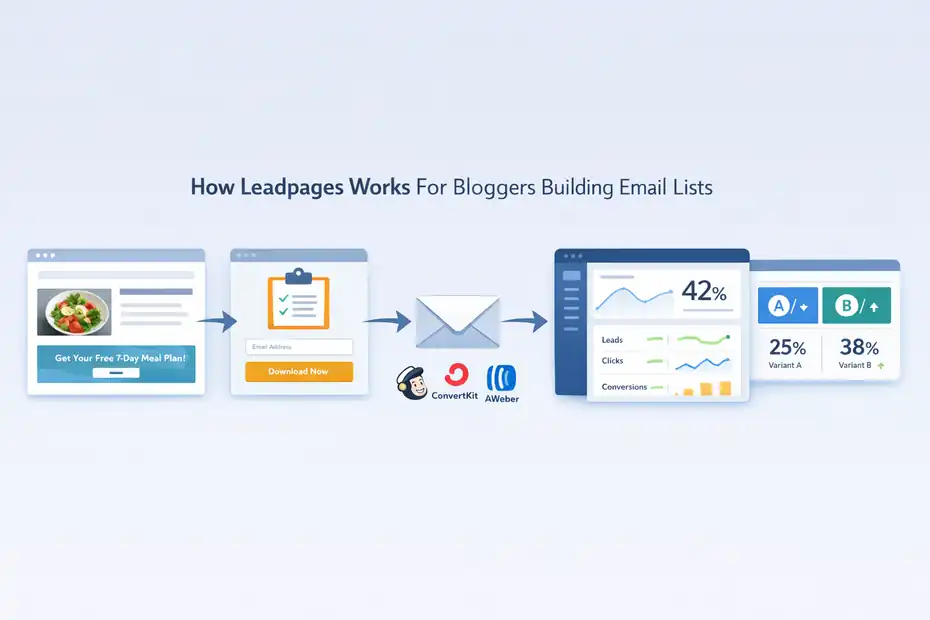
Leadpages works best when you use it as the conversion layer between your content and your email platform. It is not the whole business system. It is the part that captures attention, gets the click, and turns that visit into an email signup.
The Core Workflow From Blog Post To Subscriber
The typical setup looks like this: someone lands on your blog post, sees a relevant content upgrade or call to action, clicks through to a landing page, enters their email, and gets added to your email platform through an integration.
Leadpages says it supports active integrations and third-party connections, and its pages, forms, and integrations are central in the new product documentation.
That workflow matters because it forces you to match reader intent with an offer. A post about Pinterest strategy should lead to a Pinterest checklist, not a vague “join my newsletter” box. A post about affiliate disclosure templates should lead to a blogger legal pages checklist, not a random weekly digest.
Let me break it down:
- Step 1: Create one lead magnet tied to one topic cluster.
- Step 2: Build one landing page around that lead magnet.
- Step 3: Add the page to your blog CTA system.
- Step 4: Connect form submissions to your email tool.
- Step 5: Track conversion rate and test one change at a time.
This is where Leadpages has an edge over using only your WordPress theme or a basic form plugin. It is designed around focused conversion paths instead of broad content layout.
Landing Pages, Pop-Ups, And Alert Bars In Real Blogging Use
Leadpages publicly emphasizes landing pages, pop-ups, and alert bars as lead generation tools, and its WordPress integration page specifically says you can publish landing pages, pop-ups, and alert bars to your site.
For bloggers, each one solves a different problem:
- Landing pages: Best for dedicated opt-ins, course waitlists, webinar registrations, and freebie downloads.
- Pop-ups: Best for catching engaged readers before they leave or after they scroll.
- Alert bars: Best for promoting one offer sitewide without rewriting every article.
I believe most bloggers should start with just two assets: one strong landing page and one sitewide alert bar. That gets you 80% of the value without creating a messy experience.
A realistic example: Say you run a food blog and have a “7-day meal plan PDF.” You can add an alert bar across recipe posts, then link it to a dedicated opt-in page with cleaner messaging and fewer distractions. That is usually stronger than embedding the same form in six places with weak copy.
The caution is important too. If you stack bars, pop-ups, ribbons, and inline forms all at once, you hurt trust. Leadpages can help you convert more, but it can also help you annoy people faster if your offer strategy is weak.
Setup Experience: How Easy Is It To Launch?
Leadpages has always sold itself on speed, and the current platform still leans heavily into quick page creation, visual editing, and publishing options. For bloggers who hate technical setup, that is probably the biggest reason to consider it.
Getting A Page Live Without A Developer
The setup is straightforward on paper. Leadpages says the platform lets you create pages with a visual editor, and its WordPress support docs show that you can publish pages from inside WordPress with its plugin.
The WordPress documentation also notes a newer plugin path available through the WordPress dashboard.
For a blogger, that means you have a few publishing options:
| Publishing Need | How Leadpages Handles It | Why It Matters For Bloggers |
|---|---|---|
| Standalone landing page | Hosted on Leadpages or connected domain | Fastest path to launch a freebie page |
| WordPress publishing | Plugin-based publishing to WordPress | Useful if your blog already lives on WordPress |
| Sitewide promotion | Pop-ups and alert bars | Lets you promote one lead magnet across many posts |
In practice, the biggest time saver is not “drag and drop.” It is not rebuilding pages from scratch inside your theme. If your blog design is clunky, it can take forever to make a page look focused. Leadpages shortens that path.
When I evaluate tools like this, I ask one simple question: can a non-technical blogger get from idea to live page in one afternoon? With Leadpages, I think the answer is yes.
Connecting Leadpages To Your Email Stack
This part matters more than design. If new leads do not reliably land in your email platform, the rest is decoration.
Leadpages’ help center lists forms and third-party integrations as core parts of the product, and official comparison and product pages state it integrates with many tools, including major email service providers and additional connections through Zapier.
For most bloggers, the integration task is basic:
- Form action: Send email capture to your ESP.
- Tag or segment: Mark which landing page the subscriber came from.
- Delivery automation: Send the freebie automatically.
- Welcome sequence: Start onboarding the subscriber into your newsletter or sales funnel.
This is where I would be careful. Leadpages is only half the system. If your email platform setup is sloppy, your subscriber experience will still be sloppy. You need the handoff to be clean.
A simple but smart move is to tag subscribers by lead magnet. That helps you learn whether your “Blog SEO checklist” audience behaves differently from your “Affiliate disclosure template” audience later. The list itself grows, but more importantly, the quality of segmentation improves.
Leadpages Features That Matter Most For List Growth
Not every feature deserves equal attention. If you are a blogger building an email list, a few capabilities matter a lot more than the long checklist on a pricing page.
Features I Think Bloggers Will Actually Use
The most relevant current features for bloggers are landing pages, forms, blogs, custom domains, integrations, analytics, and A/B testing.
Higher plans add optimization features like Smart Traffic, Smart Personalization, and advanced analytics, while Scale adds continuous auto-testing and cross-page learning.
That sounds very SaaS-y, so here is the useful translation:
- Landing pages: Your lead magnet pages, webinar pages, waitlist pages.
- Forms: The actual capture mechanism for subscriber data.
- Analytics: See whether people convert or bounce.
- A/B testing: Compare two versions and keep the better one.
- Smart optimization tools: More advanced routing and personalization on higher tiers.
For most bloggers, I think the true value comes from three things:
- Faster creation of focused opt-in pages.
- Easier on-site promotion through bars or pop-ups.
- Simple testing to improve conversion rates over time.
Everything else is secondary unless you are running bigger campaigns, paid traffic, or multiple brands.
A/B Testing Is More Valuable Than Most Bloggers Realize
Leadpages’ current help docs explain that A/B testing lets you compare page variants and optimize for form submissions, clicks, or purchases. The new plans documentation shows A/B testing included, though the details vary by plan.
I think this is one of the most underused advantages for bloggers.
Most bloggers redesign entire pages when results are weak. That is usually the wrong move. A/B testing lets you change one important variable and learn from it. For example:
- Headline test: “Get My Free Blog SEO Checklist” vs. “Steal My 15-Minute Blog SEO Workflow.”
- CTA test: “Download Now” vs. “Send Me The Checklist.”
- Layout test: Short page vs. longer page with proof and examples.
- Offer framing test: “Checklist” vs. “Template pack.”
With a baseline median landing page conversion rate of 6.6%, even small gains matter. A lift from 5% to 7% means 40% more subscribers from the same traffic. That is why conversion tools can pay for themselves if you already have enough visitors to test meaningfully.
My advice is simple: Test the message first, not the design polish. Headlines and offer clarity usually beat prettier sections.
Leadpages Pricing In 2026: Is It Worth The Cost?
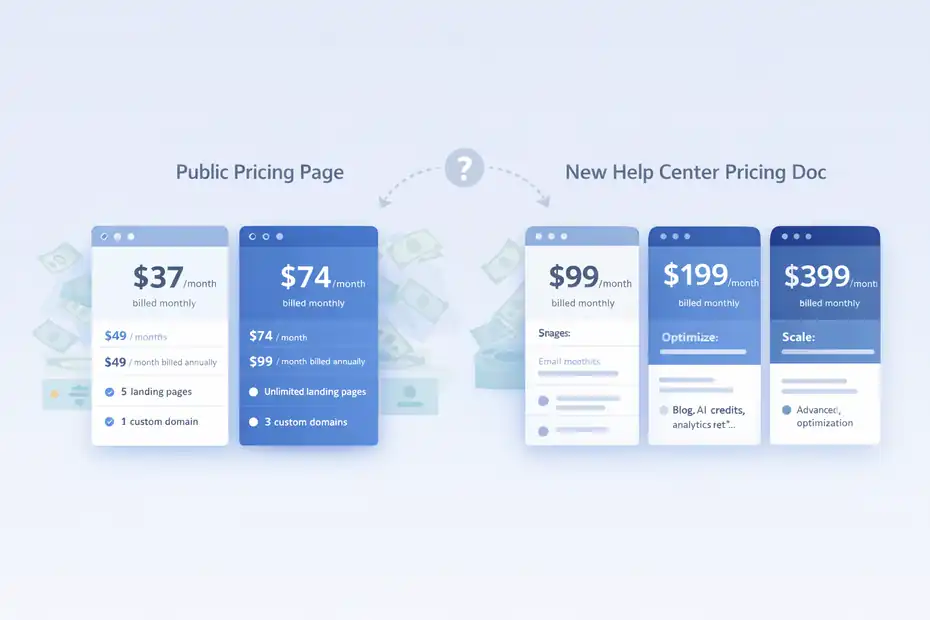
Pricing is where this review gets more nuanced. Leadpages currently shows one pricing structure on its main pricing page and a different “new Leadpages” plan structure in its current support docs, which suggests the company is in a product transition or has parallel plan models depending on account type.
That alone is something bloggers should notice before buying.
What The Official Pricing Pages Show Right Now
The public pricing page currently lists Standard at $37 per month billed monthly or $49 billed annually, Pro at $74 per month billed monthly or $99 billed annually, plus custom pricing. That page says Standard includes 5 landing pages and 1 custom domain, while Pro includes unlimited landing pages and 3 custom domains.
The newer support documentation, however, lists Grow at $99 per month, Optimize at $199 per month, and Scale at $399 per month, with much broader feature bundles, AI credits, page limits, blog limits, and advanced optimization features.
Here is the cleanest way to think about it:
| Official Source | Plans Shown | Notable Details |
|---|---|---|
| Public pricing page | Standard, Pro, Custom | Starts at $37/month monthly; Standard includes 5 landing pages |
| New help center pricing doc | Grow, Optimize, Scale | Starts at $99/month; includes blogs, AI credits, analytics retention, advanced optimization |
That does not mean Leadpages is being deceptive. It does mean you should verify which product version and plan path your account will actually get before you commit.
My Honest Pricing Verdict For Bloggers
For a blogger with low traffic or a tiny budget, Leadpages can feel expensive. That is especially true if you also pay for an email platform, WordPress hosting, and a few plugins.
I think Leadpages is worth it when at least one of these is true:
- You already get traffic: Enough visitors to benefit from better conversion rates.
- You sell or plan to sell: Courses, services, affiliate offers, workshops, or digital products.
- You need speed: You want pages live fast without custom design headaches.
- You will actually test: Not just publish and forget.
It is harder to justify if you are still in the “I have 14 subscribers and no lead magnet” phase. At that stage, strategy matters more than tooling.
A simple math example helps. If better pages help you generate 100 extra subscribers a month, and your email list earns even modest revenue later through affiliates, ads, sponsorships, or products, the tool can pay back its cost. But if you barely publish and never optimize, the subscription becomes dead weight.
Pros, Cons, And Who Should Avoid It
Every review is easy when you only talk about the good parts. The real question is whether the tool matches your business stage, budget, and tolerance for stacking multiple platforms.
What I Like About Leadpages For Bloggers
The strongest advantage is focus. Leadpages is not trying to be your social scheduler, CRM, and online course empire all at once. It is trying to help you launch and optimize conversion assets.
The things I like most:
- Fast launch path: You can get a focused page live quickly.
- WordPress compatibility: Helpful if your blog already runs on WordPress.
- Built-in testing mindset: A/B testing is part of the product story, not an afterthought.
- Multiple list-building surfaces: Landing pages, pop-ups, and alert bars give bloggers more than one entry point.
I also like that Leadpages still feels centered on lead generation instead of just page aesthetics. That sounds obvious, but it matters. Some builders are great at looking polished and surprisingly weak at guiding conversion decisions.
Where Leadpages Falls Short
The biggest weakness is that Leadpages is not a complete email growth ecosystem by itself. You still need your email platform, your lead magnet delivery logic, and your audience strategy.
The other friction points are pretty clear:
- Cost anxiety: It can be a lot for newer bloggers, especially if your traffic is low.
- Version confusion: Current official plan information is split across different pricing frameworks.
- Tool overlap risk: Some bloggers already have page builders or form tools inside WordPress, so Leadpages may duplicate part of the stack.
- Not your email platform: You still need another tool for newsletters, automation, and deeper subscriber management.
In my opinion, the biggest practical downside is not a missing feature. It is that some bloggers buy Leadpages before they have a clear offer strategy. Then they blame the tool when the page underperforms.
Best Use Cases, Worst Use Cases, And Common Mistakes
A tool can be good and still be wrong for you. The fastest way to decide on Leadpages is to look at the scenarios where it clearly wins and the ones where it does not.
When Leadpages Is A Smart Buy
Leadpages is a smart buy when you already know what you want readers to sign up for.
Best-fit examples:
- Content upgrade strategy: Each article category leads to a related checklist or template.
- Service blogger funnel: Blog posts feed a consultation or waitlist opt-in.
- Course creator blog: Posts lead to webinar registration or pre-launch email signup.
- Affiliate blog: Readers join an email list for buyer guides, comparison sheets, or deal alerts.
Here is a realistic scenario. Imagine you run a blogging tips site and publish a post on “how to write better email welcome sequences.” Instead of ending with “subscribe for updates,” you link to a landing page offering “5 welcome email templates for bloggers.” That kind of alignment is where Leadpages shines.
The reason this works is simple: search intent and email intent match. Readers are not being asked to join a vague newsletter. They are getting something directly tied to the problem they came to solve.
The Mistakes That Make Bloggers Think Leadpages “Doesn’t Work”
I have seen the same mistakes over and over with conversion tools:
- Mistake 1: Using a generic newsletter offer instead of a specific lead magnet.
- Mistake 2: Sending all blog readers to the same signup page regardless of topic.
- Mistake 3: Testing too many things at once and learning nothing.
- Mistake 4: Driving cold traffic to weak offers and blaming the page builder.
- Mistake 5: Ignoring mobile experience and page clarity.
Unbounce’s benchmark data is helpful here because it reminds us that landing page performance varies heavily by offer, industry, and execution. A median of 6.6% is not a guarantee. It is just proof that strong dedicated pages can convert meaningfully when the message is right.
So no, Leadpages is not a “grow faster” button. It is more like a multiplier. It multiplies a strong offer. It does not rescue a weak one.
Optimization Tips If You Decide To Use Leadpages
If you buy Leadpages, the real win comes after the page goes live. Most of the growth comes from small improvements layered over time, not from the first draft.
How To Get Better Conversions Without More Traffic
Here’s the approach I suggest:
- Tip 1: Build one page per lead magnet, not one page for your entire newsletter.
- Tip 2: Match the headline to the blog post problem that sent the click.
- Tip 3: Keep the form short unless you truly need extra fields.
- Tip 4: Put proof or specificity near the CTA.
- Tip 5: Test headline, CTA, and offer framing before redesigning the full page.
Why this matters: if your blog already gets consistent traffic, conversion gains are the cheapest growth lever you have. Going from 2% to 4% is a doubling of subscriber growth without touching SEO, content output, or social media.
Mailchimp’s benchmark page also shows that average email engagement varies a lot by industry, which is another reason list quality matters more than list size. Better opt-ins usually attract better subscribers, and better subscribers generally engage more.
I believe most bloggers should aim for relevance first, volume second. A smaller but well-matched subscriber stream beats a giant list of people who only wanted a random freebie.
A Simple Testing Plan For The First 90 Days
Do not overcomplicate this.
- Month 1: publish one main landing page and connect it properly.
- Month 2: add one sitewide promotion layer, like an alert bar.
- Month 3: run one A/B test on the headline or CTA.
Track these metrics:
| Metric | Why It Matters | Good Question To Ask |
|---|---|---|
| Page conversion rate | Measures opt-in efficiency | Is the offer strong enough? |
| Traffic source | Shows visitor intent quality | Which posts send the best subscribers? |
| Email confirmation/delivery rate | Confirms setup works | Are leads entering the system cleanly? |
| Welcome email open rate | Tests subscriber quality | Did the landing page attract the right people? |
| Subscriber-to-revenue trend | Tests business value | Is list growth turning into income? |
That last metric is the one people forget. Email list growth is not a vanity project. It should support your actual business model.
Final Verdict: Grow Faster Or Not?
The honest answer is: yes, but only under the right conditions.
Leadpages can help bloggers build email lists faster because it gives you focused landing pages, sitewide promotional assets, WordPress publishing options, integrations, and testing tools that are built around conversion rather than general website design. The current product documentation clearly supports that use case.
But it is not automatically worth it for every blogger.
It is a good choice if you already publish consistently, have at least one real lead magnet, want cleaner conversion paths, and can justify paying for a specialized tool. It is a weaker choice if you are brand new, cash-tight, or hoping a landing page builder will replace strategy.
So my final Leadpages review for bloggers building email lists is this: it is a strong conversion tool, not a miracle. If your blog has traffic and your offer is clear, Leadpages can absolutely help you grow faster. If your strategy is fuzzy, it will mostly expose that faster too.
Personally, I would recommend Leadpages to bloggers in the messy middle stage: you have content, you have some traffic, and you are tired of watching readers leave without subscribing. That is exactly where a tool like this earns its keep.
FAQ
Is Leadpages good for bloggers building email lists?
Yes, Leadpages is effective for bloggers who want focused landing pages that convert readers into subscribers. It simplifies creating opt-in pages, pop-ups, and alert bars. However, it works best when paired with a strong lead magnet and consistent blog traffic.
Can Leadpages replace an email marketing platform?
No, Leadpages is not an email marketing platform. It captures leads and sends them to your email service provider. You still need a tool to manage subscribers, send emails, and automate sequences after someone signs up.
How much does Leadpages cost for bloggers?
Leadpages pricing varies depending on plan and product version, starting around $37 per month on older plans and higher on newer ones. The cost can be worth it if you have traffic and want better conversion rates, but may feel expensive for beginners.
Does Leadpages increase email conversion rates?
Leadpages can improve conversion rates by offering distraction-free landing pages and testing features. Results depend on your offer quality and targeting. A strong, relevant lead magnet combined with a clear page often leads to better subscriber growth.
Who should not use Leadpages?
Beginner bloggers with little traffic or no clear lead magnet may not benefit from Leadpages yet. If you are still building content or testing your niche, it is better to focus on strategy first before investing in a paid landing page tool.

I’m Juxhin, the voice behind The Justifiable.
I’ve spent 6+ years building blogs, managing affiliate campaigns, and testing the messy world of online business. Here, I cut the fluff and share the strategies that actually move the needle — so you can build income that’s sustainable, not speculative.
Related posts:
 How to Build Lead Pages That Convert Like Crazy
 The Biggest Mistakes When Creating a Blog – Fix Them Now
 What’s the Best Website to Start a Blog for Income?
 Create a Blog Post That Ranks and Brings in Traffic
 Create a Blog Free and Start Earning With No Risk
 How to Open a Blog for Income and Long-Term Growth