
Table of Contents
Some links on The Justifiable are affiliate links, meaning we may earn a small commission at no extra cost to you. Read full disclaimer.
Serpstat pricing explained gets a lot more practical once you stop looking at the monthly number alone and start looking at the limits behind it.
If you are trying to decide whether Serpstat is affordable, worth it, or quietly more expensive than it first appears, that is the real question to answer. I have seen plenty of SEO tools look cheap until usage caps, team seats, exports, or auto-renewals kick in.
In this guide, I’ll break down Serpstat’s plans, costs, feature limits, and the hidden fees or friction points that actually affect your budget.
What Serpstat Pricing Actually Looks Like In 2026
Before you compare value, you need to understand what Serpstat is really selling. This is not just a flat software fee.
It is a mix of plan access, usage limits, feature unlocks, and billing behavior.
What The Public Plan Prices Are
As of the current pricing page, Serpstat shows four main public plan options under its annual discount view: Individual at $50 per month, Team at $100 per month, Team x2 at $169 per month, and Agency at $410 per month.
The page also says users can save up to 27% with annual billing, which matters because the displayed prices are framed around that discounted annual commitment rather than a plain month-to-month view.
That distinction is important. When readers search for “Serpstat pricing explained,” many of them assume the first visible number is the normal monthly subscription rate. In practice, the pricing page emphasizes discounted annual billing first.
So if you are budgeting for cash flow, not just total annual spend, you should treat those numbers as the “best-case advertised rate,” not automatically the most flexible subscription option.
Here is the simple version:
| Plan | Advertised Price | Best Fit | Core Pattern |
|---|---|---|---|
| Individual | $50/mo | Freelancers, beginners | Lower limits, no API |
| Team | $100/mo | Small agencies, growing teams | Higher limits, API, shared access |
| Team x2 | $169/mo | Teams needing more headroom | Bigger limits plus added integrations |
| Agency | $410/mo | Large agencies, enterprise-style teams | Highest limits, white label, phone support |
All four plans are positioned as SEO workspaces, but the real differentiator is not just features. It is how much data, tracking, exporting, auditing, and collaboration you can do before the plan starts feeling tight.
Why The Sticker Price Can Be Misleading
In my experience, SEO buyers often compare tools by headline price and only later realize that credits and limits drive actual cost. Serpstat is a classic example. On the surface, $50 per month for the entry plan looks affordable compared with several larger SEO suites.
But that number comes with only 100 searches per day, 10,000 position checks per month, 30,000 pages to audit, 50,000 export rows, and no API access.
For a single-site consultant, that may be enough. For a content-heavy publisher, ecommerce store, or agency handling multiple client campaigns, those limits can get used faster than expected.
Imagine you audit a medium site, export a few keyword sets, and run competitor research for three clients in the same week. The plan may still be “cheap,” but your practical room to work narrows quickly.
That is why I suggest reading Serpstat pricing like this: first price, then limits, then workflows. If the workflow does not fit, the cheap plan is not actually cheap. It just delays the upgrade decision.
The Annual Discount Changes The Math
Serpstat’s pricing page states “Save up to 27% with annual discount,” and it also lists annual savings for each tier, including $228 annually on Individual, $348 on Team, $484 on Team x2, and $1,068 on Agency.
This matters in two ways. First, annual billing can improve value if you already know Serpstat fits your workflow. Second, annual billing increases commitment risk if you are still testing whether the limits, reporting style, and data depth suit your business.
For many users, especially smaller agencies, the smartest move is not “grab the biggest annual discount.” It is “validate the usage pattern first, then commit.”
That is why the trial and cancellation details matter almost as much as the list price, which we will get into later.
How The Plans Differ Beyond The Headline Cost
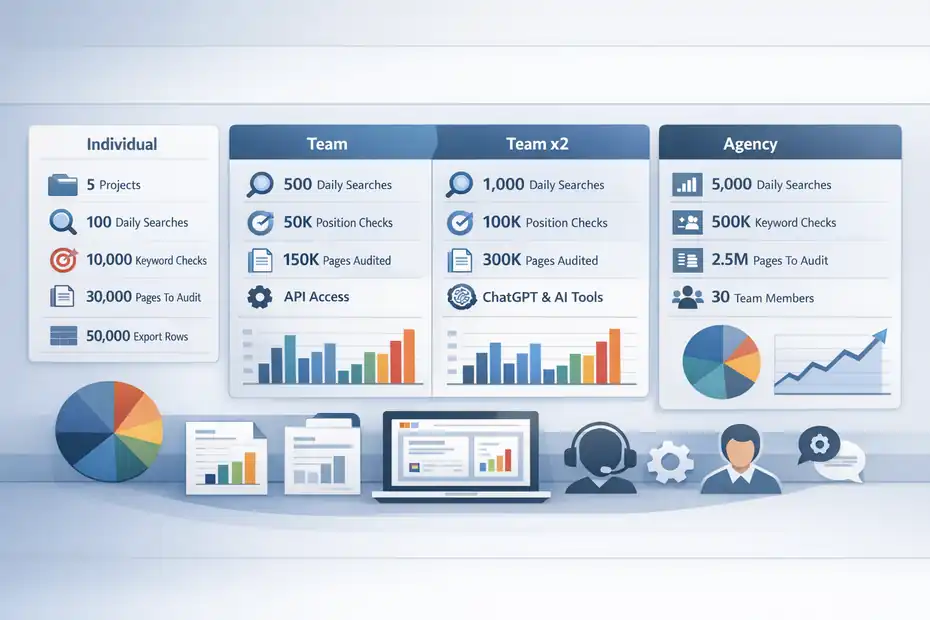
Once you move past the front-page prices, Serpstat becomes easier to evaluate. Each plan is really a bundle of access rights, credit ceilings, and team capability.
That is what determines whether it feels lean, comfortable, or restrictive.
Individual Plan: Affordable, But Tightly Scoped
The Individual plan is built for freelancers and beginners. It includes 5 projects, 100 searches per day, 10,000 top-100 keyword position checks per month, 30,000 pages to audit, and 50,000 export rows.
Serpstat also positions it as access to core features like keyword research, site analysis, rank tracking, site audit, and backlink analysis.
For one person managing one site or a very small client roster, that can be a sensible starting point. I actually think this is where Serpstat becomes attractive.
You get a broad SEO toolkit without jumping straight into enterprise pricing. That said, the restrictions are real.
The biggest gap is API access. Serpstat’s API documentation says API access is available on Team and Agency plans, and the comparison table shows no API credits on Individual.
If you rely on automation, internal dashboards, custom reporting, or data pipelines, Individual stops being a serious option immediately.
A realistic scenario: If you are a solo SEO consultant doing audits, a handful of tracking campaigns, and occasional exports, Individual may feel cost-efficient. If you are building repeatable systems, it will likely feel cramped within a month.
Team And Team x2: Where Most Agencies Start
The Team plan raises the ceiling in the places agencies usually care about first. It includes unlimited projects, 500 daily searches, 50,000 monthly position checks, 150,000 pages to audit, 250,000 export rows, 3 team members, API access, scheduled reports, branded reports, and billing by invoice.
Team x2 pushes those usage caps further, including 1,000 searches per day, 100,000 position checks, 300,000 audit pages, 500,000 export rows, 6 team members, and 400,000 API credits per month.
That difference is not trivial. If your bottleneck is not just “more users,” but “more work per client account,” Team x2 is the version that gives your processes breathing room.
I would describe Team as the practical baseline for a small SEO agency, while Team x2 feels more like the plan for an agency that has already outgrown manual workflows and wants fewer usage bottlenecks.
One interesting addition on Team x2 is the mention of ChatGPT and Claude integration through MCP, plus an AI Overview Brand Opportunities Report.
That suggests Serpstat is packaging some newer AI-adjacent workflow features into the upper mid-tier rather than leaving them only for enterprise users.
Agency: The Premium Tier Is About Scale, Reporting, And Support
The Agency plan includes unlimited projects, 5,000 daily searches, 500,000 monthly top-100 position checks, 1.5 million pages to audit, 2.5 million export rows, 30 team members, white label reports, phone support, and data engineer consultation.
It also carries 2,000,000 API credits per month and 10 API requests per second.
That tells you exactly who this tier is for: not casual users, but teams running many client accounts, higher-volume reporting, and heavier technical usage. White label reporting alone changes the economics for agencies that present branded deliverables to clients.
Phone support and data engineer consultation also signal that this plan is less about basic access and more about operational reliability.
I would not recommend Agency unless you know you need its scale. But if you do need it, the price should be judged against labor savings, not just software spend. One saved analyst day per month can make an expensive plan look cheap.
The Real Cost Drivers Most People Miss
This is where “hidden fees” usually enter the conversation.
Not always as surprise charges in the traditional sense, but as overlooked cost drivers that make a plan more expensive in practice than it looked on the landing page.
Credits And Limits Are The Hidden Budget Layer
Serpstat explains that its modules spend credits differently. Search analytics credits renew daily. Rank Tracker and Site Audit renew monthly. Audit uses 1 credit per scanned page, and JavaScript-rendered pages consume 10 limits per page.
Rank tracking credits are charged per keyword update and per analyzed region. For example, 10 keywords in 2 regions equals 20 credits.
This is the part buyers often underestimate. A tool may seem generous until your workflow multiplies usage. Let’s say you track 2,000 keywords across 5 regions for a multi-country ecommerce project. Even before you think about exports or audits, the rank-tracking math becomes meaningful.
The same goes for JavaScript-heavy sites. Modern ecommerce stores, SaaS sites, and web apps often rely on JavaScript rendering. If every such page burns 10 limits instead of 1, your audit allowance can disappear much faster than a simple “pages to audit” headline suggests.
I believe this is one of the most important practical truths in Serpstat pricing: the plan is not just about how many features you unlock. It is about how your website architecture and campaign design consume credits.
Extra Credits Can Turn A Cheap Plan Into An Expensive One
Serpstat’s tutorial states that if credits for a specific module are running out, you can buy additional credits rather than wait for the new billing month. It directs users to profile settings or a sidebar purchase flow for extra credits.
The pricing page does not prominently display standardized self-serve extra-credit prices in the same simple way it displays subscription tiers, which means your total cost may become more variable than expected.
That is not automatically bad. Flexible top-ups can be useful. But it does mean the “monthly fee” is not always the whole number you should budget around.
A smart way to think about this is to separate predictable spend from burst spend. Predictable spend is your plan price. Burst spend is what happens during migrations, audits, quarterly reporting pushes, large exports, or big client onboarding weeks.
If your workflow has bursts, you should assume the possibility of additional credit purchases and budget accordingly.
Trial Auto-Renewal And Card Verification Are Small But Important Friction Points
Serpstat’s pricing FAQ says that when you start the free trial, you enter a credit card for verification, a $1 charge is made and returned in 5 to 30 minutes, and auto-renewal is activated after the free trial unless the renewal is canceled.
The trial page also says the Team trial runs for 7 days and then becomes $129 per month on that page’s flow.
This is not unusual in SaaS, but it is exactly the kind of detail people mean when they search for hidden fees. The charge is temporary, but the bigger issue is forgetting to cancel. If you are testing Serpstat only to evaluate data quality or reporting, set a reminder the same day you sign up.
In my opinion, this is not a red flag so much as a reminder: trials with auto-renewal are only “free” when you manage them intentionally.
Which Serpstat Plan Makes Sense For Different Types Of Users
Pricing only becomes useful when it maps to a real use case. The best plan is not the cheapest one or the biggest one.
It is the one that matches your workload without forcing constant upgrades, credit anxiety, or wasted spend.
Best Option For Freelancers And Solo Site Owners
If you are a freelancer, blogger, affiliate marketer, or small business owner managing a single site, Individual is the obvious starting point.
You get the main SEO functions most people need early on: keyword research, backlink analysis, site auditing, and rank tracking. The 5-project cap also fits many solo workflows surprisingly well.
Where I would be careful is volume. Solo does not always mean low usage. A solo publisher with multiple niche sites, or a consultant exporting large keyword sets for clients, can hit limits faster than expected.
So the question is not just “Am I one person?” It is “How heavy is my workflow?”
A simple rule I would use: Choose Individual if you mainly research, monitor, and occasionally export. Move up if you need routine reporting, larger-scale audits, or automation. That keeps your decision tied to output, not identity.
Best Option For Small Agencies
Serpstat’s own FAQ says the Team plan is ideal for small agencies, offering unlimited projects, 3 team members, and extensive features. I think that is broadly fair.
Team unlocks API, share access, branded reports, scheduled reporting, and larger usage caps, which are exactly the things agencies usually need when they stop operating like freelancers and start operating like a system.
Imagine a three-person agency managing 12 SEO clients. They need rank tracking, audit capacity, exports, internal collaboration, and reports they can send without rebuilding everything manually every month. That is Team territory.
The bigger question is whether Team or Team x2 gives better value. If you are winning clients fast, Team x2 may actually save money by avoiding near-term upgrade pain
I have seen plenty of teams buy the lower plan to “be safe,” then spend more time managing limits than doing work.
Best Option For Larger Agencies And Data-Heavy Teams
Agency is for teams that need scale and client-facing polish. White label reports, larger member allowances, stronger API limits, phone support, and data engineer consultation are not beginner perks. They are workflow infrastructure.
If your team sells SEO as a premium service, these extras may have direct revenue value. White label reporting can improve presentation. Better support can reduce downtime.
Higher export and API capacity can shorten analyst hours. That is where expensive software becomes a margin tool instead of just an operating expense.
The key here is honesty. If you are not using those advantages, Agency is overkill. If you are using them every week, Agency may be the cheapest option in terms of cost per team output.
How Serpstat Compares On Value, Not Just Price
A lot of readers searching for pricing are really asking a different question: is Serpstat worth the money?
That answer depends less on raw cost and more on what type of SEO stack you are trying to build.
Serpstat Competes By Bundling Breadth At A Lower Entry Point
Serpstat’s pricing page presents it as an all-in-one SEO platform, and the Individual tier includes keyword research, site analysis, rank tracking, site audit, and backlink analysis.
Compared with higher-end SEO suites that reserve some functionality for more expensive tiers, Serpstat’s appeal is that you can access a broad toolkit without starting at a very high monthly number.
That broad access matters for buyers who do not want to stitch together four separate subscriptions for keyword tracking, audits, backlinks, and competitor analysis.
For many smaller teams, one tool that covers 80% to 90% of the job can be better than the “best” specialized platform in each category.
This is why Serpstat often attracts freelancers, small agencies, and budget-conscious in-house teams. The value proposition is not “we are the most premium SEO tool on earth.” It is “we give you a wide SEO operating system at a lower entry cost.”
The Cheapest Useful Plan Depends On Your Workflow
I suggest looking at value through this lens:
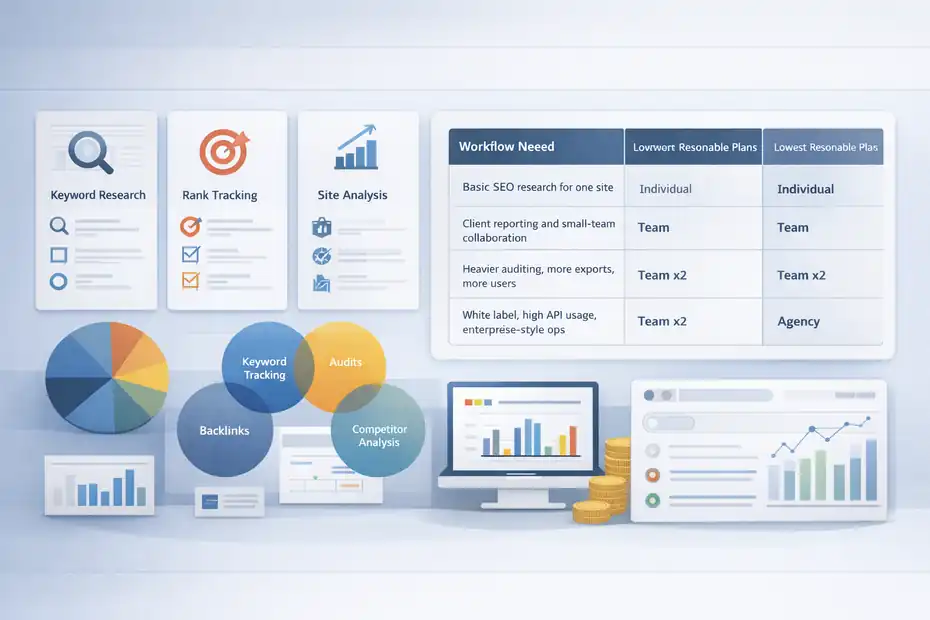
| Workflow Need | Lowest Reasonable Plan |
|---|---|
| Basic SEO research for one site | Individual |
| Client reporting and small-team collaboration | Team |
| Heavier auditing, more exports, more users | Team x2 |
| White label, high API usage, enterprise-style ops | Agency |
That table is simple, but it prevents a common mistake: buying based on ambition instead of current process. You do not need Agency because your business goals are big. You need Agency when your actual recurring workload needs Agency-level limits.
At the same time, you should not buy Individual if you already know you need API, branded reports, or multi-user collaboration. That is not frugal. It is just postponing the inevitable.
Where Serpstat Can Feel More Expensive Than Expected
Serpstat usually looks affordable at first glance, but it can feel more expensive in three situations. First, your project uses a lot of rank-tracking regions or keywords.
Second, your site audits are heavy, especially with JavaScript rendering. Third, your process depends on exports, reports, and API usage that push you out of Individual quickly.
That does not make Serpstat overpriced. It just means the cheapest plan is best seen as an entry point, not a promise that every SEO workflow will remain cheap indefinitely.
Common Pricing Mistakes Buyers Make With Serpstat
Most pricing regret does not come from bad software. It comes from buying the wrong plan for the wrong reason.
Serpstat is no different. A little planning here can save real money and a surprising amount of frustration.
Mistake 1: Choosing By Monthly Price Alone
This is the biggest one. People see $50 and decide it is the best-value option, then realize the plan excludes API, has only 5 projects, and offers limited daily searches and exports.
A better buying habit is to estimate your monthly workload before you subscribe. Count how many sites you manage, how many keywords you track, how many exports you run, how many regions matter, and whether you need collaboration. That five-minute exercise tells you much more than the price card alone.
I recommend making a tiny internal checklist before purchase:
- Projects needed
- Keywords tracked
- Regions tracked
- Audit volume
- Export frequency
- Reporting needs
- API or no API
That list is more useful than any sales page summary.
Mistake 2: Ignoring The Trial Renewal Behavior
The pricing FAQ is clear that the trial involves card verification and auto-renewal after 7 days unless canceled. That means a trial is not a “set and forget” test.
I have seen teams sign up for tools during a busy week, intend to evaluate them later, and end up paying because nobody reviewed the cancellation date.
The fix is simple: set a calendar reminder for day 5 or day 6, not day 7. That gives you time to decide before the system decides for you.
This is not dramatic, but it is practical. Small billing habits are part of software ROI.
Mistake 3: Underestimating Usage Spikes
Normal usage and peak usage are not the same thing. Your average month may fit a plan perfectly.
But migrations, quarterly audits, client onboarding, or major reporting cycles may push you over the edge. Serpstat explicitly allows buying additional credits when module limits run low.
That tells you something useful: usage spikes are expected. So instead of asking, “Does this plan fit my average month?” ask, “Does this plan survive my busiest month without becoming annoying or expensive?”
That mindset shift alone can help you choose better.
How To Pick The Right Plan And Control Total Cost
By this point, the best Serpstat plan should be clearer. Now it becomes a decision framework.
The goal is not just to subscribe. The goal is to subscribe without overpaying or boxing yourself into the wrong tier.
Start With Your Workflow, Not The Feature List
Feature lists are seductive because they make every tool sound complete. Workflows are more honest.
Ask yourself a few direct questions. Do you need API access? Do you deliver reports to clients? Do you manage multiple teammates? Do you run large site audits? Do you track across many regions?
The answers will usually point to the right plan faster than reading every row in a comparison chart.
Here is the practical shortcut I would use:
| If This Sounds Like You | Start Here |
|---|---|
| One person, one site, limited exports | Individual |
| Small agency, regular reporting, collaboration | Team |
| Growing team, heavier usage, larger clients | Team x2 |
| Large-scale delivery, white label, deep API needs | Agency |
That is not flashy advice, but it is reliable.
Use The Trial To Validate Data Habits, Not Just Features
A free trial should answer one question: does this tool fit how you actually work? The Team trial page highlights 500 searches per day, unlimited projects for audit and rank tracker, 50,000 keyword position checks, and access to API and AI tools during the trial experience.
So during the trial, do not just click around. Run your real use case. Import projects. Audit a real site. Export real data. Check the rank-tracking process.
See whether the interface helps or slows you down. That is how you avoid buying a plan that looks fine on paper but feels awkward in practice.
In my experience, the smartest buyers test friction, not just features.
Budget For Total Ownership, Not Subscription Price
The final layer of Serpstat pricing explained is this: the subscription fee is only part of the cost. Your real cost includes unused seats, time spent managing limits, potential extra credits, and whether the platform reduces or increases manual labor.
A $100 plan that saves five hours of reporting each month may be cheaper than a $50 plan that creates workflow friction. A $410 plan may be justified if white label reporting and higher API limits support client retention or delivery scale. This is why I always come back to operational fit.
If you want the cleanest answer, here it is: Serpstat is usually best-value for freelancers and small-to-mid agencies that want broad SEO coverage without starting at ultra-premium pricing.
But the “hidden fees” are really hidden usage pressures: auto-renewal, extra credits, and plan ceilings that only become obvious once real work starts.
Final Verdict
Serpstat pricing explained in one sentence: It is competitively priced on the surface, but the right plan depends heavily on how often you audit, export, track, collaborate, and automate. Individual is the budget-friendly entry point.
Team is the practical agency baseline. Team x2 gives growing teams more breathing room. Agency is for serious scale, client presentation, and high-volume data work.
If I were choosing today, I would not start by asking which plan is cheapest. I would ask which plan lets me do my actual monthly workflow without babysitting credits. That is usually where the smartest software buying decisions happen.
FAQ
What does Serpstat pricing include?
Serpstat pricing includes access to SEO tools like keyword research, rank tracking, site audits, and backlink analysis. Each plan also includes usage limits such as daily searches, monthly keyword tracking, and export rows. Higher-tier plans unlock API access, team collaboration, and advanced reporting features.
Is there a free trial for Serpstat?
Yes, Serpstat offers a 7-day free trial that requires credit card verification. A small temporary charge is applied and refunded shortly after. If you do not cancel before the trial ends, the subscription automatically renews into a paid plan.
What are the hidden costs in Serpstat pricing?
The main hidden costs come from usage limits and additional credits. If you exceed your plan’s limits for audits, rank tracking, or exports, you may need to purchase extra credits. These costs depend on how heavily you use the platform.
Which Serpstat plan is best for beginners?
The Individual plan is best for beginners or freelancers managing a small number of websites. It provides core SEO tools at a lower price but comes with tighter limits on searches, audits, and exports, making it ideal for lighter workloads.
Is Serpstat worth the price?
Serpstat is worth the price for users who need an all-in-one SEO tool at a lower entry cost. Its value depends on your workflow. If your usage stays within plan limits, it offers strong functionality, but heavy users may need higher-tier plans.

I’m Juxhin, the voice behind The Justifiable.
I’ve spent 6+ years building blogs, managing affiliate campaigns, and testing the messy world of online business. Here, I cut the fluff and share the strategies that actually move the needle — so you can build income that’s sustainable, not speculative.
Related posts:
 Semrush Alternatives Cheaper But Still Good Picks
 Semrush Pricing Worth It For Beginners Or Not?
 Semrush Vs Ahrefs Which Is Better For SEO Today?
 Serpstat All In One SEO Platform Review: Full Breakdown
 Serpstat SEO Tool Review: Is It Worth Your Money?
 Is the Squirrly SEO WordPress Plugin Enough to Rank?