
Table of Contents
Some links on The Justifiable are affiliate links, meaning we may earn a small commission at no extra cost to you. Read full disclaimer.
Sellfy pros and cons for digital sellers matter a lot when you’re trying to choose a platform that won’t slow you down, overcomplicate your store, or quietly eat into your margins.
I’ll be honest: Sellfy is not the most advanced ecommerce platform on the market, and that is both its biggest strength and its biggest weakness. It is built for creators who want to sell downloads, subscriptions, videos, merch, or simple products without managing plugins, hosting, or a complicated tech stack.
In this guide, I’ll walk you through where Sellfy shines, where it falls short, and how to decide if it fits your digital product business.
Understand What Sellfy Is Before Judging The Pros And Cons
Before we compare features, pricing, and limitations, it helps to understand what Sellfy is actually designed to do.
A lot of frustration comes from expecting Sellfy to behave like a full enterprise ecommerce system when it is really built for simpler creator-led selling.
What Sellfy Does For Digital Sellers
Sellfy is an ecommerce platform made for creators and small businesses that want to sell products online without building a complex website from scratch. Its main use case is selling digital products such as ebooks, presets, templates, videos, audio files, design assets, subscriptions, and downloadable bundles.
The platform also supports physical products, subscriptions, and print-on-demand items, so it can work for hybrid creator businesses too.
For example, a YouTuber could sell a video editing preset pack, a monthly membership, and branded merch from one storefront. Sellfy lists digital downloads, video streaming, subscriptions, physical products, and print-on-demand as supported product types.
What makes Sellfy appealing is the “all-in-one but lightweight” setup. You get a hosted storefront, checkout, product delivery, basic marketing features, payment connections, and store customization in one place. You do not need to manage separate hosting or install a pile of apps just to sell your first product.
In my experience, this kind of platform works best when your offer is already clear. If you know what you want to sell and need a simple place to take payment and deliver files, Sellfy can feel refreshingly direct.
But if you want deep content marketing, advanced funnels, custom checkout logic, or a large plugin ecosystem, you may feel boxed in sooner than expected.
Who Sellfy Is Best Suited For
Sellfy is best for creators who care more about launching quickly than building a highly customized ecommerce machine. That includes designers selling templates, photographers selling presets, musicians selling beats, educators selling downloadable resources, fitness creators selling PDF plans, and video creators selling streaming content.
It is also a practical option for sellers who already have an audience somewhere else. Imagine you have 20,000 Instagram followers, a YouTube channel, or an email list. In that case, your store does not need to do all the discovery work. You mainly need a clean product page, reliable checkout, and fast delivery. Sellfy can handle that kind of job well.
The platform is less ideal if your business depends heavily on search engine traffic from a blog, advanced segmentation, multi-step funnels, large product catalogs with complex filtering, or custom backend workflows. You can still sell with Sellfy, but you may need outside systems for content, analytics, and deeper automation.
A simple way to think about it is this: Sellfy is a good fit when your business needs a store, not an entire custom commerce infrastructure. That distinction matters because many Sellfy pros and cons for digital sellers come directly from this simplicity-first approach.
How Sellfy Handles Digital Product Delivery
One of Sellfy’s strongest practical benefits is automatic file delivery. When a customer buys a digital product, Sellfy hosts the product files and delivers the order instantly, so you do not have to manually email downloads or manage private file links.
Sellfy’s help documentation says it hosts product files on a secure server and takes care of instant delivery after purchase.
This matters more than beginners realize. Manual delivery may sound fine when you sell two products a week, but it becomes stressful when people buy across time zones, ask for missing links, or expect instant access. A digital product platform should remove that friction.
Sellfy also lets you upload multiple files inside one product. According to its documentation, a digital product can include up to 50 files, and sellers can use a compressed ZIP or RAR folder when they need to package more files together.
That is useful for bundles. For example, if you sell a “Complete Notion Creator Kit,” you could include a PDF guide, template links, bonus worksheets, icon files, and a setup checklist in one purchase. My suggestion is to keep the customer experience simple: even if Sellfy allows many files, organize them clearly so buyers are not confused after checkout.
Evaluate Sellfy’s Biggest Pros For Digital Sellers
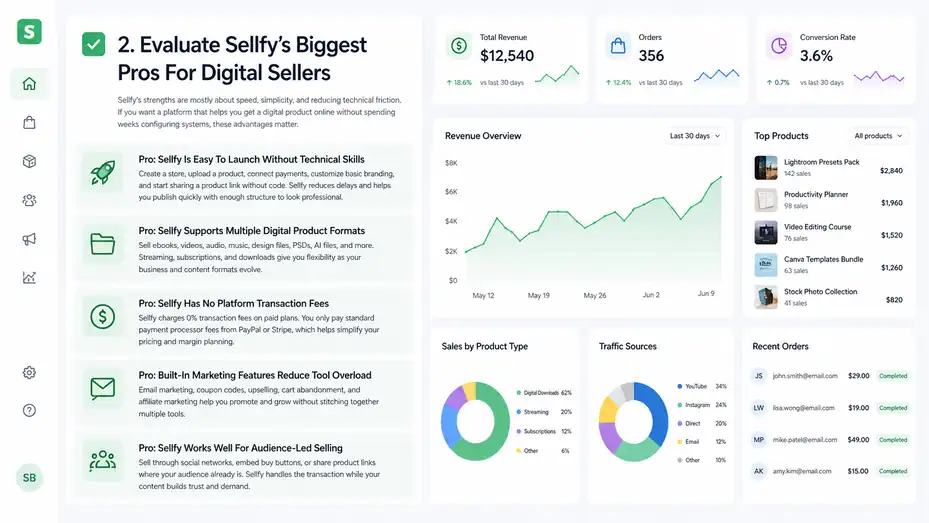
Sellfy’s strengths are mostly about speed, simplicity, and reducing technical friction.
If you want a platform that helps you get a digital product online without spending weeks configuring systems, these advantages matter.
Pro: Sellfy Is Easy To Launch Without Technical Skills
The biggest Sellfy pro is how quickly you can get from “I have a product idea” to “people can buy this.” You can create a store, upload a product, connect payments, customize basic branding, and start sharing a product link without touching code.
That matters because many digital sellers get stuck before they ever sell. They compare platforms, buy themes, install plugins, tweak colors, and delay the scary part: asking people to buy. Sellfy reduces that delay. It gives you enough structure to publish quickly without making you design every tiny piece yourself.
The store builder supports basic customization like adding your logo, changing colors, adjusting layout, connecting a custom domain, and creating a mobile-optimized store. Sellfy also lists shopping cart functionality and store language options among its customization features.
For a beginner, that is usually enough. You can create a clean storefront that looks legitimate, especially if your product images, descriptions, and positioning are strong.
Here’s how you can get started:
- Create your store and choose a simple layout.
- Upload one focused digital product instead of trying to launch ten.
- Add a clear product title, benefit-driven description, and preview images.
- Connect Stripe or PayPal.
- Test the checkout yourself before promoting the link.
I recommend launching with one strong offer first. You learn much faster from one real product with real buyers than from a beautiful store full of half-finished ideas.
Pro: Sellfy Supports Multiple Digital Product Formats
Sellfy is not limited to one type of digital file. You can sell ebooks, videos, audio, music, design files, PSDs, AI files, and other downloadable assets. The platform also supports video streaming, which helps sellers offer video content without forcing every customer to download large files.
This flexibility is helpful if your digital product business evolves. You might start with a PDF guide, then add a template pack, then later sell a video workshop. You do not necessarily have to switch platforms just because your format changes.
Video streaming is especially valuable for sellers worried about download friction. Large video files can create support issues: customers struggle with storage, slow internet, failed downloads, or device compatibility. Streaming can make the buying experience smoother.
Let’s say you sell a $49 mini-course on watercolor basics. Instead of sending buyers a giant video folder, you can offer access through streaming. That feels more polished and reduces the “I can’t open the file” messages that drain your time.
The key is matching the delivery format to the product. For worksheets, templates, and presets, downloadable files are usually fine. For educational video content, streaming may feel more professional. For recurring content, subscriptions can create predictable revenue, but only if you can keep delivering value over time.
Pro: Sellfy Has No Platform Transaction Fees
Sellfy does not charge its own transaction fee on paid plans. Its pricing page lists 0% transaction fees, and its help documentation says Sellfy charges a recurring subscription cost but no Sellfy transaction fees. Sellers still pay payment processor fees from PayPal or Stripe.
This is important for margin planning. Some ecommerce platforms take a platform fee on top of payment processing fees, especially on lower-tier plans or marketplace-style systems. Sellfy’s subscription model can be attractive if you want predictable platform costs.
However, “no transaction fee” does not mean “no selling costs.” Sellfy’s documentation says PayPal and Stripe charge transaction fees, with examples around 2.9% + $0.30 in the U.S. for each transaction.
Here’s a simple scenario. If you sell a $20 template pack, payment processing may take roughly $0.88 in the U.S. using a 2.9% + $0.30 example. That leaves $19.12 before considering your Sellfy subscription, taxes, refunds, and other business expenses.
The practical takeaway is simple: Sellfy can be cost-effective when you sell enough volume to justify the monthly fee. If you are making only a few sales per month, a subscription platform may feel expensive. If you sell consistently, the lack of added platform transaction fees becomes more attractive.
Pro: Built-In Marketing Features Reduce Tool Overload
Sellfy includes built-in marketing features such as email marketing, coupon codes, upselling on higher plans, cart abandonment on higher plans, and affiliate marketing on higher plans. The Business plan includes growth features like product upselling, cart abandonment, and affiliate marketing, while Premium adds advanced options and priority support.
This is useful because new digital sellers often drown in tools. They sign up for a store builder, email software, checkout app, affiliate platform, landing page tool, and analytics dashboard before they have enough revenue to justify the stack.
Sellfy’s built-in tools are not always as advanced as dedicated platforms, but they are convenient. For many creators, convenience beats complexity at the start.
Imagine you sell Lightroom presets. A customer adds your $19 preset pack to their cart. With upselling, you could offer a discounted $9 mobile editing guide before checkout. With coupons, you could run a weekend promotion for your email subscribers. With cart abandonment, you may recover some people who left before buying.
The real benefit is not just having these features. It is having them close to the purchase moment. Marketing tools work best when they connect directly to buyer behavior, and Sellfy gives smaller sellers a way to act on that behavior without stitching together multiple systems.
Pro: Sellfy Works Well For Audience-Led Selling
Sellfy is strongest when you already have a traffic source. That could be YouTube, TikTok, Instagram, Pinterest, a podcast, a newsletter, a blog, or a community. You can send people directly to your product page or embed buying options where relevant.
Sellfy says sellers do not need an existing website because they can build a store on Sellfy and sell through social networks. It also says sellers with a website can embed buy buttons, product widgets, or a full store.
That makes Sellfy useful for creators who do not want their ecommerce platform to become the center of their entire brand. Your main relationship with your audience might live elsewhere, while Sellfy handles the transaction.
For example, a music producer might post beat-making tutorials on YouTube, then link to a Sellfy store with drum kits and sample packs. A productivity creator might share free tips on LinkedIn, then sell digital planners through a Sellfy product page. A teacher might use a blog or newsletter to explain classroom systems, then sell printable resources.
In these cases, Sellfy’s job is not to replace your content strategy. Its job is to make buying easy once someone is already interested. I believe that is the fairest way to evaluate it.
Review Sellfy’s Biggest Cons Before You Commit
Sellfy’s weaknesses usually show up when you need more control, deeper customization, or advanced growth systems. These limitations are not always deal-breakers, but they can become expensive if you discover them after building your store.
Con: Store Customization Can Feel Limited
Sellfy lets you customize the basics, but it is not built for unlimited design freedom. You can adjust branding, colors, layout, domains, and store themes, but you should not expect the same level of control you would get from a fully custom website or a more extensible ecommerce platform.
For many digital sellers, this is fine. A simple store can convert well if the offer is strong. But if your brand depends on a highly specific visual experience, advanced landing page sections, custom product filtering, or unique checkout flows, Sellfy may feel restrictive.
This matters for positioning. Let’s say you sell premium design templates for $299. Your buyers may expect an elevated brand experience. If your storefront feels too generic, it can work against the price point. You can improve this with strong images, clear copy, and a custom domain, but there is still a ceiling.
A practical workaround is to use Sellfy as the checkout and delivery engine while hosting richer sales pages elsewhere. For example, your main website can explain the offer in depth, show testimonials, answer objections, and then send buyers to Sellfy for payment.
That setup gives you more storytelling control without losing Sellfy’s simple delivery system. Still, it means you are now managing more than one piece of infrastructure, which slightly reduces Sellfy’s simplicity advantage.
Con: Pricing Can Be Hard For Very New Sellers
Sellfy’s monthly pricing starts at $29 per month on the monthly Starter plan, with Business at $79 per month and Premium at $159 per month. Annual pricing is lower, starting at $22, $59, and $119 per month respectively, according to Sellfy’s pricing page.
That pricing is not unreasonable for a serious seller, but it can feel heavy when you are still validating your first product. If you make $50 in your first month, a $29 monthly plan takes a large share of revenue before payment fees.
Sellfy also uses annual sales volume limits by plan. The Starter plan supports up to $10,000 in yearly sales, Business up to $50,000, and Premium up to $200,000. Sellfy says sellers who exceed their plan’s yearly sales cap are expected to upgrade, and it may charge a 2% overage fee if the account does not upgrade.
Here is a quick pricing snapshot:
| Plan | Monthly Price | Annual Price Equivalent | Annual Sales Volume | Best Fit |
|---|---|---|---|---|
| Starter | $29/mo | $22/mo | Up to $10k | New creators validating products |
| Business | $79/mo | $59/mo | Up to $50k | Sellers using upsells, cart recovery, affiliates |
| Premium | $159/mo | $119/mo | Up to $200k | Higher-volume sellers needing priority support |
My advice is to judge Sellfy pricing against your expected monthly gross profit, not just revenue. If your digital product has high margins and you can sell consistently, the subscription can make sense. If you are still guessing whether anyone will buy, validate demand before committing long-term.
Con: Advanced SEO And Content Marketing Are Not The Main Strength
Sellfy can give you product pages and a store, but it is not primarily a content publishing platform. If your growth plan depends on ranking dozens of blog posts, building topical authority, creating comparison guides, or publishing long educational content, you will likely want a dedicated content website alongside Sellfy.
This is a big point for digital sellers who rely on Google traffic. Product pages can rank, but they usually need support from helpful content.
For example, a seller offering budgeting spreadsheets might rank better by publishing guides around budgeting methods, savings challenges, debt payoff plans, and personal finance templates. A simple storefront alone rarely covers that full search journey.
Sellfy does allow product URLs to include the product name as a custom slug, and its documentation notes that product names are automatically included in URLs unless you use a custom domain setup. That helps, but URL structure is only one small part of SEO.
The bigger SEO needs are content depth, internal linking, schema, fast page experience, search intent matching, and consistent publishing. Sellfy is not where I would build a full SEO content engine.
A smart setup is to use your main site for organic traffic and education, then use Sellfy for checkout and delivery. That way, you are not asking Sellfy to do a job it was not mainly built for.
Con: Some Growth Features Require Higher Plans
Sellfy’s Starter plan gives you the basics, but several growth features sit on higher tiers. Business includes product upselling, cart abandonment, affiliate marketing, and custom fields. Premium adds advanced options, migration support, and priority support.
This matters because those features can directly affect revenue. Cart abandonment, for example, helps you follow up with people who nearly bought but left. Upsells can increase average order value. Affiliate marketing can help partners promote your products.
If you are comparing Sellfy against platforms with lower entry costs, check which features are actually included at your target price. A platform can look affordable until you realize the feature you need is one plan higher.
Let’s use a realistic example. You sell a $27 digital planner. On the Starter plan, you may sell the planner successfully. But if you want affiliates to promote it, or you want to offer a discounted add-on at checkout, you may need Business. That shifts your monthly cost from $29 to $79 if paying monthly.
That does not mean Business is bad. If one upsell or affiliate campaign adds several extra sales per month, it can pay for itself. But you should make that decision intentionally, not because you discovered a limitation after launch.
Compare Sellfy Pricing And Value For Digital Sellers
Pricing is not just about the monthly fee.
The real question is whether Sellfy helps you sell enough, save enough time, or avoid enough technical headaches to justify the cost.
How To Think About Sellfy’s Monthly Cost
When reviewing Sellfy pros and cons for digital sellers, I would not compare the monthly cost in isolation. Compare it against the cost of building the same selling system yourself.
A basic digital product setup may require hosting, a checkout tool, file delivery, email marketing, coupon handling, analytics, tax settings, security, and support workflows. Sellfy bundles many of these into one subscription, which can save time even if it is not the cheapest possible route.
But there is a trade-off. Bundled platforms are convenient because decisions are made for you. They are limiting for the same reason. You get speed, but you give up some flexibility.
A useful rule: If you value simplicity and your product is straightforward, Sellfy’s price can be fair. If you enjoy building custom systems or need advanced workflows, you may prefer a more flexible setup even if it takes longer.
Run the numbers like this:
- Low validation stage: If you expect fewer than five sales per month, keep costs lean and avoid overbuilding.
- Early traction stage: If you already sell $300–$1,000 per month, Sellfy can be worth it for smoother delivery and checkout.
- Growth stage: If you sell several thousand dollars per month, Business or Premium may make sense if the growth tools lift revenue.
The platform should support your business model, not pressure you into one.
Payment Fees, Sales Caps, And Real Margins
Sellfy does not charge platform transaction fees, but payment processors still do. Sellfy’s help center lists PayPal and Stripe as payment processing options and notes that processor fees are deducted from each transaction.
You also need to consider plan sales caps. A sales cap is the maximum yearly sales volume allowed on a plan before you are expected to upgrade. Sellfy’s monthly pricing table lists annual sales volume limits of up to $10k, $50k, and $200k across Starter, Business, and Premium.
For digital sellers, this can be both good and annoying. It is good because your platform cost is predictable at each stage. It is annoying because crossing a revenue threshold can force a plan upgrade even if you do not need the extra features.
Let’s break down a simple example:
| Scenario | Product Price | Monthly Sales | Gross Revenue | Likely Plan Pressure |
|---|---|---|---|---|
| Beginner template seller | $19 | 20 | $380/mo | Starter may be enough |
| Growing course seller | $79 | 60 | $4,740/mo | Business likely fits better |
| Established creator | $149 | 150 | $22,350/mo | Premium or custom option may be needed |
The mistake is looking only at revenue. A $10 ebook and a $300 template bundle behave differently. Higher-ticket products hit sales caps faster with fewer customers, while lower-ticket products may create more support volume.
In most cases, Sellfy works best when you have strong digital margins and a simple catalog. If your product requires heavy support, fulfillment, or one-on-one time, calculate that cost too.
When Sellfy Becomes Worth The Price
Sellfy becomes worth the price when it helps you move faster and reduces operational drag. That usually happens once your product has proven demand.
For example, imagine you sell a $39 Canva template bundle. You promote it through Pinterest and a small newsletter. You make 25 sales per month, or $975 in gross revenue. At that point, paying for a simple store, checkout, and delivery system feels reasonable because the platform is supporting real sales.
Now imagine the same seller adds a $19 upsell, improves the product page, and sends two email campaigns per month. If those changes add even 10 extra purchases or upgrades, the platform starts looking less like an expense and more like infrastructure.
I suggest using a simple “platform payback” test. Ask: How many sales do I need each month to cover Sellfy? If the answer feels realistic based on your audience size and conversion rate, the cost may be fine. If the answer requires wishful thinking, validate the product first.
For example, on a $29 monthly Starter plan, one $49 sale covers the platform before processor fees. On a $79 Business plan, two $49 sales nearly cover it. That does not mean you are profitable overall, but it gives you a grounded starting point.
Set Up Sellfy The Right Way If You Choose It
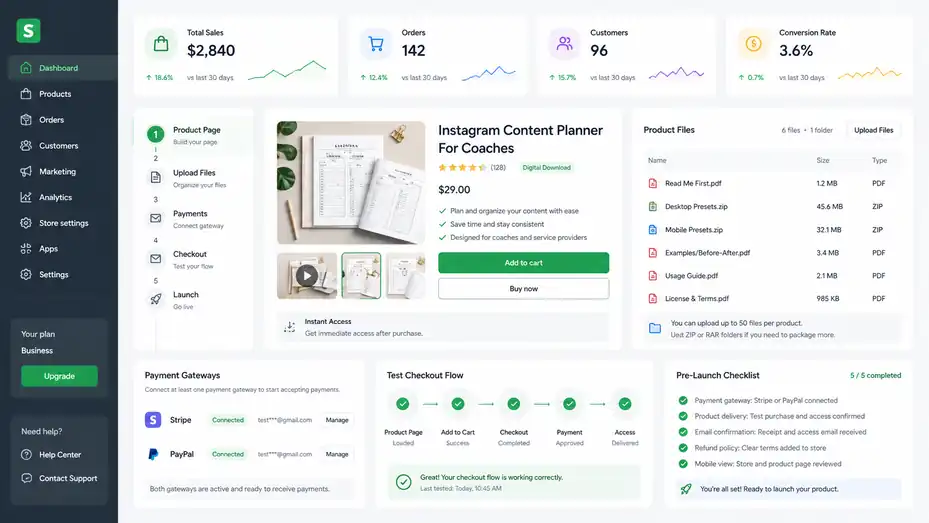
If you decide Sellfy fits your business, setup matters.
A simple platform still needs a strong offer, clear product packaging, and a buying experience that feels trustworthy.
Build Your First Product Page Around Buyer Intent
Your product page should answer the buyer’s real question: “Is this worth my money right now?” Too many digital sellers describe what is inside the product but forget to explain the outcome.
Start with a title that clearly names the product and benefit. Instead of “Creator Bundle,” try “Instagram Content Planner For Coaches.” Specificity sells because it helps the right person recognize themselves.
Your description should cover the problem, the transformation, what is included, who it is for, and how to use it. Keep it simple but complete. A buyer should not need to message you to understand what they will receive.
Use preview images whenever possible. Digital products feel intangible, so screenshots, mockups, short previews, or sample pages reduce uncertainty. If you sell templates, show the template in use.
If you sell presets, show before-and-after examples. If you sell an ebook, show the table of contents and sample pages.
I recommend this structure:
- Lead with the outcome.
- Explain who the product is for.
- Show exactly what is included.
- Add usage instructions.
- Address common objections.
- End with a clear call to action.
A good Sellfy product page does not need to be fancy. It needs to make the buying decision easy.
Organize Files For A Smooth Customer Experience
Digital delivery is only successful if buyers can understand what they received. Sellfy can deliver the files, but you still need to package them well.
Use clear file names. “Budget-Planner-2026.pdf” is better than “final-v7-new.pdf.” If you include multiple files, add a quick-start PDF that tells customers what to open first. This tiny touch reduces confusion and makes the product feel more premium.
Sellfy allows multiple files in one product upload and recommends compressed folders when sellers need to package more than 50 files or use folders. That gives you flexibility, but do not abuse it by dumping a messy folder on buyers.
For example, if you sell a photography preset pack, organize it like this:
- Read Me First: Installation instructions and license notes.
- Desktop Presets: Files for desktop editing software.
- Mobile Presets: Files for mobile users.
- Examples: Before-and-after images or suggested settings.
This helps buyers get value quickly. And when buyers get value quickly, they are less likely to refund, complain, or forget your brand.
My rule is simple: design the post-purchase experience as carefully as the sales page. The sale is not the end of the relationship. It is the first moment the customer decides whether they trust you again.
Connect Payments And Test Checkout Before Launch
Sellfy supports PayPal and Stripe for payment processing. Sellfy’s pricing page says sellers can receive payments through PayPal or Stripe, and its help documentation says payments are sent directly to the connected PayPal or Stripe account depending on the gateway used.
Before promoting your store, test the full checkout flow. This sounds basic, but it catches embarrassing problems. Make sure the product page loads, the price is correct, payment works, the confirmation email arrives, and the download or access experience feels smooth.
Check your store on mobile too. Sellfy says stores are optimized for mobile devices, but your images, descriptions, and product previews still need to look good on smaller screens.
Here’s a simple pre-launch checklist:
- Payment gateway: Confirm Stripe or PayPal is connected properly.
- Product delivery: Buy or test the product and check access.
- Email confirmation: Make sure the message is understandable.
- Refund policy: Add clear terms so buyers know what to expect.
- Mobile view: Review the page on your phone before sharing.
I advise doing this even if you are in a hurry. A broken checkout does not just cost sales; it weakens trust with the people most likely to support your launch.
Optimize Sellfy For More Sales After Launch
Once your store is live, your job shifts from setup to improvement.
This is where small changes to pricing, product pages, offers, and follow-up can have a meaningful impact.
Improve Conversion With Clear Offers And Proof
Conversion rate is the percentage of visitors who buy. If 100 people visit your product page and 3 buy, your conversion rate is 3%. For digital products, conversion depends heavily on clarity, trust, relevance, and perceived value.
The first thing I would optimize is the offer itself. A weak offer cannot be saved by a pretty store. Your product should solve a specific problem for a specific person. “Templates for business owners” is vague. “Client onboarding email templates for freelance designers” is much stronger.
Add proof where you can. That could be testimonials, screenshots of customer results, examples of the product in action, or honest usage previews. If you are new and do not have testimonials yet, show the product clearly and explain your process.
A realistic mini scenario: You sell a $29 meal planning spreadsheet. Your first version says, “Meal planner template.” Your improved version says, “A weekly meal planning spreadsheet that helps busy students plan meals, estimate grocery costs, and reduce last-minute takeout.” Same product, clearer value.
Use your product description to remove doubt. Buyers often wonder:
- Will this work for me?
- Is it easy to use?
- What exactly do I get?
- Can I access it right away?
- What happens if I have a problem?
Answer those questions before they ask.
Use Upsells And Bundles Carefully
Upsells can increase average order value, but only when they are relevant. An upsell is an additional offer shown during the buying process, often at a discount. Sellfy’s Business and Premium plans include product upselling.
The best upsell feels like a natural next step. If someone buys a digital planner, offer a matching habit tracker. If someone buys presets, offer an editing workflow guide. If someone buys an ebook, offer templates that help them implement the advice.
Avoid random upsells. If the buyer feels like you are throwing unrelated products at them, it can reduce trust. The upsell should make the original purchase more useful.
Bundles can also work well for digital sellers. A bundle combines several products into one higher-value offer. For example, instead of selling a $15 resume template, $12 cover letter template, and $9 interview checklist separately, you could create a $29 job search kit.
That increases perceived value and simplifies the decision. Buyers often prefer one complete solution over several separate purchases.
My recommendation is to create one core product, one logical upsell, and one bundle. Test that before building a large catalog. Too many offers too early can confuse buyers and make your store harder to manage.
Use Email Credits With A Simple Campaign Plan
Sellfy’s help documentation says email credits count as emails sent from its built-in email marketing tool. It lists 2,000 monthly credits on Starter, 10,000 on Business, and 50,000 on Premium, with the option to purchase more if needed.
This can be useful, but only if you send emails with purpose. Email marketing is not just “announce a sale and hope.” It works best when you build trust, educate buyers, and make timely offers.
For digital sellers, a simple email plan could look like this:
- Email 1: Share a helpful tip related to the product problem.
- Email 2: Explain the product and who it helps.
- Email 3: Show a customer example or use case.
- Email 4: Offer a limited-time discount or bonus.
- Email 5: Follow up with answers to common objections.
Keep it human. You do not need corporate language. Write like you are helping one person make a good decision.
For example, if you sell Notion templates, your first email could teach readers how to organize weekly tasks. Then your product naturally becomes the shortcut, not the whole conversation.
Email credits are valuable when they support a real strategy. If you blast discounts constantly, people tune out. If you help first and sell second, your offers feel more welcome.
Troubleshoot Common Sellfy Problems
Even simple platforms can create friction. The good news is that many Sellfy problems are not technical failures; they are setup, positioning, or expectation issues you can fix.
Problem: Your Store Gets Traffic But Few Sales
If people visit your Sellfy store but do not buy, the issue is usually one of four things: weak offer, unclear product page, wrong audience, or price mismatch.
Start with the offer. Is the product solving a painful enough problem? Digital products sell best when they save time, reduce stress, help someone make money, improve a skill, or provide a desirable shortcut. A product that is merely “nice to have” may need stronger framing or a lower price.
Next, check your product page. Does the first screen explain what the product is and why it matters? Are there visuals? Do you show what is included? Is the call to action obvious? If not, improve clarity before changing platforms.
Then look at traffic quality. A viral TikTok can bring curious visitors who never intended to buy. A small email list of highly interested people may convert better than thousands of random clicks. Not all traffic is equal.
Finally, test pricing. If your product is expensive, add more proof, more detail, or a stronger guarantee. If your product is cheap but still not selling, the issue may not be price. It may be perceived value.
I suggest changing one thing at a time. Update your headline, wait for enough traffic, then evaluate. If you change the price, images, description, and offer all at once, you will not know what helped.
Problem: Buyers Get Confused After Purchase
Post-purchase confusion usually means the product packaging needs work. Sellfy may deliver the files correctly, but buyers still need guidance.
Add a “Start Here” file to every product. This can be a short PDF or text file explaining what is included, how to use it, and where to get help. It does not need to be long. It just needs to remove friction.
If you sell templates, include setup instructions. If you sell presets, include installation steps. If you sell spreadsheets, include a short explanation of which cells to edit. If you sell videos, explain whether customers should stream, download, or both.
Also review your file names and folder structure. People should not need to guess which file is the final version. Clean organization makes your product feel more valuable even when the actual content is the same.
A helpful scenario: Suppose you sell a $35 social media content calendar. The buyer downloads five files and does not know where to begin. Add a “Read Me First” guide with three steps: duplicate the template, choose your content pillars, fill the weekly planner. That one page can prevent support messages and improve satisfaction.
Good delivery is part of your brand. Buyers remember whether the product felt easy.
Problem: You Outgrow Sellfy’s Simplicity
Outgrowing Sellfy is not a failure. It may mean your business has become more sophisticated. The platform that helped you launch quickly may not be the platform that supports every advanced need later.
Signs you may be outgrowing Sellfy include needing complex automations, advanced segmentation, deep SEO publishing, custom checkout logic, multi-author course management, advanced analytics, or a large app ecosystem.
Before migrating, identify the exact limitation. Do not move platforms just because another tool looks exciting. Migration costs time, breaks workflows, and can distract from selling. If the issue is only your product page copy, a new platform will not fix it.
Ask yourself:
- What specifically can’t I do in Sellfy?
- How much revenue could that feature realistically add?
- Can I solve it with one external tool instead of moving everything?
- Will migration improve the customer experience or just satisfy my curiosity?
In many cases, the best setup is hybrid. Keep Sellfy for checkout and delivery, but use another system for blogging, analytics, landing pages, or advanced email. That lets you extend your business without rebuilding everything.
I believe the best platform is the one that matches your current bottleneck. If your bottleneck is speed, Sellfy helps. If your bottleneck is advanced customization, you may need something else.
Decide Whether Sellfy Is Right For Your Digital Product Business
The honest answer is that Sellfy is neither perfect nor weak. It is a focused platform with clear strengths and clear limits.
The right decision depends on your stage, product type, traffic source, and growth plan.
Choose Sellfy If You Want Speed And Simplicity
Choose Sellfy if you want to sell digital products quickly without managing a complicated tech stack. It is especially appealing if your product is straightforward, your audience already exists, and your main need is a clean checkout plus automatic delivery.
The strongest use cases are creator-led businesses. Designers, musicians, educators, photographers, writers, coaches, and video creators can all use Sellfy to package and sell digital offers without spending weeks building infrastructure.
Sellfy also makes sense if you want to test product ideas. You can launch a simple storefront, promote one offer, and see whether people buy. That speed matters because real buyer behavior teaches you more than endless planning.
I would choose Sellfy when:
- You sell simple digital downloads, videos, subscriptions, or merch.
- You want automatic file delivery and hosted checkout.
- You prefer fewer tools over maximum customization.
- You already have or plan to build an audience elsewhere.
- You value predictable pricing with no Sellfy platform transaction fee.
In short, Sellfy is a good “get selling” platform. It helps you focus on the offer, the audience, and the sale instead of technical maintenance.
Avoid Sellfy If You Need Deep Customization Or Advanced SEO
Avoid Sellfy if your business model requires heavy customization, advanced content marketing, complex product architecture, or deep automation from day one. It can still be part of your setup, but it may not be the central platform.
For example, if you plan to build a large SEO-driven website with hundreds of articles, comparison pages, lead magnets, and advanced internal linking, you probably want a dedicated website platform for that content. Sellfy can handle the product sale, but it should not carry the full SEO strategy.
You may also want another option if you need a marketplace, advanced course learning features, multi-step funnels, highly customized checkout, or complex integrations. Sellfy is intentionally simpler than platforms built for those needs.
The key is not to punish Sellfy for being simple. Simplicity is the product. But you should be clear about whether simplicity supports or limits your strategy.
If your biggest competitive advantage is brand experience, custom UX, or advanced marketing operations, Sellfy may feel too narrow. If your advantage is product quality and audience trust, it may be more than enough.
Final Verdict On Sellfy Pros And Cons For Digital Sellers
My honest verdict: Sellfy is a strong choice for digital sellers who want a simple, reliable way to launch and sell products without becoming ecommerce technicians. It is not the most flexible platform, but it removes a lot of early friction.
The main pros are fast setup, digital product delivery, multiple product formats, no Sellfy transaction fees, built-in marketing features, and creator-friendly selling options. The main cons are limited customization, subscription costs that may feel high for beginners, sales caps, and less depth for advanced SEO or complex ecommerce systems.
The decision comes down to your stage. If you are still trying to make your first sale, Sellfy can help you launch quickly and learn from real buyers. If you are scaling a mature digital product business, you need to check whether its limits match your next stage.
I suggest starting with this simple question: “Do I need a fast, clean store to sell a focused digital product, or do I need a deeply customizable commerce system?” If the first answer feels true, Sellfy deserves serious consideration. If the second answer feels true, compare carefully before committing.
For many digital sellers, Sellfy is not the final destination. It is the practical bridge between having a product idea and building a real revenue stream. And honestly, that bridge can be exactly what you need when momentum matters most.
FAQ
Is Sellfy good for digital sellers?
Yes, Sellfy is good for digital sellers who want a simple way to sell downloads, videos, subscriptions, and creator products. It works best if you value fast setup, built-in checkout, automatic file delivery, and fewer technical tasks over advanced customization or deep ecommerce control.
What are the main Sellfy pros and cons for digital sellers?
The main pros are easy setup, no Sellfy transaction fees, automatic digital delivery, built-in marketing tools, and support for multiple product types. The main cons are limited customization, monthly pricing, sales volume limits, and fewer advanced SEO or automation features than larger ecommerce platforms.
Is Sellfy better for beginners or advanced sellers?
Sellfy is usually better for beginners and growing creators because it keeps selling simple. Advanced sellers may still use it, but they might outgrow it if they need complex funnels, deep analytics, custom checkout flows, advanced SEO publishing, or a larger integration ecosystem.
Can I sell digital downloads on Sellfy?
Yes, Sellfy lets you sell digital downloads such as ebooks, templates, presets, audio files, design assets, spreadsheets, and more. After purchase, customers receive access automatically, which saves time and creates a smoother buying experience compared with manually sending files.
Is Sellfy worth the price for digital sellers?
Sellfy is worth the price if you sell consistently and want an easy platform for checkout, product delivery, and basic marketing. It may feel expensive if you are still testing your first product, so it works best when you already have demand or an audience.

I’m Juxhin, the voice behind The Justifiable.
I’ve spent 6+ years building blogs, managing affiliate campaigns, and testing the messy world of online business. Here, I cut the fluff and share the strategies that actually move the needle — so you can build income that’s sustainable, not speculative.
Related posts:
 Sellfy Ecommerce Platform Review: Honest Creator Verdict
 How the Salehoo Catalog Helps You Spot Winning Items Quickly
 How the Salehoo App Works and Why It Speeds Up Product Research
 How to Sell on SaleHoo: A Simple Guide for New Sellers
 Doba Pricing Explained: Plans, Fees, and Hidden Costs
 Doba Alternatives: Better Dropshipping Platforms Compared