
Table of Contents
Some links on The Justifiable are affiliate links, meaning we may earn a small commission at no extra cost to you. Read full disclaimer.
Thinkific course platform review searches usually come from one honest question: “Can I actually build, sell, and grow a real online course business with this, or will I outgrow it fast?” I get why you’d ask.
Course platforms all promise simple setup, beautiful student experiences, and better sales, but the day-to-day reality can feel very different once you upload lessons, price your offer, handle payments, and support students.
In this review, I’ll walk you through Thinkific from setup to scaling so you can decide whether it fits your goals, budget, and level of technical comfort.
What Thinkific Is And Who It Is Really Built For
Thinkific is an online course platform for creating, hosting, selling, and managing learning products such as courses, communities, memberships, and digital downloads.
Its biggest appeal is that you can build a structured learning business without stitching together a website builder, video host, checkout tool, and learning management system from scratch.
What Thinkific Does In Plain English
Thinkific gives you one place to turn your knowledge into a paid or free learning experience. You can upload videos, add text lessons, create quizzes, organize modules, build landing pages, accept payments, and manage students from a central dashboard.
The simplest way to understand it is this: Thinkific is both a course delivery tool and a light business platform. A basic course delivery tool only lets people watch lessons. Thinkific goes further by adding selling tools, student management, site pages, analytics, payment options, and, depending on your plan, features like order bumps, bundles, subscriptions, communities, and advanced reporting.
For example, imagine you’re a fitness coach selling a “12-week beginner strength program.” You could create weekly modules, upload workout demonstrations, add PDF trackers, create a private community for questions, and sell access through a checkout page. You would not need to code the website or manually email every lesson.
That matters because many new course creators underestimate the hidden work behind online education. The hard part is not just uploading content. It is making the experience easy enough for students to finish, trust, and recommend.
Thinkific’s drag-and-drop builder, hosted content, and built-in commerce features are designed to remove much of that operational friction.
Thinkific describes itself as an all-in-one platform for courses, communities, memberships, and digital downloads, with no developer experience required for core setup.
Who Thinkific Is Best For
Thinkific works best for creators, coaches, educators, small businesses, consultants, and training companies that want a professional learning environment without hiring a developer. In my experience, its sweet spot is someone who cares more about delivering structured education than building a highly customized software product.
It is especially strong if you want to sell knowledge in a clean, organized way. Thinkific is commonly used for online courses, coaching programs, professional training, customer education, employee learning, and academy-style businesses. Capterra describes it as learning management software used by small businesses in e-learning and coaching to deliver structured online courses.
Here’s where I believe Thinkific makes the most sense:
| User Type | Fit Level | Why It Works |
|---|---|---|
| First-time course creators | High | Simple builder, hosted lessons, beginner-friendly setup |
| Coaches and consultants | High | Easy to package expertise into courses, programs, or communities |
| Small training businesses | High | Useful for structured learning, enrollments, and reporting |
| B2B customer education teams | Medium to high | Stronger on higher-tier and Plus plans |
| Advanced marketers | Medium | Good sales tools, but less flexible than a fully custom funnel stack |
| Developers wanting full control | Low to medium | Customization can feel limiting |
If you want to launch your first serious course, Thinkific is approachable. If you want a deeply customized marketplace, complex gamified app, or fully custom checkout logic, you may feel boxed in.
Who Should Think Twice Before Choosing Thinkific
Thinkific is not the perfect answer for every creator. I would pause before choosing it if your business depends on unusual design layouts, advanced automation logic, or highly custom student experiences.
For example, if you want your course site to behave like a custom SaaS product, you’ll probably need more flexibility than Thinkific’s standard site and course builder provide. G2’s review summary says users often praise Thinkific’s ease of use and support, but some mention limited customization and missing advanced features.
This does not mean Thinkific is weak. It means the platform is intentionally built to simplify. Simplicity is helpful when you want to launch. It can become restrictive when your business model gets more complex.
I’d be careful if you need:
- Deep design control: You want pixel-level control over every page and interaction.
- Complex automation: You need advanced branching based on student behavior across many tools.
- Marketplace-style selling: You want many instructors, revenue sharing, and complex vendor management.
- Ultra-low-cost selling: You are testing a tiny offer and every monthly fee matters.
For most solo creators and small teams, those trade-offs are acceptable. For larger businesses, they become strategic decisions.
How Thinkific Works From Course Idea To Student Experience
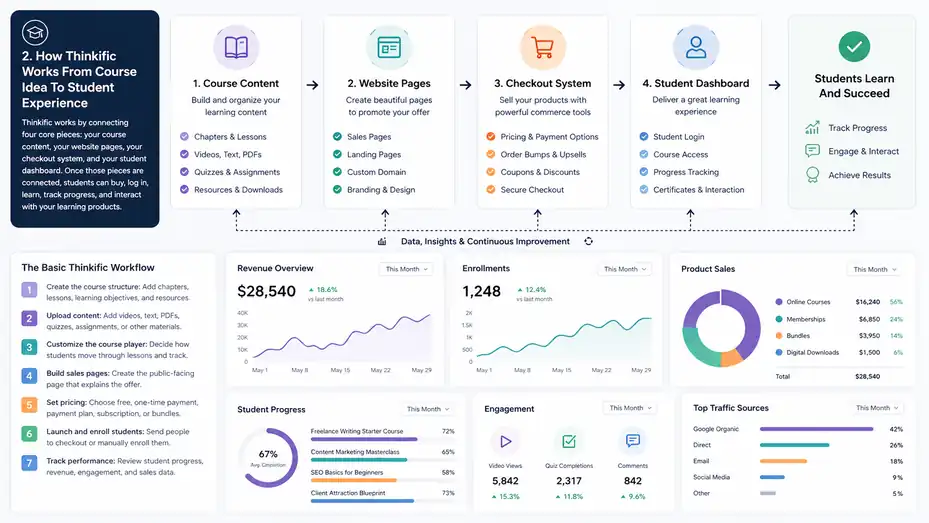
Thinkific works by connecting four core pieces: your course content, your website pages, your checkout system, and your student dashboard.
Once those pieces are connected, students can buy, log in, learn, track progress, and interact with your learning products.
The Basic Thinkific Workflow
The workflow starts with creating a product. In Thinkific, a product can be an online course, community, membership, digital download, or bundle depending on your plan and setup. You then add content, arrange it into lessons and chapters, set pricing, design your sales page, and publish.
Let me break it down in a simple order:
- Create the course structure: Add chapters, lessons, learning objectives, and downloadable resources.
- Upload content: Add videos, text, PDFs, quizzes, assignments, or other learning materials.
- Customize the course player: Decide how students move through lessons and track completion.
- Build sales pages: Create the public-facing page that explains the offer.
- Set pricing: Choose free, one-time payment, payment plan, subscription, or bundle options.
- Launch and enroll students: Send people to checkout or manually enroll them.
- Track performance: Review student progress, revenue, engagement, and sales data.
What I like about this flow is that it mirrors how most people naturally think about a course. You start with the curriculum, then package it, then sell it, then improve it.
The risk is that beginners sometimes spend too much time decorating pages before validating the course idea. I suggest building a simple version first: five to eight lessons, one clear outcome, one sales page, and one price. After you get real student feedback, improve the design and learning path.
What The Student Experience Feels Like
The student experience is one of Thinkific’s stronger areas. Students create an account, log in, access their purchased products, and move through course content in a clean learning environment. For many course businesses, that matters more than flashy marketing pages.
A student can usually see their progress, resume lessons, download resources, and complete quizzes or assignments depending on how you structure the course. From what I’ve seen, this kind of organized course player helps reduce confusion, especially for students who are not very tech-savvy.
Imagine you sell a “Freelance Writing Starter Course.” A student buys it after seeing your webinar. Inside the course, they see Week 1, Week 2, Week 3, and so on. Each week includes short videos, examples, templates, and an action task. That structure gives them momentum.
The main point is this: Thinkific helps you create a learning experience that feels more formal and trustworthy than a folder of videos or a private playlist. That can improve perceived value, which matters if you’re charging premium prices.
Still, your course quality is not automatic. Thinkific can organize your lessons, but it cannot make your teaching clear. You still need concise videos, useful examples, logical sequencing, and student support.
How Thinkific Handles Website And Checkout
Thinkific includes website and landing page tools so you can promote your courses without building a separate site. You can create course pages, customize sections, add your branding, and connect a custom domain depending on your setup. Thinkific’s official site highlights unlimited websites, landing pages, and custom domains among its learning business features.
For checkout, Thinkific offers native commerce tools through TCommerce, its built-in selling and payment infrastructure. The platform lists sales features such as order bumps, gifting, group orders, abandoned cart emails, flexible payment options, PayPal support, coupons, bundles, free trials, and affiliate reporting across different plans.
This is where Thinkific becomes more than just a course host. If you sell a $299 course, you might add a $49 workbook as an order bump. If you sell a membership, you might offer a free trial. If you sell to companies, group orders can help one buyer purchase access for multiple learners.
My honest view: Thinkific’s checkout tools are strong enough for most knowledge businesses, but not as flexible as a dedicated ecommerce or funnel platform. That is a reasonable trade-off if you value simplicity.
Thinkific Features Review: What You Actually Get
Thinkific’s feature set is strongest when you look at the full learning business stack: course creation, student management, sales tools, analytics, communities, and integrations. The important question is not “Does Thinkific have features?” It is “Are the features deep enough for your business model?”
Course Builder And Learning Tools
Thinkific’s course builder is designed for non-technical users. You create lessons, arrange them into modules, upload content, and publish without touching code. This is one of the reasons many beginners like the platform.
The core course features usually cover what most creators need: video lessons, text lessons, downloads, quizzes, surveys, assignments, drip scheduling, course completion controls, and certificates depending on the plan.
Drip scheduling means students receive content gradually instead of getting everything at once.
This is useful for cohort programs, coaching experiences, and courses where learners need time to practice.
In practical terms, the builder is best for structured courses with clear modules. For example, a language tutor could create “Beginner Spanish” with pronunciation videos, vocabulary PDFs, quizzes, and weekly speaking assignments.
A software trainer could create short screen-recorded lessons and require students to finish basics before moving to advanced workflows.
The main limitation is that Thinkific is not a full authoring suite like tools used for highly interactive corporate e-learning. If you need complex simulations, branching scenarios, or advanced interactive content, you may need external content tools or a higher-level LMS setup.
For most creators, though, simple structure beats complexity. A clear module, a short lesson, a useful worksheet, and one action step often outperform a fancy interactive course that overwhelms students.
Website Builder, Branding, And Page Design
Thinkific’s site builder lets you create a course website with your brand colors, images, copy, landing pages, and navigation. You can usually launch a professional-looking course site faster than building from scratch.
This is helpful if you do not already have a website. You can create a homepage, course sales page, checkout flow, and student login area in one place. For a creator who wants to launch quickly, that is a real advantage.
However, the design flexibility is not unlimited. You are working within Thinkific’s themes, sections, and customization options. That is fine for clean education businesses, but it can feel limiting if you want a highly unique brand experience.
Here’s the practical decision I’d make:
| Design Need | Thinkific Fit | My Take |
|---|---|---|
| Clean course sales page | Strong | Good enough for most launches |
| Custom branded academy | Good | Works well with thoughtful copy and visuals |
| Complex blog-heavy SEO site | Medium | Better paired with a dedicated CMS |
| Highly custom landing pages | Medium | May need external page builders |
| App-like user interface | Limited | Not Thinkific’s strongest use case |
In my experience, design rarely saves a weak offer. If your promise is clear, your sales page explains the transformation, and your curriculum looks credible, Thinkific’s page builder can do the job.
Commerce, Payments, And Sales Features
Thinkific has invested heavily in selling features. Its official platform page promotes TCommerce for built-in checkout, multiple payment options, order bumps, coupons, abandoned cart emails, failed payment recovery, and tax-related tools for certain regions.
These features matter because small improvements at checkout can change revenue. Thinkific claims TCommerce users sell up to 31% more, and its site also mentions average order value increases of up to 31% with Thinkific Payments.
These are platform-reported figures, so I would treat them as useful directional signals rather than guaranteed results for every creator.
The practical value is simple. You can test different ways to sell:
- One-time payment: Best for self-paced courses with a clear outcome.
- Payment plan: Best for higher-ticket offers where affordability matters.
- Subscription: Best for memberships, communities, and ongoing training.
- Bundle: Best when you have multiple related products.
- Free trial: Best when the product has recurring value and strong onboarding.
Imagine you sell a $599 certification prep course. Offering three payments of $225 may increase conversions because buyers feel less pressure upfront. Or if you sell a $29 monthly community, a seven-day free trial may help people experience the value before paying.
The sales tools are not magic. You still need strong positioning, proof, and traffic. But Thinkific gives you enough commerce options to test offers without building a custom checkout system.
Analytics, Reporting, And Student Management
Analytics are where course creators separate guesswork from improvement. Thinkific includes reporting features for revenue and learner behavior, with more advanced dashboards on higher plans.
Its pricing page lists basic reporting, reporting and analytics, Thinkific Analytics, and advanced reporting and analytics across plan levels.
At a basic level, you want to answer questions like:
- Are students starting the course after buying?
- Where do they stop watching?
- Which offers generate the most revenue?
- Which lessons need improvement?
- Are refunds connected to specific expectations or modules?
For example, if 70% of students stop at Module 2, the issue may not be marketing. It might be that Module 2 is too long, too difficult, or missing a quick win. A good course business improves the learning path, not just the sales page.
Thinkific also supports student management features such as manual enrollment, bulk import and enrollment on certain plans, site administrators, course administrators, and group analyst accounts depending on plan level.
This matters more as you grow. Manually enrolling 10 students is easy. Managing 3,000 learners, multiple instructors, and group buyers is a different operation. Thinkific can support that growth, but advanced management features may require higher-tier plans.
Thinkific Pricing Review: What It Really Costs
Thinkific pricing depends on your plan, billing cycle, payment setup, and the features you need. The smartest way to review the cost is not just the monthly fee.
It is whether the plan gives you the sales, analytics, and management features that match your stage.
Current Plan Structure And Pricing Logic
Thinkific’s pricing page shows its main plan ladder as Basic, Start, Grow, and Plus, with Plus designed for larger or more advanced needs. The official pricing comparison also shows that features vary by plan, especially around reporting, commerce, management, and advanced tools.
Third-party pricing trackers in 2026 commonly list Basic at around $49/month monthly or $36/month annually, Start around $99/month monthly or $74/month annually, Grow around $199/month monthly or $149/month annually, and Plus as custom pricing. Because SaaS pricing can change, I’d always confirm directly on Thinkific’s pricing page before buying.
Here’s a simplified buyer-focused view:
| Plan Type | Best For | Main Reason To Choose It |
|---|---|---|
| Basic | First serious course launch | You need core course and selling tools without overbuying |
| Start | Growing creators | You want stronger commerce and learning features |
| Grow | Established course businesses | You need better reporting, admin capacity, and scaling tools |
| Plus | Larger teams or academies | You need advanced support, scale, integrations, or B2B features |
I don’t recommend choosing the cheapest plan automatically. Choose the plan that protects your launch from avoidable limitations.
For example, if you know payment plans or subscriptions are central to your offer, confirm those are available on the plan you choose before building your funnel.
Hidden Costs To Consider
The monthly subscription is only part of the real cost. You may also pay for email marketing software, a custom domain, video production tools, design help, ads, bookkeeping, community management, or external integrations.
Thinkific includes many core pieces, but it does not replace every tool in your business. If you plan to run advanced email sequences, complex webinars, or paid ad attribution, you may still use dedicated tools outside Thinkific.
Here’s a realistic beginner budget:
| Cost Category | Typical Need | Budget Note |
|---|---|---|
| Thinkific subscription | Course hosting and selling | Depends on plan and billing |
| Domain | Branded URL | Usually low annual cost |
| Email marketing | Nurture leads and students | May be free at small list sizes |
| Video recording | Course production | Can start with simple tools |
| Design assets | Thumbnails and worksheets | Optional but helpful |
| Paid traffic | Ads or sponsorships | Optional, risky without validation |
In my experience, the biggest hidden cost is not software. It is time. A platform can help you publish, but you still need to write lessons, record videos, answer student questions, and improve the offer.
If your budget is tight, start lean. Validate with a simple course, organic content, and a small audience before spending heavily on design or ads.
Is Thinkific Good Value For Money?
Thinkific is good value if it helps you launch faster, charge confidently, and avoid technical headaches. It becomes less attractive if you only need a basic file delivery system or if you want a low-cost experiment with no sales plan.
Let’s use a simple scenario. Suppose you pay around $99/month for a plan and sell a $299 course. One sale per month covers the platform cost several times over. But if you have no audience, no offer validation, and no launch strategy, even a cheaper platform can feel expensive.
I suggest judging Thinkific by business fit, not just price:
- Worth it: You have a clear course idea, a defined audience, and a plan to sell.
- Maybe worth it: You are still validating but want a professional setup from day one.
- Not worth it yet: You are unsure what to teach and have no path to reach buyers.
A platform should support momentum. It should not become a substitute for market research.
Thinkific Pros And Cons Based On Real-World Use
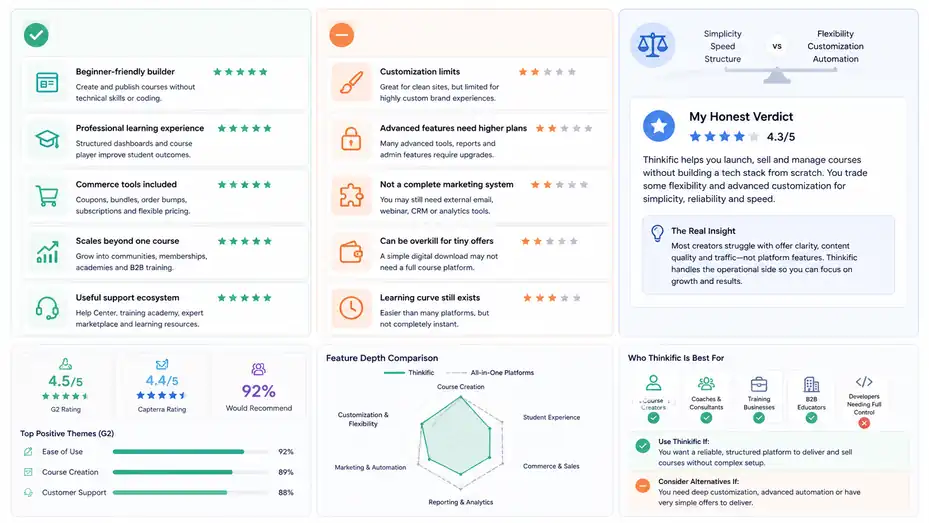
Thinkific’s strengths are ease of use, structured course delivery, built-in selling tools, and scalability for many education businesses.
Its weaknesses tend to show up around customization, advanced automation, and feature depth for complex businesses.
Thinkific Pros
The biggest advantage is that Thinkific makes course creation feel manageable. You do not need to be a developer to build a course site, publish lessons, accept payments, and serve students.
G2’s review summary says users consistently praise Thinkific for ease of use, intuitive design, course creation, and customer support. It also lists “Ease of Use,” “Course Creation,” and “Customer Support” among frequently mentioned positives.
I’d summarize the pros like this:
- Beginner-friendly builder: You can create a course without technical confidence.
- Professional learning experience: Students get a structured dashboard and course player.
- Commerce tools included: You can sell with coupons, bundles, order bumps, and flexible pricing depending on plan.
- Scales beyond one course: You can grow into communities, memberships, academies, and B2B training.
- Useful support ecosystem: Thinkific offers a Help Center, training academy, expert marketplace, and educational resources.
The underrated benefit is confidence. When your platform feels organized, you spend less time worrying about tech and more time improving your course and selling it. For many creators, that alone is worth paying for.
Thinkific Cons
Thinkific’s biggest downside is that it can feel limiting when your needs become advanced. You may want more design freedom, more automation flexibility, or deeper reporting without upgrading.
Capterra’s 2026 overview says Thinkific is practical for teams that want to launch courses without deep technical skills, but notes trade-offs in customization and support responsiveness. G2’s review summary also mentions limited customization and advanced feature limitations as recurring concerns.
The main cons are:
- Customization limits: Good for clean course sites, less ideal for highly custom brand experiences.
- Advanced features can require higher plans: Scaling often means upgrading.
- Not a complete marketing system: You may still need external email, webinar, CRM, or analytics tools.
- Can be overkill for tiny offers: A simple digital download may not need a full course platform.
- Learning curve still exists: It is easier than many systems, but not instant.
I don’t see these as deal-breakers for most creators. I see them as fit questions. Thinkific is strongest when your product is education-first. It is less strong when your business depends on custom software-like experiences.
My Honest Verdict On The Trade-Offs
Thinkific’s central trade-off is simplicity versus flexibility. You get a platform that helps you launch, sell, and manage courses without building a tech stack from scratch. In exchange, you accept some boundaries around design, automation, and deep customization.
For many creators, that is a good trade. Most people do not fail because their course platform lacks exotic features. They fail because the offer is unclear, the lessons are too bloated, the sales page is weak, or they never drive traffic.
Thinkific helps with the operational side. It will not fix the strategic side for you.
My practical advice is simple: Use Thinkific if you want to build a real learning business and you value speed, structure, and reliability. Skip or delay it if you only need to test an idea with a tiny audience and no paid offer yet.
Step-By-Step Guide To Setting Up Thinkific The Smart Way
The best way to use Thinkific is to start with the student outcome, not the platform settings.
Build the smallest useful course first, then improve the experience once real students show you what they need.
Step 1: Define The Course Outcome Before Building
Before you touch the course builder, write one sentence that answers this: “After finishing this course, the student will be able to do what?”
This prevents a common beginner mistake: building a course around everything you know instead of what the student needs to achieve. A course should be a guided transformation, not a content archive.
For example, “Learn photography” is too broad. “Take sharp, well-lit product photos for your online store using a smartphone” is much clearer. That outcome tells you what lessons to include and what to leave out.
I suggest mapping your course into three layers:
- Outcome: The final result students want.
- Milestones: The major stages they must complete.
- Lessons: The smallest teachable steps inside each milestone.
A strong course usually has fewer lessons than you think. Many students prefer short, direct videos with clear action steps. A 7-minute lesson that helps someone finish one task is often more valuable than a 45-minute lecture full of theory.
Inside Thinkific, this outcome-first approach makes setup easier. Your milestones become chapters. Your lessons become individual course items. Your worksheets become downloads. Your quizzes check whether students understood the key points.
Step 2: Build A Simple Course Structure
Once the outcome is clear, create your curriculum inside Thinkific. Start with a lean structure. I suggest five to eight modules for most beginner-to-intermediate courses, with three to six lessons per module.
Each module should answer one question or solve one stage of the student’s journey. If you’re teaching “How to Start a Home Bakery,” your modules might cover offer selection, pricing, legal basics, kitchen workflow, packaging, local marketing, and first customer delivery.
Keep lessons focused. One lesson should teach one idea, skill, or action. This helps students feel progress and makes your course easier to update later.
A simple structure might look like this:
- Module 1: Foundation: Help students understand the goal and avoid early mistakes.
- Module 2: Setup: Walk them through the tools, materials, or preparation.
- Module 3: Execution: Teach the core process step by step.
- Module 4: Improvement: Show how to troubleshoot and refine results.
- Module 5: Next Steps: Help them apply, repeat, or scale what they learned.
Thinkific makes this kind of structure easy because the builder is organized around chapters and lessons. But the platform cannot decide your sequence for you.
I advise testing your course outline with one real person before recording everything. Ask them, “Where would you feel confused?” That one question can save hours of editing.
Step 3: Set Pricing, Payments, And Launch Settings
After your course structure is ready, decide how students will pay. Thinkific supports different pricing models depending on plan and product type, including one-time payments, payment plans, subscriptions, coupons, bundles, and free trials across its commerce feature set.
Choose pricing based on the value of the outcome, not the number of videos. A course that helps someone earn clients, pass an exam, save time, or avoid expensive mistakes can usually command more than a general information course.
Here’s a practical pricing framework:
| Offer Type | Typical Pricing Logic | Best Use Case |
|---|---|---|
| Free course | Lead generation | Build trust before selling |
| Low-ticket course | Fast purchase decision | Templates, mini skills, quick wins |
| Mid-ticket course | Clear transformation | Most self-paced flagship courses |
| High-ticket course | Support plus curriculum | Coaching, certification, implementation |
| Membership | Ongoing value | Community, updates, recurring training |
If you are new, do not obsess over the perfect price. Pick a reasonable starting point, launch to a small audience, and watch behavior. If people say “yes” quickly and complete the course, you may be underpricing.
If people love the idea but hesitate, you may need stronger proof, a payment plan, or a clearer promise.
How To Optimize Thinkific For Sales And Student Results
A successful Thinkific course needs two wins: people need to buy, and students need to get results.
The best optimization work happens where sales psychology and learning design meet.
Improve Your Sales Page Before Driving More Traffic
Before spending money on ads or partnerships, improve your course sales page. A weak sales page wastes every visitor, no matter how good the course is.
Your Thinkific sales page should quickly answer five buyer questions:
- Who is this for? Make the audience obvious.
- What result will I get? State the outcome clearly.
- Why should I trust you? Add proof, experience, or examples.
- What exactly is inside? Show modules, bonuses, and deliverables.
- What happens after I buy? Explain access, support, and next steps.
A mistake I see often is leading with curriculum instead of transformation. Students do not buy “12 modules and 48 lessons.” They buy the ability to solve a problem. The curriculum supports the promise, but the promise sells the course.
For example, instead of “Includes video lessons on budgeting,” say, “Build a simple monthly budget you can actually stick to in under two hours.” That feels concrete.
Use Thinkific’s page sections to make the offer easy to scan. Add a short hero section, outcome-focused bullet points, curriculum overview, instructor credibility, testimonials if you have them, FAQs, and a clear call to action.
Increase Completion With Better Learning Design
Course completion is not just a student responsibility. It is also a design responsibility. If students quit halfway through, you may need to make the course easier to follow.
Start each module with a short orientation. Tell students what they will learn, why it matters, and what they should complete before moving on. End each lesson with one action step. This keeps momentum alive.
I suggest using a “quick win” early in the course. In the first 20 minutes, help students accomplish something visible. If you teach email marketing, help them write one welcome email. If you teach drawing, help them complete one simple sketch. If you teach productivity, help them clear and organize one task list.
Thinkific gives you the structure, but you create the learning rhythm. Use downloads, quizzes, and assignments only when they help students act. Do not add them just to make the course look bigger.
A useful rule: Every lesson should reduce confusion or increase capability. If a lesson does neither, cut it or turn it into optional bonus material.
Use Upsells And Bundles Without Feeling Pushy
Thinkific’s commerce features can help increase revenue, but they work best when the extra offer genuinely supports the main purchase. Thinkific lists order bumps, product bundles, after-purchase flows, coupons, and related selling tools across its plans.
An order bump is a small add-on at checkout. A bundle combines multiple products into one package. An after-purchase flow can send buyers to a thank-you page, upsell, or next product.
Here’s how to use them naturally:
- Order bump: Offer a workbook, template pack, checklist, or mini-training that helps students implement faster.
- Bundle: Combine related courses that solve a bigger journey.
- Upsell: Offer coaching, feedback, or advanced training after the first purchase.
- Coupon: Use sparingly for launches, partners, or seasonal promotions.
Imagine you sell a $199 “Beginner Podcast Launch” course. A helpful order bump might be a $29 podcast planning template. A pushy order bump would be an unrelated social media course. Relevance is what keeps selling ethical.
My view is that the best upsells feel like the next logical step, not a trap. If the student would thank you for offering it, it belongs.
Thinkific Compared With Other Course Platform Options
Thinkific is not the only online course platform, and it should not be evaluated in isolation.
The right choice depends on whether you prioritize course structure, marketing automation, community, customization, affordability, or enterprise training.
Thinkific Vs All-In-One Marketing Platforms
Some platforms focus more heavily on marketing funnels, email campaigns, webinars, and automation. Thinkific focuses more directly on structured learning products and course delivery, while still offering commerce and sales tools.
If your main challenge is delivering a polished course experience, Thinkific is strong. If your main challenge is complex lead nurturing, segmented email automation, or multi-step funnel testing, you may need additional marketing tools or a different platform.
That said, I would not overcomplicate this too early. Many creators think they need an advanced funnel when they really need a clearer offer and a better sales page. A simple Thinkific course with one strong email sequence can outperform a complicated funnel attached to a weak product.
Here’s the decision:
| Priority | Thinkific Fit | Better Direction If Not |
|---|---|---|
| Structured course delivery | High | Stay with Thinkific |
| Beginner-friendly launch | High | Stay with Thinkific |
| Advanced funnel automation | Medium | Add or choose marketing-first tools |
| Deep email segmentation | Medium | Use dedicated email software |
| Highly custom checkout testing | Medium | Consider specialized funnel tools |
Thinkific is best when the course is the center of the business. If the funnel is the center, compare more carefully.
Thinkific Vs Marketplace Platforms
Marketplace platforms give you access to existing learners, but you usually give up control over pricing, branding, customer relationships, and long-term business assets. Thinkific is different because it helps you build your own branded course business.
This is an important distinction. On a marketplace, discovery may be easier, but you are often competing side by side with other instructors. On Thinkific, you own more of the experience, but you must bring your own traffic.
I usually recommend Thinkific for creators who want to build an asset. Your email list, brand, student community, pricing strategy, and course catalog can grow over time. That is harder when your course lives mainly inside someone else’s marketplace.
However, marketplaces can be useful for validation. You might test a topic there, learn what students ask, and later build a premium version on Thinkific. Just do not confuse marketplace exposure with true business independence.
The big question is: Do you want access to someone else’s audience, or do you want to build your own? Thinkific is for the second path.
Thinkific Vs Custom Website And Plugin Setups
A custom website with plugins can be more flexible, especially if you use a content management system and learning plugin. You may get more control over design, SEO, data, and integrations. But you also take on more maintenance.
Thinkific removes many technical responsibilities. Hosting, course access, student login, video delivery, checkout, and core learning functions are handled inside the platform. That simplicity is valuable if you would rather teach and sell than troubleshoot plugin conflicts.
A custom setup may be better if you already have a strong technical team, a content-heavy SEO site, or a unique learning model. Thinkific may be better if you want predictable operations and faster launch.
My honest preference for most solo creators: Start with the simpler platform unless you have a specific reason not to. Technical flexibility sounds exciting until it becomes the reason you delay launching for six months.
Common Thinkific Mistakes And How To Avoid Them
Most Thinkific problems are not caused by the platform itself.
They come from unclear offers, bloated courses, weak onboarding, poor pricing decisions, or launching before the audience understands the value.
Mistake 1: Building Too Much Before Validating Demand
The classic mistake is recording a huge course before confirming that people want it. Thinkific makes publishing easier, but ease can tempt you to build too much too soon.
Before creating a full course, validate the topic. Talk to potential students. Run a small webinar. Offer a beta version. Sell a founding-student cohort. Even five paying beta students can teach you more than months of guessing.
Validation questions I’d ask:
- What problem are people already trying to solve?
- What have they tried before?
- What outcome would feel worth paying for?
- What objections stop them from buying?
- What level are they really at?
A simple beta course can be messy and still valuable. You might run live sessions, upload recordings into Thinkific, and improve the material each week. This approach gives you proof, testimonials, and a better curriculum.
Do not hide behind production quality. A polished course nobody wants is still a failed product. A simple course that solves a painful problem can grow into a strong business.
Mistake 2: Treating Thinkific Like A Magic Sales Machine
Thinkific can host and sell your course, but it does not automatically create demand. You still need traffic, trust, and a reason for people to buy now.
A course platform is infrastructure. Marketing is the engine. If you publish your course and wait, sales may be slow. You need a launch plan, content strategy, partner outreach, email list, or sales conversation process.
For a beginner, a simple launch plan might look like this:
- Pre-launch: Share educational content for two to four weeks.
- Interest list: Invite people to join a waitlist or free training.
- Launch event: Host a webinar, workshop, or challenge.
- Offer window: Open enrollment with clear bonuses or deadlines.
- Follow-up: Answer objections and share student examples.
- Post-launch: Improve the course based on feedback.
Thinkific gives you the destination. You still need roads leading to it.
I believe this is where many reviews get too platform-focused. The question is not only “Is Thinkific good?” It is “Do I have a plan to use Thinkific well?”
Mistake 3: Ignoring Student Onboarding
The first 24 hours after purchase matter. Students are excited, but they can also feel uncertain. If they do not know where to start, they may delay, forget, or request a refund.
Create a simple onboarding path inside Thinkific. Start with a welcome lesson. Explain how to use the course, what to do first, how long lessons take, where to ask questions, and what result they should aim for in week one.
A good onboarding lesson can include:
- Welcome: Reassure students they made a smart decision.
- Course roadmap: Show the path from start to finish.
- Quick win: Give them one easy first action.
- Support rules: Explain where and how to get help.
- Success habit: Suggest a weekly study rhythm.
This is not fluff. It reduces confusion and improves completion. A student who starts confidently is more likely to finish, get results, and recommend your course.
Advanced Thinkific Strategies For Scaling
Once your first course works, Thinkific can support more advanced business models such as memberships, academies, corporate training, communities, bundles, and learning paths.
Scaling is less about adding content and more about designing repeatable systems.
Turn One Course Into A Product Ladder
A product ladder means you offer different levels of value for different customer needs. Instead of relying on one course, you create a path from beginner to advanced.
For example:
| Ladder Stage | Offer Example | Purpose |
|---|---|---|
| Free | Mini course or checklist | Build trust and leads |
| Entry | $49 starter course | Help buyers get a quick win |
| Core | $299 flagship course | Deliver the main transformation |
| Premium | $1,500 coaching program | Add support and accountability |
| Recurring | $39/month membership | Continue value over time |
Thinkific can support this kind of structure through courses, bundles, communities, memberships, and digital products depending on plan. Its official platform positioning includes courses, communities, memberships, and digital downloads as supported learning products.
The secret is not creating random products. Each offer should solve the next problem. If your starter course helps someone set up a podcast, your flagship course might help them grow listeners, and your membership might offer monthly content planning and feedback.
This creates a better customer journey and increases lifetime value without forcing people into offers they do not need.
Use Communities For Retention And Support
Communities can make a course feel alive. Students can ask questions, share progress, meet peers, and stay connected after finishing lessons. That can improve retention, especially for memberships and coaching-style programs.
But I’ll be honest: A community is only valuable if you have a reason for it to exist. An empty community can hurt the student experience. Before adding one, decide what students will do there.
Useful community formats include:
- Weekly wins: Students share progress and build momentum.
- Office hours questions: Students post questions before a live session.
- Accountability threads: Students commit to one action each week.
- Peer feedback: Students review each other’s work using simple guidelines.
- Resource updates: You share templates, examples, or new lessons.
A community works best when it supports the course outcome. If the course teaches job interview preparation, the community might include mock interview practice and resume feedback. If it teaches watercolor painting, students might post weekly practice pieces.
Thinkific can host communities, but your facilitation creates the culture. I recommend starting with one or two simple rituals rather than trying to make it busy every day.
Build For B2B And Group Training
Thinkific can also support businesses that sell training to teams, organizations, or corporate clients. Features like group orders, bulk enrollment, admin roles, and reporting become important here.
Thinkific’s pricing page references group orders, bulk import and student enrollment, site administrator accounts, course administrator accounts, and group analyst accounts across different plans.
B2B training can be powerful because one buyer may purchase access for many learners. Instead of selling one seat at a time, you might sell a training package for 25 employees.
For example, a cybersecurity consultant could create a “Security Awareness Basics” course for small companies. The company owner buys 50 seats, employees complete the training, and managers review completion data.
To make B2B work, you need more than content. You need clear outcomes, reporting, onboarding instructions, and buyer confidence. Business buyers often care about implementation, compliance, time savings, and measurable progress.
If B2B is your goal, I would design your course with managers in mind. Include completion certificates, clear modules, easy enrollment instructions, and a short admin guide. The easier you make rollout, the easier it is to sell.
Final Verdict: Is Thinkific Really Worth It?
Thinkific is worth it for creators and businesses that want a reliable, structured, beginner-friendly way to build and sell online learning products.
It is not the cheapest possible setup, and it is not the most customizable system, but it gives most course businesses a strong balance of usability, learning features, and sales tools.
The Best Reasons To Choose Thinkific
Choose Thinkific if you want to move from idea to launched course without drowning in technical decisions. It is especially useful when you want your learning product to feel professional from the start.
The best reasons to choose it are:
- You want simplicity: You prefer a guided platform over a custom tech stack.
- You care about student experience: You want lessons, progress, downloads, and access organized clearly.
- You plan to sell seriously: You need payment options, coupons, bundles, order bumps, or checkout tools.
- You may scale later: You want room for communities, memberships, academies, or B2B training.
- You do not want to code: You want a no-code course business setup.
Thinkific’s public positioning emphasizes simple launch, learning products, commerce, analytics, support, and scalability. It also says more than 35,000 businesses use the platform, and its review page cites a 4.5/5 rating from over 395 G2 reviews.
That does not mean every creator will succeed with it. But it does suggest Thinkific is a mature option with broad adoption.
When Thinkific Is Not Worth It
Thinkific may not be worth it if you have no validated course idea, no plan to reach buyers, or only need to deliver a simple file. It may also frustrate you if you need advanced customization from day one.
I would avoid or delay Thinkific if:
- You are still unsure what audience you serve.
- You want a fully custom learning app.
- You need advanced automation more than course structure.
- You only sell one tiny digital product.
- You cannot commit time to creating and improving the course.
This is not a criticism of Thinkific. It is a reminder that timing matters. The right platform at the wrong stage can feel like wasted money.
If you are still validating, start with conversations, a waitlist, a live workshop, or a beta offer. Then move into Thinkific when you know the course has demand.
My Final Recommendation
My final take on this Thinkific course platform review is straightforward: Thinkific is a strong choice for serious course creators who want a clean, structured, scalable platform without needing a developer. It is best for people who are ready to package expertise into a real learning product and sell it professionally.
I would choose Thinkific for a flagship course, coaching program, training academy, certification-style product, or membership where student experience matters. I would be more cautious if the business depends on deep customization, complex funnels, or ultra-low software costs.
The platform is worth it when you use it as a business system, not just a video library. Start with a clear outcome. Build a lean course. Create a strong sales page. Onboard students carefully. Watch your analytics. Improve based on real behavior.
That is where Thinkific can genuinely pay for itself: not by doing the work for you, but by giving you a stable place to turn your knowledge into a learning business people can trust.
FAQ
What is Thinkific used for?
Thinkific is used to create, host, sell, and manage online courses, memberships, communities, and digital products. It helps creators build a learning website, upload lessons, accept payments, track students, and deliver a professional course experience without needing coding or complex technical setup.
Is Thinkific worth it for beginners?
Thinkific is worth it for beginners who want a simple way to launch an online course with built-in hosting, payments, course pages, and student management. It is especially useful if you want to avoid complicated tech tools and focus more on teaching, selling, and improving your course.
What are the main downsides of Thinkific?
The main downsides of Thinkific are limited advanced customization, higher costs as you scale, and the need for extra tools for advanced email marketing or complex funnels. It works well for course delivery, but creators with highly custom website or automation needs may feel restricted.
Can you make money with Thinkific?
Yes, you can make money with Thinkific by selling online courses, memberships, coaching programs, digital downloads, or bundled learning products. Your results depend on your course topic, audience demand, pricing, sales page, traffic strategy, and how well your course helps students achieve a clear outcome.
Is Thinkific better than other course platforms?
Thinkific may be better than other course platforms if you want strong course delivery, easy setup, built-in selling tools, and a clean student experience. However, it may not be best if you need advanced funnel automation, marketplace exposure, or full design control over every page.

I’m Juxhin, the voice behind The Justifiable.
I’ve spent 6+ years building blogs, managing affiliate campaigns, and testing the messy world of online business. Here, I cut the fluff and share the strategies that actually move the needle — so you can build income that’s sustainable, not speculative.
Related posts:
 Thinkific Review For Course Creators: Worth Your Time?
 Sell Online Courses: Effective Marketing Strategies for Maximum Revenue
 How to Get LearnWorlds Free Trial and Start Fast
 LearnWorlds Platform Guide: Build Your Online School
 Create Online Courses LearnWorlds: Complete Beginner Guide
 LearnWorlds Online Course Platform Review: Hidden Advantages