
Table of Contents
Some links on The Justifiable are affiliate links, meaning we may earn a small commission at no extra cost to you. Read full disclaimer.
Apollo IO sales intelligence platform review is not just about whether the software has a big contact database. The real question is whether Apollo gives you enough usable, current, and searchable data to build pipeline without wasting hours cleaning bad leads.
I’ve seen plenty of sales tools look impressive in demos, then fall apart when you test niche titles, direct dials, job changes, or regional markets.
So in this review, we’ll look at Apollo from a practical angle: Data depth, search quality, outreach workflow, pricing logic, setup, limitations, and when it is actually worth using.
Understand What Apollo IO Is Before You Judge The Data
Apollo is best understood as a combined sales intelligence and sales engagement platform.
That means it helps you find prospects, enrich contact records, build lists, send outreach, track engagement, and manage early pipeline from one workspace.
What Apollo IO Actually Does
Apollo’s core value is simple: It helps sales teams find the right people at the right companies and reach them faster. Instead of jumping between a lead database, email finder, CRM, spreadsheet, dialer, and sequencing tool, Apollo tries to bring those jobs together.
At the data layer, Apollo provides contact and company information such as verified emails, direct-dial phone numbers, job titles, company details, firmographics, and technographics.
Firmographics are company-level details like industry, headcount, location, and revenue range. Technographics are clues about what software a company uses, which can be useful when you sell into specific tech stacks.
Apollo says its database includes B2B contact and company data, and its own data page highlights verified emails, direct-dial phone numbers, firmographic details, and technographic data as part of the platform’s coverage.
Where Apollo becomes more interesting is the workflow around that data. You can search for accounts, filter people by role or buying signal, save leads, enrich records, add them to outbound sequences, and sync them to your CRM.
In other words, Apollo is not only a place to find names. It is a system for turning raw prospect data into sales activity.
In my experience, that matters because data alone rarely creates pipeline. A huge list of contacts is only useful when you can quickly narrow it down, verify it, prioritize it, and act on it.
Apollo’s biggest strength is that it shortens the distance between “I need leads” and “I have a tested outreach motion running.”
Who Apollo Is Best For
Apollo is strongest for B2B teams that need volume, structure, and speed. If you sell to businesses, especially across software, agencies, recruiting, consulting, financial services, marketing services, or professional services, Apollo can be a practical fit.
It is especially useful for:
- Founders: Building first outbound lists without hiring a full sales operations team.
- SDRs: Prospecting accounts, finding decision-makers, and launching sequences.
- Revenue teams: Enriching CRM data and improving segmentation.
- Agencies: Finding clients by niche, location, title, and company size.
- Recruiters: Identifying professionals by title, seniority, and company type.
That said, Apollo is not perfect for every use case. If you need extremely specialized industry datasets, hyper-accurate private-company revenue data, or region-specific mobile numbers in smaller markets, you should test before committing. Data coverage can vary by industry, country, seniority level, and contact type.
A good way to think about Apollo is this: It is excellent when you need a broad, flexible sales intelligence platform with built-in outreach. It may need support from another data source if your market is tiny, heavily regulated, or unusually hard to map.
What Makes This A Data Depth Review
A normal Apollo.io review might stop at features, pricing, and pros and cons. But a real buying decision depends on data depth.
Data depth means asking questions like:
- Can you find the right accounts, not just a lot of accounts?
- Can you filter contacts by useful buying criteria?
- Are emails and phone numbers reliable enough for outreach?
- Can you enrich existing records without creating duplicates?
- Does the platform help you prioritize leads, or only collect them?
- Can the data support your exact ideal customer profile?
Apollo promotes 65+ data attribute filters and lead intelligence in one view, including intent data and employee trends. That gives it a strong foundation for detailed prospecting, but the real test is whether those filters help you build a list that matches your actual market.
Here’s the practical lens I recommend: Do not judge Apollo by the size of its database alone. Judge it by how quickly you can build a clean list of 200 contacts you would genuinely email tomorrow. If you can do that in one session, the platform is probably useful for your workflow.
Test Apollo’s Contact And Company Data Quality
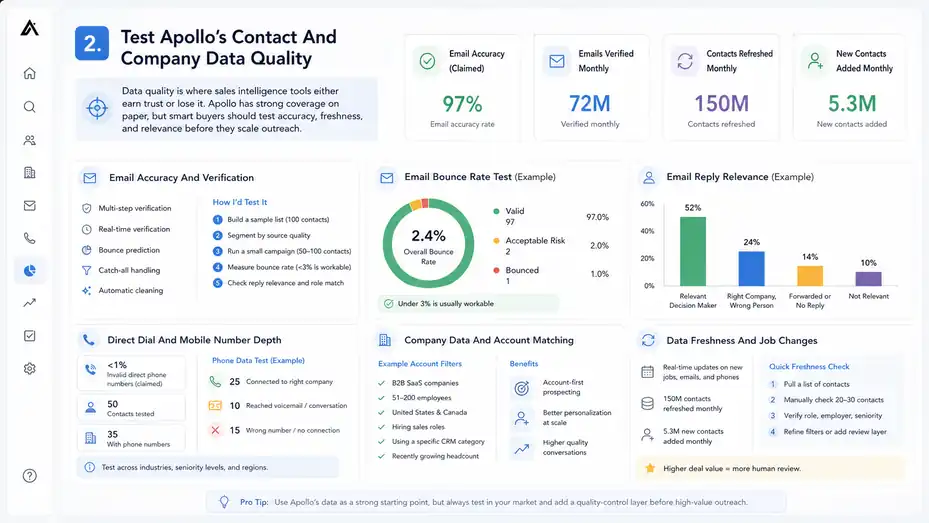
Data quality is where sales intelligence tools either earn trust or lose it.
Apollo has strong coverage on paper, but smart buyers should test accuracy, freshness, and relevance before they scale outreach.
Email Accuracy And Verification
Apollo states that it uses multi-step verification for emails and direct phone numbers, including real-time verification, bounce prediction, catch-all handling, and automatic cleaning. Its data page claims a 97% email accuracy rate and says 72 million emails are verified monthly.
That is a strong claim, but I recommend treating it as a benchmark, not a guarantee for your specific market. Your actual accuracy depends on the audience you target.
For example, emails for software executives in the United States may perform differently from emails for small manufacturers in Eastern Europe.
Here’s how I’d test it:
- Build a sample list: Pull 100 contacts from your exact ideal customer profile.
- Segment by source quality: Separate verified emails, guessed emails, and catch-all domains if visible.
- Run a small campaign: Send a low-risk outreach sequence to 50–100 contacts.
- Measure bounce rate: Anything under 3% is usually workable, while 5% or higher needs attention.
- Check reply relevance: Good data should produce replies from the right people, not just low bounces.
In my experience, email accuracy is not only about deliverability. A valid email for the wrong person is still bad data. Your test should measure whether the person is still in the role, still at the company, and still relevant to your offer.
Direct Dial And Mobile Number Depth
Phone data is usually harder than email data. Apollo says it verifies direct phone numbers in real time when requested and claims less than 1% invalid direct phone numbers on its data page.
This is useful, but phone number depth can vary more than email coverage. Senior executives, founders, and revenue leaders may have stronger coverage in some markets, while technical roles, smaller companies, and international contacts may be patchier.
If cold calling is central to your sales process, do not rely only on marketing claims. Run a phone data test by selecting 50 contacts across your target industries and seniority levels. Track three things: connection rate, wrong-number rate, and role match.
A realistic test might look like this: Imagine you sell HR software to companies with 100–500 employees. You pull 50 VP People, HR Director, and Talent Acquisition contacts. If 35 have phone numbers, 25 connect to the right company, and 10 lead to actual conversations or voicemails, that is a usable starting point. If most numbers fail or route to generic switchboards, you may need another phone data source.
The biggest mistake I see is buying Apollo for phone prospecting without testing mobile number coverage by region. Apollo may still be valuable for email-led outreach, but calling-heavy teams should validate phone depth first.
Company Data And Account Matching
Company data matters because outbound works better when you target accounts, not random people. Apollo lets you search companies and filter by business attributes so you can build account lists before choosing contacts.
Apollo’s company search documentation says users can search through company filters to find businesses likely to match their offering, then reach people at those companies through sequences, calls, and meetings.
The practical benefit is account-first prospecting. Instead of searching “Marketing Manager” across the entire database, you might first define accounts like this:
- B2B SaaS companies
- 51–200 employees
- United States and Canada
- Hiring sales roles
- Using a specific CRM category
- Recently growing headcount
Then you find the best people inside those accounts. This keeps your outbound tighter and improves personalization because every contact sits inside a company context.
I suggest checking company data against your CRM, website research, and LinkedIn-style public profiles before launching a major campaign.
Look for mismatches in headcount, company domain, industry, and location. A few mismatches are normal in any sales intelligence platform. A pattern of bad matches means your filters need refining or the database is weak for that niche.
Data Freshness And Job Changes
Freshness is one of the most underrated parts of sales intelligence. A contact who changed jobs six months ago can still look good in a database but waste your credits, hurt personalization, and create awkward outreach.
Apollo says it updates data in real time when it captures signals such as a new job, email, or direct phone number. It also reports 150 million contacts refreshed monthly and 5.3 million new contacts added monthly.
That sounds impressive, but again, test it in your market. Pull a list of contacts, then manually check 20–30 of them against public professional profiles or company websites. You are looking for role accuracy, employer accuracy, and seniority accuracy.
From what I’ve seen, the best workflow is to use Apollo’s data as a starting point, then apply a quick quality-control layer before high-value outreach.
For low-ticket, high-volume campaigns, you may accept a little more noise. For enterprise deals, I would never send executive outreach without verifying the top accounts manually.
A simple rule helps: The higher the deal value, the more human review you should add before launching.
Evaluate Apollo’s Search Filters And List-Building Power
Apollo’s search experience is one of its most important features because the database is only valuable if you can turn it into precise, usable lead lists.
Building An Ideal Customer Profile Inside Apollo
Your ideal customer profile, or ICP, is the type of company most likely to buy from you. In Apollo, your ICP should be translated into filters.
Let’s say you sell a compliance training platform. A weak search would be “HR Manager.” That is too broad. A better search would combine company and contact signals:
- Company size: 100–1,000 employees.
- Industry: Healthcare, finance, or logistics.
- Location: Regions where your product is legally supported.
- Seniority: Director, VP, Head, or Manager.
- Department: HR, People, Compliance, Operations.
- Growth signal: Hiring, expansion, or recent funding where relevant.
This structure matters because bad outbound usually starts with bad segmentation. If your list is too broad, personalization becomes fake. If your list is too narrow, you may not have enough volume. Apollo’s value is that it lets you test both.
I suggest starting with a narrow “perfect fit” list first. Build 100–300 contacts that match your best buyers. Then create adjacent lists around related industries, lower seniority, or similar company sizes.
This gives you cleaner performance data because you can compare segments instead of blaming the whole platform.
The goal is not to build the biggest list. The goal is to build the most believable list.
Using Contact Filters Without Over-Segmenting
Apollo’s contact filters are powerful, but too many filters can quietly damage your campaign. If you stack every possible condition, you may create a tiny list that looks perfect but misses real buyers.
For example, imagine you sell appointment-setting services to B2B consultants. You might filter for “Founder,” “United States,” “11–50 employees,” “management consulting,” and “uses HubSpot.”
That sounds specific. But many good-fit consulting firms may not show their tech stack clearly, so the technographic filter could remove useful prospects.
A better approach is to build filters in layers:
- Core fit: Industry, location, company size, and role.
- Quality signals: Seniority, department, active company status, and valid email.
- Optional signals: Technologies, hiring trends, funding, intent, or keywords.
- Exclusions: Students, contractors, irrelevant titles, competitors, and vendors.
In my experience, exclusions are where Apollo becomes much cleaner. Removing irrelevant job titles can improve list quality quickly. For example, if you target “Head of Growth,” you may need to exclude “Growth Intern,” “Growth Marketing Assistant,” or “Business Growth Consultant” depending on your market.
A strong Apollo list usually comes from filtering, scanning, excluding, and saving in small batches rather than exporting thousands of contacts at once.
Using Company Filters To Avoid Random Outreach
The biggest improvement most teams can make is switching from contact-first prospecting to account-first prospecting. Contact-first means you search for people and hope their companies fit. Account-first means you define the companies first, then find the right people inside them.
Apollo supports company search and account-based filtering, which is helpful for teams that sell into specific industries, company sizes, regions, or buying triggers. Its data page also mentions firmographic and technographic data, which are especially useful for account segmentation.
Here’s a scenario. Imagine you sell cybersecurity consulting to mid-market SaaS companies. If you search only for “CTO,” you’ll get a messy list. But if you first search for SaaS companies with 51–500 employees, recent hiring, and relevant technology signals, then find CTOs, VPs of Engineering, and Security leaders inside those accounts, your messaging becomes more specific.
Your email can now say something relevant about growing engineering teams, security readiness, or compliance pressure. That is much better than a generic “I help companies improve cybersecurity.”
Apollo is at its best when you use the company layer to create context. The contact is the person you email, but the company signal is often the reason you email them.
Saving, Exporting, And Managing Credits
Apollo uses credits for certain actions, especially exporting contacts outside Apollo. Apollo’s pricing FAQ explains that export credits are consumed when a contact is exported outside Apollo, such as through CSV, CRM sync, person API enrichment, or syncing to another system.
This is where many new users get surprised. Searching inside Apollo and saving leads can feel unlimited, but moving data into your CRM or other systems may use credits depending on your plan and credit system.
My advice is simple: Do not export too early. Build and review lists inside Apollo first. Remove weak-fit contacts, check role relevance, and segment the list before spending credits.
A practical workflow looks like this:
- Search: Build the broad list.
- Review: Remove obvious mismatches.
- Save: Add the best contacts to a list.
- Prioritize: Sort by verified email, seniority, and account fit.
- Export or sequence: Use credits only when the list is campaign-ready.
This small habit can save money and keep your CRM cleaner. A messy CRM full of low-fit contacts is expensive even if the software feels cheap.
Review Apollo’s Outreach And Engagement Workflow
Apollo’s data is stronger when paired with its engagement tools.
The platform lets you move from finding prospects to contacting them without rebuilding everything in another system.
How Sequences Fit Into The Sales Workflow
Sequences are automated outreach steps. In plain language, they let you send a planned series of emails, calls, LinkedIn-style tasks, or follow-ups to prospects over several days or weeks.
Apollo includes email campaign functionality, and its pricing FAQ states that email campaigns are included on every account, though non-paying plans are limited to Gmail email account connections while paid plans can connect Microsoft Office or other providers.
The useful part is speed. You can find contacts, add them to a sequence, and start testing messaging without exporting data to another email tool. For small teams, that can reduce software clutter.
But automation is not magic. A bad list plus a generic sequence still fails. I recommend building sequences around the pain point of each segment, not around your product features.
Example: If your segment is operations leaders at growing logistics companies, your first email should not say, “We offer a complete automation platform.” It should speak to a real pressure, like missed handoffs, manual reporting, or delayed customer updates.
Apollo gives you the workflow. You still need the thinking.
Personalization Without Slowing Everything Down
Personalization is where many teams get stuck. They either send bland templates to everyone or spend so long researching each contact that outbound becomes impossible to scale.
Apollo’s data points can help you personalize at the account and segment level. Instead of writing a custom essay for every prospect, you can create modular personalization based on title, company size, industry, hiring signal, or technology signal.
Here’s a simple structure I like:
- Opening: Mention the business context or role.
- Problem: Call out a likely pain point.
- Proof: Share a short result, observation, or relevant example.
- Offer: Suggest a small next step.
For example, a founder selling analytics consulting might write: “Noticed you’re leading growth at a 50-person SaaS team. Teams at that stage often have plenty of data but not enough clarity on which channels are actually creating revenue.”
That feels more human than “I hope this email finds you well.” It also scales because the personalization comes from the segment logic, not from manually reading every website for 20 minutes.
Apollo helps by centralizing the data, but you should still review your messaging. The platform can support personalization. It cannot fully replace judgment.
Tracking Engagement And Learning From Replies
A sales intelligence platform becomes more valuable when it tells you what happens after outreach. Opens, clicks, replies, bounces, meetings, and unsubscribes all help you understand whether your list and message are working.
I suggest looking at four basic metrics after your first Apollo campaign:
| Metric | Healthy Starting Benchmark | What It Tells You |
|---|---|---|
| Bounce Rate | Under 3% | Data quality and email verification strength |
| Reply Rate | 3%–10% | Message relevance and audience fit |
| Positive Reply Rate | 1%–3% | Offer strength and buying intent |
| Unsubscribe/Complaint Rate | As low as possible | Targeting and messaging trust |
These are not universal rules. A high-ticket enterprise campaign may have lower volume but better conversation quality. A broader SMB campaign may produce more replies but weaker fit.
The main point is this: Apollo’s data depth should be judged by business outcomes, not just contact counts. If a list creates clean delivery, relevant replies, and actual meetings, the data is doing its job.
If it creates bounces, confusion, or “wrong person” replies, you need to fix segmentation before scaling.
When To Use Apollo Alone Versus With A CRM
Apollo can handle a lot of early sales activity, but most growing teams still need a CRM as their system of record. A CRM is where you manage relationships, deals, revenue forecasts, and customer history.
Apollo’s pricing page says it integrates with Salesforce, HubSpot, Outreach, SalesLoft, Marketo, Sendgrid, LinkedIn, and email providers, with API access on Custom plans.
For a solo founder or tiny team, Apollo alone may be enough at the beginning. You can prospect, send sequences, and track basic engagement.
Once you have multiple reps, handoffs, deal stages, customer records, and reporting needs, I recommend syncing qualified contacts and accounts into a CRM.
The cleanest setup is to keep Apollo as the prospecting and enrichment layer, while your CRM remains the source of truth for pipeline.
That prevents Apollo from becoming a messy storage system and prevents your CRM from filling with every unqualified lead you ever touched.
Compare Apollo Pricing, Credits, And Real Cost
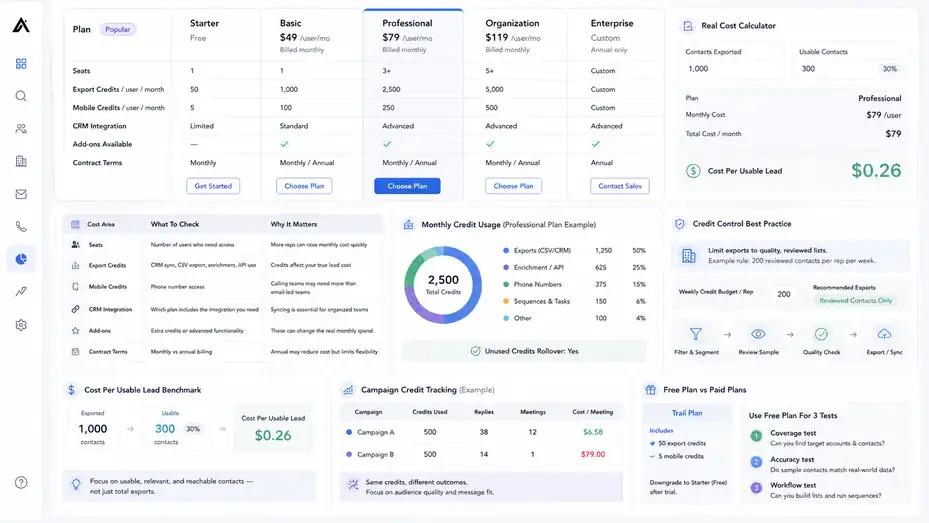
Apollo’s pricing is not just about the monthly seat cost.
The real cost depends on credits, exports, phone data, CRM syncs, enrichment needs, and how many users need access.
Understanding Apollo’s Pricing Structure
Apollo has a pricing page with multiple plans and credit rules. It also notes that some features may depend on Apollo’s newer credit system and that existing customers may still be on legacy systems during rollout.
That detail matters because two teams may see different limits depending on plan type, billing term, add-ons, and whether they are on the new or legacy credit model.
Here is a practical way to evaluate Apollo pricing:
| Cost Area | What To Check | Why It Matters |
|---|---|---|
| Seats | Number of users who need access | More reps can raise monthly cost quickly |
| Export Credits | CRM sync, CSV export, enrichment, API use | Credits affect your true lead cost |
| Mobile Credits | Phone number access | Calling teams may need more than email-led teams |
| CRM Integration | Which plan includes the integration you need | Syncing is essential for organized teams |
| Add-Ons | Extra credits or advanced functionality | These can change the real monthly spend |
| Contract Terms | Monthly vs annual billing | Annual may reduce cost but limits flexibility |
I suggest calculating cost per usable lead, not cost per contact. If you export 1,000 contacts but only 300 are accurate, relevant, and reachable, your real cost is based on those 300.
This is where many buyers make a mistake. They compare Apollo’s sticker price against another platform’s sticker price without testing how many usable leads each system produces.
Credit Usage And Budget Control
Credits can feel confusing at first, but the concept is manageable. Apollo’s FAQ says export credits are used when contacts leave Apollo through CSV, CRM, person API enrichment, or sync to another system.
The best way to control credits is to make Apollo users follow a list-quality process before exporting.
For example, a sales rep should not export every “VP Sales” in the database. They should first filter by industry, company size, territory, verified email, active role, and exclusions. Then they should review a sample. Only then should they export or sync.
A small team could create a weekly credit rule like this: Each rep gets a target of 200 reviewed contacts per week, not 2,000 random exports. That keeps the team focused on quality and protects the budget.
I also recommend tracking credit usage by campaign. If Campaign A uses 500 credits and creates 12 meetings, while Campaign B uses 500 credits and creates 1 meeting, your issue is not the platform price. Your issue is audience and message fit.
Credits become easier to justify when you connect them to pipeline outcomes.
Free Plan Versus Paid Plans
Apollo’s pricing FAQ says trial plans include 50 credits and 5 mobile credits, and users can downgrade to a free Starter plan after trial.
The free or starter experience is useful for testing the interface, checking database coverage, and building sample lists. But I would not judge Apollo’s full value only from a small free plan because credit limits, integrations, and advanced workflow needs may be different on paid plans.
Use the free option for three tests:
- Coverage test: Can you find your target accounts and contacts?
- Accuracy test: Do sample contacts match real-world public data?
- Workflow test: Can you build a list and understand the sequence process?
If those tests are positive, then evaluate a paid plan based on your monthly prospecting volume. If your market is weak in Apollo during the free test, upgrading will not magically fix the data.
The free plan is best treated as a diagnostic tool. It helps you answer, “Does Apollo have enough of my market?” before you spend serious money.
Pricing Verdict
Apollo can be cost-effective when you use multiple parts of the platform: data, enrichment, sequencing, CRM sync, and engagement tracking. It becomes less cost-effective when you only need one narrow function, such as occasional email lookup or a small one-time list.
My honest view: Apollo’s pricing makes the most sense for teams that will prospect every week. If you only need 100 leads once, it may be more tool than you need. If you need a repeatable outbound engine, the combined workflow can justify the cost.
The key is discipline. Poor list hygiene can turn any credit-based platform into a money leak. Strong segmentation can make Apollo feel much more valuable because every exported contact has a clear purpose.
Set Up Apollo For A Clean Data Depth Test
Before committing fully, run a structured test. This gives you evidence instead of relying on demos, reviews, or feature pages.
Step 1: Define Your Test Market
Start by defining one narrow market. Do not test Apollo across five industries at once. You need a clean signal.
A good test market includes:
- Industry: Choose one clear vertical.
- Company size: Pick a realistic range.
- Region: Limit geography to where you sell.
- Buyer titles: Select 3–5 decision-maker or influencer titles.
- Exclusions: Remove students, consultants, vendors, and irrelevant roles.
Example: “B2B SaaS companies in the United States with 51–500 employees, targeting VP Sales, Head of Revenue, Sales Operations, and CRO titles.”
That test is specific enough to measure. If you simply search for “sales leaders,” your results will be too broad to evaluate.
I recommend writing your ICP in a document before opening Apollo. This keeps you honest. Otherwise, it is easy to keep changing filters until the results look impressive but no longer match your real buyers.
Step 2: Build Three Lists
Create three test lists so you can compare quality.
- Core ICP List: Your best-fit companies and decision-makers.
- Adjacent ICP List: Similar companies or slightly lower seniority.
- Stretch List: A broader audience you might test later.
This structure helps you see whether Apollo is strong only in your obvious market or useful across related segments.
For each list, aim for 100 contacts. You do not need thousands for a test. You need enough records to spot patterns.
Review each list manually for obvious issues. Are job titles relevant? Are companies still active? Are contacts in the right geography? Are there duplicates? Are emails verified?
I suggest scoring each contact from 1 to 3:
- 3: Perfect fit and ready for outreach.
- 2: Possibly useful but needs review.
- 1: Bad fit or should be removed.
If fewer than 60% of your contacts score a 3, your filters need work or Apollo may not be deep enough for that segment.
Step 3: Verify A Sample Manually
Manual verification is boring, but it saves you from expensive mistakes. Take 20 contacts from each list and check them against public company websites, professional profiles, or your CRM if you already have data.
Look for these fields:
| Field | Pass Criteria | Red Flag |
|---|---|---|
| Name | Person appears to exist professionally | No public trace at all |
| Company | Current employer appears correct | Contact left company |
| Title | Role matches your targeting | Old or unrelated title |
| Verified or likely valid | Generic, guessed, or suspicious | |
| Company Fit | Matches ICP | Wrong industry or size |
This gives you a rough confidence score. If 17 out of 20 records are accurate enough, that is strong. If only 10 out of 20 are usable, you should pause before exporting or sequencing heavily.
No sales intelligence platform is perfect. The question is whether the error rate is manageable for your sales motion.
Step 4: Launch A Low-Risk Outreach Test
Once you have a reviewed list, send a small campaign. Keep the message simple and track results carefully.
A good first test is 50–100 contacts. Use one clear offer, one audience, and one sequence. Do not test five variables at once.
Your first campaign should answer these questions:
- Did emails deliver cleanly?
- Did people recognize the problem you mentioned?
- Did replies come from relevant buyers?
- Did anyone say they were the wrong person?
- Did the list produce meetings or useful conversations?
I advise keeping the first sequence short: 3–4 touches over 10–14 days. You are testing data and relevance, not trying to squeeze every last reply from a cold audience.
If the list is good but replies are weak, improve messaging. If replies say “wrong person” or “I left that company,” improve filters and verification. If bounces are high, tighten email quality before scaling.
Analyze Apollo’s Strengths And Weaknesses
Apollo has real strengths, but it also has limitations. A useful review should make both clear so you can decide with realistic expectations.
Biggest Strength: All-In-One Prospecting Workflow
Apollo’s biggest advantage is the connection between data and action. You can search, save, enrich, sequence, track, and sync from one platform.
For small and mid-sized teams, this is genuinely useful. Buying separate tools for database access, email verification, sequencing, enrichment, and CRM sync can get expensive and messy. Apollo reduces that friction.
Apollo’s pricing page also confirms integrations with major sales and marketing systems, including Salesforce, HubSpot, Outreach, SalesLoft, Marketo, Sendgrid, LinkedIn, and email providers.
In practice, this means a rep can go from “I need 100 target accounts” to “I have a campaign live” faster than they could with a disconnected tool stack.
That speed is valuable, especially when your team is still finding product-market fit, testing new segments, or building outbound from scratch.
Biggest Strength: Search Depth And Filtering
Apollo’s search filters make it easier to move beyond generic lead lists. Its data page references more than 65 data points and filters, including intent data and employee trends.
This gives you flexibility. You can build lists around company size, location, role, seniority, industry, technologies, and other signals. For many outbound teams, that is enough to create meaningful segmentation.
The practical advantage is message relevance. When your list is tighter, your emails sound less random. You can write to a specific pain point instead of using vague outreach like, “We help businesses grow.”
However, filters are only useful if you know your market. Apollo will not fix a vague ICP. If your targeting strategy is unclear, the platform may simply help you build bad lists faster.
My advice: Treat Apollo like a precision tool. The sharper your ICP, the better the output.
Main Weakness: Data Accuracy Still Needs Testing
Even with strong verification claims, no database is perfect. G2’s Apollo review page shows a 4.7 rating across 9,572 reviews, with many users praising ease of use and contact data, while also noting complaints around inaccurate or outdated data.
That mix feels realistic. Many users get value from Apollo, but some still run into data issues.
This is not unique to Apollo. Every B2B data provider deals with job changes, company moves, domain changes, layoffs, rebrands, mergers, and hidden contact information. The difference is how often those issues appear in your target market.
You should expect some wrong titles, outdated contacts, and missing numbers. The question is whether the platform gives you enough good records to make the workflow profitable.
I would not recommend exporting thousands of contacts blindly from any tool, including Apollo. Review samples, monitor bounces, and keep your CRM clean.
Main Weakness: Credit And Plan Complexity
Apollo’s credit model can be confusing, especially for teams that are new to sales intelligence platforms. Export credits, mobile credits, enrichment usage, plan limits, and legacy versus new credit systems can all affect cost.
Apollo’s own FAQ notes that some features are only available with its new credit system, while existing customers may still be on legacy systems during rollout.
That means you should read the current plan details carefully before buying. Do not assume a feature is included just because you saw it in a review, demo, or older article.
Ask these questions before upgrading:
- How many export credits do we get?
- How are mobile numbers counted?
- Does CRM sync consume credits?
- What happens if we exceed limits?
- Which features are included in our exact plan?
- Are we on the new or legacy credit system?
This is not a dealbreaker, but it is something to manage. Apollo works best when someone on your team owns usage rules.
Review Security, Compliance, And Data Privacy
Sales intelligence platforms handle personal business contact data, so privacy and compliance cannot be an afterthought.
Apollo provides public security and privacy information, but your team still needs to use the platform responsibly.
Apollo’s Security And Compliance Position
Apollo’s security page says the platform is ISO 27001 and SOC 2 certified, GDPR compliant as both a Data Processor and Data Controller, and uses encryption in transit and at rest.
It also describes database security measures such as encrypted passwords, two-factor authentication, intrusion detection systems, and firewall-protected infrastructure.
Those are important trust signals, especially for teams syncing Apollo with CRM data or using it across multiple reps.
Apollo also states that annual network and graybox application penetration tests are performed by a certified third-party consultant, and that internal and external audits are carried out quarterly across access control, risk, information security, IT infrastructure, and HR procedures.
From a buyer’s perspective, these details matter most if you work in a larger organization with procurement, legal, or security review. You may need Apollo’s security documents, DPA, subprocessors list, or trust center information before approval.
For smaller teams, the practical takeaway is simple: Apollo appears to provide the security documentation serious B2B teams usually expect, but you still need to configure user access carefully.
Privacy Rights And Opt-Out Considerations
Apollo’s privacy materials explain that people whose information appears in its contributor database can opt out through its Privacy Center and submit access requests to learn more about the data Apollo has collected.
This matters because responsible outreach is not only about legal compliance. It is also about trust.
You should make sure your campaigns include appropriate unsubscribe options, accurate sender identity, and relevant messaging. If someone asks not to be contacted, remove them. If your market includes regions with stricter privacy rules, get proper legal guidance before launching large-scale outreach.
I am not a lawyer, so I would not treat this as legal advice. But from a practical sales perspective, privacy-aware outreach performs better anyway. People are more likely to respond when your message is targeted, respectful, and easy to opt out of.
Bad outbound damages more than deliverability. It damages your brand.
Responsible Data Use Inside Your Team
A strong sales intelligence platform can be misused quickly. Apollo may help you collect and contact many prospects, but that does not mean you should blast everyone.
Set internal rules before reps start exporting lists:
- Rule 1: Only contact people who match a documented ICP.
- Rule 2: Do not export contacts without campaign intent.
- Rule 3: Remove bounced, unsubscribed, and wrong-person contacts.
- Rule 4: Keep CRM fields clean and avoid duplicate records.
- Rule 5: Review regional privacy rules before entering new markets.
These rules may sound basic, but they protect your sender reputation, budget, and brand.
In my experience, teams that struggle with Apollo often do not have a software problem. They have a governance problem. The tool gives everyone access to data, but nobody defines what “good data” means.
Optimize Apollo For Better Results
Once your basic setup works, optimization is where Apollo starts becoming more valuable. The goal is to improve list quality, messaging relevance, and conversion from lead to meeting.
Improve Your List Quality Score
Create a simple internal list quality score. This helps your team avoid the trap of measuring only quantity.
A good score might include five criteria:
| Criterion | Score 1 | Score 2 | Score 3 |
|---|---|---|---|
| Company Fit | Poor fit | Partial fit | Exact ICP |
| Contact Fit | Wrong role | Influencer | Decision-maker |
| Data Confidence | Unverified | Somewhat verified | Verified and current |
| Timing Signal | None | Weak signal | Strong trigger |
| Message Match | Generic | Somewhat relevant | Highly relevant |
Before launching a campaign, score a sample of 20 contacts. If the average is below 2.3, improve the list.
This small process changes behavior. Reps stop thinking, “How many leads did I pull?” and start thinking, “How many of these leads deserve outreach?”
That is the mindset shift that makes Apollo more profitable.
Use Segments To Improve Messaging
Segmentation is where Apollo’s filters become revenue. Do not send the same message to every contact just because they came from the same database.
Segment by the pain that matters most. For example:
- VP Sales cares about pipeline, rep productivity, and forecast quality.
- RevOps cares about process, reporting, routing, and tool efficiency.
- Founder cares about growth, cash flow, and speed.
- Marketing leader cares about lead quality, attribution, and campaign performance.
Even when selling the same product, your email should change based on the buyer’s job.
Here’s a simple example. If you sell lead enrichment services, your message to RevOps might focus on CRM hygiene and routing accuracy. Your message to Sales Leadership might focus on reducing rep research time and improving meeting quality.
Apollo helps you find both groups. Your segmentation decides whether the message lands.
Clean Your CRM Sync Rules
If you connect Apollo to a CRM, be careful with sync rules. Syncing everything can create duplicates, messy fields, and reporting problems.
A better approach is to sync only qualified contacts or contacts tied to active campaigns. Decide which fields Apollo can update and which fields your CRM should protect.
For example, Apollo might enrich job title, company size, industry, email, phone, and LinkedIn-style profile URL. But you may want your CRM to control lifecycle stage, owner, lead source, opportunity stage, and customer status.
I recommend creating a field mapping document before full sync. It does not need to be fancy. Just list each field, source of truth, update rule, and owner.
This prevents a common headache: Apollo updates a record, the CRM overwrites it, and nobody knows which version is correct.
Run Monthly Data Audits
A monthly data audit keeps your Apollo workflow from drifting. Review recent campaigns and ask what the data actually produced.
Look at:
- Bounce rates by segment
- Reply rates by title
- Positive replies by industry
- Wrong-person replies
- Missing phone number patterns
- CRM duplicate creation
- Credit usage by campaign
This gives you a feedback loop. Maybe Apollo performs well for SaaS founders but poorly for nonprofit operations leaders. Maybe emails are strong, but direct dials are weak in your region. Maybe your best replies come from mid-market companies, not enterprise accounts.
These insights help you refine filters and protect budget.
In my opinion, this is the difference between casual Apollo users and serious revenue teams. Casual users keep exporting. Serious teams keep learning.
Decide Whether Apollo Is Worth It
Apollo is worth considering if you need a broad B2B sales intelligence platform with built-in outreach, enrichment, and workflow automation.
It is not perfect, but it can be very useful when tested and managed properly.
Best Use Cases For Apollo
Apollo is a strong fit when your team needs repeatable outbound prospecting. It works especially well when you sell to defined B2B markets and need both data and engagement tools.
The best use cases include:
- Outbound sales: Finding target accounts, decision-makers, and verified emails.
- Lead generation: Building segmented prospect lists for campaigns.
- CRM enrichment: Filling missing company and contact fields.
- Founder-led sales: Testing new markets without building a large sales stack.
- Agency prospecting: Finding niche business owners or department leaders.
- Revenue operations: Improving account and contact data quality.
Apollo’s strength is not that it replaces strategy. It is that it makes strategy easier to execute. Once you know who you want to reach, Apollo can help you find, filter, verify, and contact them.
I would recommend it most confidently to teams that already have a clear ICP and need a practical way to scale prospecting.
When Apollo May Not Be The Best Fit
Apollo may not be the right choice if you need only a tiny number of leads, if your audience is mostly consumers, or if your market is highly specialized and not well represented in common B2B datasets.
It may also be too much if you already have a dedicated best-in-class sales stack and only need one narrow feature. For example, if your team already has a CRM, sequencing platform, enrichment provider, dialer, and data warehouse, Apollo might duplicate parts of your stack.
Be cautious if your outbound depends heavily on perfect mobile phone coverage in a narrow region. Test before buying.
Also, if your team does not have a clear outbound process, Apollo can create noise. The platform will give you access to lots of contacts, but without targeting discipline, that can lead to low-quality campaigns.
A tool that makes prospecting faster can also make bad prospecting faster. That is not Apollo’s fault, but it is a real risk.
Final Verdict
My verdict in this Apollo IO sales intelligence platform review is that Apollo is a strong, practical platform for B2B teams that want data depth and outreach execution in one place. Its biggest value is the combination of searchable data, enrichment, filtering, sequencing, integrations, and workflow speed.
Apollo publicly claims broad data coverage, 65+ data attributes, 97% email accuracy, real-time verification, and large-scale monthly refresh activity. Those are compelling signals, but your buying decision should depend on your own market test.
I would not buy Apollo just because the database sounds large. I would buy it if a 100-contact test proves that Apollo can find your real buyers, match your ICP, keep bounce rates low, and generate relevant replies.
That is the honest data depth test.
Recommended Next Step
Start with a narrow ICP, build three 100-contact test lists, manually verify a sample, and run a small outreach campaign. If Apollo produces clean delivery, relevant replies, and usable meetings, it is likely worth deeper investment.
For most B2B teams, that evidence is far more valuable than any feature checklist.
FAQ
Is Apollo IO good for sales intelligence?
Yes, Apollo IO is good for sales intelligence if you need B2B contact data, company insights, lead filters, email outreach, and CRM enrichment in one platform. Its value depends on your target market, so testing data accuracy, email quality, and lead relevance before scaling is important.
How accurate is Apollo IO contact data?
Apollo IO contact data can be strong for many B2B markets, especially when using verified emails and clear filters. However, accuracy varies by industry, location, job title, and company size. A small sample test helps confirm whether Apollo’s database is reliable for your audience.
What is Apollo IO best used for?
Apollo IO is best used for B2B prospecting, lead generation, account research, email sequencing, and CRM enrichment. It helps sales teams find relevant contacts, organize target accounts, and launch outreach campaigns without switching between too many separate tools.
Is Apollo IO worth it for small businesses?
Apollo IO can be worth it for small businesses that depend on outbound sales and need a repeatable way to find leads. It is most valuable when you have a clear ideal customer profile and use credits carefully instead of exporting large, unqualified lists.
What should I test before buying Apollo IO?
Before buying Apollo IO, test data coverage, verified email quality, phone number availability, company filters, CRM integration needs, and outreach results. Build a small list from your exact target market, verify a sample manually, then measure bounce rates, replies, and lead relevance.

I’m Juxhin, the voice behind The Justifiable.
I’ve spent 6+ years building blogs, managing affiliate campaigns, and testing the messy world of online business. Here, I cut the fluff and share the strategies that actually move the needle — so you can build income that’s sustainable, not speculative.
Related posts:
 Apollo IO Platform Walkthrough Guide: From Signup To First Leads
 Apollo IO Pricing Explained: Every Plan, Limit, And Real Cost
 Best Tips To Write Cold Emails
 How to Integrate Aweber with ClickFunnels
 10 Secrets to Generating Leads Online & Skyrocketing Sales
 Apollo IO B2B Lead Generation Tool Review: Hidden Power or Hype?