
Table of Contents
Some links on The Justifiable are affiliate links, meaning we may earn a small commission at no extra cost to you. Read full disclaimer.
Apollo IO platform walkthrough guide content can get confusing fast because Apollo is not just a lead database. It is part prospecting tool, part sales engagement platform, part enrichment system, and part revenue workflow hub.
If you are signing up for the first time, the real goal is not to click every menu. The goal is to build a clean path from “Who should I contact?” to “Which leads are worth saving and reaching out to?”
In this guide, I’ll walk you through Apollo from signup to your first usable lead list, with practical setup steps, filtering advice, outreach basics, and mistakes I’d avoid.
Understand What Apollo IO Actually Does Before You Start
Apollo is built to help you find B2B contacts, understand their companies, enrich missing data, and run outreach from one workspace.
Before touching filters or exporting contacts, it helps to understand the moving parts so you do not waste credits or build messy lists.
What Apollo IO Is In Simple Terms
Apollo is a sales intelligence and engagement platform. In plain English, that means it helps you find people who match your ideal customer profile, view their business contact details, organize them into lists, and contact them through outbound workflows.
The reason many beginners feel overwhelmed is that Apollo combines several jobs that are often handled by separate tools. You can search a large B2B database, reveal contact details, enrich records, create sequences, connect a CRM, track engagement, and use AI-assisted research in one place.
Apollo describes itself as an AI sales platform for outbound, inbound, and automation, and its homepage says more than 600,000 companies use it.
Think of Apollo like a sales workspace with four core layers. The first layer is the database, where you search contacts and companies. The second is enrichment, where missing or outdated information gets updated. The third is engagement, where you send emails, create sequences, or assign sales tasks. The fourth is reporting, where you learn what is working.
Here’s the simple mental model I recommend: Do not treat Apollo as a random contact finder. Treat it as a lead qualification system. Your first win is not downloading 1,000 names. Your first win is finding 25 to 100 people who clearly match your target buyer and have enough context for a relevant message.
How Apollo Fits Into A Lead Generation Workflow
A good lead generation workflow has a predictable order: define your target market, find matching accounts, identify decision-makers, verify the data, prioritize the best-fit leads, and then start outreach. Apollo can support each stage, but it works best when you bring a clear strategy into the platform.
Imagine you sell bookkeeping services to small software companies. A weak Apollo workflow would be searching “CEO” and exporting hundreds of contacts. A stronger workflow would be filtering for software companies with 11–50 employees, specific locations, recent hiring signals, and finance-related titles like founder, operations lead, or head of finance.
That difference matters because outbound outreach is partly a math problem and partly a relevance problem. More contacts do not automatically mean more sales conversations. Better-fit contacts usually produce cleaner replies, fewer spam complaints, and better pipeline quality.
In my experience, Apollo is most useful when you use it to answer three questions:
- Who should I target? Define accounts by company size, industry, geography, technology use, funding stage, or growth signals.
- Who is the right person? Find contacts based on role, seniority, department, and buying influence.
- Why now? Look for timing signals, pain points, or context that make your outreach feel relevant.
Once you understand that flow, the rest of this Apollo IO platform walkthrough guide becomes much easier.
Create Your Apollo Account And Choose The Right Starting Plan
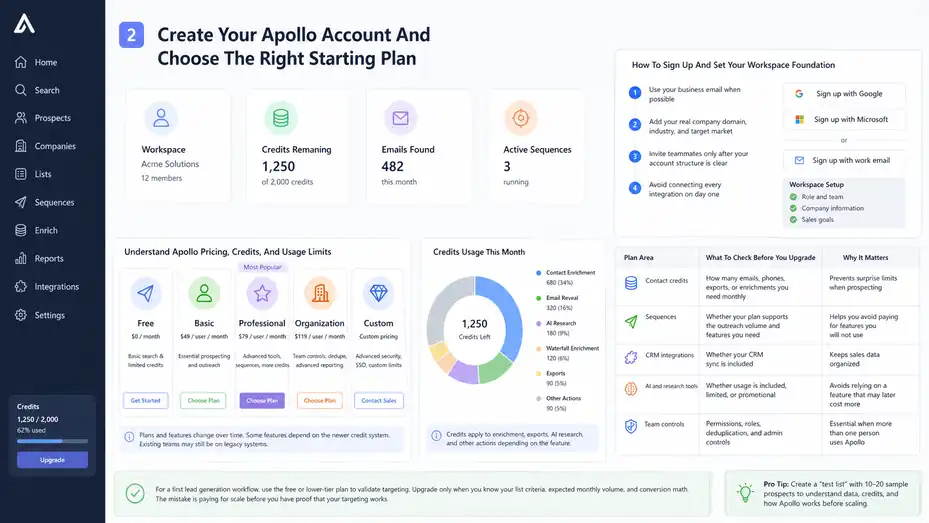
Signup is simple, but the plan and credit structure matter because Apollo usage can become expensive if you reveal, export, or enrich data without a plan.
Start small, learn the workflow, then upgrade only when the platform is clearly producing qualified leads.
How To Sign Up And Set Your Workspace Foundation
Apollo’s signup flow usually lets you create an account with work email, Google, or Microsoft. Apollo’s homepage currently shows free signup options, including Google and Microsoft signup. After account creation, you will normally be guided through workspace basics such as your role, company information, team size, and sales goals.
The first setup decision I suggest you take seriously is your company profile. Apollo uses workspace context across prospecting, recommendations, AI features, and integrations. If you skip this or enter vague details, you may get weaker suggestions later.
- Step 1: Use your business email when possible because it makes CRM and email connection smoother later.
- Step 2: Add your real company domain, industry, and target market so Apollo has useful context.
- Step 3: Invite teammates only after your account structure is clear because duplicated users and unclear ownership can make lead routing messy.
- Step 4: Avoid connecting every integration on day one unless you already know your workflow. It is better to start with clean prospecting than to sync messy test data into your CRM.
One small but important habit: Create a “test list” before building your real lead list. I like using 10 to 20 sample prospects to understand how Apollo displays data, uses credits, and handles saving contacts. That tiny test can save you from burning through credits on contacts you never needed.
Understand Apollo Pricing, Credits, And Usage Limits
Apollo pricing changes over time, so always check the official pricing page before committing. As of the current official pricing page, Apollo has plans that include Free, Basic, Professional, Organization, and Custom options.
The page also explains that some features depend on the newer credit system, and that existing teams may still be on legacy systems.
Credits are important because they affect how much prospect data you can reveal, export, enrich, or use through certain AI and enrichment actions. Apollo’s own credit documentation says credits can apply to AI research, contact and account enrichment, waterfall enrichment, and other actions depending on the feature.
| Plan Area | What To Check Before You Upgrade | Why It Matters |
|---|---|---|
| Contact credits | How many emails, phones, exports, or enrichments you need monthly | Prevents surprise limits when prospecting |
| Sequences | Whether your plan supports the outreach volume and features you need | Helps you avoid paying for features you will not use |
| CRM integrations | Whether your CRM sync is included | Keeps sales data organized |
| AI and research tools | Whether usage is included, limited, or promotional | Avoids relying on a feature that may later cost more |
| Team controls | Permissions, roles, deduplication, and admin controls | Essential when more than one person uses Apollo |
For a first lead generation workflow, I suggest using the free or lower-tier plan to validate targeting. Upgrade only when you know your list criteria, expected monthly volume, and conversion math. The mistake is paying for scale before you have proof that your targeting works.
Set Up Your Profile, Email, And Compliance Basics
Before finding leads, set up the sending and identity pieces that affect trust. This is not the flashy part of Apollo, but it protects your domain reputation and keeps your outreach organized.
Complete Your User Profile And Workspace Settings
Your profile tells prospects who you are, while workspace settings tell Apollo how to organize activity. Add your name, company, title, sender information, timezone, and notification preferences before you start building sequences or saving leads.
This sounds basic, but it impacts real workflows. If your timezone is wrong, follow-up timing can feel strange. If your sender name is incomplete, emails look less trustworthy. If your team permissions are unclear, one person may edit lists or sequences that another person is actively using.
- Step 1: Add your name, role, company, and domain accurately.
- Step 2: Set your timezone so task reminders and sequence steps match your real working hours.
- Step 3: Review team permissions if more than one person will use the account.
- Step 4: Create naming rules early, such as “ICP – Region – Segment – Month” for lists.
A practical example: Instead of naming a list “New Leads,” name it “SaaS Founders – US – 11-50 Employees – Apr 2026.” That name tells you exactly what the list contains months later.
I believe this small organization habit separates casual Apollo users from people who actually build repeatable outbound systems.
Connect Email Carefully Before Sending Outreach
Apollo can support email outreach through sequences, but connecting your mailbox should not be rushed. Apollo’s sequence documentation explains that sequences can include automatic emails, manual emails, calls, and action items, and Apollo AI can help generate sequences. Still, your sending setup and message quality matter more than the sequence tool itself.
Before sending anything, check whether your domain is ready for outbound. That means your email authentication records, sending volume, and message quality need attention. Terms like SPF, DKIM, and DMARC may sound technical, but they simply help mailbox providers confirm that your emails are really coming from your domain.
Do not connect a brand-new domain and blast hundreds of prospects. That is one of the fastest ways to hurt deliverability. Start with low volume, relevant targeting, and human-sounding messages.
- Tip 1: Use a real person’s inbox rather than a generic address when appropriate.
- Tip 2: Keep first campaigns small, such as 25 to 50 contacts, while you test replies and deliverability.
- Tip 3: Make unsubscribe or opt-out handling clear and respectful.
- Tip 4: Avoid over-automation. A good outbound system should feel thoughtful, not robotic.
Apollo gives you the workflow, but your responsibility is to use it responsibly. Better targeting usually beats higher sending volume.
Build Your Ideal Customer Profile Before Searching
Most Apollo mistakes start before the first search. If you do not define your ideal customer profile, every filter feels tempting and every contact looks “maybe useful.”
Define The Company Profile First
Your ideal customer profile, often called ICP, is the type of company most likely to need, afford, and benefit from what you sell. Start with company-level criteria before contact-level criteria because the right person at the wrong company is still a bad lead.
Let me break it down for you. If you sell HR software for companies hiring quickly, your ICP might include companies with 51–500 employees, active job postings, a growing people team, and locations where your product is supported. If you sell web design to local dentists, your ICP might focus on industry, geography, website quality, and business size.
Your company profile should usually include:
- Industry: Which categories have the strongest pain point?
- Company Size: What employee range can afford your offer?
- Location: Where can you sell legally and practically?
- Growth Signal: Hiring, funding, expansion, technology change, or recent activity.
- Exclusion Criteria: Companies that are too small, too large, irrelevant, or poor fit.
I suggest writing your ICP in one sentence before using Apollo. For example: “We help B2B SaaS companies with 11–100 employees in the US improve outbound sales conversion.” That sentence makes your filters easier.
Without this clarity, Apollo becomes a huge database of distractions. With it, Apollo becomes a focused lead discovery engine.
Define The Buyer Persona And Decision-Maker
After you know the right companies, define the people inside those companies. A buyer persona is not just a job title. It includes responsibility, pain points, influence level, and likely motivation.
For example, “CEO” might be useful for a 12-person startup but too broad for a 900-person company. At larger companies, the better buyer might be VP Sales, Revenue Operations, Demand Generation, IT Director, or Head of People, depending on what you sell.
I like to split contacts into three categories. Decision-makers approve budget. Influencers research and compare options. Users feel the daily pain and may push internally for a solution. Apollo can help you find all three, but your first campaign should focus on the person most likely to understand the problem.
Example: Imagine you sell a sales call coaching tool. At a small company, the founder may care most. At a mid-market company, the VP Sales or Sales Enablement Manager may be a better fit. At an enterprise company, RevOps may influence implementation.
Do not rely on title alone. Look at department, seniority, company size, and how close the person is to the pain. A founder at a tiny agency and a founder at a funded SaaS company might have completely different buying behavior.
Use Apollo Search Filters To Find Better Leads
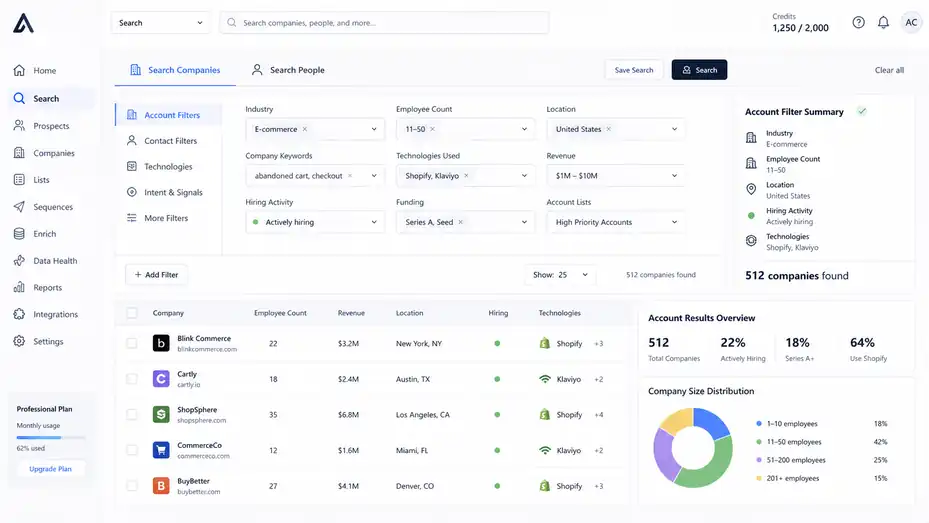
Apollo’s search filters are where the platform starts to feel powerful.
The key is to filter in layers, not all at once, so you can see how each filter changes the quality and size of your lead pool.
Start With Account Filters Before Contact Filters
Begin with account filters because they help you build a list of companies worth targeting. In Apollo, account-based prospecting means you first identify companies that match your ICP, then find the right people inside those companies.
Useful account filters often include industry, employee count, location, company keywords, technologies used, revenue estimates, hiring activity, funding, and account lists. You do not need every filter. You need the filters that match your buying logic.
A beginner-friendly process looks like this:
- Choose Industry: Start with one clear market instead of five.
- Set Employee Range: Use the range that matches your pricing and service capacity.
- Add Geography: Filter for regions where your offer makes sense.
- Apply One Intent Or Growth Signal: Use hiring, funding, technology, or company keywords when relevant.
- Review Sample Accounts: Open 10 companies manually before saving anything.
That last step is underrated. Before you save contacts, scan sample companies and ask, “Would I be happy if every company on this list looked like this?” If the answer is no, adjust your filters.
In my experience, the best Apollo users spend more time refining account filters than collecting contacts. That patience gives you cleaner outreach later.
Add Contact Filters To Reach The Right People
Once your account pool looks strong, add contact filters. This is where you narrow the search from “good companies” to “people worth contacting.”
Common contact filters include job title, department, seniority, location, email status, and whether the person is already saved or contacted. Be careful with job title filters because titles vary a lot. “Head of Growth,” “VP Marketing,” and “Demand Generation Director” may all be relevant for the same campaign.
Use department and seniority filters to support your title search. For example, if you target marketing leaders, you might include seniority levels like owner, founder, director, head, VP, or C-level. Then you can add specific titles to improve precision.
Example: If you help e-commerce brands reduce abandoned carts, you might search for companies in retail or consumer goods, then contact founders, heads of e-commerce, CRM managers, or growth marketers. A generic “marketing manager” search may be too broad.
I suggest saving different personas into separate lists. Do not mix founders, managers, and technical users in the same campaign unless your messaging adapts to each group. The more specific the persona, the easier it is to write an email that feels relevant.
Review Lead Quality Before Saving Or Exporting
Finding leads is not the same as qualifying leads. Before you reveal contact details or export records, slow down and inspect whether the data matches your campaign goal.
Check Contact Data, Company Fit, And Context
Apollo can show contact and company records, but you still need human judgment. Review each lead through three lenses: fit, accuracy, and relevance.
Fit means the person and company match your ICP. Accuracy means the title, company, and contact details appear current. Relevance means you have a reason to reach out beyond “you exist in my database.”
Apollo’s enrichment tools are designed to keep contact and account records current, including CRM enrichment, CSV enrichment, API enrichment, deduplication, job change tracking, and data health workflows. That is helpful, but no data platform is perfect. You should still spot-check important leads manually.
A quick lead review process:
- Company Check: Does the company match your target industry, size, and location?
- Role Check: Does this person likely feel or own the problem you solve?
- Timing Check: Is there any signal that makes outreach timely?
- Data Check: Does the email look verified or usable?
- Duplicate Check: Has your team already contacted this person or account?
Here’s a realistic scenario. You search for “Head of Sales” at SaaS companies and find a promising lead. Before saving, you notice the company has only three employees. If your product costs $2,000 per month, that lead may not be worth a credit. Filtering is powerful, but review protects your budget.
Create Lists That Match Campaign Goals
Lists are not just storage folders. They are campaign assets. A good list should have a clear purpose, audience, and next action.
Instead of building one massive list called “Prospects,” create focused lists based on your outreach angle. For example, “US SaaS Sales Leaders – Hiring SDRs” is better than “Sales Leads.” It gives you context for messaging and helps you compare performance later.
List segmentation also helps you avoid generic campaigns. A founder campaign should not use the same copy as a RevOps campaign. A company hiring sales reps may need a different message than a company that just raised funding.
I recommend creating lists around one of these angles:
- Persona-Based List: Same buyer role across similar companies.
- Signal-Based List: Companies sharing a trigger like hiring, funding, or technology use.
- Account-Based List: Multiple contacts inside a handpicked company group.
- Location-Based List: Useful for local services or region-specific offers.
- Problem-Based List: Contacts likely experiencing the same operational pain.
Once your list is saved, add notes or naming conventions that explain why it exists. Future you will be grateful.
Reveal Contact Details And Manage Credits Wisely
Credits are easy to waste when you are excited. The smarter approach is to reveal or export only after a lead has passed your qualification checks.
When To Reveal Emails, Phones, Or Enriched Data
Revealing contact details should be a decision, not a reflex. If your target list is still messy, do not reveal emails yet. Clean the filters first. Every unnecessary reveal increases cost and clutter.
Apollo’s official pricing page explains that export credits are consumed when you export a contact outside Apollo, such as through CSV, CRM, person API enrichment, or syncing data to another system. That means you should think carefully before moving data out of Apollo.
A simple rule: Reveal details only when the lead is ready for a defined next step. That next step might be adding the person to a sequence, syncing to your CRM, or exporting a small test list for review.
Here’s a practical example. Suppose your search returns 2,500 contacts. Do not reveal all of them. First, narrow the list to 100 best-fit contacts. Then manually inspect 20. Then reveal 25 to 50 for a pilot campaign. If replies look promising, expand gradually.
Credit discipline is not about being cheap. It is about keeping your data clean and your outreach focused. A smaller list of qualified leads usually beats a giant list full of weak matches.
Use Enrichment Without Creating Data Chaos
Enrichment means adding or updating missing information, such as email, phone, company size, job title, or account details. Apollo’s enrichment overview says its enrichment tools help keep data fresh and up to date across contact and account records.
Apollo also offers waterfall enrichment, which uses a series of cascading data sources to find actionable contact emails and phone numbers. In simple terms, waterfall enrichment checks multiple sources in order instead of relying on just one.
This can be useful, but it can also create messy systems if you enrich everything without rules. Before enrichment, decide which fields matter. For many teams, the essentials are name, title, company, company domain, verified email, LinkedIn URL, employee count, industry, and CRM owner.
Enrichment works best when you have a clear field mapping plan. Field mapping means deciding where each Apollo data point should go in your CRM or spreadsheet. For example, Apollo’s “Company Industry” field should match your CRM’s “Industry” field.
- Tip 1: Enrich only records that match your ICP.
- Tip 2: Review duplicates before syncing enriched data.
- Tip 3: Avoid overwriting trusted CRM fields without checking.
- Tip 4: Track enrichment source and date when possible.
Data freshness is valuable, but clean data governance is what keeps your team from losing trust in the system.
Create Your First Outreach Sequence The Right Way
Once you have a qualified list, you can create your first outreach sequence. Keep it small, relevant, and easy to measure.
Build A Simple First Sequence
A sequence is a planned set of outreach steps. It might include emails, manual tasks, calls, or reminders. Apollo’s sequence documentation says sequences can include automatic and manual emails, phone calls, and action-item steps, and that Apollo AI can help generate sequence content.
For your first sequence, do not overcomplicate it. I suggest starting with three to four steps over 10 to 14 days. The goal is to learn whether your targeting and message resonate, not to squeeze every possible follow-up into one campaign.
A beginner-friendly sequence could look like this:
- Email 1: A short personalized opener, clear problem, and simple question.
- Email 2: A useful angle, example, or observation related to their company.
- Manual Task: Check profile or company context before the next touch.
- Email 3: A polite close-the-loop message with a low-pressure call to action.
Keep the first email under 120 words if possible. Long cold emails usually feel heavy, especially when the person does not know you yet. Your goal is not to explain everything. Your goal is to earn a reply.
Example: “Noticed your team is hiring SDRs. When teams grow outbound headcount, lead routing and follow-up quality can get messy fast. Are you already tracking which rep activities turn into qualified meetings?”
That is specific, relevant, and easy to answer.
Personalize Without Spending Ten Minutes Per Lead
Personalization does not mean writing a custom essay for every prospect. It means showing that your message belongs in their inbox.
Apollo’s AI research features are designed to help uncover insights about people and companies, narrow targeting, and personalize emails. Apollo says AI research combines Apollo data, content center information, external data sources, and Apollo AI to find useful prospect details.
Still, I recommend using AI assistance as a helper, not a replacement for judgment. Bad personalization can be worse than no personalization. “I saw your impressive company” feels empty. “Noticed you added three sales roles this month” feels grounded.
Use personalization at three levels:
- Company Signal: Hiring, funding, expansion, technology, or new market.
- Role Relevance: Connect your message to what their role likely owns.
- Problem Context: Name a pain point that naturally fits the company stage.
Here’s how you can get started. Create one sentence that can be personalized by segment, not by individual. For example: “Teams hiring SDRs often hit a point where more activity does not automatically mean more qualified meetings.” That line works for many sales leaders at growing companies without pretending you know private details.
The best personalization feels useful, not creepy.
Sync Apollo With Your CRM Or Spreadsheet
You do not need a complex tech stack to start, but you do need a clean place to track leads and outcomes.
Apollo can integrate with major sales tools, but beginners should connect systems carefully.
Decide Whether You Need A CRM Integration Yet
Apollo’s pricing page says it integrates with platforms such as Salesforce, HubSpot, Outreach, SalesLoft, Marketo, SendGrid, LinkedIn, and email providers, with API access available on Custom plans. That is useful, but integration should follow process, not replace it.
If you are a solo founder or freelancer testing your first campaign, a spreadsheet or Apollo list may be enough for the first 50 to 100 leads. If you have a sales team, multiple pipeline stages, or existing customer data, CRM integration becomes more important.
| Setup Option | Best For | Main Benefit | Main Risk |
|---|---|---|---|
| Apollo Lists Only | First campaign testing | Simple and fast | Limited long-term tracking |
| Spreadsheet Export | Manual review or small teams | Flexible and easy to audit | Can become outdated quickly |
| CRM Sync | Sales teams and active pipelines | Centralized reporting and ownership | Bad field mapping can create clutter |
| API Workflow | Advanced revenue operations | Custom automation | Requires technical planning |
My advice is simple: Do not sync unqualified leads into your CRM. Your CRM should be a trusted sales system, not a dumping ground. Use Apollo to discover and qualify, then sync the records that deserve follow-up.
Map Fields And Avoid Duplicate Records
Field mapping is one of those boring tasks that saves hours later. Before syncing, decide how Apollo fields should match your CRM fields. For example, contact title should map to job title, company domain should map to website, and lead source might be “Apollo outbound.”
Duplicates are a common problem when teams move quickly. Apollo’s enrichment product page highlights data deduplication, including configurable detection rules and merging duplicate contacts in Apollo or a CRM. Use those controls where available, but also create team rules.
- Step 1: Choose a unique identifier, usually email address or company domain.
- Step 2: Decide whether Apollo or your CRM is the source of truth for each field.
- Step 3: Test sync with 10 records before syncing hundreds.
- Step 4: Review duplicates and field changes after the test sync.
- Step 5: Document the process so teammates do not improvise.
A realistic mistake: A team syncs 800 Apollo leads into HubSpot without checking duplicates. Suddenly, old customers, open opportunities, and cold prospects are mixed together. Sales reps lose trust in the CRM. That is not an Apollo problem alone. It is a process problem.
Clean syncing is slow at first, but it scales much better.
Track Your First Campaign Metrics
Your first Apollo campaign should teach you something. Do not judge success only by how many contacts you found. Judge it by list quality, deliverability, engagement, replies, and meetings.
Measure The Metrics That Actually Matter
Beginner users often obsess over open rates. Open rates can be useful, but they are less reliable than replies, interested replies, booked meetings, and qualified opportunities.
Track the funnel from search to outcome. For example, if you found 500 contacts, saved 100, revealed 50, emailed 40, got 6 replies, and booked 2 calls, you now have a baseline. That baseline tells you where to improve.
Useful metrics include:
- Lead Match Rate: How many search results truly fit your ICP?
- Email Validity: How many contacts have usable emails?
- Reply Rate: How many prospects respond?
- Positive Reply Rate: How many replies show interest?
- Meeting Rate: How many contacts turn into scheduled calls?
- Conversion By Segment: Which persona, industry, or signal performs best?
I suggest tracking campaign quality by segment. If founders reply at 2% and operations leaders reply at 9%, that is a major insight. If companies hiring sales reps respond better than companies without hiring signals, your next search should reflect that.
A simple mini case scenario: You send 50 emails to SaaS founders and 50 to sales leaders. Founders give you one polite no. Sales leaders give you seven replies and three meetings. That does not mean founders are useless forever. It means your current offer and message fit sales leaders better.
Use Results To Improve Targeting And Messaging
Apollo gives you data, but you still need iteration. After your first campaign, review both the people who replied and the people who ignored you. Look for patterns.
If replies are low, your issue could be targeting, message relevance, deliverability, offer clarity, or timing. Do not change everything at once. Change one variable per test. For example, keep the same audience and test a new opening line. Or keep the same message and test a more specific audience.
Here’s a practical optimization loop:
- Review Replies: Identify the exact words prospects use when they respond.
- Review Non-Replies: Check whether the list was too broad.
- Adjust Filters: Tighten company size, title, signal, or region.
- Rewrite The First Email: Make the problem sharper and easier to answer.
- Run A Smaller Retest: Try another 25 to 50 leads before scaling.
In my experience, one strong insight from a small campaign is worth more than a huge campaign with unclear results. Apollo helps you build volume, but your learning loop creates performance.
Troubleshoot Common Apollo Beginner Problems
Almost every new Apollo user hits a few bumps. The good news is that most issues come from unclear targeting, messy data, or overcomplicated outreach rather than the platform itself.
Why Your Search Results Look Too Broad
If your results look random, your filters are probably too loose. Apollo has a large database, so broad searches can produce thousands of contacts that technically match but do not truly fit.
Start by tightening account criteria before contact criteria. Add company size, industry, geography, and one meaningful signal. Then refine titles. If you start with job titles alone, you will often get a mixed bag of companies.
Example: Searching “CEO” across all industries is too broad. Searching “CEO or Founder at B2B SaaS companies with 11–50 employees in North America using sales automation keywords” is much more focused.
Another issue is relying on one title. Buyers use different titles across industries. Try title groups instead. For example, a marketing decision-maker could be “Head of Marketing,” “VP Marketing,” “Demand Generation,” “Growth Lead,” or “Founder” depending on company size.
- Mistake 1: Using too many industries in one campaign makes messaging generic.
- Mistake 2: Mixing small businesses and enterprise companies creates different pain points.
- Mistake 3: Saving contacts before reviewing sample accounts wastes credits.
- Mistake 4: Filtering by title without checking company fit creates weak lists.
A better search is narrower, more intentional, and easier to message.
Why Your Outreach Is Not Getting Replies
Low replies can feel frustrating, but it is usually diagnosable. The biggest causes are weak targeting, vague messaging, too much pitch, poor timing, or deliverability issues.
Start with the message. Does it clearly show why you contacted this person? Does it connect to their role? Does it ask a simple question? If your email reads like a brochure, rewrite it. Cold outreach should start a conversation, not deliver a full sales presentation.
Next, check your list. If your leads are only loosely related to your offer, even a good email will struggle. Apollo makes it easy to gather contacts, but relevance still decides whether people care.
Also review your sending setup. If your emails are landing in spam or promotions, your reply rate will suffer. Keep sending volume modest, avoid spammy language, and make your emails feel human.
A simple first-email formula:
- Context: Mention a relevant company or role-based observation.
- Problem: Name a pain point they might recognize.
- Credibility: Briefly explain how you help.
- Question: Ask something easy to answer.
Example: “Noticed your team is expanding customer success. Many teams at that stage struggle to spot churn risk early. Are you already tracking expansion and renewal signals in one place?”
That kind of message is specific enough to earn attention.
Optimize Apollo For Better Data, Better Lists, And Better Conversion
Once you understand the basics, optimization is about improving precision. You want better segments, cleaner data, stronger personalization, and more useful reporting.
Build Repeatable Lead List Templates
A lead list template is a saved way of thinking. Instead of rebuilding every search from scratch, create repeatable segments that match your best-performing audiences.
For example, after testing, you may learn that your best audience is “US-based B2B SaaS companies with 11–100 employees, hiring sales roles, targeting VP Sales and RevOps.” That becomes a reusable template. Each month, you can refresh the search, review new accounts, and build a new campaign list.
I recommend documenting every winning search with:
- ICP Criteria: Industry, size, geography, and exclusions.
- Persona Criteria: Titles, seniority, and departments.
- Signal Criteria: Hiring, funding, technology, keyword, or growth trigger.
- Message Angle: The main pain point used in outreach.
- Performance Notes: Reply rate, meeting rate, and objections.
This gives you a system instead of a one-time campaign. Over time, you can compare segments and invest more effort where conversion is strongest.
A smart outbound team does not ask, “How many leads can we pull?” It asks, “Which segment creates the best conversations?” Apollo becomes far more valuable when you use it to answer that question repeatedly.
Use AI And Automation With Human Review
Apollo has been expanding AI-related features. Its 2026 release notes mention AI Assistant availability as an introductory offer on Basic, Professional, and Organization plans, with Free plans including up to 5 chats, while noting pricing and availability may change.
AI can help with research, filtering, message drafts, and workflow automation, but I suggest keeping a human review step. AI is useful for speed. You are useful for judgment.
Use AI to generate hypotheses, not final truth. For example, it can suggest pain points for a persona, summarize a company, or draft a first email. Then you should check whether the insight is accurate and whether the message sounds like something you would actually send.
Good automation removes repetitive work. Bad automation removes judgment. The difference is huge.
A balanced workflow might look like this: use Apollo search to find accounts, AI research to identify useful context, manual review to approve the best leads, and sequences to run consistent follow-up. That keeps speed and quality working together.
I believe the future of outbound is not fully automated spam. It is thoughtful targeting supported by smart tools. Apollo can help with that, but only if you keep the strategy human.
Scale From First Leads To A Reliable Prospecting System
After your first leads and first campaign, your next goal is consistency. Scaling is not just sending more emails. It is building a repeatable process that keeps quality high as volume increases.
Create A Weekly Apollo Prospecting Routine
A weekly routine prevents Apollo from becoming a tool you use randomly. It also helps you keep data fresh, review performance, and build pipeline steadily.
Here’s a simple routine I would use:
- Monday: Review campaign performance and identify winning segments.
- Tuesday: Build or refresh account searches based on best-fit criteria.
- Wednesday: Review and save qualified contacts.
- Thursday: Add approved leads to sequences or sync to CRM.
- Friday: Review replies, update notes, and document learning.
This routine does not need to be complicated. The goal is to create a habit of prospecting, testing, learning, and improving.
For a solo founder, 50 carefully selected leads per week may be enough. For a sales team, each rep may need a larger volume, but quality controls become even more important. The more people involved, the more you need clear rules for lists, ownership, CRM sync, and messaging.
Scaling works best when you increase volume after you know what converts. If your current campaign gets no replies, sending five times more will usually create five times more silence. Fix the offer, audience, or message first.
Know When To Upgrade, Integrate, Or Add Advanced Workflows
You should upgrade Apollo when a clear bottleneck appears. Do not upgrade because a feature looks interesting. Upgrade because you need more credits, better automation, deeper CRM sync, more team controls, or advanced enrichment.
Apollo’s enrichment pages describe use cases like CRM enrichment, CSV enrichment, API enrichment, deduplication, job-change tracking, and data health monitoring. Those features become more valuable as your database grows.
Consider advanced workflows when:
- Your CRM has many stale or incomplete records.
- Your team needs consistent lead routing.
- You want account-based sales motions with multiple contacts per company.
- You need to enrich inbound leads before sales follow-up.
- You are tracking job changes for past champions or customers.
- Your outbound process needs better reporting and ownership.
The best advanced setup is boring in a good way. Leads enter cleanly, fields map correctly, duplicates are controlled, reps know what to do next, and managers can see what is working.
That is the real promise of Apollo: not just finding leads, but building a cleaner revenue workflow from data to action.
Conclusion: Your First Apollo Leads Should Be Small, Clean, And Useful
The smartest way to use Apollo is not to rush from signup to a massive export. Start with a clear ideal customer profile, build account filters first, narrow into the right personas, review lead quality, reveal contact data carefully, and test outreach with a small list.
This Apollo IO platform walkthrough guide is really about building good habits early. Apollo can help you find contacts, enrich data, create sequences, and connect sales workflows, but the platform works best when your strategy is clear. Start with 25 to 50 strong leads, learn from the response, and improve one step at a time.
Your first goal is not “more leads.” Your first goal is proof that the right people understand the problem you solve and are willing to talk. Once you have that, Apollo becomes much easier to scale.
FAQ
What is an Apollo IO platform walkthrough guide?
An Apollo IO platform walkthrough guide explains how to use Apollo from account setup to finding qualified leads. It usually covers signup, search filters, contact lists, lead enrichment, email sequences, CRM syncing, and basic optimization so beginners can move from setup to their first usable prospect list.
How do I get my first leads in Apollo IO?
To get your first leads in Apollo IO, start by defining your ideal customer profile, then use account filters like industry, company size, location, and growth signals. After that, add contact filters such as job title, seniority, and department before saving only the best-fit prospects.
Is Apollo IO good for beginners?
Yes, Apollo IO can be good for beginners because it combines prospect search, contact data, enrichment, and outreach tools in one platform. The key is to start with a small lead list, test your filters carefully, and avoid exporting too many contacts before checking lead quality.
What should I do before launching an Apollo sequence?
Before launching an Apollo sequence, review your lead list, check email quality, confirm your message matches the audience, and keep your first campaign small. You should also connect your email properly, use a clear opt-out option, and avoid sending generic outreach to broad audiences.
How can I improve lead quality in Apollo IO?
You can improve lead quality in Apollo IO by filtering accounts before contacts, using specific buyer personas, checking company fit, and reviewing sample leads manually. Strong lists usually come from clear targeting, relevant growth signals, clean data, and separate campaigns for each audience segment.

I’m Juxhin, the voice behind The Justifiable.
I’ve spent 6+ years building blogs, managing affiliate campaigns, and testing the messy world of online business. Here, I cut the fluff and share the strategies that actually move the needle — so you can build income that’s sustainable, not speculative.
Related posts:
 Apollo IO B2B Lead Generation Tool Review: Hidden Power or Hype?
 Best Tips To Write Cold Emails
 How to Integrate Aweber with ClickFunnels
 10 Secrets to Generating Leads Online & Skyrocketing Sales
 How to Build Lead Pages That Convert Like Crazy
 10 Similar Sites To Apollo IO Every Marketer Should Try