
Table of Contents
Some links on The Justifiable are affiliate links, meaning we may earn a small commission at no extra cost to you. Read full disclaimer.
AWeber email list growth strategy works best when you stop chasing random subscribers and start building a system that attracts the right people, tags them properly, and moves them toward action.
If you want faster list growth without wrecking engagement, this guide will walk you through the exact setup I would use in AWeber today.
We’ll cover the foundation, signup flow, lead magnets, automation, optimization, and scaling so you can grow a list that actually converts instead of just looking bigger on a dashboard.
Why A Strong AWeber Email List Growth Strategy Matters
A lot of people treat list growth like a numbers game. I think that is the fastest way to build a weak email program.
The real goal is not just more subscribers. It is more qualified subscribers who open, click, and eventually buy.
Start With Quality Before Quantity
Most email lists stall because the audience is too broad. Someone signs up for “updates,” forgets why they joined, then ignores every email after that. That problem usually starts before the first email is even sent.
A better approach is to make your signup promise painfully clear. Tell people exactly what they are joining, what they will get, and how often you will email them. In my experience, this lowers vanity signups a little, but it increases engaged signups a lot.
For example, a fitness coach should not say “Join my newsletter.” That is weak and forgettable. A much stronger offer is “Get my 5-day home workout plan and one weekly email with practical fat-loss tips.” Now the reader understands the value immediately.
This is also where an AWeber email list growth strategy has an advantage for smaller businesses. AWeber is built around the basics that matter most: signup forms, landing pages, tagging, automations, and integrations.
Those tools are enough to create a focused system without turning list growth into a technical project.
AWeber offers landing pages, email automation, signup forms, web push notifications, and a large integration ecosystem, which makes it practical for creators and small businesses building a lean growth system.
Focus On Owned Audience Growth
Social platforms are useful, but they are borrowed land. Algorithms shift, reach drops, and one account issue can cut off your audience overnight. Your email list is different because you own the relationship.
That matters even more in 2026. Email still delivers some of the strongest marketing returns available, with many benchmark roundups placing average ROI in roughly the $36 to $40 returned for every $1 spent.
That does not mean every email campaign prints money. It means email remains one of the few channels where a well-built list compounds over time.
I suggest thinking of your list as a long-term asset, not a campaign add-on. A blog post can bring in subscribers for months. A lead magnet can keep converting while you sleep. A welcome sequence can sell for you every week without needing fresh manual effort.
When you frame it that way, your strategy changes. You stop asking, “How do I get more subscribers this week?” and start asking, “How do I build a system that keeps earning subscribers every month?”
Use Better Metrics Than Subscriber Count
Subscriber count is the easiest metric to obsess over and one of the least useful by itself. A list of 2,000 highly engaged readers can outperform a list of 20,000 people who barely remember you exist.
Here are the metrics I recommend tracking from the start:
- Signup conversion rate: How many visitors turn into subscribers
- Welcome sequence click rate: Whether your first emails create action
- Lead source quality: Which pages, forms, or campaigns drive the best subscribers
- Unsubscribe rate: Whether your promise matches the actual email experience
- Click-to-open rate: Often more reliable than open rate alone
That last point matters. Open rates are still useful as a directional signal, but privacy changes have made them less dependable in isolation.
Recent benchmark reporting shows click rate, click-to-open rate, and conversion rate are better indicators of true engagement, while average open rates in 2025 were reported around 43.46%, average click rates around 2.09%, and unsubscribe rates around 0.22%.
So yes, grow your list. But grow it with intent.
Build The Foundation Before You Try To Scale
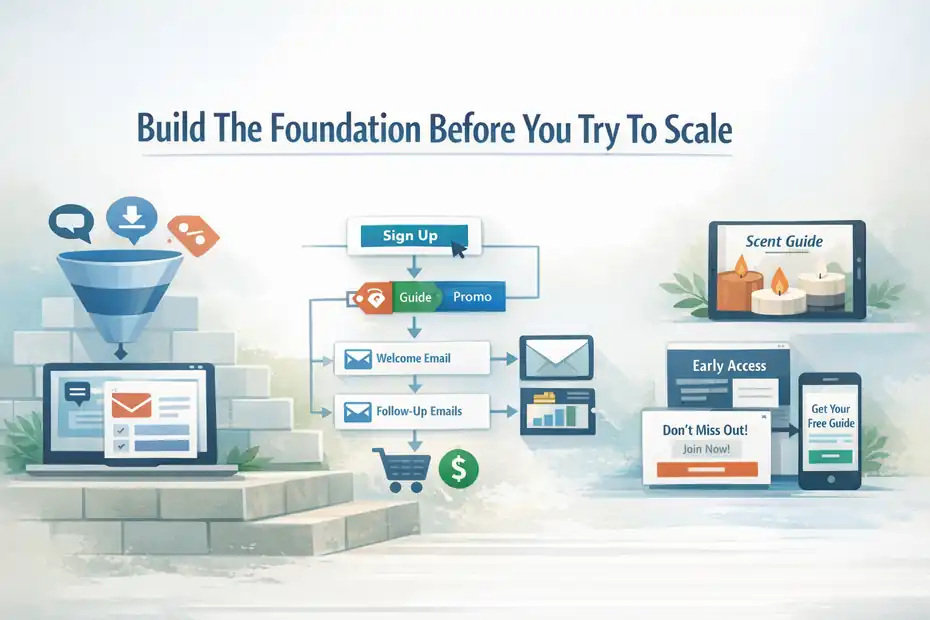
Before you drive traffic, create content upgrades, or launch promotions, you need the underlying structure in place. Otherwise, growth becomes messy fast.
Define One Core Subscriber Journey
The biggest mistake I see is trying to send every new subscriber into the same generic list. That creates confusion for you and irrelevance for the reader.
Instead, choose one primary subscriber journey first. Ask yourself: what is the main reason someone should join this list right now?
Your answer might be one of these:
- A newsletter with expert insights
- A free download tied to a product or service
- A discount or first-purchase offer
- A free email course
- Early access to launches or content
Pick one. Build around that. Expand later.
Imagine you run a small ecommerce brand selling handmade candles. You could offer a 10% discount, sure. But if your products are premium and story-driven, you may get stronger long-term results from a “Scent Guide For Making Your Home Feel More Expensive” lead magnet. That attracts buyers who care about taste and atmosphere, not only price.
A simple subscriber journey looks like this: visitor sees offer, visitor signs up, AWeber tags the subscriber by source or interest, welcome email delivers the promised value, follow-up emails deepen trust, then sales emails appear naturally. That is a system. And systems scale better than scattered tactics.
Set Up Your Tagging Logic Early
AWeber tags are one of the most useful parts of the platform because they let you group subscribers by actions, interests, or lead source. AWeber’s own documentation describes tags as keywords or phrases used to group subscribers and assign relevant messages or content.
I strongly recommend creating a simple tagging structure before your first form goes live. Do not make it fancy. Make it usable.
A clean setup might include:
- Source tags: blog-form, popup, landing-page, instagram-bio
- Intent tags: beginner, buyer, webinar-interest, course-interest
- Action tags: clicked-offer, downloaded-guide, visited-sales-page
- Lifecycle tags: new-subscriber, engaged-30d, customer
This matters because list growth is only valuable when paired with relevance. If someone joins through a beginner guide, they should not immediately get advanced content meant for warm buyers. Tags help you route people more intelligently.
From what I’ve seen, even a basic tag system can lift engagement quickly because your follow-up emails stop feeling random. And once you have tags in place, optimization becomes much easier.
You can compare which sources bring buyers, which offers create the best clicks, and which traffic channels just produce dead weight.
Create A Clear Signup Architecture
Your list growth setup should feel predictable. Every opt-in point should have a job.
I like to structure signup architecture into three layers:
- Core opt-in: The main offer you promote across your site
- Contextual opt-ins: Offer-specific forms tied to blog posts or product pages
- Capture overlays: Popups or slide-ins used carefully for abandonment or timing
This is where AWeber’s form builder and landing page tools become useful. AWeber supports signup forms, pop-up style options, and landing pages that can collect subscribers without needing a full external page builder.
The key is not to place forms everywhere. The key is to place the right offer where intent is highest. A blog post about email welcome sequences should not pitch a random homepage newsletter. It should offer something like a welcome email template pack.
That is how conversion rates improve without increasing traffic.
Create Offers People Actually Want To Join
This is where most list growth strategies either take off or collapse. You cannot out-optimize a weak offer.
Choose A Lead Magnet That Matches Buying Intent
A lead magnet should solve one specific problem fast. That is the sweet spot. Too broad and it feels vague. Too complex and people delay using it.
The best AWeber email list growth strategy usually starts with one of these lead magnet formats:
- Checklist: Best for quick wins and implementation
- Template: Best when your audience wants shortcuts
- Mini guide: Best for teaching a focused concept
- Quiz or assessment: Best for segmentation
- Discount or coupon: Best for ecommerce and immediate purchase intent
- Email course: Best for trust-building in expert-led businesses
I usually prefer templates, checklists, and short guides because they create immediate perceived value. A busy reader will happily trade an email address for a practical shortcut.
For example, if you sell consulting services, a “Free Strategy Session” can attract tire-kickers. But a “Client Onboarding Email Template Pack” often attracts more serious prospects because it appeals to people actively trying to improve a real business process.
That is a subtle but important difference. The best lead magnet is not always the most exciting. It is the one that filters for the kind of subscriber you actually want.
Write Opt-In Copy That Converts
Most signup copy fails because it is too generic. “Subscribe for updates” is not a reason. It is a request with no emotional weight.
Better opt-in copy usually includes four parts:
- A clear benefit
- A specific outcome
- A low-friction promise
- A reason to act now
Here is a simple framework I use: Get [specific result] without [common frustration]. Enter your email and I’ll send you [exact asset] today.
A few examples:
- Get your first welcome sequence written without staring at a blank page. Enter your email and I’ll send you my 3-email welcome template pack.
- Want healthier weekday dinners without overthinking meal prep? Join and I’ll send you my 7-day easy dinner plan.
- Turn more blog readers into subscribers. Get the content upgrade checklist I use to improve opt-in conversions.
Notice what is missing: hype, fluff, and vague branding language.
I believe clarity usually beats cleverness here. Readers move fast. Your job is to help them understand the value in seconds.
Match Each Offer To The Traffic Source
One lead magnet can work well. Multiple lead magnets matched to traffic intent usually work better.
If someone clicks from Pinterest, they often expect a visual, saveable resource. If they arrive from Google, they may want a practical guide tied directly to the page topic. If they come from Instagram, they may respond better to a shorter, faster payoff.
So instead of one universal opt-in, build offer-to-source alignment:
- Blog traffic → content upgrades and checklists
- Social bio traffic → starter guide or free resource hub
- Ecommerce traffic → discount, buyer guide, back-in-stock alerts
- Webinar traffic → replay, worksheet, or bonus resource
- Product page traffic → comparison chart, FAQ guide, or buyer incentive
This is one of the easiest ways to improve list growth without touching your traffic volume. You are simply making the first offer more relevant.
Set Up High-Converting AWeber Signup Assets
Once your offer is strong, the next step is making it easy to join.
Build Landing Pages For Focused Campaigns
Landing pages work best when you want one goal and zero distractions. AWeber includes a landing page builder, and the platform positions it as part of its email growth stack.
I recommend using landing pages for:
- Paid traffic campaigns
- Bio link promotions
- Lead magnet downloads
- Webinar registrations
- Seasonal list-building pushes
A high-converting landing page usually includes a direct headline, one strong visual, three concrete benefits, a short form, and a call to action that feels specific.
Here is the trap to avoid: Adding too much explanation. Most opt-in pages do not fail because they are too short. They fail because they make the visitor think too hard.
Keep it tight. One promise. One audience. One action.
For example, a freelance designer offering a “Proposal Template That Helps You Close Better Clients” should not clutter the page with portfolio links, testimonials in five different blocks, and a long bio. The page only needs enough trust and specificity to earn the email signup.
Use Forms On High-Intent Pages
Signup forms should appear where interest already exists, not just where space is available.
The best placements are usually:
- At the top or middle of educational blog posts
- Near product comparisons or buying guides
- In the site footer for broad newsletter intent
- On about pages with a founder-led or story-driven audience
- After helpful content sections where trust has already built
AWeber’s signup form system supports templates and embedding forms on your site. That makes it easy to test form placement without rebuilding your whole website.
What I suggest is starting with one inline form per high-intent article rather than stacking multiple aggressive forms on every page. Aggressive placement can lift raw leads, but it can also damage user trust and bring in weaker subscribers.
A good inline form feels like the next logical step in the article, not an interruption.
Use Popups Carefully, Not Desperately
Popups still work. They just need restraint.
The problem is not the format itself. The problem is lazy timing and weak relevance. A popup that appears three seconds after page load with a generic “Join our newsletter” message is basically training people to ignore you.
A better setup might be:
- Exit-intent popup on blog posts
- Scroll-based popup after 50% engagement
- Time-delayed popup only on long-form content
- Mobile-friendly slide-in instead of full-screen interruption
AWeber supports pop-up and lightbox style signup forms, which gives you flexibility here.
I would test one popup offer at a time and compare not just signup rate, but downstream quality. A popup may convert at 4% while an inline content upgrade converts at 2%, but if the inline subscribers click three times more often, the lower opt-in rate may still produce more revenue.
That is why quality metrics matter.
Turn New Subscribers Into Engaged Readers Fast
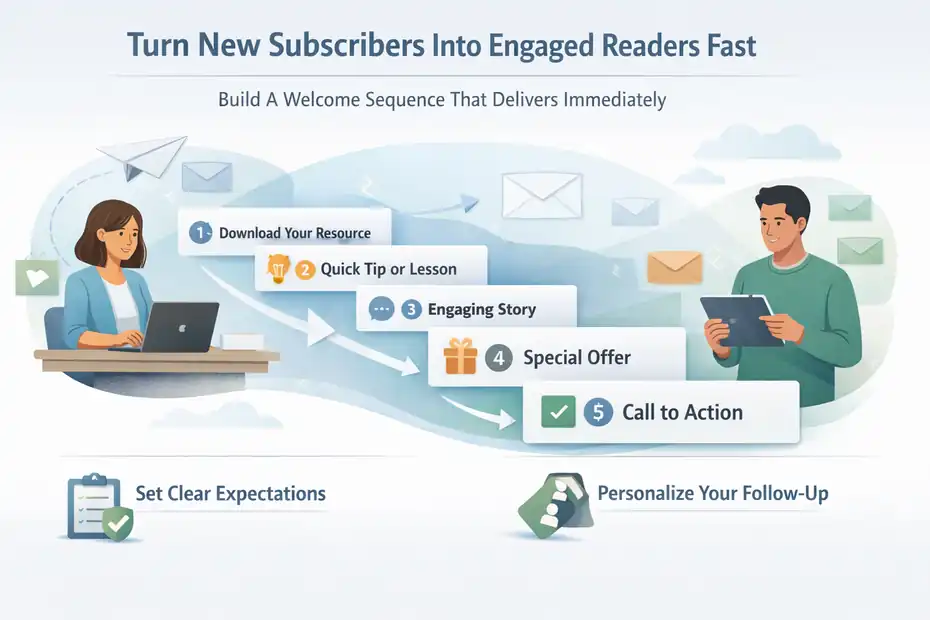
Getting the email is only half the job. Your first few emails shape everything that happens next.
Build A Welcome Sequence That Delivers Immediately
Welcome emails matter more than most people realize. Some current benchmark roundups place average welcome email open rates around 51%, which means the first email often gets more attention than almost anything you send later.
That is why I recommend a simple 3-to-5 email welcome sequence inside your AWeber email list growth strategy.
A practical structure looks like this:
- Email 1: Deliver the promised resource and set expectations
- Email 2: Share a quick win or useful lesson
- Email 3: Tell a story that builds credibility and connection
- Email 4: Introduce your core offer or next step
- Email 5: Handle objections and invite action
This sequence should feel helpful, not performative. New subscribers are deciding whether you are worth keeping in their inbox. Respect that moment.
I suggest writing these emails in plain language. No fake urgency. No blo-marketing jargon. Just useful ideas, one clear point per email, and a natural path toward your product, service, or content ecosystem.
Use Tags To Personalize The Follow-Up
This is where AWeber tagging starts pulling real weight. If a subscriber joined through a beginner checklist, tag them accordingly. If they clicked a product-specific resource, tag that too.
Then shape the follow-up around those signals.
A beginner subscriber might receive foundational educational content. A product-aware subscriber might receive buyer-focused emails, proof, and use cases. Someone who clicks pricing links twice might be ready for a stronger sales sequence or a case-study email.
You do not need enterprise-level complexity to make this work. You just need enough logic to avoid sending obviously irrelevant emails.
AWeber allows tags to organize subscribers and trigger more relevant messaging paths, which makes this type of lightweight segmentation practical for small teams.
From what I’ve seen, this is one of the fastest ways to improve both engagement and conversion without increasing send volume.
Set Expectations So Unsubscribes Stay Healthy
People unsubscribe for many reasons, but one of the biggest is mismatch. They expected one thing and got another.
Your first email should clarify:
- What kind of emails you send
- How often you send them
- What the reader should do first
- What kind of content or offers may appear later
This sounds small, but it builds trust. It also protects list quality.
For example, if your lead magnet is purely educational but your emails will eventually promote a paid workshop, say that early in a low-pressure way. Something like: “I’ll send practical weekly tips, and from time to time I’ll also share tools and paid training I think will help.”
That honesty prevents surprise. And surprise is a quiet list killer.
Drive More Subscribers From Existing Traffic
Most businesses do not need more traffic first. They need to capture more of the traffic they already have.
Upgrade Your Best Existing Content
One of my favorite list-growth shortcuts is content upgrading. That means taking pages that already attract traffic and adding a highly relevant opt-in resource.
Start by identifying pages with:
- Solid organic traffic
- Good time on page
- Clear search intent
- Weak or generic email capture
Then build one specific resource that extends the value of that page.
Examples:
- Blog post about welcome emails → welcome sequence swipe file
- SEO checklist article → downloadable audit template
- Product comparison page → buyer decision worksheet
- Recipe post → printable meal plan
- Service page → cost calculator or prep checklist
This works because the offer feels contextual. The visitor is already engaged with the topic, so the signup becomes a natural continuation of intent.
I have seen relatively small sites increase subscriber growth just by adding better upgrades to their top ten articles. No viral content. No new ad spend. Just smarter capture.
Repurpose Social Traffic Into Email Signups
Social traffic is often noisy, but it can still feed your AWeber list if you stop asking for vague newsletter subscriptions.
Use one clear entry point in your bio, profile, or pinned post. Send people to a focused landing page tied to one offer.
Then repeat that offer consistently. Do not rotate the CTA every three days just because you got bored. Repetition matters more than novelty here.
For example, a creator posting short videos about productivity can keep promoting the same “Weekly Planning System” resource for months. Every new post becomes another entry point into the same email ecosystem.
This is also where AWeber landing pages can be helpful for simple campaigns because they let you create a dedicated destination without needing a complicated site update.
Add Web Push As A Secondary Growth Lever
Web push is not a replacement for email, but it can support list growth and content distribution. AWeber offers web push notifications that let site visitors opt in through their browser and receive updates even when they are not actively on your site.
AWeber also states those subscribers can be tagged and tied into related automation.
I like web push for three specific use cases:
- Bringing readers back to fresh content
- Promoting time-sensitive launches or offers
- Capturing people who are not ready to share an email yet
The important part is using it as a companion channel. Someone may accept push notifications first, return later, and then join your email list through a stronger lead magnet.
That makes web push a bridge, not the destination.
Optimize Conversion Without Hurting List Quality
Once the system is live, optimization becomes the compounding layer.
Test The Right Elements First
Do not start by testing tiny button color changes. Start with the high-impact variables.
In order, I usually test:
- The offer itself
- The headline
- The CTA wording
- The form placement
- The number of fields
- The page friction or distractions
For many of us, the biggest gains come from changing the promise, not the design. A checklist can outperform a generic newsletter. A specific CTA can beat a vague one. A better-matched offer can double opt-ins without touching layout.
Good email conversion rate benchmarks often land around 2% to 5% depending on the industry and the action being measured, while broader landing-page medians can be higher. Use benchmarks for context, but judge success based on your traffic quality and business model.
Reduce Friction In Your Forms
Every extra decision lowers conversion.
Ask only for what you need. In many cases, email address alone is enough. First name can be useful for personalization, but only if you actually use it well. Otherwise it is just another obstacle.
Also review the micro-friction points:
- Is the form visually obvious?
- Is the button text benefit-driven?
- Is there too much copy before the form?
- Are you asking for commitment before trust is built?
- Does mobile experience feel smooth?
One practical example: changing a button from “Submit” to “Send Me The Template” can improve clarity immediately. It may seem tiny, but it reminds the reader what they are getting.
Protect Deliverability While You Grow
Fast growth can backfire if list quality drops. Bad sources, weak intent, and irrelevant follow-up can hurt engagement and eventually damage deliverability.
A few protective habits go a long way:
- Remove or suppress chronically inactive subscribers
- Avoid importing low-quality or old lists
- Keep opt-in promises accurate
- Segment by source and behavior
- Send consistently enough to stay familiar
This is the part people skip because it feels less exciting than growth hacks. But a bloated, cold list is expensive and misleading. I would rather have a smaller list with strong clicks than a giant list that drags down every campaign.
Use Tools Only Where They Improve Implementation
Strategy should come first, but there are a few moments where platform decisions matter.
When AWeber Alone Is Enough
For a lot of businesses, AWeber can handle the full starter system without much extra software.
That is especially true if you need:
- Simple landing pages
- Embedded signup forms
- Basic popup capture
- Tag-based segmentation
- Welcome automations
- Broadcast emails
- Basic integrations
AWeber’s current pricing documentation shows a Lite plan starting at $15 per month monthly or $12.50 per month billed annually for 500 subscribers, while its broader pricing page also highlights a free starting option and larger account support.
For many solo businesses, that is enough to build a sensible growth engine without stacking five other tools.
I usually recommend starting lean. Complexity is not a growth strategy.
When Integrations Make Sense
Use integrations when they remove manual work or improve conversion tracking. AWeber supports integrations across ecommerce, CRM, lead generation, surveys, webinars, and more.
That matters in cases like these:
- Your store should tag buyers automatically
- Your webinar tool should add registrants to the correct sequence
- Your CRM should reflect subscriber actions
- Your lead form should feed subscribers into AWeber instantly
The rule I follow is simple: add a tool only when it solves a real bottleneck. Not when it merely looks sophisticated in a stack diagram.
Common Mistakes That Slow Growth Down
This section is where a lot of hidden leaks show up. Most list growth problems are not mysterious. They are structural.
Growing A List With The Wrong Incentive
A massive giveaway can explode your subscriber count and quietly destroy your list quality. The same goes for generic contests, broad freebies, or discount offers that attract people who only want the reward.
If the incentive does not connect to your actual business, you end up renting attention from the wrong audience.
I suggest asking one question before launching any signup offer: “Would the ideal buyer still want this if there were no freebie attached?” If the answer is no, the incentive may be too disconnected.
Sending Too Much Too Soon Or Too Little Too Long
Some brands overwhelm new subscribers with daily promotions right after signup. Others disappear for three weeks and wonder why engagement dies.
Neither works well.
Your cadence should match the promise and the business model. Weekly is a strong starting point for many newsletters. More frequent sends can work when the content is timely, sharp, and expected.
Less frequent sends can work for premium or seasonal businesses if every message feels worth opening.
Consistency creates recognition. Recognition creates trust.
Ignoring What Happens After The Signup
This is the quiet killer. People spend weeks building forms and landing pages, then barely think about the first five emails.
But subscriber growth without subscriber activation is just contact collection.
The real win is turning a new lead into an engaged reader, then a buyer, then a repeat customer or loyal follower. That is why the welcome sequence, tagging, and follow-up logic matter so much in any AWeber email list growth strategy.
Scale What Works Without Making The System Messy
Once you have a working engine, scaling should mean expanding proven patterns, not adding chaos.
Clone Winning Offers Across Related Topics
If one content upgrade converts well, do not stop there. Build adjacent versions for related topics.
For example, if a “Welcome Email Template Pack” performs well, you might expand into:
- Subject line swipe file
- Newsletter planning template
- Product launch email checklist
- Re-engagement campaign guide
This lets you create a family of offers that all feed your list while improving segmentation. Each offer gives you another signal about what the subscriber actually wants.
That is smart scale. Not just more volume, but better insight.
Create A Simple Monthly Optimization Routine
I like simple systems because they survive busy months. Here is a lightweight review process:
- Check top signup sources
- Review best and worst converting forms
- Compare lead magnet performance
- Check welcome sequence clicks
- Review unsubscribe trends
- Pause underperforming capture points
- Improve one page and one offer each month
That is enough to keep the machine improving without turning optimization into a full-time job.
Expand Into Revenue-Focused Segments
Once your list is growing steadily, start identifying segments that deserve dedicated messaging.
Common examples include:
- New subscribers
- Highly engaged readers
- Recent clickers
- Product-interested leads
- Customers
- Lapsed subscribers
This is where growth starts paying off more visibly. You are no longer emailing one giant bucket of people. You are speaking to groups with different levels of awareness and intent.
That shift usually leads to better clicks, cleaner sales messaging, and less subscriber fatigue.
Final Thoughts
A scalable AWeber email list growth strategy is not about chasing every tactic at once. It is about building one clean system that attracts the right subscriber, delivers immediate value, and uses simple segmentation to keep the relationship relevant.
If I were starting today, I would keep it straightforward: one strong offer, one focused landing page, one welcome sequence, one clear tagging system, and one monthly optimization habit.
That may not sound flashy, but it is exactly the kind of setup that compounds. And in email marketing, compounding beats cleverness almost every time.
FAQ
What is an aweber email list growth strategy?
An aweber email list growth strategy is a structured approach to attracting, capturing, and nurturing subscribers using AWeber tools like signup forms, landing pages, and automation. It focuses on building a high-quality email list that engages consistently and converts into leads or customers over time.
How can I grow my email list faster with Aweber?
You can grow your email list faster with Aweber by using targeted lead magnets, high-converting landing pages, and smart form placement. Pair this with a strong welcome sequence and tagging system so new subscribers are engaged immediately and guided toward meaningful actions.
What is the best lead magnet for Aweber list growth?
The best lead magnet for Aweber list growth solves a specific problem quickly. Templates, checklists, and short guides perform well because they deliver instant value. The key is aligning the lead magnet with your audience’s intent so subscribers are more likely to stay engaged.
How does tagging improve Aweber email list growth?
Tagging improves Aweber email list growth by organizing subscribers based on their behavior and interests. This allows you to send more relevant emails, which increases engagement and reduces unsubscribes. Over time, better targeting leads to stronger conversions and healthier list growth.
Why is my Aweber email list not growing?
Your Aweber email list may not be growing due to weak offers, unclear opt-in messaging, or poor form placement. If visitors do not see immediate value or relevance, they will not subscribe. Improving your lead magnet and aligning it with user intent can significantly boost growth.

I’m Juxhin, the voice behind The Justifiable.
I’ve spent 6+ years building blogs, managing affiliate campaigns, and testing the messy world of online business. Here, I cut the fluff and share the strategies that actually move the needle — so you can build income that’s sustainable, not speculative.
Related posts:
 What is Getresponse: A Brief Introduction
 How Do I Create An Email Newsletter And What Should It Include?
 How to Advertise Your Business: Utilizing Email Marketing Strategies
 Top 10 Email Service Providers: Powerful Tools for Businesses
 Email Platform: 12 Proven Strategies for Higher ROI
 What Is Aweber Communications