
Table of Contents
Some links on The Justifiable are affiliate links, meaning we may earn a small commission at no extra cost to you. Read full disclaimer.
AWeber pricing explained is not as simple as “free or paid,” and that is exactly where many people get caught off guard.
If you are trying to choose the right plan, compare monthly vs annual billing, or figure out whether AWeber has surprise charges, you need the full picture before you subscribe.
I went through AWeber’s current pricing pages and support docs, and the good news is this: the structure is fairly clear once you know what actually triggers upgrades, what features are limited by plan, and where the real extra costs can show up.
What AWeber Pricing Looks Like Right Now
AWeber uses a tiered pricing model based on both subscriber count and monthly email sends, not just a flat “one price fits all” system.
That matters, because your bill can change when your list grows or when your sending frequency increases.
How The AWeber Plan Structure Works
AWeber currently offers four core plans: Free, Lite, Plus, and Unlimited. The Free plan includes up to 500 subscribers and 3,000 email sends per month. Paid plans require a credit card, while the Free plan does not. AWeber also says there are no long-term contracts on its standard plans.
What I think is important here is that AWeber is not pricing purely by contacts. It also meters sending volume. Lite allows up to 10 times your subscriber count in monthly sends, Plus allows up to 12 times, and Unlimited allows up to 15 times per subscriber monthly.
That sounds generous at first, but if you send often, those caps matter more than the sticker price.
For example, a list of 1,000 subscribers on Lite can send up to 10,000 emails a month. If you send a weekly newsletter plus a few automations, you may be fine.
But if you email daily, run broadcasts, and stack automation sequences, you can hit the send ceiling faster than you expect. In my experience, this is the kind of pricing detail people miss during checkout and then blame on “hidden fees” later.
Current AWeber Prices By Plan
Here is the current standard pricing AWeber shows for key tiers. Plus starts at $30 per month for 500 subscribers on monthly billing, or $240 per year on annual billing, which AWeber presents as $20 per month billed annually.
Lite starts at $15 per month for 500 subscribers on monthly billing, or $150 per year on annual billing. AWeber Unlimited is listed at a flat $899 per month.
| Plan | Entry Pricing | Core Limit |
|---|---|---|
| Free | $0 | 500 subscribers, 3,000 monthly emails |
| Lite | $15/month or $150/year at 500 subscribers | 10x subscriber count in monthly sends |
| Plus | $30/month or $240/year at 500 subscribers | 12x subscriber count in monthly sends |
| Unlimited | $899/month | Unlimited subscribers, up to 15x sends per subscriber |
AWeber also publishes additional pricing tiers. For Lite, 2,500 subscribers costs $35 monthly or $350 annually; 10,000 costs $100 monthly or $1,000 annually; and 100,000 costs $600 monthly or $6,000 annually.
For Plus, 2,500 subscribers costs $55 monthly or $550 annually; 10,000 costs $135 monthly or $1,350 annually; and 100,000 costs $750 monthly or $7,500 annually.
Breaking Down What You Actually Get On Each Plan
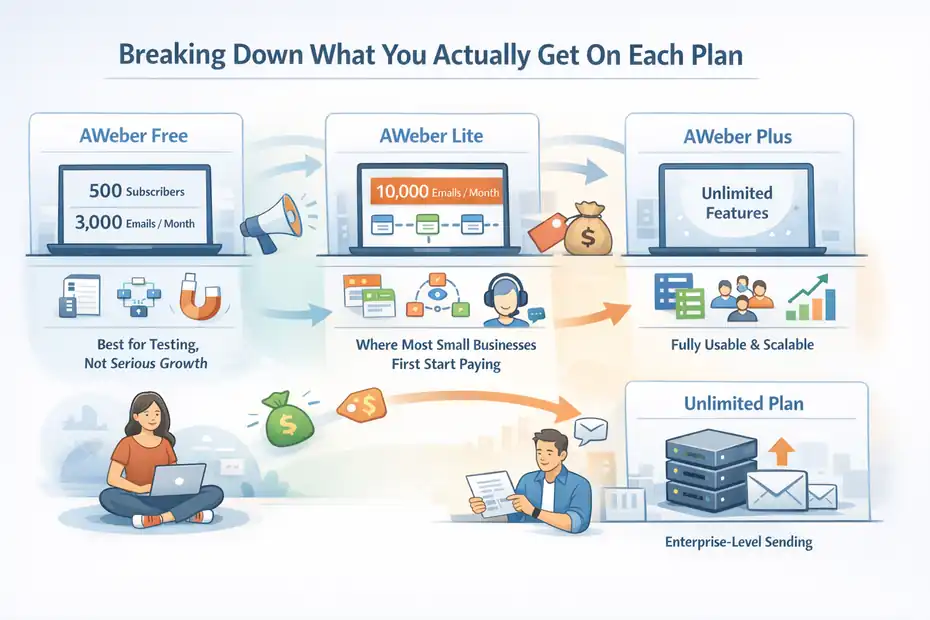
The pricing alone does not tell you whether AWeber is cheap or expensive. The real value depends on which limits affect your workflow, especially lists, automation, reporting, branding, and ecommerce features.
AWeber Free: Best For Testing, Not Serious Growth
The Free plan gives you lifetime access at no cost, with up to 500 subscribers, 3,000 monthly email sends, one list profile, and one workflow automation. If you exceed 500 subscribers, AWeber says you will need to upgrade.
That makes Free useful for a brand-new creator, local business, or side project that wants to test signup forms and send a basic welcome sequence. It is also a sensible sandbox if you want to learn the interface before committing money.
I actually like when email platforms offer a real free tier instead of forcing a trial-only experience.
But there is a catch: Free is intentionally narrow. You are not getting the room to build a serious segmentation strategy, multiple automations, or a more polished branded setup. So yes, it is free, but it is free in the “prove your concept” sense, not the “run your business forever” sense. That distinction matters.
A realistic use case: Imagine you run a simple fitness newsletter and collect 200 subscribers from Instagram. AWeber Free is probably enough for one lead magnet, one welcome flow, and a weekly send. Once you start adding product promotions, multiple lead sources, or different subscriber paths, you will feel the ceiling fast.
AWeber Lite: Where Most Small Businesses First Start Paying
Lite is AWeber’s first paid tier and is positioned as the upgrade path from Free. It includes 10 times your subscriber count in monthly sends, one email list, three landing pages, three email automations, three users, one custom segment, 24/7 support, and advanced message analytics.
It does not include advanced landing page features, lower ecommerce transaction fees, or removal of AWeber branding.
This is the plan that will make sense for many early-stage businesses that have outgrown Free but are not yet doing sophisticated lifecycle marketing. You can build a basic funnel, create a few landing pages, and send a healthy number of campaigns each month.
The tradeoff is that Lite still has meaningful structural limits. One list, three automations, and one custom segment may be fine for a single-offer business, but it can get cramped for an agency, ecommerce brand, or content business with multiple audience paths.
If you have a lead magnet for beginners, a customer onboarding sequence, a webinar funnel, and a re-engagement series, three automations disappears quickly.
I would describe Lite as workable, but not roomy. It is the plan you pick when you want lower cost and can keep your setup intentionally simple.
AWeber Plus: The First Plan That Feels Fully Usable
Plus includes unlimited lists, landing pages, automations, custom segments, and users, along with advanced reporting and analytics, advanced landing page features, lower ecommerce transaction fees, and removal of AWeber branding. AWeber says Plus allows 12 times your subscriber count in monthly sends.
To me, this is the first plan that feels like a real operating plan for a growing business rather than a controlled starter plan. If you care about brand presentation, reporting depth, segmentation, and not constantly watching your automation count, Plus is where AWeber becomes much easier to live with.
This is also where the value math changes. Lite is cheaper, but Plus can save time and friction if your business actually needs flexibility. A plan that forces you to simplify every campaign is not always the cheaper plan in practice. Sometimes paying more prevents bad compromises.
A simple scenario: a coach with a podcast, webinar funnel, paid mini-course, and weekly email newsletter will usually be more comfortable on Plus. The ability to remove branding, build unlimited landing pages, and run more advanced reporting is not just nice to have. It helps the business look more credible and measure what is working.
AWeber Unlimited: For High-Volume Senders, Not Typical Small Businesses
Unlimited is listed at $899 per month and is described by AWeber as best for large enterprises or high-volume senders. It offers unlimited subscriber capacity, including unsubscribed addresses, full access to all features, and sending up to 15 times to each subscriber monthly.
Most readers will not need this. And honestly, if you are comparing AWeber Unlimited to normal SMB email tools, you are probably asking the wrong question. At that level, you are dealing with scale, internal teams, deliverability management, and usually more complex operational requirements.
What does matter is this: Unlimited exists as a ceiling, and it tells you AWeber wants to keep bigger accounts inside its ecosystem. If you are a publisher, large ecommerce brand, or media-heavy sender, that may be relevant. For everyone else, it is mostly a reference point.
The Hidden Fees Question: Does AWeber Actually Have Them?
This is where people usually expect some nasty surprise. The honest answer is that AWeber says there are no setup fees or hidden charges with its account plans.
That statement appears clearly in its pricing FAQ.
The Short Answer On “Hidden Fees”
AWeber explicitly states there are no setup fees or hidden charges on its account plans. It also says there are no long-term contracts.
On the surface, that is reassuring, and I think it is fair to say AWeber is more transparent than some software companies that bury billing rules in tiny text.
But here is the nuance: no hidden fees does not mean no unexpected costs. Those are not the same thing.
Unexpected costs can still happen when:
- Your subscriber count crosses into a higher tier
- Your monthly send volume exceeds your plan allowance
- You choose annual billing and pay the full year upfront
- You use ecommerce payments and pay transaction fees
- You buy optional services outside the core plan
That is not deceptive pricing by itself. It just means you need to understand what triggers extra spend before you assume the base price is your forever price.
I believe that is the real issue most people are talking about when they complain about “hidden fees.”
The Biggest Surprise Cost: Automatic Upgrades
AWeber says that if your subscriber count exceeds your current plan limit, your account is automatically upgraded to the appropriate tier.
It also says if your sends exceed the limit of your current plan, it will automatically upgrade you to the next tier that supports a higher send count, with notification of the billing adjustment.
Downgrades are not automatic and require contacting Customer Solutions.
This is the biggest pricing risk to watch.
Let me translate that into plain English. If your list spikes after a giveaway, viral post, or paid campaign, your bill can increase automatically. If you later clean your list and shrink your audience, your price does not automatically drop back down. You need to request the downgrade yourself.
That is not a hidden fee, but it is absolutely a hidden workflow problem if you are not paying attention. I strongly suggest treating subscriber cleanup as a billing task, not just a deliverability task.
If you remove inactive contacts but never request a lower tier, you can end up paying for capacity you no longer use.
Ecommerce Transaction Fees Are Real
If you use AWeber’s ecommerce tools to sell digital products, paid newsletters, coaching, or subscriptions, transaction fees apply. AWeber’s ecommerce page says the fee is 0.6% per transaction plus Stripe’s 2.9% + 30 cents.
The pricing comparison on AWeber’s plan page shows 0.6% transaction fees on Plus and 1.0% on Lite.
This is one of those details that can quietly matter a lot.
For a creator selling a $29 product occasionally, the difference is small. But for someone selling a $499 course at volume, fee percentages start to bite. Imagine 100 sales at $499 in a month. Even a small percentage difference creates a meaningful cost gap over time.
That does not automatically make AWeber bad for selling, but it does mean your email platform cost is not just the plan price if ecommerce is central to your business.
Monthly Vs Annual Billing: Which One Actually Saves Money?
AWeber strongly encourages annual billing, and the savings are real. On Plus, AWeber says annual billing starts at $20 per month billed annually instead of $30 monthly at the 500-subscriber tier, which it presents as 33.3% savings. Lite shows the same pattern, with $15 monthly or $150 annually at 500 subscribers, effectively paying for 10 months and getting 12.
When Annual Billing Makes Sense
Annual billing makes sense when you already know AWeber fits your workflow and your list is stable enough that you are unlikely to switch soon. The savings are not tiny. On Plus at 500 subscribers, the difference is $120 across a year.
On Lite at 10,000 subscribers, it is $1,200 annually versus $100 monthly times 12, which is a $200 difference.
If you are committed to the platform, those savings are easy to justify. I usually like annual pricing only after a business has been using a tool long enough to know where the friction points are.
Before that, the cheaper monthly sticker can actually be safer because it buys flexibility.
When Monthly Billing Is The Smarter Move
Monthly billing is usually smarter when:
- You are still testing AWeber against another platform
- Your list growth is unpredictable
- Your sending habits are changing fast
- You are not sure whether you need Lite or Plus
- Cash flow matters more than percentage savings
There is a personal finance angle here too. Plenty of founders choose annual billing to “save money” and then switch platforms three months later. That is not really saving. That is prepaying for certainty you did not have.
AWeber also promotes a 14-day free trial on its pricing page, and its help docs say the trial gives access to the selected plan’s features. If you exceed the subscriber tier during the trial, the trial ends and the appropriate plan tier is charged.
How To Choose The Right AWeber Plan For Your Situation
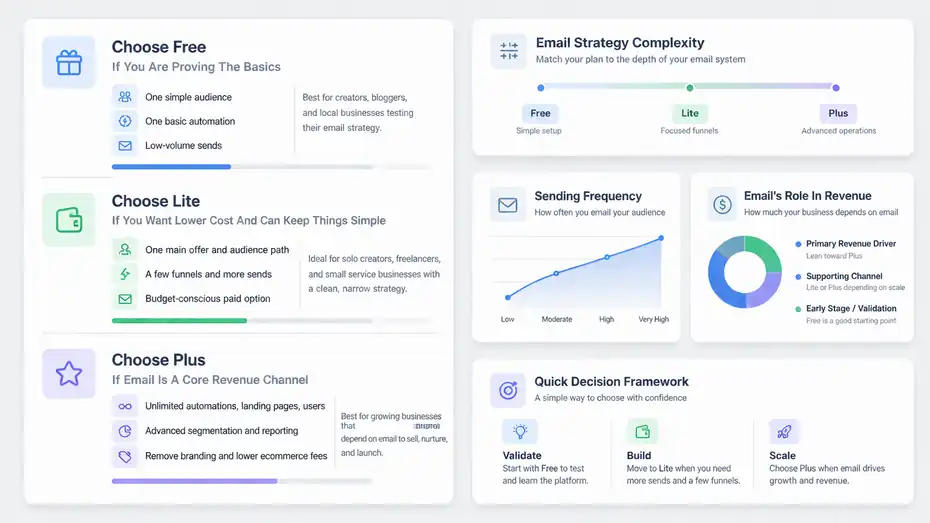
The best AWeber plan depends less on your business type and more on your complexity, sending frequency, and whether your revenue model depends on email.
That is the framework I would use before looking at price alone.
Choose Free If You Are Proving The Basics
Pick Free if you are doing one simple audience, one basic automation, and low-volume sends. This fits creators starting a newsletter, bloggers collecting early subscribers, or local businesses sending occasional updates.
The plan gives you enough room to learn the platform and validate that people actually want your emails.
I would not build a long-term growth strategy around Free, but I do think it is a useful starting point. It lowers commitment and lets you test signup conversions, lead magnet demand, and welcome sequence performance before money enters the equation.
Choose Lite If You Want Lower Cost And Can Keep Things Simple
Lite is the budget-conscious paid option. It fits a solo creator, freelancer, or small service business that wants more sends and a few funnels without paying for unlimited everything. If your business has one main offer and one audience path, Lite can be enough.
This works especially well when your email strategy is clean and narrow. One lead magnet. One nurture sequence. One newsletter. One product. In that case, Lite can be cost-efficient.
Where Lite starts breaking down is when your business gets layered. If you already know you want different funnels for podcast listeners, webinar leads, buyers, and inactive subscribers, Plus will probably save frustration.
Choose Plus If Email Is A Core Revenue Channel
Choose Plus when email is central to how you sell, nurture, launch, or segment. Unlimited automations, landing pages, users, and segments make it easier to run a more mature system.
This is also the plan to choose if removing AWeber branding matters to you or if you want stronger reporting and lower ecommerce transaction fees.
If I were advising a serious digital creator or growing ecommerce-adjacent business, Plus would usually be my default recommendation. Not because the price is low, but because constrained infrastructure gets expensive in other ways.
It slows testing, weakens segmentation, and pushes you into awkward workarounds.
Common Mistakes People Make With AWeber Pricing
AWeber’s pricing is understandable, but there are a few traps people walk into repeatedly. Most of them come from choosing based on the entry price instead of the actual operating model.
Mistake 1: Choosing Based Only On Subscriber Count
A lot of people compare tools based only on contact tiers. With AWeber, that is incomplete because email send limits matter too. Lite allows 10x subscriber count in monthly sends, Plus allows 12x, and Unlimited allows 15x.
If you send heavily, your email frequency can push pricing decisions just as much as list size. A 5,000-person list sounds modest, but daily campaigns plus automations can create far more volume than a weekly newsletter audience of the same size.
Mistake 2: Ignoring The Cost Of Staying On The Wrong Plan
I see this often with software decisions. Someone picks the cheapest paid tier, then spends months trying to avoid upgrading by limiting campaigns or not setting up useful automations.
That is penny wise, growth foolish.
If Lite’s limits stop you from segmenting properly or building the flows you need, the cheaper plan can cost you more in missed sales than the price difference to Plus. That will vary by business, but it is a real tradeoff, not theory.
Mistake 3: Forgetting To Request A Downgrade
AWeber says upgrades can happen automatically when you exceed subscriber or send limits, but downgrades are not automatic. You need to contact Customer Solutions to adjust your billing tier downward.
That means list hygiene has a direct pricing consequence. If you regularly delete inactive contacts but never review billing, you may carry unnecessary software cost month after month.
Advanced Ways To Keep AWeber Costs Under Control
Once you understand the billing triggers, the smartest move is not just choosing a plan. It is building your email operation so pricing grows only when performance grows too.
Track Three Numbers Every Month
The three numbers I would watch are:
- Active subscribers
- Monthly send volume
- Revenue or leads generated from email
AWeber’s pricing changes based on the first two. Your business health depends on the third.
This matters because a list can grow while quality drops. If you keep adding low-intent subscribers, you may pay more without improving results. On the other hand, a smaller list with stronger click and conversion rates can justify a higher plan because the channel is producing real return.
Clean Your List Before Billing Becomes A Problem
Inactive subscribers hurt deliverability and can push you into a more expensive tier. AWeber’s FAQ makes clear that deleting subscribers does not automatically lower your bill; you must request the downgrade.
So make list cleanup part of your financial operations:
- Remove or suppress cold subscribers on a schedule
- Review list size before renewal dates
- Check whether your current send volume still matches your plan
- Request a downgrade when your usage drops
This is boring advice, but boring advice often saves the most money.
Use Plus Only When The Extra Flexibility Produces A Return
I like Plus, but I would not recommend upgrading just because “unlimited sounds better.” Upgrade when one of these is true:
- You need more than three automations
- Branding removal matters for trust
- You need stronger reporting to optimize campaigns
- Lower transaction fees matter because you sell directly through AWeber
- Your business has multiple funnels or audience segments
If none of those are true, Lite may genuinely be enough. The right answer is not always the bigger plan. It is the plan that fits your actual system.
Is AWeber Pricing Worth It?
AWeber pricing is fair if you value ease of use, support, and a plan structure that scales from beginner to advanced without forcing an immediate jump to enterprise software. It is less attractive if you want the absolute cheapest way to send email at scale or if your strategy depends on squeezing maximum flexibility out of a lower-cost tier.
My honest take is this: AWeber is not pretending to be the cheapest platform on the market. It is trying to offer a straightforward progression from free starter use to more serious email operations. That can be a good fit for creators and small businesses that want clarity and support more than endless bargain hunting.
The real pricing lesson is simple. The advertised monthly number is only the starting point. Your actual cost depends on list growth, send frequency, ecommerce usage, and whether you stay proactive about upgrades and downgrades.
If you go in understanding that, AWeber pricing is much easier to evaluate and much less likely to surprise you.
FAQ
What is AWeber pricing and how does it work?
AWeber pricing is based on the number of subscribers and how many emails you send each month. Plans range from free to paid tiers like Lite and Plus. As your list grows or your sending volume increases, your monthly cost adjusts accordingly.
Does AWeber have hidden fees?
AWeber does not have traditional hidden fees like setup charges, but costs can increase when your subscriber count or email sends exceed plan limits. Ecommerce transaction fees and automatic upgrades can also raise your overall cost if not monitored closely.
Is AWeber free to use?
Yes, AWeber offers a free plan that supports up to 500 subscribers and 3,000 emails per month. It is suitable for beginners testing email marketing but includes limitations on automation, branding, and advanced features compared to paid plans.
Which AWeber plan is best for small businesses?
The best plan depends on your needs. Lite works well for simple email setups with basic automation, while Plus is better for businesses that need advanced segmentation, multiple funnels, and more flexibility to scale their email marketing strategy.
How can I reduce my AWeber costs?
You can reduce AWeber costs by regularly cleaning inactive subscribers, monitoring your monthly send volume, and choosing the right plan based on actual usage. Switching to annual billing can also lower your overall cost if you plan to use the platform long-term.

I’m Juxhin, the voice behind The Justifiable.
I’ve spent 6+ years building blogs, managing affiliate campaigns, and testing the messy world of online business. Here, I cut the fluff and share the strategies that actually move the needle — so you can build income that’s sustainable, not speculative.
Related posts:
 Aweber Cost Explained: Is Aweber Worth the Price Tag?
 Top 10 Email Service Providers: Powerful Tools for Businesses
 Constant Contact Pricing: Which Plan Is Right for You?
 MailerLite Free: What You Actually Get Without Paying
 Aweber Affiliate Sign Up Tutorial for Beginners
 Aweber vs MailerLite Comparison: Hidden Costs