
Table of Contents
Some links on The Justifiable are affiliate links, meaning we may earn a small commission at no extra cost to you. Read full disclaimer.
If you’ve been exploring Freshsales pricing but can’t quite decide which plan actually fits your business best, you’re in the right place.
Freshsales offers several tiers—each packed with different tools, automations, and AI-powered insights designed to scale with your sales process. The tricky part is figuring out which one delivers the most value for your needs.
Should you go with the budget-friendly Growth plan, or is the advanced Pro or Enterprise plan a better investment?
Let’s break down each option so you can make a confident, cost-effective choice.
Understanding Freshsales Pricing Plans
Freshsales pricing is structured to fit businesses at different stages of growth, from startups just setting up their pipelines to enterprises managing complex sales processes.
To make an informed choice, you’ll need to understand not just the sticker price but how the billing model, user licensing, and annual payment system actually work in practice.
How Freshsales Pricing Works
Freshsales uses a subscription-based model, meaning you pay a set amount per user, per month, with billing typically done annually.
Here’s how it breaks down:
- User-based pricing: You’re charged for each person who actively uses Freshsales, such as sales reps, team leads, or managers.
- Plan tiers: Each plan—Growth, Pro, and Enterprise—includes progressively advanced tools like Freddy AI automation, sales forecasting, and custom workflows.
- Billing period: Choosing annual billing (instead of monthly) usually gives you a discount, helping you save more over the long run.
To visualize it, think of Freshsales like Netflix but for sales management: the more features (or “shows”) you want access to, the higher the subscription level you’ll need.
I suggest reviewing the specific features you’ll actually use before upgrading.
For instance, if you’re mainly focused on contact tracking and basic pipeline management, the Growth plan might be all you need.
But if automation or AI forecasting would save your team hours each week, the Pro or Enterprise tier might pay for itself.
The Key Differences Between User and Agent Billing
This distinction often confuses new users. Freshsales (and its broader Freshworks suite) sometimes uses user billing for CRM products and agent billing for customer support tools like Freshdesk.
Here’s the difference:
- User billing applies to Freshsales. You’re billed for every sales user who has login access to manage leads, deals, and reports.
- Agent billing applies to support platforms like Freshdesk or Freshcaller, where you’re billed for each support agent handling customer inquiries.
For example, a company might use Freshsales for lead tracking (5 users) and Freshdesk for support tickets (3 agents). Even though they’re under the same Freshworks ecosystem, the billing is handled separately.
I recommend keeping this in mind if you plan to integrate multiple Freshworks tools—each module tracks usage differently, so your total cost will depend on how your teams are structured.
What “Billed Annually” Really Means for Your Budget
When Freshsales says billed annually, it means you’ll pay for the entire year upfront, not monthly.
While that might sound like a lot at once, it’s often the smarter move if you’re committed to using the tool long-term.
For instance:
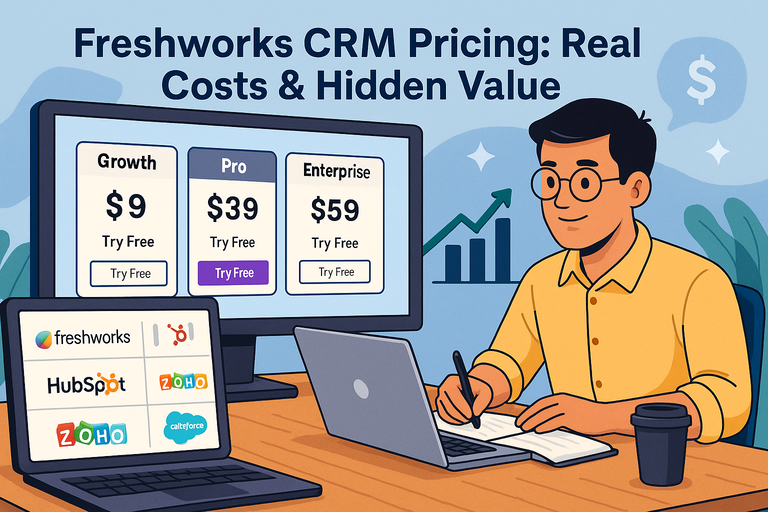
- The Growth plan costs $9/user/month when billed annually. That equals $108 per user for the year.
- If you were to choose a monthly plan, you’d likely pay around 20% more overall.
In practical terms, annual billing locks in your lower rate, ensures no mid-year price fluctuations, and helps with predictable budgeting.
I believe this approach makes sense for most teams that have steady operations. But if your sales team fluctuates frequently (for example, seasonal hires), monthly billing might give you more flexibility even if it costs a bit more.
Quick tip: Review your yearly renewal date carefully—Freshsales auto-renews unless canceled in advance, so keep a reminder in your calendar to reassess before renewal.
Freshsales Growth Plan: Best for Startups and Small Teams
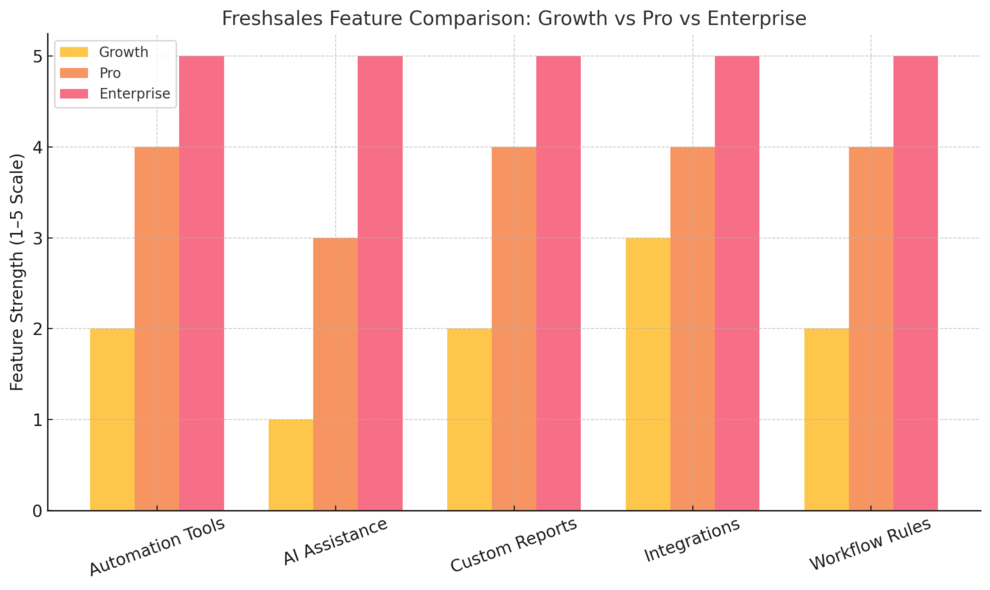
The Growth plan is Freshsales’ entry-level tier, designed for small teams that want CRM essentials without complex setup.
It’s priced affordably but still gives you tools powerful enough to track deals, communicate with customers, and visualize your pipeline in one place.
What You Get in the Growth Plan
At $9/user/month (billed annually), the Growth plan includes:
- Kanban view for tracking contacts, accounts, and deals.
- Built-in communication channels—email, phone, and chat.
- Custom fields for tailoring the CRM to your specific business data.
- Product catalog for managing what you sell.
- Freshworks Marketplace access for integrations.
- 24×5 support to assist when needed.
Think of it as your foundational toolkit: Everything you need to organize your pipeline and keep track of who’s in it, without the distraction of advanced automation or heavy customization.
I often suggest this plan to early-stage founders or solo operators—it’s intuitive enough to get you running in an hour yet robust enough to scale to your first few team members.
Why Startups and SMBs Benefit Most from This Plan
Startups thrive on simplicity and speed, and that’s exactly what the Growth plan delivers. You can set up your CRM without hiring a tech consultant or spending days in configuration.
Here’s why it fits SMBs perfectly:
- Affordable entry point: You pay only for what you need, keeping overhead minimal.
- Quick adoption: Team members can start tracking deals right away without extensive training.
- Scalable: When you grow, upgrading to Pro or Enterprise keeps your data intact.
For example, a three-person sales team using Growth can manage leads, automate follow-ups, and measure deal progress without investing in heavier systems like Salesforce.
I’ve seen small businesses double their deal close rates just by using the Kanban view consistently—it turns scattered spreadsheets into a single visual workflow.
How Growth Plan Features Simplify Your Sales Pipeline
The Growth plan’s power lies in its simplicity. By focusing on clarity, it helps sales reps stay on top of what matters: follow-ups, deal stages, and communications.
Here’s how it streamlines things:
- Kanban pipeline gives you drag-and-drop deal management.
- Contact lifecycle tracking shows where leads are in your sales journey.
- Contextual collaboration with Slack keeps discussions linked to deals.
- Email templates save time and ensure consistency in communication.
Imagine you’re managing 50 leads. With Growth, you can visually drag each one through stages—like “Contacted,” “Negotiating,” and “Closed”—and have all notes and emails attached right there.
That’s the kind of organization that scales.
When It’s Time to Upgrade from Growth
Growth is ideal for early stages, but there are signs you’re ready to move up:
- You’re spending too much time on manual updates.
- You want deeper insights into what drives conversions.
- You’re managing multiple pipelines or larger teams.
That’s when Freshsales Pro starts making sense—it adds AI-driven scoring, advanced workflows, and automation tools that can save hours each week.
In my experience, the best time to upgrade is when your CRM starts feeling like a bottleneck instead of a helper.
If your team has grown beyond three or four active users or you’re handling multiple deal sources, the Pro plan’s automation can make your workflow far more efficient.
Freshsales Pro Plan: Designed for Growing Businesses
The Freshsales Pro plan is where things start to get exciting. It’s built for businesses that have outgrown the basics of the Growth plan and need more automation, smarter insights, and team coordination.
If you’re scaling your sales operations, this plan gives you the control and intelligence to keep growth efficient and predictable.
What’s Included in the Pro Plan
The Pro plan costs $39 per user each month (billed annually), and it includes everything in the Growth plan, plus several advanced tools designed to help growing teams handle more complex sales cycles.
Here’s what you get:
- Freddy AI for Contact Scoring – automatically ranks leads based on likelihood to convert.
- Custom Sales Activities – personalize your CRM workflow to match your sales process.
- Sales Sequences – automate follow-ups and outreach messages.
- Advanced Custom Fields and Filters – organize and search your CRM data more effectively.
- Multiple Sales Pipelines – manage separate pipelines for different products or regions.
- Custom Reports and Dashboards – track performance metrics with precision.
- Advanced Workflows and Auto-Assignment Rules – reduce manual effort by automating repetitive tasks.
A practical example: If you’re managing separate teams for B2B and B2C sales, you can create two distinct pipelines under the same Freshsales account, each with unique stages and reporting metrics. That’s the kind of flexibility you get at this level.
How Freddy AI Elevates Your Sales Productivity
Freddy AI is Freshsales’ secret weapon. It’s not just another buzzword—it’s an assistant that quietly works behind the scenes to surface the right data when you need it most.
Here’s what it does in practice:
- Contact Scoring: Freddy analyzes engagement patterns—like email opens, site visits, or call logs—and assigns a score to each lead.
- Deal Insights: It highlights which deals are most likely to close (and which might need attention).
- Email Enhancements: With the “Rephrase, Expand, and Enhance” tools, Freddy helps you craft better outreach messages in seconds.
I believe Freddy AI is particularly valuable for sales reps juggling multiple deals. Instead of spending hours manually sorting through contacts or second-guessing priorities, the AI gives data-driven guidance.
One mid-sized company I worked with reduced lead response time by nearly 40% after enabling Freddy scoring and workflows in Pro—because reps always knew which leads mattered most.
Key Features That Make the Pro Plan Worth the Jump
Moving from Growth to Pro isn’t just about getting more features—it’s about transforming how your team operates.
Here’s why the Pro plan stands out:
- Automation at scale: You can set up workflows that automatically move deals, send follow-ups, or reassign leads based on conditions.
- Customizable dashboards: Tailor reports to measure what truly drives growth for your business.
- Team productivity tools: With auto-assignment and role-based permissions, managers can streamline collaboration.
- Smart communication tools: Freddy helps optimize your messaging for better engagement.
Imagine this scenario: You create an automation that assigns new leads from your website to the right regional rep, triggers a welcome email, and schedules a follow-up task—all without human intervention.
That’s the power of the Pro plan.
If your sales process has reached a point where manual tracking feels chaotic, I strongly recommend this upgrade. It pays off fast by freeing up time and improving deal accuracy.
Comparing Pro Plan Value vs. Cost
At $39 per user, billed annually, the Pro plan offers strong value for teams generating consistent monthly revenue. You’re not just paying for features—you’re investing in efficiency and scalability.
Here’s a quick breakdown of where that value comes from:
- Time savings: Automations can cut manual tasks by up to 30%.
- Higher close rates: Freddy AI identifies high-intent leads faster.
- Better reporting: Real-time dashboards let you spot issues early.
From what I’ve seen, teams of 5–15 users benefit the most at this tier. Once your operations involve more than one sales manager or multiple product lines, Pro becomes less of an option and more of a necessity.
Freshsales Enterprise Plan: Built for Large and Complex Teams

The Enterprise plan is the top-tier option for organizations that need advanced customization, security, and AI forecasting.
If your company manages multiple teams across different geographies or operates under strict compliance standards, this plan gives you full control and deep data intelligence.
Advanced Tools and Customization Options
At $59 per user each month (billed annually), the Enterprise plan includes everything from the Pro plan, plus advanced governance and reporting tools.
You’ll get:
- Field-Level Permissions – control who can view or edit sensitive data.
- Custom Modules – build CRM components tailored to your unique business model.
- Forecasting Insights by Freddy AI – predictive analysis for revenue planning.
- Workflows for Custom Modules – connect specialized data automatically.
- Transactional Emails – send system-generated communications like invoices or confirmations.
- Sandbox Environment – safely test workflows or integrations before deployment.
- Audit Logs – track every change for compliance and accountability.
If your CRM setup requires custom data objects (like “Vendors” or “Agencies”), the Enterprise plan allows you to create them directly inside Freshsales without needing developer-heavy workarounds.
AI Forecasting and Automation Capabilities
The AI forecasting feature is what truly separates the Enterprise plan from the rest. Freddy AI goes beyond lead scoring here—it predicts future sales outcomes using past performance and deal data.
For example: if your team closed 70% of Q1 deals within 30 days, Freddy can forecast your Q2 revenue based on similar patterns, giving management early visibility into potential shortfalls or growth spikes.
This level of automation allows sales leaders to make proactive decisions rather than reactive ones.
I’ve seen enterprise clients use these forecasts to adjust budgets or reallocate resources mid-quarter—and end up beating their targets by 10–15%.
How Enterprise Plan Improves Governance and Control
With growth comes complexity—and risk. The Enterprise plan’s governance tools ensure consistency, security, and compliance across your organization.
It offers:
- Granular access controls for sensitive client data.
- Centralized oversight across global sales teams.
- Detailed audit trails for transparency during audits.
If you’re in a regulated industry like finance or healthcare, I’d argue this plan isn’t optional—it’s essential. Having full audit logs and field-level permissions protects both your customers and your business reputation.
Is Enterprise Worth the Higher Price Tag?
At first glance, $59 per user per month sounds steep. But when you factor in how much it can save in time, compliance headaches, and operational errors, the ROI becomes clear.
For large teams:
- Forecast accuracy improves with AI-driven insights.
- Security risk decreases due to access controls.
- Managerial efficiency increases thanks to automation.
If your company has 20+ users, multiple departments, or customized workflows, the Enterprise plan is worth it. I’d personally recommend it for businesses that see CRM as a long-term investment rather than just a data tool.
Comparing Freshsales Growth vs. Pro vs. Enterprise
Each Freshsales plan serves a different stage of business growth. Understanding the differences helps you choose wisely—not based on price, but on value.
Feature Comparison: What’s Added at Each Level
| Feature | Growth | Pro | Enterprise |
| Kanban View | ✓ | ✓ | ✓ |
| Custom Fields | ✓ | ✓ | ✓ |
| Freddy AI Contact Scoring | – | ✓ | ✓ |
| Multiple Pipelines | – | ✓ | ✓ |
| Forecasting Insights | – | – | ✓ |
| Sandbox Environment | – | – | ✓ |
| Custom Modules | – | – | ✓ |
| Advanced Workflows | – | ✓ | ✓ |
You can think of Growth as the foundation, Pro as the automation layer, and Enterprise as the intelligence and governance layer.
Cost-to-Benefit Ratio for Each Plan
- Growth ($9/user): Best for small teams with simple sales pipelines.
- Pro ($39/user): Ideal for mid-sized businesses that need automation and AI support.
- Enterprise ($59/user): Suited for large organizations managing multiple teams and compliance needs.
From what I’ve observed, the Pro plan offers the strongest value jump—it brings in Freddy AI, automation, and customization at a manageable price point.
Which Plan Delivers the Best ROI for Different Team Sizes
- 1–5 users: Start with Growth. You’ll get all the essentials without unnecessary complexity.
- 5–20 users: Move to Pro. The automation and AI features pay for themselves as your workload scales.
- 20+ users: Choose Enterprise. Governance, forecasting, and custom modules become critical at this size.
In my opinion, Freshsales has done a great job aligning its pricing with real business milestones. You can start small, grow naturally, and upgrade seamlessly as your needs evolve.
Add-Ons That Can Boost Your Freshsales Experience
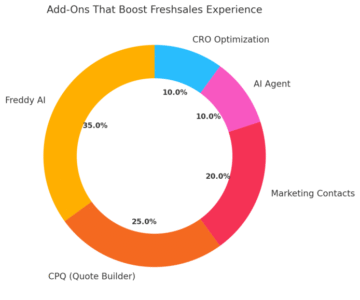
Freshsales on its own is powerful, but the right add-ons can completely change how you sell, engage, and close deals.
These extras aren’t just optional features—they’re performance enhancers designed to automate, personalize, and optimize your CRM workflow.
How AI Agent and Freddy AI Extend Your Capabilities
AI Agent and Freddy AI are Freshworks’ intelligent assistants that make Freshsales smarter and faster. They take care of repetitive tasks, surface insights, and even predict customer intent.
Here’s how they help you work more efficiently:
- AI Agent: This add-on manages AI-driven conversations across multiple channels like chat, email, and WhatsApp. It can handle FAQs, qualify leads, and route customers to the right sales rep automatically. For example, if a prospect asks about pricing on your website, the AI Agent can instantly respond and log that interaction in Freshsales.
- Freddy AI: Freddy is like a smart coach built into your CRM. It can suggest the next best action for a deal, analyze patterns, and forecast outcomes based on your sales history. You’ll see prompts such as “This deal has an 80% chance of closing” or “Follow up with this lead today.”
I suggest enabling Freddy AI early if you’re on the Pro or Enterprise plan. It not only saves time but also sharpens your team’s decision-making.
From what I’ve seen, companies using Freddy insights often close 20–30% more deals because they focus on the right opportunities.
Using Marketing Contacts Add-On for Larger Campaigns
If your outreach list is growing fast, the Marketing Contacts add-on is a lifesaver.
It allows you to expand your CRM’s contact limit so your campaigns can reach a broader audience without juggling multiple tools.
In practice, this means:
- You can purchase extra contact slots to scale beyond your plan’s included limits.
- It integrates seamlessly with Freshmarketer, letting you run automated campaigns for larger segments.
- Every added contact syncs automatically with your CRM data, so sales and marketing stay aligned.
Let’s say you’re running a holiday campaign targeting 10,000 leads, but your plan only supports 5,000 contacts. With this add-on, you can simply expand your limit and launch without breaking your workflow.
I recommend this especially for growing businesses or seasonal sales teams—it’s cheaper than switching plans prematurely and keeps your campaigns smooth.
Why Configure, Price, Quote (CPQ) Is a Game-Changer
CPQ (Configure, Price, Quote) is one of the most underrated Freshsales add-ons, yet it can dramatically simplify your sales process.
Essentially, it helps you create accurate, branded quotes and proposals directly from your CRM.
Here’s what it does:
- Configures product bundles: You can easily combine services or products without manual price checks.
- Automates pricing rules: Set dynamic pricing based on region, discounts, or customer tier.
- Generates instant quotes: Create polished proposals in just a few clicks.
Example workflow: Inside Freshsales, select a deal → click Generate Quote → CPQ automatically fills in customer data, selected products, and pricing rules. Within seconds, your quote is ready to send.
I’ve seen teams cut their quote turnaround time from hours to minutes using CPQ. If you manage complex pricing models or frequent client customizations, this add-on pays for itself.
Conversion Rate Optimization: Getting More from Your CRM
The Conversion Rate Optimization (CRO) add-on is perfect for businesses that rely heavily on digital leads.
It helps you understand how visitors interact with your website or forms and identifies what’s driving—or blocking—conversions.
It works by:
- Tracking visitor behavior: See where users drop off in your funnel.
- Running A/B tests: Experiment with form layouts or CTAs to improve lead capture.
- Integrating with Freshsales: All results flow back into your CRM for smarter targeting.
For example, if you notice that leads from your pricing page convert 40% better than others, you can direct more ad spend there and create tailored follow-ups in Freshsales.
I believe CRO is especially powerful when paired with Freddy AI—it combines data-driven insights with predictive analytics to help you focus on high-value leads.
Tips for Choosing the Right Freshsales Plan
Choosing the right Freshsales plan isn’t just about cost—it’s about matching features with your workflow and business stage. These simple strategies can help you find your perfect fit.
Match Plan Features to Your Sales Team Goals
Before deciding, ask: What do we need to achieve this quarter?
If your goal is organization, Growth might suffice. But if you’re aiming for automation and analytics, Pro or Enterprise is the smarter move.
For instance:
- Startups usually need lead tracking and email management (Growth).
- Mid-sized teams often benefit from workflow automation and Freddy AI (Pro).
- Large organizations rely on custom modules and forecasting (Enterprise).
I suggest writing down your must-have features—then match them directly to what each plan includes. Freshsales’ pricing page makes this easy by showing a side-by-side comparison.
Evaluate Cost Per User vs. Total Business Impact
It’s tempting to focus on the monthly per-user fee, but the real metric that matters is return on productivity.
Here’s how to think about it:
- Growth: $9/user → basic CRM organization.
- Pro: $39/user → automation + AI = higher output.
- Enterprise: $59/user → custom governance + forecasting = strategic control.
If automation helps one rep close even two more deals a month, the Pro plan easily justifies itself.
I recommend testing each plan’s feature impact during the trial period—especially workflows and Freddy AI scoring—to see measurable results before committing.
When to Take Advantage of the Free Trial
Freshsales offers a 21-day free trial with no credit card required, and it’s worth using strategically.
Here’s how to make the most of it:
- Set up your actual contacts and deals (not dummy data).
- Test one real workflow—like automatic lead assignments.
- Try Freddy AI insights for your top 10 leads.
- Evaluate how many manual tasks you could eliminate.
By day 10, you’ll have a clear sense of whether Growth, Pro, or Enterprise fits your process. I always advise exploring one tier higher than you think you need—you’ll understand what extra value you’re paying for.
How to Scale Seamlessly as Your Sales Operations Grow
Freshsales makes scaling simple because upgrades don’t disrupt your existing setup. You keep all your contacts, deals, and reports when moving up a plan.
To scale efficiently:
- Monitor when your team starts hitting manual limits (e.g., repetitive data entry).
- Use automation first before adding headcount.
- Upgrade when AI insights or forecasting could make decision-making easier.
I’ve seen teams that moved from Growth to Pro not because they grew in size, but because automation helped them grow in revenue. Scaling smartly is about efficiency—not just expansion.
Final Thoughts: Making the Most of Freshsales Pricing
Freshsales pricing is built to evolve with you. Whether you’re a solo entrepreneur, a mid-sized sales team, or a large enterprise, the right plan can help you sell smarter, not harder.
The Best Plan for Startups, Mid-Sized Teams, and Enterprises
- Startups: Go with Growth. It’s clean, affordable, and gives you all the basics to organize deals.
- Mid-sized teams: Pro is your best bet—it’s where automation and Freddy AI start making a real difference.
- Enterprises: Choose Enterprise for custom data structures, forecasting, and top-level governance.
If I were advising a small team planning to double its leads this year, I’d confidently recommend starting with Pro. It’s the perfect balance between price and power.
How to Future-Proof Your Investment in Freshsales
CRM needs evolve, and Freshsales is built to grow with you. I recommend reviewing your plan every 6–12 months to ensure it still aligns with your team’s workflow.
Future-proofing tips:
- Regularly update your automation rules as your sales stages evolve.
- Use Freddy AI’s forecasting to plan staffing and budgeting.
- Integrate with tools like Freshmarketer and Freshdesk for a unified ecosystem.
Staying proactive keeps your CRM investment efficient and adaptable as your business changes.
Expert Tip: Combine Freshsales with Freshmarketer for Full CRM Power
If you truly want an end-to-end system, combining Freshsales and Freshmarketer is a winning move. Together, they connect your marketing automation with your sales follow-ups.
For example, leads generated through Freshmarketer campaigns automatically enter Freshsales pipelines—scored, tagged, and ready for conversion. This kind of integration helps reduce lead leakage and improves collaboration between marketing and sales.
In my experience, this duo transforms how businesses operate. You go from chasing leads manually to nurturing them intelligently—powered by data, automation, and AI.
When used strategically, Freshsales becomes more than a CRM—it becomes the command center for your entire revenue process.

I’m Juxhin, the voice behind The Justifiable.
I’ve spent 6+ years building blogs, managing affiliate campaigns, and testing the messy world of online business. Here, I cut the fluff and share the strategies that actually move the needle — so you can build income that’s sustainable, not speculative.
Related posts:
 Why CRM Freshworks Stands Out From Other Platforms
 Freshsales CRM Explained: How It Helps You Close Faster
 Apollo IO Pricing Explained: Plans, Costs & Real Value
 How To Use Apollo Lead Generation To 5x Your Sales
 Freshworks CRM Pricing: Real Costs & Hidden Value
 Ecommerce Marketing Solutions That Multiply Your Sales