
Table of Contents
Some links on The Justifiable are affiliate links, meaning we may earn a small commission at no extra cost to you. Read full disclaimer.
How to use AWeber for email marketing becomes a lot easier once you stop treating it like “just another newsletter tool” and start using it as a simple customer journey system.
If you are a creator, coach, small business owner, or ecommerce seller, AWeber gives you the core pieces you need in one place: list building, broadcasts, automations, landing pages, segmentation, and reporting.
In this guide, I’ll walk you through the full process step by step so you can set it up properly, avoid beginner mistakes, and get better results without making your email marketing feel complicated.
What AWeber Is And Who It Is Best For
AWeber works best when you want a clean, practical email marketing setup without building a giant stack of tools from day one.
Before you touch templates or automations, it helps to understand what AWeber is actually good at.
What AWeber Does Well
AWeber is an email marketing platform built around a few core jobs: collecting subscribers, sending one-time emails, building automated sequences, creating landing pages and forms, and organizing people with lists, tags, and segments.
It also supports ecommerce pages, web push, and a large integrations library, which makes it useful for many small businesses that want one hub instead of five disconnected tools.
In plain English, it helps you do three things. First, grow your audience. Second, stay in touch consistently. Third, move subscribers toward a sale, booking, download, or next action.
I think this is where a lot of people overcomplicate email marketing. They imagine advanced funnels, dozens of automations, and endless segmentation from day one. In reality, most people get better results by setting up one good signup path, one welcome sequence, and one consistent weekly email.
AWeber is especially useful if your business looks like one of these:
- Creator Business: You sell content, coaching, digital products, or memberships.
- Service Business: You want leads from forms and follow-up emails that book calls or consultations.
- Small Ecommerce Brand: You need product-focused emails, launch emails, and behavior-based follow-up.
- Local Business: You want a list you actually own instead of relying only on social media.
When AWeber Is A Good Fit And When It Is Not
AWeber is a strong fit if you value simplicity, reliable email fundamentals, and fast setup. Its current pricing starts with a Lite plan at $15 monthly or $12.50 monthly when billed annually for 500 subscribers and 5,000 sends, with higher tiers increasing both subscriber and send limits.
That makes it approachable for beginners, though your real cost depends on list size and sending volume.
Where I’d recommend caution is when you need extremely complex CRM logic, sales pipeline management, or very advanced automation branching across multiple systems. AWeber can automate a lot, but it is not trying to be an enterprise CRM.
That is not a weakness for most readers. It is actually a strength. For many of us, simpler software creates better execution. A tool you fully use is more profitable than a “powerful” platform that overwhelms you.
A realistic example: If you run a small course business with one lead magnet, one sales webinar, and one evergreen offer, AWeber can handle that nicely. If you run a multi-brand operation with layered lifecycle marketing across sales teams, you may outgrow it.
How AWeber Organizes Your Email Marketing
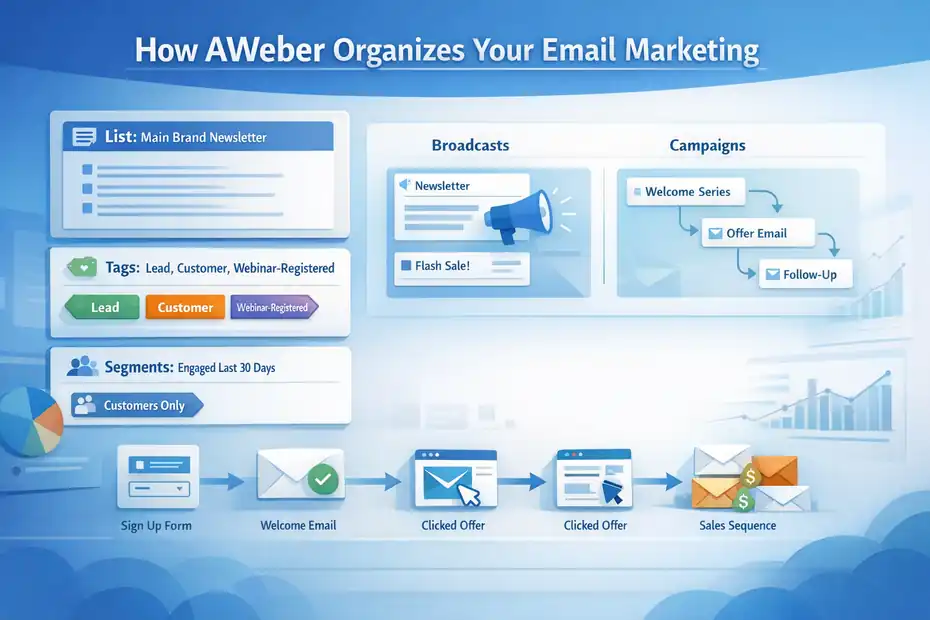
This is the part most beginners skip, and then they wonder why their account gets messy.
If you learn AWeber’s structure first, everything else starts making sense.
Understand Lists, Tags, And Segments First
AWeber uses lists to separate major audiences or brands, tags to label subscriber behavior or status, and segments to create dynamic groups based on search criteria.
Segments update automatically as subscribers meet the saved conditions, which is one reason they are useful for sending more targeted broadcasts.
Here is the simple way I explain it:
- List: The big container. Think “main newsletter” or “brand A.”
- Tag: A label. Think “downloaded-checklist” or “clicked-pricing.”
- Segment: A filtered audience. Think “people tagged webinar-interest who opened an email in the last 30 days.”
My advice is to keep your number of lists low unless you truly run separate businesses. Too many lists create duplicate subscribers, reporting confusion, and unnecessary admin work.
In most cases, one main list plus thoughtful tags is enough. For example, if you run a fitness coaching brand, you do not need separate lists for leads, customers, and webinar attendees. One list with clear tags often works better.
A clean starter structure could look like this:
- List: Main Brand Newsletter
- Tags: lead-magnet-guide, webinar-registered, customer, vip, clicked-pricing
- Segments: engaged-last-30-days, customers-only, warm-leads, inactive-90-days
That setup gives you flexibility without turning your account into a filing cabinet nobody wants to open.
Know The Difference Between Broadcasts And Campaigns
AWeber lets you send one-time emails and automated emails, and knowing the difference matters. Broadcasts are your one-off emails, like a newsletter, launch message, or sale announcement.
Campaigns and workflows are your automated sequences, like a welcome series or follow-up path triggered by a signup or tag. AWeber also supports automation rules that can add tags when someone opens or clicks an email.
That means you can design email marketing around behavior instead of guessing.
A practical setup looks like this:
- A subscriber joins through your lead magnet form.
- A tag gets applied.
- A welcome sequence starts automatically.
- If the subscriber clicks your offer link, another tag gets added.
- That tag can move them into a more sales-focused follow-up.
This is where AWeber starts feeling professional. You are no longer blasting the same email to everyone. You are responding to what people actually do.
I recommend using broadcasts for timely communication and campaigns for relationship-building. Broadcasts are great for weekly newsletters, promotions, product updates, and announcements. Campaigns are great for onboarding, nurturing, education, and post-purchase follow-up.
How To Set Up AWeber The Right Way
This is where you build the foundation. If you rush the setup, your future automations, forms, and reports get harder to manage.
Create Your Core List And Brand Settings
Your first job is to create one clean list with accurate brand details. In AWeber, each list has its own branding and identity, which is useful if you manage multiple businesses, but it also means sloppy naming creates confusion later.
I suggest keeping your list name boring and clear. Something like “Main Newsletter” is better than “Growth Machine 2026.” Fancy internal naming feels smart for about twelve minutes.
Set these basics carefully:
- From Name: Use a real person or recognizable brand voice.
- From Email: Use a branded domain email, not a random Gmail.
- Reply-To Address: Make sure replies land where someone can actually answer them.
- Business Info: Keep it accurate for trust and compliance.
AWeber specifically recommends using a custom domain and confirmed opt-in as part of strong deliverability practices. Those choices can improve list quality and inbox placement over time.
I also recommend deciding your sending identity early. Are emails coming from you personally, from the brand, or from a team role? Consistency matters. If one week it is “Sarah from Bright Studio” and the next week it is “Bright Support Team,” subscribers can feel less connected.
Build One Signup Path Before Building More
AWeber includes sign-up forms and landing pages, and both are useful. Sign-up forms are embedded collection points on your website, while landing pages are standalone pages designed to capture subscribers or promote an offer.
AWeber’s landing page builder is mobile responsive and does not require coding, and you can create forms from templates inside the account.
Here is my honest recommendation: start with one clear signup path, not five.
Pick one offer:
- A checklist
- A short email course
- A discount code
- A webinar registration
- A consultation invitation
Then connect that offer to one form or one landing page. That is enough to get traction.
Imagine you run a small skincare store. Instead of offering a newsletter, a coupon, a quiz, and a waitlist all at once, you create one landing page offering “A 5-Step Routine For Sensitive Skin” and connect it to a welcome sequence. That is easier to measure and easier to improve.
Focus on message match. If the page promises a guide for beginners, the first email should deliver exactly that. Not your life story. Not six unrelated links. Just the promised value.
Import Existing Subscribers Carefully
If you already have a list, resist the temptation to dump everyone into AWeber and start blasting emails. Imported subscribers should be organized and cleaned first.
AWeber’s best-practice guidance emphasizes maintaining a clean list, removing undeliverable addresses, and managing inactive subscribers to protect engagement and inbox placement.
Before importing, I suggest you:
- Remove Dead Contacts: Old bounces and obvious junk addresses are not helping you.
- Separate Buyers From Leads: This matters for future messaging.
- Tag By Source: Add labels like old-list, webinar-2025, customer-import.
- Exclude Unclear Contacts: If you are not sure how they joined, be careful.
This matters because list quality affects performance. AWeber’s own deliverability advice highlights confirmed opt-in and clear subscriber intent as important practices, and AWeber community guidance says keeping bounce rates under 2% and spam complaints below 0.1% is a healthy target.
A smaller, cleaner list nearly always beats a larger, colder one.
How To Create Emails That Actually Get Opened And Clicked
Once the account structure is solid, the next job is writing emails people want to open.
This is where many businesses underperform, not because the software is bad, but because the message is forgettable.
Write Better Subject Lines And Preview Text
Your subject line does not need to be clever. It needs to be relevant. That is a huge difference.
The benchmark numbers vary by provider and industry, but recent studies still show email opens matter a lot.
MailerLite reported an average 2025 open rate of 43.46% and an average click rate of 2.09%, while Mailchimp’s benchmark page shows many industries clustering in a lower but still meaningful range, with overall averages shaped heavily by industry mix.
What I take from that is simple: there is room to win with clarity.
Here are patterns that usually work better than hype:
- Specific Curiosity: “The 3 Emails That Brought Back Dead Leads”
- Clear Outcome: “How To Fix Your Welcome Sequence In 20 Minutes”
- Audience Match: “For New Coaches Who Hate Writing Newsletters”
- Timely Relevance: “Before You Send Your Spring Promo, Read This”
What usually fails? Vagueness. “Big Update.” “Important News.” “Quick Thought.” Those can work if you already have a loyal audience, but for most businesses, they are too empty.
Preview text matters too. I think of it as the second half of the subject line. Use it to finish the thought, reduce confusion, or sharpen the promise.
Format Emails For Readability, Not Decoration
Most subscribers are scanning, not sitting down with tea to admire your paragraph structure. So make the email easy to consume.
A simple email format often works best:
- Opening line that feels human
- One main idea
- Short paragraphs
- One clear call to action
- Minimal distractions
I recommend keeping most promotional emails focused on one goal. If you ask readers to buy, read a blog post, follow on Instagram, watch a video, and reply with feedback, you usually weaken all five.
A realistic example: If you are sending a product launch email, the goal is not to explain every feature in exhausting detail. The goal is to get the right reader to click and view the offer. The landing page can do the heavy lifting.
You do not need a designer-grade layout for every email either. In many niches, cleaner text-style emails outperform overbuilt templates because they feel more direct and personal. That is especially true for service businesses, coaches, educators, and creator brands.
Match Email Type To The Reader’s Stage
The email that works best depends on what the subscriber already knows and wants.
For new subscribers, welcome and orientation emails work well. Campaign Monitor reports very high welcome email engagement, with one guide citing a 91.43% open rate for initial welcome emails.
That number will vary by list quality and industry, but the bigger point is true: welcome emails usually get more attention than ordinary newsletters, so they deserve care.
I recommend thinking in three stages:
- New Subscriber: Deliver promised value, set expectations, introduce your best content.
- Warm Lead: Share case studies, buyer education, objections, and decision support.
- Customer: Send onboarding, usage tips, upsell logic, or retention content.
This is why tags matter so much. A subscriber who clicked your pricing page should not receive the same email as someone who just downloaded a beginner guide ten minutes ago.
When you write with stage awareness, your emails stop sounding generic. They start sounding helpful.
How To Build A Simple AWeber Automation System
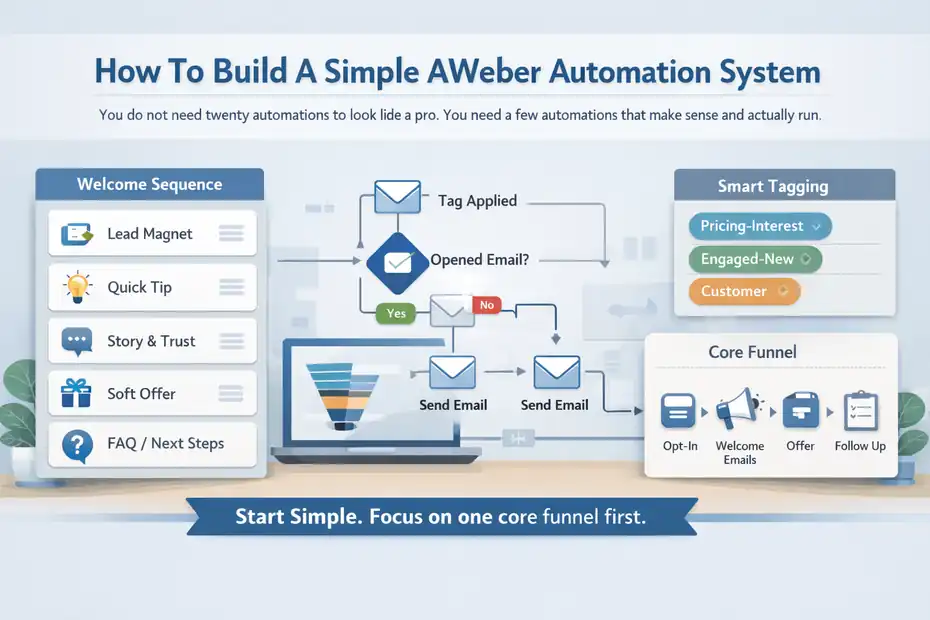
You do not need twenty automations to look like a pro. You need a few automations that make sense and actually run.
Start With A Welcome Sequence
Your first automation should almost always be a welcome sequence. AWeber supports automation rules and workflows that can apply tags, respond to opens and clicks, and move subscribers through messages based on behavior.
A good beginner sequence might look like this:
- Email 1: Deliver the promised lead magnet or resource.
- Email 2: Share one quick win or useful insight.
- Email 3: Tell a short story that builds trust.
- Email 4: Introduce your offer softly.
- Email 5: Answer a common objection or next-step question.
That sequence is enough to turn a passive signup into an active relationship.
In my experience, the biggest mistake here is trying to sound too polished. Your welcome emails do not need to read like a corporate campaign deck. They need to feel relevant, useful, and honest.
For example, if someone downloads a guide about launching a podcast, your second email could say, “Most new podcasters waste time on artwork before they validate the format. Here is the order I’d actually use.” That feels grounded. It helps.
Use Tags To Trigger Smarter Follow-Up
AWeber’s tagging system is where your automation starts getting sharp. You can apply tags through link clicks, opens, and workflow actions, then use those tags to build segments or trigger future sequences.
This allows simple but powerful behavior-based marketing.
Examples:
- Clicked Sales Page: Apply tag pricing-interest
- Opened 3 Welcome Emails: Apply tag engaged-new
- Bought Product: Apply tag customer
- Ignored Promo: Move them away from aggressive sales follow-up
A helpful mindset is this: tags should describe meaning, not just activity.
“clicked-email-4” is technically accurate, but “course-interest” is more strategically useful. One tells you what happened. The other tells you what it means.
That small naming shift makes future segmentation easier and your reporting more valuable.
Build One Core Funnel Before You Add More
I see this mistake constantly. Someone builds a welcome series, a webinar funnel, a product funnel, a re-engagement funnel, and a post-purchase funnel in the same week. Then they stop maintaining all of them.
Please do not do that to yourself.
Start with one complete path:
- Opt-in
- Welcome emails
- Offer introduction
- Basic follow-up
- Broadcast continuation
That is enough to generate results and teach you what your audience responds to.
Once that works, add one more system. Maybe a post-purchase onboarding sequence. Maybe a cart-adjacent sales follow-up using tags. But earn your complexity.
How To Use AWeber Landing Pages, Forms, And Integrations
This is where list growth becomes more intentional. Instead of hoping people subscribe, you create clear entry points.
Choose Between A Form And A Landing Page
AWeber lets you create both embedded forms and standalone landing pages, and they serve different jobs. Forms are best when you already have website traffic and want a compact signup area.
Landing pages are better when you want one focused conversion goal without navigation or distractions.
Here is how I’d choose:
- Use a form for blog sidebars, site footers, resource pages, or popups.
- Use a landing page for ads, social bio links, webinars, lead magnets, or launches.
A landing page usually gives you more control over the subscriber’s attention. That is why it is often the better choice for an offer with a clear promise.
A form works better when the context around it already does the selling. For example, if you have a high-traffic blog article about meal prep, a form inside that article offering a meal prep checklist can convert well without needing a separate page.
Connect AWeber To The Rest Of Your Stack
AWeber offers integrations across ecommerce, lead generation, content management, webinars, surveys, and more, which helps you connect it to the tools you already use. It also supports Stripe-based ecommerce elements on landing pages for selling certain products directly.
This becomes useful when you want subscriber actions to flow automatically.
Examples:
- A webinar registration adds a tag and starts reminder emails.
- A purchase adds a customer tag and stops prospect emails.
- A form on your website feeds into a nurture sequence.
- A checkout action triggers onboarding content.
My rule is simple: Integrate only what improves the customer journey. Do not connect platforms just because you can.
If a connection saves manual work, improves segmentation, or creates a better experience for the subscriber, it is worth doing. If it adds technical clutter with no real strategy behind it, skip it.
How To Measure Performance Inside AWeber
If you do not review your numbers, you will keep guessing. The goal is not to obsess over every metric. It is to know what to change next.
Focus On The Metrics That Actually Matter
The most useful AWeber metrics for day-to-day decisions are usually opens, clicks, unsubscribes, bounces, and tag-based engagement patterns.
Broader email benchmarks suggest many brands aim for strong engagement while keeping unsubscribe rates low; MailerLite reported a 2025 unsubscribe average of 0.22%, and AWeber community guidance points to spam complaints below 0.1% and bounce rates under 2% as healthy thresholds.
I suggest reading metrics this way:
- Low Opens: Your subject line, sender identity, or audience quality needs work.
- High Opens, Low Clicks: Your email body or offer alignment is weak.
- High Unsubscribes: Your frequency, expectations, or relevance may be off.
- High Bounces: Your list quality likely needs cleaning.
- Low Replies: Your emails may feel too impersonal or too broad.
Do not judge a campaign on one number alone. A curiosity-driven subject line can raise opens but lower trust if the email itself disappoints.
Compare Performance By Segment, Not Just Overall
This is one of the easiest pro-level upgrades. Instead of looking only at account-wide averages, compare segments.
For example, your customer segment may click at twice the rate of your cold lead segment. That tells you something important: your messaging is resonating more with people who already trust you.
Try comparing:
- New subscribers vs long-term subscribers
- Buyers vs non-buyers
- Engaged last 30 days vs inactive 90 days
- Lead magnet A vs lead magnet B
AWeber’s dynamic segments make this practical because you can save recurring search criteria and watch how those groups behave over time.
This is where smarter decisions come from. Not “our average click rate is 2%,” but “our buyers click onboarding emails at 8%, so we should expand that sequence.”
Common AWeber Mistakes That Hurt Results
You do not need perfect emails to succeed. You do need to avoid the handful of mistakes that quietly ruin performance.
Sending Too Much Too Soon
One of the fastest ways to lose trust is to collect a subscriber today and hammer them with nonstop promotion tomorrow.
AWeber’s own best-practice resources include optimizing sending frequency and maintaining a clean, engaged list as core recommendations.
A better approach is progressive trust-building. Start with the promised value, then add useful context, then introduce offers naturally.
If someone joined for a free guide and gets five hard-sell emails in three days, the problem is not the software. The problem is the experience.
Poor Tagging And Messy Account Structure
Messy tags create messy marketing. If your tags are inconsistent, duplicated, or meaningless, your automations become harder to manage and your segments become less useful.
Bad examples:
- tag1
- clickedlink
- interestedmaybe
- buyers-final-real
Good examples:
- downloaded-seo-checklist
- pricing-interest
- customer-course
- webinar-registered
Simple naming saves future you from frustration.
Ignoring Deliverability Basics
AWeber recommends practices like confirmed opt-in, using a custom domain, and maintaining clear sender identity to improve deliverability. Its best-practice documentation also emphasizes list hygiene and avoiding spam-triggering behaviors.
In plain language, this means:
- Do not email people who never clearly subscribed.
- Do not keep dead subscribers forever.
- Do not disguise who the email is from.
- Do not suddenly spike your sending volume with a cold list.
Deliverability problems often look like “email marketing stopped working,” when the real issue is that inbox placement got worse over time.
Advanced Ways To Use AWeber Like A Pro
Once your basics are working, this is where you sharpen the machine. You do not need to become fancy for the sake of it. You just want smarter relevance and better timing.
Build Behavior-Based Campaign Paths
This is where tags and segments become powerful. Instead of one universal nurture sequence, you create small branching paths based on actual interest.
For instance:
- A subscriber clicks a pricing link and gets sales-support emails.
- A subscriber clicks educational content and gets more teaching content.
- A customer gets onboarding and retention emails instead of beginner lead nurturing.
AWeber supports click and open automations for applying tags, which makes these paths possible without building a giant enterprise system.
This style of email marketing feels better for the reader because it respects intent. It also tends to improve conversion efficiency because people see more of what they already care about.
Use AWeber For Simple Revenue Loops
AWeber’s ecommerce functionality includes landing page selling with Stripe and tools designed to support digital products, subscriptions, coaching, and similar offers. AWeber says sellers keep 96.5% of each sale before Stripe processing fees under its ecommerce landing page setup.
That creates a simple revenue loop:
- Traffic hits a landing page
- Subscriber joins or purchases
- Follow-up sequence starts
- Tags identify buyer intent or product type
- Broadcasts and automations drive repeat engagement
For a creator or small business, that is a practical system. Not flashy. Profitable.
Re-Engage Or Prune Cold Subscribers
Not every subscriber should stay forever. Some people stop opening. Some addresses go stale. Some simply moved on.
AWeber’s guidance encourages list maintenance and removing inactive or undeliverable subscribers to protect account health and engagement quality.
I usually recommend one of two actions for cold subscribers:
- Run a re-engagement sequence with a simple “still interested?” angle.
- Remove or suppress people who remain inactive after repeated attempts.
That can feel scary at first. But cutting dead weight often improves reporting, inbox placement, and decision-making.
Final Thoughts On Using AWeber Well
If you want to know how to use AWeber for email marketing effectively, the real answer is not “use every feature.” It is “build one clear system that helps the right subscriber take the next step.”
Start with one list, one signup path, one welcome sequence, and one consistent sending habit. Use tags to add meaning, segments to improve relevance, and reports to guide decisions. Keep your account clean. Keep your writing human. Keep your offers aligned with what people signed up for in the first place.
That is how you start using AWeber like a pro. Not by making it more complicated, but by making it more intentional.
FAQ
What is AWeber used for in email marketing?
AWeber is used to build email lists, send newsletters, and automate follow-up emails. It helps businesses collect subscribers, organize them with tags, and send targeted messages that guide people toward a specific action like buying a product or booking a service.
How to use AWeber for email marketing as a beginner?
To use AWeber as a beginner, start by creating one list, building a signup form or landing page, and setting up a simple welcome email sequence. Focus on sending consistent emails and gradually add automation as you understand your audience’s behavior.
Is AWeber good for small businesses?
AWeber is a strong choice for small businesses because it offers simple setup, automation features, and reliable email delivery. It works well for creators, service providers, and small ecommerce stores that need an easy way to grow and communicate with their audience.
How do AWeber campaigns and broadcasts work?
AWeber campaigns are automated email sequences triggered by actions like signups or tags, while broadcasts are one-time emails sent to a list or segment. Campaigns build long-term relationships, while broadcasts are used for updates, promotions, or announcements.
How can I improve email open rates in AWeber?
To improve open rates in AWeber, focus on writing clear subject lines, using a consistent sender name, and sending relevant content. Segment your audience with tags so subscribers receive emails that match their interests and stage in the customer journey.

I’m Juxhin, the voice behind The Justifiable.
I’ve spent 6+ years building blogs, managing affiliate campaigns, and testing the messy world of online business. Here, I cut the fluff and share the strategies that actually move the needle — so you can build income that’s sustainable, not speculative.
Related posts:
 Email Marketing Tips: Improve Email Marketing Results
 10 Secrets to Generating Leads Online & Skyrocketing Sales
 Best Email Marketing Software for Boosting Customer Retention
 How to Master AWeber Email Marketing in Just a Few Steps
 Create a Marketing Email That Readers Can’t Ignore
 Aweber Email Automation Examples: Templates & Pro Insights