
Table of Contents
Some links on The Justifiable are affiliate links, meaning we may earn a small commission at no extra cost to you. Read full disclaimer.
LinkedIn Marketing Solutions is one of the most powerful tools for finding and attracting high-value leads in the B2B world. But how do you actually use it to turn your profile views, posts, and campaigns into real business opportunities?
In this guide, you’ll discover a step-by-step strategy to leverage LinkedIn’s paid and organic features to build authority, connect with decision-makers, and drive consistent leads without wasting ad spend or time.
Understanding LinkedIn Marketing Solutions And Its Core Features
LinkedIn Marketing Solutions gives you a full ecosystem for reaching professionals where they make business decisions — not just where they scroll.
It’s more than just ads; it’s a way to align content, targeting, and analytics with the intent of your buyers.
What LinkedIn Marketing Solutions Includes And Why It Matters
LinkedIn Marketing Solutions is essentially LinkedIn’s suite of tools designed to help businesses connect with the right audience, at the right time, using the right content. It includes:
- Sponsored Content: Promoted posts that appear directly in users’ feeds.
- Message Ads: Personalized messages sent straight to inboxes.
- Dynamic Ads: Automatically personalized ads that pull user data like name or job title.
- Text Ads: Simple pay-per-click (PPC) banners that drive quick conversions.
- Lead Gen Forms: Pre-filled forms that make it easy for users to share their information.
Why it matters: These tools tap into first-party professional data that’s unmatched anywhere else online. You’re not guessing who sees your content — you’re targeting verified professionals based on job role, company size, or seniority.
I’d argue that’s what makes LinkedIn the most precise B2B advertising platform on the web.
Example: Imagine you’re promoting a SaaS product for HR teams. Instead of targeting “business owners,” you can directly reach “HR directors in companies with 200–1000 employees in tech.” That specificity is where the magic happens.
How The Platform Helps You Reach Decision-Makers And Influencers
LinkedIn is home to over 65 million business decision-makers, which means you’re marketing inside a live business database. Using LinkedIn Marketing Solutions, you can filter audiences by:
- Seniority: Directors, VPs, founders, or C-level executives.
- Company demographics: Size, industry, and growth stage.
- Behavioral signals: People who’ve engaged with similar posts or visited your website.
In practice, this means your campaigns reach people with purchasing power. For example, if you target “Operations Managers at logistics companies,” LinkedIn ensures only users in those exact roles and industries see your ad.
I recommend regularly checking the Demographics tab in Campaign Manager — it shows exactly which job functions, locations, and company sizes your ads are hitting. This is your window into who’s truly engaging.
Key Differences Between Organic LinkedIn And LinkedIn Ads
Organic LinkedIn and LinkedIn Ads serve different but complementary purposes.
- Organic LinkedIn builds trust. It’s where you post thought leadership content, share insights, and start conversations.
- LinkedIn Ads accelerate results. They amplify reach, drive measurable conversions, and target with surgical precision.
Think of it this way: organic activity warms up your audience, while paid ads move them to action. I’ve seen brands combine both — posting valuable insights weekly, then retargeting those post viewers with a lead magnet ad — and watch their cost per lead drop by 40% or more.
If you’re serious about B2B growth, you need both engines working together.
Setting Up Your LinkedIn Campaign Manager For Success
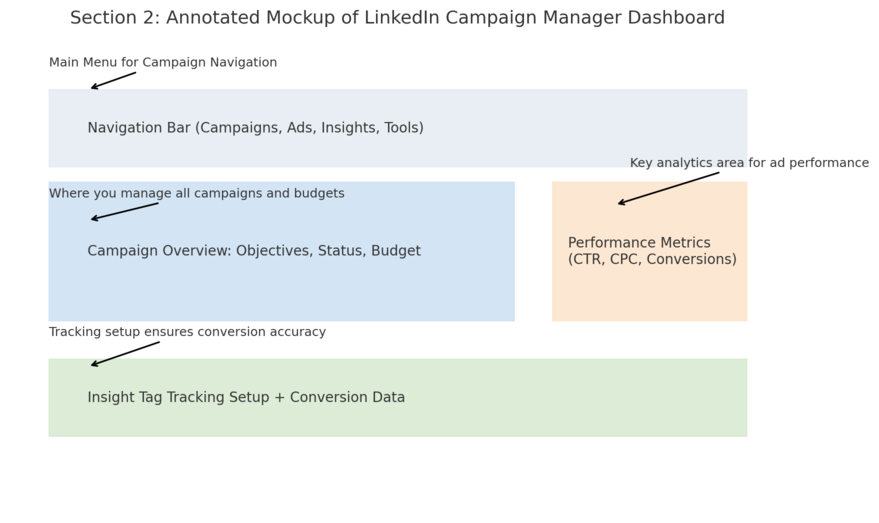
Campaign Manager is the control center for everything you do in LinkedIn Marketing Solutions. Getting it right early saves hours later — and prevents messy reporting or lost data.
How To Structure Your Ad Account For Easy Management
I suggest structuring your Campaign Manager account like a clear filing system.
Start by dividing campaigns by objective (awareness, consideration, or conversion). Under each, group ad sets by audience type — for example, “Marketing Managers,” “Operations Leaders,” or “SaaS Founders.”
Then, within each ad set, run 2–3 ad variations to test different formats and copy. Keep your naming conventions consistent:
- Campaign: Q4 Awareness – SaaS – Marketing Managers
- Ad Set: Video Ad – Pain Point Focused
- Ad: Hook: Streamline Your Marketing Stack
This structure makes data easier to interpret later and avoids confusion when scaling campaigns.
Creating Conversion Tracking And Insight Tags The Right Way
To measure ROI accurately, you’ll need to install LinkedIn Insight Tag — a piece of tracking code similar to Facebook Pixel. You can find it in Campaign Manager under: Account Assets → Insight Tag → Install My Insight Tag
Once added to your site, it tracks conversions (like form fills or downloads) and powers retargeting audiences. I suggest verifying that your tag is firing correctly through the “Check Status” option after setup.
You can also define specific conversion actions — such as demo bookings or newsletter sign-ups — under Assets → Conversions. Assign each action a clear name, value, and thank-you page URL so you can track exactly what drives ROI.
Setting Clear Campaign Objectives That Match Lead Goals
Every successful campaign starts with the right objective. In Campaign Manager, you’ll choose from:
- Brand Awareness: For exposure and visibility.
- Engagement: For driving post interactions and page followers.
- Lead Generation: For collecting form submissions directly in LinkedIn.
- Website Conversions: For off-platform actions like purchases or sign-ups.
If your goal is to get high-value leads, I advise starting with Lead Generation. LinkedIn’s native Lead Gen Forms usually outperform external landing pages due to their seamless auto-fill feature.EOnce you start collecting leads, integrate them directly with a CRM like HubSpot, Monday, or Freshsales to automate follow-ups. It keeps momentum while prospects are warm.
Building A High-Converting LinkedIn Audience Strategy
A powerful audience strategy is the backbone of every successful LinkedIn campaign. Without precise targeting, even great ads fail.
Using Matched Audiences To Retarget And Re-Engage Prospects
Matched Audiences lets you reconnect with people who’ve already engaged with your brand. You can upload email lists, retarget website visitors, or re-engage video viewers.
For instance, upload a CSV of past webinar attendees — LinkedIn will match their emails to profiles. Then, you can serve them a “Book a Demo” ad, staying top of mind with people already familiar with you.
I also recommend combining Matched Audiences with website retargeting. Just enable the Insight Tag and create a retargeting segment like: Website Visitors → Visited Pricing Page (Last 30 Days)
This approach often cuts cost per lead by 20–30% because you’re targeting warmer users who already know you.
How To Leverage Lookalike Audiences For Quality Leads
Lookalike Audiences (found under Audiences → Create Audience → Lookalike) help you scale by finding professionals similar to your best customers.
Here’s a practical way to use them:
- Upload a list of your top 500 paying clients.
- Let LinkedIn analyze that data.
- Create a Lookalike Audience to find users with matching roles, industries, and behaviors.
I’ve seen this boost qualified lead volume by 40% when done correctly because it expands reach without diluting relevance. Just avoid making them too broad — quality trumps quantity on LinkedIn.
Narrowing Down Targeting With Firmographics And Job Titles
LinkedIn’s targeting power lies in its firmographic data — company size, industry, and employee count — and demographic data like job title and seniority.
For high-value B2B leads, focus on:
- Company Size: Target mid-market or enterprise companies (200–1000+ employees).
- Seniority Level: Manager and above.
- Job Functions: Marketing, operations, finance, or tech depending on your offer.
Here’s a smart trick I use: Exclude entry-level roles and irrelevant industries to reduce wasted impressions. You can set exclusions directly in the targeting setup — this keeps your ads laser-focused on decision-makers.
To visualize performance, check Campaign Insights → Audience Breakdown. If you notice strong engagement from specific titles, create a separate ad set to refine and scale that group.
Pro Tip: Keep your first audience under 50,000 members for precision testing. Once you find what works, gradually scale up to 200,000+ while maintaining quality.
Creating Effective Ad Campaigns That Convert
LinkedIn ads work best when they blend authenticity with precision.
The goal isn’t to “sell” immediately — it’s to speak directly to the challenges your audience already feels, then show them the next logical step.
Crafting Compelling Sponsored Content That Grabs Attention
Sponsored Content appears directly in the LinkedIn feed, which means it competes with thought-leadership posts, career updates, and hiring announcements.
To stand out, you need relevance and emotion, not corporate jargon.
Here’s what I’ve learned works best:
- Lead with a relatable statement or data point. Instead of “Discover our SaaS platform,” try “Most marketing teams waste 8+ hours a week switching tools — here’s how to fix it.”
- Show proof quickly. If you can include a stat or result in your creative (“Used by 2,000+ HR leaders”), engagement jumps.
- Use native formats. LinkedIn’s algorithm favors content that feels organic, like single-image posts or video snippets under 30 seconds.
In Campaign Manager, go to Create Campaign → Choose Objective → Engagement or Lead Generation → Ad Format: Sponsored Content.
I suggest testing three variations of the same ad — one focusing on pain, one on aspiration, and one offering a clear benefit. You’ll usually find that emotionally grounded messages outperform product-led ones.
Designing Carousel, Video, And Message Ads For Engagement
Each ad format serves a different intent, and mixing them strategically builds momentum in your campaign.
- Carousel Ads: Best for storytelling or step-by-step value delivery. I’ve used these to share short “mini-guides” (e.g., “5 Ways to Boost B2B Conversions”). Keep 3–5 cards max, with a clear CTA on the last card.
- Video Ads: Excellent for awareness. Keep them under 30 seconds, add subtitles, and open with a human face or key stat in the first 2 seconds.
- Message Ads (or Conversation Ads): These land directly in inboxes. To create one, go to Ad Format → Message Ad → Choose Sender → Add Personalization Token. Write it like a personal note, not a sales pitch.
A small but powerful trick: Always end with a question that invites engagement.
Example: “Would you be open to a quick walkthrough?” That single line increases response rates more than any button ever could.
Writing Ad Copy That Converts With Emotional And Logical Hooks
Great LinkedIn ad copy hits two notes — logic (ROI, time savings, proof) and emotion (stress relief, achievement, belonging). The mix depends on your audience type.
Here’s a structure I often use:
- Start with empathy: Acknowledge a common struggle.
- Example: “Hiring the right marketer shouldn’t feel like rolling dice.”
- Introduce your value: Explain how your solution changes that.
- Example: “With our AI-powered shortlist tool, you’ll see qualified candidates in hours.”
- End with a clear CTA: Guide the reader’s next step.
- Example: “Try a free 15-minute demo today.”
Tip: Keep ad copy under 150 characters for mobile readability. If your offer needs more explanation, use a strong headline with a visual to carry the message.
Optimizing LinkedIn Lead Gen Forms For Maximum ROI
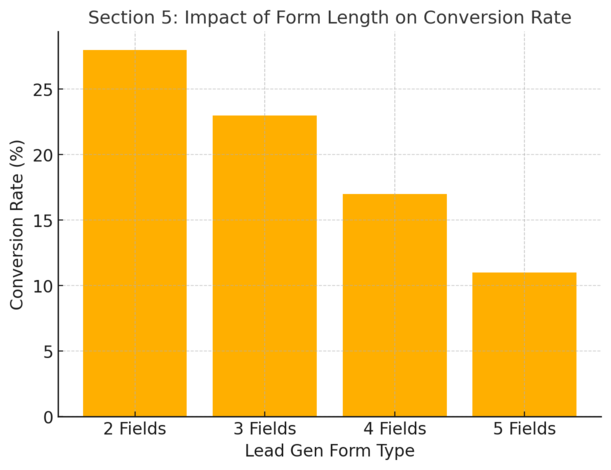
Lead Gen Forms are one of LinkedIn Marketing Solutions’ secret weapons.
They pre-fill user information directly from their profiles — making it frictionless for prospects to share data and for you to collect it.
Setting Up Lead Gen Forms To Reduce Friction
In Campaign Manager → Assets → Lead Gen Forms, click “Create Form Template.” You’ll see pre-filled fields like name, email, and job title. Avoid adding more than two custom questions — the more effort required, the lower your completion rate.
What I suggest instead: make the value irresistible. Pair your form with a gated asset — like an ebook, checklist, or webinar — that truly helps your audience. A clear headline like “Get The 2025 B2B Trends Report” outperforms vague offers like “Learn More.”
Also, don’t forget to set your privacy policy URL (LinkedIn requires it). It reassures prospects that you handle their data responsibly, which builds trust.
Personalizing Forms With Contextual Value Offers
Context is everything. If your ad promotes an “SEO Strategy Guide,” the form should continue that conversation — not start a new one.
Here’s what works:
- Match the headline to the ad copy: Keep consistency between ad and form titles.
- Add a short description: Use 1–2 sentences to reinforce the benefit.
- Offer a next-step promise: Example: “After submission, you’ll get the PDF instantly and a follow-up demo invite.”
Personalization isn’t about names — it’s about relevance. When users feel your offer speaks directly to their intent, they’re far more likely to convert.
Integrating LinkedIn Leads Directly Into Your CRM Or Email Platform
Collecting leads is only half the job; nurturing them is where conversions happen.
You can automatically sync LinkedIn leads to CRMs like HubSpot, Salesforce, or Zoho under Account Assets → Lead Gen Forms → CRM Sync.
If you’re using a marketing automation tool like Zapier, set up a workflow to instantly send leads to your email sequence.
I recommend following up within 24 hours. A quick thank-you email with a personalized note or bonus resource (“Here’s a short video explaining how we help companies like yours…”) keeps engagement high while your brand is still top-of-mind.
Using LinkedIn Analytics To Refine Your Campaign Performance
Your analytics dashboard inside Campaign Manager is where good campaigns become great.
By reading the data correctly, you’ll know which audiences and messages to scale — and which to retire.
Tracking Key Metrics: CTR, Conversion Rate, And Cost Per Lead
Three core metrics reveal campaign health:
- CTR (Click-Through Rate): Shows how engaging your creative is. Aim for 0.6–1% on Sponsored Content.
- Conversion Rate: Measures how many clicks turn into leads. Anything above 10% on Lead Gen Forms is solid.
- CPL (Cost Per Lead): The most critical metric. Depending on your industry, $60–$120 per qualified lead is normal for B2B.
In Campaign Manager → Performance Chart → Columns → Conversions and Leads, you can customize your view to track these metrics side by side.
I suggest exporting data weekly to spot trends — sudden drops in CTR often mean ad fatigue or poor creative alignment.
Identifying Which Audience Segments Deliver The Best ROI
LinkedIn lets you break down performance by job function, company size, location, and seniority under Campaign Insights → Demographics.
For example, you might notice your “Operations Manager” segment delivers leads at half the CPL compared to “Marketing Director.” That’s a cue to allocate more budget to what’s working.
I believe in doubling down early — once you identify a high-performing audience, duplicate that ad set and expand slightly (e.g., include related job titles or nearby regions). This helps scale ROI without losing relevance.
How To Use A/B Testing To Continuously Improve Ad Performance
A/B testing (found under Campaign → Duplicate → Change One Variable) lets you isolate what drives results — be it your headline, image, or CTA.
Start with one element at a time:
- Test visuals: People-focused vs. product screenshots.
- Test copy: Pain-driven headline vs. value-driven headline.
- Test CTA: “Download Now” vs. “Get Free Access.”
Run each test for at least 7 days or 300 impressions to gather statistically relevant data.
I recommend keeping a simple tracking sheet — noting CTR, conversion rate, and CPL per variation. Over time, you’ll spot patterns unique to your brand voice and audience. That’s how high-performing advertisers create repeatable wins.
Pro Tip: Never pause a campaign too early. LinkedIn’s algorithm takes 3–5 days to “learn” your audience. Give it room to optimize before making final judgments.
Leveraging Organic LinkedIn Marketing For Authority And Trust
Organic LinkedIn marketing builds the foundation of credibility before your ads ever show up.
When you post genuinely valuable insights and engage consistently, you create familiarity and trust—two things that make your paid campaigns convert faster.
Building A Consistent Posting Strategy That Supports Ads
The key to organic success on LinkedIn isn’t frequency; it’s alignment. Your organic content should echo the same themes, problems, and aspirations that your ads target.
I recommend this simple rhythm:
- 2 educational posts per week: Address pain points your product solves.
- 1 personal insight post: Share lessons learned, mistakes, or growth stories.
- 1 engagement post: Ask questions or run a poll to spark conversation.
Keep posts short—under 200 words—and use one clear takeaway per post. Native LinkedIn articles are useful for long-form storytelling but perform best when paired with snippets shared in your main feed.
One of my favorite methods is to “recycle” high-performing ad copy. If an ad headline converts well, turn it into a carousel post or video teaser. This way, your paid and organic channels reinforce each other’s messages.
You can even view post analytics under Profile → Posts & Activity → Analytics to see engagement trends. If certain topics attract more saves or shares, consider turning them into lead magnets.
Engaging Through Comments, DMs, And Groups To Warm Up Leads
Organic engagement is your quiet sales funnel. I’ve seen people close deals purely through consistent commenting and DM conversations.
Start small:
- Comment thoughtfully on 5–10 relevant posts daily. Avoid “Great post!”—instead, add a perspective or question that continues the discussion.
- Send personalized DMs after meaningful comment exchanges. Mention a specific point from their post before introducing your offer.
- Join LinkedIn Groups related to your niche. Focus on helping, not selling—groups are ideal for market listening and authority building.
Example: If you run a B2B SaaS for HR teams, join “HR Tech Innovations” groups, answer questions, and link to a relevant case study only when it adds value. This soft-touch approach often leads to warmer leads entering your paid funnel later.
Combining Organic And Paid Efforts For Stronger Conversions
The real power of LinkedIn Marketing Solutions comes when your organic strategy feeds your paid one. People who see your content organically are more likely to convert when retargeted with ads later.
Here’s how to bridge the two:
- Track post viewers: Go to Campaign Manager → Create Audience → Retarget → People who engaged with your company page or videos.
- Retarget them with ads: Offer lead magnets or demos specifically to those who already interacted with your posts.
- Use organic feedback for creative testing: If an organic post gets strong engagement, use it as ad copy.
I’ve seen CTR (click-through rate) improve by up to 60% when ads target people who’ve already engaged organically. It’s simple psychology—familiarity lowers resistance.
Advanced Tactics To Scale With LinkedIn Marketing Solutions
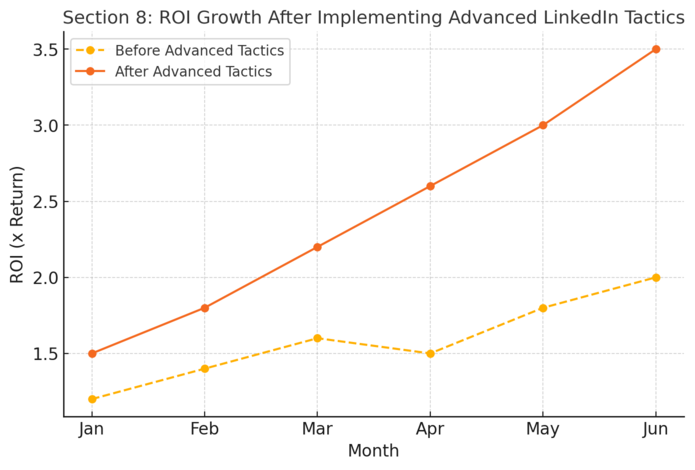
Once you’ve nailed the basics, scaling your results comes down to precision targeting and smart automation. These advanced tactics keep your funnel full without bloating your workload.
Using Website Retargeting To Capture Warm Traffic
Website retargeting is one of the most efficient ways to re-engage visitors who didn’t convert.
To set this up:
- Go to Campaign Manager → Account Assets → Insight Tag → Create Audience → Website Retargeting.
- Choose pages that show buying intent—like pricing, case studies, or demo pages.
Once the segment builds (usually 300+ users), create a tailored ad. Example: if someone visited your pricing page but didn’t book a demo, show an ad offering a short “ROI calculator” or free consultation.
I’ve found these retargeting campaigns often achieve 2–3x higher conversion rates compared to cold targeting because you’re reaching users already considering you.
Running Account-Based Marketing (ABM) Campaigns On LinkedIn
ABM campaigns focus your marketing on a select list of high-value companies. LinkedIn is ideal for this because it lets you target by company name, employee role, and seniority.
To launch an ABM campaign:
- Upload your target company list in Campaign Manager → Create Audience → Company List Upload.
- Layer on filters like “Job Title: Marketing Director” or “Seniority: VP.”
- Create ads that speak directly to their needs. Example: “See how we helped Acme Corp reduce onboarding time by 30%.”
This hyper-personalized strategy often delivers fewer leads but higher-value ones. In my experience, ABM leads are 2–4x more likely to close because they come from accounts that already match your ideal customer profile.
How To Automate Lead Nurturing With Tools Like HubSpot Or Zapier
Automation ensures no lead slips through the cracks. Once your LinkedIn campaigns start producing leads, connect them directly to your CRM.
Here’s a simple path:
- Campaign Manager → Lead Gen Forms → CRM Integration → Choose HubSpot, Salesforce, or Zapier.
- In HubSpot, create a workflow that automatically sends a welcome email and assigns the lead to your sales rep.
- Use Zapier if your CRM isn’t listed. You can trigger actions like “Add lead to email sequence” or “Send Slack notification.”
I advise setting a 3-step email sequence for new leads:
- A quick thank-you and promised resource (sent immediately).
- A follow-up with extra value (day 2).
- A soft sales CTA (day 5).
Automation keeps momentum alive while maintaining a personal touch, which is crucial for nurturing high-value prospects.
Common LinkedIn Marketing Mistakes To Avoid
Even well-planned LinkedIn campaigns can fall flat if you miss small details.
Avoiding these common pitfalls will save you money and frustration.
Targeting Too Broadly And Burning Through Budget
One of the biggest mistakes I see is marketers casting too wide a net. Broad targeting looks appealing (“more reach!”), but it often leads to wasted spend and low-quality leads.
Instead, start small. Keep audiences between 30,000–70,000 for the first few campaigns.
Refine by:
- Job title and seniority.
- Company size (especially if you sell B2B).
- Industry relevance.
You can always expand later once you know what works.
Ignoring The Creative And Message-Testing Phase
Creative testing is where your best insights come from. Too many advertisers set one ad and let it run for weeks, assuming results will improve.
I always recommend:
- Launch at least 3 ad variations per audience.
- Test visuals, tone, and CTAs separately.
- Refresh creatives every 3–4 weeks to prevent fatigue.
For example, if your video ad engagement drops suddenly, try turning the same message into a carousel or image post. Sometimes, a simple format change can reignite conversions.
Failing To Nurture Leads After The Initial Connection
Collecting leads isn’t the finish line—it’s the start of the relationship. If you don’t follow up within 24–48 hours, most of them go cold.
Have a clear lead nurturing process:
- Send a personalized email or message thanking them for engaging.
- Share one valuable resource (not another sales pitch).
- Reconnect 5–7 days later with an invitation to chat or demo.
People rarely convert from one click—they convert through familiarity.
Proven Best Practices To Get More High-Value Leads
Consistency and refinement are what separate average campaigns from elite performers. These best practices help you sustain momentum and scale without burning through your budget.
Aligning Content Offers With Buyer Intent Stages
Different audiences need different value at each stage of the funnel:
- Top of Funnel (Awareness): Free guides, industry reports, or insights.
- Middle of Funnel (Consideration): Webinars, demos, or case studies.
- Bottom of Funnel (Decision): Free trials, ROI calculators, or consultations.
If you match your ad offer to the user’s intent, conversions rise naturally.
For instance, offering a “free demo” to someone who’s never heard of you rarely works—but a “guide to saving 20% on marketing ops” does.
Balancing Awareness And Conversion Campaigns For Scalability
A healthy LinkedIn strategy includes both awareness and conversion ads. Awareness ads warm your audience, while conversion ads turn that warmth into action.
Here’s the balance I suggest:
- 60% of your budget for conversion (lead gen) ads.
- 40% for awareness and engagement ads.
Awareness content ensures your brand stays visible and credible, which directly boosts the performance of your future conversion campaigns.
Consistently Refreshing Ad Creatives To Prevent Fatigue
LinkedIn users see the same ad multiple times if you don’t rotate creatives. After about 2 weeks, click-through rates usually decline.
Create 2–3 new ad variations every month. Reuse your top-performing visuals but test new headlines or CTAs. You can monitor ad fatigue under Campaign Manager → Performance → CTR Trends.
A small creative tweak—like changing “Book a Demo” to “See It In Action”—can extend an ad’s lifespan by weeks.
Pro Tip: The best LinkedIn advertisers act more like publishers than marketers. They create content that informs, challenges, and connects—then use paid campaigns to amplify what’s already working. When you combine genuine value with data-driven precision, high-value leads come naturally.

I’m Juxhin, the voice behind The Justifiable.
I’ve spent 6+ years building blogs, managing affiliate campaigns, and testing the messy world of online business. Here, I cut the fluff and share the strategies that actually move the needle — so you can build income that’s sustainable, not speculative.
Related posts:
 How to Master LinkedIn Marketing Solutions Ad Targeting Like a Pro
 Aweber Email Marketing: Boosting Your Business Through Effective Email
 Paid Social Traffic: Strategies for Increasing Conversions
 How to Integrate Aweber with ClickFunnels
 10 Secrets to Generating Leads Online & Skyrocketing Sales
 How to Build Lead Pages That Convert Like Crazy