
Table of Contents
Some links on The Justifiable are affiliate links, meaning we may earn a small commission at no extra cost to you. Read full disclaimer.
Sellfy pricing explained clearly can save you from choosing a plan that looks affordable at first but becomes limiting once your creator business starts growing.
I’ve seen many creators compare only the monthly fee, then later realize that sales limits, payment processing fees, email credits, migration support, and upgrade timing matter just as much.
In this guide, we’ll walk through the real cost of Sellfy in plain English, from beginner setup to advanced optimization, so you can decide whether Sellfy fits your products, audience size, and revenue goals without guessing.
Understand What Sellfy Pricing Actually Includes
Sellfy is built for creators who want a simple ecommerce setup without stitching together five different tools.
Before comparing plans, it helps to understand what you’re really paying for.
What Sellfy Is Designed To Help You Sell
Sellfy is an ecommerce platform for creators who want to sell digital products, physical products, subscriptions, and print-on-demand merchandise from one storefront.
That matters because its pricing is not just about “website hosting.” You are paying for product delivery, checkout, storefront tools, payment integrations, marketing features, and basic store management in one place.
In practical terms, Sellfy is often used by creators selling ebooks, design assets, video presets, music files, templates, courses, memberships, or branded merch. You can build a hosted Sellfy store, connect your own domain, or embed products on an existing website.
That makes it useful for creators who already have traffic from YouTube, Instagram, TikTok, email, or a blog.
Here’s where I think Sellfy makes the most sense: You already have something to sell, but you do not want to spend weeks configuring a complex ecommerce system. The platform leans toward speed and simplicity rather than deep enterprise-level customization.
Sellfy’s official pricing page says the platform supports downloads, subscriptions, merch, unlimited products, PayPal/Stripe gateway support, SSL, mobile optimization, tax settings, and integrations across its paid plans.
It also states that Sellfy does not charge its own transaction fee, although payment processors such as PayPal or Stripe still charge processing fees.
The Three Main Sellfy Plans At A Glance
Sellfy currently offers three main paid subscription plans: Starter, Business, and Premium. According to Sellfy’s Help Center, the monthly prices are Starter at $29/month, Business at $79/month, and Premium at $159/month.
Annual billing is listed as $264/year for Starter, $708/year for Business, and $1,428/year for Premium.
| Sellfy Plan | Monthly Price | Annual Price | Annual Sales Limit | Best Fit |
|---|---|---|---|---|
| Starter | $29/month | $264/year | Up to $10,000/year | New creators testing products |
| Business | $79/month | $708/year | Up to $50,000/year | Growing creators needing upsells and cart recovery |
| Premium | $159/month | $1,428/year | Up to $200,000/year | Established creators needing higher limits and priority support |
The important thing is that Sellfy plans are partly based on annual sales volume. That means the cheapest plan is not always the cheapest option if your revenue grows quickly.
If you pass your plan’s yearly sales cap, Sellfy expects you to upgrade, and the company says it may charge a 2% overage fee on revenue above the limit if the account is not upgraded.
So, when comparing Sellfy plans, don’t ask only, “What can I afford this month?” Ask, “Which plan matches where my store will likely be in six to twelve months?”
What “No Transaction Fees” Really Means
One of Sellfy’s strongest selling points is that it does not charge a platform transaction fee. That sounds simple, but it is worth slowing down because many creators misunderstand this part.
Sellfy’s own fee structure means you pay your subscription price, and Sellfy does not take an extra percentage from each sale. However, your payment processor still charges fees.
Sellfy’s Help Center lists typical PayPal fees as 2.9% + $0.30 in the U.S. and 3.4% + $0.30 on average worldwide, while Stripe is listed at 2.9% + $0.30 per transaction. These processing fees are deducted by the payment provider, not by Sellfy.
Imagine you sell a $20 template. With a 2.9% + $0.30 processor fee, the fee would be about $0.88, leaving roughly $19.12 before taxes, refunds, or other business expenses. Sellfy does not add another platform percentage on top of that, which can be attractive if you sell higher volumes.
This is where the real math begins. A platform with no monthly fee but a high transaction fee may look cheaper when you sell nothing. But once you sell consistently, a fixed monthly subscription can sometimes protect your margins better.
Break Down The Real Monthly And Annual Cost
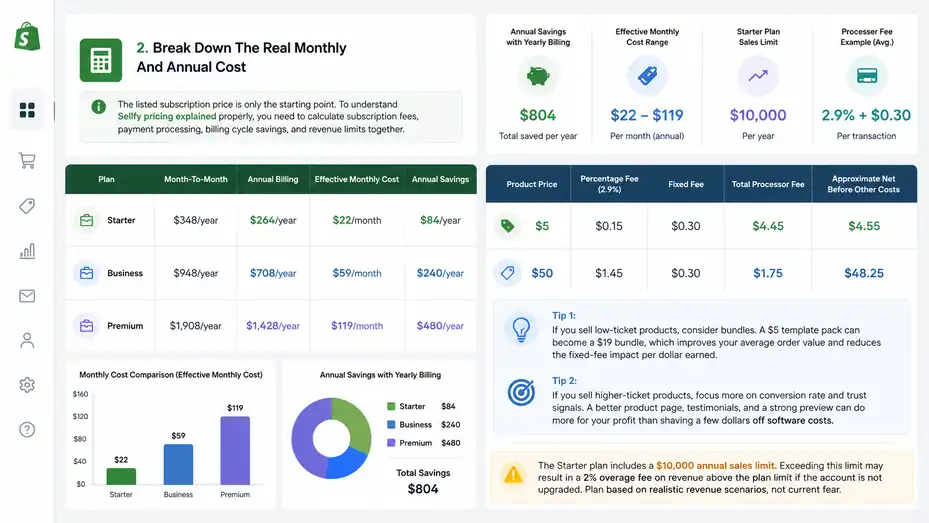
The listed subscription price is only the starting point.
To understand Sellfy pricing explained properly, you need to calculate subscription fees, payment processing, billing cycle savings, and revenue limits together.
Monthly Billing Versus Annual Billing
Sellfy offers monthly and annual pricing, and annual billing lowers the effective monthly cost. Based on Sellfy’s Help Center pricing, Starter costs $29 month-to-month or $264 annually, which works out to $22/month when paid yearly.
Business costs $79 month-to-month or $708 annually, equal to $59/month. Premium costs $159 month-to-month or $1,428 annually, equal to $119/month.
| Plan | Month-To-Month | Annual Billing | Effective Monthly Cost | Annual Savings |
|---|---|---|---|---|
| Starter | $348/year | $264/year | $22/month | $84/year |
| Business | $948/year | $708/year | $59/month | $240/year |
| Premium | $1,908/year | $1,428/year | $119/month | $480/year |
I usually suggest monthly billing when you are still validating your product idea. Paying yearly before you have proof of demand can make you feel committed to a store that has not earned its keep yet.
Once you have consistent sales, annual billing becomes more appealing.
For example, a creator making $2,000 per month from digital downloads may not feel much difference between $79 and $59 effective monthly cost, but saving $240 per year is still money that can go into design, ads, editing, or better product assets.
Payment Processing Fees You Still Need To Budget For
Even though Sellfy does not charge its own transaction fee, payment processing fees are part of your real cost. This matters most when your products are low-priced because fixed fees like $0.30 per transaction can take a noticeable bite.
Let’s compare two examples using a typical 2.9% + $0.30 processing fee:
| Product Price | Percentage Fee | Fixed Fee | Total Processor Fee | Approximate Net Before Other Costs |
|---|---|---|---|---|
| $5 | $0.15 | $0.30 | $0.45 | $4.55 |
| $50 | $1.45 | $0.30 | $1.75 | $48.25 |
This is why pricing strategy matters. A $5 product needs a much higher number of sales to cover the same subscription fee. A $50 product gives you more room to absorb payment processing costs, discounts, refunds, and customer support.
- Tip 1: If you sell low-ticket products, consider bundles. A $5 template pack can become a $19 bundle, which improves your average order value and reduces the fixed-fee impact per dollar earned.
- Tip 2: If you sell higher-ticket products, focus more on conversion rate and trust signals. A better product page, testimonials, and a strong preview can do more for your profit than shaving a few dollars off software costs.
The Hidden Cost Of Choosing Too Small A Plan
The Starter plan can be enough for a new creator, but the $10,000 annual sales limit deserves attention. That cap equals about $833 per month in revenue. If your audience is small, that may feel far away. But a successful product launch can move faster than expected.
Imagine you launch a $29 digital planner to an email list of 2,000 people. If 70 people buy during launch week, that is $2,030 in sales. Do that a few times throughout the year, and suddenly Starter becomes tight.
The hidden cost is not just an overage fee. It is the stress of having your store plan out of sync with your growth. Sellfy says users are expected to upgrade if they exceed the annual sales limit, and it may charge a 2% overage fee on revenue above the plan limit if the account is not upgraded.
In my experience, the better approach is to pick your plan based on realistic revenue scenarios, not your current fear. If you genuinely expect to cross $10,000 within the year, Business may be the cleaner choice because it also unlocks growth features that can help you earn more from the traffic you already have.
Compare Sellfy Starter, Business, And Premium Plans
Each Sellfy plan serves a different stage of creator growth.
The right plan depends on your sales volume, marketing needs, product type, and how much support you want.
Starter Plan: Best For Testing A Creator Store
The Starter plan is the entry point. It allows up to $10,000 in annual sales and includes unlimited products, customization, discounts, and email marketing credits.
Sellfy’s Help Center lists 2,000 monthly email marketing credits on Starter, along with support for selling digital products, physical products, subscriptions, and print-on-demand merchandise.
This plan is best when you are validating demand. Maybe you have a small YouTube channel and want to sell presets. Maybe you run a design page and want to test icon packs. Maybe you have a small audience and want a clean checkout without building a full ecommerce site from scratch.
Where Starter feels limited is growth automation. According to Sellfy’s plan comparison, upselling and cart abandonment are not included on Starter but are included on Business and Premium.
That matters because upsells and abandoned cart recovery can increase revenue without increasing traffic. If you are getting only a few sales per month, that may not matter yet. But once your store has regular visitors, these features become more valuable.
- Best use case: Start with Starter if your main goal is to publish products, connect payments, build a simple storefront, and test whether people buy.
- Watch-out: Do not stay on Starter just because it is cheaper if your store is already close to the $10,000 annual cap or if you are losing recoverable sales.
Business Plan: Best For Growth And Better Revenue Per Visitor
The Business plan raises the annual sales limit to $50,000 and includes features designed to help you earn more from existing traffic. Sellfy lists 10,000 monthly email marketing credits, upselling, cart abandonment, product migration, and all product types under the Business plan.
This is the plan I would look at seriously if you already have an audience and are not just experimenting. The reason is simple: Once traffic starts coming in, conversion and average order value matter more than saving $50 per month.
Upselling lets you present an additional offer during the buying flow. For example, if someone buys a $19 Lightroom preset pack, you could offer a $9 bonus editing guide or a discounted bundle. Cart abandonment lets you follow up with people who started checkout but did not finish.
Let me break it down for you: If Business costs $79/month and an upsell adds only four extra $20 purchases per month, you have nearly covered the difference between Starter and Business before considering the higher sales limit.
- Best use case: Choose Business when you are making consistent sales, have a launch calendar, run email promotions, or want to improve revenue per customer.
- Watch-out: Business is not automatically better if you have no traffic. Growth tools help most when people are already visiting your store.
Premium Plan: Best For Established Creators And Higher Sales Volume
Premium is built for creators with larger sales volume and a stronger need for support. It includes up to $200,000 in annual sales, 50,000 monthly email marketing credits, priority support, and migration support.
Sellfy’s pricing page also highlights product and design migration, advanced options, affiliate marketing, cart abandonment, and upselling on Premium.
This plan makes sense when your store is already a serious revenue channel. At that stage, software cost is not the only factor. Reliability, support speed, migration help, and growth features become more important because downtime or confusion can cost real money.
Imagine you are a creator selling $12,000 per month in templates, digital courses, and merch. At that level, the difference between Business and Premium is less about affordability and more about operational fit. You may care more about support, higher email volume, and not worrying about crossing the Business sales cap.
Premium is also relevant if you are moving from another platform and want help with product or design migration. Sellfy’s Help Center says product migration is available on Business and Premium, while store design migration is available with annual Business or Premium subscriptions.
- Best use case: Choose Premium if your creator business is established, your annual revenue could exceed $50,000, or you need priority support.
- Watch-out: Premium can be overkill if you are still pre-launch or only selling a few products casually.
Calculate Which Sellfy Plan Fits Your Revenue
The smartest way to choose a plan is to calculate backward from your expected sales. This keeps the decision practical instead of emotional.
Use Annual Revenue As Your First Filter
Sellfy’s plans are organized around annual sales limits: Starter up to $10,000, Business up to $50,000, and Premium up to $200,000. That makes revenue your first decision filter.
Here’s a simple way to estimate your likely plan:
| Monthly Revenue | Annualized Revenue | Likely Plan To Consider |
|---|---|---|
| $0–$833 | $0–$10,000 | Starter |
| $834–$4,166 | $10,008–$49,992 | Business |
| $4,167–$16,666 | $50,004–$199,992 | Premium |
| $16,667+ | $200,004+ | Contact Sellfy |
This table is not a perfect rule because launches can create uneven revenue. A creator might make $1,000 in most months but $15,000 during one launch. That is why I suggest estimating annual revenue, not just average monthly sales.
If you sell seasonal products, use your biggest launch months as part of the forecast. If you sell evergreen digital products, use your last 90 days of sales and multiply carefully.
- Step 1: Estimate your monthly baseline revenue from normal sales.
- Step 2: Add expected launch revenue from planned campaigns.
- Step 3: Compare the total with Sellfy’s annual plan limits.
- Step 4: Choose the plan that gives you breathing room, not the one you barely squeeze into.
Calculate Cost As A Percentage Of Revenue
One helpful metric is platform cost as a percentage of revenue. This tells you whether the subscription fee is reasonable for your business stage.
Let’s use annual billing because many serious sellers eventually choose it:
| Plan | Annual Cost | Revenue At Plan Cap | Subscription Cost As % Of Cap |
|---|---|---|---|
| Starter | $264 | $10,000 | 2.64% |
| Business | $708 | $50,000 | 1.42% |
| Premium | $1,428 | $200,000 | 0.71% |
This shows something interesting: The higher plans cost more in absolute dollars, but less as a percentage of revenue when used near their limits. That is common with ecommerce software.
For a new creator making $200 per month, Starter at $29/month feels expensive because it is 14.5% of monthly revenue before processor fees. For a creator making $3,000 per month, Business at $79/month is about 2.6% of revenue. The same software cost feels very different depending on sales volume.
I recommend setting a rough comfort range. For many small digital product sellers, keeping core ecommerce software under 5% of revenue is a reasonable target once the store has traction. Early on, it may be higher while you are still testing.
Factor In Average Order Value And Conversion Rate
Your average order value, often shortened to AOV, is the average amount a customer spends per order. Your conversion rate is the percentage of visitors who buy.
These two numbers help you understand whether Sellfy’s growth features can pay for themselves.
Imagine two creators:
| Creator | Monthly Visitors | Conversion Rate | Average Order Value | Monthly Revenue |
|---|---|---|---|---|
| Creator A | 1,000 | 1% | $15 | $150 |
| Creator B | 1,000 | 3% | $35 | $1,050 |
Both get the same traffic, but Creator B earns seven times more because the offer, pricing, and checkout experience perform better.
This matters for Sellfy pricing because Business includes upselling and cart abandonment. If those features raise AOV or recover missed orders, the higher plan may be more profitable even though it costs more.
In my experience, creators often underestimate AOV. They obsess over getting more traffic when the faster win is improving the offer. A $19 product with a $9 add-on can outperform a $19 product alone without needing more visitors.
Understand Feature Differences That Affect Cost
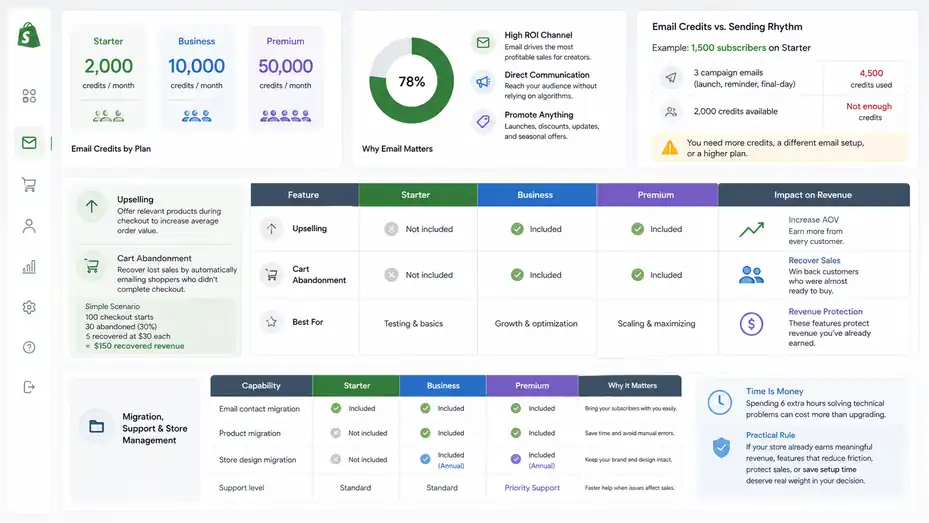
Features are not just checkboxes. A missing feature can become a hidden cost if you need another tool to replace it.
Email Marketing Credits And Audience Communication
Sellfy includes monthly email marketing credits across plans: 2,000 on Starter, 10,000 on Business, and 50,000 on Premium, according to its Help Center. Email credits count as emails sent through Sellfy’s built-in email marketing feature.
This matters because email is often where creators make their most profitable sales. Social algorithms are unpredictable. Paid ads can get expensive. But an email list gives you a direct way to announce launches, discounts, product updates, and seasonal promotions.
Still, email credits are not the same as subscribers. If you have 2,000 credits and email 1,000 people twice in a month, your credits are gone. If you email 500 people four times, same result. So, you need to think in sends, not just list size.
Example: A creator with 1,500 subscribers on Starter might assume 2,000 credits are enough. But if they send a launch announcement, a reminder, and a final-day email, they need 4,500 sends. That means they either need more credits, a different email setup, or a higher plan.
I suggest mapping your email rhythm before choosing a plan. A casual store might send one newsletter per month. A launch-driven store may send five to eight emails around each product release.
Upselling And Cart Abandonment
Upselling and cart abandonment are two features that can directly change revenue. Sellfy lists upselling and cart abandonment as available on Business and Premium, not Starter.
Upselling means offering a relevant extra product during the buying journey. It works best when the offer feels helpful, not pushy. For example, someone buying a $29 video LUT pack might appreciate a discounted $12 editing workflow guide. Someone buying a $49 course template might want a matching sales page template.
Cart abandonment helps recover people who start checkout but leave before buying. Not every abandoned cart is a lost sale forever. Some buyers get distracted. Some need to check their payment details. Some hesitate and buy later after a reminder.
Here’s a simple scenario. You get 100 checkout starts per month, but 30 people abandon. If cart recovery brings back just 5 buyers at $30 each, that is $150 recovered. That alone can justify upgrading from Starter to Business for many creators.
My opinion: If you already have consistent checkout activity, these features are not “nice extras.” They are revenue protection.
Migration, Support, And Store Management
Migration support can be easy to overlook until you need it. Sellfy says email contact migration is available on all paid plans, product migration is available on Business and Premium, and store design migration is available with annual Business or Premium subscriptions.
If you are starting from zero, migration may not matter. But if you already sell on another platform, migration can save time and reduce mistakes. Moving product files, descriptions, customers, and design elements manually can be tiring, especially if you have dozens of digital products.
Support also becomes more important as your store grows. Starter may be fine when a small issue costs little. But if a checkout problem appears during a major launch, faster help matters.
I believe creators should value their own time more honestly. Saving $50 per month is not a win if you spend six extra hours fighting technical problems. Your time has a cost, even when no one sends you an invoice.
Practical rule: If your store is already earning meaningful revenue, features that reduce friction, protect sales, or save setup time deserve real weight in your decision.
Compare Sellfy Pricing With Alternative Cost Models
Sellfy is not the only way to sell online, so pricing only makes sense when compared with other ecommerce cost structures.
The goal is not to declare one winner for everyone, but to understand what you are paying for.
Subscription Pricing Versus Transaction-Based Pricing
Sellfy uses a subscription-first model with no Sellfy transaction fees. That means your cost is predictable: You pay your plan fee plus payment processing.
Some creator platforms use a lower monthly fee or free plan but charge a percentage of each sale. That can be friendly when you are just starting, because you pay mostly when you earn. But as revenue grows, percentage fees can become expensive.
Let’s compare a simple hypothetical:
| Monthly Revenue | 5% Platform Fee Model | Sellfy Starter Monthly Fee | Sellfy Business Monthly Fee |
|---|---|---|---|
| $500 | $25 | $29 | $79 |
| $2,000 | $100 | $29 | $79 |
| $5,000 | $250 | Not enough annual cap | $79 |
This is simplified and does not include payment processing, but it shows the tradeoff. Transaction-based pricing can be cheaper at very low revenue. Subscription pricing can become more attractive as your sales increase.
In plain English: If you are unsure whether you will sell anything, a percentage-based platform can feel safer. If you are confident you can generate consistent revenue, Sellfy’s fixed subscription model can protect your margins.
Sellfy Versus Building Your Own Store Stack
Another option is building your own ecommerce stack using a website builder, checkout tool, file delivery system, email platform, analytics, and plugins. This can be powerful, but it adds complexity.
The DIY route may include costs like:
| Need | Possible Cost Type | Why It Matters |
|---|---|---|
| Website hosting | Monthly or annual | Keeps your site online |
| Theme or builder | One-time or recurring | Controls design and layout |
| Checkout system | Monthly or transaction-based | Processes orders |
| Digital file delivery | Monthly or plugin-based | Sends files securely |
| Email marketing | Subscriber or send-based | Handles promotions |
| Analytics/tracking | Free or paid | Measures performance |
| Maintenance | Time or contractor cost | Fixes updates and bugs |
For technical creators, this can be worth it. You get more control and flexibility. For many creators, though, the “cheap” DIY path becomes expensive in time. You may save on subscription cost but lose hours to setup, plugin conflicts, checkout testing, and support issues.
This is where Sellfy’s value proposition becomes clearer. It is not trying to be the most customizable ecommerce system on earth. It is trying to help creators sell quickly without turning into web developers.
My take: If you enjoy technical setup and need deep customization, a custom stack may fit. If your main job is creating, teaching, designing, filming, writing, or building an audience, an all-in-one store can be worth the subscription.
When Sellfy Is Not The Cheapest Option
Let’s be honest: Sellfy is not always the cheapest platform for every creator. If you have no audience, no product validation, and no sales plan, even $29/month can feel heavy.
Sellfy may not be the best financial fit if:
- You are only collecting interest: A landing page or waitlist may be enough before paying for ecommerce.
- You sell one very low-priced item rarely: Fixed monthly costs may eat too much margin.
- You need advanced custom workflows: A more flexible ecommerce setup may make sense.
- Your payment processor is not supported in your country: Sellfy says it supports PayPal and Stripe for payment collection, so availability matters.
That said, “cheapest” is not always “best.” A platform that saves $20 but makes checkout clunky can cost you more in lost conversions. A platform with more features but a confusing setup can slow down your launch.
I suggest judging Sellfy by total business fit: cost, ease, checkout experience, product delivery, customer communication, and growth features.
Set Up Sellfy Without Overspending
A smart setup helps you avoid paying for features before you need them. The goal is to start lean, validate quickly, and upgrade when the numbers support it.
Start With The Smallest Plan That Matches Your Next Milestone
Sellfy offers a 14-day free trial, but Sellfy’s Help Center notes that checkout is disabled during the trial, so you cannot sell products until upgrading. The trial is still useful for testing the store builder, product setup, design options, and dashboard before committing.
Use the trial to answer practical questions:
- Can I build a product page quickly?
- Does the checkout flow feel simple?
- Can I organize my products clearly?
- Does the storefront match my brand well enough?
- Do the available payment options work for my audience?
Once you upgrade, choose based on your next milestone. If your next milestone is “make my first 20 sales,” Starter is probably enough. If your next milestone is “run a serious launch to an existing audience,” Business may be safer because of upsells and cart recovery.
I do not recommend choosing Premium just because you want to “look professional.” Your customers usually care more about the product, page clarity, trust, and checkout experience than the name of your backend plan.
Practical setup path: Trial first, Starter for validation, Business when traffic and sales become consistent, Premium when revenue and support needs justify it.
Build A Lean Product Catalog First
Unlimited products can tempt you to upload everything. But a crowded store with weak positioning often converts worse than a focused store with clear offers.
Start with a lean catalog. For example, instead of launching 20 random digital downloads, create one core product, one bundle, and one low-priced entry offer. This makes your pricing easier to understand and your store easier to browse.
A simple creator store might look like this:
| Product Role | Example | Purpose |
|---|---|---|
| Entry product | $9 checklist | Low-risk first purchase |
| Core product | $29 template pack | Main revenue driver |
| Bundle | $59 complete toolkit | Higher average order value |
| Subscription | $12/month resource library | Recurring revenue test |
This kind of structure helps you make better use of Sellfy’s features. On Business, for example, you can upsell from the entry product to the bundle or recover abandoned carts from the core product.
In my experience, creators often need fewer products and better product pages. A clear promise, strong preview images, simple pricing, and a believable outcome can outperform a large catalog that feels messy.
Avoid Paying For External Tools Too Early
Because Sellfy includes storefront, checkout, product delivery, email credits, discounts, and marketing features, beginners should avoid stacking extra tools too early. Extra software can create duplicate costs and confusion.
For example, you may not need a separate email tool immediately if Sellfy’s built-in email credits fit your current list size and send frequency. You may not need a separate landing page builder if your Sellfy product pages are clear enough for launch. You may not need advanced analytics tools before you have enough traffic to analyze.
I suggest this simple rule: Add a paid tool only when you can name the specific problem it solves and how it will likely pay for itself.
- Bad reason: “Everyone says I need a bigger stack.”
- Good reason: “My list has outgrown Sellfy’s email credits, and I need segmentation for weekly campaigns.”
This keeps your cost structure clean. Early creator businesses often fail not because the tools are bad, but because the setup becomes heavier than the sales.
Optimize Sellfy Costs For Higher Profit
Once your store is live, pricing optimization becomes more important than software savings. Small improvements in offer structure can make Sellfy feel much cheaper relative to revenue.
Increase Average Order Value With Bundles
Bundles are one of the simplest ways to improve profitability. Instead of selling one $12 product at a time, package related products into a $29 or $49 offer.
Imagine you sell social media templates:
| Offer | Price | Customer Value |
|---|---|---|
| Single template pack | $12 | Good for one campaign |
| Creator bundle | $29 | Multiple campaigns and formats |
| Complete brand kit | $59 | Templates, guide, and bonus assets |
The bundle works because it gives the buyer a clearer outcome. They are not just buying files. They are buying convenience, speed, and less decision fatigue.
This matters for Sellfy pricing because fixed subscription costs become easier to absorb when your average order value rises. If your AOV is $10, you need many more sales to cover your plan. If your AOV is $40, fewer sales can cover the same cost.
I suggest designing bundles around outcomes, not just quantity. “100 templates” sounds big, but “launch your next content campaign in one afternoon” sounds useful.
Product pricing tip: Keep the bundle discount meaningful but not desperate. A 20–30% bundle advantage often feels attractive without training customers to wait for huge discounts.
Use Upsells Without Annoying Buyers
If you are on Business or Premium, upselling can help you earn more from each buyer. But upsells work best when they are relevant, timely, and easy to understand.
A good upsell should feel like a natural next step:
| Original Purchase | Smart Upsell | Why It Works |
|---|---|---|
| Ebook | Workbook | Helps apply the lesson |
| Preset pack | Editing tutorial | Helps use the product better |
| Website template | Copywriting checklist | Helps finish the site faster |
| Music sample pack | Bonus drum kit | Expands creative options |
A bad upsell feels random. If someone buys a photography preset, offering a business tax spreadsheet may technically be another product, but it does not match the buyer’s immediate intent.
I recommend keeping upsells simple. One strong offer usually beats three confusing offers. The buyer is already in checkout mode, so do not overload them with decisions.
Mini scenario: A video creator sells a $39 editing preset pack. They add a $15 upsell for a short editing workflow guide. If 20% of buyers accept the upsell, every 100 sales adds $300 in extra revenue before processor fees. That kind of improvement can easily justify a higher plan.
Reduce Refunds With Better Product Pages
Refunds are a cost too. They create lost revenue, support work, and sometimes payment processing complications. The best way to reduce refunds is to set accurate expectations before purchase.
Your Sellfy product page should answer the buyer’s silent questions:
- What exactly do I get?
- Who is this for?
- What format is included?
- How do I access it after purchase?
- Do I need specific software to use it?
- What result should I realistically expect?
For digital products, include screenshots, previews, compatibility notes, file types, and a simple “how it works” explanation. If your template requires Canva, Photoshop, Notion, Excel, or another tool, say that clearly. Do not make the buyer discover it after purchase.
In my experience, vague product pages convert poorly and create more support questions. Clear product pages may feel longer, but they build trust. Buyers want confidence, especially when purchasing from an individual creator instead of a huge brand.
A strong product page can improve conversion rate, reduce refunds, and lower support time. That means your Sellfy subscription works harder without costing more.
Track The Metrics That Prove Sellfy Is Worth It
You do not need enterprise analytics to know whether Sellfy is paying off. You need a few core numbers and the habit of checking them regularly.
Track Revenue, Fees, And Net Profit
Start with basic financial tracking. Revenue is exciting, but profit keeps the business alive. Your real Sellfy cost includes the subscription fee, payment processing fees, refunds, taxes, product creation costs, and any extra tools.
A simple monthly tracking table might look like this:
| Metric | Example Amount |
|---|---|
| Gross sales | $2,500 |
| Payment processing fees | $95 |
| Sellfy subscription | $79 |
| Refunds | $80 |
| Other tools | $40 |
| Estimated net before tax | $2,206 |
This kind of tracking helps you avoid emotional decisions. Maybe Business feels expensive at $79/month, but if it supports $2,500 in monthly sales, the cost is reasonable. On the other hand, if your store makes $90/month for several months, you may need to rethink your offer, traffic source, or platform choice.
I recommend reviewing numbers monthly, not daily. Daily sales can swing too much and make you anxious. Monthly data gives you a clearer pattern.
Important metric: Calculate your ecommerce platform cost as a percentage of gross revenue. If that percentage drops over time, your store is becoming more efficient.
Measure Conversion Rate By Traffic Source
Not all traffic is equal. A visitor from your email list may be warmer than a random social media click. A blog reader searching for a specific solution may convert better than someone casually browsing from a viral post.
Track where your buyers come from as best you can. You want to know which channels create revenue, not just attention.
Example:
| Traffic Source | Visitors | Sales | Conversion Rate |
|---|---|---|---|
| Email list | 400 | 32 | 8% |
| YouTube description | 900 | 27 | 3% |
| Instagram bio | 700 | 7 | 1% |
| Blog post | 500 | 20 | 4% |
This tells a clear story. The email list is small but powerful. YouTube brings volume. Instagram brings attention but fewer buyers. Blog content converts well because search intent is stronger.
This matters for Sellfy pricing because your plan should match your growth engine. If email drives sales, email credits and campaigns matter. If product pages get lots of checkout starts, cart abandonment matters. If you rely on bundles and add-ons, upselling matters.
In plain language: Do more of what creates buyers, not just followers.
Review Plan Fit Every Quarter
Creator businesses change quickly. A plan that made sense in January may be too small by June. I suggest reviewing your Sellfy plan every quarter.
Ask yourself:
- Am I close to my annual sales cap?
- Am I using the features I pay for?
- Would upgrading unlock revenue I am currently missing?
- Would downgrading hurt my sales process?
- Do I need more email credits, support, or migration help?
This keeps you from both underpaying and overpaying. Underpaying sounds impossible, but it happens when a creator stays on a cheaper plan and misses revenue opportunities. Overpaying happens when someone buys advanced features before they have the audience or sales process to use them.
From what I’ve seen, the best upgrade moment is when the next plan has a clear job. For example, “I need Business because abandoned checkout recovery can recover sales from my upcoming launch” is a strong reason. “I feel like I should upgrade because I want to be serious” is not.
Avoid Common Sellfy Pricing Mistakes
Most pricing mistakes come from choosing based on emotion instead of math. A little planning can prevent expensive frustration.
Mistake 1: Comparing Only Monthly Prices
The most common mistake is comparing only the visible monthly fee. Starter is cheaper than Business. Business is cheaper than Premium. That part is obvious. But the better question is what each plan helps you earn, save, or avoid losing.
If Business helps recover abandoned carts, increase average order value, and stay under a higher sales cap, it may be cheaper in practice than Starter for a growing creator. If Premium prevents support delays during high-volume launches, it may be worth the higher cost for an established seller.
This is why I like thinking in “net value” instead of “monthly cost.” Net value includes:
- Revenue potential: Can this plan help increase sales?
- Time savings: Can it reduce manual work?
- Risk reduction: Can it prevent migration, support, or limit problems?
- Scalability: Can it support where the store is going next?
A beginner does not need every feature. But a growing creator should not automatically avoid the higher plan just because it costs more.
Better approach: Compare plan cost against expected revenue, feature usage, and missed opportunity.
Mistake 2: Ignoring The Annual Sales Cap
The annual sales cap is one of the most important parts of Sellfy pricing explained properly. Starter supports up to $10,000 in annual sales, Business up to $50,000, and Premium up to $200,000. If you exceed your plan limit, Sellfy expects an upgrade and may apply a 2% overage fee on revenue above the limit if you do not upgrade.
Many creators underestimate this because they think in monthly averages. But launches, promotions, seasonal sales, and viral content can create revenue spikes.
Imagine your normal month is $500, so Starter feels safe. Then one product launch brings in $6,000. Suddenly your annual projection changes. That is a good problem, but it is still a planning issue.
I suggest tracking annualized revenue. Take your last 90 days of sales, divide by three, and multiply by twelve. Then add any known launches or seasonal campaigns. This gives you a more realistic plan-fit estimate.
Better approach: Choose the plan that fits your likely annual revenue, not just your current monthly baseline.
Mistake 3: Forgetting The Cost Of Your Time
Creators often treat their own time as free. I understand why. When you are starting, you do everything yourself. But your time still has value.
If a cheaper setup saves $30 per month but costs you five extra hours of troubleshooting, is it really cheaper? Maybe not. Those five hours could go into product creation, content, customer research, email writing, or improving your offer.
Sellfy’s value is partly convenience. It bundles store setup, product delivery, checkout, email credits, and marketing features into one system. That may not matter if you love technical setup. But if you are trying to grow a creator business around your skills, simplicity has real value.
I advise assigning a basic hourly value to your time, even if it feels awkward. If you value your time at $25/hour and a platform saves four hours per month, that is $100 of practical value.
Better approach: Count time saved, not just money spent.
Decide Whether Sellfy Is Worth It For Your Creator Business
The final decision should connect cost to business model. Sellfy is worth it when its simplicity, no-platform-transaction-fee model, and creator-focused features support your revenue goals.
Sellfy Is Worth It If You Have A Clear Product And Audience
Sellfy makes the most sense when you have a clear product and a realistic way to reach buyers. That audience can be small. It does not need to be huge. But there should be some path to traffic: YouTube, search, email, social media, partnerships, or an existing community.
A creator with 1,000 engaged subscribers and a $39 product may do better than a creator with 50,000 passive followers and no clear offer. Pricing software cannot fix weak positioning. But it can make buying easier when the offer is strong.
Sellfy is especially practical if you want to sell multiple product types without overcomplicating your setup. Digital products, subscriptions, physical products, and print-on-demand merchandise can all fit inside the same creator business model. Sellfy’s pricing page and Help Center list support for these product types across plans.
My honest view: Sellfy is worth considering if you care more about launching quickly than customizing every pixel of a complex store.
- Good fit: You have products, an audience, and want a simple sales system.
- Weak fit: You are still brainstorming and do not know what you will sell.
Choose Your Plan Based On Your Current Stage
Here is my practical recommendation:
| Creator Stage | Suggested Plan | Reason |
|---|---|---|
| Testing first product | Starter | Lowest paid entry point and enough for validation |
| Selling consistently | Business | Higher sales cap plus upsells and cart recovery |
| Scaling seriously | Premium | Higher limit, more credits, priority support |
| Over $200,000/year | Contact Sellfy | Standard plans may not fit |
Starter is for proof. Business is for growth. Premium is for scale.
That does not mean every creator must follow that path perfectly. You might start on Business if you already have an audience and a launch planned. You might stay on Starter longer if your sales are steady but modest. You might skip Premium until support speed and revenue limits truly matter.
The key is to choose based on evidence. Look at revenue, traffic, conversion rate, average order value, email needs, and support needs.
I would rather see you start lean and upgrade confidently than start expensive and hope the plan motivates you. Motivation is great, but math is calmer.
Final Verdict On Sellfy Pricing Explained
Sellfy pricing is fairly straightforward on the surface: Three paid plans, no Sellfy transaction fees, and annual sales limits. The real decision is deeper. You need to account for payment processing, annual billing savings, email credits, upsells, cart abandonment, migration, support, and your expected revenue.
For new creators, Starter can be a sensible way to validate a store. For growing creators, Business is often the more strategic plan because its revenue features can pay for themselves. For established creators, Premium becomes less about the monthly fee and more about capacity, support, and smoother operations.
My recommendation is simple: Start with the plan that matches your next realistic milestone, then review your numbers every quarter. Do not overbuy features you will not use, but do not underbuy if the next plan can help you recover sales, raise order value, or avoid growth limits.
When Sellfy pricing is explained through real business numbers, the question changes from “Is Sellfy expensive?” to “Can Sellfy help my creator store earn more than it costs?” That is the question that actually matters.
FAQ
What is Sellfy pricing explained in simple terms?
Sellfy pricing explained means understanding the monthly plan cost, annual sales limits, payment processing fees, and growth features before choosing a plan. Creators should compare Starter, Business, and Premium based on expected revenue, product type, email needs, and whether features like upsells or cart recovery can increase profit.
How much does Sellfy cost for creators?
Sellfy pricing starts with paid monthly or annual plans, and the real cost depends on your sales volume and billing cycle. Creators also need to budget for payment processor fees from services like Stripe or PayPal, even though Sellfy does not charge its own transaction fee.
Which Sellfy plan is best for beginners?
The Starter plan is usually best for beginners who want to test digital products, physical products, subscriptions, or print-on-demand items without paying for advanced growth tools. It works well when your sales are still modest and you mainly need a simple storefront, checkout, and product delivery system.
Is Sellfy Business worth the higher price?
Sellfy Business can be worth it when you already have traffic or regular sales because it includes features like upselling and cart abandonment recovery. These tools can help increase average order value and recover missed sales, which may offset the higher monthly cost for growing creator businesses.
Does Sellfy have hidden fees?
Sellfy does not charge its own transaction fee, but creators still pay payment processing fees through providers like Stripe or PayPal. You should also consider annual sales limits, possible upgrade needs, email credit usage, migration support, and extra tools when calculating the full cost of using Sellfy.

I’m Juxhin, the voice behind The Justifiable.
I’ve spent 6+ years building blogs, managing affiliate campaigns, and testing the messy world of online business. Here, I cut the fluff and share the strategies that actually move the needle — so you can build income that’s sustainable, not speculative.
Related posts:
 Advantages of a Dropshipping Company: Genuine Business Knowledge
 Fitness Bloggers and the Art of Passive Income: Tips and Tricks
 Ecommerce Store Guide: 7 Negative Pitfalls to Avoid
 7 Best Website Builder for Online Store Launches in One Day
 How to Start an Online Store That Gets Sales Faster
 Online Business Courses: Start Your Entrepreneurial Journey Today