
Table of Contents
Some links on The Justifiable are affiliate links, meaning we may earn a small commission at no extra cost to you. Read full disclaimer.
SurveyMonkey review for startups collecting data is a topic worth looking at closely because this tool can feel deceptively simple at first. You open it, build a survey, send a link, and responses start coming in.
But for a startup, the real question is not whether SurveyMonkey works. It is whether it helps you collect the right data fast enough, cleanly enough, and affordably enough to guide actual product and growth decisions.
In my experience, that is where the hidden pros show up, along with a few limits that matter more than most reviews admit.
What SurveyMonkey Actually Offers Startups
If you are early-stage, you do not need a giant research suite on day one.
You need a tool that helps you ask better questions, collect answers fast, and turn responses into decisions.
What SurveyMonkey Is Best At
SurveyMonkey is an online survey and forms platform built around quick survey creation, response collection, logic, analysis, templates, and integrations. Its current product lineup includes AI-assisted survey creation, 500+ templates, 200+ integrations, logic tools, market research methods, and team plans for collaboration.
The free tier allows unlimited surveys with up to 25 responses per survey, while paid plans unlock unlimited questions, more advanced logic, branding, and stronger analysis tools.
For a startup, that matters because speed usually beats complexity in the first few months. You might be validating a pricing page, testing onboarding friction, measuring customer satisfaction after delivery, or asking churned users why they left.
In those cases, SurveyMonkey’s biggest advantage is that it lowers the setup barrier. You do not need a research team to launch something usable.
I believe this is one of the most underrated parts of the platform. A lot of founders think data quality starts in the dashboard. It usually starts in the first ten minutes of survey creation. If a tool helps you launch clean questions faster, it quietly improves your data before you ever open a report.
A realistic example: Imagine you run a SaaS startup with 800 signups a month. You want to know why trial users stop after day three. With SurveyMonkey, you can build a short offboarding survey, add skip logic so people only see relevant follow-up questions, and send it the same afternoon. That speed can be more valuable than a more “powerful” platform you never fully implement.
Why Startups Keep Coming Back To It
Third-party user reviews consistently highlight SurveyMonkey’s ease of use, quick setup, templates, and built-in analytics. At the same time, reviewers also mention that some of the better features sit behind paid plans, which is important for startup budgeting.
That tradeoff explains why SurveyMonkey stays popular with smaller teams. It solves the first problem quickly: getting responses. It also solves the second problem reasonably well: making those responses understandable without exporting every dataset to another tool.
Many startups overestimate how much advanced analytics they need in the beginning. What they usually need is clarity. They need to know things like:
- Which customer segment is most frustrated
- Which feature request appears most often
- Which signup source brings lower-intent users
- Which onboarding step causes drop-off
SurveyMonkey helps with that middle layer between “we have no data” and “we have a full research ops workflow.” That is its sweet spot.
My honest take is that SurveyMonkey works best when your team is still forming a measurement habit. It is not only about gathering answers. It is about getting your startup comfortable asking focused questions regularly.
Where SurveyMonkey Fits In The Startup Data Journey
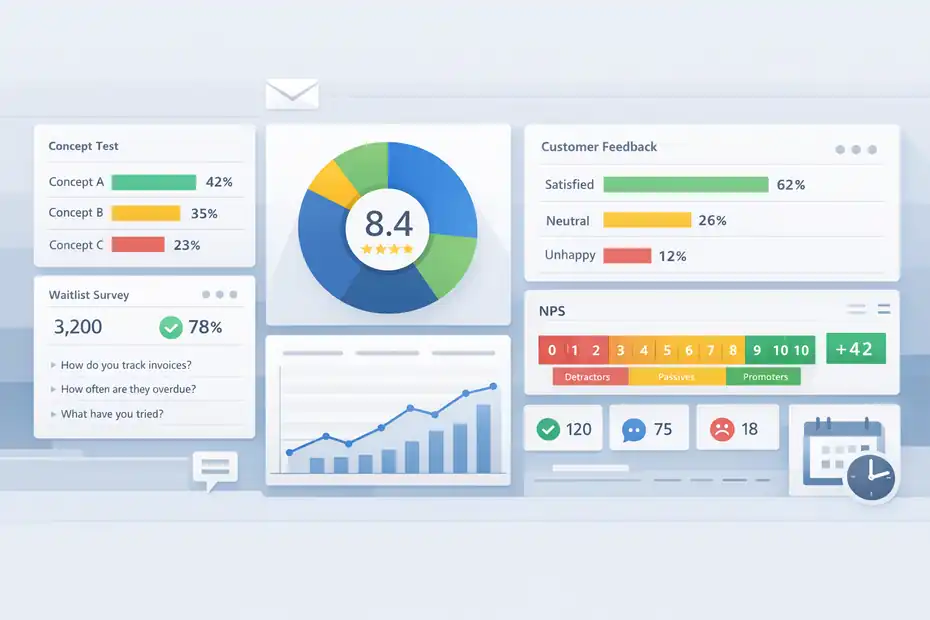
This is where many reviews get too generic. They say the platform is good for surveys, which is true but not very useful.
The better question is where it fits in your startup’s actual operating rhythm.
Early Validation And Problem Discovery
At the pre-seed or seed stage, most teams are collecting directional data, not perfect data. You are trying to validate pain points, understand jobs to be done, and find language customers naturally use.
SurveyMonkey is strong here because it lets you launch concept tests, customer discovery surveys, waitlist questionnaires, and onboarding questions quickly. Its templates and certified question bank also help reduce badly worded questions that can bias results.
SurveyMonkey says its Question Bank contains hundreds of certified questions created by survey methodologists, which is more useful than it sounds if your team has little survey design experience.
This is one of the hidden pros I like most. Founders are usually not trained researchers. That is normal. The risk is that they ask leading questions like, “How much do you love our new feature?” which tells you almost nothing. Starting from stronger question structures can save you from collecting polished nonsense.
Imagine you are building a budgeting app for freelancers. A bad question would be, “Would you use our automated invoice reminders?” A better sequence is: “How do you currently follow up on unpaid invoices?” then “How often does this create delays?” then “What have you already tried?”
That sequence reveals behavior, urgency, and failed alternatives. A decent survey platform nudges you toward that kind of structure.
For startup discovery, SurveyMonkey is not magic. It simply makes disciplined research easier to repeat. That matters more than fancy dashboards.
Ongoing Feedback Once You Have Users
Once you have active users, the job changes. You are no longer just validating an idea. You are measuring satisfaction, friction, retention signals, support quality, and feature demand.
This is where SurveyMonkey becomes more operational. You can use it for post-purchase feedback, NPS-style sentiment tracking, support interaction surveys, onboarding check-ins, and churn interviews.
The platform supports multiple question types, including multiple choice, checkboxes, comment boxes, and validated short text fields for things like numbers, dates, and email addresses.
That variety matters because different business questions require different response formats. If you want to benchmark satisfaction over time, structured scales help. If you want to understand why users are confused, open-ended responses often reveal the real problem. A startup needs both.
I suggest treating SurveyMonkey less like a one-off survey app and more like a lightweight listening system. For many startups, that means setting up a few recurring data loops:
- New user survey after activation
- Post-support survey after ticket resolution
- Quarterly customer sentiment survey
- Churn exit survey when someone cancels
- Lead qualification survey for demos or waitlists
You do not need a research department to run this. You need consistency and decent question design.
Team Collaboration As You Grow
As your startup grows from two founders to a functional team, surveys stop being one person’s side project. Product wants feedback. Customer success wants satisfaction scores. Marketing wants lead qualification. Operations wants event or process feedback.
SurveyMonkey’s team-oriented features include team plans, consolidated billing, user management, branding controls, and collaboration capabilities aimed at growing teams. The platform positions teams plans specifically for growing teams that need branding controls and real-time collaboration.
This is a quiet advantage for startups entering the messy middle. You may not think you need collaboration controls until multiple people start duplicating surveys, changing questions midstream, or exporting different versions of the same data. Then it becomes a headache very quickly.
In my experience, one hidden cost in startup data collection is inconsistency. If marketing calls a user “qualified” one way and product defines them differently in a survey, your insights stop matching. Centralized survey ownership and templates can prevent that drift.
The Hidden Pros Most Reviews Skip
This is the heart of the review. The obvious pros are ease of use and brand recognition.
The hidden pros are what make SurveyMonkey useful for startups that need decisions, not just response counts.
Hidden Pro 1: It Shortens The Time Between Question And Action
SurveyMonkey’s AI survey builder, templates, and guided setup reduce the time it takes to move from vague curiosity to a live survey. Officially, the platform supports AI-generated survey creation based on a prompt, plus expert templates to speed setup.
That sounds like a convenience feature, but for startups it is really an execution feature. The longer it takes to build a survey, the less likely you are to send it while the question still matters.
A founder notices churn is rising, says “we should survey users,” then gets pulled into recruiting, product bugs, and investor updates. Two weeks later, the survey never happened.
A fast survey workflow fixes that.
Here is a practical example. Say your conversion rate from demo to paid drops from 18% to 11%. You do not need a three-week research project first. You need a quick survey sent to lost deals asking what stopped them from moving forward. The faster you can launch, the more recent and reliable the feedback.
I have seen startups win simply because they ask timely questions while the customer memory is still fresh. SurveyMonkey supports that behavior extremely well.
Hidden Pro 2: Logic Improves Data Quality More Than People Realize
Survey logic is one of the most valuable startup features because it keeps respondents from seeing irrelevant questions. SurveyMonkey’s logic tools include skip logic, page routing, advanced logic, and answer piping, which lets you personalize later questions using earlier responses.
SurveyMonkey specifically states that logic is used to control survey behavior and enhance data quality.
This matters because startup surveys often fail from fatigue, not volume. People abandon surveys when questions feel repetitive, generic, or obviously unrelated to them.
A good example is a B2B founder interviewing both current customers and lost prospects in one survey. Without logic, the survey feels clumsy. With logic, current customers see onboarding and product value questions, while lost prospects see budget, timing, and objection questions. Same survey link, cleaner data, better completion rate.
I recommend using logic any time your audience includes more than one segment. It makes the experience feel tailored, and that usually produces more honest answers.
This is one of those areas where a startup can look more mature than it is. Thoughtful survey flow signals professionalism, and respondents notice that even if they cannot explain why.
Hidden Pro 3: Built-In Analysis Is Good Enough For Many Startup Decisions
SurveyMonkey is not a full business intelligence stack, but its built-in filtering, charts, summaries, and text analysis can be enough for many startup workflows.
The platform highlights action-ready insights, filters, reporting, and text analysis for open-ended responses in relevant paid offerings, while user reviews also praise the built-in analytics for turning responses into understandable patterns.
This is important because the real bottleneck for many startups is not data collection. It is interpretation. Teams collect feedback, export a CSV, open it once, then forget it exists because no one has time to clean and analyze everything manually.
If your survey dashboard already shows common trends, quick filters, and readable summaries, you are more likely to act on the results.
For example, if you ask churned users why they left and then filter responses by company size, acquisition source, or plan type, you may discover that one segment leaves mostly for missing integrations while another leaves because your pricing feels too high.
Those are very different problems. A decent built-in analysis layer helps you spot them faster.
Would I still export major research projects into deeper tools sometimes? Yes. But for weekly or monthly startup decision-making, “good enough and easy to use” often beats “advanced and ignored.”
Step-By-Step Setup For Startups Collecting Data
A review is only useful if it helps you use the tool properly.
So let me break this down the way I would for a small startup team using SurveyMonkey with limited time.
Start With One Business Question, Not Ten
The fastest way to ruin a startup survey is to ask everything at once. SurveyMonkey can handle long surveys on paid plans, but that does not mean you should build one.
Paid plans support unlimited questions, while the free plan limits surveys to 10 questions and 25 responses per survey.
The better approach is to define one core decision before writing the first question.
Try this framework:
- Decision: What do we need to decide after this survey?
- Audience: Who can answer this accurately?
- Timing: When should we ask them?
- Success: What pattern in responses would be actionable?
Here is a concrete example. Instead of “let’s learn more about our customers,” choose “we need to know why free users do not invite teammates during the first week.” That sharper question changes everything. It narrows your audience, makes the survey shorter, and produces more useful answers.
In my experience, founders often think broader surveys produce more insight. They usually produce more noise. The highest-performing startup surveys are narrow, timely, and tied to a real decision someone will make within days.
Build The Survey Around Behavior First
SurveyMonkey gives you multiple structured and open-ended question types. Use that flexibility wisely. Ask about real behavior before asking for opinions. Officially, the platform supports multiple choice, checkbox, comment box, and validated text entry options, among others.
A simple structure I recommend is:
- Context question: What type of user is this?
- Behavior question: What did they actually do?
- Friction question: Where did they struggle?
- Priority question: What mattered most?
- Open-ended follow-up: What did you expect instead?
That order works because it warms people up and gives you analyzable data before the nuanced comments come in.
Imagine a startup testing a new reporting dashboard. A weak survey asks, “Do you like the dashboard?” A stronger version asks, “How many times did you use the dashboard this week?” then “Which task were you trying to complete?” then “What slowed you down?” and finally “What would have made this more useful?”
That sequence tells you usage, intent, friction, and improvement opportunities.
You do not need to sound clever in a survey. You need to sound clear. I would choose a plain question that gets honest data over a “smart” question that confuses people every time.
Use Logic To Keep It Short And Relevant
Once the base questions are in place, add logic. SurveyMonkey’s skip logic and advanced logic allow you to route people based on earlier answers, and piping can personalize later questions using previous responses.
This is especially useful for startups collecting data from mixed audiences. A marketplace startup, for instance, may survey both buyers and sellers. Those groups should not receive the same questions after the first segmenting question.
A clean setup might look like this:
- Question 1: Are you a buyer or seller?
- Buyer path: Ask about checkout, search, trust, pricing
- Seller path: Ask about onboarding, listing quality, payout speed
- Final question: What should we improve first?
That kind of flow keeps surveys shorter and increases the chance of completion.
I suggest aiming for completion in under five minutes unless the respondent has a strong reason to finish a longer form. Startups sometimes forget that attention is part of the cost. Every unnecessary question spends some of it.
Pricing, Limits, And Whether The Cost Makes Sense
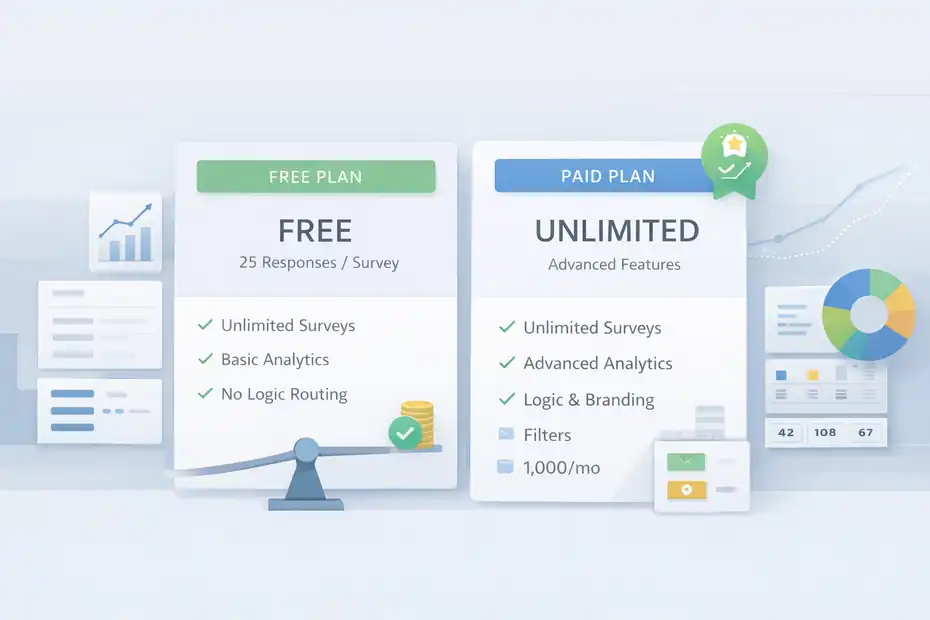
For startups, value matters more than feature lists. A tool can be excellent and still be the wrong fit if it creates budget pressure too early.
What You Get On Free Vs Paid
SurveyMonkey’s free offering is useful for testing simple workflows, but it is intentionally limited. The company currently states that Basic users can create unlimited surveys and collect 25 free responses on each survey, while paid plans unlock unlimited questions and additional advanced features.
Paid offerings also add items like logic, branding, analysis tools, and advanced research capabilities. The FLEX plan page also highlights 1,000 responses per month, filters, and text analysis in that plan context.
For a bootstrapped startup, the free version is fine for light validation work, internal feedback, or very small respondent pools. It becomes restrictive fast if you are collecting customer research regularly or need branded, logic-based, stakeholder-ready surveys.
Here is the practical interpretation:
| Startup Need | Free Plan Fit | Paid Plan Fit | My Take |
|---|---|---|---|
| Quick concept validation | Good | Better | Free is enough for small tests |
| Ongoing customer feedback | Limited | Strong | Paid starts making sense |
| Multi-segment surveys with logic | Weak | Strong | Logic is worth paying for |
| Branded surveys for partners or clients | Weak | Strong | Presentation matters |
| Team collaboration | Weak | Strong | Important after early stage |
| Open-ended response analysis at scale | Limited | Better | Paid saves manual work |
This is where I think SurveyMonkey can feel expensive or efficient depending on your workflow. If you send one survey every quarter, it may feel overpriced. If you run weekly customer learning loops, it can pay for itself by helping you avoid bad product decisions.
The Real Startup Cost Is Not The Subscription
The hidden cost in data collection is usually not software. It is bad decisions made from weak feedback or no feedback at all.
Let’s say your startup spends a month building a feature because five loud users requested it. Then you survey the wider base and learn only 8% consider it important, while 41% care more about reporting accuracy. That is not a survey cost problem. That is a prioritization problem.
I believe this is the strongest financial argument for SurveyMonkey. If it helps you validate faster and avoid one misallocated sprint, the subscription can be cheap compared with engineering time.
That said, I would not rush every startup into a paid plan. My recommendation is simple:
- Stay free when you are testing demand lightly
- Upgrade when you need logic, branding, recurring programs, or larger response volumes
- Reassess later if your team needs deeper analytics or heavier workflow automation
That path keeps spend tied to actual research maturity.
Common Mistakes Startups Make With SurveyMonkey
Even a good tool will disappoint you if the setup is weak. Most survey failures are operator errors dressed up as platform complaints.
Asking Leading Questions
This is the classic startup mistake. You want validation, so you accidentally write questions that invite people to agree with you.
Examples of weak wording:
- “How useful is our powerful new dashboard?”
- “Would you love a faster export feature?”
- “How much did our onboarding improve your experience?”
These questions are emotionally loaded. They push respondents toward a positive answer and make your data less trustworthy.
A better SurveyMonkey workflow is to use neutral phrasing and combine structured answers with one open comment box. SurveyMonkey’s question bank and prebuilt question formats can help reduce this kind of bias if your team is not experienced in survey writing.
I advise startups to treat every survey question like a product experiment. If the wording nudges the outcome, the experiment is broken.
One useful test: ask whether a skeptical outsider would see the question as fair. If not, rewrite it.
Sending Surveys At The Wrong Moment
Timing can distort feedback as much as wording. If you ask a new user to rate your product before they have completed the key action, you are measuring confusion, not value. If you ask churned users six weeks after cancellation, memory decay kicks in and answers get fuzzy.
SurveyMonkey cannot fix bad timing for you, but it does make it easier to launch surveys quickly when the moment is right. That is why fast setup matters operationally, not just aesthetically.
Good timing examples look like this:
- Right after support resolution
- Immediately after onboarding completion
- Within 24 hours of cancellation
- After a feature has been used at least twice
- After a purchase or onboarding milestone
When I see startups complain that surveys “didn’t reveal anything,” the issue is often that they asked too early, too late, or without connecting the survey to a clear user moment.
Collecting Responses But Not Closing The Loop
This is the most expensive mistake of all. Teams collect feedback, maybe glance at the top-line chart, then move on. No action gets assigned. No hypothesis gets updated. No customer gets a follow-up. Nothing changes.
SurveyMonkey’s analysis and filtering tools make it easier to spot patterns, but the startup still needs a system for turning insights into action. User reviewers specifically call out the built-in analytics and summaries as a strength, which helps here, but only if the team actually reviews them.
I recommend a simple closing-the-loop ritual:
- Review results within 48 hours
- Write down the top three insights
- Assign one owner to each action
- Decide what will change this sprint
- Share one follow-up internally
That rhythm matters more than perfect methodology. A lightweight action process turns surveys into learning instead of archive material.
Advanced Ways To Use SurveyMonkey As You Scale
Once the basics are working, SurveyMonkey becomes more useful as a repeating system, not just a survey creator.
Build A Lightweight Research Engine
SurveyMonkey supports more than one-off feedback. The platform also positions itself around continuous insights, multiple survey use cases, integrations, and automation-friendly workflows.
It advertises 200+ integrations and use across customer experience, employee experience, market research, event feedback, and registration forms.
For a scaling startup, that opens up a useful operating model. Instead of asking random questions whenever someone remembers, you create a repeatable cadence.
A strong monthly rhythm could include:
- Week 1: New customer onboarding survey
- Week 2: Lost lead objection survey
- Week 3: Active user feature priority pulse
- Week 4: Support satisfaction review
That gives you a more balanced signal across the customer journey. It also prevents one loud group from dominating your roadmap.
I suggest keeping each survey tied to a specific owner. Product owns onboarding friction. Sales owns lost-deal feedback. Support owns service quality. Marketing owns message clarity. That structure makes the data more likely to affect decisions.
Use Open-Ended Responses Smarter
Open text is where some of the best startup insight lives. It is also where teams get overwhelmed.
SurveyMonkey highlights text analysis in relevant plans, which can help organize open-ended responses at scale.
Even if you are not running sophisticated NLP workflows, you can still make open text far more usable with a simple manual tagging framework:
- Tag pain points by theme
- Count frequency by segment
- Separate symptom from root cause
- Pull one direct quote for stakeholder meetings
For example, if users keep writing “the dashboard is confusing,” do not stop there. Ask what “confusing” really means. Is it slow? Missing filters? Hard to find? Too many metrics? Poor defaults? Good open-text review turns vague sentiment into specific product work.
In my experience, the best founder habit is reading at least twenty verbatim responses before looking only at aggregates. Charts show scale. Comments show texture. You usually need both.
Know When To Outgrow It
A fair review should say this clearly: SurveyMonkey is excellent for many startup workflows, but it is not automatically your forever platform.
You may start to feel friction when:
- Research programs become multi-country and highly specialized
- You need heavier respondent management
- Advanced analysis becomes a core function
- Survey governance gets very complex
- You need deep workflow orchestration beyond standard integrations
That does not make SurveyMonkey a bad choice. It means it often works best as a strong growth-stage bridge between ad hoc feedback collection and more specialized research operations.
Honestly, that is a compliment. Very few tools are ideal at every stage. The best startup tools are the ones that solve the problem you have now while keeping enough headroom for the next phase.
Final Verdict: Is SurveyMonkey Worth It For Startups Collecting Data?
For most startups, yes, SurveyMonkey is worth serious consideration if your goal is to collect actionable data without creating a research process so heavy that no one actually uses it.
Its biggest strengths are not flashy. They are practical. Fast setup. Strong templates. Useful logic. Good-enough analysis. A familiar interface. Team-ready expansion once your startup matures.
Officially, the platform offers AI-assisted survey creation, logic and piping, multiple question types, team plans, 200+ integrations, and free entry-level access with clear upgrade paths.
The hidden pros are really about momentum. SurveyMonkey helps startups move from guessing to asking, and from asking to acting. That is a bigger advantage than it sounds. Many teams do not fail because they lack data tools. They fail because their learning loop is too slow.
My honest verdict looks like this:
| Verdict Area | Rating For Startups | Why |
|---|---|---|
| Ease Of Use | 9/10 | Fast to launch, low learning curve |
| Data Quality Potential | 8/10 | Strong if you use logic and good survey design |
| Budget Friendliness | 7/10 | Fine early, but paid features matter sooner than some teams expect |
| Team Scalability | 8/10 | Good for growing teams before research ops gets complex |
| Analysis Depth | 7.5/10 | Strong for most startup decisions, not limitless |
| Overall Fit | 8.5/10 | Best for startups that value speed, clarity, and repeatable feedback loops |
I would recommend SurveyMonkey to startups in these situations:
- You need to validate product or market assumptions quickly
- You want recurring customer feedback without a heavy setup burden
- Your team needs logic, templates, and readable analysis more than enterprise-grade complexity
- You are trying to build a habit of data collection, not just buy software
I would be more cautious if your startup already needs highly specialized research workflows or if your budget is extremely tight and the free limits will be restrictive almost immediately.
Still, for many founders, operators, and lean product teams, SurveyMonkey hits a very useful balance. It is simple enough to use now and structured enough to grow with you for a while. And in startup life, that balance is often exactly what you need.
FAQ
What is SurveyMonkey best used for in startups collecting data?
SurveyMonkey is best used by startups to quickly collect structured customer feedback, validate ideas, and identify product issues. It helps teams gather insights through surveys without complex setup, making it ideal for early-stage research, onboarding feedback, and ongoing customer experience tracking.
Is SurveyMonkey free for startups and what are the limits?
SurveyMonkey offers a free plan that allows unlimited surveys but limits responses to 25 per survey and restricts advanced features. Startups often need paid plans to unlock logic, branding, and deeper analytics, especially when collecting larger datasets or running recurring feedback programs.
How does SurveyMonkey improve data quality for startups?
SurveyMonkey improves data quality through survey logic, templates, and structured question types. Features like skip logic and answer piping ensure respondents only see relevant questions, reducing drop-offs and increasing accuracy, which helps startups collect cleaner and more actionable insights.
Is SurveyMonkey worth it for early-stage startups?
SurveyMonkey is worth it for early-stage startups that need fast, reliable feedback without complex tools. It helps teams move quickly from questions to insights, making it valuable for validating ideas, improving user experience, and avoiding costly product decisions based on assumptions.
What are the main drawbacks of SurveyMonkey for startups?
The main drawbacks include pricing limitations as advanced features require paid plans, and limited customization in lower tiers. Startups may also outgrow its capabilities if they need advanced research workflows, but it remains a strong option for most early and growth-stage data collection needs.

I’m Juxhin, the voice behind The Justifiable.
I’ve spent 6+ years building blogs, managing affiliate campaigns, and testing the messy world of online business. Here, I cut the fluff and share the strategies that actually move the needle — so you can build income that’s sustainable, not speculative.
Related posts:
 SurveyMonkey Review For Small Business Surveys: Worth It Or Waste?
 Is SurveyMonkey Worth It For Startups: Smart Tool Or Waste?
 SurveyMonkey Review For Market Research Beginners: Easy Or Confusing?
 Is SurveyMonkey Worth Paying For Premium Plan: Upgrade Or Skip?
 Social Media Marketing for Small Business – Best Tips
 Methods for Marketing Affiliate Websites – Simple Ways