
Table of Contents
Some links on The Justifiable are affiliate links, meaning we may earn a small commission at no extra cost to you. Read full disclaimer.
SimpleTexting SMS marketing platform review is really a question of fit: is this tool the easiest way for a business to start texting customers, or do the tradeoffs show up once you scale?
I went through the current feature set, pricing structure, integrations, app support, analytics, and outside user feedback to answer that in a practical way.
My takeaway is pretty simple: SimpleTexting looks strongest for small teams that want fast setup, clear campaign tools, and light automation, but you need to watch credit costs, carrier fees, and workflow limitations as volume grows.
What SimpleTexting Is And Who It Fits Best
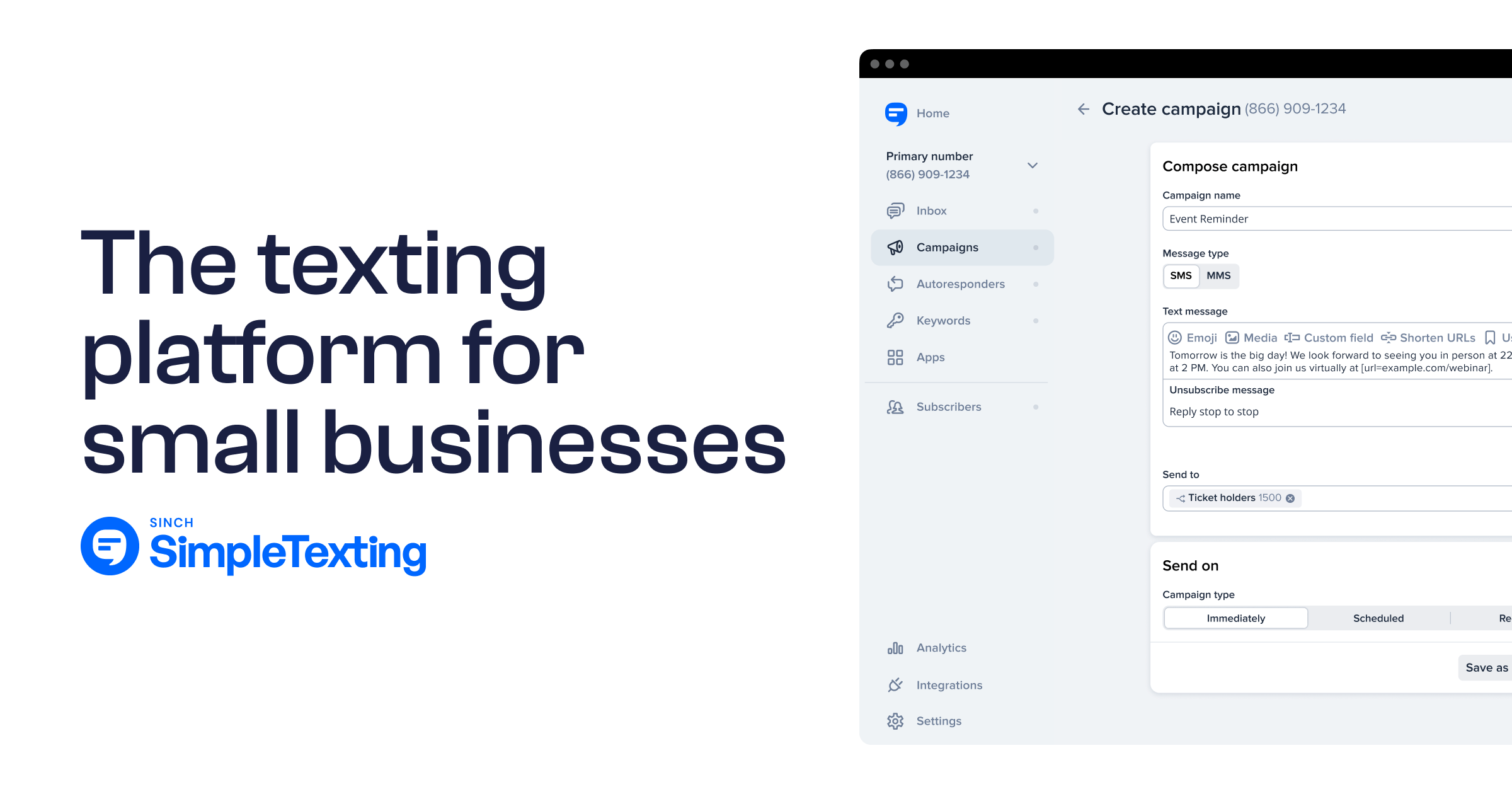
SimpleTexting positions itself as an SMS marketing and business texting platform for companies that want to send campaigns, automate some customer communication, and manage two-way conversations from one dashboard.
The official site highlights mass texting, automation, API access, multiple number types, and integrations as core parts of the product.
What The Platform Is Actually Built To Do
At its core, SimpleTexting is designed to help a business collect subscribers, send promotional or informational texts, reply to customers, and track basic campaign performance.
That sounds obvious, but it matters because some SMS tools lean heavily into e-commerce popups, while others are built more for support or internal messaging. SimpleTexting sits in the middle: it clearly supports marketing campaigns, but it also leans on two-way texting and conversational use cases in its reviews and app messaging.
For many readers, that middle ground is the main appeal. If you run a clinic, restaurant, agency, local service business, school, or retail brand, you probably do not need a complicated enterprise communications suite.
You need a tool that lets you send reminders, promotions, quick updates, and replies without a painful setup. From what the official positioning shows, SimpleTexting understands that audience well.
I believe this matters more than flashy feature lists. A lot of SMS platforms look similar on landing pages. The real question is whether the product helps you launch quickly without forcing you into a technical project. On that point, SimpleTexting’s current messaging, free trial, and review trends all point toward accessibility and ease of use as major strengths.
The Best-Fit Business Types
The feature pages show dedicated solution pages for industries like restaurants, e-commerce and retail, healthcare, education, real estate, nonprofits, franchises, agencies, and government. That does not automatically make the platform perfect for all of them, but it does suggest the product is being actively packaged around common business texting workflows rather than one narrow niche.
In practice, I would say SimpleTexting fits best when your team needs three things at once: straightforward list growth, regular outbound campaigns, and occasional one-to-one replies. Imagine you run a med spa with appointment reminders, monthly promos, and last-minute cancellation fills.
Or maybe you run a local retailer that wants to text VIP discounts and answer quick product questions. That is the kind of workflow where SimpleTexting looks comfortable. Reviews on G2 and Capterra repeatedly mention ease of sending campaigns, customer communication, and operational convenience.
Where I would be more cautious is high-complexity lifecycle marketing. If your whole growth engine depends on deep branching logic, advanced attribution, and highly customized event-based automations, you may start feeling the edges sooner. SimpleTexting does offer automation and API access, but the public-facing product story emphasizes accessibility first, not enterprise-grade orchestration.
How The Platform Works Day To Day
Before you care about advanced features, you need to know what it feels like to use. This section covers the practical workflow: getting a number, building a list, sending a text, and handling replies.
Numbers, Credits, And Basic Sending Logic
SimpleTexting’s entry pricing page makes the model pretty clear. The base example on the current pricing page shows 500 credits for $29 plus a $10 local number charge, with extra credits billed at 5.5 cents each, and additional carrier fees noted separately.
The estimated monthly cost shown on that page is $39 billed yearly, plus a one-time carrier registration fee of $4 in the example displayed.
That pricing structure tells you a lot about the product. This is not a flat-rate unlimited texting tool. It is a credit-based system, which can be perfectly fine, but it means you need to understand your expected send volume before you commit.
If you plan to send one monthly campaign to a few hundred contacts, this may feel efficient. If you start layering broadcasts, reminders, drip automations, and support conversations, costs can rise faster than many beginners expect.
The number options also matter. SimpleTexting publicly references local numbers, toll-free texting, text-to-landline, and dedicated short codes.
On the features page, short code pricing starts at $1,000 per month, which makes that route more realistic for larger programs with serious throughput and brand recall needs. Most smaller businesses will likely stay with a local or toll-free setup.
Campaigns, Replies, And Mobile Access
On the sending side, the product is built for both mass texts and individual conversations. The iPhone app description says users can reach large groups with mass texts or connect one-on-one with two-way messaging. That lines up with review language from users who describe campaign sending, reminders, rescheduling, and ongoing customer communication as common use cases.
That combination is one reason the platform will feel intuitive for smaller teams. You are not jumping between a campaign-only dashboard and a separate inbox product. If your marketing and service workflows overlap, that can reduce friction. In my experience, this is where many tools either become too basic or too bloated. SimpleTexting seems to land in a pretty practical middle.
Mobile support also deserves a quick mention because it changes real adoption. A platform can be brilliant on desktop and still fail inside a busy business if nobody checks it after hours. The App Store listing emphasizes using the app for business texting, which suggests SimpleTexting understands that staff often need to monitor and answer texts away from a desk.
Features Tested Against Real Search Intent
This is the part most people actually care about. Not a generic feature dump, but whether the main features solve common SMS marketing jobs: list growth, campaign sending, automation, analytics, and team collaboration.
Subscriber Growth And List Building
Any SMS platform lives or dies on list growth. If you cannot collect subscribers cleanly, the rest of the dashboard does not matter. SimpleTexting’s broader feature and tools ecosystem includes sign-up widgets, keywords, QR-related resources, and subscriber source tracking through analytics.
The analytics page says you can see how many new subscribers you’ve gained and where subscribers come from, which is more useful than vanity metrics because it helps you identify the opt-in source that actually produces growth.
This matters because subscriber acquisition is usually where beginners make their first mistake. They pick an SMS platform and immediately focus on sending messages, not building a permission-based audience.
SimpleTexting’s public resources strongly emphasize opt-ins, compliance guides, and dedicated list-building tools, which is a good sign that the product is shaped around sustainable growth rather than just blasting texts.
A realistic scenario: Say you run a small gym. You place a keyword on in-club signage, add a website signup widget, and ask front-desk staff to invite members to join for class alerts and offers. If your analytics then show that the front desk is generating 60% of signups while the website only brings 10%, you know exactly where to improve. That kind of visibility is basic, but incredibly valuable.
Campaign Creation And Message Types
SimpleTexting supports SMS campaigns and MMS, and the pricing examples themselves make a distinction between SMS and MMS capacity. That is important because MMS can be useful for product images, event graphics, coupon visuals, or brand-heavy promotional messages, but it consumes credits faster than plain SMS.
For most businesses, plain SMS will still do the heavy lifting. SMS stays effective because it is direct, quick to read, and usually action-oriented. SimpleTexting’s own published research says 84% of consumers were opted in to receive texts from businesses in 2025, while another SimpleTexting stats resource says SMS open rates sit around 98% and overall click-through benchmarks range roughly from 19% to 32% depending on context and industry.
Those numbers do not mean every campaign will perform well, of course. What they do mean is that SMS gives you a strong channel if your messaging is relevant. The platform appears to support the practical mechanics you need: sending broadcasts, shortening the path to reply, and tracking link engagement. G2 reviews specifically mention link tracking and reporting as useful.
Automation And API Access
SimpleTexting’s homepage says users can send automated welcome messages, out-of-office texts, and even more complex behavior-based texts, while also noting API access on all plans. The pricing page also mentions done-for-you advanced automations for custom pricing if the connected system has an API.
That is a meaningful combination. On one end, you get approachable automations for common business use cases. On the other, there is a path toward custom workflows if you have technical support or need to connect another system.
I suggest treating this as “automation with headroom,” not “full marketing automation replacement.” That is not a knock. It is actually a healthier expectation for most small and midsize businesses.
Here is how that plays out in practice. A beginner workflow might be: when someone joins your SMS list, they receive a welcome text, then a follow-up offer three days later. A more mature workflow might trigger texts from booking events, support events, or CRM data through the API.
If you are in that second camp, the question is less “Can SimpleTexting automate?” and more “Is this the best command center for our stack?” The public docs suggest yes for moderate needs, with custom work available for deeper cases.
Analytics And Performance Visibility
The analytics feature page says users can track subscriber growth, link clicks, and messages sent per list. That is not the same as deep multi-touch attribution, but it covers the core SMS metrics most businesses need to make better decisions.
I actually like this more than overloaded reporting in early-stage programs. When a team is just starting, the most useful questions are usually simple: Which opt-in sources work? Which campaigns get clicks? Which list is growing? Which campaigns underperform? SimpleTexting appears to cover those operational questions without pretending to be a full BI platform.
SimpleTexting’s own ROI guidance suggests aiming for a delivery rate greater than 90%, and its published benchmark content highlights click-through, conversion, and opt-out ranges.
That makes the platform more useful when paired with a clear KPI framework: delivery rate, CTR, conversion rate, and unsubscribe rate. For many small teams, that is enough to run disciplined testing without drowning in dashboards.

Pricing, Value, And What It Costs As You Grow
This is where every “easy” SMS tool gets tested. Great UX means less if the pricing becomes uncomfortable once your list starts working.
Entry-Level Cost Breakdown
Based on the official pricing page, the current visible base example includes 500 credits for $29, a local number for $10, extra credits at 5.5 cents each, additional carrier fees, and a yearly-billed estimate of $39 per month plus a one-time $4 carrier registration fee in the shown example. There is also a 14-day free trial with no credit card required mentioned across official pages.
That makes SimpleTexting relatively approachable to try, but not as cheap as some beginners first assume when they hear “starts at $29.” The number fee and carrier fees matter.
This is not unusual in SMS, but it does mean the advertised entry price is not the whole story. I recommend budgeting based on total program cost, not just the headline plan.
Here is a quick-reference view:
| Cost Element | What The Official Site Shows | Why It Matters |
|---|---|---|
| Base credits | 500 credits for $29 | Determines how many messages you can realistically send |
| Number fee | Local number $10 | Raises true monthly cost above base credit price |
| Extra usage | 5.5¢ per extra credit | Can make growth expensive if forecasting is off |
| Carrier fees | Additional fees apply | Adds variable cost outside the simple plan view |
| Trial | 14-day free trial | Good for testing workflow before committing |
Where Value Looks Good And Where It Slips
SimpleTexting’s value looks strongest when you use it intentionally. If you text a permission-based list, segment properly, and send relevant campaigns, SMS can be a high-return channel.
SimpleTexting’s own benchmark content says most businesses report click-through rates between 21% and 35% and opt-out rates between 1% and 2%, while 91% of business owners and marketing managers in its 2024 stats content said integrated campaigns including SMS improved conversion rates.
That is the upside. The downside is waste. Credit-based pricing punishes sloppy strategy faster than email does. If you text unengaged subscribers, send too often, or broadcast generic offers to everyone, you can spend more without learning much. SimpleTexting itself advises setting expectations early and segmenting based on preferences to optimize frequency.
In plain English: The platform is not overpriced if your SMS program is disciplined. It can feel expensive if your list hygiene is poor. That is not a SimpleTexting-only problem, but it is more visible here because usage costs are easier to feel.
Integrations, Apps, And Workflow Flexibility
A platform review is incomplete without talking about how well the tool fits your existing systems. Even a simple SMS tool becomes frustrating if it lives in isolation.
Integrations And Custom Connectivity
The official integrations page says SimpleTexting connects with marketing tools businesses already use, and the pricing page mentions custom advanced automations if the other system has an API. The product homepage also states API access is available on all plans.
That is a pretty healthy signal for midsize flexibility. Even if the out-of-the-box integration you need is not perfect, API availability gives technical teams a path forward. For non-technical teams, the existence of an integrations catalog matters because it reduces the chance that SMS becomes a manual side channel no one wants to manage.
I would still separate two ideas here. Integration availability is not the same thing as workflow elegance. A connector may exist, but the real question is whether it moves the right data at the right time. That is why I usually tell businesses to test one live workflow during the trial instead of just browsing the integration page.
Mobile And Team Usability
SimpleTexting’s mobile app supports mass texting and one-to-one messaging, which is more important than it sounds. Businesses rarely manage texting from one person at one computer anymore. Sales, service, front desk, and marketing may all need visibility at different times.
User reviews also reinforce the usability angle. On Capterra, reviewers describe the interface as friendly and straightforward, and one review specifically mentions the API as a plus for integrating with an existing CRM. Another review points to sub-accounts as a way to better organize inboxes, which hints at some flexibility for team structure.
That said, reviews are never perfectly consistent. Capterra also includes complaints tied to support and porting frustration, which is a reminder that operational details matter when numbers and onboarding are involved. I would not treat that as a red flag on its own, but I would absolutely test number setup questions early in your trial if porting is important to you.
Common Mistakes And Limitations To Watch
This is where a good review gets honest. No SMS platform is perfect, and the wrong expectations create more disappointment than the product itself.
Mistake 1: Confusing Ease Of Use With Unlimited Scale
SimpleTexting looks intentionally approachable, which is great for adoption. But easy to use does not mean infinitely flexible. The platform clearly supports automation, analytics, app access, and integrations, yet the public product story still centers on accessible business texting rather than sophisticated multi-channel orchestration.
That becomes a problem when a team buys the tool for one reason and later expects it to replace a full customer data platform, enterprise help desk, and lifecycle engine. Could it support a lot? Probably. Should you assume it is built for every advanced use case out of the box? No. I think the better mindset is: use it for high-value SMS workflows first, then expand based on proof.
Mistake 2: Underestimating Compliance, Costs, And Message Discipline
The pricing page openly mentions carrier registration and carrier fees, while the broader site includes compliance guides and educational content around best practices. That is a strong clue that SMS is not something you can treat casually.
If you text too often, target the wrong people, or fail to set expectations at signup, performance drops and opt-outs rise. SimpleTexting’s own data shows consumers care about messaging cadence, and most prefer texts every other week, while 34% are comfortable with weekly messages according to its 2025 statistics content.
My advice is simple: Start with one clear promise. Example: “Get one weekly promo and occasional VIP alerts.” Then segment from there. This is not just compliance-minded. It is financially smarter on a credit-based platform.
Optimization Strategies If You Decide To Use It
A review should help you improve results, not just pick a winner. If you end up using SimpleTexting, these are the moves that will most likely determine whether it performs well.
Build Around A Few Core KPIs
SimpleTexting’s own content gives a useful baseline: delivery rate over 90% as a best practice, strong SMS open rates, click-through benchmarks, conversion benchmarks, and low opt-out expectations for healthy programs.
So instead of obsessing over dozens of metrics, I recommend tracking four first:
- Delivery Rate: Aim above 90% so your messages are actually reaching people.
- Click-Through Rate: Compare your results to overall ranges like 19% to 32% or industry-specific ranges where relevant.
- Conversion Rate: Look at the action after the click, not just engagement.
- Opt-Out Rate: A healthy program typically stays low; SimpleTexting’s benchmark content cites 1% to 2% for many businesses.
That KPI set is enough to guide real testing without turning your team into analysts.
Use Segmentation And Frequency Control Early
SimpleTexting’s own SMS frequency guidance emphasizes setting expectations up front and segmenting by preferences. I agree completely. One of the easiest ways to waste an SMS channel is treating every subscriber the same.
Imagine you run an online boutique. Your VIP buyers, discount shoppers, and first-time subscribers should not all get identical texts. The VIP segment might respond to early access.
Discount shoppers may click more on time-limited offers. New subscribers may need a welcome sequence first. When you separate those groups, every credit works harder.
This is also how you protect the channel long term. SMS is intimate. People will forgive mediocre emails. They will not forgive irrelevant texts for very long.
Final Verdict: Is SimpleTexting Worth It?
SimpleTexting does a lot right. The platform offers a low-friction entry point, a free trial, campaign sending, two-way texting, mobile access, analytics, automation, integrations, and API availability.
User feedback consistently highlights ease of use and practical business value, even though some reviews also point to occasional support or setup frustrations.
My Honest Take
I believe SimpleTexting is a strong choice for businesses that want to launch SMS quickly without buying a bloated enterprise stack. It looks especially solid for local businesses, service providers, healthcare-adjacent teams, retailers, and lean marketing teams that need campaigns plus replies in one place. The current feature set supports that use case well.
Where I would be careful is high-volume scaling without a plan. Credit costs, carrier fees, and workflow complexity can catch up with you if you treat SMS casually. The platform can clearly do more than basic texting, but its real sweet spot still appears to be practical, accessible business SMS rather than ultra-complex orchestration.
So the answer to this simpletexting sms marketing platform review is yes, it is worth serious consideration, especially if your main goal is to get live fast and run a disciplined SMS program. Just go in with clear expectations: SimpleTexting is best when you use it like a focused revenue and communication channel, not a magic box that fixes weak targeting, messy opt-ins, or poor offer strategy.
Pros And Cons At A Glance
| Pros | Cons |
|---|---|
| Easy entry point with free trial | True monthly cost includes number fees and carrier fees |
| Supports mass texting and two-way messaging | Credit-based pricing can feel expensive if you oversend |
| API access on all plans | Advanced needs may require custom work or careful setup |
| Mobile app for on-the-go replies | Some third-party reviews mention support or porting friction |
| Built-in analytics for subscriber growth and clicks | Not positioned as a full enterprise lifecycle platform |
FAQ
What is SimpleTexting SMS marketing platform used for?
SimpleTexting is used to send marketing texts, automate customer messages, and manage two-way conversations from one dashboard. It helps businesses promote offers, send reminders, and engage customers directly through SMS. Most users rely on it for campaigns, subscriber growth, and real-time communication.
Is SimpleTexting good for small businesses?
Yes, SimpleTexting is well-suited for small businesses because it is easy to set up and does not require technical experience. It allows teams to quickly launch SMS campaigns, manage replies, and track performance. Its simplicity makes it ideal for businesses that want fast results without complex systems.
How much does SimpleTexting cost per month?
SimpleTexting pricing starts around $29 per month for 500 credits, plus additional fees for phone numbers and carrier charges. The total monthly cost depends on how many messages you send and the type of number you use. Businesses should estimate usage carefully to avoid unexpected costs.
Does SimpleTexting support automation?
Yes, SimpleTexting includes automation features like welcome messages, scheduled campaigns, and behavior-based texts. You can create simple workflows without coding, and more advanced automation is possible through API integrations. This makes it flexible for both beginners and growing businesses.
What are the main advantages of SimpleTexting?
The main advantages of SimpleTexting include ease of use, fast setup, two-way messaging, and strong campaign tools. It also offers mobile access and basic analytics to track results. Many businesses choose it because it balances simplicity with enough features to run effective SMS marketing campaigns.

I’m Juxhin, the voice behind The Justifiable.
I’ve spent 6+ years building blogs, managing affiliate campaigns, and testing the messy world of online business. Here, I cut the fluff and share the strategies that actually move the needle — so you can build income that’s sustainable, not speculative.
Related posts:
 SimpleTexting Review For Businesses: Powerful Or Overrated?
 Marketing Materials: Best Practices for Increasing Conversions
 SMS Marketing Magic: Increase Engagement by 300%
 How to Integrate Aweber with ClickFunnels
 Boost Your Digital Marketing Business Revenue in 90 Days
 Constant Contact Pricing: Which Plan Is Right for You?