
Table of Contents
Some links on The Justifiable are affiliate links, meaning we may earn a small commission at no extra cost to you. Read full disclaimer.
Hiring the right Upwork app developer can be the difference between launching a flawless app and wasting months (and money) on revisions.
With thousands of freelancers claiming to be “experts,” how do you actually identify the one who can bring your vision to life—on time and within budget?
In this guide, I’ll walk you through a step-by-step process to help you find, vet, and hire the best Upwork app developer for your project.
1. Define Your App Requirements Clearly
Before hiring an Upwork app developer, you need to know exactly what you want built. A well-defined plan not only helps developers understand your expectations but also saves you from endless revisions later.
Think of this stage as your blueprint—it tells the developer where to start and where to go.
Identify Your App’s Core Features and Goals
Start by identifying what your app must do and why it matters. If you’re building a fitness tracker, for instance, decide early if it needs GPS tracking, calorie counting, or integration with smartwatches.
Here’s a simple way to break it down:
- Primary Goal: What problem is your app solving? (e.g., “Help users find healthy meal plans quickly.”)
- Essential Features: What’s non-negotiable? (e.g., “Search by ingredients, weekly meal planner, user profiles.”)
- Nice-to-Have Features: What can wait for future updates? (e.g., “AI meal suggestions or video tutorials.”)
I always recommend keeping the first version lean. You can expand after launch when you get real user feedback.
Pro tip: Use a mind-mapping tool like Miro or Whimsical to visualize your app’s structure. It’s far easier to explain your concept visually than through paragraphs of text.
Choose the Right Platform: iOS, Android, or Cross-Platform
Choosing the right platform is like picking the right vehicle for your journey—it affects cost, speed, and user reach.
- iOS (Apple): Ideal for markets like the US or Western Europe where iPhones dominate. Development typically happens in Swift or Objective-C.
- Android: Great for global reach, especially in Asia and South America. Most Android apps are built with Kotlin or Java.
- Cross-Platform (e.g., Flutter, React Native): Lets you build for both iOS and Android at once. I suggest this route if you’re tight on budget or time, but keep in mind that performance might slightly lag behind native apps for heavy features like AR or 3D graphics.
If you’re unsure, ask yourself: Where are my target users? That answer usually points you in the right direction.
Set a Realistic Budget and Development Timeline
One of the biggest mistakes I’ve seen clients make on Upwork is underestimating both cost and time. App development is not just “coding”—it includes design, testing, feedback loops, and launch prep.
Here’s a rough idea (based on average Upwork developer rates):
| App Type | Complexity | Estimated Cost (USD) | Timeline |
| MVP / Simple App | Basic features | $2,000–$5,000 | 3–6 weeks |
| Mid-Level App | APIs, integrations | $5,000–$15,000 | 6–12 weeks |
| Complex App | Custom backend, advanced UI | $15,000+ | 3–6 months |
Tip: When budgeting, add a 15–20% buffer for revisions or unexpected scope changes. Developers appreciate clients who understand that good work takes time—and testing.
Prepare a Clear Project Brief for Developers
Once you’ve nailed down your app’s goals, platform, and budget, package it all into a clear project brief. This is what developers will rely on when deciding whether to apply for your job post.
A good brief should include:
- Overview: One paragraph describing the app’s purpose and audience.
- Core Features: List the top 3–5 must-have functionalities.
- Technical Requirements: Mention preferred tech stack (e.g., Flutter, React Native).
- Design Reference: Include 1–2 apps you like and why.
- Deliverables: What you expect at each milestone (e.g., wireframe, beta version, final release).
You can upload this as a PDF or paste it into the job description on Upwork. Developers love clarity—it signals professionalism and helps you attract top talent instead of beginners guessing your needs.
2. Understand the Upwork Hiring Process
Once your app concept is clear, it’s time to dive into how Upwork actually works. Understanding the hiring mechanics saves you from confusion later and helps you spot the best developer faster.
How Upwork’s Talent Marketplace Works
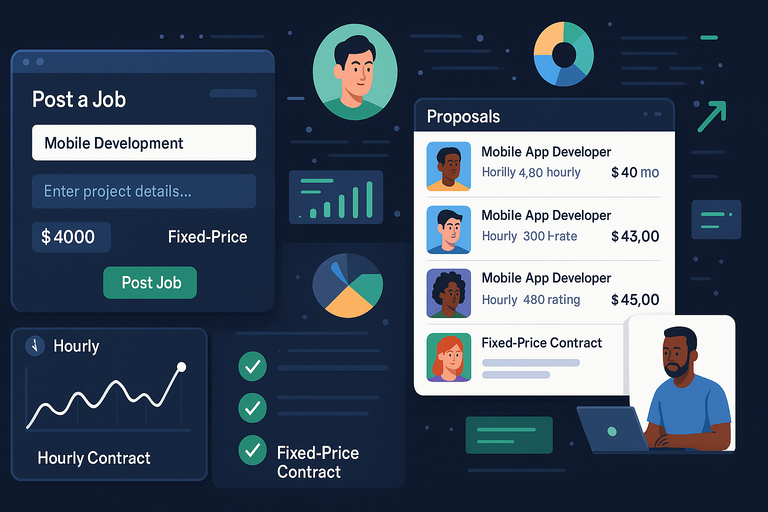
Upwork operates like a matchmaking platform between clients and freelancers. You post your project, and developers submit proposals outlining their skills, rates, and experience.
When you post a job:
- Log in to Upwork.com, click Post a Job from your dashboard.
- Choose “Mobile Development” as your category.
- Fill in your project details, attach your brief, and set your budget (hourly or fixed-price).
- Review incoming proposals in your “Jobs” tab.
Tip: Don’t rush to hire the first applicant. Wait at least 24 hours to allow top-rated developers (who are often busy) to apply.
Difference Between Hourly and Fixed-Price Contracts
This choice depends on your project scope and how defined your requirements are.
- Hourly Contracts: Best for evolving projects where features may change. You pay for actual time tracked using Upwork’s Work Diary—a built-in time tracker that takes random screenshots.
- Fixed-Price Contracts: Ideal when your scope and deliverables are crystal clear. Payments are divided into milestones—say, design, prototype, and final build.
I recommend fixed-price for well-planned projects and hourly for long-term or exploratory work. Either way, Upwork’s payment protection ensures both sides are safe: clients get verified work, and developers get guaranteed pay.
Benefits of Hiring Through Upwork’s Talent Pool
Hiring on Upwork offers more than convenience—it gives you access to a global pool of skilled app developers with verified reviews and transparent work histories.
Here’s why I believe Upwork is a strong choice:
- Quality Control: Reviews, ratings, and job success scores offer quick credibility checks.
- Secure Payments: Escrow protects both parties until work is approved.
- Flexible Collaboration: You can hire one developer or a full team.
- Scalable Talent: Easily find specialists (UI/UX designer, QA tester) as your project grows.
According to Upwork’s 2024 report, over 60% of app development clients rehire the same freelancers for follow-up projects—proof that the system works for long-term partnerships when managed well.
Using Upwork’s “Talent Scout” for Vetted Developers
If you’re short on time or don’t want to sift through dozens of proposals, Upwork’s Talent Scout service is a powerful shortcut.
Here’s how it works:
- You describe your project, and Upwork’s team handpicks pre-vetted developers.
- These candidates are usually in the top 2–3% of talent on the platform.
- You get matched within a few days—saving you hours of screening.
This service is especially useful if your project requires niche expertise (e.g., AR development, blockchain integration, or Flutter animations).
While Talent Scout rates are typically higher, the quality and speed make it worth it for businesses that can’t afford trial-and-error hiring.
3. Create a Job Post That Attracts Top Developers
Crafting your job post is where your hiring success truly begins. The best Upwork app developers don’t apply to vague or confusing listings — they’re drawn to clear, professional, and detailed posts that show you’ve done your homework.
Think of your job post as your “first impression.” It’s your chance to stand out among hundreds of clients competing for the same top-tier developers.
Write a Compelling and Specific Project Description
Your project description is your sales pitch — not for your app idea, but for why great developers should want to work with you. Developers look for projects that are well-defined and realistic.
Here’s a simple framework I use when posting on Upwork:
1. Start with a short, clear summary. Example: “We’re developing a fitness app for iOS and Android that tracks workouts and provides personalized nutrition suggestions. We need an experienced Flutter developer to build an MVP (Minimum Viable Product) within 8 weeks.”
2. Describe your goals and core features. List your top 3–5 features in plain language:
- User login via email or Google
- Dashboard showing daily calories and steps
- Integration with Google Fit and Apple Health
- Push notifications for daily reminders
3. Be transparent about what’s ready. If you already have designs or wireframes, mention it. Developers love structure. For example:
“We’ve completed UI designs in Figma. You’ll receive all assets and a detailed workflow document before starting.”
4. End with a professional but friendly tone. “I value clear communication and timely feedback. Looking for someone reliable, proactive, and passionate about clean, scalable code.”
Pro tip: Keep your description between 250–400 words. Enough to explain what you want, but concise enough that busy developers will read it all.
Use Keywords Developers Search For
Many clients don’t realize that developers search for jobs using keywords — the same way we search Google. So, your post should naturally include terms that your ideal developer might type in.
For example, if you’re hiring for a mobile app, use natural phrases like:
- Flutter app developer
- React Native app developer
- iOS Swift developer
- Android Kotlin app project
Example sentence: “We’re looking for an experienced Flutter app developer who can build a cross-platform MVP with Firebase integration.”
This kind of phrasing not only improves visibility in Upwork’s search algorithm but also signals clarity and seriousness to developers.
Avoid keyword stuffing. Using “Upwork app developer” 10 times doesn’t help. Two or three natural mentions in a 400-word job post are enough.
Set Clear Expectations for Deliverables and Communication
One of the best ways to attract (and keep) strong developers is to set expectations upfront. It shows you’re organized and prevents headaches later.
Here’s what to include:
- Deliverables: Define what you expect at each milestone. Example:
- Milestone 1: User authentication setup
- Milestone 2: Dashboard and API integration
- Milestone 3: Testing and final submission
- Timeline: Mention if you have a launch deadline. Example: “We’d like to complete the MVP by January 10, with weekly progress updates.”
- Communication: Specify your preferred channels. Example: “We’ll use Slack for daily communication and Trello for task tracking. Weekly calls on Google Meet.”
I personally recommend scheduling short weekly check-ins — 15–20 minutes max. It keeps everyone aligned and motivated without wasting time.
Bonus tip: Developers appreciate when clients mention flexibility, like “We understand timelines may shift slightly if discussed in advance.” It signals respect for their work process.
Include Screening Questions to Filter Applicants
Adding screening questions can instantly separate top talent from the rest. Many clients skip this step — but it’s one of the smartest ways to save time.
Here are a few examples I use:
- “What’s the most complex app you’ve developed, and what was your role?”
- “Which technology stack would you recommend for this project and why?”
- “Share a recent app you built using Flutter or React Native.”
- “What’s your typical communication process with clients?”
You can set these in Upwork’s job posting form under “Add Screening Questions.”
I suggest including two technical and one communication-related question. You’ll quickly spot who actually reads your post and who’s just copy-pasting proposals.
Pro tip: When you get a thoughtful response to your screening questions, that’s a green flag. It means the developer understands your project and values clarity — traits of professionals worth hiring.
4. Evaluate Upwork App Developer Profiles Effectively
Once your job post is live, you’ll start receiving proposals — sometimes dozens within 24 hours. The challenge is knowing how to evaluate them objectively.
Many clients make hiring decisions based purely on price, which almost always leads to trouble. Instead, focus on skill match, communication, and track record.
Analyze Portfolio Projects and Past Client Feedback
A developer’s portfolio is the best indicator of their real-world ability. Don’t just glance at pretty screenshots — dig deeper.
Here’s what I look for:
- Relevance: Have they built apps similar to yours (in function, scale, or industry)?
- Role clarity: Did they build the full app or just a small part (like backend or UI)?
- Quality: Are the apps live on Google Play or the App Store? Download one and test it for speed and usability.
When reviewing feedback:
- Read specific comments, not just the star rating. Look for mentions of responsiveness, meeting deadlines, and code quality.
- A long project history with consistent positive reviews is more valuable than one big flashy project.
Example: If a developer has “100% Job Success Score” and comments like “delivered on time, great communicator,” that’s a strong signal of reliability.
Check Developer Ratings and Job Success Scores
Upwork’s Job Success Score (JSS) is a crucial metric, showing how satisfied clients have been across all past projects.
Here’s how to interpret it:
- 90–100% JSS: Excellent — typically top-rated developers.
- 80–89% JSS: Good, but check individual feedback for issues.
- Below 80%: Proceed with caution unless they’re new (fewer than 5 projects).
Also, check the “Top Rated” or “Top Rated Plus” badges on profiles — these mean the developer has maintained consistently high performance and client satisfaction.
Personal insight: I usually focus on developers with at least 90% JSS and 500+ billed hours. It’s a good balance between proven skill and sustained performance.
Review Technical Skills and Specializations
Upwork profiles list each freelancer’s technical stack under the “Skills” section. Cross-check these with your project needs.
For example:
- If your app requires real-time chat, look for “Firebase,” “Socket.io,” or “WebRTC.”
- If you want a sleek UI, check for “Flutter,” “React Native,” or “SwiftUI.”
I also recommend looking at the Certifications or Employment History sections — they often reveal deeper expertise that’s not obvious from the portfolio.
Pro tip: Message developers asking which technologies they feel most comfortable with and why. Their response often tells you more about their depth than any list of skills.
Look for Consistency Between Profile and Work Samples
Finally, verify that what a developer claims matches their actual work. Consistency shows honesty and professionalism.
Check:
- Does their listed role (“Lead Mobile Developer”) match their contributions in portfolio projects?
- Are their stated hourly rates in line with their experience and job success?
- Do their reviews align with their claimed skills?
For instance, if a developer claims to specialize in Flutter but most reviews mention “WordPress” or “web design,” that’s a red flag.
Consistency tells you the developer’s story adds up — and in hiring, that’s worth gold.
5. Conduct Smart and Structured Interviews
Once you’ve shortlisted a few promising Upwork app developers, the interview stage becomes your chance to see how they think, communicate, and approach real-world problems.
It’s not just about technical know-how — you’re also testing reliability, collaboration style, and creativity. I’ve found that the best interviews feel more like a conversation than an interrogation.
Ask Targeted Technical and Situational Questions
Instead of asking textbook questions (“What is Flutter?”), ask situational questions that reveal how a developer solves problems. You’re trying to see how they think under real project conditions.
Here are some questions that work well:
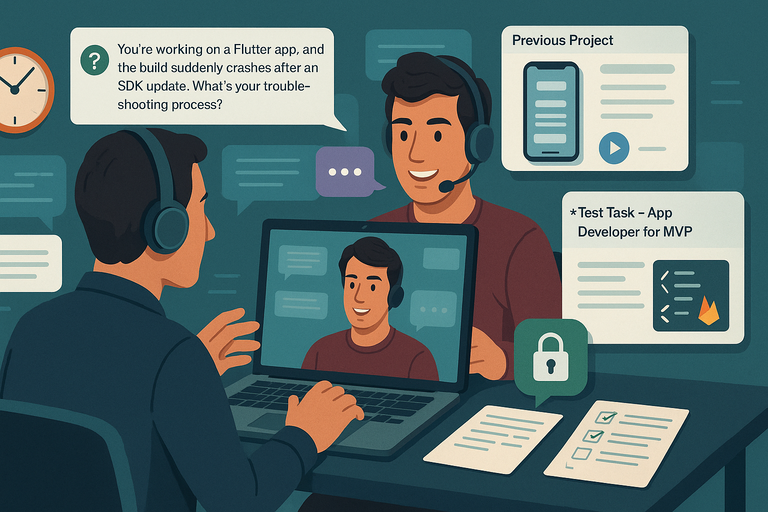
- “You’re working on a Flutter app, and the build suddenly crashes after an SDK update. What’s your troubleshooting process?”
- “If we needed to add in-app purchases later, how would you design the app architecture today to make that easy?”
- “Tell me about a project where you optimized performance — what tools or techniques did you use?”
For extra insight, ask them to walk through one of their previous projects on Upwork. You can say: “Can you share your screen and show me how you structured the app files or handled backend integration?”
This tells you two things — whether they truly built what they claim, and how clearly they can explain their thought process.
Pro tip: Avoid rapid-fire questioning. Let them elaborate. Great developers often reveal their strongest skills through storytelling.
Assess Communication and Problem-Solving Skills
A talented developer who can’t communicate effectively will slow your project to a crawl. During interviews, I always pay attention to clarity, tone, and responsiveness.
Ask questions like:
- “If there’s a delay or issue, how do you usually communicate that to clients?”
- “How often do you prefer to check in — daily, weekly, or by milestone?”
You’re looking for signs of proactive communication — developers who provide updates before you have to chase them.
Also, present a simple challenge, such as: “Imagine our login screen stops working after an API change. What’s your first step?”
A strong developer will explain their reasoning clearly (not just “I’ll fix it”) — often referencing tools like Postman, Firebase console, or Xcode logs.
Request a Small Paid Test Task to Evaluate Quality
This step separates theory from practice. I always recommend offering a small, paid test task — it’s fair to the freelancer and incredibly revealing for you.
Here’s how to structure it:
- Keep it under 4–6 hours of work.
- Choose a feature from your actual project (e.g., “Build a simple user registration screen with Firebase integration”).
- Pay fairly — even for a small task. Around $50–$100 is standard for a short test.
This gives you a firsthand look at:
- Code structure and quality
- Ability to follow instructions
- Turnaround time and communication
You can create a new “test project” on Upwork for this purpose, keeping everything within the platform’s payment protection system.
Example workflow: From your Upwork dashboard → click “Jobs” → “Post a Job” → label it “[Test Task] – App Developer for MVP.”
Gauge Developer Availability and Time Zone Compatibility
Even the most talented developer can become a bottleneck if your working hours never align. Ask upfront about availability and time zone preferences.
Here’s what to clarify:
- Working hours overlap: You don’t need full overlap — 2–3 shared hours per day is often enough.
- Response time: Ask how quickly they usually respond to messages.
- Holidays and part-time status: If they freelance part-time, plan around that.
You can easily check this on Upwork: open the freelancer’s profile → scroll to “Availability” and “Local Time.”
Personal insight: I like to work with developers who can adapt to short morning or evening syncs — flexibility often signals reliability and commitment.
6. Compare Proposals and Assess True Value
When your proposals start coming in, it’s tempting to pick the cheapest or fastest one. Don’t. The goal is to find value, not just low cost. Great app developers balance price, skill, communication, and professionalism.
Understand How to Evaluate Cost vs. Expertise
On Upwork, rates vary wildly — from $15/hour to $100/hour or more. Here’s how I interpret those ranges:
| Developer Type | Typical Rate (USD/hr) | Best Use Case |
| Junior Developer | $15–$30 | Simple apps, prototypes |
| Mid-Level Developer | $30–$60 | MVPs, scalable apps |
| Senior Developer | $60–$100+ | Complex apps, long-term projects |
Paying more doesn’t always mean better — but paying too little often guarantees rework.
I suggest this rule: choose the most experienced developer you can reasonably afford. Good developers work faster and produce fewer bugs, which saves money in the long run.
Spot Red Flags in Developer Bids and Responses
Certain clues can help you avoid future headaches. Be cautious if you see:
- Copy-paste proposals: Generic intros like “Dear Sir/Madam…” are red flags.
- Unrealistic promises: “I’ll deliver your complex app in 3 days” — run.
- Lowball offers: Very cheap bids usually come with poor communication or quality.
- Lack of specific examples: If they can’t describe similar past projects, they probably haven’t done them.
Look for proposals that reference your project directly — something like: “I recently built a Flutter app with Firebase authentication, similar to what you described. Here’s a link to the live version.”
That’s gold.
Shortlist Developers Based on Fit, Not Just Price
When you narrow down candidates, focus on fit — technical, communicative, and cultural.
Ask yourself:
- Do they understand your app’s purpose?
- Did they ask smart clarifying questions?
- Do they align with your preferred work style (agile, milestone-based, etc.)?
I recommend keeping a shortlist of 2–3 developers for interviews or test tasks. That way, if your top choice becomes unavailable, you have a backup ready.
Review Milestone Plans and Delivery Estimates
Before committing, carefully review how each developer structures milestones.
A strong proposal will break the project into stages like this:
- Wireframe and UI setup – 1 week
- Core features development – 3 weeks
- Testing and bug fixes – 2 weeks
- Deployment and support – 1 week
Ask them to include estimated hours per milestone. This makes timelines transparent and prevents surprise delays.
Pro tip: Request that each milestone includes testing deliverables — not just “code completed.” This ensures accountability and smoother reviews.
7. Negotiate and Set Clear Terms Before Hiring
Once you’ve found the right Upwork app developer, the final step is setting terms. This is where you protect yourself and the developer — clear agreements build trust and prevent disputes later.
Define Payment Structure and Milestones
Agreeing on a transparent payment plan keeps your project moving smoothly. On Upwork, you can choose between:
- Hourly Contracts: Ideal for evolving projects. Payments are based on time logged in Upwork’s Work Diary.
- Fixed-Price Contracts: Best when deliverables are well-defined. Payments are released after each milestone.
Here’s what I usually recommend:
- Start with a fixed-price test task (small milestone).
- Move to hourly once trust is established for longer projects.
Example:
Milestone 1 – Login and user registration module ($500)
Milestone 2 – Dashboard and analytics ($1,200)
Milestone 3 – Testing and launch ($800)
Agree on Project Scope and Change Management
Scope creep — when extra features sneak into the project — is one of the most common pitfalls in app development. Prevent it early.
- Write a clear Scope of Work (SOW) document describing what’s included and what’s not.
- Use tools like Notion, Trello, or ClickUp to track scope changes transparently.
- If new features arise mid-project, handle them as separate milestones or post-project updates.
Pro tip: Add a simple statement in your contract: “Any new feature requests beyond the agreed scope will be estimated separately and approved before development.”
It sounds formal, but it protects everyone.
Clarify Intellectual Property and Ownership Rights
Never skip this step. By default, Upwork’s Terms of Service assign all rights of completed work to the client once payment is made — but it’s still smart to restate this in writing.
Include something like:
“All source code, designs, and related assets created under this contract are the property of [Your Company Name] upon full payment.”
Ask your developer to upload final source files directly in your Upwork message thread or a shared GitHub repository.
This ensures all assets are securely transferred and backed up.
Set Expectations for Updates and Communication Tools
The last piece of the puzzle is keeping the collaboration smooth and transparent. Define how you’ll communicate and track progress.
Recommended setup:
- Slack or Upwork Messages: For daily communication.
- Trello / ClickUp: For task management.
- Google Meet / Zoom: For weekly sync calls.
- GitHub / Bitbucket: For code updates and version control.
I suggest agreeing on:
- Update frequency: e.g., “Brief progress updates every 2 days.”
- Weekly check-ins: 15-minute calls to discuss blockers.
- End-of-week summary reports: Quick recap of completed and pending tasks.
Personal tip: Developers appreciate clients who respect their flow. Keep messages concise and use structured check-ins instead of random pings. It builds mutual respect — the foundation of every successful app project.
8. Manage and Collaborate With Your Developer Efficiently
Hiring a talented Upwork app developer is just the beginning — managing the collaboration effectively is what truly determines your project’s success. The secret?
Clear communication, structured tools, and mutual respect. Developers thrive when clients are organized and transparent, so let’s walk through how to set that stage.
Use Project Management Tools for Transparency
Once your developer is onboard, the first thing I recommend is setting up a central workspace where both of you can track progress and communicate efficiently.
This avoids endless message threads and keeps every task visible.
Here’s how I usually structure it:
- Trello: Great for visual task tracking. Create lists like To Do, In Progress, and Done. Each card can represent a feature or bug.
- Notion: Ideal for detailed documentation and milestone tracking. You can add due dates, attach files, and assign subtasks.
- Slack: Use for daily communication. I advise keeping discussions about deliverables inside Upwork for recordkeeping.
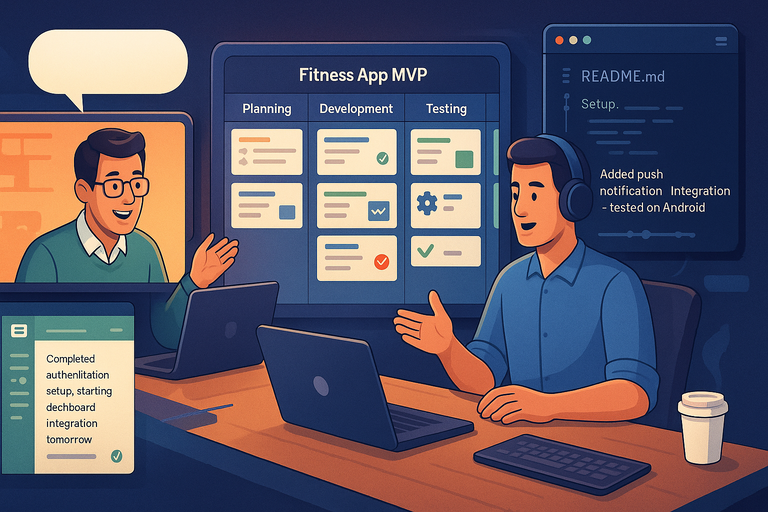
Example setup: From your Trello dashboard, click “Create Board” → name it Fitness App MVP → add lists for Planning, Development, Testing, and Launched. Invite your developer using their email address.
Transparency reduces confusion and helps both parties stay accountable. Plus, it shows your developer you’re serious about the process.
Pro tip: Don’t micromanage. Trust your developer’s rhythm while still tracking key milestones. Balance autonomy with structure.
Provide Regular Feedback and Conduct Review Meetings
Consistent communication is the backbone of a smooth project. Developers need feedback early and often to avoid rework later.
Here’s what I recommend:
- Weekly Review Calls: 15–30 minutes on Zoom or Google Meet to discuss progress, blockers, and next steps.
- Async Updates: Ask for short progress summaries every 2–3 days — something like:
“Completed authentication setup, starting dashboard integration tomorrow.” - Visual Feedback: Instead of long text explanations, use tools like Loom (screen recording) or Figma comments for visual notes.
When giving feedback, always be specific. Instead of saying, “This doesn’t look right,” say, “The login button overlaps on smaller screens; can we adjust the padding by 10px?”
Personal insight: Developers appreciate clients who give constructive feedback, not constant criticism. Make it a conversation, not a verdict.
Encourage Clear Documentation and Version Control
A project without documentation is a ticking time bomb. If your app scales or changes developers later, good documentation will save you thousands in future costs.
Encourage your developer to:
- Maintain a README file in your project’s repository (e.g., GitHub or Bitbucket) explaining setup steps and dependencies.
- Use Git version control for every major feature — this keeps code history organized and reversible.
- Document API endpoints, database structure, and libraries used.
Example workflow in GitHub: From your repo → click “Branches” → create one per feature (e.g., feature/login-screen) → merge only after testing.
I always advise developers to push updates regularly and label commits clearly — something like “Added push notification integration – tested on Android.”
This practice not only improves transparency but also makes onboarding new team members effortless.
Build a Positive, Professional Working Relationship
A good relationship with your developer goes beyond deadlines — it’s about partnership. The best results happen when both sides trust each other.
Here’s what helps build that trust:
- Be respectful of time zones and work hours.
- Give credit when a milestone is completed well — a quick “This looks great, nice work!” goes a long way.
- Pay promptly once milestones are approved. Upwork’s system allows instant release from your “Pending” tab.
Personal tip: I like to close each week by summarizing wins and next steps. It builds momentum and positivity.
A happy developer will go the extra mile for you — often without being asked.
9. Test, Review, and Launch Your App Successfully
Before you hit “Publish” on your app, you need to test everything — twice. Testing isn’t just about finding bugs; it’s about ensuring your app feels intuitive, fast, and reliable.
Let’s look at how to handle this like a pro.
Plan for Multiple Testing Phases Before Launch
Rushing through testing is the most common mistake I see clients make. Proper testing should happen in stages.
I recommend three key phases:
- Developer Testing: Your developer runs basic tests to ensure core features work (e.g., sign-up flow, API connections).
- User Acceptance Testing (UAT): You test it yourself or with a few users. Check usability, performance, and flow.
- Beta Testing: Release to a limited audience through TestFlight (iOS) or Google Play Console’s Internal Testing (Android).
Example: In Google Play Console → select your app → click Testing > Internal Testing → invite users via email.
Each phase should include a feedback loop where issues are tracked in Trello or GitHub until resolved.
Pro tip: Never test alone. Fresh eyes catch what you’ve overlooked.
Collect User Feedback for Final Refinements
Once beta testing begins, user feedback becomes your best quality assurance tool. Encourage testers to focus on functionality and usability, not just design.
You can collect feedback using tools like:
- Google Forms or Typeform: For structured surveys.
- Hotjar or UXCam: For in-app heatmaps and behavior tracking.
- Firebase Crashlytics: For real-time crash reports and performance logs.
Look for patterns — if multiple users mention slow login or confusing navigation, that’s a priority fix.
Personal insight: Always thank users for feedback, even when it’s harsh. Their honesty helps your app grow.
Ensure Compliance With App Store Guidelines
Each app store has its quirks, and ignoring them can lead to rejections.
For iOS: Follow Apple’s App Store Review Guidelines. Pay attention to privacy, data handling, and user permissions (e.g., camera access).
For Android: Use Google Play’s Developer Policy Center. Ensure you include proper permissions in your manifest file and comply with data safety requirements.
Example: Before submission on Google Play Console → click App Content → complete the “Data safety” section.
If you’re unsure, ask your developer to run a pre-launch check using tools like Firebase App Distribution.
Prepare a Launch and Post-Launch Support Plan
Your launch isn’t the end — it’s the start of a new phase. You’ll need a plan for both rollout and maintenance.
Here’s a simple checklist:
- Marketing assets: Screenshots, app description, keywords, and promo videos.
- Monitoring tools: Integrate analytics (e.g., Firebase, Mixpanel) for user insights.
- Support plan: Decide who fixes post-launch bugs — the same developer or a maintenance retainer.
Example: After launch, set a follow-up milestone on Upwork labeled “Post-launch updates – $300” to handle bug fixes during the first month.
Pro tip: Never disappear after launch. Check analytics weekly and track retention rates and crash data. Early course correction keeps your app healthy.
10. Build Long-Term Relationships With Trusted Developers
If you’ve found a developer who’s professional, skilled, and dependable — hold on to them. Long-term partnerships save you time, reduce onboarding friction, and build continuity for your product.
Rehire Reliable Developers for Future Projects
When you find a great Upwork app developer, rehire them directly for your next phase. You can do this easily in Upwork:
From your dashboard → go to My Hires → click Rehire next to the freelancer’s name.
Developers love repeat clients. They’ll prioritize your work and often offer loyalty discounts because they know your systems and style.
Personal tip: Keep a running “wishlist” of future features. When you’re ready, share it with your trusted developer — they’ll already understand your architecture and can estimate quickly.
Offer Feedback and Referrals to Strengthen Partnerships
Developers value reputation just as much as you value performance. Leave detailed, honest feedback on their profile. Mention specifics — speed, communication, or problem-solving skills.
Example review snippet:
“Delivered our MVP two weeks early with great attention to UI details. Clear communicator and quick problem solver. Highly recommend.”
You can also refer them to other clients or projects. That goodwill often returns in the form of extra support or flexibility later.
Maintain Updated Documentation for Future Maintenance
Even after the project is done, keep your app’s documentation alive. Update it after every new feature or version release.
Store documentation in a shared Google Drive or Notion workspace, including:
- API keys and endpoints
- App store credentials
- Database schema
- Version release notes
If you ever hire new developers, this single step saves days of confusion.
Evaluate Performance for Continuous Improvement
Every few months, reflect on your developer’s performance — not to judge, but to evolve.
Ask yourself:
- Were milestones consistently met?
- Was communication effective?
- Did the developer take ownership of challenges?
Use those insights to refine how you work together. A little structure and reflection turn one-time collaborations into long-term partnerships.
Pro tip: Schedule a “retrospective meeting” at the end of each phase. Ask, “What worked well, and what can we improve?” This small habit keeps both sides growing.

I’m Juxhin, the voice behind The Justifiable.
I’ve spent 6+ years building blogs, managing affiliate campaigns, and testing the messy world of online business. Here, I cut the fluff and share the strategies that actually move the needle — so you can build income that’s sustainable, not speculative.
Related posts:
 7 Practical Steps to Grow as a Freelance Flutter Developer
 Python Freelance Jobs Where to Land High-Paying Projects
 Freelance Developer: How to Find the Perfect Fit for Your Project
 WordPress Freelancer: How to Hire Experts Without Overpaying
 Upwork Freelancer Tips to Avoid Scams and Wasted Money
 Freelance Data Entry Jobs You Can Start From Home Today