
Table of Contents
Some links on The Justifiable are affiliate links, meaning we may earn a small commission at no extra cost to you. Read full disclaimer.
When I first started blogging, I had no idea that my blog writing format mattered as much as my ideas. I’d spend hours crafting great content—yet somehow, the traffic and earnings never matched the effort.
Over time, I learned that format is what turns good writing into high-performing content. The structure of your blog post—how you organize, design, and present your ideas—directly impacts engagement, SEO ranking, and conversions.
In this guide, I’ll walk you through a proven blog writing format that not only attracts readers but also increases your income potential.
Crafting a Click-Worthy Blog Title and Introduction
The first thing readers notice—before your content, before your expertise—is your title. A strong title sets expectations, sparks curiosity, and often determines whether someone clicks or scrolls past.
Your introduction then has one job: keep them hooked enough to keep reading.
Hook Readers With Emotionally Engaging Titles
The best blog titles don’t just describe—they promise. They tap into emotions like curiosity, urgency, or aspiration. Think of your title as a headline that starts a conversation in your reader’s mind.
- Curiosity hooks: “You’ll Never Believe What This Blog Format Does to Your Traffic”
- Specific benefit: “The Blog Writing Format That Tripled My Ad Revenue”
- Data-driven proof: “How I Boosted Organic Traffic by 67% Using One Format Change”
The key is to make the reader feel something. But don’t trick them—your content should always deliver exactly what the title promises. That’s how you build long-term trust.
Integrate Keywords Naturally Without Sacrificing Flow
Your focus keyword, blog writing format, should blend into the sentence like it belongs there. A forced keyword is obvious—and it hurts readability and ranking.
Here’s how to do it right:
- Use the keyword in natural language: “This blog writing format can help you rank higher without writing longer posts.”
- Mix in variations: “blog structure,” “post layout,” “content format.”
- Keep density low—around once every 100–150 words feels right for modern SEO.
What Google rewards now isn’t repetition—it’s relevance and context. Write for humans first, and search engines will follow.
Start With a Relatable Story or Surprising Statistic
Humans connect to stories far more than they do to facts. A short, relatable story or unexpected stat immediately makes your post more engaging.
Example: “When I first started, I thought great writing would naturally rank. It didn’t. But after reformatting my posts, my bounce rate dropped by 40%, and my average read time doubled.”
It’s a small story, but it instantly shows transformation—and that’s what keeps readers reading.
Show Readers the Value They’ll Get Right Away
Your introduction should answer the reader’s silent question: What’s in it for me?
Let them know exactly what they’ll learn or achieve by the end of your article.
For instance:
- “By the end of this post, you’ll know how to structure your blog so readers stay longer, share more, and convert faster.”
Setting this expectation keeps readers engaged and improves scroll depth, which search engines interpret as quality content.
Structuring the Perfect Blog Post Layout
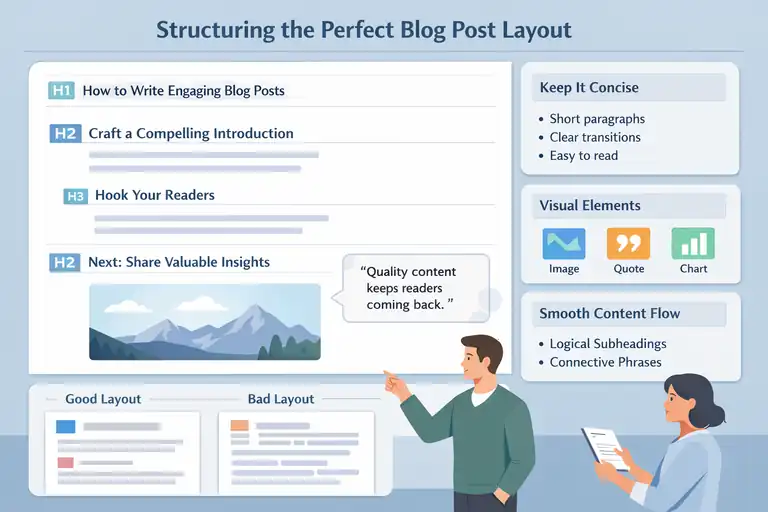
A great blog writing format isn’t just about words—it’s about experience. The layout decides whether your post feels digestible or overwhelming.
Let’s make sure yours feels effortless to read.
Use Clear Headings to Guide the Reader Journey
Headings are your blog’s road signs. They guide readers through your post and help search engines understand its hierarchy.
Here’s how to make them work for you:
- Use H2s for main sections and H3s for subtopics.
- Keep each heading under 60 characters for clarity.
- Use descriptive language (e.g., “Write Engaging Introductions,” not “Introduction Tips”).
Think of your reader as someone scanning the page. Your headings should tell the full story even if they don’t read everything.
Keep Paragraphs Short and Easy to Scan
Attention spans are short—especially on mobile. Aim for 2–4 lines per paragraph.
To make your text more readable:
- Break up dense sections.
- Use transition phrases like “Here’s why,” “Let me explain,” or “Think of it like this.”
- Insert micro-pauses with line breaks for breathing room.
When content is visually digestible, readers subconsciously feel like it’s easier to consume—so they stay longer.
Incorporate Visual Breaks Like Images and Quotes
Visual elements keep readers engaged. Use them strategically to emphasize points and reset attention.
Try this format:
- Images: Add one every 300–400 words for rhythm.
- Quotes: Use short pull quotes to highlight insights.
- Charts or screenshots: Ideal for data or tutorials.
For example, if you’re explaining formatting, include a visual comparison of a good vs. bad layout. It instantly deepens understanding.
Use Subheadings to Build Logical Content Flow
Every section should naturally lead to the next. Subheadings act as mini transitions, helping readers anticipate what’s coming.
To ensure flow:
- Group ideas that build upon each other.
- Use connective subheadings like “Next,” “Now let’s,” or “Here’s how.”
- Keep tone consistent to avoid disjointed reading.
A smooth structure doesn’t just help readers—it helps SEO by clarifying relationships between topics.
Writing Compelling and SEO-Friendly Blog Content
Even the best structure won’t save weak content. The blog writing format only works if the writing inside it feels genuine, purposeful, and optimized.
Balance Keyword Use With Natural Readability
Keywords are seasoning, not the main ingredient. Sprinkle them thoughtfully.
Best practices:
- Write your draft first, optimize second.
- Replace generic phrases with keyword-rich alternatives.
- Use synonyms like “blog post format” or “content structure.”
Remember: Google’s algorithms now understand semantics. What they can’t detect is authenticity—so write like a human.
Write With Purpose—Inform, Inspire, or Solve
Every section should achieve something tangible. Before writing, ask yourself: What do I want the reader to feel or do after this?
Here’s a quick way to focus purpose:
- Inform: Teach something actionable.
- Inspire: Motivate them with relatable results or experiences.
- Solve: Remove a problem or confusion they face.
For instance, instead of saying “keep paragraphs short,” explain why: short paragraphs reduce eye fatigue and improve retention. That’s purposeful writing.
Integrate LSI Keywords for Topical Depth
Latent Semantic Indexing (LSI) keywords are related terms that signal topic authority. They make your post contextually rich without repeating the main keyword.
Examples for this topic include: content readability, SEO structure, blog layout, audience engagement, article flow.
Where to use them:
- Within subheadings
- In image alt text
- Inside natural sentences that expand meaning
This approach strengthens your SEO without sounding robotic.
Maintain Consistency in Tone and Voice
Readers should feel like they know you through your words. Consistency builds trust and keeps them returning.
To keep your voice steady:
- Write as you speak—naturally and conversationally.
- Avoid sudden shifts from casual to overly formal.
- Use empathy: “I get how frustrating it is when…”
Your tone is your brand fingerprint. Keep it steady, and readers will follow you across posts, platforms, and years.
Using Formatting to Improve Readability and Retention
A well-structured blog writing format does more than look good—it helps readers stay longer, absorb your message, and actually enjoy reading.
Let me show you how small formatting details can transform your blog from “just another post” into something readers finish and share.
Highlight Key Takeaways With Italics or Lists
People rarely read every single word online—they skim. That’s why emphasizing important takeaways matters so much. Using italics or short, digestible lists helps readers pick up what’s important without losing the flow.
Here’s how I approach it:
- Italics work beautifully for key phrases or quick emphasis.
- Bullet points make complex ideas instantly clearer.
- Use numbered steps for processes or tutorials.
For example, if you’re explaining how to build an email list, break it down like this:
- Create a lead magnet (a free resource).
- Add an opt-in form near the top of your post.
- Offer clear value upfront—tell readers why they should subscribe.
This approach respects your reader’s time and improves comprehension, which in turn keeps them scrolling.
Add White Space for Visual Comfort
White space is like oxygen for your content—it lets your ideas breathe. A crowded layout makes readers feel overwhelmed, even if your writing is great.
What I’ve learned is simple: leave generous margins, use short paragraphs, and avoid stacking multiple visuals or links too close together. The goal is to make the experience effortless.
Think of your content like a well-designed room. Too much furniture (text) makes it cluttered, but when there’s room to move, people want to stay longer.
Use Strategic Internal and External Links
Links are powerful tools for SEO and reader trust—when used with care.
Here’s a strategy that works:
- Internal links: Point readers to related posts that deepen their understanding. For example, if you mention “SEO copywriting,” link to a guide that explains it further.
- External links: Use reputable sources (like HubSpot, Backlinko, or Statista) to validate facts or data. It shows credibility and gives readers more to explore.
A small but useful tip: always set external links to open in a new tab. That way, readers don’t accidentally leave your site before finishing your post.
Optimize for Mobile Readability and Skimmability
Most readers are scrolling your blog on their phones—so if it’s not mobile-friendly, you’re losing half your audience.
To make your blog writing format mobile-optimized:
- Keep paragraphs under 3 lines.
- Use clear headings so readers can jump between sections easily.
- Avoid tiny fonts or closely packed text.
- Test your blog on different devices before publishing.
I’ve noticed that when I format my posts with mobile readers in mind, bounce rates drop noticeably. It’s a simple adjustment that pays off with better engagement.
Enhancing Engagement With Multimedia and Interactive Elements

Adding multimedia and interactive elements can transform a static post into an experience. When readers see visuals or can interact with your content, they connect more deeply and stay longer.
Embed Relevant Images, Charts, or Videos
Visuals reinforce your message and make data easier to digest. A well-placed image or chart can often explain what words can’t.
For example:
- Images: Use them to illustrate examples or demonstrate outcomes.
- Charts: Perfect for showing comparisons, trends, or survey data.
- Videos: Great for tutorials or walkthroughs.
If you’re explaining a process, a short 30-second clip can increase retention by 40% or more compared to text alone (according to Wyzowl’s visual content stats).
Just make sure visuals aren’t random decoration—they should clarify or strengthen the point you’re making.
Use Interactive Polls or Quizzes to Boost Time on Page
One of the easiest ways to make your content stickier is by letting readers participate. Polls, quizzes, or mini-surveys break the passive reading pattern and spark curiosity.
Here’s how to use them well:
- Place a short poll midway through long posts.
- Add a “What kind of blogger are you?” quiz at the end of a tutorial.
- Use one-click emoji reactions for quick engagement.
Even small touches like this can increase time on page by 20–30%, and those engagement metrics send positive signals to search engines.
Add Click-to-Tweet Quotes or Share Buttons
If you’ve ever come across a powerful sentence and wanted to share it instantly, that’s exactly what click-to-tweet quotes are for. They make your content spread organically.
When you use these, keep your quotes short (under 250 characters) and emotionally resonant.
For instance:
- “Your blog format isn’t about how it looks—it’s about how it makes readers feel.”
Adding visible share buttons at the top and bottom of your posts also encourages readers to take action while the content is still fresh in their minds.
Keep File Sizes Light for Faster Load Times
Slow websites lose readers. Every extra second your blog takes to load can cost you up to 10% of visitors (according to Google’s PageSpeed research).
Here’s how I keep my posts quick to load:
- Compress images before uploading (use tools like TinyPNG or ShortPixel).
- Avoid embedding too many videos from heavy platforms.
- Use lazy loading for media-heavy posts.
A fast-loading blog writing format doesn’t just please Google—it keeps readers engaged and less likely to bounce.
Optimizing the Blog Writing Format for Conversions
Once your post looks and reads beautifully, the next step is turning attention into action.
A good blog writing format gently guides readers toward a next step—whether that’s subscribing, purchasing, or exploring more.
Add CTAs That Feel Helpful, Not Salesy
Calls-to-action (CTAs) should feel like a logical next step, not an interruption. The best ones help, not push.
For example:
- At the end of a section about SEO tools, you might say: “If you’d like a list of the tools I personally use, grab my free resource here.”
- After a how-to guide, invite readers to “try the template and see your own results.”
It’s all about tone—be a guide, not a salesperson.
Use Storytelling to Build Trust Before Selling
Before you ask for anything, give something meaningful first. Storytelling helps readers relate to you and builds emotional credibility.
I often share small, honest experiences: the early posts that didn’t rank, the tweaks that finally worked, or the time a single layout change increased signups. These real stories humanize your advice.
People don’t buy information—they buy connection and trust.
Position CTAs Strategically Within the Content
Where you place your CTAs matters just as much as what they say.
Here’s what works best:
- Top CTA: Gentle, like a newsletter sign-up.
- Mid-content CTA: Offer something relevant to the section (e.g., a free checklist).
- End CTA: The strongest ask—purchase, subscribe, or contact.
When CTAs appear naturally in flow with your content, they feel like part of the reading journey, not a detour.
Link to Relevant Products, Services, or Resources Naturally
Internal and external linking within your conversion strategy should feel natural and helpful.
If you mention a tool, briefly explain what it does and why you recommend it.
For instance: “I use Kit (formerly ConvertKit) to automate my blog emails—it’s intuitive and great for creators who want to build genuine connections with readers.”
This kind of transparency builds authenticity, which in turn improves conversions.
Using Analytics to Refine Your Blog Writing Format
No matter how strong your blog writing format feels, data will always tell the real story. Analytics show you what’s working, what’s not, and where readers are dropping off.
Let’s talk about how to turn those numbers into smarter content decisions.
Track Metrics Like Dwell Time and Bounce Rate
Two of the most important metrics to track are dwell time and bounce rate. Dwell time measures how long readers stay on your page before returning to search results, while bounce rate shows how many leave without interacting further.
If your dwell time is low, your introduction or formatting may not be engaging enough. When bounce rate is high, it could mean your content didn’t match what readers expected—or that your internal links weren’t inviting enough to explore.
Here’s what I recommend:
- Check Google Analytics weekly for these metrics.
- Compare top-performing posts to lower ones.
- Identify patterns—are longer posts keeping people longer, or is it the formatting that’s working?
Small format changes like shorter paragraphs, clearer headings, and more visuals often reduce bounce rate significantly.
A/B Test Headlines and Layout Changes
A/B testing means publishing two slightly different versions of your content (or elements like titles, CTAs, or images) and measuring which performs better.
You can test things like:
- The blog title wording: “Blog Writing Format That Boosts SEO” vs. “The Blog Format That Doubled My Traffic.”
- CTA placement: end of post vs. mid-content.
- Image layout or header font styles.
Tools like Optimizely or Thrive Optimize make this easy. In my experience, even changing a headline’s emotional tone—from informational to aspirational—can increase click-throughs by 20% or more.
Study Heatmaps to See Reader Behavior
A heatmap visually shows where users click, scroll, and spend time on your page. It’s one of the most revealing tools for understanding how people interact with your blog format.
When I first used Hotjar (a heatmap tool), I discovered readers weren’t scrolling past my second subheading—even though the content below was valuable.
That insight helped me move my main takeaway higher up, and engagement immediately improved.
Pay attention to:
- Scroll depth: How far users go before leaving.
- Click maps: Which links or buttons get attention.
- Idle zones: Where people pause or hover longest.
It’s like watching your readers in real time—and it’s one of the best ways to optimize your blog writing format.
Adjust Content Structure Based on Data Insights
Once you collect data, act on it. Numbers mean nothing without implementation.
For example:
- If heatmaps show readers stop mid-post, break long sections into smaller chunks or add visuals.
- If dwell time is low, strengthen your introductions or storytelling.
- If bounce rate is high, add stronger internal links near the top.
I like to make one small adjustment per week and measure its effect. That way, you learn continuously without overwhelming your content with too many changes at once.
Leveraging SEO Techniques Within the Blog Format
Even the most engaging blog post won’t reach readers without proper SEO. The good news is, SEO and readability can go hand in hand—especially when your blog writing format supports them naturally.
Use Proper Header Tag Hierarchy (H1–H3)
Your header structure (H1, H2, H3) is the backbone of your post’s organization. It tells both readers and search engines what each section is about.
Here’s the structure I recommend:
- H1: The main blog title (use once).
- H2s: Core sections that answer main questions.
- H3s: Supporting points under each H2.
Think of it like a content tree—each branch builds logically from the one above it. This clarity improves both SEO and readability since search engines understand your post’s context better.
Include Meta Descriptions That Entice Clicks
A meta description is the small text that appears under your title on Google. It’s your ad space—use it wisely.
Keep it under 160 characters, and make sure it includes your focus keyword naturally. But don’t write it for algorithms—write it for humans.
Example: Discover the blog writing format that boosts traffic, improves readability, and keeps readers coming back for more.
That’s clear, keyword-rich, and offers a benefit upfront.
Optimize Images With Descriptive Alt Text
Alt text (alternative text) describes an image to search engines and visually impaired readers. It’s often overlooked but critical for SEO.
When writing alt text:
- Be descriptive: “Infographic showing blog writing format structure.”
- Include relevant keywords when natural.
- Avoid keyword stuffing—write like you’re explaining it to a friend.
As a bonus, optimized images can appear in Google Image results, bringing in more traffic.
Ensure Fast Loading Speeds and Mobile Responsiveness
A beautiful blog that loads slowly will lose readers before it even begins. Google reports that pages taking longer than 3 seconds to load lose over 50% of visitors.
Here’s how to keep your blog quick:
- Compress all images before uploading.
- Use caching plugins like WP Rocket.
- Test your speed with PageSpeed Insights regularly.
Also, make sure your layout adapts smoothly to mobile devices. A mobile-responsive blog writing format keeps your content accessible and enjoyable across all screens.
Increasing Traffic Through Smart Content Promotion
Even the best content won’t perform if no one sees it. Promotion is where your blog writing format meets the real world—and this is where many bloggers fall short. Let’s fix that.
Share Posts on Social Platforms With Engaging Snippets
Don’t just drop your link on social media—tease it with a story or insight.
For example:
Instead of posting “New blog post: Blog Writing Format Tips,” try something like:
“I used to write posts that no one read. Then I changed one thing—my format. Here’s what happened…”
This approach builds curiosity and emotion, which makes people click.
Experiment with different formats: short LinkedIn articles, Instagram carousels, or even quick Twitter threads that summarize key takeaways from your post.
Build Backlinks Through Guest Posting
Backlinks are one of the strongest SEO signals, and guest posting is still one of the most effective ways to earn them.
Find blogs with audiences similar to yours and pitch them high-value, educational topics. Offer insights, not promotions.
A quick example: If you specialize in content structure, pitch an article like “How to Simplify Blog Layouts for Better SEO.” Include a contextual backlink to your post where it adds real value.
Guest posting not only improves rankings—it introduces your blog to new audiences who already trust the platform you’re writing for.
Repurpose Blog Posts Into Videos or Infographics
Repurposing is a secret growth hack. You already have the research and insights—so why not turn them into multiple formats?
Try these:
- Create a short video explaining your post’s main tips.
- Turn a key section into an infographic using Canva.
- Record an audio summary for podcast listeners.
Repurposed content reaches people who prefer watching or listening over reading, multiplying your reach with minimal extra work.
Encourage Reader Comments and Discussion
Engagement signals tell both readers and algorithms that your content is valuable. Encourage comments by asking thoughtful questions at the end of your post, like:
- “What’s one formatting trick that’s helped you keep readers engaged?”
Then, reply to every comment genuinely. Conversations extend the life of your content, build community, and keep your post active long after publishing.
You can also use comment feedback to inspire new content ideas—real reader questions often turn into high-performing posts.
Maintaining a Consistent Blog Writing Format for Growth
Consistency is one of those quiet but powerful ingredients that separates hobby bloggers from thriving creators.
A consistent blog writing format helps readers recognize your voice, builds authority, and makes your workflow much smoother over time.
Develop a Repeatable Content Template
Creating a repeatable template saves you hours and ensures your readers always know what to expect. Think of it as your blog’s “skeleton.”
Here’s what I usually include:
- Headline section: Clear, emotional, and keyword-optimized.
- Introduction: A relatable story or bold statement that hooks readers.
- Main body: Divided with H2s and H3s for easy navigation.
- Conclusion: A strong takeaway or call-to-action.
You can even create reusable templates inside platforms like Notion. This approach streamlines your process and prevents writer’s block because you’re not starting from scratch every time.
Templates also make it easier to train new writers or maintain tone consistency if you ever scale into a content team.
Use Style Guides to Keep Formatting Consistent
A style guide is like your rulebook for tone, structure, and formatting. It’s especially useful when you have multiple contributors or plan to grow your blog into a brand.
A good style guide covers:
- Heading formats (H1, H2, H3 usage).
- Grammar preferences (Oxford comma or not?).
- Tone and personality guidelines (friendly, expert, conversational).
- Link styling and internal linking rules.
You can look at examples like HubSpot’s Content Style Guide for inspiration. Personally, I keep mine short—just one page in Notion—because simplicity encourages consistency.
Schedule Regular Content Audits to Update Old Posts
Even evergreen content can fade. Statistics change, tools evolve, and reader behavior shifts. That’s why I suggest running a content audit every 3–6 months.
Here’s my system:
- Use Google Analytics to spot underperforming posts.
- Update outdated sections (especially tools or screenshots).
- Re-check internal links to ensure none are broken.
- Refresh meta descriptions for higher click-through rates.
I once updated an old “SEO Tools” post that had dropped to page 4 of Google. After refreshing the format, headings, and stats, it climbed back to the top three results within a month.
Evolve Format Based on Reader Feedback and Trends
Your blog isn’t static—it should grow with your audience. Pay attention to reader comments, emails, and analytics insights.
If readers say your posts feel “too long,” try adding summaries or visual guides. If they love your storytelling sections, expand those. I also track social reactions (likes, shares, saves) to gauge what resonates most.
Trends change too—think of how short-form video reshaped blog embeds. Staying adaptable ensures your blog writing format always feels fresh and relevant.
Monetizing Your Blog Through Format-Driven Strategies
Once your content structure is solid and consistent, it’s time to make your format work for you financially.
A good blog writing format subtly leads readers toward conversions—without ever feeling pushy.
Structure Posts Around Affiliate or Ad Placement
Monetized blogs often rely on smart placement of affiliate links or ads. The trick is to make these placements blend naturally with your content.
For instance:
- Place affiliate links near actionable advice (“I use this email tool called Kit to automate my campaigns—it’s beginner-friendly and effective.”).
- Use contextual links instead of intrusive banners.
- Keep at least 70% of the content purely educational so trust remains intact.
The structure of your article should lead to moments where affiliate mentions feel helpful, not forced. This builds both credibility and conversions.
Write Product Reviews Using Conversion-Optimized Layouts
A good review post is less about persuasion and more about transparency. Readers want honesty, not hype.
Here’s a structure that works well:
- Quick summary: Who the product is for.
- Pros and cons: Easy to scan.
- Key features: Explained in plain language.
- My experience: Personal, authentic, results-focused.
- Verdict or comparison: Help readers decide confidently.
Including comparison sections or side-by-side breakdowns (using tables) often improves click-through rates dramatically. People love clarity when they’re deciding between products.
Use Comparison Tables to Drive Clicks
Comparison tables make decision-making simple and visual. They’re especially powerful in affiliate posts or list-style content.
Example layout:
| Tool | Best For | Price | Free Plan | My Take |
| Kit | Email marketing for creators | From $15/mo | Yes | Great for personalized automation |
| Brevo | All-in-one marketing suite | From $25/mo | Yes | Best for beginners and small teams |
Keep it scannable and objective. Add affiliate links only where appropriate, and always disclose transparently.
Include Lead Magnets in High-Traffic Posts
Lead magnets—like checklists, templates, or eBooks—turn casual readers into loyal subscribers.
Here’s how I approach it:
- Identify your top 3 traffic-driving posts.
- Add a simple lead magnet offer that matches the topic (for example, “Download my free blog post formatting checklist”).
- Use an email platform like Kit to deliver the resource automatically.
This method builds your list while genuinely helping readers take the next step. It’s a win-win.
Expert Tips to Master the Blog Writing Format
By now, you understand the mechanics of a great blog writing format. But mastery comes from ongoing experimentation, data awareness, and genuine care for your audience.
Study High-Performing Blogs in Your Niche
Find three to five blogs you admire—and study them deeply. Look beyond the content itself.
Analyze:
- How they structure headlines.
- Their rhythm between text and visuals.
- How they use CTAs subtly.
In my experience, it’s not about copying—it’s about pattern recognition. You’ll start to see what makes great blogs “flow.”
Use Data-Backed Decisions for Format Adjustments
When you make format tweaks, back them with data, not guesswork.
Track performance metrics like:
- Average time on page.
- Click-through rate (CTR) for internal links.
- Conversion rate from CTAs or lead magnets.
I once changed my CTA button color and headline placement after reviewing heatmap data—and conversions jumped 18%. Little insights like that can make a huge difference.
Focus on Delivering Real Value Before Monetization
It’s tempting to chase revenue early, but trust compounds faster than money ever will. Focus on genuinely helping your readers first—traffic and income naturally follow.
Ask yourself: “Would I still publish this if it didn’t earn me a cent?” If the answer is yes, you’re on the right track.
Keep Testing, Tweaking, and Improving Over Time
Blogging isn’t static—it’s a living, breathing process. Formats that worked two years ago might feel outdated today.
Here’s my rule of thumb:
- Test something small each month (like headline structure, visuals, or word count).
- Review analytics monthly.
- Adjust based on what your audience responds to.
I treat my blog like a lab—always experimenting, always learning. That’s how you move from being “just another writer” to a trusted voice in your niche.
Pro Tip: If you want your blog to grow sustainably, think of your blog writing format as a system, not a style. Systems evolve, adapt, and scale. Keep refining yours, and your blog will not only attract traffic—it’ll build trust and generate income long-term.
FAQ
What is the best blog writing format for higher traffic?
The best blog writing format uses short paragraphs, clear headings (H2/H3), visuals, and keyword-rich subtopics that improve readability and SEO performance.
How does a good blog writing format increase earnings?
A strategic format improves user engagement and dwell time, which boosts rankings and ad visibility. It also enhances conversion flow for affiliate links and calls-to-action.
How can I make my blog writing format more SEO-friendly?
Use descriptive headers, add internal links, optimize meta descriptions, and include relevant images with alt text to strengthen your blog’s SEO.

I’m Juxhin, the voice behind The Justifiable.
I’ve spent 6+ years building blogs, managing affiliate campaigns, and testing the messy world of online business. Here, I cut the fluff and share the strategies that actually move the needle — so you can build income that’s sustainable, not speculative.
Related posts:
 Digital Marketing Solutions: 8 Game-Changing Strategies for Businesses
 Writing Blogs for Money: The Hard Truth About Making It Work
 10 Small Business Marketing Solutions That Actually Work
 Free Blog Tips to Grow Traffic Without Spending
 10 Digital Marketing Affiliate Marketing Hacks That Work
 Easy Blog Maker Tools That Help You Earn Fast