
Table of Contents
Some links on The Justifiable are affiliate links, meaning we may earn a small commission at no extra cost to you. Read full disclaimer.
A Semrush review honest pros and cons article should do more than repeat marketing claims, so let’s keep this practical. If you are trying to decide whether Semrush is actually worth the money for SEO, content, PPC, or competitor research, the answer depends less on hype and more on how you plan to use it.
I have seen people love it because it replaces several tools at once, and I have also seen people overpay because they only use 15% of what is inside. Semrush is powerful, but it is not automatically the right fit for everyone.
What Semrush Is And Who It Is Really For
Semrush is best understood as an all-in-one digital marketing platform, not just a keyword tool.
That difference matters because your experience with it will depend on whether you need one narrow function or a complete workflow.
What Semrush Actually Does
Semrush positions itself as a platform for SEO, paid search, content, social, and competitive intelligence, with the SEO Toolkit covering features like keyword research, site auditing, backlink analysis, position tracking, and competitor research.
It also now pushes broader brand visibility use cases, including AI search visibility and cross-channel measurement, which shows how the platform has expanded beyond classic SEO.
What that means in plain English is simple: instead of using one tool to find keywords, another to audit your site, another to track rankings, and another to inspect backlinks, Semrush tries to keep all of that in one account. For a solo blogger, that can feel like a lot. For an agency or in-house team, that can be a huge time-saver.
I think this is where many reviews miss the point. Semrush is not “expensive” or “cheap” in isolation. It is expensive if you only need a lightweight keyword checker. It is often reasonable if it replaces three or four separate subscriptions and helps you move faster.
A realistic scenario: Imagine you run a mid-sized ecommerce store. In one afternoon, you can use Semrush to audit technical issues, find competitor keywords, track rankings for your money pages, and spot backlink opportunities. That convenience is the product.
Who Gets The Most Value From It
Semrush’s own plan positioning is pretty clear. Its entry SEO plan is framed for freelancers, small business owners, and SEO beginners, while higher tiers are aimed at agencies and larger businesses with more websites, tracked keywords, and reporting needs.
Current listed pricing for the SEO Toolkit starts at $139.95 per month, then $249.95, and $499.95 as usage limits increase.
In practice, the best-fit users usually look like this:
- Freelancers: Good fit if you actively do audits, keyword research, and rank tracking for multiple clients.
- Agencies: Often a strong fit because reporting, competitor research, and workflow consolidation matter more at scale.
- In-House SEO Teams: Useful when you need shared visibility into rankings, technical issues, and market movements.
- Content Teams: Helpful if SEO-driven editorial planning is part of your growth model.
- PPC And Mixed Marketing Teams: Useful when SEO and advertising research overlap.
The weakest fit is usually the casual user. If you publish one blog post a month and mostly want a handful of keyword ideas, Semrush can feel like bringing a full toolbox when you only need a screwdriver.
That does not make the tool bad. It just means your use case should decide the purchase, not the brand name.
How Semrush Works In Real-World SEO Workflows
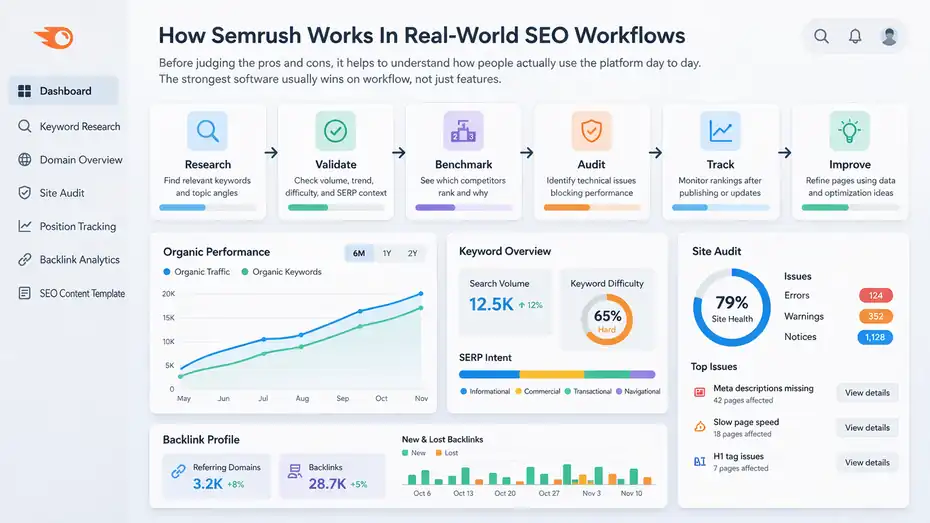
Before judging the pros and cons, it helps to understand how people actually use the platform day to day.
The strongest software usually wins on workflow, not just features.
The Core Workflow Most Users Follow
Most Semrush users move through a pretty consistent sequence. They start with keyword research, validate difficulty and intent, review competitor rankings, audit their own site, track positions, and then use backlink data or optimization suggestions to improve pages over time.
Semrush bundles these stages together, which is one reason users on G2 often describe it as comprehensive and efficient for managing multiple SEO tasks in one place.
Here is the practical flow many people follow:
- Research: Find relevant keywords and topic angles.
- Validate: Check search volume, trend direction, keyword difficulty, and SERP context.
- Benchmark: See which competitors already rank and why.
- Audit: Identify technical issues that block performance.
- Track: Monitor rankings after publishing or updating content.
- Improve: Use backlink, content, and optimization data to refine pages.
That workflow matters because it reduces context switching. You do not need to keep exporting CSV files from one tool and importing them into another every few minutes.
In my experience, this is where Semrush earns its price for serious users. The time savings are real when the tools connect logically. You can go from “why are we losing traffic?” to “which pages dropped?” to “which keywords were affected?” to “what technical or competitive changes might explain it?” without leaving the platform.
Why It Feels Powerful And Overwhelming At The Same Time
The same thing that makes Semrush useful also creates its biggest usability downside: there is a lot inside it. Third-party reviews repeatedly praise depth and breadth, but they also point out that the platform can feel expensive or too feature-heavy for smaller users who do not need everything.
Capterra’s listing also reflects strong feature and functionality scores, with weaker value-for-money relative to pure usability scores, which matches what many users say in practice.
This usually shows up in three ways:
- Dashboard density: There are many reports, filters, and modules.
- Metric confusion: New users may not know how to interpret keyword difficulty, authority-style scores, or traffic estimates.
- Limit anxiety: You start worrying about tracked keywords, report caps, crawl allowances, and add-on costs.
None of this is fatal, but it does mean Semrush has a learning curve. Beginners often think the tool is harder than it is because they try to understand every report at once. I suggest doing the opposite. Pick one workflow first, such as keyword research plus rank tracking, and ignore the rest for a week.
That small shift makes the platform feel more useful much faster.
Semrush Pros That Make It Worth Considering
This is the part most buyers care about. Why do so many marketers keep paying for Semrush when cheaper tools exist? Usually because the platform solves multiple problems at once.
Pro 1: It Replaces Multiple Marketing Tools
Semrush’s biggest strength is consolidation. Its current product stack spans SEO research, site auditing, position tracking, content support, app integrations, and broader digital marketing features, which means one subscription can cover a surprising amount of work for the right team.
The App Center extends that further with additional marketing apps under the same ecosystem.
That has a direct business benefit. Instead of paying separately for a keyword tool, a backlink tool, a rank tracker, a technical audit crawler, and a competitor research platform, you can centralize a lot of that in one place.
Here is where this becomes practical:
- For agencies: Fewer disconnected logins and reporting systems.
- For in-house teams: Easier handoff between content, SEO, and management.
- For consultants: Faster audits and client recommendations.
- For founders: One view of organic opportunities instead of a pile of tools.
I believe this is the single most honest reason people stick with Semrush. It is not always the absolute best at every individual function, but it is often one of the best all-around combinations.
That matters in real work, because workflow friction is expensive even when the software bill looks cheap.
Pro 2: The Keyword And Competitor Research Is Deep Enough For Serious Strategy
User reviews consistently praise Semrush for keyword research, competitor insights, and helping teams find actionable opportunities. Capterra’s feature breakdown also highlights strong sentiment around competitive analysis and keyword tracking, which matches how the platform is typically used.
What makes this useful is not just volume numbers. It is the context around the keyword:
- Difficulty estimates: A rough sense of how competitive a term may be.
- Trend data: Whether interest is stable, seasonal, or declining.
- SERP analysis: What kind of pages currently rank.
- Competitor overlap: Which sites are winning the same audience.
- Keyword expansion: Related ideas you might not think of on your own.
That combination is valuable because search strategy is rarely about one perfect keyword. It is about building a cluster of pages that matches intent, authority, and realistic ranking potential.
Imagine you run a pet supply store and want to rank for “best dog food for allergies.” A weaker tool might stop at volume and difficulty.
Semrush lets you expand into adjacent angles like ingredient comparisons, breed-specific concerns, vet-related modifiers, and competing domains already owning the space. That makes your content plan smarter, not just bigger.
Pro 3: Site Audits And Rank Tracking Make Ongoing SEO Easier
The SEO Toolkit includes site auditing, position tracking, crawl capacity, and monitoring limits that scale by plan. Even the entry tier includes 5 websites to monitor, 500 keywords to track, and 100,000 pages to crawl per month, which is enough for many small businesses and freelancers to run meaningful SEO operations.
This matters because SEO is not a one-time project. Most websites lose growth from slow technical decay, ranking shifts, internal linking problems, and content aging. Semrush helps turn those issues into a repeatable process.
The practical upside looks like this:
- You can catch technical issues early: Broken links, crawl issues, duplicate content signals, and missing metadata patterns.
- You can monitor movement: If rankings drop after a redesign or content update, you will usually see it quickly.
- You can prioritize fixes: Not every SEO issue matters equally, and audit structure helps teams focus.
From what I have seen, this is where Semrush becomes sticky. Keyword research gets people in the door, but tracking and auditing keep them subscribed because ongoing SEO needs ongoing visibility.
Semrush Cons You Should Not Ignore
A balanced Semrush review honest pros and cons should be very clear here: the platform has real drawbacks. They are not deal-breakers for everyone, but they absolutely matter.
Con 1: Pricing Can Be Hard To Justify For Solo Users
Semrush’s entry SEO plan starts at $139.95 per month, with higher tiers at $249.95 and $499.95, and some adjacent toolkits or add-ons priced separately. For example, the Content Toolkit is listed at $60 per month, which shows how costs can grow if you want more than the base stack.
This is probably the most common complaint for a reason. If you are a solo blogger, a new affiliate site owner, or a local business doing occasional SEO, the cost can feel heavy very quickly.
The issue is not just the headline price. It is the total cost of the platform if you need:
- More tracked keywords
- More users
- Extra toolkit access
- Broader reporting
- More advanced workflows
I suggest being brutally honest with yourself before subscribing. Ask one question: “Will this tool help me make or save more than it costs every month?” If the answer is unclear, you may be paying for potential rather than actual utility.
Many users on G2 and Capterra like the platform but still mention pricing as a downside, especially for smaller businesses. That consistency across review sources is worth taking seriously.
Con 2: The Learning Curve Is Real
Semrush is not impossible to learn, but it is not instantly intuitive for everyone. Review summaries on G2 often mention its broad functionality as a strength while also implying that the platform is more rewarding for experienced marketers who use that depth regularly.
This happens because the tool gives you a lot of data before it gives you judgment. That is not a flaw in the product exactly, but it can feel like one when you are new.
Common beginner pain points include:
- Not knowing which report matters first
- Overreacting to estimated metrics
- Confusing traffic estimates with real analytics
- Treating every audit warning as equally urgent
- Getting lost between SEO, content, ads, and other sections
I think Semrush is easiest to use when you come in with a job to do. If you log in thinking, “I need to find three realistic keywords and track ten existing pages,” you will learn quickly. If you log in hoping the dashboard will magically tell you what to do next, it can feel messy.
That difference is subtle, but it changes the whole experience.
Con 3: Some Data Requires Interpretation, Not Blind Trust
No SEO platform has perfect visibility into Google, competitor traffic, or the full web. Semrush provides estimates, directional signals, and large-scale datasets that are useful for strategy, but those numbers should still be interpreted carefully.
Even positive reviewers sometimes mention limitations in certain markets or accuracy questions around specific data points.
This matters especially for:
- Traffic estimates: Useful for benchmarking, not for pretending you know a competitor’s exact sessions.
- Keyword difficulty: Helpful as a shortcut, not a law of nature.
- Authority-style metrics: Good for relative comparison, not a perfect quality score.
- Backlink data: Strong, but not the same as having Google’s internal index.
I recommend using Semrush as a decision support system, not an oracle. A good SEO uses the data to narrow options, then validates with actual SERPs, Search Console performance, and business context.
That is not a criticism unique to Semrush, but it is part of an honest review. The tool is powerful because it simplifies a chaotic search landscape. It can still be misused if you treat every metric as exact truth.
Step-By-Step: How To Decide If Semrush Is Worth It For You
The smartest purchase decision is not based on whether Semrush is “good.” It is based on whether it matches your stage, workflow, and revenue goals.
Step 1: Match The Tool To Your Business Model
Start with the way you make money. That sounds obvious, but many people skip it.
If you run an agency, Semrush often makes sense because you need multiple workflows: audits, keyword research, reporting, competitor comparisons, and rank tracking across several sites. The platform’s higher tiers are clearly structured for that kind of scale.
If you are an affiliate publisher or content site owner, Semrush makes sense when content planning and SERP analysis directly influence traffic growth and earnings. In that model, one good keyword cluster can pay for the tool.
If you are a local business owner doing your own SEO, the answer is more mixed. You may still benefit, especially if you are actively improving pages and tracking rankings. But if you only check SEO occasionally, you might not use enough of the platform to justify the spend.
A simple filter helps here:
- Strong fit: Agencies, consultants, in-house SEO teams, aggressive publishers
- Possible fit: Ecommerce brands, growth-focused local businesses
- Weak fit: Casual bloggers, occasional users, owners who want a set-and-forget tool
I believe this one step saves more wasted subscriptions than any feature comparison.
Step 2: Calculate Value Beyond The Monthly Price
Too many reviews stop at “it costs $139.95 per month.” That is useful, but incomplete. The better question is what that price replaces or unlocks. Semrush’s value is strongest when its integrated toolset reduces software sprawl or speeds up work that has direct financial impact.
Here is how to think about it in practical terms:
- Time saved: If Semrush saves you 5 to 10 hours a month, what is that worth?
- Revenue impact: Could one ranking improvement, client win, or content opportunity cover the subscription?
- Tool replacement: Are you canceling other subscriptions because Semrush covers the same functions?
- Decision quality: Will better data help you avoid publishing weak content or targeting the wrong keywords?
Imagine a freelancer charging $100 per hour. If Semrush helps them audit faster, pitch smarter, and retain clients with clearer reporting, the math looks very different from a hobby blogger paying out of pocket.
My advice is to run a 90-day value test in your head before paying. Do not ask, “Can I afford it?” Ask, “Can I operationalize it?”
Step 3: Test One Clear Workflow First
Many people waste a Semrush subscription by trying to use every feature immediately. That almost always leads to overload. A better approach is to choose one workflow with obvious ROI and build from there.
Good starting workflows include:
- Content SEO: Keyword research, SERP analysis, content planning, position tracking
- Technical SEO: Site audit, issue prioritization, page monitoring
- Competitive research: Domain comparison, keyword gaps, backlink opportunity review
- Client reporting: Tracking, audits, and presentation-ready summaries
This works because the platform becomes valuable through repetition. Once you do the same workflow a few times, the interface stops feeling crowded and starts feeling efficient.
In my experience, Semrush is one of those tools that rewards structured use. When people say it is overwhelming, they are usually trying to do too much too quickly. Start narrow, then expand.
Semrush Features That Matter Most In Practice
Not every feature deserves equal attention. Some are nice-to-have. Others are the reason people subscribe in the first place.
Keyword Research And Topic Discovery
Keyword research is still the gateway feature for many Semrush buyers, and for good reason.
The platform is known for combining volume, trends, difficulty, and competitor context in ways that support planning instead of guesswork. Review summaries repeatedly call this out as one of Semrush’s strongest areas.
What makes it useful in practice is the ability to move from one idea to a structured topic set. Instead of stopping at one phrase, you can map supporting subtopics, intent angles, and adjacent opportunities.
A strong use case looks like this: You want to rank for “email outreach templates.” You can use Semrush to find close variants, informational modifiers, commercial-intent phrases, and competing domains already ranking. That helps you build not just one article, but a mini topical cluster.
I recommend using keyword research in layers:
- Start with one seed term
- Expand into related terms
- Group by intent
- Review the live SERP patterns
- Prioritize achievable opportunities first
That sequence keeps you from chasing volume for its own sake.
Site Audit And Technical Monitoring
Technical SEO can get abstract quickly, which is why site audits are so valuable. Semrush gives you a structured way to spot errors, warnings, and on-site issues before they quietly damage performance.
The entry plan’s crawl allowance of 100,000 pages per month is enough for many small to midsize sites, while larger tiers scale significantly.
The real value here is prioritization. Most websites have some level of technical mess. The problem is not finding issues. It is deciding what actually matters.
Good audit use looks like this:
- Fix crawl blockers first
- Review broken pages and broken internal links
- Watch duplicate or thin page patterns
- Improve page speed and site health where possible
- Re-audit after significant changes
I like audit tools when they help teams act, not panic. Semrush usually does a decent job of surfacing the issue list in a way that makes repeated maintenance manageable.
Just remember that audit tools are diagnostic helpers. You still need judgment. Not every warning deserves equal urgency.
Position Tracking And Competitive Visibility
Rank tracking sounds basic until you lose traffic and need to know why. Semrush’s tracking tools are useful because they help you connect content changes, algorithm turbulence, and competitor movement over time.
That is especially helpful when you manage multiple key pages or client campaigns.
This becomes practical in several situations:
- You update a landing page and want to monitor recovery
- A competitor suddenly climbs for your money keywords
- You need proof of progress for a client or stakeholder
- You want to see whether a content cluster is actually gaining traction
A realistic example: Say your SaaS homepage slips from position 4 to position 9 for a high-intent keyword. If you only notice that in Search Console weeks later, you may lose a chunk of pipeline. Position tracking helps you catch movement earlier and investigate faster.
That kind of visibility is boring when things are stable and incredibly valuable when they are not.
Common Mistakes People Make With Semrush
A lot of frustration with Semrush is self-inflicted. The platform is not perfect, but some of the loudest complaints come from using it in ways that guarantee disappointment.
Mistake 1: Buying It Before You Have A System
Semrush works best when it supports a real process. It works worst when you buy it hoping the software itself will become your strategy.
I see this a lot with newer site owners. They subscribe because they heard it is the tool “serious SEOs” use. Then they open five reports, feel overwhelmed, and cancel a month later.
The better approach is to define your repeatable process first:
- What pages are you trying to improve?
- Which keywords matter most?
- How often will you publish or optimize?
- What metrics will you actually monitor?
Once those answers are clear, Semrush becomes much easier to use because every report has a purpose.
I suggest writing down one weekly workflow before you subscribe. Even a short plan helps. For example: Monday keyword research, Wednesday content optimization, Friday ranking review. That sounds simple, but it transforms the tool from an expensive dashboard into a working system.
Mistake 2: Chasing Metrics Instead Of Search Intent
Semrush gives you a lot of attractive numbers. Search volume. difficulty. trend curves. visibility. estimates. The danger is thinking those numbers matter more than intent or content quality.
A keyword with lower volume but clearer buyer intent may outperform a flashy head term. A page ranking in position 6 for a highly relevant query may generate more revenue than a page ranking in position 2 for a broad informational term.
This is why I always tell people to treat Semrush as a prioritization tool. Use it to narrow the field, then ask smarter questions:
- What does the current SERP actually reward?
- Is the searcher looking to learn, compare, or buy?
- Do I have the authority to compete here?
- Can I create something meaningfully better?
When Semrush is used this way, it becomes very strategic. When it is used like a scoreboard for vanity metrics, people burn time and miss better opportunities.
Mistake 3: Ignoring Limits, Add-Ons, And Team Needs
Semrush pricing becomes more complicated when a business grows. That is not unusual for B2B software, but it still surprises people. The SEO Toolkit has plan-specific limits for websites, tracked keywords, crawl volume, report depth, and reporting, while some additional toolkits and apps are priced separately.
This matters most when:
- You need more than one user
- You manage many client properties
- You want content or advertising toolkits too
- You expect enterprise-style reporting from a smaller plan
I recommend checking operational needs before you buy, not after. Count how many websites you will monitor, how many keywords truly need tracking, how many teammates need access, and whether your use case depends on paid add-ons.
That sounds unglamorous, but it is the difference between feeling delighted and feeling nickel-and-dimed.
Advanced Tips To Get More Value From Semrush
Once the basics are working, Semrush becomes more useful when you use it for prioritization and compounding improvements rather than one-off checks.
Build Topic Clusters Instead Of Isolated Pages
One of the smartest ways to use Semrush is to turn individual keyword research into cluster planning. Instead of writing one page per keyword idea, group related terms into a primary page plus supporting content structure.
That approach tends to work better because search authority is rarely built by a single article. It comes from depth, internal linking, topical consistency, and intent coverage.
A practical workflow looks like this:
- Choose one commercial or high-priority core topic
- Expand related questions and adjacent modifiers
- Separate supporting informational content from conversion pages
- Link supporting pages back to the main page strategically
- Track cluster growth over time
This is where Semrush’s breadth helps. You can research the cluster, inspect competitors, audit your own site, and track rankings without bouncing between tools.
For content-led businesses, this is often where the subscription pays for itself.
Use Competitor Research To Shorten The Learning Curve
You do not always need to invent the strategy from scratch. Semrush is especially useful when you want to reverse-engineer what is already working in your niche. Reviewers often highlight competitive insight as one of its strongest practical benefits.
The key is not copying competitors. It is identifying patterns:
- Which pages attract the most visibility?
- What content formats dominate the SERP?
- Which subtopics appear repeatedly?
- Where are competitors thin, outdated, or vague?
- Which backlinks or mentions suggest partnership opportunities?
I believe this is one of the most underrated strengths of Semrush. It saves you from guessing what “good” looks like in your category. Instead, you start with evidence and then improve on it.
That can save months of trial and error, especially in competitive verticals.
Turn Reports Into Decisions, Not Just Data
The final level of maturity with Semrush is simple: stop collecting reports and start making decisions faster.
A lot of teams get trapped in endless analysis. They export keyword lists, review audit scores, compare competitors, and build dashboards, but they delay action. The best use of Semrush is usually more decisive than that.
Try this simple rule: every report you open should answer one of three questions.
- What should we create next?
- What should we fix next?
- What should we stop doing?
That rule keeps the platform tied to execution. It also makes team communication easier because your reports become recommendation engines instead of data dumps.
In real businesses, that is the difference between “we use Semrush” and “Semrush improves our outcomes.”
Final Verdict: Is Semrush Worth It?
Semrush is a strong platform, and in a lot of cases it deserves its reputation. It offers broad coverage across SEO, competitor research, rank tracking, site auditing, content support, and adjacent marketing workflows, with pricing and limits that clearly target different business sizes.
Third-party reviews consistently praise its feature depth and usefulness while also repeating the same caution: it can be expensive, especially for smaller users, and you only get full value if you actually use the platform deeply.
So here is my honest conclusion.
Semrush is worth it for agencies, consultants, in-house marketers, ecommerce teams, and content-led businesses that need one serious platform to support repeated SEO work. It is less compelling for hobby bloggers, occasional users, or anyone who mainly wants a cheap keyword idea generator.
The honest pros are clear: strong workflow consolidation, robust keyword and competitor research, useful audits, and rank tracking that supports ongoing optimization. The honest cons are just as real: meaningful cost, a noticeable learning curve, and data that still requires interpretation.
If you buy it with a system, it can be excellent. If you buy it hoping the tool itself will create the system for you, it will probably feel overpriced.
That, to me, is the most accurate Semrush review honest pros and cons summary you should know before spending a dollar.
FAQ
Is Semrush worth it for beginners?
Semrush can be worth it for beginners if you plan to actively learn SEO and use its features regularly. However, the platform has a learning curve and may feel overwhelming at first. If you only need basic keyword research occasionally, it may not justify the monthly cost.
What are the main pros of Semrush?
The main pros of Semrush include its all-in-one functionality, strong keyword research tools, detailed competitor analysis, and reliable rank tracking. It allows users to manage multiple SEO tasks in one place, which saves time and improves workflow efficiency for marketers and agencies.
What are the biggest cons of Semrush?
The biggest cons of Semrush are its relatively high pricing, feature overload for beginners, and the need to interpret data carefully. Some users may not use enough features to justify the cost, and metrics like traffic estimates are not always perfectly accurate.
How accurate is Semrush data?
Semrush provides reliable directional data based on large datasets, but it should not be treated as exact. Metrics like traffic estimates and keyword difficulty are best used for comparison and strategy, not precise measurement. Combining it with real analytics tools gives better results.
Can Semrush replace other SEO tools?
Yes, Semrush can replace several SEO tools because it includes keyword research, site audits, backlink analysis, and rank tracking in one platform. This makes it especially useful for agencies and businesses that want to simplify their workflow and reduce the need for multiple subscriptions.

I’m Juxhin, the voice behind The Justifiable.
I’ve spent 6+ years building blogs, managing affiliate campaigns, and testing the messy world of online business. Here, I cut the fluff and share the strategies that actually move the needle — so you can build income that’s sustainable, not speculative.
Related posts:
 Online Marketing Agency: The Essential Tools and Techniques for Success
 Semrush Pricing Worth It For Beginners Or Not?
 How To Use Semrush For Keyword Research Fast
 How Automated Marketing Solutions Save Time and Increase Revenue
 Is the Squirrly SEO WordPress Plugin Enough to Rank?
 Squirrly SEO Pricing: What You Pay vs What You Get