
Table of Contents
Some links on The Justifiable are affiliate links, meaning we may earn a small commission at no extra cost to you. Read full disclaimer.
Bubble no code platform review is a tougher topic than most people expect, because Bubble is not just another drag-and-drop toy. It is one of the few no-code platforms that can genuinely power real products, but it also asks more from you in return.
In my experience, that tradeoff is exactly why some founders love it and others bounce off it fast.
This deep dive gives you the honest version: where Bubble is strong, where it gets frustrating, who should use it, and when you are better off choosing something simpler.
What Bubble Actually Is And Why So Many Founders Consider It
Bubble sits in a different category from lightweight website builders. It is a visual development platform that combines interface design, database management, backend logic, hosting, security, and deployment in one product.
Bubble also now positions itself as a web and mobile app builder, with AI-assisted generation, a visual editor, built-in data handling, workflows, and support for iOS and Android alongside web apps.
What Bubble Means In Plain English
If you are new to no-code, here is the simple version: Bubble lets you build software without writing traditional code, but you still need to think like a product builder. You define pages, data types, user actions, workflows, conditions, and permissions. That means the platform removes syntax, not complexity.
That is the first thing I would want any reader to understand in a bubble no code platform review. Bubble is not “easy” in the way beginner tools are easy. It is powerful in the way spreadsheets are powerful. You can build a lot, but you can also create a mess if you do not structure things well.
For many founders, that is a fair trade. Bubble gives you much more control than template-first no-code tools. You are not boxed into a rigid page system or a narrow content model.
You can build marketplaces, SaaS dashboards, internal tools, client portals, AI apps, booking platforms, and fairly custom workflows from one editor. Bubble itself highlights examples across marketplaces, travel, subscriptions, AI SaaS, and internal tools.
Why Bubble Has Earned A Serious Reputation
Bubble has earned attention because it solves a painful founder problem: getting a product off the ground without hiring a full engineering team on day one.
Bubble’s own 2026 messaging leans hard into that idea, positioning the platform as a way to go from idea to launch in weeks while handling hosting, backend infrastructure, and security for you.
That promise is attractive for a reason. Bubble can drastically reduce the time between concept and usable MVP. Instead of stitching together a frontend builder, backend service, hosting provider, authentication system, and deployment workflow, you can start in one place. For a solo founder or small team, that convenience matters.
I believe this is where Bubble is strongest: Compressing the early build phase. If your goal is to validate demand, collect user behavior, test pricing, and refine your product before hiring developers, Bubble can save you an enormous amount of time and cash.
Who Usually Gets The Most Value From It
Bubble fits best when your app has meaningful logic, user accounts, dynamic data, and custom workflows. In other words, it shines when your project is more “application” than “website.”
A few strong-fit examples:
- SaaS MVPs: User dashboards, billing flows, onboarding, saved data, and admin controls.
- Marketplaces: Listings, search, filters, profiles, payments, and messaging-style experiences.
- Internal Tools: Team dashboards, process automation, approval flows, and data views.
- Client Portals: Custom user access, documents, status tracking, and actions tied to accounts.
Where people struggle is expecting Bubble to feel effortless. It is not. It rewards builders who are willing to learn architecture, data modeling, and workflow logic, even if they never touch code.
How Bubble Works Behind The Scenes
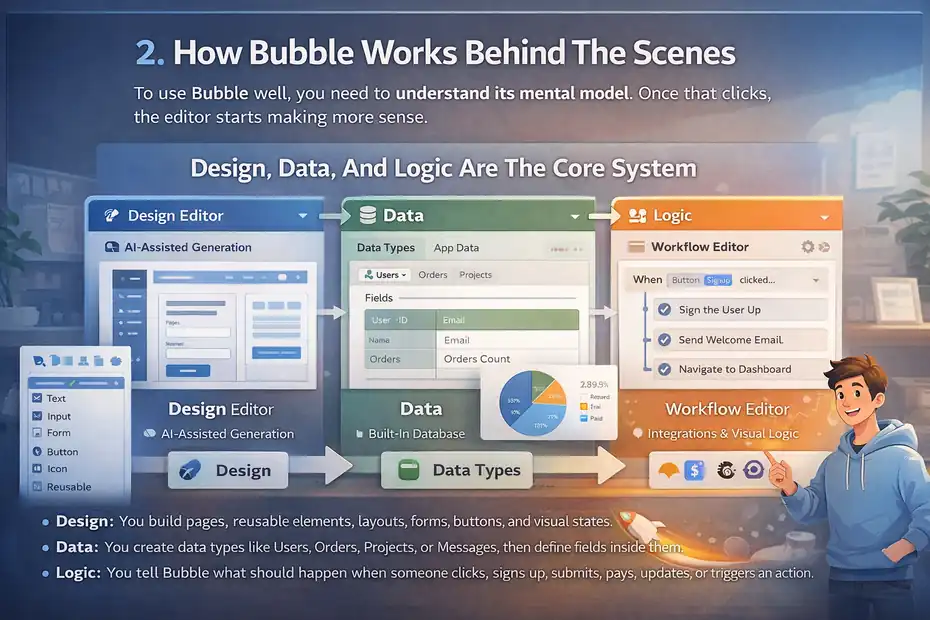
To use Bubble well, you need to understand its mental model. Once that clicks, the editor starts making more sense.
Design, Data, And Logic Are The Core System
Bubble organizes app building around three major layers: design, data, and logic. On the official side, Bubble describes its platform in exactly those terms, with AI-assisted design generation, a built-in database, integrations, and visual logic workflows.
In practice, here is what that means:
- Design: You build pages, reusable elements, layouts, forms, buttons, and visual states.
- Data: You create data types like Users, Orders, Projects, or Messages, then define fields inside them.
- Logic: You tell Bubble what should happen when someone clicks, signs up, submits, pays, updates, or triggers an action.
This structure matters because Bubble is not page-design software with a few forms attached. It is closer to a visual full-stack environment. That is why it can feel overwhelming at first, but also why it can support more advanced products than many no-code alternatives.
When I have seen people get stuck, the problem is usually not the editor itself. It is that they skipped architecture and tried to improvise everything visually.
The Database Is More Important Than Most Beginners Realize
The biggest beginner mistake in Bubble is treating the database like an afterthought. Bubble includes a built-in database editor, and its docs make clear that app data lives centrally in the platform, with separate development and live databases.
That sounds simple, but it affects almost everything:
- Your search speed
- Your privacy rules
- Your page load behavior
- Your reporting structure
- Your future scalability
Imagine you are building a client portal. If you define sloppy data types early, you may end up with duplicated records, messy relationships, broken search logic, and workflows that become harder to maintain every week. If you plan the data structure first, your app becomes much easier to scale.
I suggest thinking in plain language before touching the editor. Ask:
- What are the main things in this app?
- What fields does each thing need?
- Who is allowed to see each record?
- What actions create or update those records?
That one exercise can save days of rework later.
Workflows Are Bubble’s Real Superpower
Workflows are where Bubble starts to feel like software development instead of site building. A workflow is simply a sequence of actions triggered by an event. Someone clicks a button, submits a form, changes a state, or schedules a process, and Bubble runs the actions you defined.
This is where Bubble becomes genuinely useful for product teams. You can create account flows, payment triggers, admin actions, condition-based experiences, automated sequences, and recurring operations without writing backend scripts.
Bubble’s pricing page also highlights recurring workflows as part of paid plans, which tells you how central automation is to the platform’s value.
From what I have seen, the builders who enjoy Bubble are usually the ones who like this workflow mindset. If you enjoy mapping “when this happens, do these three things,” Bubble feels empowering. If you hate logic trees, it may feel exhausting.
The Real Learning Curve: Easier Than Code, Harder Than Marketing Suggests
This is the section every honest bubble no code platform review needs to include. Bubble is accessible, but it is not frictionless.
Why Beginners Often Feel Overwhelmed
Bubble is marketed as no-code, and that is true. But no-code does not mean no systems thinking. You still need to understand data structure, interface hierarchy, conditions, debugging, and user flows.
Recent G2 review summaries reflect that split pretty clearly. Users praise Bubble’s flexibility and ability to create complex apps without code, but they also repeatedly mention the steep learning curve, pricing issues, and bug-related frustrations.
G2 lists 166 reviews on the current product page snapshot, with review summaries emphasizing flexibility, strong resources, and complexity for advanced use cases.
I think that tracks with reality. Bubble feels amazing once the model clicks. Before that, it can feel like being dropped into an airplane cockpit with a cheerful tutorial.
What The “Hard Part” Usually Is
The hard part is usually not dragging elements onto the page. It is understanding why the app behaves the way it does.
Here are the common friction points:
- Data relationships: Knowing whether something should be a field, a separate data type, or a list.
- Conditional logic: Controlling visibility, user roles, and dynamic states without creating chaos.
- Workflow debugging: Figuring out why one action did not fire because of a hidden condition upstream.
- Performance awareness: Building searches and page loads in ways that do not become heavy later.
- Privacy rules: Making sure users only see what they should see.
In my experience, Bubble becomes manageable when you stop trying to learn everything at once. Build one complete user journey first. For example: signup, create record, view record, edit record. That teaches more than watching ten disconnected tutorials.
AI Helps, But It Does Not Remove Product Thinking
Bubble now promotes its AI app generator and AI Agent as major parts of the experience. The docs describe AI-generated app structure, built-in workflows, and an in-editor AI assistant trained on Bubble documentation that can help with building, troubleshooting, and understanding the app.
That is useful, especially for first drafts and setup guidance. But I would not confuse AI assistance with app mastery. AI can accelerate the blank-page phase. It cannot replace good decisions about product structure, user flows, naming conventions, privacy, or performance.
So yes, the AI layer is a real advantage. But no, it does not magically make Bubble beginner-simple.
Setting Up Your First App The Right Way
Bubble rewards thoughtful setup. Rush this part and you will pay for it later.
Start With The User Journey, Not The Home Page
A lot of first-time builders start by designing a pretty landing page. I understand the instinct. It feels productive. But unless marketing pages are the whole product, that is rarely the best first move.
I recommend starting with one core flow:
- User signs up.
- User creates something.
- User sees that thing later.
- User edits or deletes it.
- Admin can monitor it.
That simple backbone forces you to define your database, workflows, and permissions early. Once those are solid, building the rest becomes easier.
Imagine you are creating a freelance-client portal. Your first flow might be:
- Client signs in
- Client submits a project request
- Request appears in dashboard
- Team updates request status
- Client sees status changes
That is already enough to validate a real use case.
Set Up Data Types Before Styling Too Much
I know this is not the fun part, but it matters. Before you obsess over spacing and typography, define your core data types and fields. For many apps, that means things like User, Project, Task, Message, Plan, or Booking.
Keep the first version small. You do not need a perfect enterprise schema. You need a clean one.
A practical rule I use:
- If it has its own lifecycle, it probably deserves its own data type.
- If it is just one attribute of something else, it is probably a field.
- If multiple users may access it, think about permissions immediately.
Bubble’s built-in database and separate live/development environments make iteration easier, but that convenience can also tempt sloppy structure.
Build Reusable Components Early
One hidden Bubble shortcut is using reusable elements early instead of repeating the same sections across pages. This keeps your app cleaner and easier to update.
Reusable patterns are especially helpful for:
- Navigation bars
- Side menus
- User profile cards
- Repeated form sections
- Status banners
- Dashboard filters
This is not just an organization tip. It is a scaling tip. Once an app grows past a few pages, repeated design blocks become painful to maintain manually.
In my experience, Bubble gets dramatically easier when you treat it like a system from day one instead of a pile of separate pages.
Pricing: Where Bubble Can Feel Fair Or Expensive
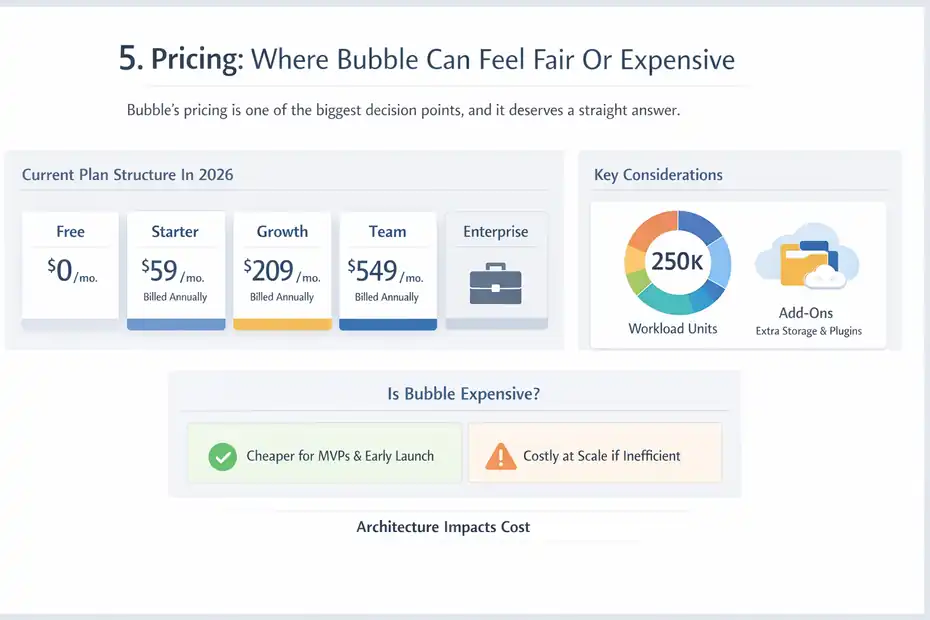
Bubble’s pricing is one of the biggest decision points, and it deserves a straight answer.
Current Plan Structure In 2026
As of Bubble’s current pricing page, the platform offers a Free plan, Starter at $59 per month billed annually, Growth at $209 per month billed annually, Team at $549 per month billed annually, and Enterprise pricing by contact.
Bubble says its plans now cover web, iOS, and Android builds, and the pricing model centers on workload units rather than traditional infrastructure line items.
Here is the practical view:
| Plan | Best Fit | Key Limits Or Benefits |
|---|---|---|
| Free | Learning and prototyping | 50K workload units, dev version, 1 editor |
| Starter | First launch | 175K workload units, custom domain, live site |
| Growth | Small team collaboration | 2 editors, 250K workload units, better version control |
| Team | Larger team and scaling | 5 editors, 500K workload units, sub apps |
| Enterprise | High-security or custom scale | Custom workload, hosting location, support |
Bubble also lists add-ons such as workload tiers, extra file storage at $3 per 100 GB monthly, and plugin subscriptions.
The Workload Model Is The Part You Must Understand
Bubble describes workload as a single metric that aggregates the server resources your app uses. In theory, that is cleaner than managing multiple infrastructure variables yourself. In practice, it means your bill and app behavior are tied closely to how efficiently you build.
That is why two apps on the same plan can have very different experiences. A simple internal dashboard may stay comfortable for a long time. A poorly structured consumer app with heavy searches, repeated workflows, and inefficient page loads may chew through workload fast.
This is where Bubble can feel fair or frustrating:
- Fair, when your app architecture is clean and your value per user is healthy.
- Frustrating, when inefficient setup creates hidden cost pressure.
I would never recommend choosing Bubble without first accepting that architecture influences cost.
Is Bubble Expensive Compared With Hiring Developers
For MVPs, usually no. For sloppy builds at scale, sometimes yes.
Bubble itself says traditional app development can range from $5,000 to $300,000, while its Starter plan can cover the essentials for launching when using its AI app builder. That comparison is obviously favorable to Bubble, but it is not unreasonable for early-stage products.
My honest take:
- For validation and early launch, Bubble is often dramatically cheaper than custom development.
- For long-term scale, cost depends on product complexity, workload efficiency, and how much expert help you need.
- If you end up hiring Bubble specialists anyway, your total cost rises, though often still below a full custom engineering team.
What Bubble Does Really Well
This is where Bubble earns its reputation. It has real strengths, not just marketing polish.
It Gives You Serious Product Flexibility
Bubble is unusually flexible for a no-code platform. The official docs and site both position it as capable of full-stack apps with custom logic, shared data, integrations, and experiences spanning web and mobile.
That flexibility matters because many no-code tools are only flexible until your product gets specific. Then you hit awkward workarounds fast. Bubble gives you more room before that happens.
For founders testing a nuanced business model, this is a big advantage. You can create custom user roles, build onboarding logic, handle dynamic content, create internal dashboards, and experiment with flows without rewriting the whole stack.
I think this is the single biggest reason Bubble stays relevant. It lets ambitious non-developers build products that feel much closer to real software than to glorified forms.
The All-In-One Setup Speeds Up MVP Development
Bubble handles a lot in one place: frontend, backend logic, hosting, database, and deployment. That reduces the setup burden dramatically compared with assembling separate tools for each layer.
Bubble explicitly markets this “one platform” approach, including hosting, secure backend, and unified editing across surfaces.
That convenience is worth more than people sometimes admit. Every extra tool in a startup stack adds friction:
- More cost
- More integrations
- More failure points
- More maintenance
- More decisions
For an MVP, less stack complexity usually means faster learning. And in the early stage, learning speed is often more important than technical purity.
The Ecosystem And Community Reduce Isolation
One underrated Bubble strength is that you are not building in a vacuum. Bubble has a mature enough ecosystem that you can find templates, plugins, agencies, freelancers, tutorials, forum discussions, and user examples fairly easily.
G2 review summaries also specifically note that users value the platform’s resources and community support.
That matters more than it sounds. When founders get stuck in no-code tools, isolation kills momentum. Bubble’s broader ecosystem makes troubleshooting and hiring much easier than with obscure builders.
If I were launching with Bubble today, that support network would absolutely factor into my decision.
Where Bubble Can Frustrate You
This is the part Bubble fans sometimes soften too much. Let’s not do that.
Performance Can Become A Real Concern
Bubble is powerful, but performance concerns show up regularly in outside commentary and user sentiment. G2’s review summaries mention bug and pricing complaints alongside praise.
Meanwhile, a recent independent review citing broader community research argues that production Bubble apps can experience slow page loads and heavy workload use in more complex scenarios.
I want to be careful here: not every Bubble app is slow, and independent critiques vary in rigor. But the pattern is real enough that you should take it seriously.
The practical takeaway is simple. Bubble does not excuse bad architecture. Poor searches, overloaded pages, too many nested conditions, weak data design, and heavy workflow usage can produce a sluggish experience.
That means Bubble is not just a builder choice. It is also an optimization discipline.
The Editor Can Become Mentally Heavy
A common Bubble frustration is that the editor grows heavier as the app grows. More workflows, more conditions, more reusable elements, more states, more database relationships, more exceptions. At some point, the challenge is not “Can Bubble do this?” but “Can I maintain this cleanly?”
That is why many Bubble apps feel great in the first few weeks, then suddenly become harder to reason about.
The hidden risk is cognitive overload:
- Too many things named poorly
- Too many one-off exceptions
- Too many workflows attached everywhere
- Too little documentation for your own decisions
I have seen this happen with both technical and non-technical teams. Bubble scales better when your internal discipline scales with it.
You May Still Need Expert Help
One of the quiet truths of Bubble is that “no-code” often becomes “less-code, but still specialized.” G2’s review mix and external Bubble commentary both suggest that many teams eventually rely on specialists for cleanup, optimization, or more advanced implementations.
That is not a failure of the platform. It is just reality. Powerful tools create specialized knowledge.
If your expectation is “I can build and maintain a serious product forever with zero technical help,” Bubble may disappoint you. If your expectation is “I can get much farther before I need help,” Bubble often delivers.
Bubble For Different Use Cases
Bubble is not universally right or wrong. The answer depends heavily on what you are building.
Best For SaaS MVPs And Workflow-Heavy Apps
Bubble is especially strong for products where logic matters more than pixel-perfect marketing pages.
Strong fits include:
- SaaS dashboards
- Client portals
- Membership platforms
- Marketplaces
- Internal operations tools
- AI wrappers with user accounts and workflows
- Booking or request systems
These products benefit from Bubble’s workflows, database, and account logic. The more your app revolves around users doing things inside the product, the more Bubble tends to make sense.
This is where I would personally place most Bubble success stories: software-like products that need to get to market quickly.
Less Ideal For Content-First Sites Or Simpler Needs
If your goal is mostly publishing content, ranking blog pages, and maintaining a marketing site with a light lead form, Bubble is often more platform than you need.
That does not make it bad. It just makes it inefficient for that use case.
For example, if your project is:
- A brochure site
- A local business site
- A portfolio
- A blog-first content brand
- A very simple directory with limited interaction
Then Bubble may introduce more complexity than value. In those cases, easier site-first or CMS-first platforms are often the better call.
Mobile Matters, But You Should Evaluate Carefully
Bubble now clearly markets mobile app support and includes mobile-related capabilities in its plan structure, including build submissions, live app versions, and OTA updates across paid plans.
That is meaningful progress. But I would still evaluate mobile needs carefully. If your product depends heavily on advanced native mobile interactions or ultra-polished native performance expectations, you should test those assumptions early rather than trusting the category label alone.
My view is that Bubble’s expanding mobile support makes it more compelling than it used to be, but I would still treat mobile-first products as a “validate aggressively” case, not an automatic yes.
Common Mistakes That Make Bubble Feel Worse Than It Is
A lot of Bubble pain is self-inflicted. That is good news, because it means you can avoid much of it.
Mistake 1: Building Without A Data Plan
This is the fastest way to create future chaos. When your data types are unclear, everything else gets harder: workflows, privacy, reporting, and performance.
A better approach:
- Name data types clearly
- Keep field names consistent
- Avoid unnecessary duplication
- Map relationships early
- Think about who owns or sees each record
This sounds boring. It is also the difference between a clean app and a rescue project.
Mistake 2: Doing Too Much On One Page
Many Bubble beginners create overloaded pages with too many repeating groups, searches, conditions, and visual states. Then the page becomes hard to manage and slow to use.
I recommend splitting responsibilities more aggressively:
- One page for overview
- One page for detailed records
- One modal or component for quick actions
- One admin area for admin-only tasks
Cleaner page boundaries usually improve both usability and maintainability.
Mistake 3: Ignoring Naming And Documentation
Bubble projects become dramatically easier when you name things well. Workflows, custom states, reusable elements, data types, and fields should all be readable.
Bad naming feels harmless when you have ten workflows. At one hundred workflows, it becomes expensive.
A simple discipline helps:
- Name workflows by action and target
- Name fields in plain language
- Group related reusable elements consistently
- Keep a lightweight app map outside Bubble
In my experience, this is one of the highest ROI habits in the entire platform.
Optimization Strategies That Matter Once Your App Starts Growing
This is where casual builders separate from serious operators.
Clean Searches And Lighter Pages Matter A Lot
As your app grows, search logic becomes a performance and cost issue. Bubble’s workload model means inefficient searches can hit more than one problem at once.
They can affect speed, workload use, and overall experience. Bubble’s own pricing framework makes that connection unavoidable because usage is tied to platform resource consumption.
A few practical habits help:
- Limit unnecessary searches on page load
- Avoid showing everything by default
- Use narrower constraints
- Split heavy dashboards into views
- Load detailed data only when needed
Think like this: Every page should earn the right to request more information.
Reusable Systems Beat One-Off Fixes
When apps grow, ad hoc fixes become dangerous. Instead of patching each page individually, look for systems:
- Shared components
- Shared workflow patterns
- Shared privacy conventions
- Shared naming standards
- Shared page templates
This reduces future errors and makes the app easier for another person to understand.
That matters whether the “other person” is a teammate, a freelancer, or tired future-you.
Monitor Real Usage Before Overreacting
One thing I appreciate about Bubble’s model is that it pushes you to pay attention to what your app is actually doing. That can be annoying, but it can also make you a better operator.
Do not optimize blindly. Watch:
- Which pages are used most
- Which actions are triggered most often
- Which workflows are business-critical
- Which experiences users abandon
Then optimize the flows that matter. Not every part of your app deserves the same attention.
Is Bubble Worth It In 2026?
For the right builder, yes. For the wrong expectations, no.
Who I Would Recommend Bubble To
I would recommend Bubble to:
- Founders building real product MVPs
- Teams that need custom workflows without a full dev team
- Operators who are willing to learn systems thinking
- Businesses building internal software or portals
- People who value flexibility more than beginner simplicity
If that sounds like you, Bubble can be one of the best no-code investments you make.
Who Should Probably Choose Something Else
I would not recommend Bubble to:
- People who want instant simplicity
- Content-first publishers with minimal app logic
- Users who hate debugging or structured thinking
- Teams that need highly specialized native-mobile behavior from day one
- Anyone expecting “set it and forget it” app development
That is not me being harsh. It is just the honest framing that saves people months of frustration.
My Final Verdict
If you want the clearest possible conclusion in this bubble no code platform review, here it is:
Bubble is one of the most capable no-code platforms available, and that capability is exactly why it is not for everyone.
Its biggest strengths are flexibility, all-in-one product building, workflow power, and MVP speed. Its biggest weaknesses are complexity, performance risk in messy builds, and the reality that scaling well requires discipline.
Bubble’s current platform positioning emphasizes AI-assisted generation, visual control, full-stack app development, and web-plus-mobile support, while current user review summaries still reflect a split between strong capability and a steep learning curve.
My honest opinion: If you are serious about building software and willing to think carefully, Bubble is still one of the few no-code platforms that can carry real weight. But if you want pure ease, there are simpler tools that will make you happier.
And honestly, that is the most important takeaway of all. Bubble is not impressive because it is effortless. It is impressive because, for the right person, it can turn a real product idea into a real business much faster than traditional development.
FAQ
What is Bubble no code platform and how does it work?
Bubble is a no-code platform that lets you build web and mobile applications using a visual editor instead of coding. It combines design, database, and workflows in one system, allowing you to create fully functional apps with user accounts, logic, and dynamic content.
Is Bubble good for building real SaaS products?
Yes, Bubble is capable of building real SaaS products, especially MVPs and early-stage platforms. It supports complex workflows, user authentication, and data handling, making it suitable for launching functional apps before investing in custom development.
How difficult is Bubble for beginners to learn?
Bubble has a moderate to steep learning curve because it requires understanding logic, workflows, and data structure. While no coding is needed, beginners must still think like product builders to use the platform effectively and avoid confusion.
Is Bubble expensive compared to other no-code tools?
Bubble can be affordable for MVPs but may become expensive as your app scales due to its workload-based pricing. Costs depend on how efficiently your app is built and how much server usage your workflows and data operations require.
What are the main advantages and disadvantages of Bubble?
Bubble offers strong flexibility, full-stack capabilities, and fast MVP development, but it also has drawbacks like a learning curve and potential performance issues. It works best for complex applications, not simple websites or content-focused projects.

I’m Juxhin, the voice behind The Justifiable.
I’ve spent 6+ years building blogs, managing affiliate campaigns, and testing the messy world of online business. Here, I cut the fluff and share the strategies that actually move the needle — so you can build income that’s sustainable, not speculative.
Related posts:
 Bubble App Builder Review: Can You Build Real Apps?
 SurveyMonkey Real User Experience For Lead Generation: What To Expect
 ManyChat Chatbot Not Sending Messages Fix You Can Do Fast
 Is SurveyMonkey Good For Audience Targeting: Smart Or Misleading?
 SurveyMonkey Review For Market Research Beginners: Easy Or Confusing?
 Is SurveyMonkey Worth Paying For Premium Plan: Upgrade Or Skip?