
Table of Contents
Some links on The Justifiable are affiliate links, meaning we may earn a small commission at no extra cost to you. Read full disclaimer.
Manychat pricing explained is really about understanding two different costs at the same time: your base subscription and the extra usage-based charges that can quietly show up when you start using more channels.
If you have ever looked at the pricing page and thought, “Okay, but what will I actually pay each month?” you are not overthinking it. ManyChat’s pricing is simple at the top level, but the real cost depends on contacts, channels, and how aggressively you automate.
This guide breaks it down in plain English so you can choose a plan without guessing.
What ManyChat Pricing Actually Means
Before you compare plans, it helps to know what ManyChat is really charging for. The headline price is only part of the story.
What You Are Paying For
When most people search for ManyChat pricing, they expect a flat SaaS fee, like “$29 a month and done.” That is not how ManyChat works. The official pricing page shows a Free plan at $0, a Pro plan starting at $15 per month, and an Elite plan with custom pricing.
The key detail is that Pro pricing scales with your number of contacts, so your bill can rise as your engaged audience grows. ManyChat also says Pro plans are billed monthly rather than annually.
That means the real pricing model is closer to this: you pay for access to more advanced automation features, and your subscription cost changes based on how many contacts are inside your account.
In ManyChat’s help documentation, the company is explicit that there is currently no flat-fee Pro option and no way to cap monthly payments as your contact count grows.
I think this is the part that trips people up. ManyChat is not just selling “software access.” It is selling automation capacity tied to audience size. So if your Instagram DM funnel starts working well, your software bill can rise right alongside your lead volume.
That is not automatically bad, but you need to budget for it like a variable marketing cost, not a fixed tool subscription.
Why So Many Users Misread The Pricing Page
The public pricing page gives you the broad structure, but it does not feel as transparent as a typical simple pricing grid. You see Free, Pro, and Elite, plus a calculator that indicates Pro pricing is tied to contact ranges, starting at $15 for up to 500 contacts.
The same page also says the Free plan supports up to 1,000 contacts, which creates a natural question: if Free goes to 1,000 contacts, why does Pro pricing begin at the 500-contact tier in the calculator?
The answer is that ManyChat’s plan logic and eligibility are tied to feature access, account state, and ongoing pricing tiers rather than one single “one-size-fits-all” threshold.
There is another wrinkle. ManyChat’s help center now references a newer pricing model introduced on March 2, 2026, with plan names such as Free, Essential, Pro, Business, and Advanced, while the main public pricing page still prominently presents Free, Pro, and Elite.
ManyChat also notes that these newer plans may vary by region and, for now, are available only to accounts created on or after March 2, 2026.
So if you feel confused, that is not a you problem. It is a rollout problem. In practice, the safest way to read ManyChat pricing today is this: the official pricing page is your current top-level source of truth, but you should expect plan availability and naming to vary depending on when your account was created and where you are located.
The Three Main Pricing Layers You Need To Know
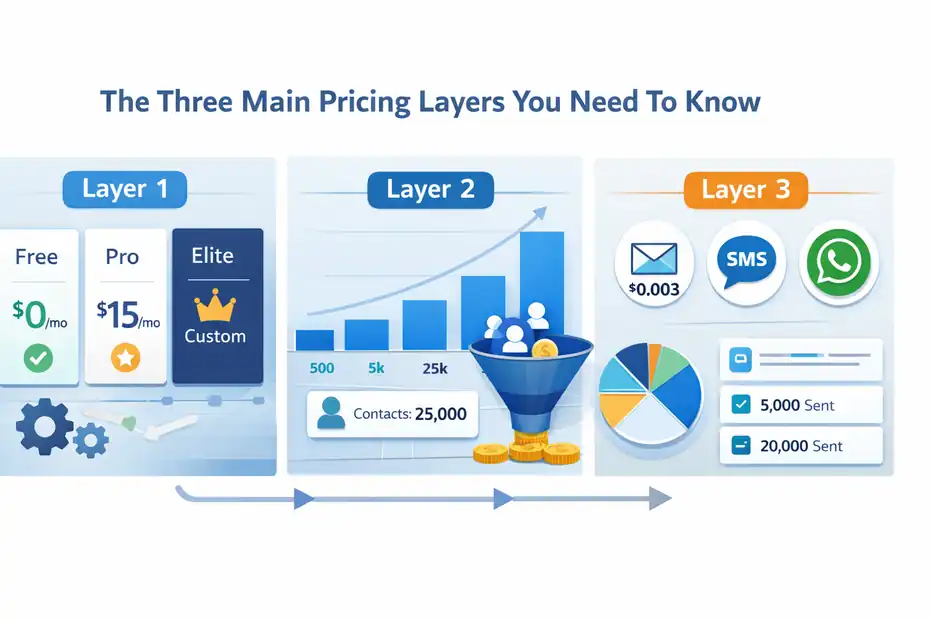
ManyChat does not really have one cost. It has multiple cost layers, and understanding them now can save you a lot of frustration later.
Layer 1: Your Base Subscription
At the base level, ManyChat offers a Free plan at $0 per month, Pro starting at $15 per month, and Elite as a custom-priced option.
Free is designed for basic use, while Pro unlocks broader automation, analytics, integrations, and expanded channel access. Elite is positioned as a more customized, higher-touch plan with onboarding, strategic support, and priority help.
This is the part most creators look at first, and it matters, but it is not the full picture. The base subscription is essentially your permission slip to access more capabilities. It is not the final answer to your monthly cost unless you stay on Free and never expand into paid usage layers.
In my experience, this is where people make their first budgeting mistake. They compare the starting Pro price to another chatbot tool’s flat monthly fee and assume ManyChat is cheaper. Sometimes it is. Sometimes it is not.
The moment your contact database grows quickly or you start using paid sending channels, your actual cost can move well beyond the starting number.
Layer 2: Contact-Based Scaling
ManyChat’s Pro pricing is dynamic. Its help center states that the system automatically switches between Pro tiers as your contact list grows, and the pricing page’s calculator shows contact thresholds ranging from 500 up to 2,000,001+ contacts. That is the clearest signal that contact count is the pricing engine behind Pro.
A “contact” in ManyChat is not just an email subscriber in the old-school sense. On the pricing page, ManyChat describes contacts as customers who have interacted with your automations through any of the connected channels.
That means successful automation can create its own cost expansion. More engagement often means more contacts, and more contacts can mean a higher tier.
This is why ManyChat pricing should be evaluated like ad spend efficiency. If your DM automation turns 1,000 comments into 300 quality leads and 20 sales, a higher contact tier may be totally justified.
But if your flows attract lots of low-intent contacts who never buy, you can end up paying more without improving revenue. The platform can work brilliantly, but only if your automation strategy is selective and conversion-aware.
Layer 3: Usage-Based Sending Costs
ManyChat also has channel-specific costs beyond the base subscription.
Its help documentation says email includes a free monthly allocation tied to your account plan, and once you exceed that allowance, extra emails cost $0.003 each from your ManyChat Wallet.
Charges are applied in increments of 5,000 emails, with any remainder billed at month-end.
For SMS, ManyChat’s help center says Twilio handles the actual sending cost, not ManyChat. For WhatsApp template messages, charges are deducted from the ManyChat Wallet, and ManyChat points users to its WhatsApp pricing guide because WhatsApp pricing depends on message type and related rules.
ManyChat also notes that if a template is sent within the 24-hour messaging window, no charge is applied for that template send.
This is the second big budgeting blind spot. A lot of users think, “I upgraded to Pro, so messaging is covered.” It is not that simple. Pro unlocks access, but some channels still carry pay-as-you-go costs.
That distinction matters a lot once you start mixing Instagram, email, SMS, and WhatsApp into one funnel.
What You Get On The Free Plan
The Free plan is more useful than many people expect, but it comes with limits that matter fast once you have traction.
Who The Free Plan Is Actually For
ManyChat’s pricing page says the Free plan gives you access to basic features for up to 1,000 contacts at no charge, and no credit card is required. The help center frames it as a starting point for creators who want to try core automation features before committing to a paid plan.
That makes Free a solid option for testing, learning, and validating an idea. If you are a creator experimenting with comment automation, a coach collecting a few early DM leads, or a small brand testing whether Instagram automation fits your audience,
Free gives you enough room to see whether people respond to the system.
Where Free usually works best is in the proof-of-concept phase. You are not yet optimizing. You are trying to answer practical questions like: Will people reply? Will they click? Will they opt in?Can I turn comments into conversations?
For that stage, the plan is genuinely helpful.
The Limits That Matter Most
Free is not unlimited-lite. It has meaningful restrictions. ManyChat’s compare-plans page says Free includes 10 tags, 2 sequences, 1 team member, 3 custom keyword triggers, and 4 non-keyword triggers.
The same page also indicates that Free retains ManyChat branding on email, SMS, and website widgets, while Pro and Elite remove that branding.
The pricing page adds two especially important constraints. First, some features are restricted once the Free account reaches 1,000 contacts. Second, Free accounts may not delete or unsubscribe contacts from their audience.
That last point is easy to overlook, but it matters because contact hygiene affects long-term pricing if you upgrade later.
I would not recommend building a serious long-term lead-gen system on Free if you expect fast growth. It is fine for testing. It is not ideal for operational control.
Once your audience starts growing, the inability to manage contacts as flexibly becomes more than an annoyance. It becomes a cost-planning issue.
What You Actually Get When You Upgrade To Pro
Pro is where ManyChat becomes a real business system rather than a lightweight automation experiment.
The Core Upgrade Benefits
On the pricing page, ManyChat says Pro includes everything in Free plus the ability to engage unlimited contacts with scaled pricing, use unlimited growth tools and keywords, create unlimited tags and custom fields, build advanced segments, access analytics and insights tools, connect integrations, remove ManyChat branding, and get email support.
The compare-plans page also shows Pro increases team seats from 1 to 3 and removes limits on tags, sequences, keywords, and triggers.
That is a real functional jump. In practical terms, Pro is where you can stop thinking like a hobby user and start thinking like an operator. You can build more branches, segment people based on behavior, run more campaigns at once, and connect the platform to the rest of your stack.
This matters because the value of ManyChat is not just “auto-reply to comments.” The value is in what happens after the first message. Can you qualify leads, route them, tag them, follow up, and measure performance? Pro is where those workflows become far more realistic.
Channel Access Changes The Economics
The pricing page shows a clear channel split between plans. Free includes Instagram Direct Messages, Facebook Messenger, and TikTok in beta. Pro adds WhatsApp plus SMS and Email. Elite includes those channels as well, with custom support layered on top.
That channel expansion is more important than it looks. It means Pro is not only about more features. It is about multi-channel monetization potential.
A creator might use Instagram comments to start the conversation, email to nurture the lead, and WhatsApp or SMS for timely reminders.
Once you view Pro through that lens, the plan price becomes less about “software cost” and more about “revenue workflow access.”
Still, this is where costs can widen. Adding email, SMS, and WhatsApp can improve conversion and retention, but those channels can also introduce new variable charges. So Pro often creates more upside and more complexity at the same time.
How Contact-Based Pricing Changes Your Monthly Bill
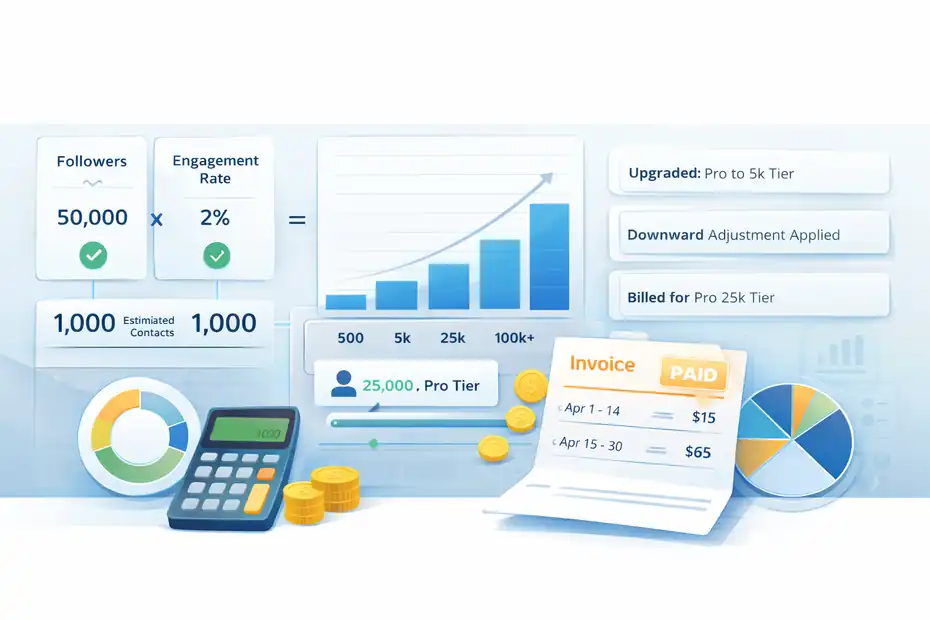
This is the section that usually determines whether ManyChat feels affordable or unexpectedly expensive.
How Contacts Influence Pro Pricing
ManyChat says Pro pricing scales with the number of contacts in your account, and its billing FAQ recommends estimating likely contacts by multiplying your followers by your engagement rate as a rough baseline. It also directs users to the pricing calculator to estimate which tier they may fall into.
That gives you a simple planning framework. If you have 50,000 followers and a 2 percent engagement rate on campaigns that push users into DMs, you can start modeling how many people may interact and become contacts. It is not perfect, but it is better than guessing.
Here is the real strategic point: ManyChat rewards efficient automation design. If your content-to-DM funnel attracts highly relevant people, rising contacts often means your system is working.
If your funnel is broad, gimmicky, or low-intent, you may collect a bloated contact list that increases cost without lifting sales. The platform does not know the difference. You have to design for it.
Why Your Invoice May Not Match A Clean Tier Price
ManyChat’s help center explains that when your account changes tiers during a billing cycle, the invoice can look different from the simple numbers shown on the pricing page.
The company says it charges for the time spent on each eligible plan, deducts unused time from the prior tier, and then charges the full price for the current plan going forward.
This means your invoice can include prorated changes rather than one neat number. For growing accounts, that is normal. It is not necessarily a billing error. It is ManyChat adjusting the cost based on when your contact count crossed into a higher tier.
I suggest treating this like cloud software billing. If usage changes mid-cycle, the invoice can become more layered than the marketing page suggests.
That is why finance-minded operators should review invoices monthly, especially during aggressive campaigns or launches. What looks like a random billing jump may simply be contact growth plus proration.
The Hidden Costs Most Buyers Miss
ManyChat’s starting price is easy to spot. The secondary costs are where budgeting gets more real.
Email Costs Beyond Your Included Allowance
ManyChat’s help documentation says email comes with a free monthly allocation based on your account plan. It gives examples such as 5,000 free emails per month for accounts with up to 500 contacts and 50,000 free emails for accounts with up to 5,000 contacts.
After that, extra emails cost $0.003 each, billed from your ManyChat Wallet.
For many businesses, that is still inexpensive. But if you use email casually, it can feel nearly invisible. If you use it heavily for broadcasts, nurture flows, reminder sequences, and segmented follow-ups, the cost becomes a real line item.
Imagine a brand with 20,000 engaged leads using frequent launch reminders and post-opt-in sequences. Even if the per-email rate is low, high-volume automation can create noticeable wallet charges.
That does not mean you should avoid email inside ManyChat. It means you should model your usage before assuming the base subscription covers your lifecycle messaging.
SMS And WhatsApp Can Add Another Budget Layer
ManyChat says Twilio handles SMS pricing, so SMS costs are external to the ManyChat subscription itself.
For WhatsApp, ManyChat uses wallet-based billing for message templates and points users to its WhatsApp pricing guide because pricing depends on message type and rules around the messaging window.
The company also notes that no charges apply when a template is sent within the 24-hour window.
That means “using ManyChat” and “paying ManyChat” are not always the same thing. Some of your messaging cost may come from connected infrastructure or wallet-funded sending rather than the headline subscription.
This is one reason I tell people not to compare ManyChat to simpler Instagram-only tools too quickly. ManyChat can do more, but broader capability usually means broader cost logic too.
Operational Costs Count Too
There is also a softer cost layer that never appears on the pricing page: setup and maintenance time.
Pro gives you more power, but power requires better flow design, better segmentation, and cleaner campaign planning. If your team is inexperienced, you may spend extra time troubleshooting or rewriting automations.
That is one reason Elite exists. The pricing page positions Elite as a custom plan with dedicated onboarding, strategic recommendations from a customer success manager, and priority support. For a solo creator, that may be unnecessary.
For a brand with a complex funnel and expensive mistakes, support can reduce internal waste even if the subscription is higher.
Which Plan Fits Different Types Of Users
The best ManyChat plan is not about features in the abstract. It is about your business stage, channel mix, and tolerance for variable costs.
Best Fit For Creators And Small Businesses
If you are a solo creator, coach, consultant, or small local business, Free can be enough to validate whether DM automation works for your audience.
Once you start getting meaningful traction, Pro usually becomes the sensible move because it opens more growth tools, segmentation, analytics, and channel access.
A simple rule I like is this: If automation is experimental, stay lean. If automation is part of your sales process, budget for Pro. The moment your DM flow is helping you collect leads, book calls, or sell products consistently, the productivity gains usually matter more than the base subscription price.
Best Fit For Agencies And Bigger Teams
The compare-plans page shows Pro includes 3 team members, while Elite allows unlimited team members. That alone changes the conversation for agencies and in-house teams.
Collaboration, permissions, and support become more important once more than one person is building, editing, and reporting on automations.
Elite also includes onboarding and strategic support, which can make sense for larger teams rolling out ManyChat across multiple campaigns or clients. If your automation setup is tied to product launches, customer support, and paid acquisition, expensive mistakes are usually not feature mistakes.
They are workflow mistakes. Support can be worth more than a lower sticker price in that environment.
Common Pricing Mistakes To Avoid
Most ManyChat pricing regret comes from forecasting mistakes, not from the platform hiding the basic structure.
Mistake 1: Budgeting Only For The Starting Price
The biggest mistake is treating “Pro from $15” as your final likely cost. ManyChat is clear that Pro scales with contacts, is billed monthly, and does not offer a flat fee or annual option right now. That means your software cost can grow as your audience grows.
A smarter approach is to budget in layers:
- Base plan: Your current expected Pro tier.
- Contact growth buffer: Extra room if a campaign performs well.
- Channel usage buffer: Wallet-funded email or WhatsApp, plus any SMS costs through Twilio.
Mistake 2: Growing Contacts Without A Quality Filter
Because pricing is tied to contacts, low-quality audience growth can become expensive. If you run broad giveaway-style campaigns or bait-heavy comment triggers, you may collect lots of contacts who never convert. ManyChat will still count them if they are interacting with your automation.
I recommend designing DM funnels that qualify quickly. Ask a simple interest question. Route by need. Tag based on intent. Move casual curiosity away from your highest-cost follow-up paths. That kind of hygiene keeps your list more valuable and makes your contact-based pricing easier to justify.
Mistake 3: Ignoring Account-Specific Plan Availability
ManyChat’s help center says the newer March 2, 2026 pricing model is currently available only to accounts created on or after that date, and plan availability may vary by region. If you compare notes with another business owner and their dashboard shows different plan names or billing options, that may be normal.
So before you make a purchasing decision based on a YouTube tutorial or a friend’s screenshot, check your own pricing page and subscription settings. With ManyChat right now, account context matters.
How To Estimate Your Real ManyChat Cost Before You Buy
This is the practical part. Let me break it down in the simplest possible way.
A Simple Forecasting Formula
Start with three numbers:
- Your likely monthly contact count.
- Your expected channel mix.
- Your team and feature needs.
ManyChat itself suggests estimating contacts by multiplying followers by engagement rate as a rough baseline.
Use that as your starting point, then pressure-test it against campaign behavior. If you run comment automation on high-performing Reels, your contact growth may spike much faster than your average follower engagement suggests.
Then ask whether you will use just Instagram and Messenger, or whether you also plan to use email, SMS, or WhatsApp. If email is central to your funnel, model whether you might exceed your free allocation and incur $0.003-per-email charges.
If SMS or WhatsApp is part of your process, treat that as a separate usage-cost layer.
A Realistic Scenario
Imagine you are running a small e-commerce brand using Instagram comment automation to deliver a discount code and collect leads. At first, Free may be enough to test the flow. But once you want more segmentation, more keywords, no branding, analytics, and email follow-up, Pro becomes the obvious next step.
If the campaign performs well and your engaged contacts grow, your subscription moves with it. If you also send large email follow-up campaigns, your wallet usage may start showing up too.
That is why the smartest way to think about ManyChat pricing is not “Can I afford the starting plan?” It is “Will the revenue from this automation justify the growing operating cost?” For healthy funnels, the answer is often yes. For weak funnels, the pricing can feel heavier very quickly.
Is ManyChat Worth The Price?
This is the question behind the whole article, and the honest answer depends on how seriously you use automation.
When ManyChat Is Absolutely Worth It
ManyChat is usually worth it when your business actively monetizes conversations. If you are generating leads through Instagram comments, qualifying prospects in DMs, capturing emails, and moving people into follow-up sequences, the platform can do work that would otherwise require manual effort, missed leads, or multiple disconnected tools.
The availability of analytics, integrations, multi-channel access, and scalable automation inside Pro gives it real business value beyond a simple auto-reply tool.
For many of us, the real ROI is speed. Fast replies, automatic lead capture, and better segmentation can improve conversion timing in ways that are hard to replicate manually. If one good automation saves you from missing even a handful of sales or discovery calls each month, Pro can pay for itself quickly.
When It May Feel Overpriced
ManyChat can feel expensive when three things happen at once: your contact list grows, your offers do not convert well, and you layer in extra sending costs without a clear funnel strategy.
In that situation, pricing feels like a tax on messy automation rather than an investment in a proven system.
So my honest take is this: ManyChat is not “cheap” or “expensive” in isolation. It is leverage. If you use it to automate high-intent conversations and track outcomes, the pricing usually makes sense.
If you use it loosely, collect weak contacts, and blast messages without structure, the cost can outrun the value.
The Bottom Line On ManyChat Pricing Explained
ManyChat pricing explained in plain English comes down to this: Free is for testing, Pro is for real growth, and Elite is for businesses that want a more customized setup with deeper support.
The base Pro plan starts at $15 per month, but your real bill depends on contact growth, invoice proration, and whether you use paid sending layers like extra email, WhatsApp templates, or SMS infrastructure.
If you want one practical takeaway, use this one: do not buy ManyChat based on the starting price alone. Buy it based on the economics of your funnel. If your automation can reliably turn conversations into leads or revenue, the pricing is usually fair.
If your funnel is still loose, test carefully on Free, monitor contact growth closely, and upgrade only when the workflow is clearly earning its keep.
FAQ
What is ManyChat pricing based on?
ManyChat pricing is primarily based on the number of contacts in your account and the features you use. The Pro plan starts at a low monthly cost but increases as your contact list grows, making it a scalable but variable pricing model depending on your audience size.
Is ManyChat free to use?
Yes, ManyChat offers a Free plan that allows up to 1,000 contacts with limited features. It’s ideal for beginners testing automation, but it includes restrictions like limited triggers, tags, and branding that can impact long-term growth and customization.
How much does ManyChat Pro cost per month?
ManyChat Pro starts at $15 per month for up to 500 contacts, but the cost increases as your contact list grows. The final monthly price depends on your audience size and can change dynamically if your contacts increase during a billing cycle.
Does ManyChat charge for messages or emails?
Yes, ManyChat includes a free email sending limit, but additional emails cost $0.003 each. SMS and WhatsApp messages may also incur extra charges through external providers or wallet-based billing, depending on usage and messaging type.
Is ManyChat worth the price?
ManyChat is worth the price if you use it to automate lead generation, sales, and customer communication effectively. Its value comes from converting conversations into revenue, but costs can rise if your contact list grows without strong funnel performance.

I’m Juxhin, the voice behind The Justifiable.
I’ve spent 6+ years building blogs, managing affiliate campaigns, and testing the messy world of online business. Here, I cut the fluff and share the strategies that actually move the needle — so you can build income that’s sustainable, not speculative.
Related posts:
 How To Use ManyChat For Chatbot Marketing With Real Wins
 ManyChat WhatsApp Setup Guide: Start in Minutes
 ManyChat Instagram Tutorial: Automate Replies Fast
 ManyChat Bot Benefits No One Talks About
 ManyChat Chatbot Platform Review: Is It Worth Using Today?
 SurveyMonkey Real User Experience For Lead Generation: What To Expect