
Table of Contents
Some links on The Justifiable are affiliate links, meaning we may earn a small commission at no extra cost to you. Read full disclaimer.
Doba worth it for new dropshippers is really a question about what you are buying: profit potential, or convenience. I think that distinction matters more than most beginner reviews admit.
Doba is not a magic margin machine, but it does offer real automation, U.S.-stocked inventory emphasis, marketplace integrations, and beginner-friendly support. The catch is that its paid plans are meaningful costs for a store that has not validated a niche yet.
So the honest answer is nuanced: Doba can be worth it, but usually only for a specific kind of beginner.
What Doba Actually Is And Why New Dropshippers Look At It
If you are new, it helps to strip away the hype first. Doba is not just “a supplier.” It is a marketplace and workflow layer that helps you find products, sync inventory, connect stores, and route orders more efficiently.
What Doba Does For You
When people ask whether Doba is worth it for new dropshippers, they are usually comparing it to two painful alternatives: manually contacting suppliers, or using lighter product-import tools that leave more work on your plate.
Doba positions itself as an all-in-one product sourcing and automation platform. On its official site, it highlights real-time inventory and pricing sync, one-click listing workflows, AI-assisted product selection, and integrations with channels like Shopify, Amazon, eBay, Wix, Walmart, WooCommerce, BigCommerce, Square, and others.
It also says 90% of products are stocked in U.S. warehouses, which matters because faster delivery usually reduces refund pressure and angry support emails.
For a beginner, that convenience is the main attraction. Instead of hunting for ten separate wholesalers and trying to piece together stock feeds, shipping settings, and order forwarding, you get one dashboard that centralizes a lot of that work.
That said, I would not confuse “easy to launch” with “easy to profit.” Doba can reduce setup friction, but it cannot fix weak product selection, bad offer positioning, or slim margins.
Why Beginners Are Tempted By It
New dropshippers are usually dealing with the same four fears at once: picking bad products, importing messy listings, overselling out-of-stock items, and getting buried in manual order handling.
Doba’s offer is built directly around those fears. Its homepage leans hard on automation, product curation, live support, and sync features.
On the Shopify App Store, merchants also commonly mention time savings from inventory and order automation, along with helpful support and easier catalog management. That is exactly the kind of messaging a beginner wants to hear.
And honestly, I get it. When you are new, the idea of plugging into a ready-made ecosystem feels safer than building a sourcing process from scratch.
But safety has a price. Doba’s paid plans are not pocket change for someone still testing their first store. So the better question is not “Is Doba good?”
The better question is “Is the time it saves worth more than the subscription cost and potential product markup for your exact business stage?”
The Real Cost Of Using Doba As A Beginner
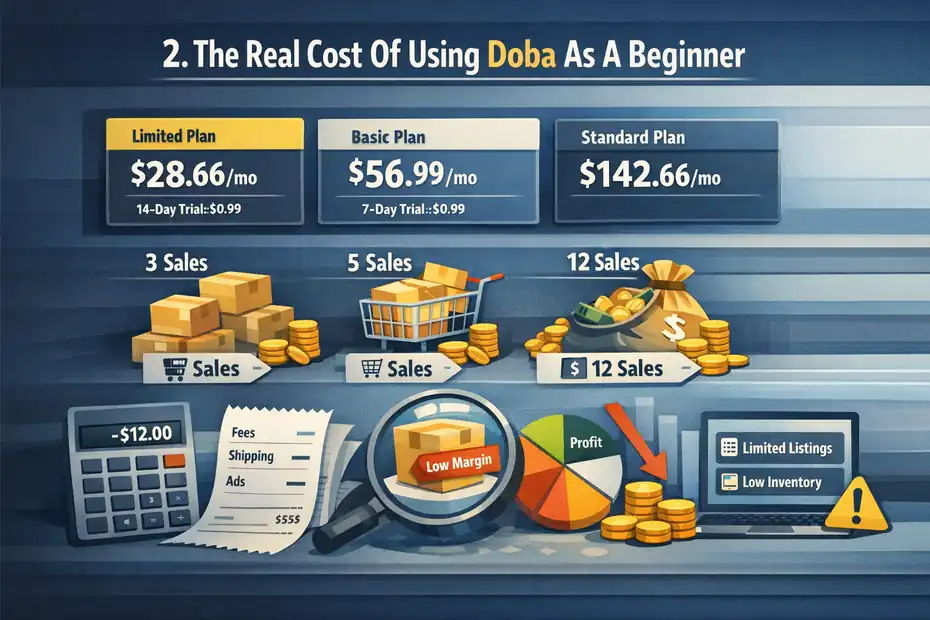
This is where the “profit reality check” really starts. Most new dropshippers overfocus on monthly plan price and underfocus on total operating drag.
Doba’s Entry Cost Is Not Tiny
On Doba’s pricing page, the Limited plan is listed at $28.66 per month billed quarterly, with a 14-day trial for $0.99.
The Basic plan is $56.99 per month billed quarterly with a 7-day $0.99 trial, and the Standard plan is $142.66 per month billed quarterly.
The feature jump is meaningful, but so is the financial jump.
For a brand-new seller, that matters more than it sounds. Let’s say your store clears only $12 net profit per sale after ad spend, payment fees, and product cost. You would need roughly:
- Limited plan: About 3 extra net sales per month just to cover the subscription.
- Basic plan: About 5 extra net sales per month.
- Standard plan: About 12 extra net sales per month.
That is before you count your store subscription, apps, creatives, returns, or test ad spend.
So yes, Doba might save you time. But if your store is unproven, paid convenience can become a fixed cost sitting on top of uncertain revenue.
The Hidden Cost Is Margin Compression
In my experience, this is where beginners get blindsided. They assume faster setup means better economics. It often does not.
Aggregator platforms like Doba are selling access and convenience. That can mean some products are less margin-friendly than what you might negotiate directly with a supplier later. Doba itself describes its role as a marketplace facilitator that helps retailers locate and purchase products from suppliers rather than manufacturing goods directly.
That model is not inherently bad. It just means you need to evaluate each SKU like a business owner, not like a hopeful beginner.
A product can look profitable on the surface and still fail once you include shipping, refunds, transaction fees, and discounting. Imagine a kitchen organizer with a $24.99 selling price and a $15 landed cost.
After payment fees and even modest marketing, your margin can get thin fast. A beginner who sees “$10 difference” might think that is healthy. Usually it is not.
I suggest treating Doba’s subscription as a multiplier: If your product economics are already weak, the subscription makes them worse. If your product economics are solid and your process is slow, the subscription may actually help.
Why The Cheapest Plan May Not Feel Cheap In Practice
The Limited plan includes 1 store integration and 30 one-click product listings. Basic raises that to 2 store integrations, 250 one-click listings, 600 inventory list capacity, 450 product downloads per month, and an advanced product research tool.
Standard jumps to 5 store integrations, 1,000 one-click listings, 3,000 inventory capacity, 2,000 monthly downloads, API access, featured product selection, and more.
Those limits matter because beginners rarely use tools exactly how pricing pages imagine. You might test more products than expected. You might need more than 30 listings to find traction. You might realize quickly that the lowest plan is fine for learning, but not for meaningful testing.
That is why I do not love the usual “just start on the cheapest plan” advice. Sometimes that works. Other times it creates a false sense of affordability because you outgrow it before you become profitable.
Where Doba Can Actually Help New Dropshippers
I do not want to make this sound harsher than it needs to be. Doba does have real value, especially for beginners who are overwhelmed by operations.
It Simplifies The Messy Parts Of Setup
A lot of beginner failure has nothing to do with marketing genius. It comes from operational friction. People upload bad listings, forget to monitor stock, mis-handle orders, and set broken shipping rules.
Doba is clearly built to reduce that friction. Its official materials emphasize one-click listings, price and inventory sync, order management, and support. On Shopify, merchant feedback also repeatedly points to automated inventory and order handling as a time-saver.
For a beginner who is still learning the basics of product pages, policies, and customer communication, that can be a real advantage. Instead of building an operations stack piece by piece, you can get moving faster.
I believe this is Doba’s strongest selling point. Not “better products than everyone else,” but less operational chaos.
U.S.-Stocked Inventory Is A Legit Beginner Advantage
Doba says 90% of its products are stocked in U.S. warehouses and that suppliers include top 500 U.S. brands. Whether every niche benefits equally is another question, but the broader principle is sound: faster domestic fulfillment usually leads to better customer experience.
This matters because beginners often underestimate shipping anxiety. Customers are more forgiving about price than they are about uncertainty. If your package takes forever, tracking is vague, and support replies are slow, your refund risk climbs fast.
Imagine two stores selling similar home products. One gets orders delivered in a few days with reliable tracking. The other leaves buyers waiting two weeks with scattered updates. The first store often wins even if its price is slightly higher.
So if you are specifically trying to avoid the classic “cheap but painfully slow” beginner setup, Doba’s U.S.-stocked positioning may be genuinely useful.
Support And Guided Learning Can Save Costly Mistakes
Doba highlights U.S.-based support, one-on-one account managers, and 24/7 live chat on its homepage. Its pricing page also includes features like growth coaching and Doba Elite Academy at higher tiers. Shopify reviews are broadly positive on customer service overall, although not universally so.
For experienced sellers, that might sound like fluff. For a true beginner, it can prevent expensive confusion.
That said, I would not oversell this. Some reviews also describe support frustration, learning-curve issues, and operational confusion around shipping settings, inventory export, plan-based limits, and payment timing. So the support story is positive on average in Shopify reviews, but clearly not friction-free in every case.
Where Doba Falls Short For Brand-New Sellers
This is the part many “review” articles soften too much. New dropshippers do not need only advantages. They need warning labels.
The Learning Curve Is Still Real
Even if a platform is beginner-friendly, it is not beginner-proof.
On Shopify reviews, one merchant specifically mentioned issues around setting shipping rates, navigating inventory exports, understanding plan-based inventory limits, limited live support help, and order-payment timing.
That is important because it shows the platform can still feel complex in real use, even if the interface is polished.
I think that is a healthy reality check. Many beginners assume automation means they can skip learning the business model. They cannot.
You still need to understand:
- Shipping rules: What you charge versus what the supplier charges.
- Product economics: Gross margin is not net margin.
- Catalog quality: Imported listings still need editing.
- Customer expectations: Fast shipping claims need to match reality.
Doba can reduce the amount of grunt work, but it does not remove the need for judgment.
Supplier Access Does Not Automatically Mean Winning Products
A huge mistake beginners make is assuming a large catalog equals a good catalog. It does not.
Doba offers curated products, AI-assisted selection, and broad category coverage, which can be useful. But product access is only one layer of success. A product still needs clear demand, a compelling angle, room for margin, decent creative potential, and acceptable return risk.
This is where new sellers can drift into lazy product research. They see “featured” or “best niche products” and assume the hard thinking is done.
It is not. A product can be trendy and still fail for you because your traffic source, offer, or positioning is weak. Another seller might succeed with the exact same item because they bundle it differently, target a better audience, or present the benefit more clearly.
So I would never buy Doba for product discovery alone. I would buy it only if I also wanted operational help.
Independent Reputation Signals Are Mixed
This part deserves honesty. Doba’s Shopify app rating is strong at 4.6 out of 5 from 100 reviews, with 82% of ratings at 5 stars. That is a positive signal, especially because it comes from users inside a live store ecosystem.
But Trustpilot looks much rougher. The page shows 2.9 and 89 reviews, and the visible feedback includes complaints about refunds, order disputes, and trust issues alongside some positive experiences.
I would not treat either source as absolute truth. Review platforms have bias in both directions. Happy users often stay quiet, while angry users are more motivated to post.
But the contrast does tell you something useful: Doba is not a universally loved beginner dream tool. Some merchants clearly like the automation and support. Others have had frustrating operational experiences.
That is exactly why the answer to “is Doba worth it for new dropshippers” depends on your risk tolerance and business style.
The Profit Reality Check Most Beginners Need
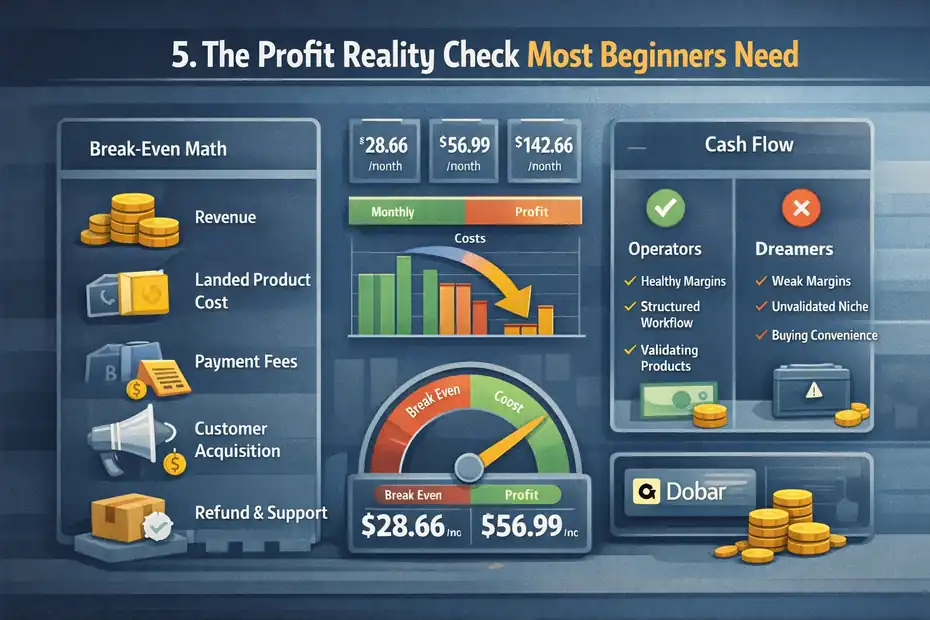
Let me be blunt here: a tool subscription does not create profit. It only helps you execute a model.
Your numbers still have to work.
The Break-Even Math Is Usually Tighter Than You Think
Most beginners calculate profit like this: selling price minus product cost. That is incomplete.
A more honest mental model looks like this:
- Revenue: What the customer pays.
- Landed product cost: Product plus shipping from supplier.
- Payment fees: Card and platform transaction costs.
- Customer acquisition cost: Ad spend or content production time.
- Refund and support drag: The cost of problems.
- Software overhead: Doba plus store and app costs.
Now add Doba on top. Suddenly your business needs a little more breathing room every month before it even feels alive.
Imagine a store doing 20 orders a month with only $8 average net profit before software. That is $160. A $28.66 plan is manageable. A $56.99 plan starts to bite. A $142.66 plan can wipe out most of the month’s progress unless it directly improves throughput or saves costly manual labor.
This is why I usually tell beginners to obsess over margin quality before they obsess over automation quality.
Doba Is Better For Operators Than Dreamers
There are two kinds of beginners.
The first kind wants a serious system, is willing to learn product economics, and values organized workflows. The second kind wants a shortcut to easy money.
Doba is much better for the first kind.
Its value shows up when you are already trying to behave like an operator: cleaning listings, monitoring margins, structuring shipping, testing products carefully, and protecting customer experience. In that case, the software can support good habits.
But if you are hoping the platform itself will hand you profitable products and do the thinking for you, disappointment is likely.
That is not me being cynical. It is just the nature of dropshipping in 2026. The easy arbitrage era is thinner, competition is smarter, and customer tolerance is lower. Tools help. They do not replace skill.
When Doba Helps Profit Versus Hurts Profit
Here is the cleanest way I can frame it.
Doba usually helps profit when:
- Your niche benefits from faster fulfillment.
- You are losing time to manual catalog and order work.
- You need one dashboard more than you need the absolute cheapest sourcing route.
- You are validating products with discipline, not importing hundreds blindly.
Doba usually hurts profit when:
- Your margins are already thin.
- You have not validated any demand yet.
- You are buying convenience before you have a repeatable sales process.
- You assume curated products equal winning offers.
That is the real profit reality check. Doba is rarely a great first answer to a bad business model. It is sometimes a good accelerator for a decent one.
Who Should Use Doba And Who Should Skip It
This is the section I think most readers actually need. Not a vague review score, but a decision filter.
Doba Is Worth It For These Beginners
I would seriously consider Doba if you sound like one of these people.
- You want structure more than maximum thrift: You are willing to pay to reduce operational mess.
- You care about U.S.-stocked fulfillment: Your niche depends on delivery speed and reliability.
- You are selling on supported channels: Doba lists integrations with Shopify, Amazon, eBay, Walmart, WooCommerce, Wix, BigCommerce, Square, and others, so the workflow fit is clearer.
- You value support while learning: You are new, but you are taking the business seriously.
A realistic example would be a beginner launching a home organization store on Shopify with a small but real testing budget. They want faster fulfillment, hate operational clutter, and plan to test a tight catalog instead of a random mega-store. That person may genuinely get value from Doba.
Doba Is Probably Not Worth It For These Beginners
I would skip it, or at least delay it, if this sounds more like you.
- You have almost no testing budget: Every fixed monthly cost increases pressure.
- You are still choosing a niche at random: You need validation before software overhead.
- You want the cheapest possible product sourcing: Convenience platforms are rarely the cheapest path.
- You have not learned margin math yet: A tool can hide bad economics behind a smooth dashboard.
A common example is the beginner who opens a store, imports dozens of products, spends a little on ads, gets no traction, and keeps assuming the issue is “the tool.” In reality, the problem is usually offer-market fit, store clarity, or weak creative.
Doba cannot save that setup.
My Honest Verdict
So, is Doba worth it for new dropshippers?
My honest answer is yes, but only for organized beginners who are buying workflow efficiency on purpose. For totally unproven sellers with almost no budget, I think it is often too early.
I would not call Doba the best first move for every beginner. I would call it a reasonable first paid system for a beginner who already understands the basics and wants to reduce manual work.
That difference matters. One person uses Doba to sharpen execution. Another uses it to avoid learning the fundamentals. Only the first person usually gets good value.
How To Test Doba Without Wasting Money
You do not need a heroic commitment here. You need a controlled test.
Start With A Narrow Validation Plan
Before you subscribe, decide what success actually looks like.
I suggest a 30-day framework built around a very small product set:
- Pick 5 to 15 products max: Not 100.
- Choose one niche angle: For example, compact kitchen efficiency rather than “home products.”
- Define your target margin floor: For example, do not test products that cannot realistically support your full cost stack.
- Track one primary outcome: Sales, add-to-cart rate, or qualified traffic, depending on your stage.
This matters because beginners often waste tools by being too broad. Doba’s listing and research features are most helpful when you already have a focused testing plan.
A tool becomes expensive when you use it as a substitute for decision-making.
Audit Every Product Before Importing It
Even if Doba makes importing easy, slow down before you push products live.
Use a quick product screen:
- Check landed cost: Not just supplier price.
- Check likely shipping speed: Especially if your offer depends on convenience.
- Check product page quality: Rewrite weak titles and descriptions.
- Check return risk: Fragile, confusing, or size-sensitive products can eat margin.
- Check creative angle: Ask whether the benefit is obvious in three seconds.
This is one place where I strongly disagree with the lazy beginner habit of bulk importing. One-click listings are useful, but they can also encourage low-effort stores full of generic pages.
Doba’s own setup guidance notes that editing listing data before syncing is a crucial step, which I think is exactly right.
Review The Trial Like A Buyer, Not A Fan
Doba offers low-cost trials on some tiers, which is helpful, but a trial should be used like a business experiment, not a shopping spree.
During your trial window, evaluate these five things:
- Catalog fit: Are there products you can genuinely position well?
- Margin reality: Do your shortlist numbers still work after all costs?
- Operational clarity: Does inventory, export, and listing workflow feel manageable?
- Support quality: How helpful is support on practical questions?
- Time saved: Are you meaningfully faster than your alternative setup?
If three or four of those are weak, I would not keep paying just because the dashboard looks professional.
How To Get Better Results If You Do Use Doba
If you decide to use it, there are smarter and dumber ways to do it.
Focus On Offer Quality, Not Catalog Size
Beginners love variety. Profitable stores usually love clarity.
Instead of stuffing your store with as many products as your plan allows, build tighter collections around one use case or buyer problem. If you sell storage products, make the offer about saving space in small apartments, not “we sell all kinds of household stuff.”
This improves conversion for a simple reason: customers understand focused stores faster.
Doba’s plan limits around listings and inventory capacity can actually help you stay disciplined if you treat them that way. The Limited and Basic caps push you toward curating rather than dumping products blindly.
I think that is one of the most overlooked beginner advantages of a platform with constraints: it can force better taste.
Rewrite Supplier Content Aggressively
This is non-negotiable.
Supplier titles and descriptions are often clunky, overstuffed, or written for catalog systems rather than real shoppers. Even Doba’s own guidance emphasizes editing listing data before pushing products live.
Here is a better approach:
- Title: Lead with the customer-facing benefit.
- Opening copy: Explain the main problem the product solves.
- Bullets: Cover size, use case, material, and shipping expectations clearly.
- Images: Prioritize clarity and context over quantity.
A beginner who rewrites ten product pages well will often outperform a beginner who imports fifty lazy ones.
Use Doba As Infrastructure, Not As Your Strategy
This is probably my biggest practical takeaway.
Doba can be your operations layer. It should not become your whole business plan.
Your strategy still needs to come from:
- Audience understanding
- Offer positioning
- Creative testing
- Pricing decisions
- Customer experience
When sellers get disappointed in platforms like Doba, I often think they expected infrastructure to do strategy’s job.
That is backwards. The platform helps you execute. You still decide what is worth executing.
Final Answer: Is Doba Worth It For New Dropshippers?
Here is the simplest verdict I can give.
Doba is worth it for new dropshippers who have a little budget, want a structured workflow, care about faster fulfillment, and are ready to treat dropshipping like a real operating system instead of a side-hustle fantasy.
Its current offer includes U.S.-stocked inventory emphasis, real-time syncing, store integrations, paid tiers from Limited through Standard and Enterprise, and generally positive Shopify app sentiment around automation and support.
Doba is usually not worth it for beginners who are still guessing on niche, operating on a tiny budget, or hoping the platform itself will generate profit. The subscription cost is real, the learning curve is still real, and independent review sentiment outside Shopify is mixed.
So my honest recommendation is this: Use Doba only if you can clearly explain why the automation, support, and fulfillment setup are worth more to you than the extra monthly overhead.
That is the whole game.
If the answer is yes, Doba can be a solid beginner platform.
If the answer is “I just want an easier way to start,” that is usually not enough.
FAQ
What is Doba and how does it work for beginners?
Doba is a dropshipping platform that connects you with suppliers, syncs inventory, and automates order processing. For beginners, it simplifies setup by centralizing product sourcing and store integration, allowing you to focus more on selling rather than managing suppliers manually.
Is Doba worth it for new dropshippers with a low budget?
Doba may not be ideal for beginners with a very limited budget because of its monthly subscription costs. If you haven’t validated a product or niche yet, the added expense can reduce profit margins and increase pressure to generate consistent sales quickly.
Can you make a profit using Doba as a beginner?
Yes, beginners can make a profit with Doba, but it depends on product selection, pricing strategy, and marketing execution. The platform itself does not guarantee profits, so strong margins and a clear offer are essential for sustainable results.
What are the main advantages of using Doba for dropshipping?
Doba offers automation, U.S.-based inventory options, and integrations with major ecommerce platforms. These features help reduce manual work, improve shipping speed, and streamline operations, which can be especially helpful for beginners learning how to manage a store.
What are the downsides of Doba for new dropshippers?
The main downsides include monthly subscription costs, potentially lower profit margins, and a learning curve despite its beginner-friendly design. Some users also report mixed experiences with support and supplier consistency, so careful testing is important before committing long term.

I’m Juxhin, the voice behind The Justifiable.
I’ve spent 6+ years building blogs, managing affiliate campaigns, and testing the messy world of online business. Here, I cut the fluff and share the strategies that actually move the needle — so you can build income that’s sustainable, not speculative.
Related posts:
 Dropshipping for Beginners: The Complete No-Fluff Guide
 Doba Review: Honest Pros, Cons, and Real Costs
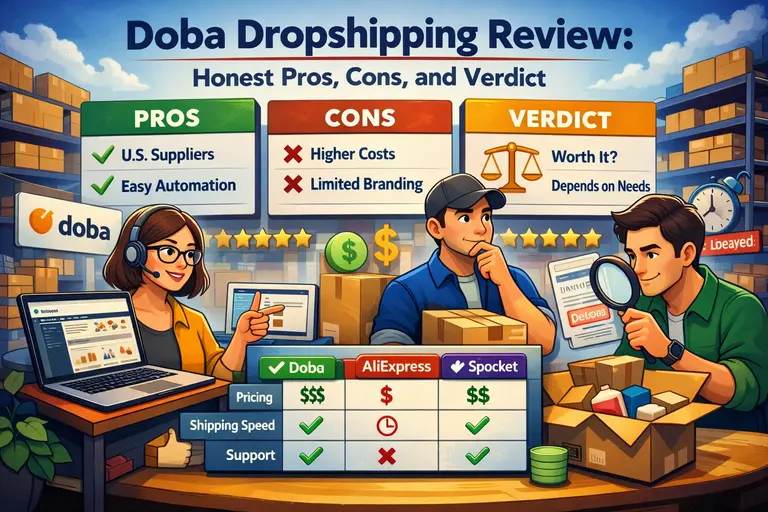 Doba Dropshipping Review: Honest Pros, Cons, and Verdict
 How To Start With Spocket Step By Step: No Experience Needed
 Doba Pros And Cons For Dropshipping: Honest No Hype Guide
 Doba Pricing Explained: Real Cost Vs Value For Dropshippers